Lessons From the Classroom for Lifelong Learners

My interest in lifelong learners as a category of learners or as an expected focus of research activity has been frustrating. I have spent considerable time proposing that the research on note-taking and other study strategies can be translated, especially when applied to learners functioning independently outside of classrooms or in response to classroom-based assignments.  When reading efforts to encourage strategies associated with concepts such as “personal knowledge management” (PKM) or “second brain”, I was surprised to be unable to find research associated with these proposals and often not even references to the literature I studied and tried to contribute to throughout my academic career. While at some level “learning is learning”, efforts to propose strategies for practice must consider differences in learning contexts and evaluate specific translations of controlled research as operationalized for these contexts.

Much of this post is based on the book “Make it Stick” (Brown, Roediger & McDaniel). I’ll explain why this book, rather than other sources, is used later. The following list of learning activities, which have been found to improve learning outcomes, is paraphrased from this source. 

Purposeful learning should require:

  1. Finding and retrieving information from memory (retrieval practice)
  2. Spacing learning activities (spaced practice)
  3. Mixing the focus of learning activities (interleaving)
  4. Building personal knowledge – use existing knowledge structures to integrate new information, use new information to modify or extend existing structures
  5. Testing understanding – recognizes failures of understanding

If you are unfamiliar with this terminology or the cognitive processes that are argued to be influenced by them, I offer the following set of links to extended posts I have written.

Retrieval practice

Spaced practice and desirable difficulty

Generative tasks and building understanding

Interleaving and desirable difficulty

When I think about useful learning activities, I do so from a different perspective. I focus on generative tasks. I define a generative task as an external task that increases the probability of productive internal (cognitive) activities. The recommendations proposed by Brown and colleagues would fit this more general category.

Brown and colleagues (Make it stick) define generation as an attempt to answer a question or solve a problem before being shown the answer or solution, and note that it makes the mind more receptive to new learning. This is a very different and I think less common use of how cognitive types use the phrase. See Fiorella and Mayers (see sources at the end) for a list of generative activities that have some overlap with those Brown and colleagues provide. The way I describe a generative activity makes sense to me. It is like asking a teacher what she has assigned a classroom activity. The teacher might use phrases such as “it gets my students to think” or “it requires my students to use”, but these are just different ways of saying internal (cognitive) behaviors are required. 

Differences in the classroom and lifelong learning contexts

When the authors of Making it Stick argue that similar learning strategies can be applied by both students and lifelong learners, they note that the contexts in which these strategies are used differ and that the strategies are adjusted accordingly. What are some of these differences?

Structure

Classroom learning is typically more structured, with teachers deliberately designing activities that encourage generative activities. Teachers mostly select the goals and related tasks – lectures, syllabi, and tests. The time course of learning is driven by external decisions informed by the needs of the group and not individual learners.

Lifelong learning is personally structured and depends on the challenges of daily life or personal interests. Task selection and the continuation of the effort of learning is based on individual insights, accomplishments or motivation.

Most consistent source of motivation

With classroom learning, the educators shaping the tasks build in base-level, external sources of motivation (grades, evaluations).

Lifelong learners rely on personal challenges and goals to motivate their effort. 

Task Initiation

In classrooms, the teacher often presents or assigns material first, then asks students to act on this material in some way. 

In lifelong learning, it often begins with “learning from experience” – you face a problem, try to solve it, and only then seek answers. Learning as part of daily life is often referred to as experiential learning. Learning activities may also be driven by personal goals and interests. 

Feedback

In classrooms, feedback is typically immediate and provided by the teacher (graded quizzes, comments).

In lifelong learning, the consequences of responding to life challenges are a source of feedback. Personal goals are typically evaluated based on reflection or in some cases the reaction of others if the goal is to produce a public product. Tasks that result in feedback can also be self-initiated.

Time Frame

The time frame for classroom learning is short and predictable. Exams and assignments have clear performance rate and these evaluations tend to be a couple of weeks or at most a couple of months.

When lifelong learners commit to a learning goal they may or may know when any knowledge or skill will be applied. In many situations, there is no guarantee a learning accomplishment will ever be applied. 

The Insight from Make It Stick

The benefits to me of reading Make It Stick were in making the connection between the efforts to identify and evaluate learning strategies and both classroom and lifelong learners. As my own interests from shifted from classroom to self-directed learning I tried to find other educational writers who addressed this relevance and made some effort to explore how the same core of strategies might apply in each learning environment. My efforts to use search tools focused on scholarly research yielded close to nothing that I would label research focused on adults learning on their own. To bridge this gap I followed the speculation about the best approaches to personal knowledge management and second brain creation and use and translated research focused on classroom learning to interpret the underlying bases for the ideas being developed to guide personal knowledge management and learning. 

Brown and colleagues were of interest because they argued that the same principles are key to all learning with emphasis and tactic of implementation varying with structural differences. The assumption of a commonality seems reasonable and not surprising, but the identification of lifelong learners and the recognition of structural differences in their learning tasks was unique. 

This brings me to an effort to identify structural differences and how these differences alter strategy implementation.

Interaction with structural differences

In school, students rarely practice these strategies spontaneously; those who do “will need more than encouragement if they are to practice them effectively”. Teachers must build retrieval, spacing, etc. into the course design (cumulative quizzing, peer instruction, daily summarizations, etc.). Secondary students can be taught to take some responsibility for these skills using tactics such as flashcards, peer quizzing, and note-reworking techniques, such as those encouraged by the Cornell note-taking system. 

Lifelong learners typically don’t have external structure, but they do have autonomy and clearer intrinsic goals. Application becomes designing their own schedules and systems, e.g., setting spaced reviews, using self-testing, and writing brief reflective summaries. Digitally based note systems often have tools encouraging random reviews and embedded AI allows the generation and evaluation of content-related questions. 

Students’ metacognition and self-regulation are still developing, so these learners are more likely to misjudge what works and gravitate to easier illusions of learning like rereading. Imposed strategies and purposeful skill instruction are important. Adults often have stronger self-regulation, but must deliberately create constraints and routines or the strategies don’t happen.

Existing knowledge and life experiences

Students tend to have less developed background knowledge, so adding complex strategies can create working memory overload when they’re already struggling. So in K–12/undergrad, teachers often need to scaffold: start with simpler retrieval (short low-stakes quizzes, guided questioning) and gradually move toward more independent study behavior.  

Lifelong learners usually work from richer life experiences and probably more formal education, so elaboration, self-questioning, and application can be more generative right away, and spacing can be stretched further because there is more prior knowledge to attach to. Goals are also based on a longer time frame for potential application. 

Why: The same strategy (e.g., self-testing) places different cognitive demands depending on knowledge and fluency; novice students need more support and tighter feedback loops.

Motivation and time span

For students, motivation is often extrinsic (grades, exams). This external focus is based on a predetermined curriculum and external expectations for what must be learned. This can make the challenges of learning feel like unfair obstacles, so teachers must explain why they’re spacing, mixing, and testing—making assessment “a positive learning experience” rather than just judgment. I have a long-term interest in what is often called “mastery learning” which is a competency-based system that allows multiple opportunities to demonstrate competence. This approach would fit well with promoting the benefit of feedback, but unfortunately is not a common approach. 

Lifelong learners are generally motivated by relevance (job, hobby, citizenship). This aligns well with an emphasis on generative activities such as write-to-learn activities and linking and adding to original notes. 

Why: With adults, you can lean hard on immediate application and self-explanation because the “why this matters” is obvious; with students, you often must cultivate that connection. The lifelong learner accepts that what they learn may not have immediate value and that skills and knowledge often find an application, impact motivation, and create a focus on improving the retrievability of notes and on linking, reviewing, and reworking notes over time as interests change and goals become evident. 

Summary

This post builds on a short section of “Make it stick” that recognized that lifelong learners and students in formal educational settings likely apply similar learning strategies adapted to unique characteristics of their settings. To me, just the mention of lifelong learners and students in the same publication seemed unique. Certainly, the brief effort to analyze a few interactions of learning strategies with these different settings is very uncommon. I admit that research of the same quality would be very difficult to evaluate the effectiveness of proposed strategies for lifelong learners, but at least the effort to speculate about how techniques of proven value in classrooms apply elsewhere seems useful.

Sources

Brown, P. C., Roediger III, H. L., & McDaniel, M. A. (2014). Make it stick: The science of successful learning. Harvard University Press.

Fiorella, L., & Mayer, R. E. (2016). Eight ways to promote generative learning. Educational Psychology Review, 28(4), 717-741.

Loading

Less Expensive Equipment Alone Won’t Take Down Chromebooks

I have been an Apple in education guy since the 1980s. The potential of the new NEO for that market immediately caught my attention. So many podcasts have speculated about the potential of the Neo in the marketplace and one of the participants on Macbreak Weekly changed my mind concerning the Neo as a Chromebook killer. She argued that the price point of the Neo or lower-end iPads is only part of what the school-based tech people consider. Apple or Microsoft has no viable alternative to Google Classroom and the structure and security issues addressed are worth a lot to school tech decision makers. 

How popular are different tech products in K12?

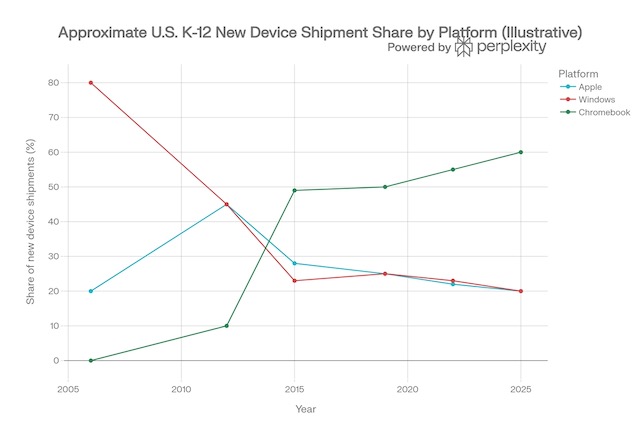
You might think providing data on the recent history of school purchases of Apple, Windows, and Chromebook devices would be simple. Some source must have found this topic to be of interest. I have tough expectations for what this would look like with Chromebooks showing a sharp rise in recent years. What I was less certain I understood was the comparative tracks of Apple and Windows equipment. I have been retired now for about a decade so I have spent only a little time in schools. I expected popularity comparisons would show Apple somewhere between Chromebook and Windows machines. 

There are no “official statistics,” and some of the most carefully acquired have value to businesses interested in the education market, and require you to purchase the reports (e.g., Futuresource). Data I could locate was inconsistent and no source fit my expectations. After multiple searches, I asked Perplexity to generate a graph for the 20 year period I wanted and that graph appears below. I did find similar general descriptions elsewhere to my surprise and the issue here is whether the new and less expensive Apple computer will change this trend. 

Why Chromebooks will likely continue the tech of choice?

So, Google’s Chromebooks have maintained a stranglehold on K-12 classrooms. While the Neo is a device that brings the prestige and power of macOS to a price point that schools can actually afford, the decisions those who make purchases depend on more than the cost of the equipment. 

The real reason Chromebooks will likely still be preferred isn’t just the lower price tag; it is the infrastructure of Google Classroom and the Google Workspace for Education ecosystem. Until Apple builds a direct, functional competitor to Google Classroom, the Neo is just a nice laptop in a room where everyone is already tied into a different system.

When a school district buys a large number of devices, often in the thousands, they are looking beyond a reasonable price point and hardware sophistication. Organizations also consider manageability and deployability – how to oversee how devices are used and how to set them up quickly and efficiently. Apple has always focused on individual users. When the machine assigned to an individual has an issue or selects one from a classroom card, each student simply signs in to the new machine, it is personalized, tabs, documents, and settings like the last time they connected. The design of Apple equipment maintains an individual’s priorities and content on that individual’s machine. 

The Google Classroom

Google Classroom was designed with an understanding of the school day and classroom tasks. It connects to Google’s online services – Google Drive, Calendar, and Meet and gives the teacher some level of immediate access to student accounts. Teachers have a way to distribute and grade assignments. Google Classroom allows a teacher to “make a copy for each student” with one click, see real-time progress on an essay, and provide instant feedback. The system works great because Google owns both the productivity suite (Docs/Sheets) and the management layer (Classroom).

Built for Collaboration

Google Docs was built for the web and for collaboration; it was built for twenty students to be in the same document at the same time without the system crashing or creating “conflicted copies.” Students can peer-edit, work on group slides, and share data in real-time. These capabilities can be accessed on the devices from other companies, but if classroom tasks are heavily dominated by tasks Google makes easy why add the complications of equipment that is not as easily integrated? 

The Cost Issue at the Level of the System

As I understand it, Google Classroom itself is generally provided at no additional cost to schools as part of Google Workspace for Education. The cost of Google Workspace depends on what schools want. There is a free tier for eligible institutions that provides the core tools such as Docs, Drive, Gmail, and Meet. Schools can also pay for other features that meet common needs, such as advanced security, analytics, admin controls, and additional teacher tools. I couldn’t find pricing details as the charge to the schools depends on the number of classrooms and teachers. 

Additional Comments

Teachers don’t choose platforms; districts do. Procurement decisions happen at the IT/admin level, not the classroom level. In considering Apple versus Microsoft in the business environment, the same issue seems to apply. In schools. Google won those relationships early and aggressively in the 2010s, and switching costs are now enormous — not technically, but now in terms of retraining staff and migrating years of curriculum materials. It seems to me Windows and Apple equipment will continue to have value in specific school applications but overcoming the inertia of a device and services suited to the most common tasks would be a massive challenge. If we get to AI on devices, perhaps things will change. 

Other companies have attempted to develop competing services. For example, Microsoft has Teams for Education. This product is regarded as capable, but teachers reportedly find Google Classroom much easier to use. 

Summary

Understanding why schools adopt a given type of tech hardware may not be as apparent as some may assume. This post argues that even given a similar price point other factors are important and Google has a lead when it comes to the basics of common classroom practice. 

Loading

What you think the research on handwritten vs keyboarded notetaking shows is flawed

If you’ve spent any time reading about study strategies, you’ve probably encountered some version of this claim: writing notes by hand is better than typing them on a laptop. There seems to be or at least there is reported to be research to back it up. I am normally a “what does the research suggest” guy, but in this case, I am skeptical and find my own experience leads me to a different conclusion.   

I try to be careful in thinking through whether any research study matches well with learner behavior in applied settings. To do this, you need to do more than read the abstract or even the discussion section from published studies. You certainly need to do more than read the analyses from “thought leaders” who have only read this content or asked AI to offer an opinion. Here is why. Researchers are free to speculate a bit in pushing an interpretation in these parts of a journal article. Readers should know this and take this into account. The section of the article, expected to be objective and descriptive, is the Methods section. Think of your role as a research consumer like this: here is exactly what he/she did and the results that these experiences produced. Now interpret them yourself given what you know about existing research and knowledge of the Methods and Results in this study. What conclusions do you reach?

Here are some issues I think are important to consider when researching keyboard versus handwritten note-taking.  I have ordered this list from most to least influential based on my perception of what matters most when considering what a given study offers for applied note-taking. Don’t take this ranking too seriously, but think about the impact the issues I identify might have.

Look for this issue in the Methods section.

Does the study focus on taking notes from a live lecture? The experience of taking notes from written material or a recorded source is different. You can pause and do not have to experience the working memory overload argued to trigger the more generative processing required to counter the slower process of handwriting? I include this item because so many adults have become interested in Personal Knowledge Management (PKM) strategies and are exposed to summaries of the research on notetaking. The PKM people seem more likely to take notes in response to what they read than students.

Does the study allow a reasonable amount of time to review notes? Does the experiment allow note review or does it focus on learning during the lecture only? What you learn during the input experience is not the entire learning opportunity.

Does the study involve a significant delay between exposure to content and before the collection of the dependent variable? Is the performance data collected as part of the same research session as the input experience?

Is intermediate processing of notes allowed or encouraged? Looking over notes immediately after taking them is a good strategy for students.

Is the digital experience limited to the original input of information? I encourage lecture focused note takers to use an app that records audio while taking notes. Such apps link notes with the audio. This allows gaps or vague notes to be remediated from the time-linked audio in a very efficient manner.  Missing something doesn’t have to be permanent and technology allows an easy way to address this issue.

An example of how I analyze a screen/paper study

I have read a large proportion of the published studies comparing keyboard and pen notetaking and have frequently written about my opinions on this matter. I decided to create this post after encountering an oft-cited study I had missed and in reading this study found some of the issues I have just mentioned. Comments related to this specific study may offer additional insights into what I think is being missed.

A 2018 study by Luo, Kiewra, Flanigan, and Peteranetz compared laptop and longhand note-taking and arrived at conclusions that many educators have taken as gospel. Laptop note takers, the study found, tend to transcribe lectures verbatim. They capture more words and paraphrase less. The researchers argue that longhand note takers, constrained by writing speed, are forced to be selective – to summarize and to impose structure. When students later reviewed their notes, the longhand group outperformed the laptop group on achievement measures. The takeaway seemed clear: put down the laptop and take your notes on paper.

But here’s the problem. The study, like many in this line of research, created conditions that almost no student would actually encounter in a real academic setting. And in doing so, the researchers may have reached conclusions that say more about experimental design than about how learning actually works.

What Happens After You Take Notes?

Think about your own experience as a student. Did you ever just take notes during a lecture and then re-read them once before a test? Maybe. But more likely, you did something with those notes afterward. You reorganized them. You filled in gaps possibly be asked to look at a friend’s notes. You rewrote messy sections. You looked up concepts you didn’t understand and added explanations. You highlighted key ideas, drew connections between topics, or created study guides.

These processes – note modification and active review – are where much of the real learning happens. And it’s precisely the step that the Luo et al. study skipped nearly entirely.

In the study, the review condition gave students just 15 minutes to passively reread their notes. No editing. No reorganizing. No supplementing. Just reading what they had already written. Under those conditions, of course longhand notes performed better as a review product – they already contained generative features like paraphrasing and images baked in from the encoding phase. Laptop notes, full of verbatim transcription, offered little additional cognitive benefit from a simple reread. Also, both the learning and the study phases happened back to back. There may be a few situations in which students are tested immediately following exposure to new information but such situations are not where the major portion of student grades are determined.

But this isn’t how students use notes in practice. The laptop note taker’s comprehensive, transcription-heavy notes aren’t a finished product – they’re a first draft intended to be a first draft revisited over time. First drafts are meant to be revised and complete notes allow both further exploration and are more likely to be meaningful after a delay of days and weeks.

The Laptop’s Advantage

Here’s what’s ironic about the study’s findings: the very feature it criticizes – the completeness of laptop notes – is actually a significant advantage when students are allowed to modify their notes and revist them after multi-day delays.

Research on note modification consistently shows that students who revise, reorganize, and elaborate on their notes achieve more than students who simply review them passively. And the richer the initial record, the more material students have to work with during revision. Laptop note-takers, with their more complete capture of lecture content, have a larger, more detailed foundation for generative processing after the fact.

Moreover, laptops offer affordances for modification that longhand simply cannot match. Affordances is a term researchers like to use to refer to possibilities a system makes available. When you have a more complete body of content to work with and this content can easily be reorganized and extended. The generative activity can occur when the learner is less challenged with a rapid input of information and has time to reflect and maybe recall other bits and pieces (a reason reviewing your notes after class is useful). 

This study did note that laptop note takers recorded far fewer images than longhand note takers, and this contributed to lower achievement on image-related test items. But this deficit is entirely addressable. Students can take screenshots of lecture slides, paste in diagrams, or create their own visual representations during a modification phase. I acquired this approach while attending conference sessions, and I was surprised when my own students seemed unaware that it was allowed. After being frequently asked to wait so students could draw something from one of my PowerPoint slides into their notes, I offered this advice. I also just made my slides available in our course management system, but that is an entirely separate issue regarding the consequences this practice has. Maybe in another post. The fact that they didn’t capture images in real time doesn’t mean those images are lost forever. 

It’s Not About the Medium—It’s About the Strategy

Perhaps the most important insight from note-modification research is this: the debate between laptop and longhand is entirely the wrong debate. What matters isn’t the tool students use to take notes – it’s the strategy they employ before, during, and after note-taking.

The Luo et al. study captured students using their default, untrained behaviors. Laptop users defaulted to transcription because they could. Longhand users defaulted to selectivity and paraphrasing because they had to. Neither group was taught how to take notes strategically, and neither group was given the opportunity to do anything meaningful with their notes afterward.

When students are trained in effective note-taking and modification strategies, the medium effect largely disappears. A laptop user who transcribes during the lecture and then spends time paraphrasing, reorganizing, and adding visual representations is engaging in just as much – if not more – generative processing as a longhand user who paraphrased during encoding but never revisits the notes.

What This Means for Students and Educators

The research isn’t wrong about what it measured. But what it measured isn’t what students actually experience. Any study that freezes the note-taking process at the moment of initial recording and calls it complete is telling only half the story. And in education, half the story can lead to entirely the wrong conclusions. Read the Methods section or follow education bloggers who do. 

Reference

Luo, L., Kiewra, K., Flanigan, A., and Peteranetz, M. (2018). Laptop versus longhand note taking: Effects on lecture notes and achievement. Instructional Science 46(6), 947-971.

Loading

A return to RSS to combat the changing media environment

The combination of recent acquisitions of major news outlets by extremely rich individuals in combinations these owners are have made some efforts to influence the tenor of programming and the topics covered is causing me some concern. I admit that it is difficult to operationalize story selection, objectivity, and even the target of humorists has become a topic of public discussion. I occasionally take a look at the data collected by organizations that attempt to measure political orientation (e.g., AllSides) and I see that recent news stories CBS, NBC, and the Washington Post are still listed as “leans left”. Part of the challenge here is that the companies making such determinations make use of public ratings rather than some more objective approach and public perception may influenced by accusations rather than facts.

Wealthy owners have almost by necessity controlled news organizations.

  • The Ochs-Sulzberger family, who own The New York Times.
  • The Murdoch family, owners of Fox News, The Wall Street Journal, and The New York Post

Newer wealthy owners largely come from the tech sector and are far more diversified in their financial interests.

  • Elon Musk, owner of X (formerly Twitter).
  • Mark Zuckerberg, whose platforms—Facebook, Instagram, WhatsApp—reach billions.
  • Larry Page & Sergey Brin, whose Google and YouTube dominate search and video.
  • Jeff Bezos, owner of The Washington Post and Amazon MGM Studios.
  • Larry Ellison, whose companies are expanding into CBS, Paramount, and potentially CNN and TikTok.

Much of my own understanding of major news outlets has been come from reading books focused on the history of the New York Times and Washington Post. For example, my most recent read was Marty Baron’s recent book describing his personal history with the Washington Post (Collision of Power: Trump, Bezos and the Washington Post). I think it fair to suggest that journalism as an ideal is about accurately presenting the facts and there is a constant tension within the professional between this goal and pressures to interpret and motivate.

Recent analyses of online news traffic, ownership structures, and platform consolidation reveal a trend that should concern anyone who cares about democracy, transparency, and the free flow of information. So, are billionaires taking over the news media? The evidence increasingly points toward “yes,” though the story is more nuanced than simple takeover headlines suggest. How objective is the news that we consume and have the few who control what we consume biased what is available to the public?

Why Are Billionaires Buying Up Media?

The motivations vary and are speculative, but here are several of the proposals:

1. Influence, Not Journalism

Owning a media outlet means controlling—not just influencing—the agenda. Which issues get amplified, which voices get sidelined, and which perspectives become “mainstream” can all shift at the whim of ownership.

This happens both subtly, through editorial pressure, and overtly, through firings, policy changes, and platform algorithms.

2. Protecting Business Interests

Billionaires with vast non-media empires benefit from shaping political and public opinion.

A critical news investigation can spark antitrust scrutiny, regulatory action, labor pressure, or public backlash. Owning the outlet that might publish such investigations can conveniently soften that blow.

3. Political Leverage

When politics and media ownership mix, journalism suffers. Several media owners have cultivated close ties to political leaders—particularly U.S. presidents. This relationship can lead to:

  • favorable regulatory rulings,
  • advantageous business deals,
  • less oversight,
  • and more power.

The public rarely sees this influence—but journalists inside the newsrooms often do.

4. Prestige and Legacy

Historically, newspapers have been considered markers of influence and intellectual status. For many billionaires, buying a publication is as much about image and legacy as profit.

Journalism’s core purpose – to hold the powerful accountable – cannot thrive in an environment where the powerful own the press.

Who is at fault?

The unsettling part is that present trends are probably not as devious as might be assumed and are a result of the following:

  • failing local news revenues,
  • the collapse of newspapers,
  • tech giants becoming gateways to information,
  • and billionaires filling the vacuum because they could.

The result is the same: a public sphere increasingly shaped by private interests.

We all bear some responsibility if we rely on “free” social media for news and have given up our subscriptions to newspaper (even digital) and magazines. The combination of free in terms of money and less demanding in terms of the effort to read longer form content is a bad combination. Of course free isn’t really free. We offer our time and attention to those who provide information and we open ourselves up to the manipulation associated with displaying more ads and attention grabbing content fed to us by  algorithms designed to attract our attention. Our personal biases and motivations are fed by these algorithms rather than objective journalism. 

Of course, we are told to purchase national and local newspapers and read in general, but maybe this is too idealistic.

Try RSS Again

RSS (Really Simple Syndication) was popular in the early 2000s as a way for individuals to keep an eye on multiple sources such as blogs and news sites to see if those sites contained any new material. Instead of taking the time to go to each site to check, a news reader kept track for you and offered a way to scroll through a list of updates to select sites you wanted to revisit. You were in control of both the sites you followed and the updated material you took the time to view. 

RSS became less popular when Facebook, Twitter, and other social sites with feeds made it easier to find new content in their feeds, which featured what others found interesting and useful. However, it wasn’t really everything. Algorithms selected what appeared in our feeds and what appeared at the top. In a way, self-selection was replaced by algorithms. 

RSS readers still exist – e.g., Feedly, Inoreader, Reeder. I use a new service called Current. The issue is how such services are used. 

My Proposal

If the goal is to spend more time exposed to unbiased content, here is what I think makes sense. Identify sources based on solid journalism committed to a fact-first approach. I wondered if there was a way to avoid what might be my own biases or at least add solid sources to my personal biases. I decided to involve AI and I suggest others with goals similar to my own might want to take a similar approach.

Step 1: Prompt AI to identify the type of resource 

My Prompt: What are the best unbiased news services for national news in the U.S?

*********

The AI response

A practical way to get “unbiased” U.S. national news

No outlet is perfectly unbiased, so the most reliable approach is to combine:

  1. a straight-wire source (fact-first reporting), and
  2. a bias-comparison / aggregation tool (to see how different outlets frame the same story).

Best “least-biased / straight reporting” services (great for national U.S. news)

  • Associated Press (AP / AP News) — widely used as a baseline “just-the-facts” wire style.
    Sources: AP “About” (independent, nonpartisan), AP News
  • Reuters — another global wire service known for restrained, fact-forward reporting (excellent for politics, courts, and especially business/economy coverage).
    (Reuters is commonly paired with AP in “least biased” recommendations; see also aggregator lists like PureVPN’s list for how it’s often categorized.)

Best “see multiple perspectives” services (reduces single-outlet framing)

  • AllSides — shows coverage “from the Left / Center / Right” and provides bias ratings; helpful for avoiding echo chambers.
    Source: AllSides Balanced News
  • Ground News — compares how outlets across the spectrum cover the same story; useful for spotting omissions and framing differences.
    Source: Ground News

Best “public-service style” national news (generally lower heat, more context)

  • PBS NewsHour — often recommended for measured tone and interviews/context (not a wire, but typically less sensational).
    Mentioned in “least-biased” style lists like: PureVPN’s list
  • NPR — strong reporting and corrections culture; perceptions of lean vary by topic, but many people use it as a core national source alongside a wire.
    (Also commonly listed in “low-bias” roundups: PureVPN’s list; and discussed in evaluation guides like UAA/APU library guide)

If you want a “single app/site” that tries to be neutral

  • Straight Arrow News (SAN) — positions itself as “unbiased / straight facts” and includes meta-coverage tools.
    Source: Straight Arrow News

Quick starter stack (simple and effective)

  • AP or Reuters for your default daily read
  • AllSides or Ground News when something feels politically charged or confusing

If you tell me whether you prefer (a) fastest headlines, (b) deeper explainers, or (c) video, I can narrow this to the best 3–4 for your routine.

*****

Step 2: Create a convenient way to import these sources into the RSS Reader

It would be easy enough to take the list from Step 1, adding each recommendation manually. There is an easier way I thought might work given the coding capabilities of AI. 

My Prompt: Create an opml file to access these sources

AI response

I have created the unbiased_news_feeds.opml file for you. It includes the “Top Stories” and “National” feeds for the sources we discussed: AP News, Reuters, NPR, PBS NewsHour, AllSides, and Straight Arrow News.

You can download the file directly from the interface and import it into any RSS reader (like Feedly, Inoreader, or NetNewsWire) to have a single, organized feed of U.S. national news.

How to use this file:

  1. Download the .opml file from the chat.
  2. Open your RSS reader of choice.
  3. Look for “Import” or “Import OPML” in the settings or sidebar.
  4. Upload the file, and your reader will automatically subscribe to all these sources at once.

If you’d like to add or remove any specific sources, just let me know!

*******

Here is the content of the OPML file. 

<?xml version=”1.0″ encoding=”UTF-8″?>

<opml version=”2.0″>

  <head>

    <title>Unbiased U.S. National News Feeds</title>

    <dateCreated>Fri, 06 Mar 2026 12:00:00 GMT</dateCreated>

  </head>

  <body>

    <outline text=”Unbiased News” title=”Unbiased News”>

      <outline type=”rss” text=”AP News – U.S. News” title=”AP News – U.S. News” xmlUrl=”https://apnews.com/hub/us-news.rss” htmlUrl=”https://apnews.com/hub/us-news”/>

      <outline type=”rss” text=”Reuters – World News” title=”Reuters – World News” xmlUrl=”https://www.reutersagency.com/feed/?best-topics=political-general&amp;post_type=best” htmlUrl=”https://www.reuters.com/”/>

      <outline type=”rss” text=”NPR – National News” title=”NPR – National News” xmlUrl=”https://feeds.npr.org/1003/rss.xml” htmlUrl=”https://www.npr.org/sections/national/”/>

      <outline type=”rss” text=”PBS NewsHour – Nation” title=”PBS NewsHour – Nation” xmlUrl=”https://www.pbs.org/newshour/feeds/rss/nation” htmlUrl=”https://www.pbs.org/newshour/nation”/>

      <outline type=”rss” text=”AllSides – Balanced News” title=”AllSides – Balanced News” xmlUrl=”https://www.allsides.com/rss/news” htmlUrl=”https://www.allsides.com/unbiased-balanced-news”/>

      <outline type=”rss” text=”Straight Arrow News – U.S.” title=”Straight Arrow News – U.S.” xmlUrl=”https://san.com/category/u-s/feed/” htmlUrl=”https://san.com/category/u-s/”/>

    </outline>

  </body>

</opml>

If you want, you can copy and paste the OPML content that appears here. Save it as a text file ending in .opml – e.g., balancednews.opml. If you are already an RSS reader user or want to try one of the tools I listed above, all you need to do is import this source, and you will be following the news sites I follow.

To complete the process, here is what I would do with my reader.

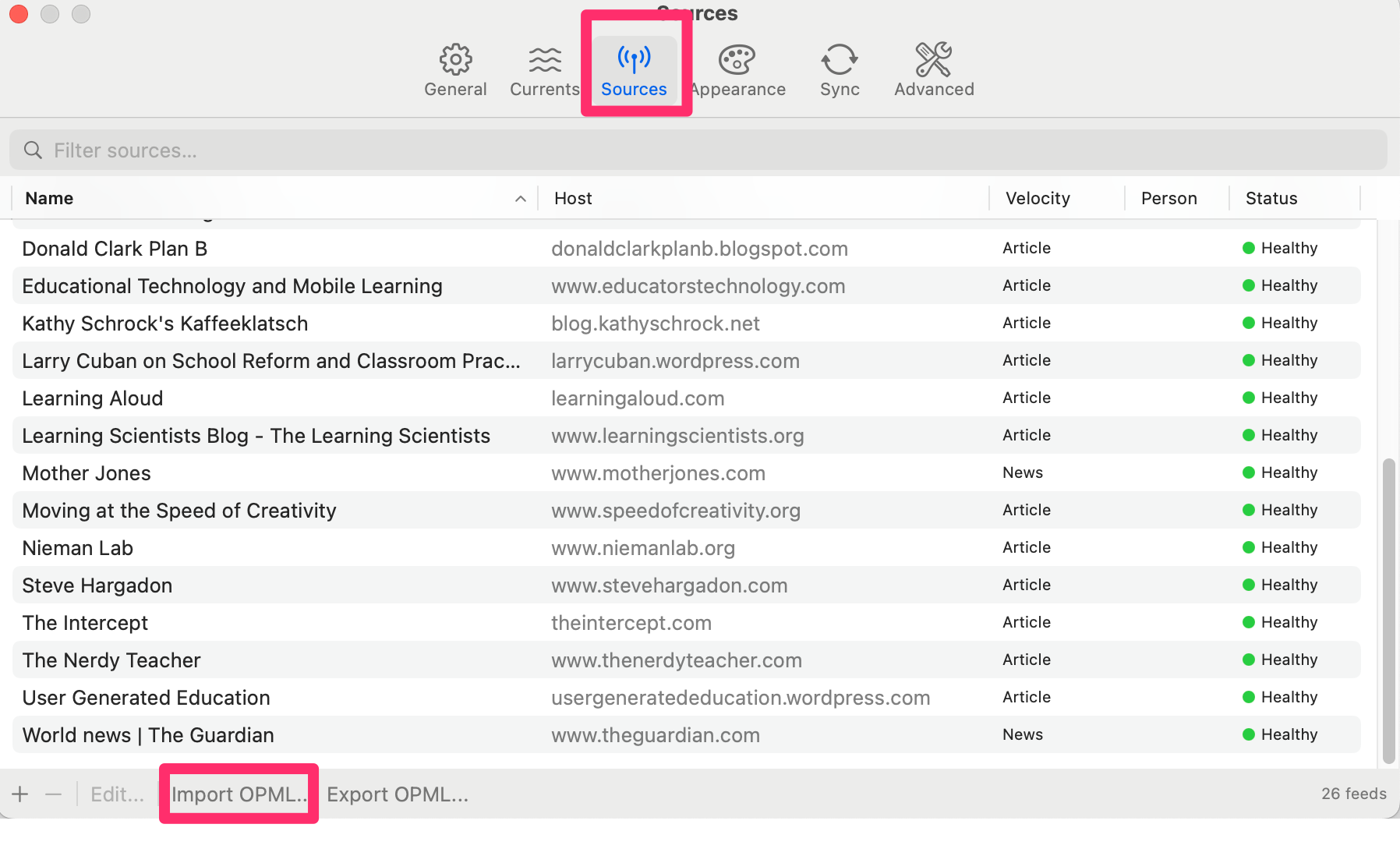
Current offers several ways to add sources. In the image above, my existing sources appear (all education blogs). At the bottom, there is an Import OPML button that allows the AI-created OPML file to be uploaded.

Summary

It seems reasonable given the politicization of news to exercise greater control of the content each of us consumes. News organizations seem less independent. The RSS reader approach allows this control if the sources identified by AI meet the requirements I specified. Hopefully, the description offered here are sufficient to give others what is needed to duplicate my approach. 

Loading