Use My Obsidian Notes Via NotebookLM

A good proportion of what I write is based on highlights and notes I have stored in Obsidian. Collaborative notetaking has always been a personal interest. There is a way to share Obsidian notes directly, but because this requires your content to actively use a server located off your own computer, it requires a subscription. I have no objection to supporting developers through subscriptions, but I have reached my personal limit on how many subscriptions I can handle. There are other ways.

In a previous post, I described Glasp, which is a site for highlighting and annotating with built-in AI. The AI is referred to within the service as an AI clone – implying that you can prompt your own documentation. There is also a “find others with similar interests” feature that takes you to the notes of others willing to share, and you can prompt their content in a similar way. 

One of my more popular posts explained how to export Obsidian content to NotebookLM. It turns out NotebookLM notebooks can be shared, so I decided I would share my content for anyone who wants to use it. I am an educational technologist, mostly now exploring note-taking, AI applications, and generative processes to improve retention and understanding. You may or may not be interested in these areas, but if you are a NotebookLM user you might just want to explore this sharing option. NotebookLM is a great tool for interacting with content using AI and perhaps even creating a podcast based on queries of this content. You cannot add to or edit someone else’s content, which I wouldn’t want, but a user is free to explore your shared content using the “read only” features of NotebookLM.

Fitting with my personal interests, the opportunities an educator might find for collecting specific references he/she wants students to explore just seems like a useful application.

A very brief tutorial

A screen capture of the topic of an open Notebook appears below. The process of sharing this notebook is initiated from the share button at the top of the browser window. 

Selecting the share button opens an overlay with multiple options. My intent is to offer public access to explore my notes. NotebookLM then returns a URL others can use. 

Use the following link to explore the content I have archived: https://notebooklm.google.com/notebook/2d94a77a-62f7-470d-9dcd-d1526a4892a5

Loading

Posted in Uncategorized | Tagged , | Leave a comment

Input Token Cost of RAG-Focused AI

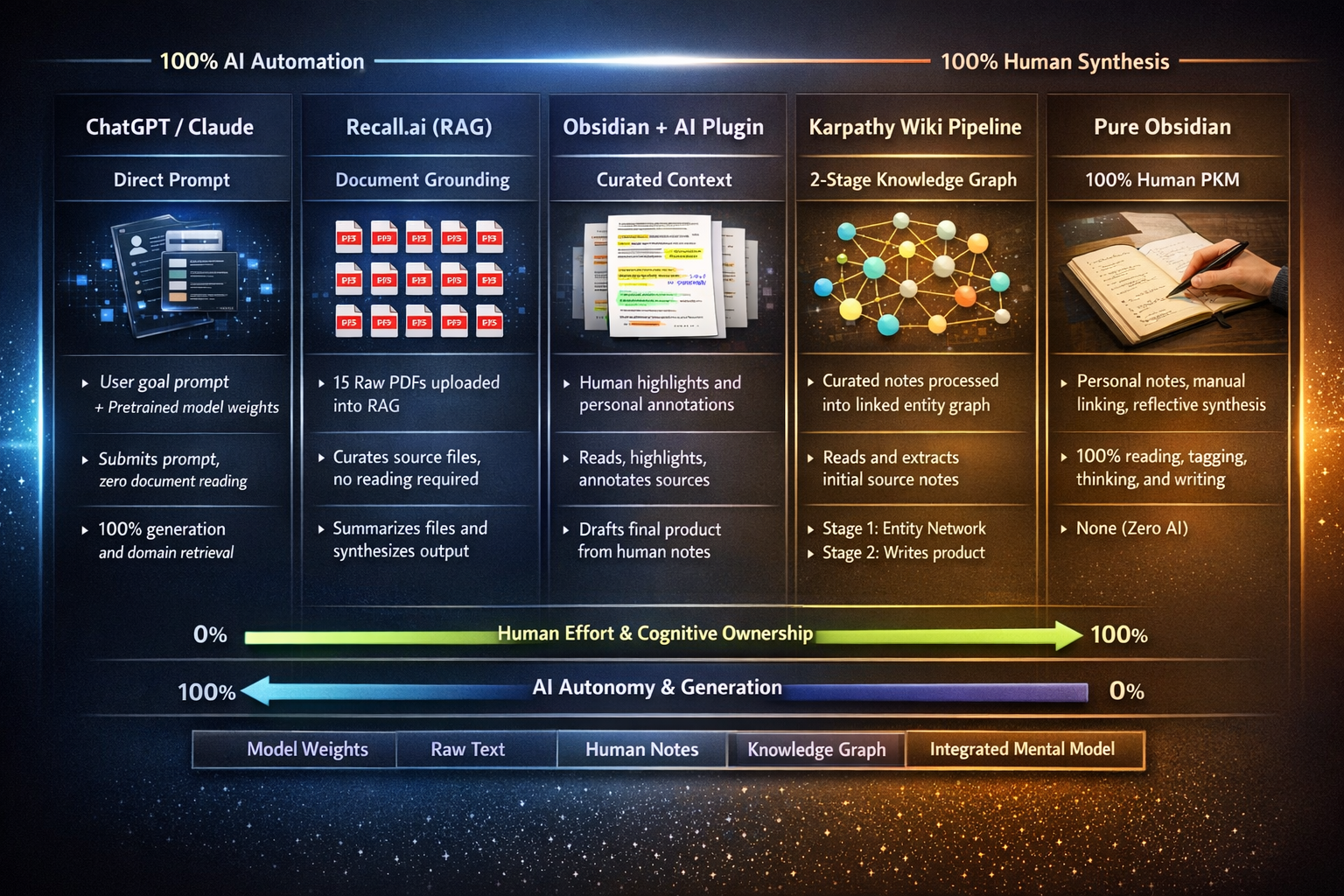
Andrew Karpathy has identified an issue with the way those of us who make use of AI to interact with content we have collected (RAG- retrieval-augmented generation). Each time we submit a prompt to query our designated content, the AI resets and reprocesses it to address our query. As I will eventually demonstrate, this repeated input processing can be significantly demanding, and if you pay by the token or have a plan that has a token limit, this repetitive processing can be quite expensive. Karpathy proposed that you have a reasonable understanding of what you generally want to get from your curated content, you can find and export this content once and then focus on an organized wiki (Karpathy’s term) of the types of information you anticipated would be of value. Karpathy’s concept and its multiple variations have generated considerable attention, including interest in running them on personal computers. It is not my intent to focus on the how-tos of the LLM-wiki process. I am intrigued and I did purchase a mac-mini I can dedicate to exploring this process. The popularity of this idea has made purchasing Mac Minis very popular and the machine I purchased in April is not scheduled for delivery until mid-July. I take this as an indication of the potential usefulness of this approach.

What I want to document here is the inefficiency of RAG. Unless you are a heavy AI user and unless you make frequent use of AI to explore a large pool of content that you designate, you are unlikely to encounter this challenge. I don’t presently have a $20 a month account. Instead, I have a lower-max account (Abacus.AI) and pay for several accounts that allow me to upload content for exploration (Mem.ai, Recall.ai). The situation that allowed me to carefully analyze token use was the API plugin I used to apply AI to content I have stored and organized in Obsidian. This plugin accesses Claude via an API and a “pay as you use” plan. Anthropic provides detailed usage data, enabling interesting analyses. 

Claude via Obsidian

I have used Obsidian to store notes and highlights I generate from my reading for several years and I have collected a sizeable body of content. The folder on note-taking I am using in the following demonstration contains 132 notes totaling 38,208 words. The following demonstration takes the following approach. The data available from my use of Claude to prompt this folder with prompts is saved by the day so for purposes of this little experiment, I issued one prompt a day. 

Prompts by the day:

Day 1: Under what circumstances is notetaking a generative activity 

Day 2: What have research studies shown regarding the relative effectiveness of taking notes by hand or using a keyboard? 

Day3: Using my notes, generate separate responses to the following prompts. Under what circumstances is notetaking a generative activity? What have research studies shown regarding the relative effectiveness of taking notes by hand or using a keyboard?

Logic of this approach. The data retained by Anthropic for use of Claude (4.6 in this case) is totaled daily. In addition to the charge to my account (one chart), a daily token total is provided, along with a running total of Tokens In and Tokens Out. By tracking the totals in combination with the charts provided, it is possible to demonstrate the problem others have demonstrated with AI and RAG – the processing required for inputting the content is required each time the system is used hence asking for a response to the same two requests following a single input will save a considerable number of tokens (i.e., day 3 token use will be nearly the same as either day 1 or day 2). So, the cost and token usage on day 3 were only slightly higher than on either day 1 or day 2. 

Summary

I must admit I was surprised at the cost of asking an AI tool to focus on content a user provides instead of asking a similar question to be answered from that tool’s own stored “knowledge”. These seemed basic requests someone might make many times a day in exploring with AI, but the focus on content the tool must first tokenize adds substantially to the cost. Given this cost, the Karpathy wiki strategy makes a lot of sense. At present as a temporary strategy, I store the output from my Obsidian-related AI queries in a separate Obsidian folder and I can then target this folder for a lower Input Token cost.

One more thing. Claude’s response to my query was great and would have been quite helpful had I been focused on creating a post. The structure of the output was, I would say, insightful. I have appended the response to my query about taking notes by hand versus on a digital device (see below).

*****

Notetaking – Hand vs Keyboard

Hand vs. Keyboard Note-Taking: What Your Notes Show

Your notes contain extensive coverage of this topic across multiple studies. Here is a synthesis of the key findings:

The Foundational Study

The landmark study by Mueller & Oppenheimer (2014), documented in Pen is mightier than the keyboard, found that keyboard users recorded more content but that longhand note-takers performed better, particularly on conceptual understanding items. In Study 3, which included a week delay with note review, differences favoring handwritten notes emerged specifically when review was allowed.

The Generative Processing Explanation

Several of your notes describe the primary theoretical explanation for a longhand advantage. Because typing speed (~33 wpm) exceeds handwriting speed (~22 wpm), as noted in transcription speeds, longhand note-takers are forced to summarize and paraphrase rather than transcribe verbatim. This engages generative processing—connecting new information to prior knowledge and reorganizing ideas—which promotes deeper learning. As described in Luo, Linlin, Kenneth A. Kiewra, Abraham E. Flanigan, and Markeya S. Peteranetz2018:

“Laptop note takers had a transcription orientation and recorded mainly verbal information… whereas longhand note takers had a generative orientation and used a combination of verbal and spatial note-taking strategies.”

The Luo et al. (2018) study further found that keyboard users recorded fewer visual notes (charts, graphs) and that the process function was more important for keyboard notes while the product function (review) was more important for longhand notes.

Contradictory and Nuanced Findings

Your notes reveal that the research is far from settled:

  • The 2022 Meta-Analysis (2022 Notetaking Meta-Analysis) by Voyer et al. analyzed 36 articles and found no overall effect for notetaking approach. The authors speculated that studies showing a longhand benefit may have been confounded by distraction opportunities on digital devices.
  • Urry et al. (2021) (Urry.et.al) replicated Mueller & Oppenheimer and found inconsistent results. Laptop users took more notes, and more notes were related to better test performance. Importantly, Urry differentiated quantity from verbatim overlap—quantity was positively related to performance while proportion of verbatim overlap was negatively correlated.
  • Note completeness research (NoteCompleteness) challenges the longhand advantage by showing that the volume and completeness of notes influence retention. Bui et al. (2013) found that students with access to more complete notes (as produced by keyboards) demonstrated better performance, directly contradicting the Mueller & Oppenheimer interpretation.

The Revision Factor

Your notes highlight that the comparison changes substantially when revision is introduced:

  • Flanigan et al. (2023) (Flaniganetal2023) found that among note revisers, longhand note-takers added three times as many complete ideas during revision pauses as computer note-takers, and scored more than half a letter grade higher on posttests. However, the advantage emerged primarily through the revision process rather than initial note-taking alone.
  • Cojean & Grand (2024) (Cojean&Grand2024) found that computer note-takers were more likely to reformat their notes after class, suggesting they compensate for shallow initial encoding through later revision—a finding that complicates simple hand-vs-keyboard comparisons.

Research with Children

Your note childrennotes describes Horbury & Edmonds (2021), which is notable as one of the few studies with children (ages 10-11). They found conceptual understanding was superior when taking notes by hand, but unlike adult studies, there were no significant differences in the amount of content recorded. The authors speculated that children’s lesser keyboarding experience may have produced greater cognitive load when typing.

Critical Perspectives from Your Notes

Your notes contain several important critiques of this research area:

  • The generative argument has a logical flaw: As you note in transcription speeds, the logic assumes “a strange lack of awareness on the part of the learner. It would seem that the keyboarding learner is oblivious to the benefits of generative processing and goes with what is easier, but less effective.”
  • Modification can equalize outcomes: Your AI response to my question challenging the Luo study that assumed the notes themselves could not result in generative activity argues persuasively that generative processing can be shifted to the review phase, that laptop notes provide a richer base for modification, and that laptop affordances enable superior reorganization. The conclusion: “The medium matters less than the strategy.”
  • Ecological validity concerns: Multiple notes flag that most studies use brief delays and immediate testing, which differs significantly from actual classroom conditions where review may occur days or weeks later (Luo, et al 2018, Flaniganetal2023).

Summary

FindingSupport
Longhand produces more generative/paraphrased notesConsistent across studies
Keyboard produces more complete/voluminous notesConsistent across studies
Longhand leads to better learning outcomesMixed—meta-analysis shows no overall effect
Note completeness predicts achievementSupported, which favors keyboard
Longhand advantage strongest with note reviewSupported in some studies, not replicated in others
Revision can compensate for shallow keyboard encodingSupported by modification research

The overall picture from your notes is that the hand-vs-keyboard question is far more nuanced than popular accounts suggest. The medium matters less than the strategy the learner employs, and the opportunity for revision and post-processing may be the most important factor in determining which approach is more effective.

Loading

Posted in Uncategorized | Tagged , , | Comments Off on Input Token Cost of RAG-Focused AI

Layering for Learning and Insert Learning

I created the phrase “layering for learning” some years ago to describe a collection of digital tools with a specific educational purpose. The phrase refers to online services that allow educators or learners to add instructional elements to existing web pages or videos without modifying the original content. Educators might want to do this as an alternative to textbook content to offer more current information or to have learners deal with the type of information that they encounter outside of the classroom environment. 

A layering tool works by retrieving content from a creator’s server and combining it with a second “layer” of additions from the layering service’s server in real-time. The combination is what the learner experiences. This approach transforms raw, passive information resources into active learning experiences while respecting the original creator’s copyright and revenue opportunities, as hits and ads are still recorded on the source server. This may sound unusual, but the mental image of a layer of additions on top of the base of existing content is one way to understand how this works. The simplest example is probably highlighting. Instead of making a permanent change to someone else’s content by marking up their work, the layered appearance of a highlighted web page is available only when the learner’s experience combines content from the content creator’s server with the layer from the server providing access to the layering tools. Different approaches exist; I focus mainly on those that individualize the experienced product to include the additions of a teacher and of an individual student. 

Layering for Generative Experiences

The fundamental purpose of layering is to implement generative activities, which are external tasks intended to encourage productive internal cognitive behaviors. While learning ultimately occurs in the student’s mind, educators can use layering to indirectly manipulate and increase the likelihood of specific mental actions. Questions make a good example of a familiar generative task. A question is added to a learning situation to encourage different types of thinking (cognitive activities) on the part of the learner. 

From your personal experience, give me an example of xx.

How would you define xxx?

Layering tools allow these tasks to be embedded directly within the flow of content, rather than being isolated as separate assignments. Textbooks typically offer questions at the end of chapters, or sometimes at the beginning to direct attention. Researchers at one point explored questions embedded within text – adjunct questions. The idea was to immediately check on understanding while the student could easily reference the relevant content. There was some value in this approach, but my guess is that extending the length and hence cost of textbooks was rejected.

There are several categories of generative tasks that can be implemented through layering:

Knowledge Activation: Before or during exposure to new material, layering can be used to insert prompts that ask students what they already know about a topic. This “pre-questioning” effect helps activate relevant existing knowledge, which serves as a base for interpreting and anchoring new information.

Elaboration and Personalization: Educators can layer prompts that require students to go beyond the provided information by generating personal examples or connecting concepts to their own life experiences. This encourages knowledge building – where the learner adds to core ideas from personal knowledge – rather than mere knowledge telling, which involves a simple restatement of what was read or heard.

Summarization and Paraphrasing: Layering allows for the insertion of tasks where students must pause and rephrase the most important information in their own words. This process requires the student to select essential information and organize it into a coherent structure, which is a significantly more powerful cognitive act than verbatim transcription or passive highlighting. Of course highlighting also has some unique value in preparing for review.

Comprehension Monitoring: Layered elements can serve as checks for understanding by forcing learners to evaluate their own “calibration” – the accuracy of their self-perceived mastery. Proposing questions that students may not be able to answer encourages them to reflect on gaps in their understanding and take remedial action, such as re-watching or re-reading a specific segment.

Retrieval Practice: Embedding multiple-choice or short-answer questions directly into a video or article facilitates the “testing effect”. Actively searching memory to answer a question strengthens future retrievability and understanding more effectively than simply studying external notes. This use works most effectively when repeated after delays from the original encounter or earlier study activity.

Interactive and Social Processing: Some layering services allow for social annotation, where thinking is made visible to a community. Students can share interpretations, respond to peer comments, or engage in threaded discussions directly on the digital document. This interactive layer provides a second input beyond the original source, prompting learners to reconsider and potentially modify their understanding in light of others’ insights. This experience might be exemplified through opportunities to discuss or debate a point. 

Some of these activities are intended to impact learner as part of the initial exposure to instructional content and some during later review activities. In practice, layering tools are specialized for use with video content or as an addition to what are commonly called web pages. Adding generative elements to PDFs or text files is also possible, but this post deals specifically with repeatable use of online experiences most likely while using a browser.

Insert Learning – A Layering Environment for Web Pages

Insert Learning is a service for layering web pages I like to describe as this service offers the complete package of instructional content design, personalized lesson assignment, and the evaluation of student effort and if desired feedback and grading. 

My experience with this tool involved its use in several instructional design courses in which the service was used with these students expecting the students would understand how the same tasks could be applied in situations in which they might apply similar activities in their own work. 

This is a subscription service although you can explore without subscribing. The cost is $100 per year or $20 per month with unlimited students for this price. I used to pay by the month because the course in which I used it was a semester long. 

Think of this service as two parts. There is the administrative and learning management component, accessed via a website, and the lessons, accessed via a web browser extension. When a student opens a lesson or the instructor works to add layered components to a web page, a menu bar will appear on the side of the browser window (see below). This menu bar provides access to the available tools. A student will have a shorter list with highlights and annotation options. The instructor can highlight, annotate (actually add various text elements including links), insert questions, and add a discussion window that retains the comments added from other students. 

The following image provides a better idea of what a layered page looks like when additions (an essay question) and a text box containing a link look like. 

Insert Learning collects student responses and allows then allows the instructor to respond with feedback, award a score if desired, or simply check to see if students have completed a task. The following screen capture is what this would look like when reviewing what students in one of my classes had generated in response to a specific questions. You can see at the top of the image how I would determine which class, lesson, and item, I wanted to review. 

The following image shows the way I would assign individual lessons that I have accumulated. 

As I said, Insert Learning is a complete environment consisting of what I would describe as a learning management system, a method for lesson creation/design and presentation, and tools for feedback and evaluation. 

I created this post mostly to explain what I mean as layering for learning tools with brief exposure to one example. I have additional descriptions of other tools both for video and for web pages that offer similar, but sometimes less complete capabilities. For web pages, the most similar product I have explored is Scrible (see below). The tool bar (top) and highlighting and annotation capabilities are visible. The question and discussion capabilities are not available, but the LMS approach is similar.

Final Comment

I think of summer as a time K12 educators and tech people might explore tools and perhaps develop some content for the coming year. Perhaps this post will offer them some ideas they might try.

Loading

Posted in Uncategorized | Tagged | Comments Off on Layering for Learning and Insert Learning

What we have lost. Personal Computing is Seldom Personal

I have a solid understanding of digital technology because, while not a programmer, I have a long history of relying on the technology of the day. Even years before the personal computer, I wrote hundreds of pages of my dissertation on the cards they used to feed to mainframes. The tags needed to produce paragraph breaks, capital letters, and bold text were required along with the raw text. More complex still were the tags and character counts necessary to create the many tables required to display data. Early word processing programs on personal computers required similar additions and writing HTML code was just a further extension and not bewildering. 

I learned to program to create the software my research interests in computer reading games required. I learned to code in PHP and MySQL and to set up and operate an Apache server because these skills were necessary to implement my research interests in computer-aided study experiences for college students. 

Yes, I use AI and for no other reason than personal curiosity, I am now waiting until July to own an upgraded Mac mini to explore the options for personal control of LLMs on your own equipment. This is not necessary for what I have to say in the following content, but it is possible and consistent with the quest for understanding and technology independence. 

I say these things to explain that I learned the skills needed to do my work at a time when personal investment of time was required. Many other early personal computer users likely have very similar stories, which may cause younger users to roll their eyes listening to such accounts. However, as a result of such experiences, I am less awed by the capabilities of present-day hardware and software. These comments are meant to get me to the claim that there is some value in hands-on experience with the hardware you own and in a similar approach to personal control of your software and content. 

What brought these thoughts to mind was an interview I recently listened to on Leo Laporte’s Intelligent Machines podcast (access requires a subscription – the transcript may be available). The guest was Nirav Patel. Patel is the founder of Framework Computers, which offers repairable, upgradeable computers. Among the topics of discussion was a post Patel has written suggesting we may be witnessing the death of personal computing. What Patel suggests, which is explained in greater detail during the podcast rather than the blog post is that the personal computer is now little more than a terminal that you have but cannot repair or upgrade, connected through the use of subscription services to online activities, which even hold any content you generate and display. For most users, AI is a continuation of this external rather than personal computing. 

The Model Has Changed

What I have described as my personal experiences has changed into a very different model of computing – one in which our devices function less like autonomous personal computers and more like portals into corporate ecosystems and subscription services.

This shift has profound implications for ownership, creativity, education, privacy, and even democratic culture.

From Ownership to Access

The computer era was built around ownership. When you bought a desktop computer in the 1980s, 1990s, or early 2000s, it was yours and totally under your control. Software was often purchased once and installed locally. Files lived primarily on your hard drive. You could back them up, move them, or preserve them without asking permission.

Today, many of the most important functions of our digital lives occur elsewhere. Documents live in cloud storage. Music is streamed. Photos synchronize automatically to remote servers. Productivity tools are rented monthly. Artificial intelligence systems mostly run remotely in data centers. 

When you examine this situation carefully, the “computer” is no longer primarily the device on your desk. The real computer is the cloud infrastructure owned by large corporations. Your laptop, tablet, or phone is increasingly a terminal.

This transforms the relationship between people and their technology.

A subscription model shifts power away from users. Instead of owning tools outright, users lease access. Features can disappear. Prices can rise. Services can shut down. Accounts can be suspended. Even files may become inaccessible if authentication systems fail or subscriptions lapse.

The Decline of User Control

Modern platforms increasingly limit control.

Smartphones make the best example. Most users cannot freely install software outside approved app stores without workarounds. Repair is difficult or discouraged. Components are soldered or glued in place. Batteries are hard to replace. Devices become disposable appliances rather than maintainable tools. Laptops and desktops follow this same pattern. Hardware is thinner, more sealed, and less upgradeable. Software ecosystems are tightly integrated with online accounts and cloud synchronization. 

We are facing a paradox, our devices are more powerful than ever, yet we often have less meaningful control over them.

The Subscription Economy Changes Software

We used to purchase and own software. Applications are no longer stable tools that we control. They become ongoing services governed by licenses and terms of use. Features are continuously updated, removed, or repositioned. Interfaces shift without user consent. Cloud integration becomes mandatory rather than optional. Our tools are updated with new capabilities we may not need and the price is adjusted as if these changes were necessary. 

Artificial intelligence accelerates this transition because many AI systems require a massive investment in training and equipment. Users cannot fully possess these tools because the computational infrastructure remains centralized. If core intellectual tools are only available as subscription services, our control over digital work is gone.

We No Longer Fully Control Our Content

Perhaps the most important shift concerns ownership of personal content.

Historically, a writer using a local word processor had direct control over their files. Your pictures were archived images locally.  Now, our intellectual and social life exists inside platforms. Social media posts live on corporate servers. Videos depend on hosting platforms. Notes synchronize to cloud systems. Family photos are organized by proprietary services. 

Platforms operate beyond our control shaping visibility through algorithms. 

Until recently, many of us maintained personal websites, blogs, and independently controlled spaces online. Today, much online expression occurs inside centralized platforms optimized for engagement, advertising, and data collection.

Convenience Versus Independence

It is true that many users willingly accept these tradeoffs because modern ecosystems provide genuine benefits. Cloud synchronization prevents data loss. Streaming services reduce complexity.  Most seem to want technology that works reliably and simply. The tension, then, is not between good and bad technology. It is between convenience and independence.

Educational and Cultural Consequences

As might be anticipated from my initial comments, these changes also influence learning and creativity. The earlier personal computer culture encouraged experimentation. Users learned by modifying systems, building websites, installing software, and exploring open environments.

We talk as if we value digital literacy, but just as AI can replace the need to learn the skills to write effectively, relying exclusively on external systems and preset approaches to everything reduces understanding. Knowing how to operate apps is different from understanding how systems work. Students raised entirely within locked-down ecosystems may have fewer opportunities to develop deeper understanding.

Reclaiming the “Personal” in Personal Computing

But the growing concern expressed by thinkers like Nirav Patel raises an important question: What does it mean for computing to remain personal? While most users may not prioritize this concern, I hope enough individuals will commit to investing time in controlling their own hardware and exploring tools they can manipulate and alter. 

For those who might be interested, I have operated, or at least had a rental server on which my blog content has appeared, since 2002. It gives me some pleasure having this nearly 25-year record of my personal history available. This post appears on this server, but also on Medium which offers me a second audience for my content. I am hedging my bets. You don’t save time or money doing things yourself. My server rental and the cost of having my own domain names total about $250 a year. Medium is $50 a year and I get some of this returned because of the activity of my readers. At my personal small scale, there would be a cost advantage to giving up doing things myself. All things considered, for the time I invest, this is an inexpensive hobby. I hope others take a similar approach. 

Loading

Posted in Uncategorized | Tagged | Comments Off on What we have lost. Personal Computing is Seldom Personal

The Digital Paradox: A Multi-Dimensional Analysis of Screen Time and Mental Health

A recent analysis of the screen time and mental health issue (Gupta and colleagues) has labeled positions taken on the basis of the highly inconsistent findings as oversimplified, hiding more nuanced representations that can be destructive or helpful. It follows that simplistic positions that have resulted in the banning of access are poorly thought through and destructive for some individuals in some situations. While public discourse often frames technology as a primary driver of a modern “mental health crisis,” research notes suggest a far more complex reality. The evidence indicates that the impact of screen time is not a monolithic “good” or “bad,” but rather a nuanced interaction between digital dose, content type, and individual user disposition

After a careful review of the literature. Gupta and colleagues propose that the literature would be better understood by modeling its impact as medical researchers model the impact of a medicine, based on the interaction among dose, mediation properties, and patients. When adapted to studying screen time as the input, dose (time spent, pattern of use – passive or active, and dose regulation), content (social comparison, fear-inducing, restorative, or generative), and individual differences (preexisting vulnerabilities, personality characteristics, age, and critical thinking skills). So while meta-analyses of the studies of the impact of screen time on mental health have found a very weak relationship overall (e.g., Ferguson and others), specific situations and circumstances with certain individuals demonstrate both positive and greater negative impacts. 

Specific examples of the Gupta argument may help. There is no way to be complete here and I am selecting studies with which I am familiar, which may or may not be in the Gupta reference list. 

Dose – there appears to be a “Goldilocks effect” with social media. Abstinence and heavy use are associated with more negative mental health issues (Vally and D’Souza). Among the causes of the level of use, self-regulation (an individual-difference characteristic) would thus seem significant, as an educated individual can act to control their level of activity.

Active/Passive use patterns – this distinction refers to the difference between scrolling through feeds without interaction vs. direct interaction, content creation, and discussions. Some, but not all, studies have found that time spent on these two types of online activity is associated with differences in mental health (Verguyn and others). 

Pre-existing vulnerabilities – Individuals with depression or low self-esteem are more sensitive to negative social feedback.

Personality traits – Neuroticism (individuals prone to worry and negative affect) are prone to stress and lower self-esteem as a result of social media use, while extraverted individuals are likely to experience enhanced mental well-being. 

Age – adolescents are sensitive to social rewards and peer evaluation, making them more vulnerable to online social comparison, while older adults who use social media reduce loneliness, stay in touch with their families, and improve mental well-being. 

The Risk of Social Deprivation

While critics like Haidt (The Anxious Generation) point to social deprivation as a risk of heavy phone use, a ban could inadvertently cause a different kind of social isolation. For many Gen Z adolescents, social media is the primary “third space” where they interact with peers. A ban would effectively cut off adolescents from their primary social infrastructure, potentially exacerbating the very feelings of loneliness and exclusion that proponents of the ban hope to solve.

Rather than a total ban, the evidence suggests we should move toward a model of dose regulation and content moderation. This includes:

  1. Promoting Active Use: Encouraging adolescents to use social media for goal-oriented purposes, such as learning or maintaining close social ties, rather than passive consumption.
  2. Psychological Inoculation: Implementing strategies like psychological inoculation to improve resilience against misinformation and the negative effects of social comparison.
  3. Focusing on Vulnerable Groups: Identifying and supporting individuals with pre-existing vulnerabilities who are most at risk, rather than applying a one-size-fits-all restriction.
  4. Voluntary Control Mechanisms – mechanisms that limit time per day are available to cap activity (e.g., time limits on Instagram and Apple Screen Time controls).

Some aspects of the concern for students’ use of social media remind me of concern about cyberbullying, which now receives far less attention. In my work with a graduate student who specialized in this topic, I also wondered about educators’ expectations regarding this concern. While victims, perpetrators, and observers knew each other because of their common school environment, actual incidences of cyberbullying very, very rarely originated from a computer within the school. Those involved were online at home, at friends’ homes, or on their phones outside school. The schools were relevant because they provided the opportunity to address the problem. 

Aside from the issue of distraction, which I regard as an issue of classroom management, I have a similar reaction to the screen time and mental health issue. Phones, social media, and digital experiences are part of the lives of all individuals from adolescence onward. I don’t see this changing.  Without discounting the value of discussions between parents and their children, which may or may not occur, I see unique value in the curricula and group experiences that educators and school counselors provide in responding to age-related concerns. This type of emphasis, unless part of the use of the tools of concern are unlikely to occur. 

In conclusion, while the concerns regarding adolescent mental health are valid and urgent, a total ban on social media is a blunt instrument for a delicate problem. By recognizing that not all clicks are equal, we can focus on fostering a digital environment that prioritizes well-being, agency, and connection over simple prohibition.

References: 

Ferguson, C. J., Kaye, L. K., Branley-Bell, D., Markey, P., Ivory, J. D., Klisanin, D., Elson, M., Smyth, M., Hogg, J. L., McDonnell, D., Nichols, D., Siddiqui, S., Gregerson, M., & Wilson, J. (2022). Like this meta-analysis: Screen media and mental health. Professional Psychology: Research and Practice, 53(2), 205–214. https://doi.org/10.1037/pro0000426

Gupta, L., Bharti, D., & Singhal, S. (2026). Not all clicks are equal: digital dose, content, and user disposition in mental health. Academia Mental Health and Well-Being, 3(1).  https://doi.org/10.20935/MHealthWellB8208

Haidt, J. (2024). The anxious generation: How the great rewiring of childhood is causing an epidemic of mental illness. Random House.

Vally, Z., & D’Souza, C. G. (2019). Abstinence from social media use, subjective well‐being, stress, and loneliness. Perspectives in Psychiatric Care, 55(4), 752-759.

Verduyn P, Ybarra O, Résibois M, Jonides J, Kross E. Do social network sites enhance or undermine subjective well-being? A critical review. Social Issues Policy Review. 2017;11(1):274–302. doi: 10.1111/sipr.12033

Valkenburg, P. M., van Driel, I. I., & Beyens, I. (2022). The associations of active and passive social media use with well-being: A critical scoping review. New media & society, 24(2), 530-549.

Loading

Posted in Uncategorized | Comments Off on The Digital Paradox: A Multi-Dimensional Analysis of Screen Time and Mental Health

Ground News – The Facts if You are Willing to Work for Them

Online news has become the target of a good deal of deserved complaints. Many sources still existing or derived from paper papers are cutting journalists as ad revenues have dwindled. Online only sources have proliferated, but get by without actual “on the streets” journalists and often focus on a shallow approach similar to those publications you see while waiting to check out at the grocery store. Add to that AI-powered offerings provided what I would describe as summarization engines. 

I have been exploring a new source with a unique approach, I believe, that makes a unique and useful contribution, as long as you understand how it works and what I believe your responsibilities should be in using it. I am a paid subscriber to the NYTimes, a local Minneapolis paper, and the resources I can access through Apple News+. I am sticking to these commitments, but I have subscribed to the service described below. 

Ground News

Ground News is a Canadian company offering an approach to news aggregation intended to make readers aware of the bias and misinformation in the news sources they use. Let me say clearly that the system can’t identify bias or errors in individual articles, as the history of the sources is used for these classifications. Ground News relies on independent organizations that rate the political bias and historical accuracy of the huge number of news sources from which it pulls sources. What it does offer are multiple sources for a given story each classified according to the historical take of each source. You are then encouraged to sample from these offerings, sources likely to put a different spin on a given story. You use the link associated with each story you select to get to the original story. You can’t go behind paywalls, even though pay-walled stories may be identified. This is one reason I would not get rid of the ways I access paywalled content. 

Ground News aggregates content from over 60,000 sources globally, including major national publications, as well as regional and international outlets. The following image should give you a feel for how this works. When a major breaking story occurs, a summary first lays out the main points for what might be called a “story cluster”. Access to different takes can then be achieved with a reminder of each source’s spin (second image).

Ground News offers multiple ways to find stories. The most basic allows a user to select topics/sources.

Classification Systems

The Ground News bias ratings are based on the average rating of three independent news monitoring organizations: AllSides, Ad Fontes Media, and Media Bias Fact Check. The Ground News Factuality Score reflects the average of two trusted rating systems: Ad Fontes Media and Media Bias Fact Check. The links in this paragraph are to previous posts I have offered on media bias. 

Identification of Blindspots

Ground News defines a blindspot as a news story that has political undertones and is disproportionately covered by media sources on one side of the political spectrum. In other words, if you rely on MSNOW or FOX, you may be unaware of certain stories not given much attention by your favorite source. 

Other Features

Sort and filtering options. The “sort and filter” settings allow the reader to select the orientation they want to explore. You can select “center” if you want to read accounts of a story from sources with the least historical bias. Educators could use the system to identify stories most likely to be authored from a left- or right-leaning perspective, and then ask students to contrast how similar facts can be slanted by writers. 

Local – Local is like a mini version of Ground News’s approach, focused on a specific location. I live in a suburb of Minneapolis, but I could set local equal to any location. I thought it was interesting that the tool identified a couple of local news sources that were new to me. 

Cost

Ground News offers multiple subscription tiers from free to $100 a year. I pay $10 a year (the lowest paid tier) and this low price offers a perfectly adequate experience. 

Summary

Ground News has been around a while which surprised me. It is important to understand what Ground News is and what it isn’t. I think it is best to understand the platform as a news aggregator for readers who seriously want to understand events, recognizing that sources present news with a spin. As long as readers are willing to do the work, Ground News provides the opportunity to compare the takes on the facts offered by sources with different biases and, from such comparisons, to understand both the facts and how the powers that be in disseminating the news want you to interpret them. 

Loading

Posted in Uncategorized | Comments Off on Ground News – The Facts if You are Willing to Work for Them