I first learned that the association between online activity and health among older individuals may actually be positive from a television news program. Since I spend a lot of time reviewing research related to the use of digital tools, I decided to follow up. Disclosure – I have no expertise in health issues, but I do read a lot of research focused on the cognitive benefits or detriments of technology. I also have considerable personal experience using technology as an older adult, and I thought others may be interested.
There are multiple concerns that technology may have damaging effects that we users may conveniently ignore.
Technology appears to discourage physical activity, which may result in weight problems and poor physical conditioning.
Technology may reduce face-to-face social interaction and the benefits (emotional and physical) associated with interactivity. The hostility so common on social media sites when it comes to certain issues, such as political discussions, may have resulted in significant divisions within society.
Certain technology tools (AI) may be used in place of the struggle involved with important cognitive tasks (e.g., writing, mathematical problem solving), limiting the learning of important skills.
It is easy to generalize concerns, and it makes some sense that older people are less tech savvy and would be less concerned about the dangers of spending a lot of time online. However, it is always worth collecting the data, and when Baylor and University of Texas at Austin researchers began to look at the published studies,s they concluded that social media activity was actually helpful in multiple areas.
The study that caught my attention was published in the journal Nature Human Behaviour, which reviewed 57 studies involving more than 411,000 adults across the globe, with an average participant age of nearly 69. The researchers Jared Benge and Michael Scullin used a statistical procedure called meta-analysis which is used to identify a general trend across the work of many other researchers. Most uses of this approach also identify variables potentially differentiating the studies and then examine outcomes found in subgroups associated with these differences to possibly identify important factors that might explain how any relationship between variables identified by the larger study might be explained. Sometimes, such an approach can identify a general explanation based on differences in what the smaller studies show. (Summary of study for public distribution).
This pattern of cognitive protection persisted when the researchers controlled for socioeconomic status, education, age, gender, baseline cognitive ability, social support, overall health, and engagement with mental activities like reading that might have explained the findings.
So, the general conclusion was that more use of social media was related to better physical and mental health. Specific causes cannot be identified in what are correlational studies (more on that at a later point) but the authors speculated there were several possible benefits:
Social connectivity – social engagement is known to facilitate mental and physical health so it seems possible to be able to connect with others even with physical limitations or the inability to drive a car. The access to visual connections (e.g, Apple’s FaceTime) offers a more social interaction.
Performance enhancement – opportunities such as online banking and shopping encourage independence and keep older individuals more active and involved. Even services that provide assistance with directions keep individuals more active.
The issue with correlational research
You may be familiar with the phrase correlation is not causation. This means that finding a relationship between one variable (tech use) and another (health variables) does not mean that greater use of your cell phone is responsible for improved health outcomes. You might have immediately made the same observation – what if those with illness or in cognitive decline don’t use their smartphones as much? Researchers can try to statistically control for other variables, but the certainty of the direction of a relationship cannot be guaranteed. The reason more powerful research designs are not applied is easy enough to understand when you think about the topic of this research and many other issues that involve avoiding a negative situation. You cannot ethically create a situation hypothesized to be damaging to see if it really is?
I decided I should take a look at a couple of the individual studies to see if the design was a simple are “A & B” type of design, and this was clearly the case in some cases.
So, despite the frustration the phrase creates among those seeking a high degree of certainty – “more research is needed”.
Sources:
Benge, J. F., & Scullin, M. K. (2025). A meta-analysis of technology use and cognitive aging. Nature Human Behaviour, 1-15.
Godie, E. A., Elfiky, E. R., & Ibrahim, E. E. (2022). Smartphone Use and Its Relation to Cognitive Impairment and Depressive Symptoms among Elderly People. Assiut Scientific Nursing Journal, 10(33), 188-196
Smart Connections discovers and reveals related notes in Obsidian. I started using the Obsidian plugin Smart Connections because I wanted a way to apply AI interrogation of my own notes. I wanted to request cross-note summarizations and generate a variety of sample written products (e.g., blog posts) based on my personal notes and highlights. I ignored an important capability that is claimed based on the product’s name — the identification of note connections.
Without an AI-based method for identifying possible connections among notes, Obsidian relies on the user to establish connections via links and tags. I was aware that other services (e.g., Mem.ai) suggested that a note retention system could do better and offered tags and links, but also made the claim that AI would help surface connections. Some would argue that exploring your Obsidian content repeatedly and finding connections are important parts of the process of personal knowledge management. Constantly working with your notes is an active cognitive activity that encourages connections between what is internally retrievable at a point in time and what you are accessing in Obsidian. New connections first brain to second brain and within Obsidian may emerge. This constant interactive process is suggested by what I would describe as the Zettelkasten practitioners. I don’t think this advice must be rejected for users who want to use AI to surface new connections.
Smart Connections makes use of AI, and the AI creates a numerical representation of the content of each note and stores these as what are called embeddings. You must subscribe to an AI provider via an API, which is far less expensive than a subscription to such a service. You have the option of basing such representations on blocks within notes rather than entire notes. I make use of this option because I store lengthy notes containing book and pdf highlights, such that a representation of an entire note does not represent a level of detail that is very useful for finding something useful in such lengthy notes. In the content that follows, I will show where to turn on block embedding.
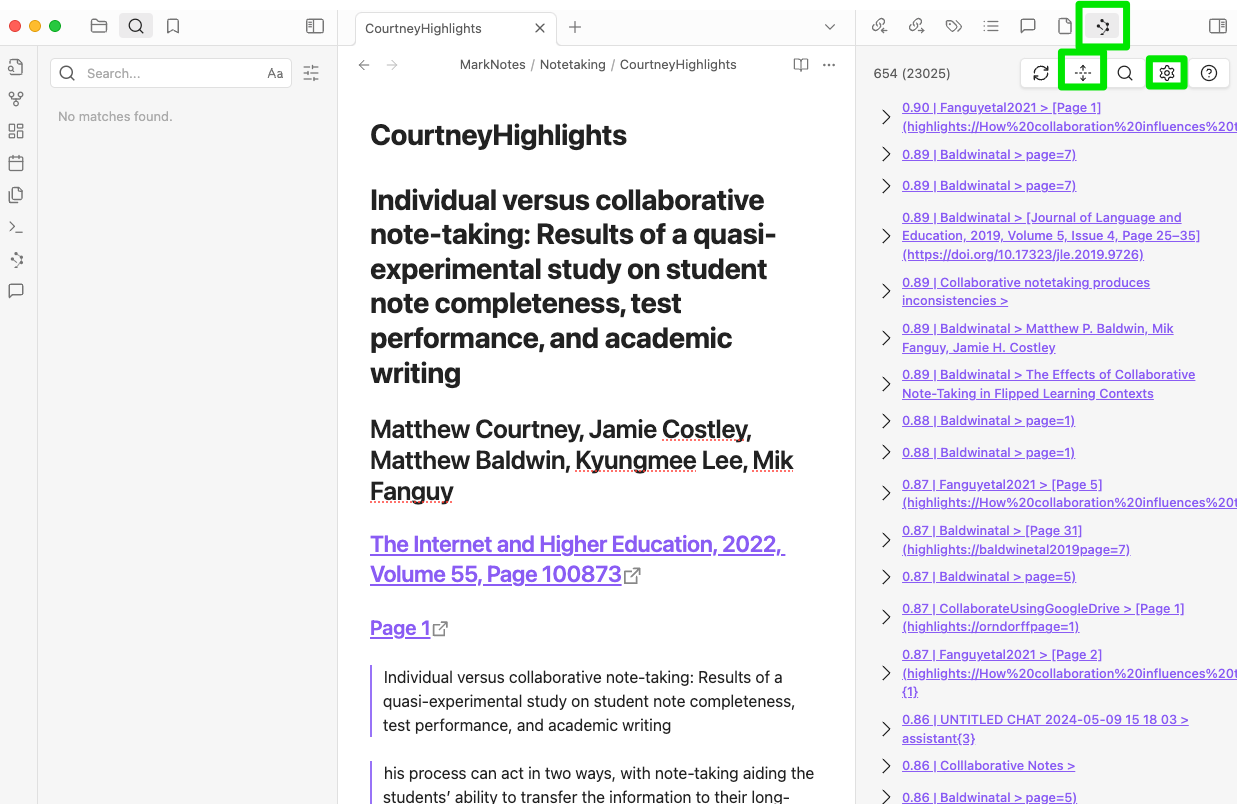
Smart Connections works by requesting connections for a note that you have selected. The following image shows Obsidian with Smart Connections active. The green rectangle in the menu bar is used to activate the Connections as opposed to the Chat capability of Smart Connections. The up/down symbol allows you to scroll through the associated notes/blocks from most related to less related. The gear symbol is used to access settings for Smart Connections. The middle panel is the active note, and the right-hand column represents a hierarchy of related notes/blocks.
Getting back to how I think AI may supplement the more hands-on use of Obsidian, I would recommend that in examining connections to a given note that you then use tags or links if you want to create permanent connections.
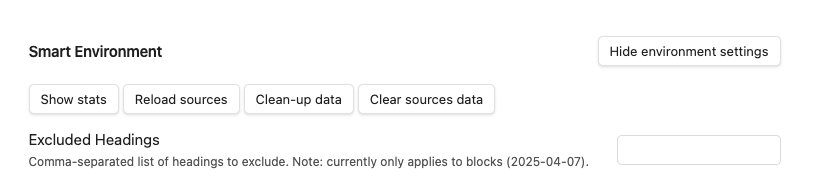
The extension of Smart Connects from note to note to note to block is worth doing if you do not keep atomic notes. Start with the Gear icon (see image above). This will reveal multiple setting options. What you are searching for are the environment settings. Open these settings with the button shown below.
Once more settings have been revealed, you are looking for Smart Blocks (see below). You turn this option on and specify a minimal length. I did not keep a careful record of the source for advice I followed and I apologize to the author, but I entered 300 characters, and that seems to work well. There are many other settings and I have mostly stayed with the defaults.
Summary:
Smart Connections is an Obsidian plugin (free) that allows AI capabilities to be applied to the notes stored in Obsidian. Chats allows a user to generate AI prompts that are applied to the contents of Obsidian. Connections generates a list of notes (note blocks in the setup I have described) associated with a selected note and is helpful in the identification of such relationships in a large collections of notes.
I began working on a post about the similarities of expressive writing and writing to learn some days ago. In the meantime, the stock market and the general attitude of the country took a decided nosedive. I could not ignore a possible interaction between this dramatic negative mood swing and the original focus of expressive writing so I will just recommend writing to those struggling to deal with our present political crisis and encourage you to read the rest of the post to learn why.
Dr. Jamie Pennebaker found a use for writing that produces both consequential and fairly consistent results. His results relate to clinical psychology which is somewhat outside my own background as an educational psychologist, but I at least can appreciate the impact of an intervention that can be classified as both consequential and fairly consistent as such outcomes are less common than others might imagine when it comes to impacting human behavior. Pennebaker asked college students to think of a traumatic experience from their own lives. His instructions – think about your feelings and emotions related to this experience. I want you to write about this experience for 15 minutes. I will have you do this for three straight days. What you write will be confidential – no one will read what you write. A control group (randomly assigned) was asked to write about their daily routine for the same periods of time. The researchers conducting this study then followed the number of student visits to student health in the following months and found that what Pennebaker eventually described as the expressive writing group had significantly fewer visits. Writing appeared to have an impact on mental health.
I know this seems on the level of magic or weird as I can imagine many reasons this connection might not materialize. Even if the treatment had an immediate consequence on the “problem” why would it follow that the results would be related to medical issues? What if the “problem” was an issue they experienced in their childhood? Why would such a random task during their college days have an impact?
I can’t answer these questions, but hundreds of follow-up studies have produced related results. Pennebaker and other researchers found that expressive writing could enhance immune function, lower blood pressure, reduce muscle tension, and even decrease doctor visits. These benefits were observed across various studies involving participants with both physical illnesses (e.g., arthritis, asthma) and mental health challenges. There has to be something to the benefits of writing.
I first encountered the concept of expressive writing not through my prior work as a psychologist, but because of an interest in the benefits of keeping a notebook. Pennebaker’s work was described in one chapter of Allen’s book “The notebook: A history of thinking on paper”. Once I became interested, I conducted literature searches that might point to an explanation for what about writing might produce this impact. Meta-analytical papers are relevant to the goal of why things work as they do because such papers examine many studies on a given topic, successful and successful experiments, and attempt from this variety of studies to determine what are the factors that contribute to successes and failures. The logic in this approach is that the differences are key to understanding why a technique might be successful and what are the boundary conditions.
The following are the suggested explanations for the benefits of writing.
Catharsis without social risk. You have likely heard of an LBGTQ+ individual “coming out”. This decision when public provides a release from feelings that you have to hide who you are and what you feel. Perhaps expressive writing works in a similar way even though writing is private. This is my example of how catharsis works and I hope this comparison is appropriate.
Cognitive-processing theory. Writing requires concreteness as the abstract and fuzzy ideas in your mind must be made concrete as the ideas are put down on paper. Pennebaker built a digital tool for identifying keywords and concepts in what was written (not in the original study promising anonymity). Those participants with more positive outcomes made greater use of causation words (e.g., because, cause, effect) and insight words (e.g., consider, know) in the content they produced. Perhaps writing helps work out why something happened to you and how significant long term consequences might actually be.
Self-regulation theory. Being able to label stressors and challenges may give the writer a greater sense of understanding and control reducing negative affect leading to greater confidence in better outcomes in the future.
Generative processing as a general explanation for the benefits of writing
I have tried to translate some of these clinical concepts into something more familiar to me. I see similarities in learning and study techniques described as generative learning. In past posts on generative activities, I have explained that the use of a self-imposed or assigned external task encourages productive mental activities. In other words, a learner has the capacity to apply process productively, but for one reason or another does not. The external task (e.g., answering questions, writing summaries, explaining to a peer) encourages these productive thinking behaviors in order to perform the external task and better understanding and retention is produced as a consequence. The cognitive processing of emotional issues may similarly be manipulated by a concrete external task (i.e., expressive writing). This way of thinking seems to fit with the theoretical proposals in the meta-analyses I listed and I think offers a tangible approach that is easier to understand and communicate.
I can’t help thinking about AI as I write this post. How might one encourage tangible “externalization” and processing of life experiences? You may have heard of ELIZA which while not AI could carry on a conversation of a sort through the use of some clever programming that used language patterns built on the input from a user to generate responses and encourage further input on their part. The Wikipedia link in the previous sentence offers more detailed information. Current large language models can now do far more. AI therapy exists and is controversial, but how different is chatting with CHATGPT and writing something you know no one will read?
What about Trump and the stock market? I will write something and put it on Facebook and I do hope someone reads it.
Sources:
Allen, R. (2024). The Notebook: A History of Thinking on Paper. Biblioasis. (Chapter 24)
Frattaroli, J. (2006). Experimental disclosure and its moderators: a meta-analysis. Psychological bulletin, 132(6), 823-865.
Fiorella, L., & Mayer, R. (2016). Eight Ways to Promote Generative Learning. Educational Psychology Review, 28(4), 717-741.
Guo, L. (2023). The delayed, durable effect of expressive writing on depression, anxiety and stress: A meta-analytic review of studies with long-term follow-ups. British Journal of Clinical Psychology, 62, 272–297. https://doi.org/10.1111/bjc.12408
Pennebaker, J. W. (1997). Writing About Emotional Experiences as a Therapeutic Process. Psychological Science, 8(3), 162-166. https://doi.org/10.1111/j.1467-9280.1997.tb00403.
I have been retired for several years and miss the social experience of sharing the research process with graduate students and faculty colleagues. Many of my interests are still very similar, but after moving to a different city, I no longer have day-to-day acquaintances with those kinds of interests. This has resulted in an interest in tools that offer note-sharing capabilities.
There is still the challenge of finding others with similar enough interests that sharing is attractive. This post will describe Glasp as a solution. At present this app is free. It offers several ways to share public notes without first having to go through a familiarization process to identify others with related interests, and the type of interaction that follows is up to you. Finally, Glasp has a built-in AI tool that offers an effective way to explore both someone else’s and your own notes.
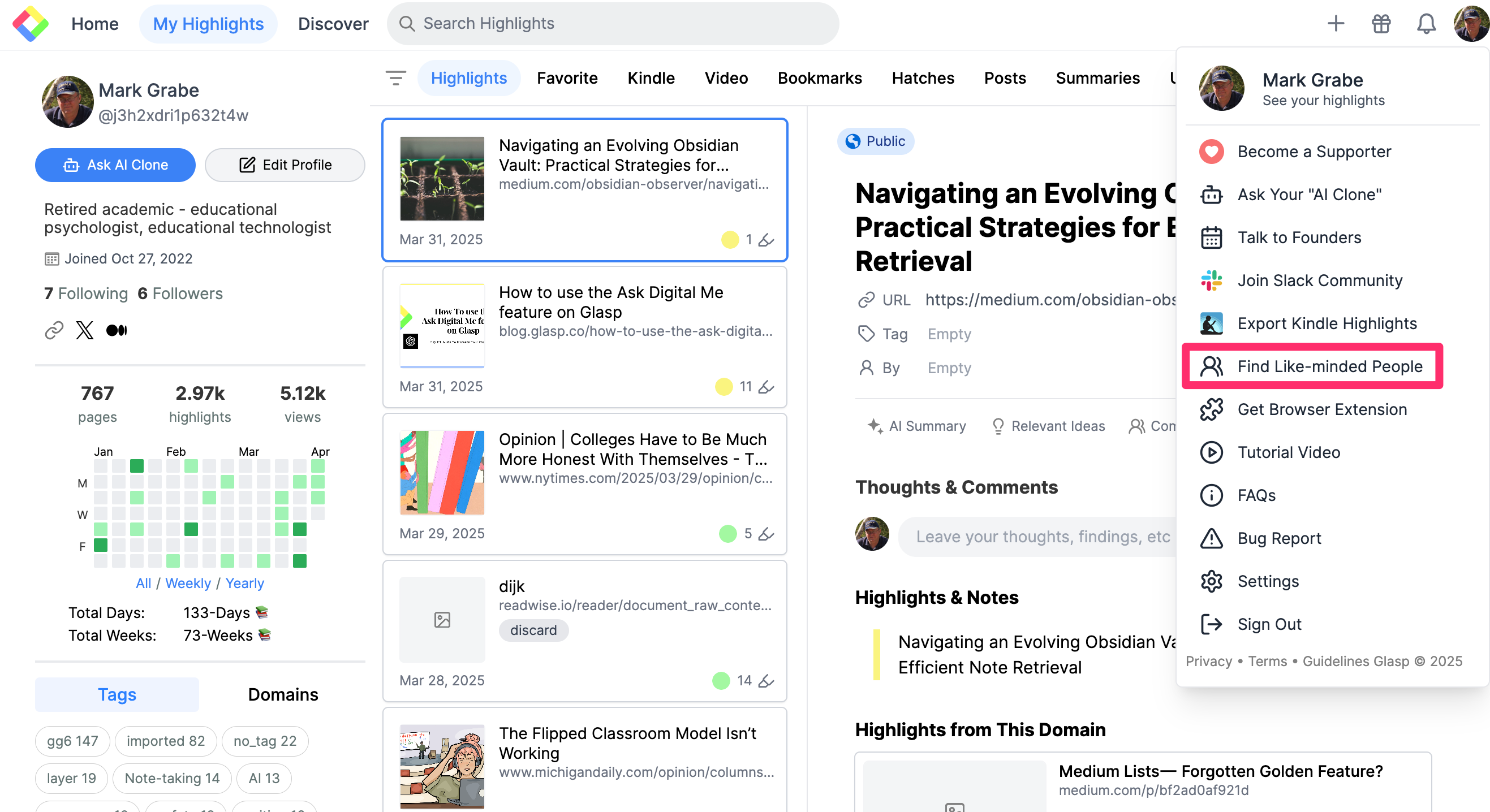
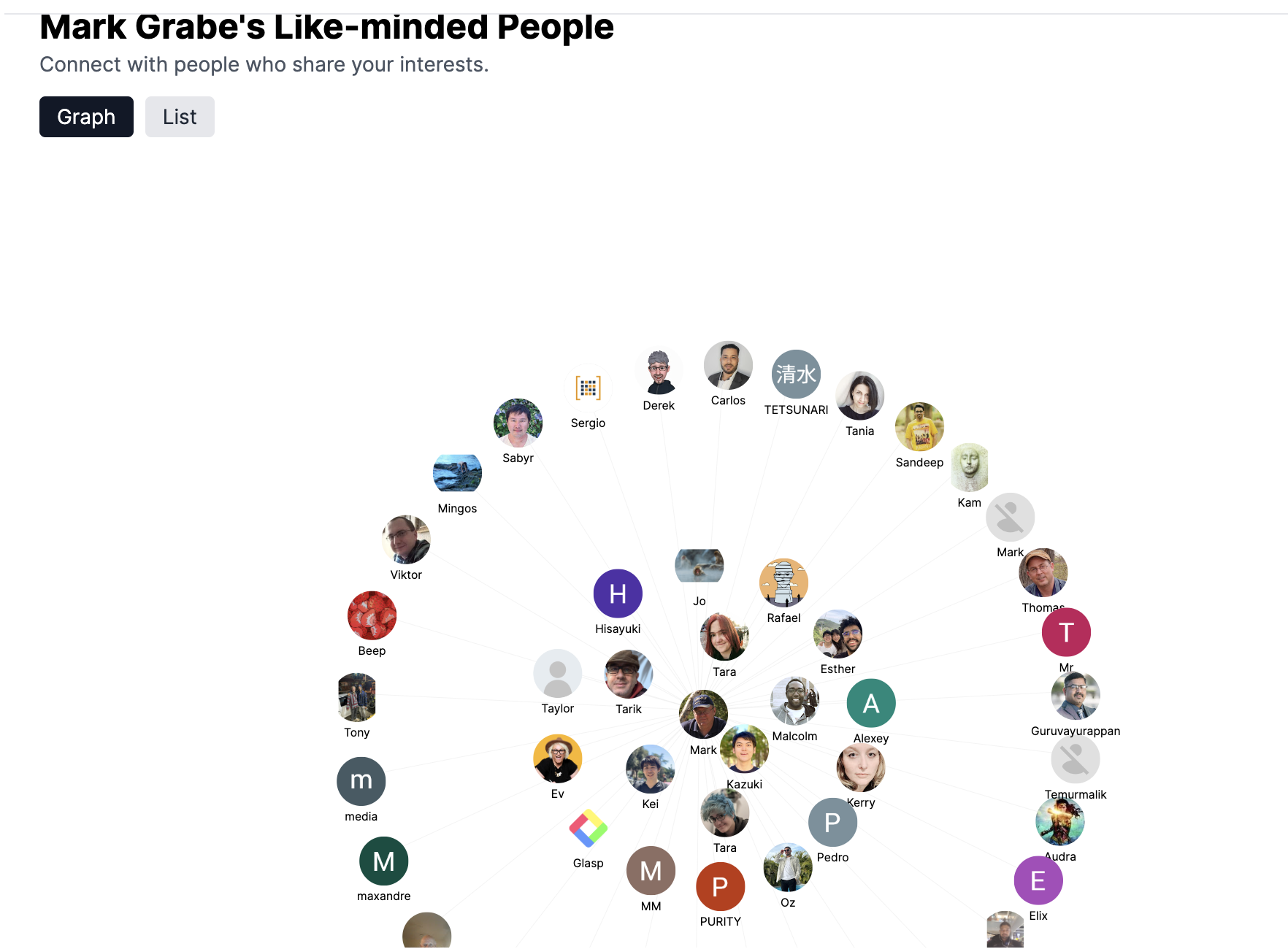
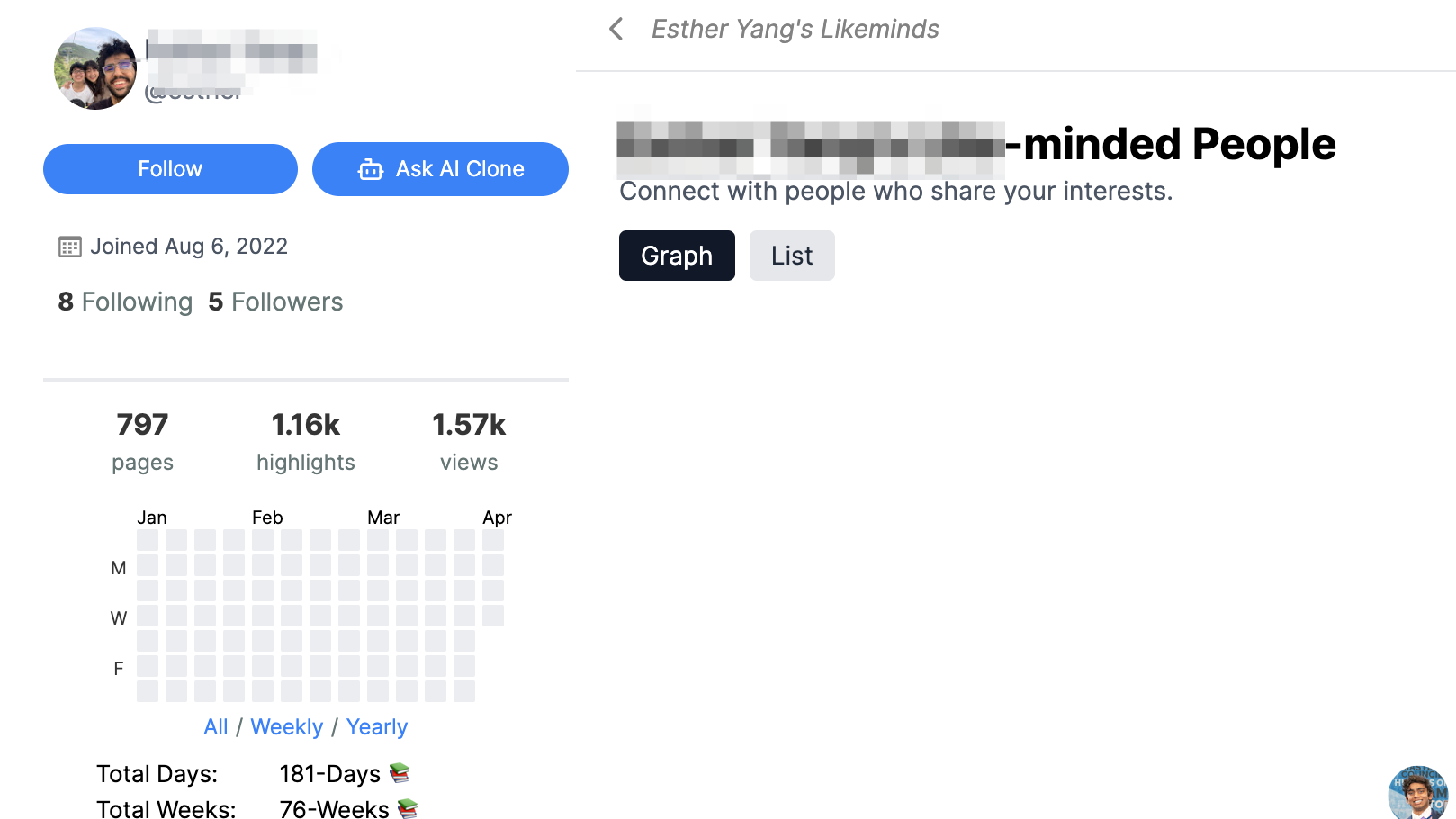
The following shows Glasp. From left to right, the first column contains personal information and basic controls, the second column lists thumbnails of the pages I have annotated (these are web pages, and other sources such as Kindle books are accessed from an icon on the heading). The final column contains the highlights and notes from a selected source. The drop-down menu is what I wanted readers to understand as it includes a link for locating “like-minded users” (second image). Glasp analyzes the content you have stored and recommends other users with similar interests. I should make clear that you store content as public or private and when you use social capabilities it is only the public content that is visible.
When you select another user, you are provided access to their site (read only) and you select to follow if you are interested.
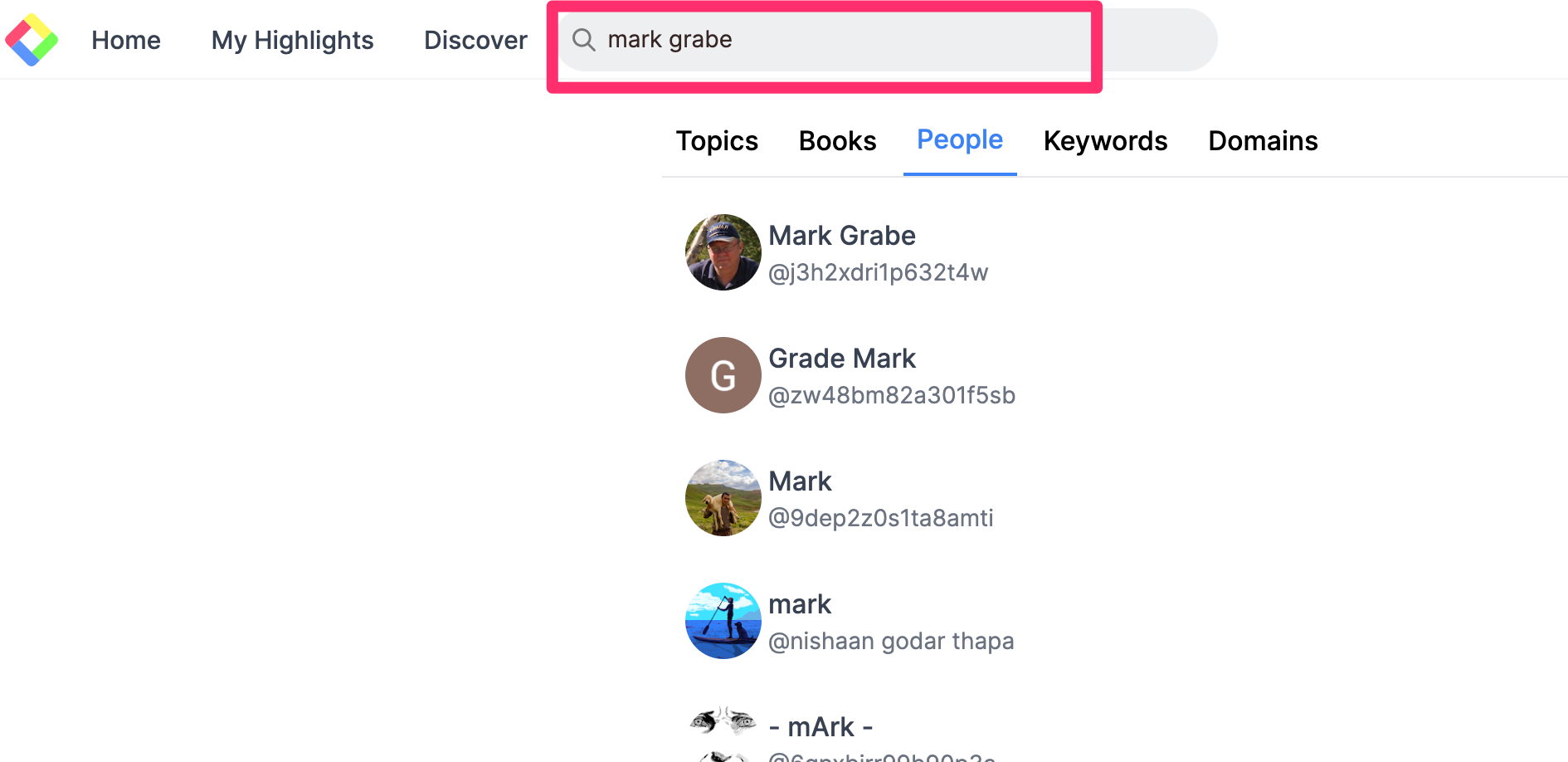
If you identify other Glasp user by other means, you can simply search for that individual and then access their site to follow that individual.
The AI feature
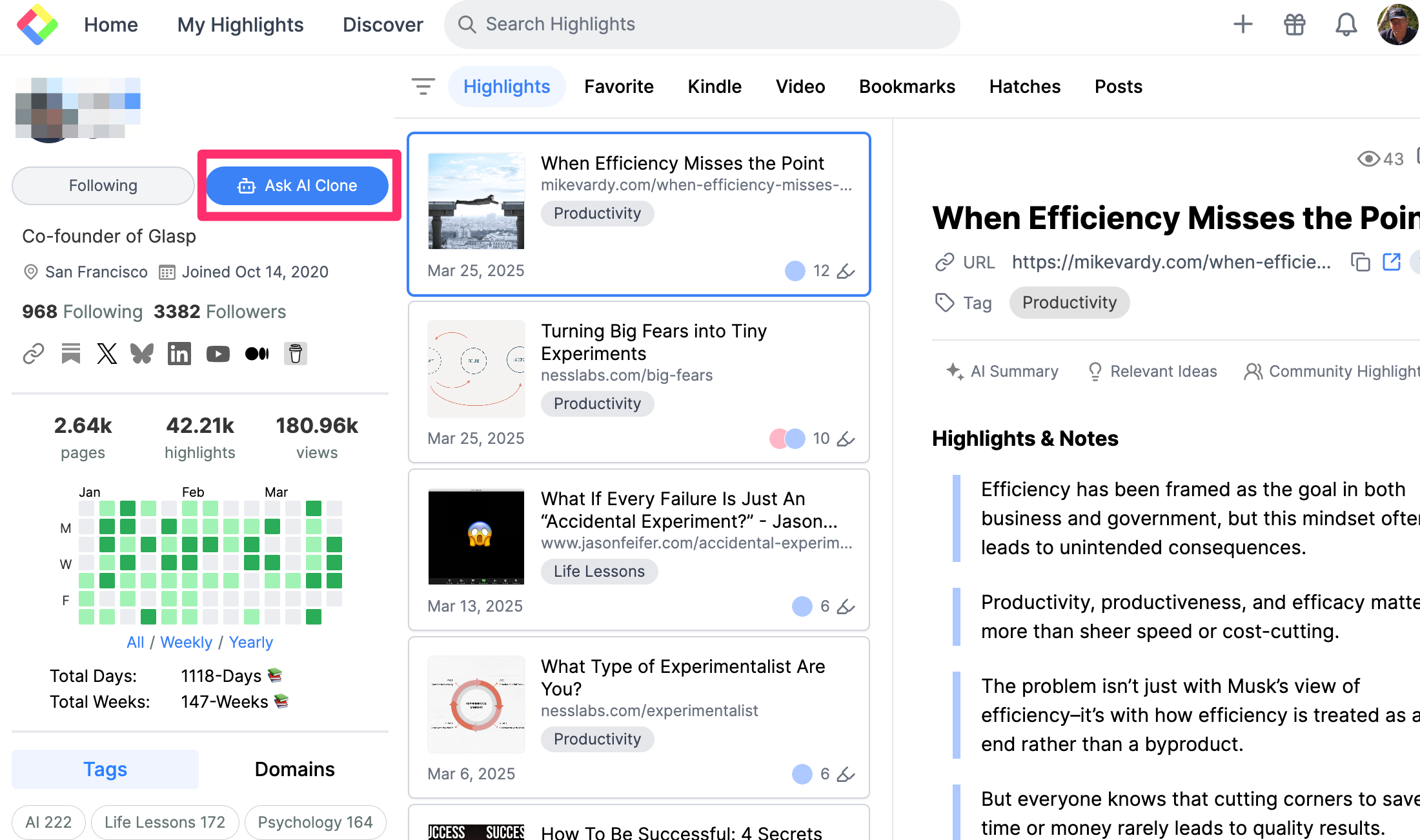
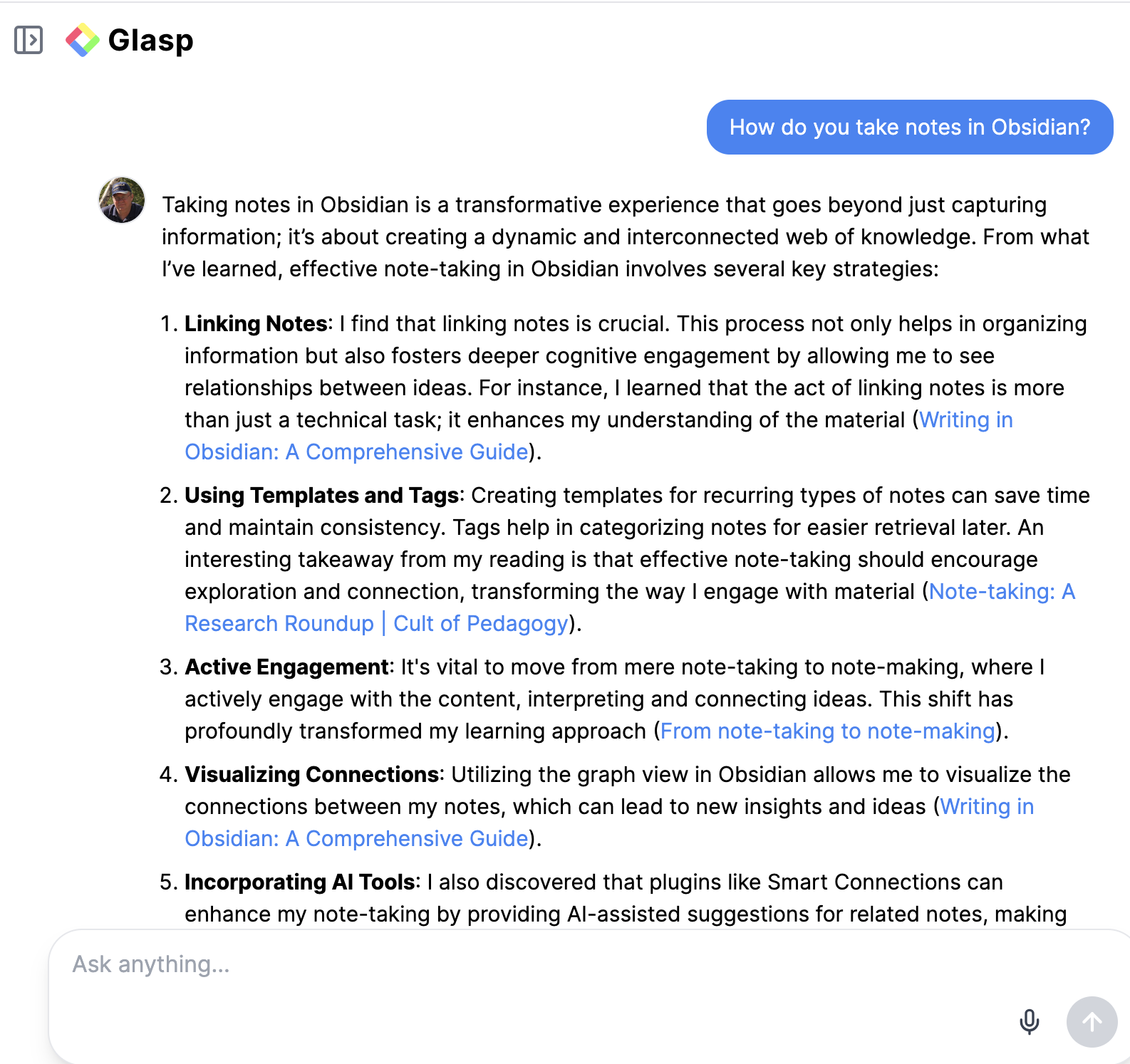
On your own site or the site of someone you have followed, a button located near the image icon of the site owner, allows access to the AI tool (following image). This is where you submit a prompt to chat with the content on that site (second image).
AI is a good way to explore a collection of content that is unfamiliar to you. With Glasp, you can use the output from a prompt to identify the source notes and move from there to the sources.
Connecting
I am interested in connecting with anyone who finds this tool interesting. You do need to create a Glasp account (free) to follow through. Without adding content to generate recommended matches, you can view my content by entering Mark Grabe in the search box to follow me. Glasp also offers a link that takes you directly to the AI prompt page for a designated user (link to my prompt page). This only connects if you have a Glasp account, but I guess it is provided so you do not have to identify yourself as a follower if an existing user wants to share content in this way.
I like Glasp and would have likely invested more time in the site for my professional reading (mostly journal article PDFs) if I had not already invested many hours highlighting and annotating with a different tool that does not transfer the highlighted content to Glasp. Glasp does include the highlights and notes I have generated from web pages and from Kindle books.
I investigate AI developments from two perspectives. First, what tools and applications will be personally beneficial? Second, what tools and applications can I write about that would be of value to those who read my posts? The following description fits both categories at the present time, but I expect it would end up more in the second category should Google move it out of beta into a paid category expected to be $20 a month. If it becomes part of the Google for Education suite, I can imagine it having great value to those with access to these services.
My present personal AI interest is in focusing AI on the resource material I have accumulated. What I mean by this is that I take notes and highlight while I read and have done so for 50 years. For the period of that time that I could read journal articles and books in digital form, I typically could export my notes and highlights and accumulate this personalized material. I have collected this content, but now I can use AI to target this content with retrieval augmented generation (RAG). I can “chat with this content” which offers me control over AI that I think is important and different from just interacting with the general knowledge base on which AI was trained. I want to generate insights and produce written products based on content and specific ideas within that content I have personally vetted. The broader application I see for what I am describing here involves an educator offering students access to content the educator has collected. An even broader application might focus on content collected by a team with a common interest.
This post described the use of Google’s NotebookLM as a tool suited to the implementation of this idea. I have described in a previous post how I get the content I want NotebookLM to focus on into that AI service in a previous post. Here I want to explain how “Mind Mapping”, a new capability of NotebookLM, can be used to explore a body of content.
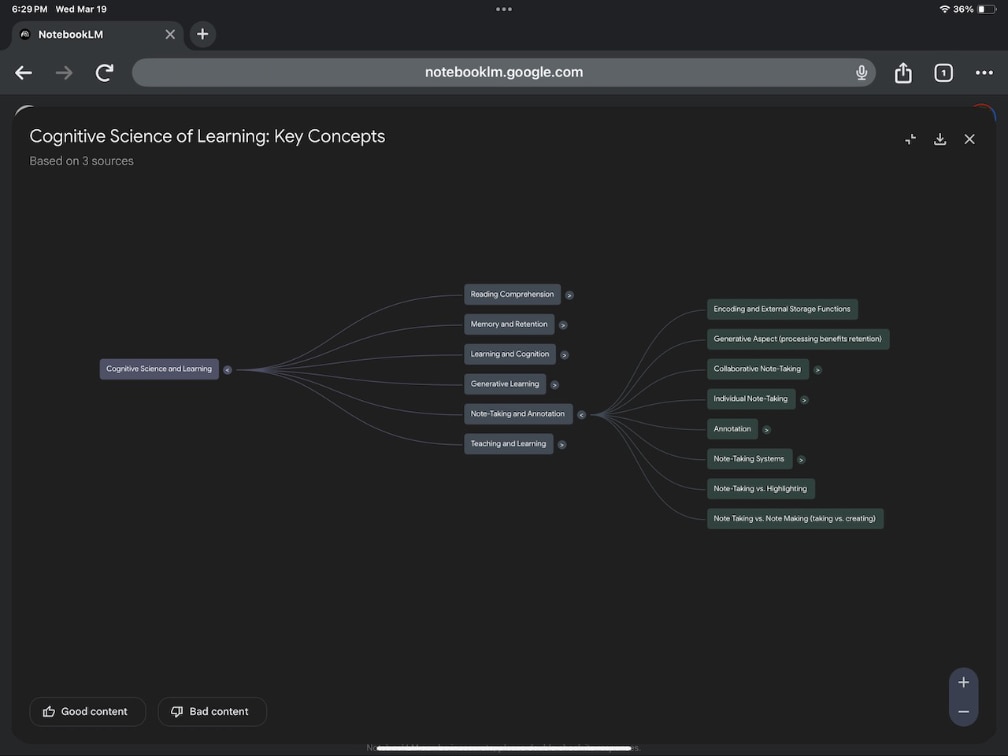
So mind mapping is a way to identify the structure of ideas within content. I would have preferred Google called their implementation concept mapping, but this is not what they did. Concept maps can be a way for some to convey the structure of ideas to someone else or it can be a task in which someone creates a mind map to demonstrate how they see ideas to be related. The reason I would have preferred concept mapping is that the Google NotebookLM capability identifies concepts and then generates a simple structure of how these concepts are related. Think of it this way. I can feed in a large collection of information I have collected and then had NotebookLM show me how this content could be organized. In addition, it will provide summaries of the nodes that it has identified and allowed me then to explore the content I fed in that were judged to justify parts of the summary.
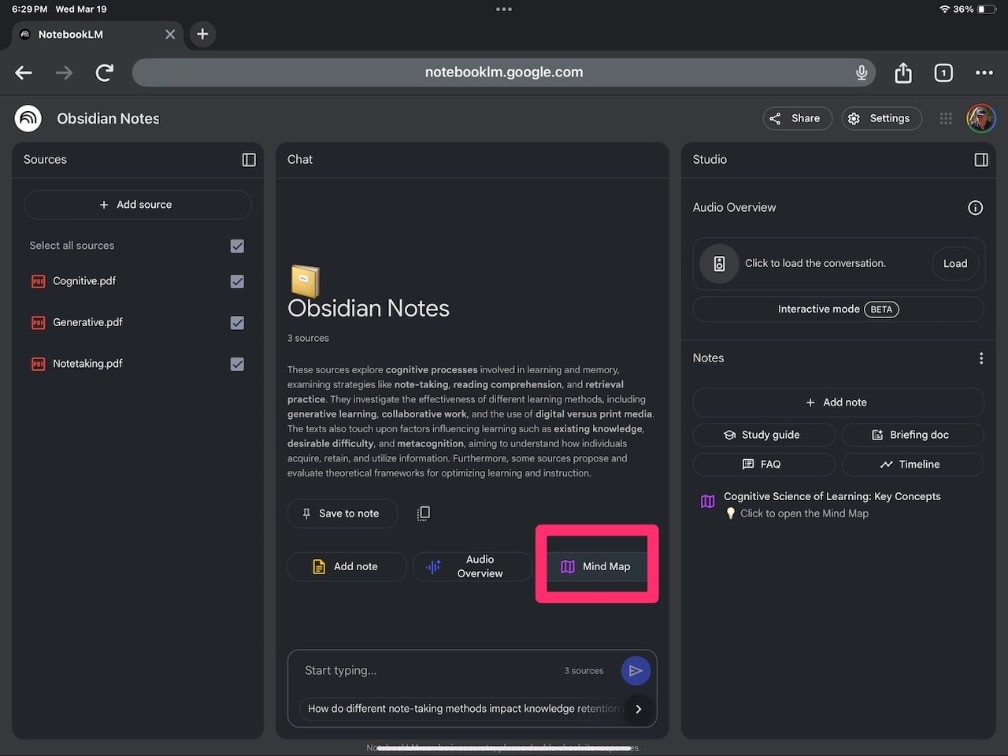
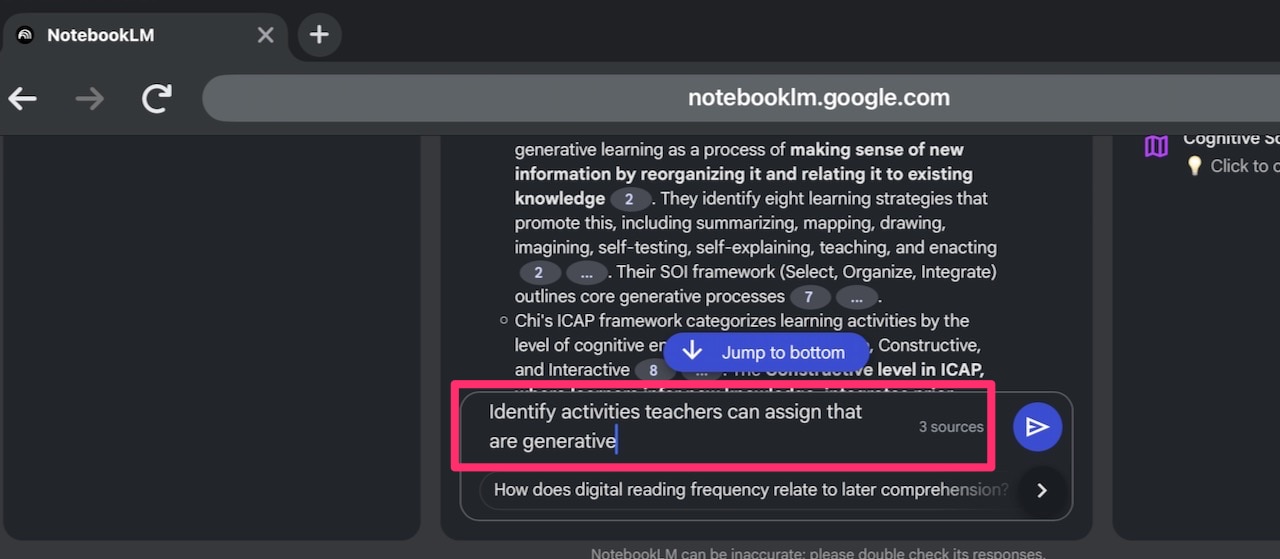
The following image shows NotebookLM already loaded with hundreds of notes and highlights (left hand column) and the button (red box) that will generate this first level of the mind map. To break one of the initial notes into subnodes, you click on the caret associated with a note.
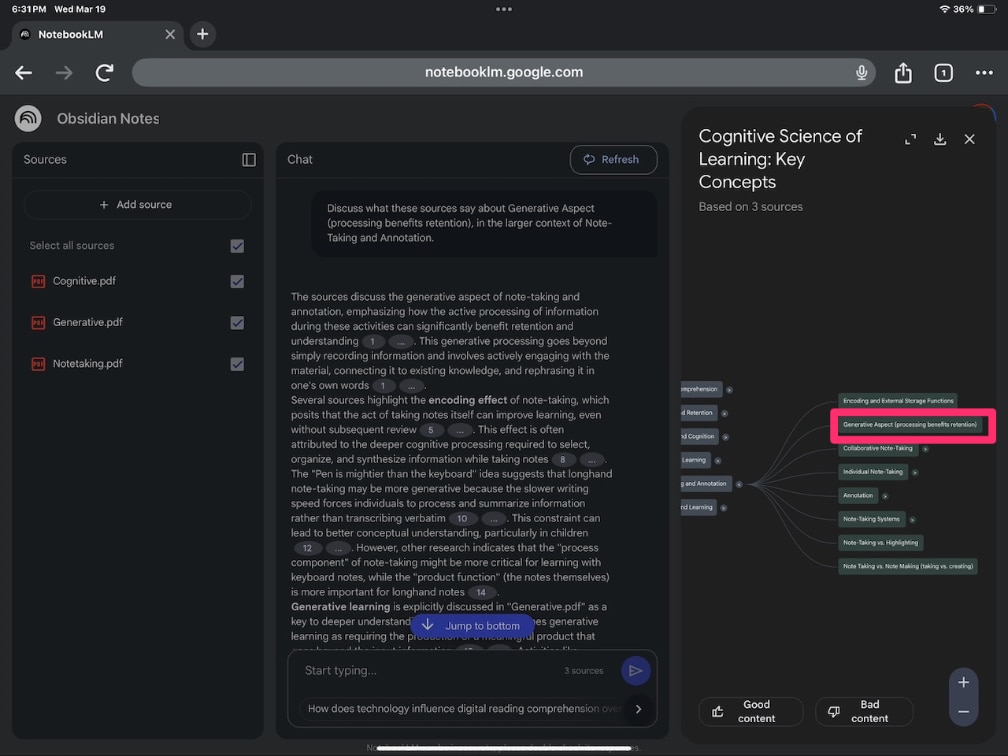
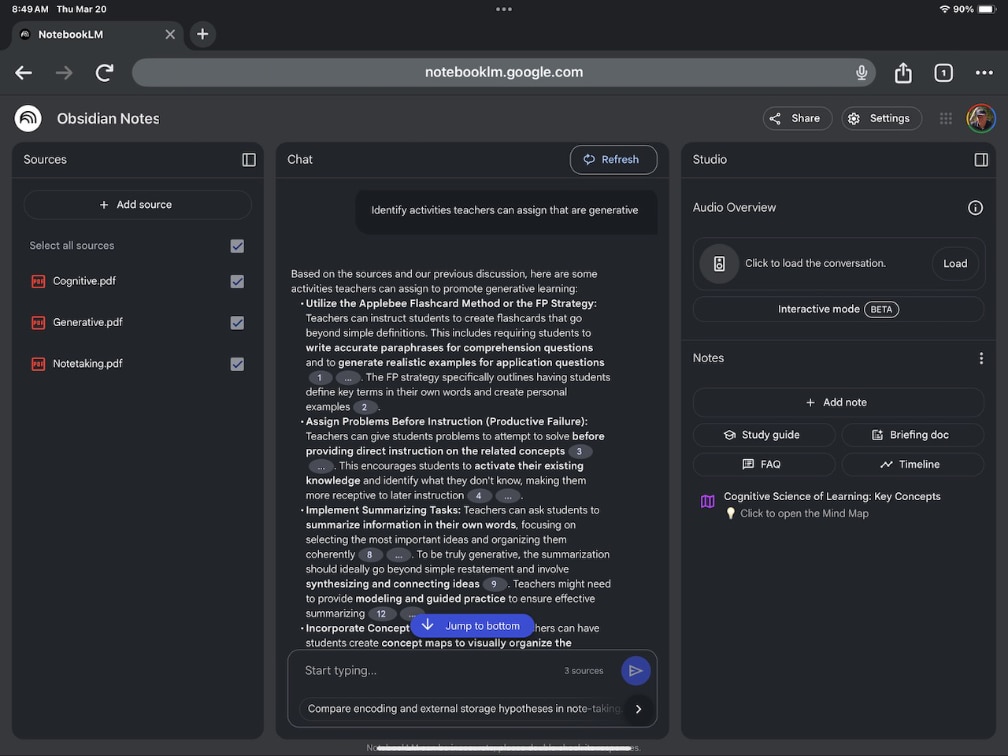
Selecting one of the nodes will reveal a summary of the content making up that higher-level category. In the following image, the summary is based on the category Generative Aspect (red box).
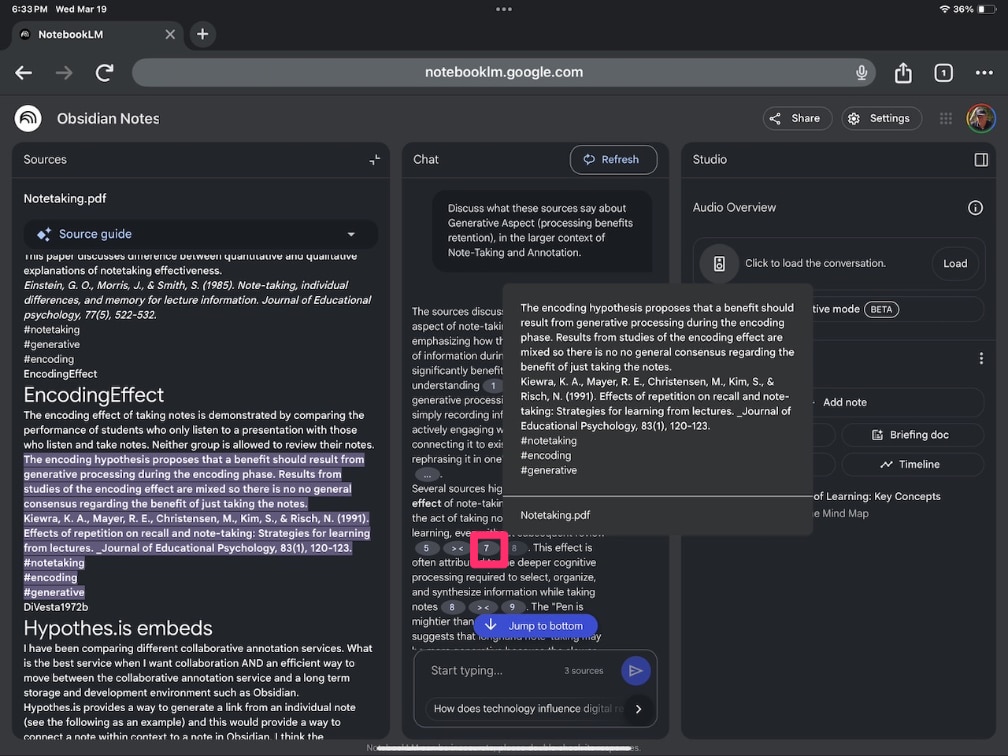
Within the summary, you should be able to identify numbers that represent the source from the content referenced by that section of the summary. Selecting a number will display that note or section of original content.
One final feature is also quite useful. NotebookLM suggests questions related to the content displayed you might want to ask. It also provides a text box you can use to enter a prompt suggesting a question of your own.
Summary
NotebookLM now includes a mind mapping tool that identifies and organizes concepts from the content it has been fed. The nodes identified can be used to provide summaries of that content and to interact with that summary and the content on which the summary was based. To fully appreciate what this allows it may be useful to imagine that hundreds or thousands of notes could be submitted by a user and processed in this manner.
This post assumes you understand the basics of what is referred to as the “writing process” and perhaps have read my previous post explaining what the writing process is and why it is valuable to educators and researchers. One additional role I proposed in that post was that the components of the writing process would be helpful in identifying technology tools that would support the various components of the Writing Process. This post identifies these tools and explains how they might be applied.
Before I get to my effort to associate specific technology tools with specific writing processes, I thought it useful just to make a case for writing using a word processor. The benefits are too easy to overlook, and opportunities may be ignored.
I assume you complete many of the writing tasks you take on using a word processing application. Do you do this because you assume this approach makes you more efficient or do you assume this approach makes you a better writer? Maybe you have never even thought about these questions. However, when functioning as a teacher and asking your students to engage in activities in a particular way, it may be helpful to consider why the approach you expect students to use will be productive. Often, to realize the full potential of an activity, the details matter and some insight into why an approach is supposed to be productive may be helpful in understanding which details to track and emphasize. The following comments summarize some ideas about the value of word processing and of learning to write using word processing applications.
In learning, as in other areas of life, you seldom get something for nothing. Still, a logical case has been proposed for how simply working with word processing for an extended period may improve writing skills and performance. One interesting proposal by Perkins (1985) is called the “opportunities get taken” hypothesis. The proposal works like this. Writing by hand on paper has a number of built-in limitations. Generating text this way is slower, and modifying what has been written comes at a substantial price. To produce a second or third draft requires the writer to spend a good deal of time reproducing text that was fine the first time, just to change a few things that might sound better if modified. Word processing, on the other hand, allows writers to revise at minimal cost. You can pursue an idea to see where it takes you and worry about fixing syntax and spelling later. Reworking documents from the level of fixing misspelled words to reordering the arguments in the entire presentation can be accomplished without crumpling up what has just been painstakingly written and starting over.
What Perkins proposed was that writers can take risks and push their skills without worrying that they may be wasting their time. The capacity to save and load text from some form of storage makes it possible to revise earlier drafts with minimal effort. Writers can set aside what they have written to gain new perspectives, show friends a draft and ask for advice, or discuss an idea with the teacher after class, and use these experiences to improve what they wrote yesterday or last week. What we have described here are opportunities—opportunities to produce a better paper for tomorrow’s class and, over time, opportunities to learn to communicate more effectively. The same is true for writing outside of an academic setting. Is not a bad idea to set a written product aside and then return to read it once more before sending it off. Often, errors become apparent and new ideas surface.
Do writers take the opportunities provided by word processing programs and produce better products? The research evaluating the benefits of word processing (Bangert-Drowns, 1993) is not easy to interpret. Much seems to depend on the experience of the writer as a writer and technology user and on what is meant by a “better” product. If the questions refer to younger students, it also seems to depend on the instructional strategies to which the students have been exposed. It does appear that access to word processing is more beneficial for older learners. General summaries of the research literature (Bangert-Drowns, 1993) seem to indicate that students make more revisions, write longer documents, and produce documents containing fewer errors when word processing. However, the spelling, syntactical, and grammatical errors that students tend to address and the revision activities necessary to correct them are considered less important by many interested in effective writing than changes improving document content or document organization. The natural tendency of most writers appears to be to address surface level features. This is especially true with less capable writers.
Writers appear to bring their writing goals and habits to writing with the support of technology. Beginning writers and perhaps writers at many stages of maturity may not have the orientation or capabilities to use the full potential of word processing, and their classroom instruction may also emphasize the correction of more obvious surface errors. Thus, there are typically improvements in the products generated when working with word processing tools, but the areas in which younger writers seem to improve are not necessarily the most important ones
Tools specific to writing components
Here are the types of tools we see as supporting individual writing processes. We list tools using general terms as specific examples of a given category come and go. Our online resources include more detailed information about specific tools you might try.
Planning – Research
Authors write based on what they know and what they can discover. What they discover could come from books, conversations with others, data collection and analysis, or Internet searches. Internet searches are a common practice, and some writing environments embed search access within the writing environment and even suggest topics and links based on the content being written. Of course, opening a browser or a second tab when writing in a browser in order to conduct a search is a simple matter. For those of us writing in specialized areas and needing source material such as scientific sources more powerful fused search tools are available and it seems new ones emerge daily. Google Scholar provides access to the resources I cite. I can search for research publications on a specific topic and use a hit on a useful resource to locate even more recent sources that cite the initial find. There no restrictions or subscriptions that apply to Google Scholar so there is no reason to not give it a try. Research Rabbit, LitMaps, Semantic Scholar, and several similar tools compete for the attention of researchers.
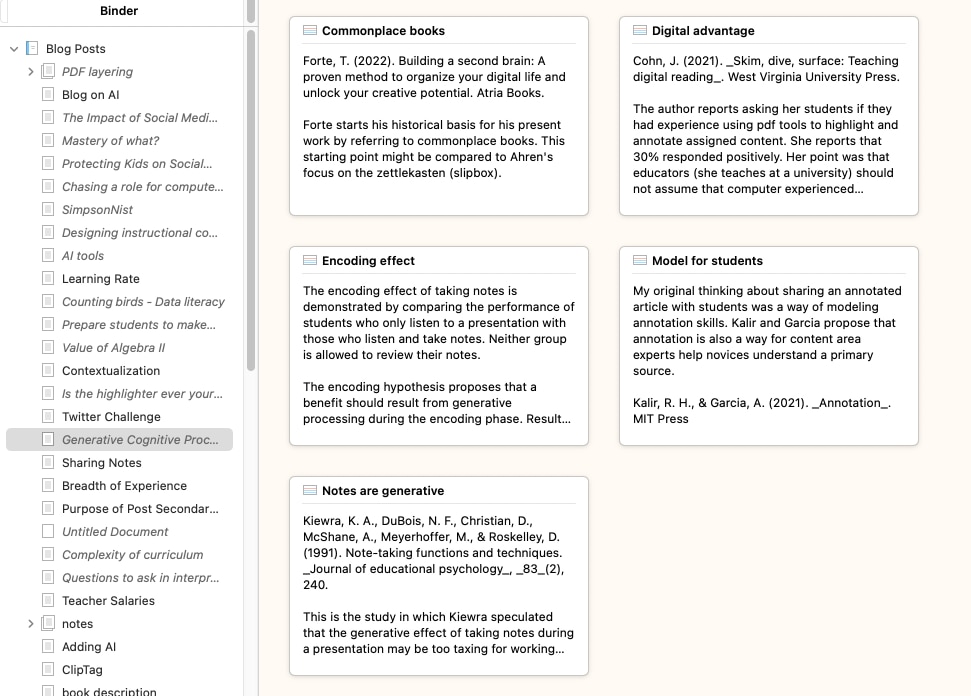
Locating information to be used in a future project or to improve an existing project also typically involves temporary storage of content and the information necessary for the attribution of useful sources. There are certainly nondigital ways to accomplish these tasks. Information could be entered in a notebook. There are now many digital tools that can be generalized to store notes or are specialized in some way. Writing systems may have built-in note taking, storage, and organization tools. Perhaps you have taken notes on cards. There is a digital equivalent. Scrivener is a writing environment and like writing tools, you would be more likely to have used is really a combination of tools. These “cards” can be organized and reorganized and offer the advantage of being searchable and other opportunities not available in the paper equivalent; e.g., copy and paste from source content, search, audio or image storage, duplication and off-site storage of resources so the work completed is not lost. The idea is that you can accumulate these “notes” and then organize them for use as you write.
Perhaps you just use a notebook to accumulate notes as you prepare for a writing task. There are many tech tools that serve a similar function and offer some enhancements not available with paper resources. Apple Notes comes with the Apple OS and iOS so that you can access your notes across Apple devices. Apple has taken to describing this tool as a way to store “forever notes”. With what could be unlimited storage, why discard notes after the project the notes were intended to support is finished? Perhaps the notes might be useful in the future. To make this practical, the tool must be capable of more than storage. You need to be able to find what you stored when useful and this involves powerful search, tags, and collections. There are many tools based on a similar concept (e.g., Evernote, OneNote, Notion, Google Keep).
Ideas as building blocks
One subcategory of note taking tools encourages the isolation of individual ideas or concepts. Think of note cards. I prefer to imagine Lego Blocks as ideas proposing that anyone familiar with these blocks appreciate how the blocks can be reused to build many different things. For those who are already familiar with what has become a popular self-improvement genre, the ideas as building blocks might alternately be described as smart notes, permanent notes, or atomic notes. For those really into this perspective on taking notes, there are differences among these terms, but all are similar enough I am not going to get into nuances. The atomic note is perhaps the most basic of these ideas and proposes that the note taker should create exactly one note for each idea, and write it as if you’re writing so you or someone else would understand this idea in the future. Use full sentences, include references. What you get from this process over time is an accumulation of ideas (lego blocks) that you can organize in different ways to accomplish different tasks. Connections among these ideas are to be explored repeatedly over time and potential meaningful associations are to be stored with links or tags. There are two important ideas here – a) identify and store useful ideas and b) revisit your collection repeatedly overtime to identify interesting connections among these ideas.
My favorite tool for this style of notetaking is Obsidian. I might have also described Obsidian under a later heading (organization) because of the process of idea organization via links and tags, but the notion of saving isolated, but connectable concepts is so unique I decided to focus on it at this point. There are other ways to keep individual ideas both without technology (note cards), but the search and interconnection possibilities among other technology facilitated writing tools offer unique benefits over long periods of time and with a large amount of content..
Referencing
A bibliography generator is also helpful when creating a large project. Citation information from sources can be stored as the sources are being read and this makes the eventual compilation of a reference list far more efficient than attempting to assemble such a list when the project is nearing completion.
Planning – organization
Most students are familiar with outlining. Incorporating an outlining tool in a writing environment allows the writer to plan the structure of the document. Often the outline entries become headings within the document, and the writer can move back and forth between the outline view and the extended text as an aid to organizing a major project. This capability helps the writer to escape the detail level and regain a sense of the overall purpose and structure of a document which research on the writing process argues is a unique challenge. It helps the writer answer questions such as “Do I want to discuss this issue at this point or would it be better to address it at a later point?” It is also possible to reverse this process – write first and outline later. This is a way to examine the structure of what has been written with the potential outcome of moving content around to provide a more logical structure. Again, I note at this point that Google docs and Microsoft 365 will generate an outline based on the structure of headings that have been used in a document. This outline is quite useful when working with a long document to quickly locate segments you want to edit or adding some new content you have just discovered, but examining the structure of the outline is also helpful.
A tool often serving a similar function allows the writer to create what are called either concept or mind maps. A map consists of nodes representing ideas and links joining the nodes. As a college student, you may have encountered textbooks in which the author or authors incorporated concept maps to represent the organization of core ideas within each chapter. The idea was to help you understand the big picture by isolating the core ideas and to show how the core ideas are related. In this case, the map was intended to help you see the structure around which much additional information was probably organized. A concept mapping tool can provide a related benefit to an individual or group attempting to organize ideas for a project. The reader and writer both benefit from a well articulated structure; the reader in interpreting the product and the writer in creating the product.
The map including concepts (nodes) and a system of organization (links) need not be completed simultaneously. In a technique such as brainstorming, an individual or small group might first quickly throw out ideas that are represented as key terms or nodes. The concepts represented by the nodes might then be discussed, prioritized (some might be deleted), and structured (linked). Much in the way an outline identifies topics and subtopics, additional nodes might then be added and linked to specify details.
Translation and Editing – tools supporting content generation and simultaneous correction of writing errors.
Applications used in translation often incorporate tools to ease and correct the process. Such tools can check spelling, suggest appropriate words (dictionary, thesaurus), and identify faulty grammar. The editorial tools may signal suggestions automatically (e.g., misspelled words are underlined) or offer suggestions when assistance is requested. Grammarly is a great tool for identifying surface level errors. This may be the perfect example of a productivity tactic that simply could not be implemented when writing without technology. Even the free version of Grammarly will alert a writer to spelling, punctuation, and grammatical errors and the paid version will both identify and make improvements. Grammarly implements these capabilities using AI and as with any AI use, it is important to consider whether AI limits the practice or development of an important skill. More on this topic at a later point
Tools that allow voice input would also fall within the translation category. While most of us have probably used voice input when engaged in tasks we would probably not define as writing (asking a question through the Amazon Echo or Apple Siri, requesting a search through Google, sending a text that serves as a note while driving), text input is available as a way to generate the initial input when engaged in more traditional writing activities. It is a different experience and messy, but it is worth exploring.
Reviewing
My comments when describing the components of the writing process model differentiated editing and revision with the primary distinction being what I would describe as depth – surface (e.g., spelling, grammar) and deep (e.g, organization and logic) and the time of changes made either delayed or immediately. Often the delay allows input from other individuals with perhaps the input from others more likely to encourage structural or logical improvements.
Reviewing – sharing
Sharing a draft allows the generation of feedback from someone other than the author. While this can be accomplished in many ways, the opportunities we want to identify here allow multiple individuals to access an online file. Depending on the service, the “editor” might then download the file for commenting or interact with the file online. Sharing printed copies has long been a possibility, but digital products allow greater convenience and a higher level of interactivity.
Reviewing – commenting
Some digital writing environments allow the author to specify constraints (permissions) that control the extent to which a reviewer can interact with the shared document. For example, the author might allow read only access, commenting (comments are not actual modifications of the existing text), or modification of the text (sometimes as suggestions that be accepted or rejected). Read only access would require that the editor provide feedback separated from the original document; e.g., comments in an email. Comments might be added as text or sometimes audio that is linked to specific locations in the original document, but are available to the author in a sidebar. Finally, actual modification of the text may be possible. Such modifications might involve the embedding of suggestions in the text. When I do this for my students, I usually change font color so the author can easily identify my recommendations. The most advanced systems even combine comments and suggestions. An editor can change the original document and offer a comment to explain the modification. The author can then review these comments and decide either to accept or reject each suggested change. Accepting a suggested change modifies the document. Rejecting a change returns the document to the state that existed before editing. Reviewing a suggested change even when rejected may encourage the author to generate a change more to the author’s liking. Note that the options we describe here are not available in all writing environments, but are also not hypothetical possibilities
Educators must consider how best to support the writer. For example, the educator may prefer to rely on comments rather than suggested revisions if it becomes obvious that the author is simply accepting everything the teacher proposes as an improvement rather than using the suggestions to guide rewriting.
AI facilitated writing
While I have already hinted at ways in which AI can be applied, this mentions have involved tools integrating AI in a limited way. You can turn this relationship around and allow the writer to control general AI services to perform a wide range of writing tasks and subtasks. What many educators most fear is that learners who need to develop writing skills or demonstrate their understanding of a topic through a writing assignment will simply turn over the task to AI with the engagement the teacher intended.
Such concerns are warranted. Early on (meaning a couple of years ago), I wanted to test how far I could push a general AI tool by seeing if I could get the tool to write an Introduction to Psychology textbook. I would describe the approach I took as AI first in which I worked through a process of steps I would take, but asked the AI tool to perform a step and then I evaluated and modified the effort produced. So, what are the topics or chapters that should appear in this type of textbook? Create an outline for the chapter on learning. Using the topics identified as behavioral theories of learning, expand these topics to explain each topic to the length of a typical college textbook and at that level off complexity. No one would be fooled by what was produced, but this was some time ago and with some work a product could be produced.
I am not advocating anything like this, but I do think I gained some insight from the process. To some extent, there were hints of the Writing Process components in what I was doing. Asking for an outline of topics I could consider was an alternative to my planning a structure on my own. My personal expertise does not extend to all of the topics covered by a survey course so asking for an outline for each chapter would likely identify topics I had not considered and would need to spend time investigating to guide what I might write in these areas. I did not ask for a review and edit of what I had AI generate for the samples I had AI create, but I have since explored how AI might be applied to perform such functions.
Perhaps my present position on AI would be to explore the role AI could play in performing or facilitating the performance of specific components of the writing process. I think it reasonable to investigate how I might work collaboratively with AI in performing these different processes. This seems different from recommending that AI should substitute for learning to perform these processes or maybe it could be imagined as a way to use AI to perform certain processes when a learner focuses on performing other processes.
Reference Bangert-Drowns, R. (1993). The word processor as an instructional tool: A meta-analysis of word processing in writing instruction. Review of Educational Research, 63 (1), 69–93.
I have become fascinated with what I now call linear narrative chains (Hays and colleagues, 2008). The phrase is appropriately descriptive in how we experience life including reading and listening to lectures and explains why reprocessing such inputs is important to understanding and learning. What the phrase indicates is that inputs come at us as a sequence of events and ideas. This is obvious when you consider reading a book or listening to a lecture, but it also applies to the events of daily life. One thing follows another.
An important insight related to learning is that what is stored when imagined by cognitive psychologists and to some extent supported by neuroscientists is best understood as a network with links among nodes differing in strength. It follows that some sort of processing and organization is necessary to get from the form of the input to the form of the storage.
When I first encountered this notion of changing information formats, I was reminded of something I used to present to my educational psychology classes. There appear to be different types of memory stores. What might be described as knowledge is stored as a web of concepts connected by links — semantic memory. We also store inputs using other formats, with the most relevant one for this description being episodic memories. I liked to describe episodic memories as stories as this was a convenient way to explain an approximation of this concept. We like stories, and the value of stories can be noted in the way we interact with others. Often, one person tells a story, and then the other individuals respond with a story of their own both to indicate they understand and to further the interaction. We often include stories in writing and teaching as a way to provide examples of ideas. Episodes are stored with our cognitive web linked with the abstract nodes of semantic memory.
Episodic memories (stories) have a time course or sequence. What I speculated about for my class was that stories are often processed into semantic memory and one of the issues with learning from experiences including class lectures was whether the lecture as story was processed into semantic memory. I asked about how students studied their notes and whether they repeatedly went through them and could even imagine where specific items, perhaps a graph, appeared in a location within their notebook. I suggested that this capability indicated at least some aspects of an episodic representation was being retained. The content stored in that fashion may not have been processed for understanding.
When are academic episodic representations converted? I suggested for some this may happen at the time of an exam. A question might refer to an example from class and ask for an application. If the class example had not been processed during the lecture or during study as related to a concept or principle, the student would have to go through this process of abstraction and organization in trying to answer the question.
External activities to encourage processing
I often write about generative activities — external tasks that change the probability of desirable cognitive behaviors involved in understanding and learning. The idea here is that we can understand and learn by self-imposed and self-guided thinking, but this may not happen for a variety of reasons. External tasks can be provided to increase probabilities. Questions are an easy example. Questions encourage different types of processing depending on the type of question. Some encourage recall, and others encourage application.
Some generative activities might have value in converting a linear input. Creating an outline requires a hierarchical organization of ideas. Something closer to the desired output as a web would be mind mapping or concept mapping. If you are unfamiliar, I would recommend Davies ( 2011) as a resource that would explain more than you probably want to know about mind mapping, concept mapping, and argument mapping. Among other things, I learned from this source was that there are differences among these tactics and many subtleties or variants of each. Some researchers and educators who apply concept maps go deep into fine details.
One differentiation among those who conduct concept mapping research (the general term I have always preferred) is whether maps are constructed by learners or constructed and provided by teachers/authors. Concept mapping assignments would be a type of generative activity and encourage the translation of a linear input into a representational web. The provision of a mind map in support of a linear narrative is different and is an attempt to show the structure that the presenter imagines as a way to encourage the learner to consider relationships among ideas that might expand whatever organization of ideas the learner had already established.
Smart notes and the creation of web structures
I am making a transition here that the uninitiated may have trouble following. Some of these who have made the study of note taking a serious focus have developed approaches that are quite different from the continuous paraphrasing and summarization that most learners use in recording notes in a notebook or on a laptop. I think of a smart note (a formal term as used here) as a concise note focused on a specific idea with enough context that it will still convey the original meaning at a future date to the note taker or others with a reasonable background. Think of a smart note as a building block that can then be combined with other smart notes in a cumulative way. The idea of specificity is that a given block can be combined with other such representations in a variety of ways. You can build different structures from different combinations of ideas. Notes are connected in several ways. Some of the possible connections can be attached as metadata — tags and links among notes.
Hopefully, the similarity between such notes and links and concept maps might now become apparent.
A web of notes within Obsidian
Obsidian is my personal note-taking tool, and it fits well with the idea of isolating specific ideas or concepts and then identifying connections between these specific notes over time. Rather than focus on using this tool as a learner, which has been the focus of multiple posts in the past, my intent here is more on the potential of sharing the structure of personal notes with others. So, in keeping with the theme of converting linear narrative chains, how might an instructor or author share the structure behind what they might present as a lecture or written product?
I briefly mentioned how a colleague who teaches history shares his background content with students in a previous post. Here, I want to describe the use of a mapping tool, Canvas, available as an extension to Obsidian. Obsidian includes its own tool for creating a map of notes and connections, but Canvas is more typical of what I have already described as a tool for concept mapping.
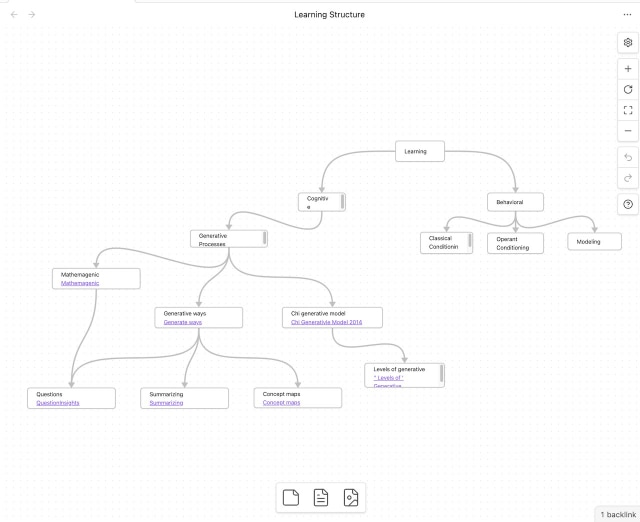
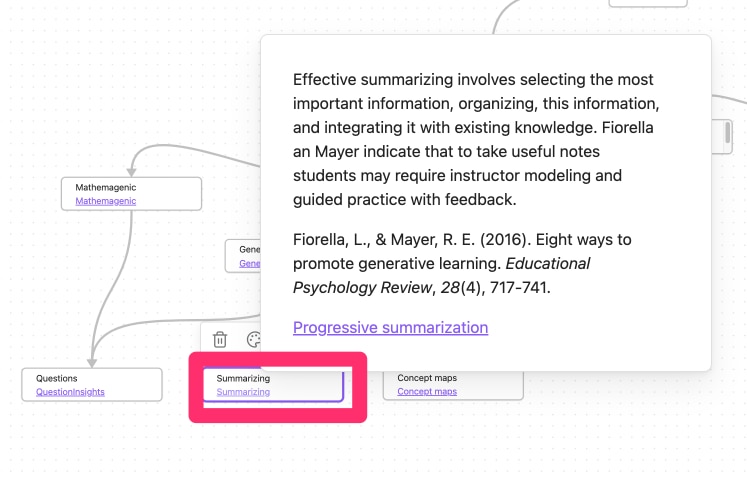
The following image shows a Canvas concept map I quickly created to show I might share the web of ideas that might be the basis for a couple of presentations I might offer describing the behavioral and cognitive models of learning. I had to find a workaround for the way Canvas was designed to work. The intention is that a Canvas web would show the entirety of notes. So, if you imagine a note consisting of a paragraph of content, you might have Canvas nodes representing concepts (as is the case in my example) linked with visible nodes containing entire paragraphs. This works fine if you are in control of a device as you can shrink and expand the content that appears on the screen very easily and expand a portion of the display if you need to make the paragraph larger so you can read it. I used a different approach, repurposing a typical text note as a node descriptor and then a link. The link would reveal the linked note layered on the basic map (second image).
To make this work in practice, you would have to pay for an Obsidian service ($8 a month) called Publish. Obsidian is a device-based tool, but Publish offers a web-based interface and storage option that allows others to view your Obsidian vault (a collection of notes).
There are likely multiple ways in which an individual could generate a shareable web experience for students. I have been focused on how I might do such a thing based on the note tool (Obsidian) I use. As another example example, in a previous post, I explored how Padlet could be used by a middle school or high school teacher to share a web of concepts and notes.
Summary
Students experience information as linear narrative chains even though the information within is likely based on a web of concepts and ideas. Since human memory is more web-like, the learner must transform a sequence of ideas to fit within his or her personal webs. Concept maps have been used to encourage the building of a personal web and can also be used for the author/teacher to share his/her web to assist in the construction of a personal representation. Note-taking tools based on the identification and linking of core ideas (Smart Notes) offer a related experience on the part of learners and possibly with some adaptations provide a way to share the structure the author/teacher used to generate their presentations.
Resources:
Ahrens, S. (2022). How to take smart notes: One simple technique to boost writing, learning and thinking.
Davies, M. (2011). Concept mapping, mind mapping and argument mapping: what are the differences and do they matter? Higher education, 62, 279-301.
Hay, D., Kinchin, I., & Lygo-Baker, S. (2008). Making learning visible: The role of concept mapping in higher education. Studies in Higher Education, 33(3), 295–311.




You must be logged in to post a comment.