Take digital notes for best lecture performance

I know that many argue the research demonstrates handwriting is superior to keyboarding when it comes to taking lecture notes. I have always taken the opposite position based on my personal experience. Here is a new take in support of my personal perspective.

Danial Willingham is one of the best cognitive researchers translating research findings for educators and the general public. He has a new 2023 book (Outsmart Your Brain) that offers very interesting analyses of learning challenges and solutions. Note-taking is one of the topics he addresses at length. What he has to say about the challenges of taking notes allows me to state my case. The topic also helps explain the book’s title.

Willingham cites research indicating that people speak six times faster than most can take notes. This reality in combination with the multiple cognitive processing tasks involved in taking notes places a learner in a difficult situation. By multiple processes, Willingham indicates that when taking notes, you must switch back and forth between what the lecturer is saying and showing and your notes. You must evaluate what you are hearing and seeing and decide what you should record. You must both attempt to understand what is being said and make the effort to record what you can. There are probably more skills, but this should be enough. The point is that there is not enough attention to go around and each student must make choices. Translating/paraphrasing is ideal, but when we are pressured our brain drifts toward writing as much as possible and that is easiest to do by writing exactly what was presented. It is as if the learner decides perhaps he or she can figure things out later. 

Some who have supported taking notes by hand suggest that despite the reality that handwriting can record less than heyboarding to start with, this is actually a good thing because it requires learners to focus on the important content. This is sometimes described as desirable difficulty. The term sounds cool and it would fit with Willingham’s notion that our brain leads us to take the easy way rather than the most productive way. So the argument is when pressured those taking notes by hand take the more difficult path and as a consequence come out understanding more.

Just to be accurate. Willingham suggests students should take handwritten notes and refers to the existing research. Willingham is especially concerned that students can’t resist the temptation to open a second window and explore unrelated online content. The following explains why I disagree. Should you make things more difficult and make use of a notebook and pen? 

Apps that record audio and synch with your notes

My personal experience has led me to read, annotate, and take presentation notes digitally. I have suggested doing this because it fits a long-term view of writing based on what I read and watch. My insight involved finding an efficient way to isolate useful information from many books and research articles for storage, organization, and retrieval months or years later. This is not the situation Willingham was describing.

For students, some digital note-taking tools are better suited to dealing with the multiple processing demands Willingham identifies than the traditional paper and pen. Willingham suggests students should decide before a lecture whether they want to understand more or write more. The tools I recommend allow the same decision but are far more forgiving when it comes to the consequences of this decision. The apps I have in mind simultaneously record audio while the user takes notes from a keyboard and with some tools a stylus. The notes and drawings are linked through time stamps to the audio. This connection and the related storage capabilities free the student from having to get as much down as possible. The audio provides a backup for information that is missed or is confusing at the pace of the presentation. It is not a necessity that the learning get as much as possible down on paper or screen in real-time. If the student wants to paraphrase, the audio is a backup. If the presentation results in so little understanding that nothing meaningful can be entered to be studied, just enter some ???? as a note and listen to the audio later when you have time to think.

What I am describing are not some recent innovations and I have never understood why students would take notes on a laptop or tablet and not use this type of software. BTW – I understand several of these apps now can generate transcription, but I am not proposing that transcription be used as a substitute for taking your own notes. The logic here is the same as taking notes even if the instructor provides access to notes or copies of any slides used in presentations. The process of generating your own representation of a presentation is helpful.

The following are some options I have used (other software with similar capabilities may exist). The tool you choose could depend on whether you want a free app or pro options such as online storage, whether you want to combine text and drawings in your notes, and whether additional features are useful to you for tasks other than taking class notes. 

Soundnote

Audionote 

Notability

The following image is the interface for Soundnote.

The following video offers a description of using Soundnote.

Source

Willingham, D. T. (2023). Outsmart your brain: Why learning is hard and how you can make it easy. Simon and Schuster.

Loading

The screen time issue – nudges or blocks?

What can be done to reduce the time spent on our devices has become a very public question. The issue has resulted in K12 schools being legislated in many areas to prevent students from bringing their phones to class and concerns are common that the rest of us should also cut back. I have written previously about the issue when present in young phone users and whether heavy use should be characterized as a physical addiction or a bad habit

The present post originated from my continued reading on this topic and an article I read related to the bad habit perspective proposing that adolescent screen time could be reduced if adolescents became more aware of their screen time and begin to think of it in terms of time not spent on other activities they value. This article described a program called Project Reboot and the Clearspace app. The app allows a user to set specific limits and informs the user when limits are being exceeded. The notion of improving mindfulness and the exertion of personal control seemed related to the bad habit perspective. Is awareness enough or should use simply be prevented?

Research on apps that intervene

It seemed likely that researchers would have investigated digital strategies to address a problem that originates with digital devices and I located a meta-analysis of such strategies (Tahmillah and colleagues, 2023). I recommend anyone interested in this topic take a look at this article because it does a great job of categorizing apps and the approaches taken to impact screen time. Just the list of apps was informative (Clearspace was not included) if for no other reasons than many may be unaware that such interventions exist and because the costs vary greatly. Identifying the apps proven to have an impact on behavior in combination with the mechanisms employed by such apps was informative. Simply blocking the use of an app or taking phones away limits screen time, but technology in general and most apps specifically have both opportunities and limitations so most of us in the long run would be better off making decisions about when and for how long to use our apps. 

The classification system

Rahmillah and colleagues proposed the following categories:

  1. Block
  2. Self-tracking
  3. Goal advancement
  4. Reward/punishment

Categories were further differentiated by underlying processes. For example, goal advancement, the approach that most interested me, included among the processes the opportunity to set a goal and a goal warning that the limit was approaching. 

The idea of the meta-analysis was to identify the apps that had demonstrated success in reducing screen time and then consider the underlying processes used by the more successful apps. In reviewing the studies found to impact screen time, I discovered the built-in screen time capabilities of iOS were listed (example of iOS screentime study available online). Given the costs I had found associated with other apps, this seemed important to me as users might be reluctant to consider costly apps this seemed important. 

Description of iOS Screen Time Controls

iOS Screen Time offers capabilities that seem examples of the goal-setting and goal-warning processes of a Goal Advancement approach. The following describes how to set up an iOS device to provide these functions.

The following image shows important iOS settings for limiting use. These features are available from the System settings. The Screen Time button (left-hand panel) provides access to multiple settings in the right-hand panel. Goals can often be accomplished in multiple ways and I am describing just one sequence here.

From the following image, note the following. The settings you can implement can be protected by a password (red box near bottom of image). If you wanted to set controls on a child’s phone to prevent access or limit the time on an app, you might want to protect the setting with a password. For your own use, you might not want to use a password offering you a way to ignore the notice that you had reached the limit you had established. You can set limits in several ways – individually or by category. If you decide to set limits by category, you might want to exclude some apps from that category. Always allowed provides a way to do this. 

The approach I am taking here makes use of the See All Apps and Website Activity option (Green box). 

The Apps activity option shows time spent by app or by category. You can toggle between the two presentations by selecting the button shown in the smaller green box (this would take you to the app view from the category view). Toward the right end of a category, you should see the > symbol. Selecting this symbol will reveal the apps associated with that category. 

You can now select the category or individual apps to set limits. I have selected Instagram. 

I can then set the maximum time per day and customize the time during a week should I want to do something more complex such as extend the limit for the weekend. 

What happens when you exceed your goal? You will encounter the following Time Limit Screen. If you have a password set, you (or someone with the password) would have to enter the password to provide you more time. If no password has been set, you see the following options and can make an informed selection to continue.

Screenshot

Summary

Apps are available to help individuals manage their screen time and research indicates some apps do produce improvement. Of course, research studies do not claim every individual will respond in this manner. Some techniques allow individuals to set goals and inform the user when they have spent the maximum time they intended to spend. This approach is based on the assumption that the lack of awareness is a reason many exceed the amount of time individuals intend to spend and behavior will change when a method of improving awareness is provided. iOS has screen time controls built in that allow for goal setting and goal awareness to be provided. Because these functions come with the operating system on Apple devices a user does not have to spend money on additional capabilities. This post explains how to set goals in iOS. 

Reference

Rahmillah, F. I., Tariq, A., King, M., & Oviedo-Trespalacios, O. (2023). Evaluating the effectiveness of apps designed to reduce mobile phone use and prevent maladaptive mobile phone use: multimethod study. Journal of Medical Internet Research, 25, e42541.

Loading

Weava

In the last few years, I have explored, used, and written about a large number of highlighting/annotation tools. At some point, one tool and service begins to seem very much like every other. Still, developers continue to create new, but similar products. I do not think most individuals need to explore each new product. I have settled on a small set of tools I use, but I continue to explore other tools mostly to make suggestions for others to consider.

I believe that most tools would work for most people, but small differences might allow some tools to match to varying degrees with different priorities. Among these priorities are the following activities:

  1. Creation of a personal resource collection – A user wants to accumulate ideas, concepts, strategies, or examples from what has been read or watched. The tool used may have built-in capabilities to accumulate this information or be designed to export the content the tool has excerpted to another tool better suited to long-term organization, manipulation, and retrieval. 
  2. Social annotation – A user may want a tool suited to the implementation of a collaborative reading and annotation process. Value is found in the identification of useful content that has not been read or the comparison of significant elements several individuals have identified in the same source.
  3. Scaffolded reading – An educator or expert adds elements to a document or video to assist learners or less knowledgeable individuals in processing a source of interest. In other posts, I have described this as layering in that an expert adds elements on top of topics of existing content (highlights, comments, links, questions) to encourage others to process the base content more effectively. 

Weava is a Chrome extension for highlighting, annotating, and sharing comments made to web pages and PDFs. I was excited to discover it because Weava has made an effort to promote its capabilities to educators. There just seems to be more education-focused layering tools for video content and I can add Weava to the tools available for web pages. There is a free and a premium ($4 a month) version with a discount for educators. I have not used Weava with students so my experience is limited to personal web annotation.

To get started with Weava, you need to download and install the Weava extension into your Chrome browser and create an account. Weava is used in two ways. It is used while viewing a web page or PDF and it is used later to organize and work with your highlights and annotations in what is called the Dashboard. You have access to a sidebar while using Weava with a web page and you use the Dashboard when working with the content you accumulate. The Dashboard is available from https://weava.com/

In the image below you can see the icon for Weava which has been selected while viewing the web page in the left-hand part of the image and the sidebar which displays highlights taken in the right-hand portion. 

To highlight text, drag text from the document and a small palette opens showing color options. Some users use different colors to indicate different types of information. Select a color. To add a note, click the now highlighted content and another palette opens with an area for entering text. 

This is the dashboard view available when you login to Weava. The dashboard allows access to the documents you have accumulated. In this case, the document described above (large window) and related highlights and annotations (middle window). The document to be displayed selected in the very left-hand window (in this case stored in the folder blog research). 

Selecting a stored document to display provides one additional opportunity. The Cite button generates a citation for the source document and provides a way to copy (export) this citation. One recommended educational use of Weava is to collect of resources and to use this collection to generate some type of educational project. The citation associated with each source can be used to provide a list of resources that can accompany a completed project. 

One final suggestion. Frequently, users return to their notes and highlights and find the selected information does not make as much sense as it probably did when it was selected. Clicking on the note will take a user to the location in the document associated with that note so that the full context can be reviewed.

Summary Comments

Import and export capabilities can be important to users. My personal workflow is focused on long-term storage, organization, and retrieval using Obsidian. Weava does not export to Obsidian so it is not the highlighting and annotation tool I rely on. It does export to other Personal Knowledge Management tools (e.g., Glasp). It makes the most sense to me to think of Weava as developed for specific projects a student or knowledge worker would focus on. The concept seems to be optimized for a targeted project and the search for documents (web pages and PDFs) is useful for that project. Students projects would be ideally suited to this focus as would knowledge workers who know what the goal of a specific task they have taken on would be. Second Brain or Personal Knowledge Management goals are broader and less specifically defined so other tools are probably more appropriate for those wanting a long-term less targeted accumulation of content. 

Loading

Disciplinary Perspectives on Taking and Using Notes

I have found myself exploring and writing about the interrelated topics of personal knowledge management, second brains, and note-taking for the past several years. As I have spent time on these interests, it became obvious that there were multiple disciplinary perspectives on these topics. In addition, the different disciplines seem mostly oblivious to each other as indicated by the lack of cross-referencing evident in their written materials. There are sometimes references to historical connections which I will identify, but for anyone interested in these topics I would suggest there are benefits for exploring more than a single point of view.

The Perspectives

Here are the descriptive labels I have decided to use for what I claim to be different perspectives. Hopefully, the labels offer some insights into the categories I have in mind.

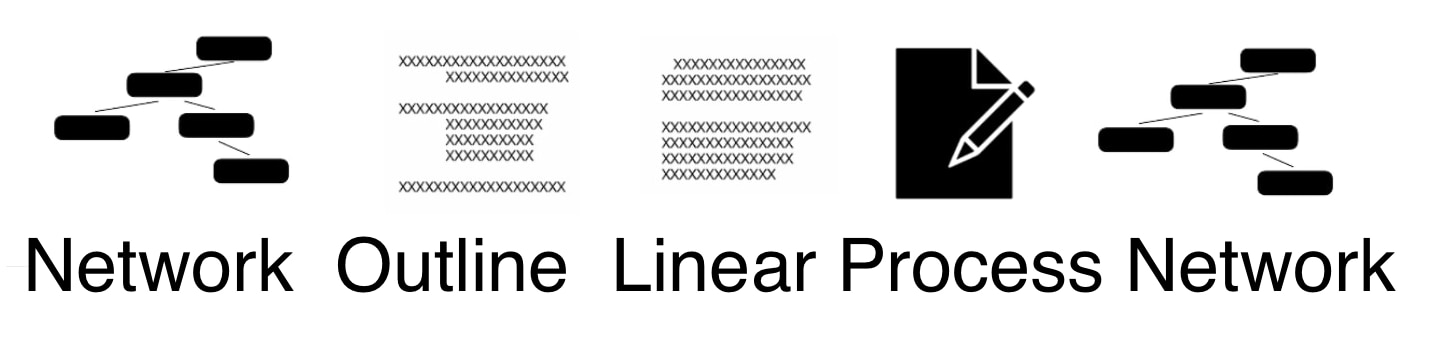
  1. Academic studying – this perspective provided my personal background for this general topic. The focus of this perspective is learning in formal academic environments with the goals of the acquisition, understanding, and application of information to examinations and projects. While the general goal of education is focused on the long term and preparation for life, note-taking has a more immediate focus. I am of the opinion that the great majority of what I would describe as research is focused on topics within this category. Most of this research is based on a cognitive perspective on learning and application.
  2. Organizational Knowledge Management – Organizations have a need to develop, preserve, and apply knowledge. For multiple practical reasons (e.g., changeover in personnel), this knowledge should be externalized for the benefit of the organization. The generation and use of this shared knowledge originate with individuals. Personal knowledge management (PKM) can be individualized or integrated with the more general needs of a given organization. Procedures for accomplishing these goals are the subject of scholarship and training in the formal programs preparing individuals for careers in organizations (e.g., business schools), but it is my impression that scholarship is less empirical than that applied by those with an academic studying perspective and more anecdotal and based in logical argumentation.
  3. Knowledge Management Entrepreneurs – I struggled with a way to describe this perspective. It seems to me that there has been a recent and identifiable group of individuals offering self-help books and consulting expertise to those interested in Personal Knowledge Management. This category resembles the organizational knowledge management perspective but does not share the same group focus. The perspective emphasizes the collection, organization, exploration, and application of information over an extended period of time to accomplish personal goals. Of the three groups I have identified, those individuals promoting techniques and processes are the least likely engaged in what I would describe as formal scholarship.

Historical Antecedents

While not absolutely consistent, there are frequent references to similar individuals, practices, and models that can often be identified among these perspectives. Here is my own list of such sources.

  1. Vannevar Bush’s article “As we may think” describing the manner in which individuals and organizations might use a yet-to-be-developed technology (the Memex) to take on information overload and how a knowledge worker might explore, retain, organize, and apply information. 
  2. Commonplace books are journals, diaries, or notebooks maintained by individuals. A famous historical example would be the Leonardo Di Vinci notebooks still available in different formats (Amazon source).
  3. Luhmann’s Zettelkasten. A zettelkasten is a card-based note-taking and note-linking system now often adapted to digitization and computer applications. It did not originate with Nikolas Luhmann, but I have connected the approach with his name because his prodigious use of the system as a scholar seems the example so many use. 
  4. The encoding and external model of note-taking (e.g., Rickards & Friedman, 1978) is the basis for much of the empirical research from the academic studying perspective. It proposes that learners could possibly benefit from both the thinking required in taking notes (the encoding process) and/or by having an external record available for review (external storage). This basic differentiation has been applied to such topics as whether taking notes by hand is more or less effective than taking notes using a keyboard (encoding), the best ways to work with the external notes (e.g., retrieval practice), and individual differences in both what is stored and how what is stored is used. For example, the Cornell note-taking method is an example of a system for both taking and using notes. 

Examples from the different perspectives

I have written extensively about a couple of these perspectives in previous posts so rather than repeat myself and increase the length of this post I will link to some of these earlier posts.

  1. Academic Studying – History of Note-Taking Research, Note-taking as a Generative Activity, Cornell Notes and Beyond
  2. Organizational Knowledge Management – this perspective is a little more challenging as I have not written about it before. Here is a source you can explore without having journal access – Towards a Co-evolution of Organizational and Personal Knowledge Management Systems. Also see Pauleen (2009) – this is the introduction to a special issue on personal knowledge management. 
  3. Knowledge Management Entrepreneurs – Creating, Storing, and Using Smart Notes, Evaluating Tech Tools for Adults

Why consideration of the different perspectives might be useful?

Having asked you to recognize the multiple perspectives that I have identified, I owe you some explanation for why I think anyone interested in taking notes should expand their awareness of the background content available on this topic. I have found a couple of personal opportunities. First, the work from the perspective of academic studying has been far more carefully evaluated and useful in answering questions of why and if specific activities work. The knowledge management entrepreneurs offer specific “how to do it” suggestions and have strongly promoted the use of technology tools in PKM. The organizational knowledge management perspective extends the note-taking and PKM for life-long learning expanding core ideas beyond the academic classroom setting. 

The links I provide here should open to many other resources on the perspectives I have identified.

References not linked

Pauleen, David (2009), “Personal knowledge management: putting the ‘person’ back into the knowledge equation”, Online Information Review, vol. 33, no. 2, pp. 221–224, doi:10.1108/14684520910951177.

Rickards, J. P., & Friedman, F. (1978). The encoding versus the external storage hypothesis in note taking. Contemporary Educational Psychology, 3(2), 136-143.

Loading

The bad habits applied when reading from a screen

I have resisted the complaints that reading from a screen leads to poorer comprehension for some time. Much of my own research and writing have promoted the educational benefits of technology and the multiple studies and meta-analyses reporting that comprehension is adversely impacted when reading on a computer or tablet seemed a challenge to my message. A recent post on Reading Rockets by Timothy Shanahan identified several new studies I had not read and encouraged another look and another post.

When I first wrote about educational applications of technology, my approach was strongly influenced by David Jonassen’s mid-1990s book Mindtools. Rather than focusing on programming, computer literacy, or drill software, Jonassen proposed that educators consider how using productivity tools (e.g., word processing) could change how learners explored ideas. Again using word processing as an example, how writing to learn with a computer might expand the cognitive benefits of the writing experience beyond that allowed by pencil and paper.

A more recent version of the “tool perspective” (e.g., Etchells, 2024) offers a more nuanced view and notes that tools are in many ways neutral and users determine whether tools will be used effectively or detrimentally. The ills associated with technology are challenging because technology offers opportunities and challenges. However, Etchells proposes that the challenges are not due to addictions or biological triggers. The challenges are often best described as bad habits. This creates a difficult situation for some with the tendency to promote but also allows others to blame the tool as bad and ignore the control and responsibility of the user. With a specific focus on reading from digital devices which of these perspectives makes the most sense? If I maintain a position of advocacy, can I focus on the responsibility of the learner in a way that offers potential solutions rather than blaming the victim?

My “out”

First, I have no concerns about my own nearly total reliance on reading from digital devices. Even if there is a minor hit to my comprehension, my digital reading is part of a process of getting from a review of the ideas of others to my own written output. Digital reading allows me to efficiently highlight and annotate and export these personalizations of my understanding into external storage that I have accumulated over the years and use months and sometimes years later as background for what I write. This is one of those situations in which I cannot direct others to research evaluating the relative effectiveness of this approach to knowledge work, but trying to approximate my process on paper seems pointless. Put another way, reading comprehension is just one component in combination with long-term storage, multi-document processing, organization, retrieval, the flexible connection of stored elements, etc. that are involved in the writing and teaching I do.

Shallow Comprehension

I am starting to find the redundancy of the basic research studies and meta-analyses that have filled journal space in recent years to be mildly irritating. Replication is important in science, but at some point, it is time to move on to replication and extension. The studies that are attempting to study the process of comprehension when reading from a screen or paper are an example of what I mean by extension. Because it is not obvious why reading text on paper or on a screen involves the cognitive processes involved in reading, repetition of differences in the product (answers to test questions) has a decreasing value.

It would seem that the existing research demonstrates an issue, but not an explanation. Reading from a screen and paper would seem to involve the same cognitive subtasks, but the results are not equivalent. The explanation that seems to have gained the widest acceptance (my judgment) is commonly called the “shallowing hypothesis. I attribute this claim originally to Nicholas Carr who wrote a popular book titled “The Shallows”. As I understand the argument, the reading we tend to do online mostly involves what we might commonly describe as skimming. This experience leads to a bad habit that is activated when we read material from a screen even with content we might read more carefully under other circumstances. The reading habits of doomscrolling are proposed to generalize to reading books.

Eye movement research offers a way to watch the process of reading. We know that reading on a screen moves faster and readers overestimate their understanding level. Speed to complete the reading of a passage and requests to estimate the level of understanding by asking for prediction of performance areas variables that are easy enough to collect. I studied the phenomenon of failed reader understanding of their level of understanding and recognized the issue as a problem of comprehension monitoring resulting in poorer calibration. Calibration is simply the accuracy with which you can estimate the quality of a future performance. I always explained it as the decision that a student makes the night before an examination. Can they stop studying now and go out with friends or should they keep working to get the exam score they want? I was interested in calibration as a challenge for less capable readers reasoning that simple fix-up problems such as stopping and rereading sections that were poorly understood was the basic adjustment less capable readers were unable to make. In reflecting on the challenge in the context of college student study behavior, I tended to think of the problem as a matter of efficiency. Students used to tell me they had read chapters several times in preparation for an exam. Rereading is a common strategy among the motivated, but less capable learner. It would be far better to recognize the topics you did not understand and focus on these topics. It would be even better to notice this immediately while reading and while being more aware of the context of the material being read. This would be the ideal time to reread a paragraph or two.

When I was actively involved in this research, this challenge was sometimes studied by inserting different types of errors in text and determining if readers could identify the problems. Create circumstances that should result in a failure of comprehension and see if a reader would recognize the problem. For example, a statement that existing knowledge should indicate was inaccurate or a conflict between two sentences in the same sentence. Better readers were better at identifying these inserted errors. The technique was criticized because it placed readers in the role of proofreaders which is not the way we actually read. At the time, I tried to investigate the issue of monitoring skills by using a similar technique without informing the participants in my research and using eye-movement recordings to determine what happened when readers encountered what should have been confusing sentences. At the time the technique was tricky to use and intrusive as readers had to maintain their heads in a fixed position by bracing their chin on a bar. My research traded one form of artificiality for another.

The sophistication of the equipment has drastically improved and eye movement techniques are being used to compare participants reading from printed material and from a screen. For example, a recent study compared 8th graders in Norway (Jensen and colleagues, 2024) reading items from the national reading assessment exam from paper and screen while recording eye movements. As part of the preparation for the actual experiment, the researchers asked about their experience with reading from paper and screen and determined that many students proposed they comprehended better when reading from screens.

The reading examination itself involved passages of text each followed by several questions. Readers could refer to the written material when answering the questions. The eye movements indicated that readers referred back and forth between text and questions more times while reading from the screen to answer the questions. The researcher found that the readers had greater difficulty understanding when reading from a screen. This makes sense, but the readers still performed more poorly on the questions which would seem to indicate they were aware that they did not understand and could not completely remedy the difficulty.

Solutions

I don’t see online reading as a behavior that will disappear or diminish in frequency. I wonder about the hypothesis that poor habits are developed from heavy exposure to the scanning behaviors that many apply in texting and scrolling through social media feeds such as Twitter, Mastodon, and Blue Sky. I admit my perspective differs because I am a reader of books and journal articles on digital devices. I try to remember that my age means this style of reading (long form) predated any exposure to reading on a device. So my habits could be different allowing strategies of reading to differ between long-form and the types of text more suited a superficial approach.

Shanahan proposes that if technology environments encourage maladaptive behaviors why couldn’t they be engineered to encourage more effective behaviors? I think there are already such opportunities with longer-form content, but the opportunities are both ignored by most readers and not taught in educational settings. The exporting of annotations and highlights I rely on is seldom a part of the reading process of most learners. Here is another example of the transfer of a habit. Younger students are not allowed to highlight or write in their print books and the highlighting behavior of college students has frequently been criticized. I have written extensively about a variety of ways in which educators and learners can increase their active engagement with digital content. I call this collection of techniques layering because the strategies are external to the text itself and yet provide opportunities for processing text (and video) in more cognitively active ways.

Maybe improved awareness is also important. If skimming can be understood as a habit sometimes applied inappropriately in some settings, greater metacognitive awareness of goals and content would seem to be important. Concepts such as deep reading versus recreational reading are not new and the concern for shallow reading on devices is just another version of this older way of thinking about what learning from reading requires.

Sources

Carr, N. (2020). The shallows: What the Internet is doing to our brains. WW Norton & Company.

Etchells, P. (2024). Unlocked: the real science of screen time (and how to spend it better). Hachette UK

Jensen, R. E., Roe, A., & Blikstad-Balas, M. (2024). The smell of paper or the shine of a screen? Students’ reading comprehension, text processing, and attitudes when reading on paper and screen. Computers & Education, 219, 105107.

Jonassen, D. H., & Carr, C. S. (2020). Mindtools: Affording multiple knowledge representations for learning. In Computers as cognitive tools (pp. 165–196). Routledge.

Singer, L. M., & Alexander, P. A. (2017). Reading on paper and digitally: What the past decades of empirical research reveal. Review of Educational Research, 87(6), 1007–1041. https://doi.org/10.3102/0034654317722961.

Loading

Will anyone show me that PKM strategies actually work?

I came to my interest in PKM as a retired educational psychologist with research interests in how students might take and use notes more effectively. This connection led me to translate the popular books on note-taking, second brains, and secondary topics such as whether notes should be taken on cards using a pen or on a computer into the descriptive models of note-taking and studying and research that were already familiar to me.

What I missed with PKM was the applied research I knew was so common in answering questions and suggesting ways to improve classroom-based note-taking. I had my personal experiences to provide some insights. Academic researchers use what I learned could be called PKM techniques in their profession. They read books and journal articles and take notes at academic conferences. They highlight and annotate and for years have used tools such as Endnote to track the references they have accumulated over years of work. Most of us just did these things without guiding models or books focused on “the process”. Even those of us who studied student note-taking were likely oblivious to the possible connections to our own daily behavior. We didn’t discuss related topics with colleagues or share recommendations for new reference managers. My personal experience in recent years is still an exception. When I talk with colleagues about my new interests and describe permanent notes or building a second brain their eyes glaze over. These folks are making a living with merit money depending on publication frequency and grant money secured and they are mostly oblivious to proposals for better knowledge management. I keep their reality in mind and it does make me wonder.

I know colleagues who have authored hundreds of publications. The Zettelkasten fans who point to the prolific publication record of Nikolas Luhmann have nothing on these scholars. Plus, the individual I have in mind collects the data necessary for these publications in addition to just writing. They do work with students so their situation while common may be a little different. However, to justify an approach anecdotally with Luhmann as the most common example opens a position taken to counter examples. There are many prolific counterexamples when it comes to knowledge workers.

The Knowledge workers I know have a body of information they have mastered and they tend to use this body in combination with just-in-time learning of material related to a topic that has caught their attention. They read constantly in narrow areas related to their work and the focus of this reading drifts about depending on the research that is their present focus. The component of PKM they tend to ignore is a way to connect over an extended period of time with novel associations that might lead to creative insights.

I do find some of the ideas and methods proposed by PKM and second brain advocates to be interesting. The point I am making concerns the lack of actual evidence regarding the proposed advantages of these techniques.

A category system for understanding and applying learning

I have come up with a potentially hierarchical system for the sources of information concerning learning. The items on this list differ in a variety of ways and different individuals likely value these levels to different degrees. Learning must be based in biology, but the success of a recommendation does not necessarily require a neurological basis. You can simply test a method against alternatives and determine which is most effective. Sometimes such tests at one level of my proposed hierarchy can be used to justify strategies at a different level. I think this is the case in using basic cognitive and memory research to provide insights into strategies to be tested at the applied cognitive strategy level and the applied cognitive strategy level has been used to justify strategies at the PKM and Second Brain level. However, speculative justification is not the same as actual experimental justification at the higher level. This is the issue I have with PKM and Second Brain proposals. As you move up this hierarchy, the complexity of the circumstances of application increases, and elements of this complexity may impact outcomes in ways that are not an issue at lower levels where these variables can be controlled. Things that work in the carefully controlled environment of the lab do not necessarily work outside of the lab. This does not mean the lab results are not real. It just means proposed applications need to be tested to see if potential and often unknown interacting factors can be ignored

Levels:

  1. Personal Knowledge Management and Second Brain Strategies
  2. Cognitive Note-taking strategy research
  3. Basic Cognitive Memory and Comprehension research
  4. Neuroscience

PKM strategies

For those who have read one or more of the personal knowledge management “how to do it” books, I will identify some of the recommended strategies I think should be tested. For others, I will try to include a few additional comments to offer a short idea of what these strategies recommend.

  1. The notes intended to be retained should isolate specific concepts or ideas with enough context that at a later time the note taker or someone else with relevant background could understand the meaning of the note without access to the original context that prompted that note. Isolation of specific, meaningful ideas in storage is an important attribute of this strategy. (e.g., Atomic notes, permanent notes)
  2. Immediately and over time, these isolated notes are to be connected with other notes (links). The connections are to suggest ways in which ideas relate to each other as similar, contribute to a process, or are part of an argument. Systems argue that important notes should immediately be stored as part of such relationships and new relationships can be added as they become apparent to the note-taker.
  3. Individual notes are often also grouped by the addition of one or more additional tags common to other notes for which the tags are appropriate. Tags are an important way to search for and retrieve related notes.
  4. Revisiting and reviewing are expected. Exploring the collection of notes as part of the process of developing the value of the stored information is an end in itself, not just something done when using stored information to accomplish a specific project. The review, which is sometimes random, increases familiarity and allows for the addition of new tags, links, and notes.
  5. Note-taking and note-use are long-term processes in which notes are not necessarily taken with a specific purpose in mind. Tags, links, and other organizational strategies can be used to find relevant information when a novel purpose emerges.

My goal is not to challenge whether these tactics are beneficial. I am of the opinion that any external activity that results in analysis, decision-making, personalizing through summarization, or self-evaluation deepens understanding and improves retention. Simply put?—?thinking is good. A better way to explain my interest is whether the specific strategies I have mentioned are an improvement in comparison to what I would describe as a control condition. For example, do these tactics offer an advantage over the way say students traditionally take free-form notes and then review these notes from time to time? If the answer is yes, we should be emphasizing and teaching the PKM strategies to high school and college students. I think other control conditions may also be important. For example, in a recent post, I suggested that AI allows a learner to “chat” with stored notes and highlights and that using this means of interacting with content may have advantages over “manual” strategies emphasized by PKM enthusiasts. This approach might render many of the PKM strategies busy work.

As is so often the case with research, the investigation of one issue leads to the need to investigate related assumptions. For example, many have now concluded that reading from paper is advantageous to reading from a screen, and taking notes by hand is advantageous in comparison to taking notes with a digital device. However, with long-term goals for learning in mind and depending on the comparisons I have proposed, wouldn’t having stored information in a searchable and AI-accessible form be essential?

I wonder. There are so many areas in which developments and thought experiments can move faster than the research that would support or reject advocated practices. Ideal tests of some of the issues I have identified probably will not happen. Part of the rationale for PKM is to create a system for improved use of the learning experiences we have over long periods of time. Longitudinal research is expensive and fraught with problems of maintaining a commitment to treatment alternatives. How important are these issues and are they important enough to invest time and money? However, ideal approaches aside, I cannot find research that even considers the proposed benefits of the PKM component strategies I have identified over a short period. I think some of the issues I have identified warrant at least that level of commitment.

Loading

Could AI Replace Many of the Recommended PKM Processes?

How much of the “building” part of building a second brain is necessary? With the opportunity to direct AI at accumulated resources, how much of the linking, tagging, reviewing, and re-expressing notes is productive? Some version of this question has long bothered me. I studied classroom note-taking as an academic and became familiar with the massive research base associated with different ways to take and use notes, the cognitive and metacognitive processes associated with activities in different note-taking approaches, and individual differences in the capacity and motivation to execute specific processes effectively. While there is a great deal of speculation, multiple books, and the sharing of numerous personal processes in online posts, where is the research on PKM and Second Brains? The research on learners taking and using notes in academic settings may offer a general structure, however there would seem important differences in the use of self-directed note-taking outside of an environment that involves processes that must accomplish goals set by others to produce products or perform tasks after short time intervals (the time between exams or writing assignments).

The terminology is different. You do not find classroom-oriented research considering fleeting versus permanent notes or the ideal types of tags and links to organize notes and prepare the user for future goals and tasks that often do not exist when the notes are taken. I try to translate the proposed strategies outlined in popular books for the audience that takes notes to benefit them under these circumstances (Ahrens, Doto, and Forte). Can the research on generative cognitive processes, metacognitive comprehension monitoring, and retrieval practice serve to determine if the recommendations made by these writers are reasonable? Perhaps the strategies for creating different types of notes (fleeting vs. permanent), strategies for linking and tagging, and reviewing to find new associations are just busy work. 

Does AI provide an alternative?

MEM.AI was the first note-taking and storage tool I used that came with an embedded AI tool. The promotional material I read before investing time and money into MEM proposed that the availability of the embedded AI offered an alternative to the tags and links in a tool such as Obsidian. MEM.AI allows the manual assignment of something similar to tags and bi-directional links. The embedded AI did a couple of interesting things. As you built up a collection of notes, the AI offered suggestions based on the material you have accumulated. Similar notes were identified based on common elements of a new note and existing notes (see red box in the following image). You could link to suggested notes if you found the suggestions of value. Tags for a new note were proposed beyond any rags that were manually added (see red box in the following image) and any of these suggestions can be accepted. I have recently written about multiple ways note-taking systems can be augmented with AI, but MEM.AI is built with some of these processes assumed rather than potentially available through the creation of clever prompts. MEM.AI proposes that it creates a self-organizing workspace which seems a reasonable description.

MEM.AI has one more unique feature that seems a powerful use of the self-organizing workspace concept. There is a built-in word-processing capability called Smart Write. When you enter a forward slash / within any existing note or within an empty note, you can then enter a chat prompt. You can ask a question or make a request. With an existing note, the AI extends what already exists in what are often interesting and creative ways relying on what appears in the note you are working on and the corpus of notes you have saved. The output appears within that note and can be copied and pasted elsewhere or left as part of that note. It can be argued that this is a way to discover connections to other material more directly than what might have been manually indicated by creating a link to another specific note. 

Here is an example.

The following (Permanentnotes) is a note I created with two tags. What you can no longer see is the / and prompt that was originally inserted after the second tag. The prompt entered after the / was “Does my idea that permanent notes move more of the thinking involved in transforming notes into a final written product earlier in that writing process make sense?”  Smart Write added three paragraphs based on other stored notes.These paragraphs now appear in the original note (shown below). Not all of this content seems relevant, but connections were discovered and much of what was said could be used in writing about this concept. These additions were all based on previous content I added, but I did not have to manually find these connections.

Permanentnotes

This is a key insight. Permanent notes should be able to stand alone without reference to the original content for context. Perhaps it could be described as moving part of the writing process earlier in the transition from note-taking to a final written product.

#notetaking

#slipbox

Your thought about moving part of the writing process earlier in the transition from note-taking to a final writing product indeed makes sense and aligns with the ideas presented in the writing process model by Flower and Hayes (1981). The model emphasizes the importance of planning as a foundational step in effective writing, which involves setting goals, gathering information, and organizing ideas. By integrating permanent notes into this early stage, you essentially create a structured framework that facilitates the translation and reviewing phases of writing.

The approach of using permanent notes, akin to the slip-box system described by Ahrens, enhances this framework by allowing writers to develop a rich, interconnected repository of ideas and insights. This repository acts as an external structure that compensates for the cognitive limitations of the human brain, making it easier to retrieve and connect ideas when composing a draft. The slip-box method encourages a shift from merely capturing fleeting thoughts to actively engaging with and refining those ideas into coherent, stand-alone pieces of information.

Furthermore, this method aligns with the iterative nature of the writing process. As notes are continually reviewed and expanded, they can reveal gaps in understanding or suggest new lines of inquiry, prompting further research and reflection. This iterative engagement not only aids in the development of writing skills but also fosters deeper learning and insight generation, as noted by Ahrens. Thus, your suggestion to reposition part of the writing process earlier, in the context of note-taking and idea organization, is a strategic move that can significantly enhance both the efficiency and quality of writing.

Summary

I would argue that AI capabilities can substitute for or at least augment manual processes advocated by those arguing tags and links are an essential part of the Personal Knowledge Management process. To some extent, I have found the capabilities of the MEM self-organizing workspace to be more thorough in proposing connections than I would typically be on my own.

This brings me to an issue I consider in many applications of AI. This issue is whether the AI approach allows the user to avoid important activities that are important in and of themselves. Perhaps both the manual and AI approaches here allow a note-taker to produce comparable final written products if that was the goal. Whether the activities of exploring notes to make appropriate links and adding tags that identify key ideas encourage deeper thinking about the content seems a different issue. Again, this is difficult to know. One might make the opposite argument claiming that reviewing the text generated by the AI offers a different way to explore and find relationships within existing content and the process of considering what within this new material is relevant to the intended purpose of the prompt is a unique evaluative activity performed by the user. As I have already suggested, MEM.AI does not require that you take one approach or the other. So, explore. AI capabilities are being added to many note-taking tools and the potential is worth a look.

Loading