Educational goals shape classroom practice

When we first began writing about the role technology could play in education, we focused on the idea that technology provided tools for thinking and learning. This idea came from the work of David Jonnasen and his book MindTools. We built on his observation that technology tools many folks used to accomplish tasks in their everyday lives (writing to communicate, spreadsheets to organize and ask questions of numerical data, etc.) could be used in classrooms not just with the goal of learning how to use the tools, but to develop an understanding of the concepts and skills important to content areas by applying the technology tools to the processing of content area information. Our first textbook used the umbrella of technology integration to describe this general approach, expanded the list of technology tools that could be useful, and created a theoretical and research-based framework based on authentic tasks, constructivism, and contextualized learning to explain and justify such tasks. 

I don’t know if blog posts are the place for exploring what I consider core concepts that drive curriculum development and classroom practice, but I want to try out some big ideas that I think have value and are not being considered by enough educators. 

Let me start with a comparison. Coding/programming has received a great deal of recent attention as identifying concrete tasks that can be used in classrooms with proposed benefits that are either not presently achieved or that can generalize in ways that make a focus on such tasks more efficient than existing classroom activities. Based on these arguments educators and administrators have been lobbied to turn over classroom time to coding/programming experiences. The benefits of this reallocation could result in a) the development of an important vocational skill (coding), b) deeper insight into how technology applications actually work (technology literacy), and c) the development of computational thinking. As you move through this list, I would argue that the proven benefits become more difficult to demonstrate. There is a difference between speculating about benefits and demonstrating these benefits exist.

OK, so coding for all has caught people’s attention and this attention has resulted in real change in how students spend time. There are secondary issues that must follow if educators continue to implement classroom experiences based on a focus on this category of classroom activities. For example, at some point, it makes sense that educators providing such experiences actually be prepared to do so and their competency in this area be evaluated as a component of their preparation to teach. We are yet to reach the point at which this is happening at a meaningful level.

The issue I am trying to address concerns how a certain type of classroom experience gains leverage in determining how classroom time is spent. Is it based on the identification of skills that are to result from education and a consideration of what learning experience best develop these skills? I don’t have the sense that computational thinking was identified as something all students need and an effort was then followed to determine how best to develop such skills. The emergence of computational thinking seemed more a justification that followed something already gaining momentum to add more pressure to the cause.

I understand the public’s interest in technology and the mystery in many people’s minds as to how the magic of technology is accomplished. OK – this fascination in some areas could result in a preparatory course at the secondary level and the opportunity to major in a discipline in college. How did we get from such possibilities to the argument that all students need to develop computational thinking? As might now be obvious, I don’t think computational thinking is an actual thing and the concept is just an area-specific version of problem-solving. Why stop with coding? One could easily argue that compositional thinking as exhibited by those heavily involved as writers and promoted by educators as writing across the curriculum should be recognized for its proven general benefits, but is commonly ignored because committing more time to writing activities is less trendy. The generalizability of higher-order cognitive skills has long been controversial. We call this transfer and achieving transfer from a specific application of a cognitive skill to a more general application of this skill is tricky and difficult to demonstrate. It simply does not happen automatically with the amount of experience schools can devote to coding and the existing practices of teaching coding are not designed to transfer whatever computational thinking is expected to emphasize.

All this aside, I think I can make a better argument for a completely different area of skills, knowledge, and dispositions I think have greater generality. Part of the challenge I see in my effort is the generation of a cutesy name. I can’t come up with something for what I have in mind that is the equivalent of computational thinking. Perhaps I will eventually make an effort, but I will first offer the background for this proposal.

What I have in mind can be identified at the level of application in such claims as data-driven or empirically supported. As consumers, clients, patients, etc., we want to believe that the value, accuracy, etc. of the experiences, information, etc. we are provided have been established. How such goals are met depends on the discipline, but all disciplines have processes based in the collection of data through processes I like to describe as methods. We are probably most familiar with the approach we associate with “the sciences” and that abstract model we call the scientific method. Still, historians have data and apply processes and dispositions to these data to generate accounts of history that they argue are accurate and unbiased. Economists and political scientists do the same. Marketers attempt to identify public opinions in order to make decisions on product preferences and persuasive approaches. Data collection, analysis, and practices based on the consequences of collection and analysis are everywhere.

At best, we give lip service to the scientific method in K-12 science instruction. Students typically follow carefully scripted labs and have no experience designing experiments (methods) to test ideas (hypotheses) through the collection and analysis of data (statistics). 

Like computational thinking, I see the benefits on multiple levels. Methods and analytical frameworks vary with domain. There is more. With experience, you learn not just the methods of a given domain, but also the limits of these methods. An example familiar to many is the use of a conclusion generated from an experiment that does not involve manipulation in arguing a causal relationship. This problem is commonly described as “correlation is not equal to causation”. Another example is that I would describe as anecdotal reasoning. For example, a politician tells the story of an individual in justifying some policy. The example may be accurate but the conclusion that this example is the most common result of similar circumstances is unproven.  The skills involved in the specification of a problem and the establishment of a methodology to collect data relevant to this problem and then the evaluation of what such data indicate are everywhere. Where and when do we acquire such skills and in how many areas are such skills developed? We should develop such skills even when we do not apply them directly as we need to evaluate the cases based in data that others offer us to influence our behavior.

This post is getting very lengthy and I am guessing readers want me to get past my rationale to something that is actionable. I have some very concrete suggestions for classrooms in mind. I propose that educators take a look at the content they teach and think about the skills they are trying to develop and begin to ask the following questions:

  1. What data are relevant to the topics I teach? What data can my students collect that have some bearing on these topics?
  2. After relevant examples of data have been identified, the thinking then should move to the methods that can be used to collect such data and what about these methods should be considered that could limit accurate conclusions being reached.
  3. Finally, educators should consider the dispositions that must accompany data collection and analysis. What attitudes encourage critical thinking and openness to the examination of personal beliefs that data collection might challenge?

Once you understand these goals, data sources, data collection and analysis methods, and desirable dispositions are everywhere. You collect data when you go to the library or search online to answer a question. What search tactics increase the likelihood useful information will emerge from your search? What commitments to thinking about this information will allow you to discount misinformation and use valid information to challenge existing beliefs? You collect data when you create a questionnaire to identify the choice a class prefers among multiple options. How can the questions in the questionnaire be written to avoid bias? The examples of  opportunities are limitless, authentic, contextualized, and focused on skills necessary throughout life. This is a mindset that is consistent with existing curriculum goals, but emphasizes skills and methods of developing these skills that are seldom emphasized.

With this position statement as a starting point, I intend over the next several weeks to identify some examples of methodology, data collection, and analysis that encourage others to imagine their own possibilities. 

More related content to follow.

Loading

Now is the time for RSS

I have advocated that educators explore RSS for years so another post on the topic probably will surprise no one. Let me try a little different approach from what you may have heard from me before. This is a great time to think about the content you consume and how this content is influencing you. Now is the time to take at least partial control of this content. Nothing wrong with picking up an occasional tidbit from Facebook or Twitter, but you have to wade through a lot of nonsense to get to the gems if you rely on social media for discovery.

The use of RSS and an RSS reader allows you to follow multiple content sources in an efficient way. The RSS reader checks on the sites you designate and returns a list of new content that has been added to those sites since you last used the reader. It provides a list of additions that provide the title of new posts and a snippet of content from each. You can scan through this list quickly and make the decision to visit the site providing the content or ignore the new information that does not seem interesting from the title and snippet. The reader keeps track of what you have scanned and will not show items from the list the next time you visit unless you specify a given item as unread.

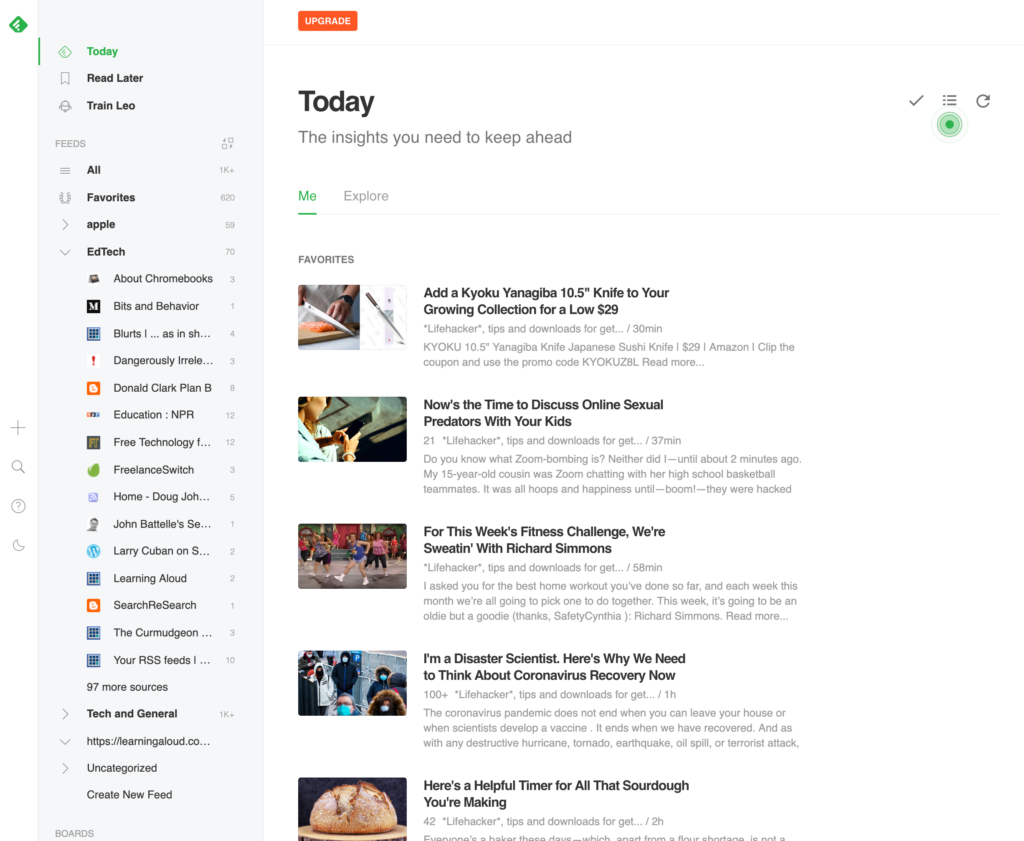
As a quick example, I use an RSS service called Feedly. I took a quick screen grab of the feed to show what the list of titles and snippets of content looks like. Again, clicking on any entry from the list takes you to the site providing this content.

Rather than explaining RSS and offering tutorials on RSS readers again, I thought it would be most efficient to offer annotated links to related content I have written in the last few years.

An introduction to RSS and RSS readers

Search vs. discovery – this is a way to understand the benefits of RSS as an addition to the searches you might generate.

Feedly – a description of the reader I use – (Feedly generates the feed shown above)

Feeder.CO – an RSS feed that is a browser extension

Google alerts – this is not RSS, but is a way to ask Google to constantly perform a search on a topic you designate and send you the results

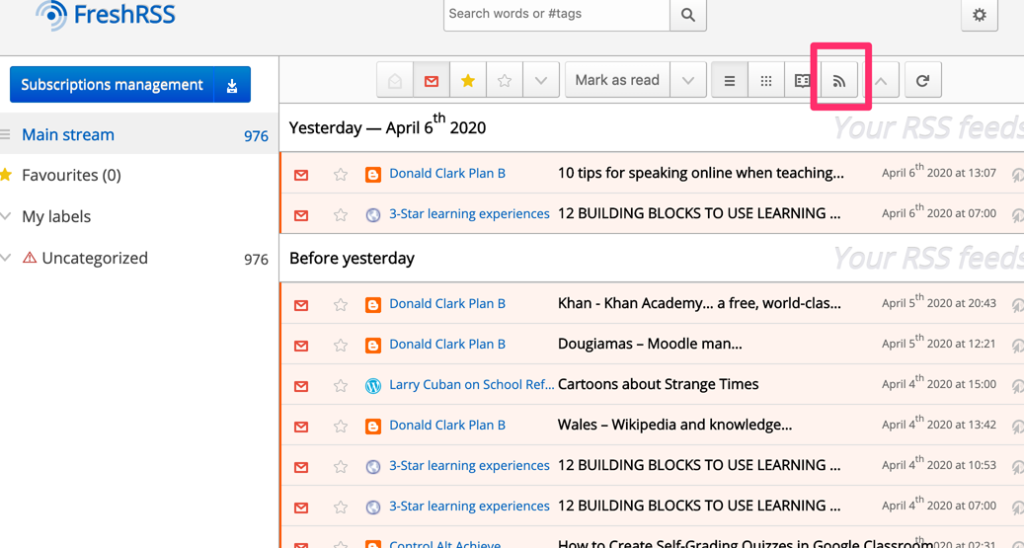
FreshRSS – this is a geeky thing you probably will not employ yourself. It is a reader I have installed on the server I operate. I provide this link because you can use the list of sources I follow if you want to seed a reader of your own (such as Feedly) with educationally relevant sites.

Here is something you might find useful. It is possible to get an RSS feed from an RSS reader. So, you can get the feed from FreshRSS to review in your own feed reader. I hope this makes sense.

If you visit FreshRSS, you will find the symbol for the RSS feed from the feed reader at the top of the display. Clicking this icon will generate something that looks like this – https://learningaloud.com/FreshRSS/p/i/?a=rss&hours=168 . This URL can be then entered into a feedreader of your own. You might also just try entering the address for the site – https://learningaloud.com/FreshRSS in a reader of your own. One entry or the other should generate in your reader the results of the content discovered by my reader.

Loading

Guilty as charged

I intend this post to be an object lesson. It concerns a copyright violation I must accept as my responsibility. The situation is worth explaining.

I am in the process of converting hundreds of web pages I have generated to be resources for teachers into a system I can manage more easily. The short version is I originally created this content over several years using Dreamweaver. As Adobe went from a business model based on customers purchasing their software to one requiring that customers lease their software, I continued to use software I had purchased. Leasing software in my situation irritates me as a mostly create content as a hobby and the ongoing cost of leased software was expensive for the amount of use I could make of this resource.

I have a couple of close calls with this approach. In both cases, my computer had serious problems and in one case I lost the motherboard. I was able to salvage the contents of the hard drive and transfer the contents of the hard drive to the repaired computer. About a year later, this happened again. The content is online, but the productivity software is on this computer. This had to be a sign.

I am switching my content over from individual web pages to an online tool called Concrete5. I can access this online tool from any computer and I can backup the online content to another location or even back to my local equipment. The new site is far from finished, but I like the look and it is available for anyone else who is curious. This project is intended to develop in two stages. Stage one – transfer the existing content. Stage two – redo this content to update the material as needed.

Back to the copyright story. I started creating an online presence in probably 2010 to offer open source resources that accompanied our textbooks. We use examples in our textbooks and online resources from classroom educators we work with. An early classroom application involved middle school teachers making a video based on a crime scene scenario. The scenario was created as the back story for the use of electrophoresis in genetic testing. The teachers had one kit and multiple classes so the video was a way to make use of the single test kit in multiple sections.

The video (it is available here) would be considered primitive by today’s standards, but the originality of the project still makes the example relevant in demonstrating the creative use of technology in a classroom project. When the teachers created the video, they used a short (very short) segment of music at the beginning to set the stage for the “crime” being investigated. To be clear, the use of this music was appropriate for them. The segment was only a few seconds long and was used in their classrooms and not online. It was my error in using their video online which is where the violation occurred.

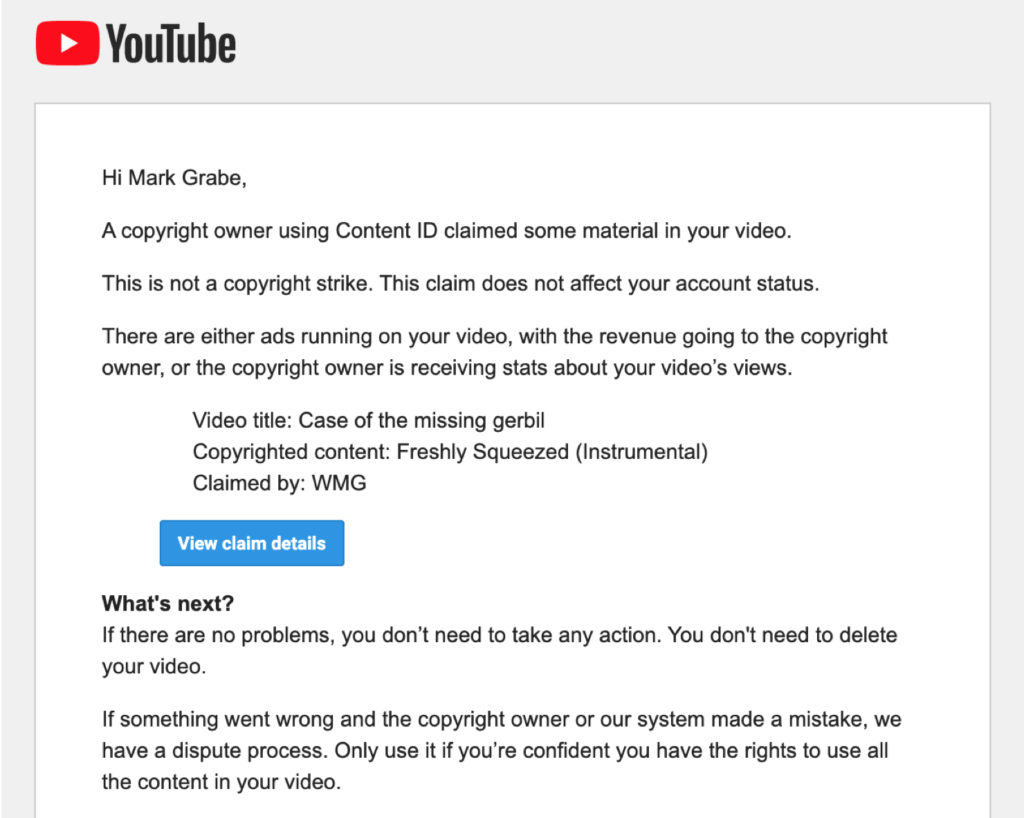
This violation was not detected for many years because I was serving the video from my own server. As I have been creating my new site, I have been uploading the videos I have been using to YouTube because Google can serve the video faster than the service I pay for. As soon as the video hit Youtube, their detection algorithm identified the brief segment of music and issued the copyright notice I have included here. If you follow some vloggers, you may know they risk losing revenue when a podcast they generate contains copyrighted material. I don’t meet the Google standard for payment (1000 registered users) so there is no revenue for me to lose even though Google may add ads to my videos. This is their tradeoff for serving my content.

As you can see from the notice, I am not being required to take this down. It would be easy enough for me to eliminate (trim) the first few seconds from audio track accompanying the video, but I am leaving it up as is for now. I bring this topic to the attention of teachers as a way of explaining the difference between what fair use allows in your classroom and what you should do online.

Loading

Zoom – a malware threat?

As more and more educators spend their time communicating using Zoom video, reports are surfacing warning of the vulnerabilities in Zoom (e.g., story from the Guardian). Zoom has been the “go to” service for the online courses I have taught in the last couple of years and the product our family now uses for group gatherings. I don’t think in all of these hours of use I have experienced the “Zoom bombing” problem. I can see this issue as resulting in inappropriate experiences in K12 settings. I guess I would probably not be aware of the other security issues that seem possible.

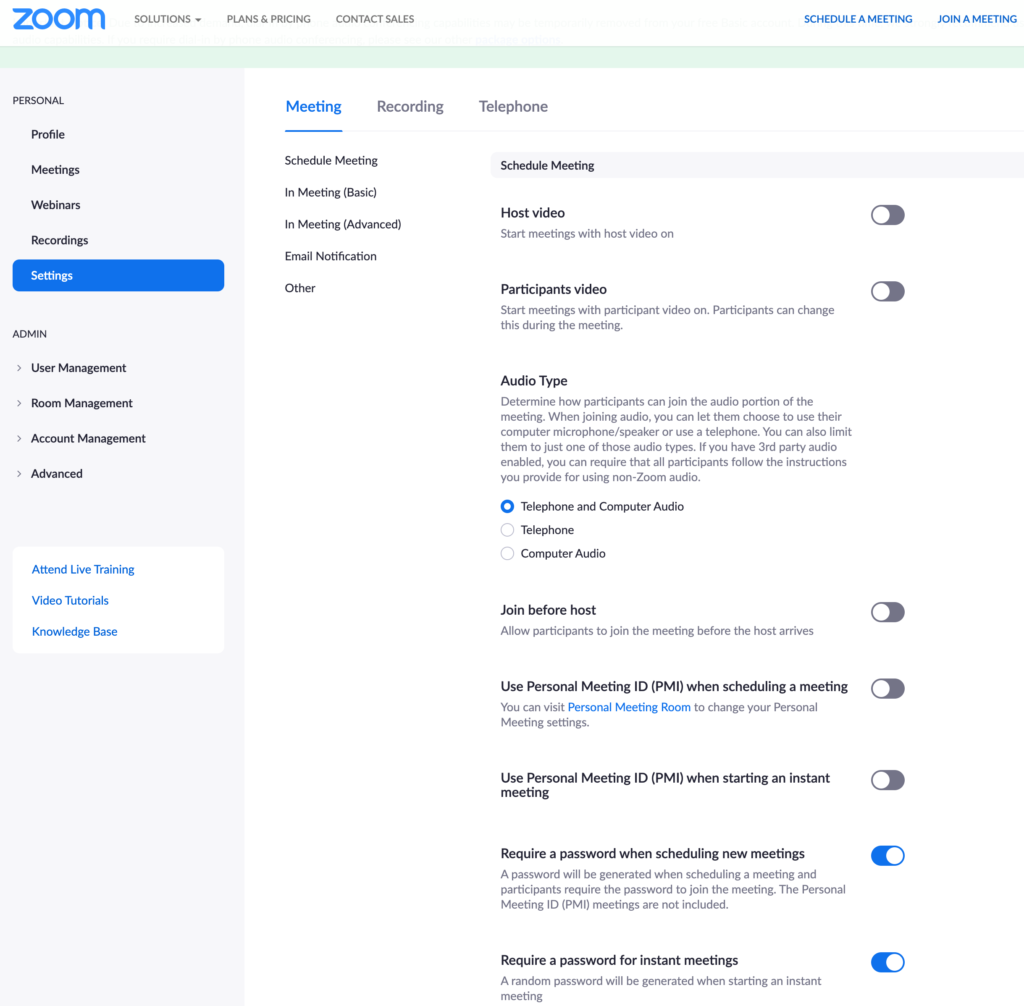
ArsTechnica offers a nice post on security suggestions for educators and their students that is worth a read. I admit I have not been using some of these suggestions (e.g., using a password for the meeting), but other suggestions were applied as a function of my normal instructional practice (e.g., the link for the Zoom meeting was sent to students using the Announcement feature in Blackboard before each meeting).

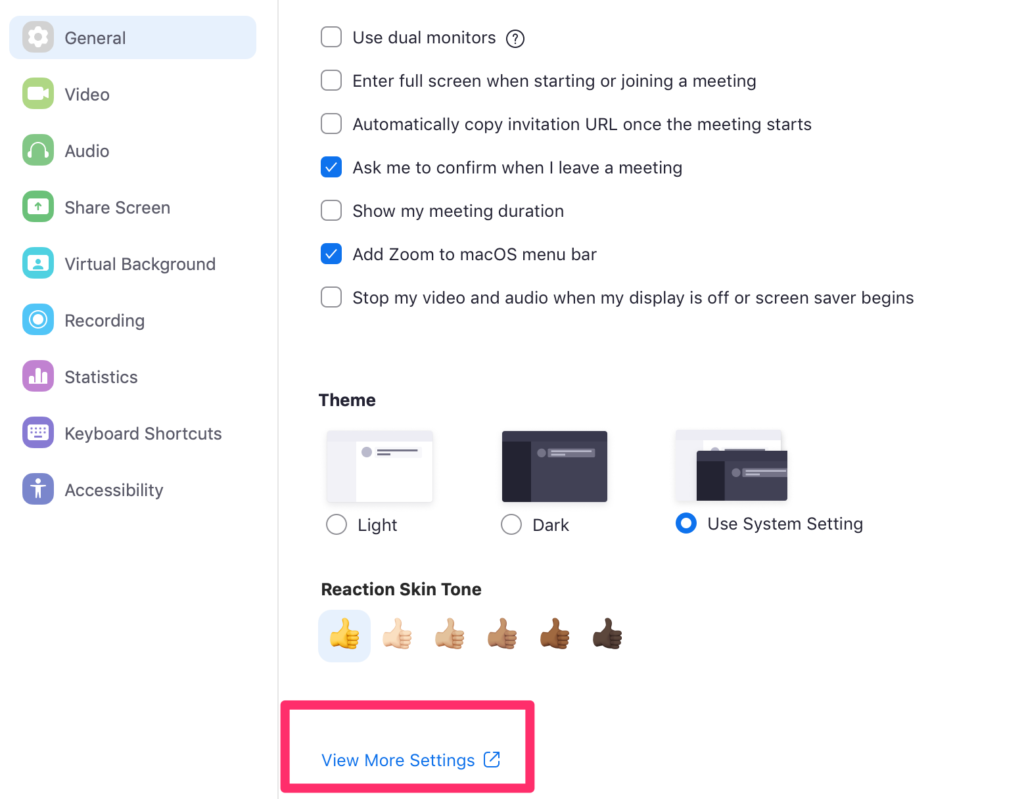
Exploring the settings that improve security can be a bit difficult to locate. Here is how I find them and I think the process may be different now for those using Zoom as a registered education service. See if this works for you. I am working from a computer and find the preference settings at the traditional location after launching a program. Use “more settings” to locate the settings described in the ArsTechnica article.

Under “General” locate more settings.

Loading

Loom

Loom is a free Chrome extension that allows the recording of the content appearing in chrome as a video AND superimposes a smaller video of you on what is captured from the Chrome screen. I see it as a great way to create tutorials, but it has many possible applications.

Here is a video describing the use of Loom. I am proud of the technique I came up with to generate this video. I am using Quicktime to record the section of the screen within which I am using Loom to simultaneously record a video of what appears within Chrome.

Here is the video generated by Loom. You can match it to the “how to do it” video that appears above.

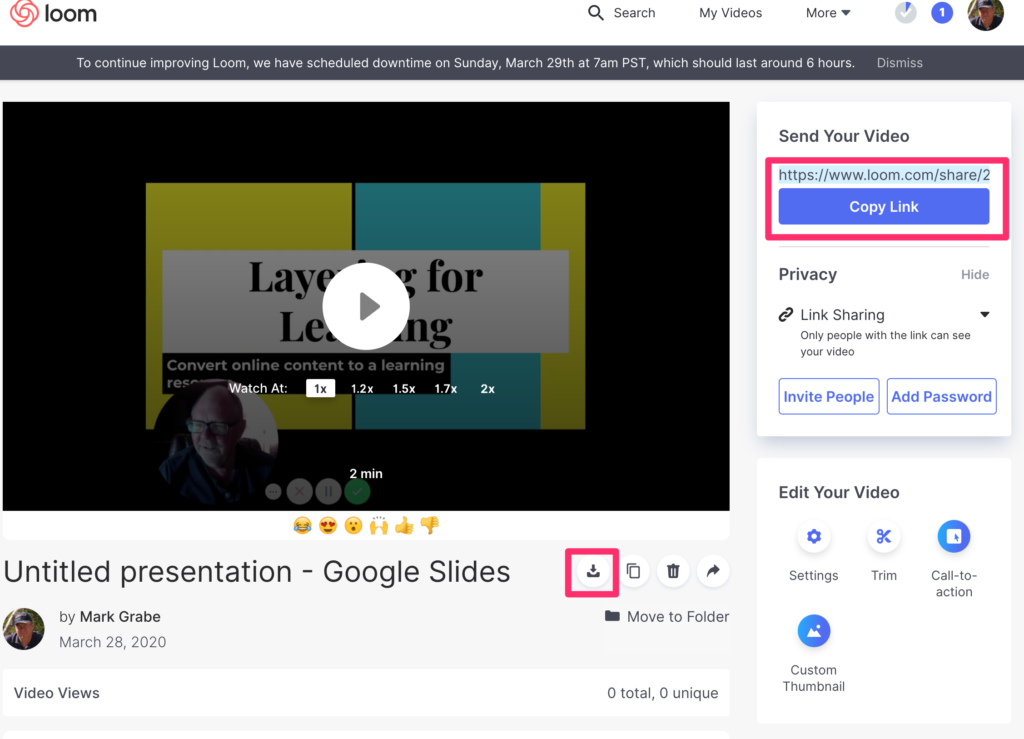
One important demonstration from the Loom processes is not well explained in the first video. At the end of the video, you will see a few seconds of the screen that appears when you end recording in Loom. This screen shows two options for sharing what has been recorded. One is the Link for the content stored by Loom. If you want to do something with this video yourself (for example, put it on Facebook), the download button offers to opportunity to save the video to your computer.

Loading

Use Diigo to share bookmarks to a group

Social bookmarking may be a novel phrase to you. I use the phrase to describe any method for a group to organize and share bookmarks (links) to online resources. I want to explain how this can be done with the online service Diigo. This tutorial will consist of several components that describe: a) Diigo, b) Diigo account options, c) establishing a group, d) sending bookmarks to this group, and e) sharing access to the group.

Diigo is an online bookmarking service with social capabilities. Bookmarking involves saving a link to online resources you have identified. You may do this within your browser for the sites you visit frequently. An online bookmarking system allows you to share these bookmarks across devices even devices that you do not own. Bookmarking services typically allow many additional features such as attaching notes, tags, and perhaps even a “snapshot” of the bookmarked sites. This link takes you to a previous discussion of such services.

Diigo offers everything from a free to organization level subscription services. Knowing about these various service levels matters as the features available vary with the level. The free level allows only private group bookmarking. This may be just what a teacher wants. The Diigo group creator then has to share access to the bookmark group with individuals. I pay for the least expensive paid level ($40 a year). This allows me to establish one public group. A public group can be located and joined by others without the group originator having to contact each user. The group I established for this tutorial is such a group and I have membership access set to require that I approve someone wanting to join the group.

Create a Diigo Group.

The top of your Diigo browser window will contain these options. Use “My Groups” to add a new group.

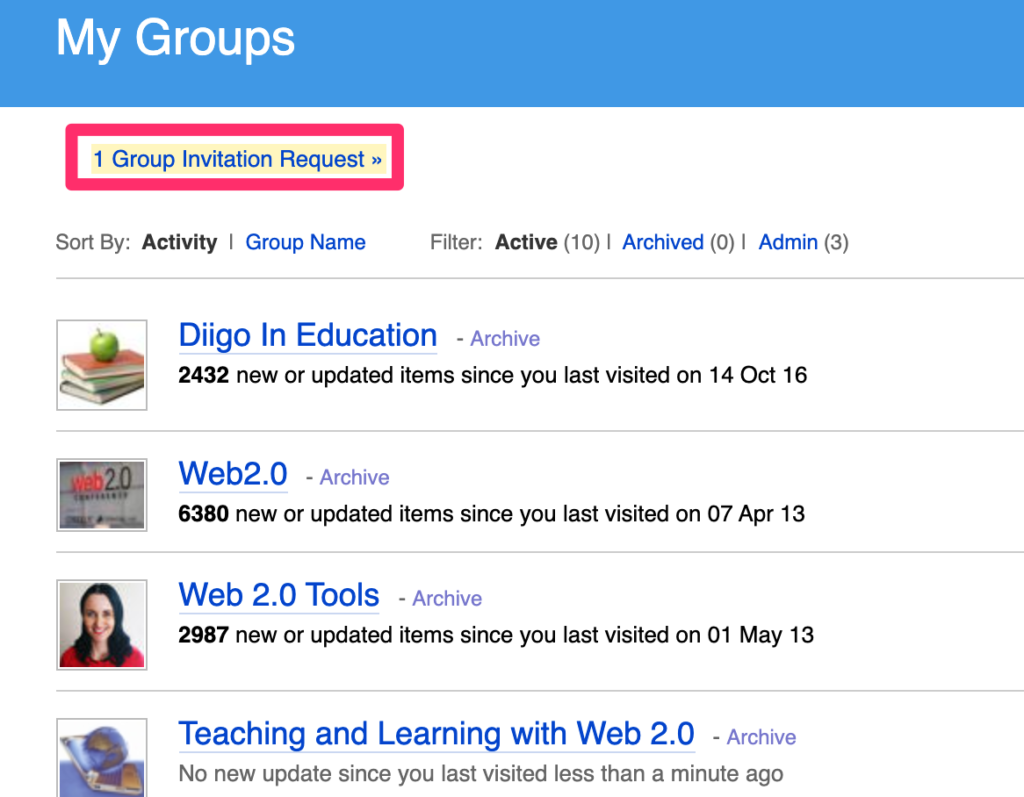
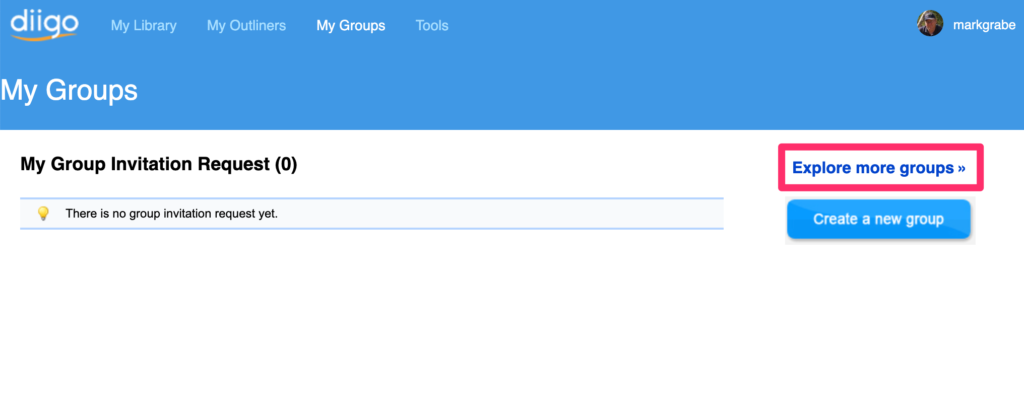
This display will indicate the groups I have already joined. To create a new group, use the “Group Invitation Request”. It is not obvious that this is the way to create a group, but this is the way I do it.

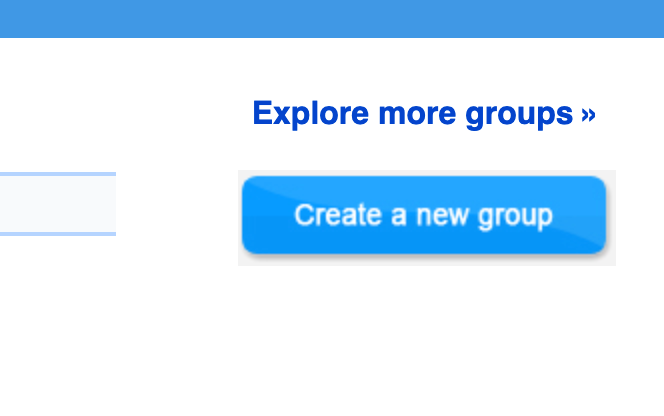
One of the options that should then appear is the button for creating a new group.

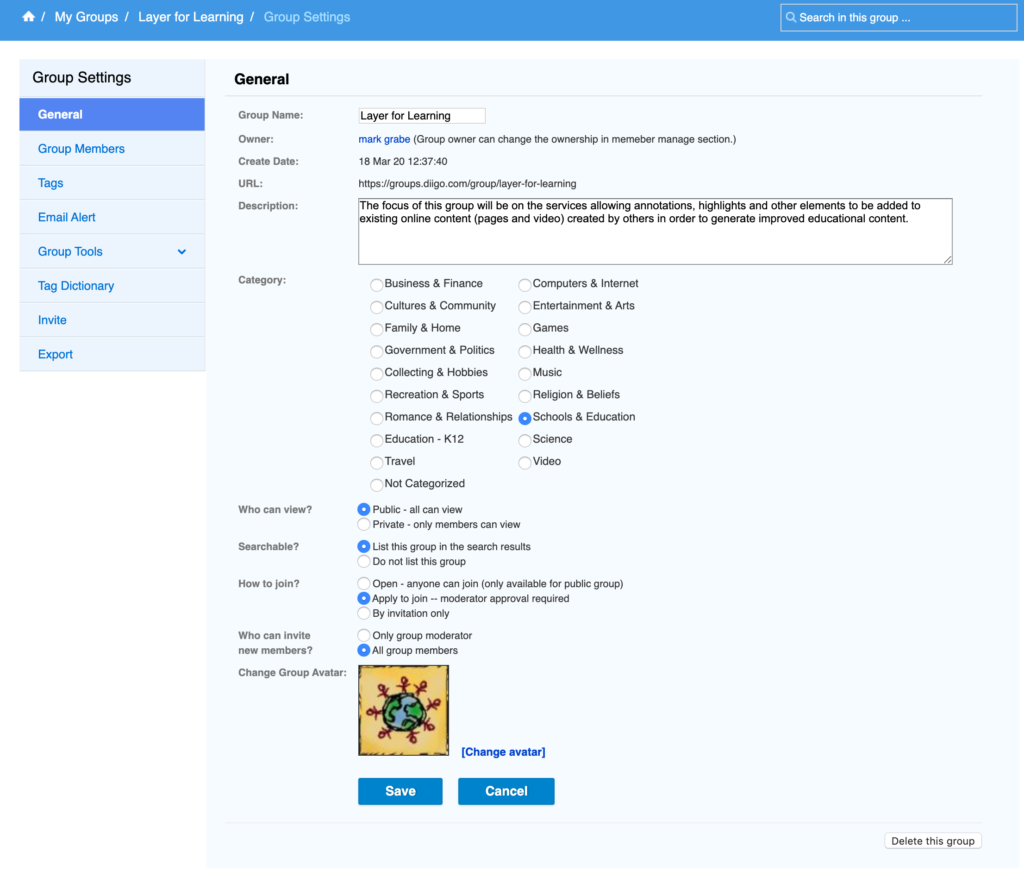
This button will bring up a form for labeling and describing the group you want to create. Note that some of the options are not available to someone with a free account. My example describes creating a group I label as “Layer for learning”.

Adding existing bookmarks to a group

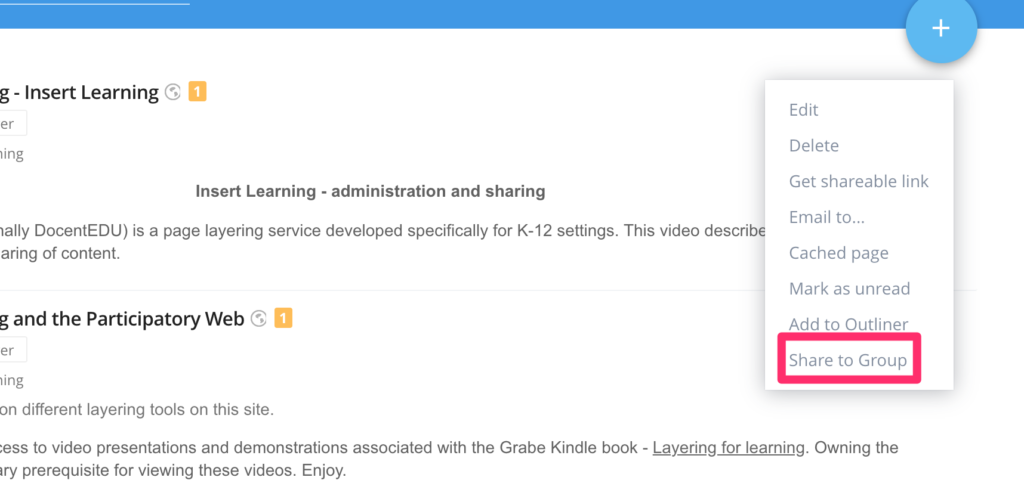
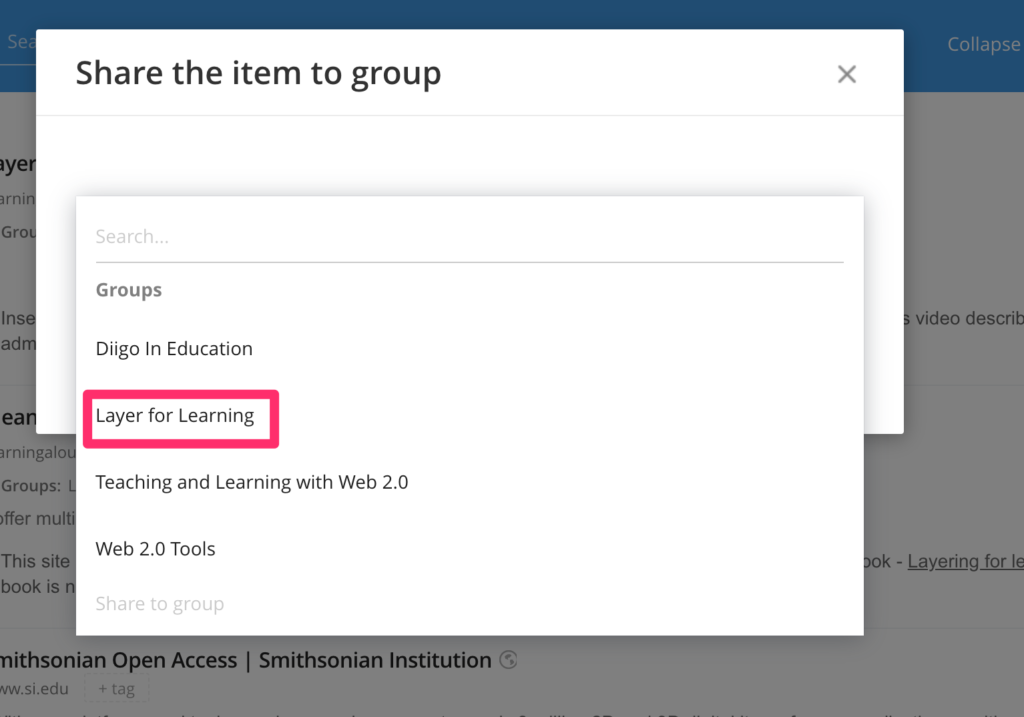
It is possible to create a group without contributing bookmarks, but it makes the most sense that to get a group started that you add some of your own bookmarks. To do this, you locate appropriate bookmarks in your personal collection. In the upper right-hand corner of each bookmark will be three dots. Clicking on these dots reveals options and among them is the share to group option. Select the group and members of the group will be able to view the bookmark you have shared.

Sharing access to the group collection

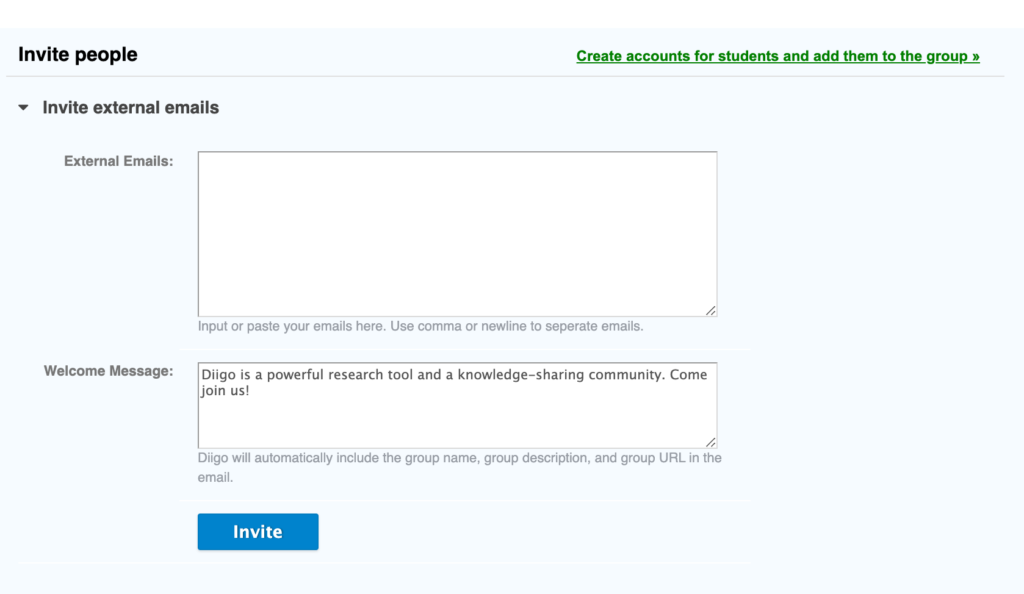
You may want or have to designate group members through invitation. As I mentioned at an earlier point, this is necessary if you are using a free account.

If you have a public group, you can share group access by providing others with the address. For example, I have created a group I will maintain if others find it interesting and add their own bookmarks. The group was created to explore what I describe as layering services. A layering service is a service that allows the annotation, highlighting, and addition of other elements to existing online content (web pages and videos) created by others. Layering offers a way for educators to take advantage of existing resources and add elements that improve the effectiveness of these resources for instructional purposes. Try https://groups.diigo.com/group/layer-for-learning.

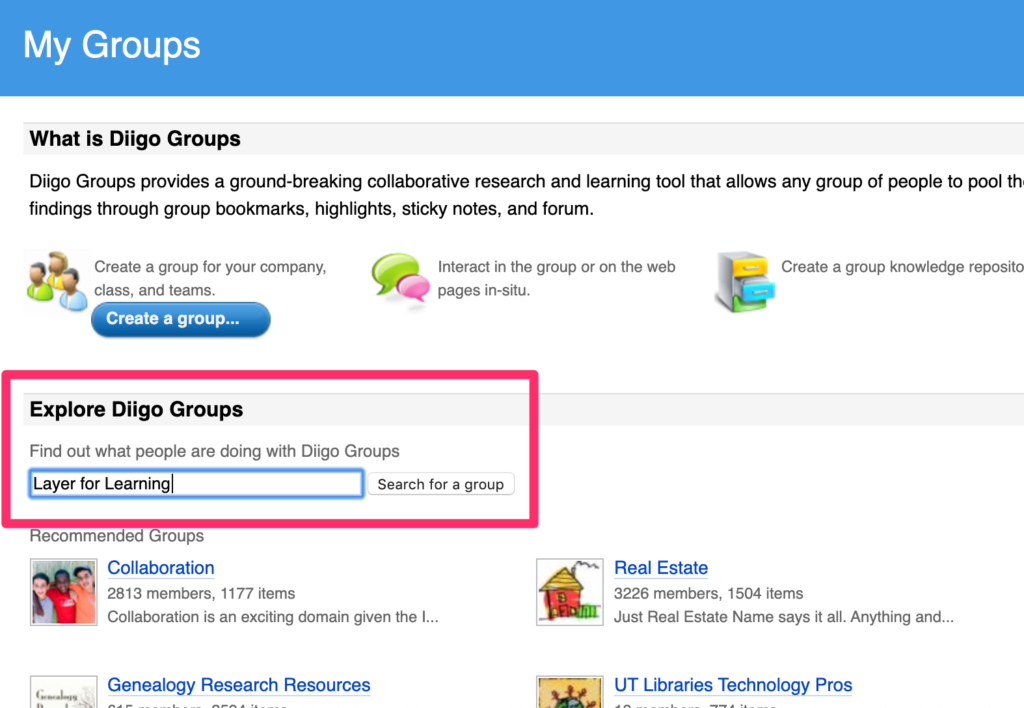
As a Diigo user, you can also search for existing public groups that may interest you. These groups may require the group manager to approve your access or may just let you explore.

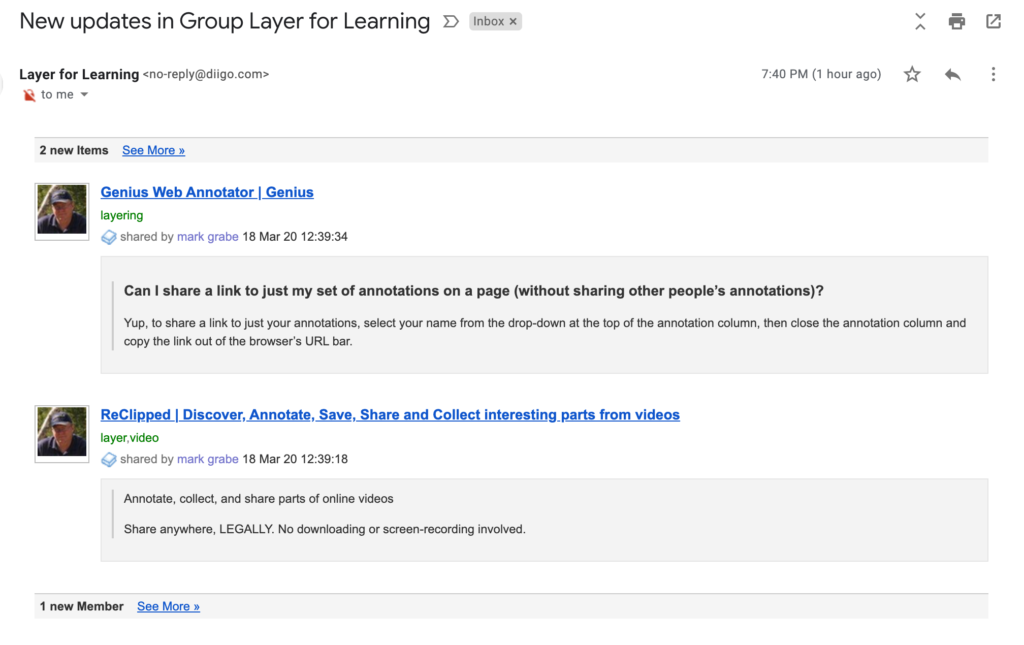
Membership in a group may include a weekly email identifying new contributions for that week.

Loading

My Zoom Tutorial

Most tech folks have created a Zoom tutorial for teachers who might need to learn the Zoom basics in case or because they must transition to distance learning. Tech companies are really stepping up to offer free services to educators and this is the case with Zoom.

Use this link as an educator for access to the full capabilities of Zoom.

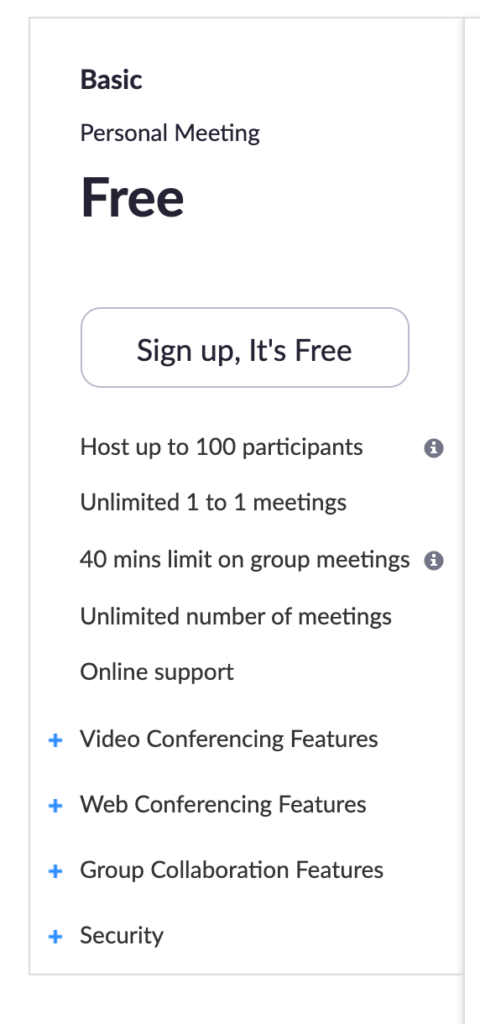
The free basic plan is enough for many applications.

Loading