This is a follow-up to an earlier post that concerned my attempts to implement the Karpathy Wiki strategy based on raw notes in Obsidian using local AI. Since that post, I have tried several AI models and ran the complete ingestion and wiki setup based on approximately 150 notes to completion without the weird inclusions I described in my initial post (Note: I will describe what I think was responsible for the unwanted inclusions at the end of this post.) The process required my Mac mini to run for approximately 26 hours. I have now reached the point I have opinions about whether the continually improving Karpathy wiki can deliver the type of insights my writing goals require.
I did not make use of my entire Obsidian note archive, and for the local setup I have, this appears necessary. This insight is consistent with other advice I have read concerning local setups, which recommend creating multiple Obsidian vaults if a user wants to address multiple categories of notes.
The focus of the Karpathy application I have been working with concerns notetaking approaches and issues. To reach conclusions regarding whether a wiki generated from my notes would satisfy my writing goals, I focused on the topic of whether handwritten notes are superior to notes taken on a device. I don’t know exactly, but I would guess maybe 30 of my notes would be relevant to issues associated with this topic. I have highlighted and annotated quite a few journal articles on this topic so what I describe as a note could contain several pages of material. I selected this topic to evaluate the Karpathy model because research on this topic seems to be inconsistent and I typically try to make arguments to explain the differences based on my analysis of the methodology of the studies. So, for example, in a vault containing many articles about note-taking, I might want to first identify those articles focused on keyboarding vs. handwriting, summarize the results, and, because I know differences exist in the way the researchers have reached conclusions about their results, investigate nuances in the research methodologies that might be responsible. It is likely that second brain approaches must vary with the eventual goals users are likely to pursue. My interests require relatively deep analyses rather than a focus on a shallower topic such as what is the general consensus of those who conduct research in this area. I did include annotations on the articles included in the exported notes, and it turns out that an important issue is whether a sense of my questions about article conclusions are reflected in the wiki content. You don’t really know when building a second brain what goals you may want your second brain to help you address a couple of years later. This seems a critical consideration when committing to the activity. Even if hints of where to look if different goals emerge, one would hope there would be a way to at least find the relevant source material stored in the second brain.
I can see several options. I could use my tags to find note-taking studies that involve handwriting and keyboarding, then reread my notes and possible sections of the original articles to add tags and perhaps generate a written study. Obsidian alone would provide this opportunity and a wiki summary would not be necessary. I could use a tool that has an embedded AI capability (say Mem.Ai, NotebookLM, or Recall.ai) to query the same collection of notes to see if I could find an efficient way to accomplish my task. I could apply an AI tool such as Claude, which I have been using in my Obsidian note system as a plugin and pay the token charges associated with the Claude API. I could create a Karpathy-type wiki to preprocess my notes and then search the wiki using AI (in my case, Ollama so I can run the AI locally) because this approach is being recommended as a way to avoid the typical RAG approach of ingesting large collections of notes with each new investigation. So, it seems there are categories of approaches that exist on three levels.
I understand that any effort to compare these approaches that may be labeled as note organization and preprocessing, RAG AI applied to the raw notes, and AI applied to the output of a Kaparthy wiki AI preprocessing is oversimplified and ignores differences in the cost, sophistication, and design of the different systems. However, on a personal level requiring me to use my own finances and relevant knowledge, I have at least differentiated several approaches, applied the same approaches to the same original content using the same information goals each multiple times, and generated some impressions. These are the impressions I offer here.
The issue with RAG seems to be cost and time to ingest the content the system users want to query. If I am committed to an extended examination of content to achieve a purpose — say, write a blog post I might ingest designated materials and then apply multiple prompts within the same session to find the approach and the output that allows me to achieve my goal. I have found this to be efficient and the costs manageable because the large number of tokens to ingest is expended once and the much smaller number of tokens to query several times. When I want an approach that may involve addressing many different goals over an extended period of time, the multiple ingest costs focused on the same content encouraged my interest in developing a “wiki” as a permanent intermediate step in getting from my original content to working to achieve my goals.
I admit that I don’t know the details of how the category of note use I have described as intermediary works. Some results of processing appear to be persistent. I upload my notes once and then can prompt these notes repeatedly multiple times per month for the same cost. I know these services save my previous uses of these notes because I can review previous prompts and results. My differentiation of this category from the type of RAG system a Karpathy wiki argues is inefficient is based mostly on the argument that a wiki solution is a useful innovation. It is unclear to me why the intermediate approach I describe is not preferable to what Karpathy proposes. I have to leave this issue for the time being. My point here is to identify what I see as the existing categories. I certainly welcome comments if readers can provide additional clarity or a correction to my speculation.
The Karpathy Wiki
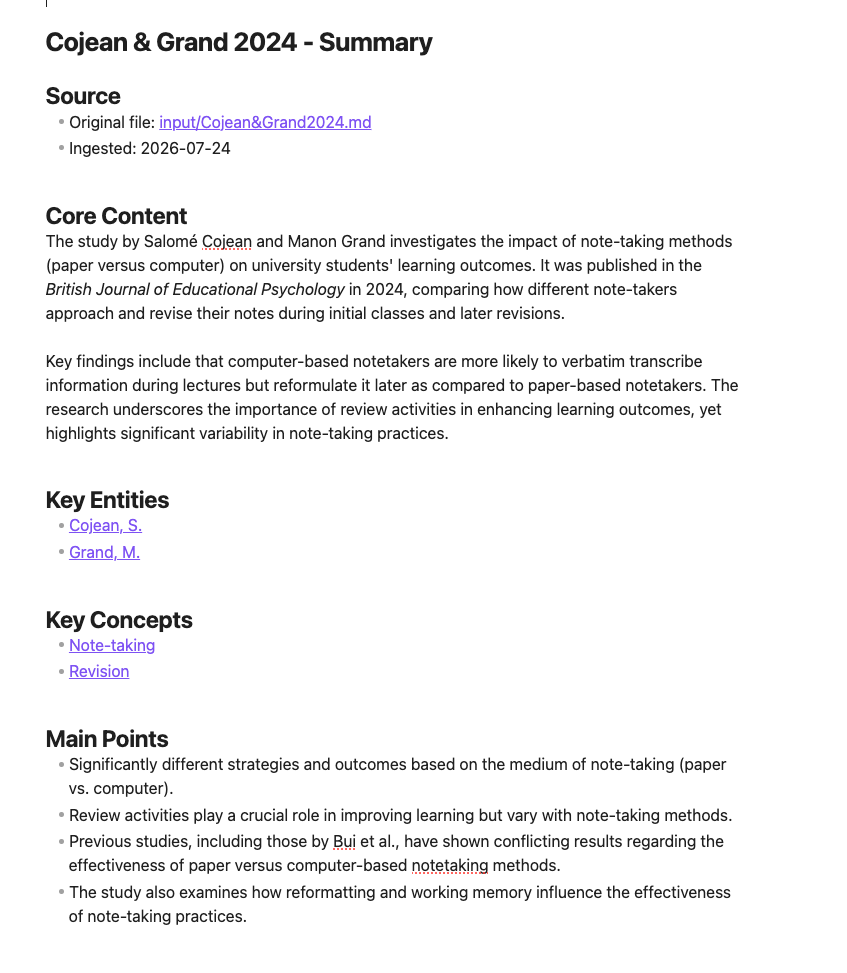
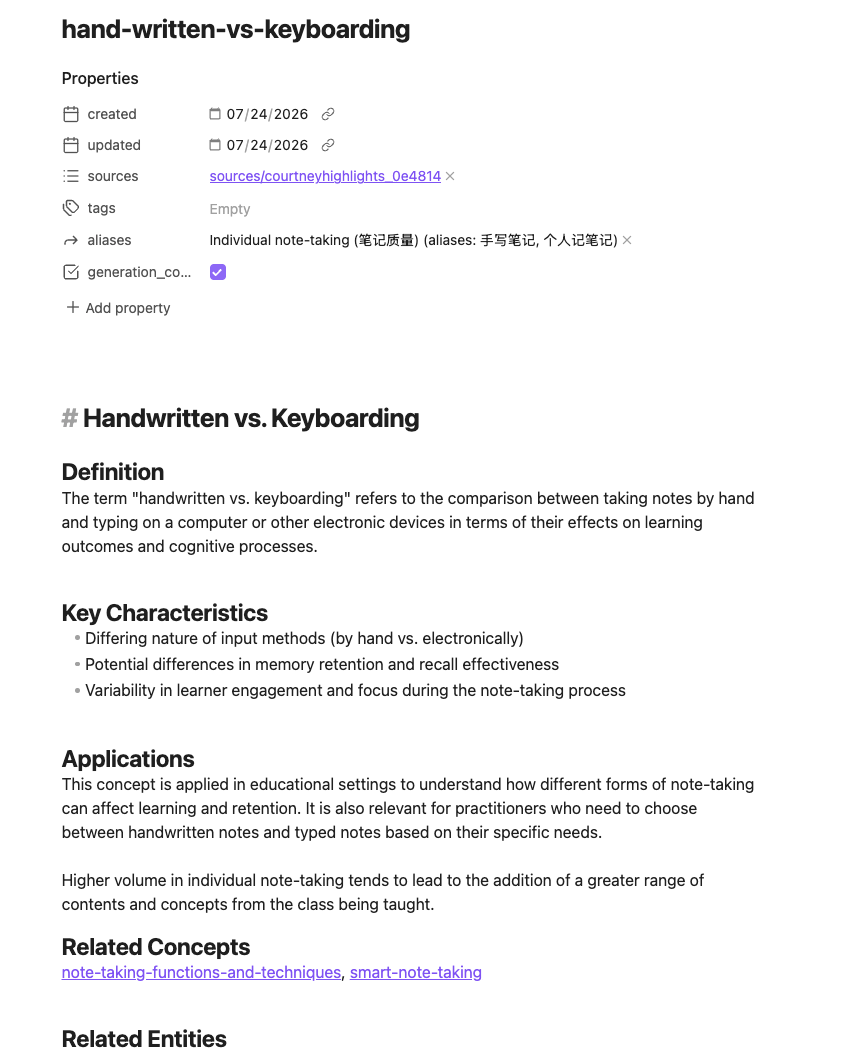
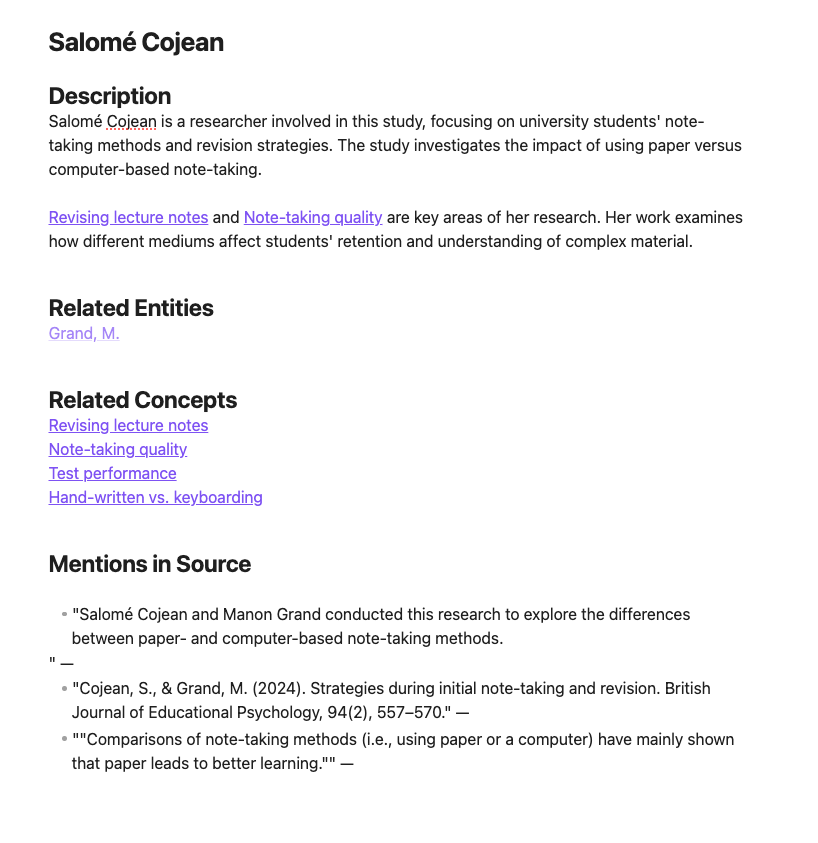
The several scripts I have used to guide the creation of the Karpathy wiki have all generated three categories of documents: sources, entities, and concepts. I have included an example of each below, using examples that I hope you will see as related.
The sources are what I would describe as abstractions or summaries of the input files. Source is an unfortunate label, in my opinion, because it is not the original; it is based on the input and created by the AI.
An Entity is a specific “thing” or “noun” — a discrete object with a name. In my situation, these might be the names of the researchers who wrote the original articles I read, their institutions, or perhaps the name of an online service or a technique I included in the input I provided.
A Concept is an abstract idea, a theory, or a methodology. It is interesting what the AI identifies as a concept. For example, “note-taking” and “note-making” are included as concepts because the terms appear repeatedly. Computer notes and handwritten notes are also listed.
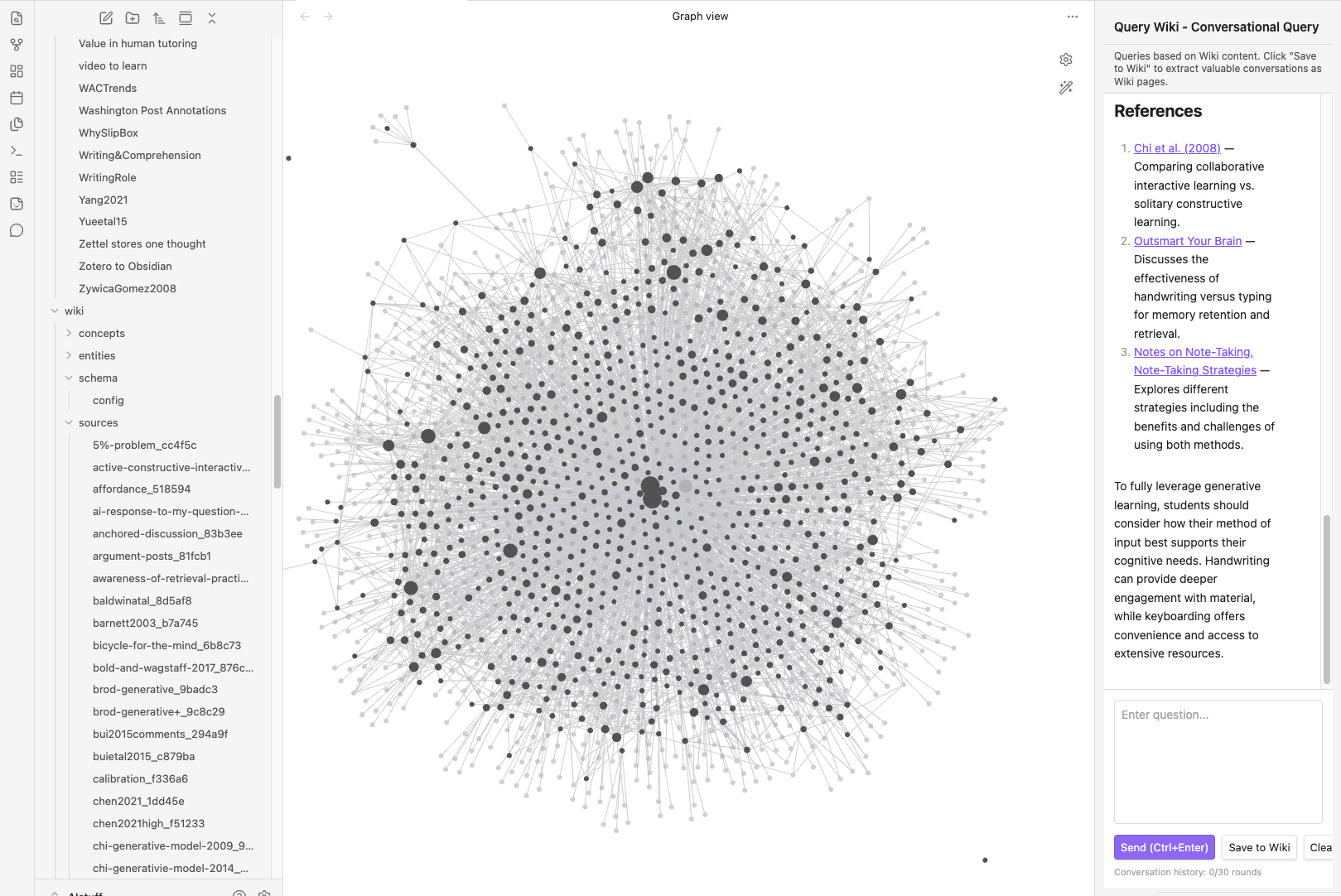
These components are all cross-referenced within the wiki, and the links accumulate as additional raw inputs are processed. For example, an author (entity) may be connected to multiple sources, each based on a different journal article that the individual worked on. A concept may be connected to the work of several authors, or to those prominently mentioned in several inputs, and to different concepts mentioned in individual or multiple sources.
Source
Concept
Entity
Reactions
I have tried to select examples from each of the wiki categories that fit the goal I am using as an example. You can see that “hand-written vs. keyboarding” appears as a concept and relevant studies and researchers were identified from the input materials to appear in the wiki. There are mentions of differences in methodology associated with areas I believe are important (e.g., what can be gleaned from stored notes over time). Given that I have an existing opinion about this body of research and have an opinion on how the reported results may be misleading, I can find elements in the wiki I could use at least to get back to the more detailed original notes and to the full original articles. A more important issue for me is whether this would have been the case should investigating this possibility have been a new interest and not a perspective I had when creating the original notes.
Finally, exactly how the wiki is to be used seems to be based on a different approach. I understand Karpathy to focus on applying AI queries to the wiki content so you don’t have to take the typical RAG strategy of ingesting all of the raw material each time. I have included the return to two AI queries asking the same question — one using the RAG approach and the second using the wiki. I have decided that both would have given me a starting point for investigating why the results of research on the topic of interest varied, but I would likely have used the wiki-based results to prompt a RAG query because of the much greater detail of the RAG approach. More relevant research was identified than was found in the wiki approach and the analysis in the RAG-based approach is far more detailed. Across many writing tasks, this combination would have been efficient. Again, the two outputs I am asking you to compare both started with exactly the same collection of notes. These two prompt responses have been included as appendices.
Final comments on setting up the Karpathy wiki using Obsidian and Ollama on my Mac mini.
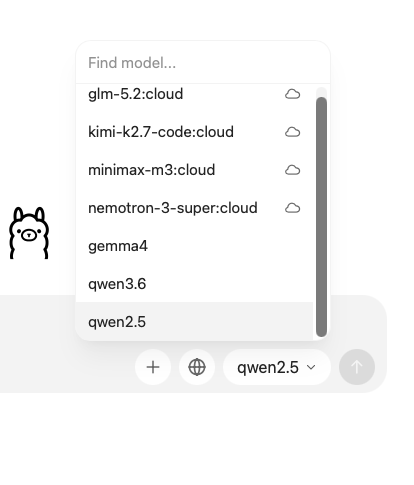
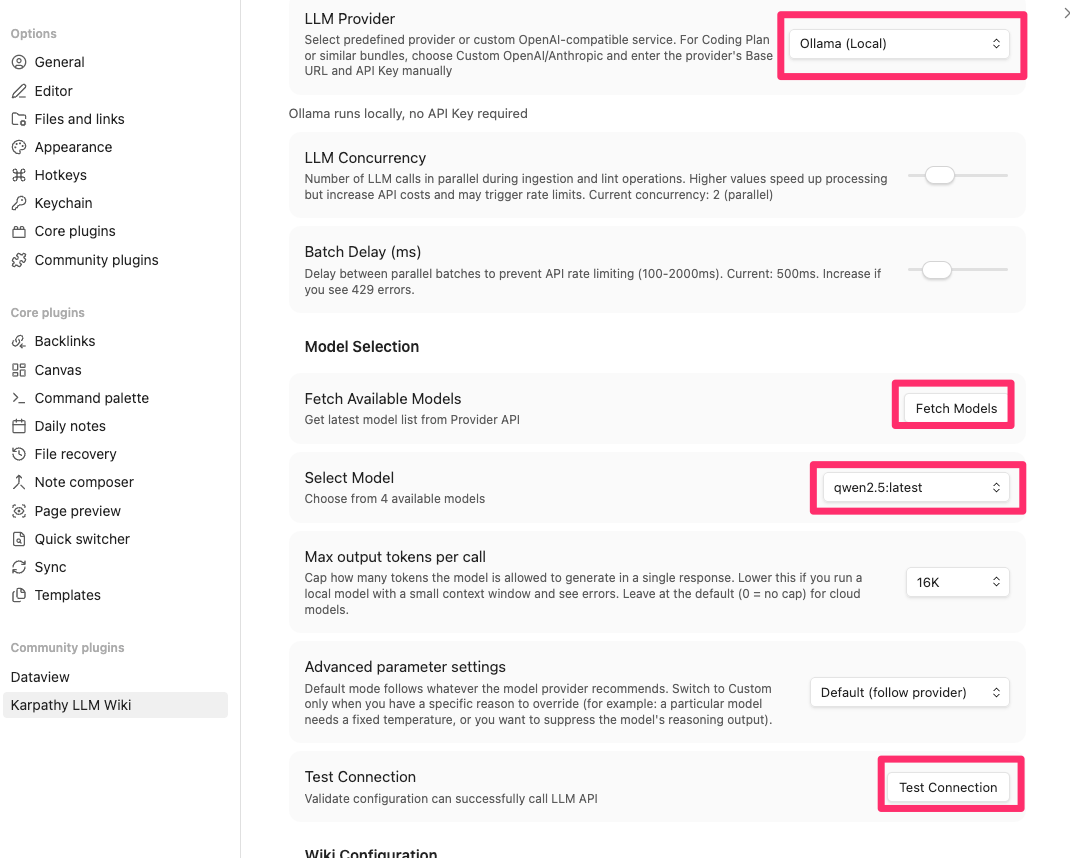
I identified the issues that resulted in the unintended content described in my initial description of my experience. These issues were fixed by clean installs of both Ollama and Obsidian (with plugins). Both Ollama and Obsidian generate JSON files that, once established, influence future efforts. In my initial explorations and false starts, I created issues that required a clean start.
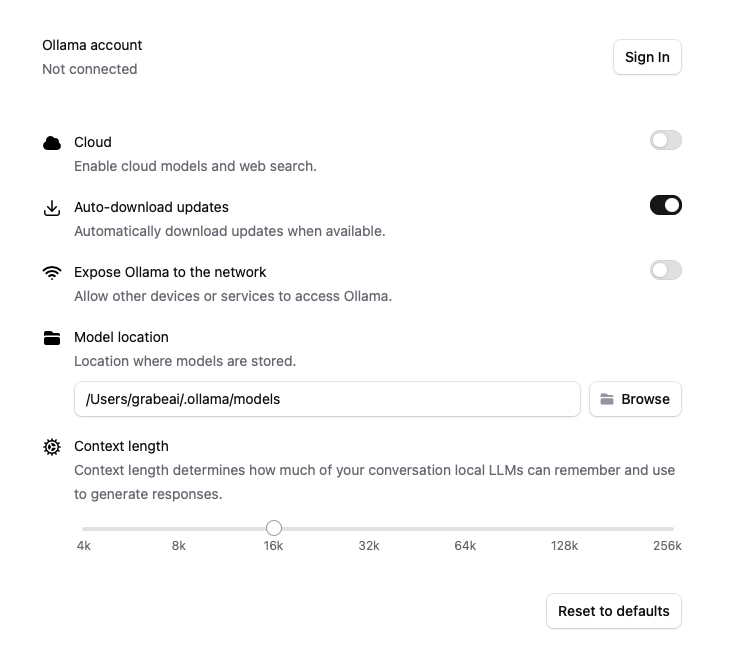
The second issue is more embarrassing. Installing Ollama added a way to set specific features I did not notice that appeared at the top of the Mac screen. Settings I did not notice were easily identified when taking advantage of what this option displayed. I now believe it is possible that the default setting allowing access to the Internet provided a way for Ollama to find concepts and entities related to the notes I knew were not from my notes. Anyway, this was easy to block and things worked perfectly when I got rid of the JSON files and changed this setting.
Appendices Output based on the Karpathy Wiki
The research comparing handwritten notes with those taken on computers has yielded varying results, which highlight different aspects of cognitive processing and learning outcomes.
Handwritten Notes
- Benefits: According to the journal summary The effects of writing on learning in science, social studies, and mathematics: A meta-analysis (citation [[WIKI_FOLDER/sources/notesvextended_e62af5|The effects of writing on LSSM learning]), handwriting notes can enhance conceptual understanding and retention. This is because the act of handwriting involves a higher level of cognitive processing which aids in deeper engagement with material.
- Empirical Support: A study by Luo et al., highlighted in Repetition of Input and Notes (citation [[WIKI_FOLDER/sources/repetition-of-input-and-notes_7e2f6d|Repetition of Input and Notes]), suggests that repeated read-throughs enhance recall when notes are reviewed, suggesting the benefits of detailed note-taking.
Computer-Notes
- Benefits: According to Repetition of Input and Notes (citation [[WIKI_FOLDER/sources/repetition-of-input-and-notes_7e2f6d|Repetition of Input and Notes]), typing notes can be more transcription-oriented, which may not encourage the same level of cognitive processing as handwriting.
- Challenges: A key study by Luo et al. (2018) found that longhand note-taking was more generative during review compared to laptop notes, which tended to be more superficial and less effective in fostering deep learning (citation AI response to my question challenging the Luo study that assumed the notes themselves could not result in generative activity).
Note Modification
In Conclusion
The evidence indicates that while handwriting may offer advantages in deep cognitive engagement and memory retention, typing notes on a computer can equally enhance learning outcomes if supported by effective note-taking strategies and subsequent revisions. The key difference lies in the type of engagement required during the initial note-taking process-handwriting encourages more direct mental involvement compared to laptop note-taking.
References
- The effects of writing on LSSM learning — The impact of various writing-to-learn activities.
- Repetition of Input and Notes — Effects of repetition on recall with note-taking.
- AI response to my question challenging the Luo study that assumed the notes themselves could not result in generative activity — How note modification strategies can counter the conclusions of Luo et al.’s study.
Output from RAG input of all notes
Hand vs. Keyboard Note-Taking: What Your Notes Show
Your notes contain extensive coverage of this topic across multiple studies.
Here is a synthesis of the key findings:
The Foundational Study
The landmark study by Mueller & Oppenheimer (2014), documented in Pen is mightier than the keyboard, found that keyboard users recorded more content but that longhand note-takers performed better, particularly on conceptual understanding items. In Study 3, which included a week delay with note review, differences favoring handwritten notes emerged specifically when review was allowed.
The Generative Processing Explanation
Several of your notes describe the primary theoretical explanation for a longhand advantage. Because typing speed (~33 wpm) exceeds handwriting speed (~22 wpm), as noted in transcription speeds, longhand note-takers are forced to summarize and paraphrase rather than transcribe verbatim. This engages generative processing-connecting new information to prior knowledge and reorganizing ideas-which promotes deeper learning. As described in Luo, Linlin, Kenneth A. Kiewra, Abraham E. Flanigan, and Markeya S. Peteranetz2018:
“Laptop note takers had a transcription orientation and recorded mainly verbal information… whereas longhand note takers had a generative orientation and used a combination of verbal and spatial note-taking strategies.”
The Luo et al. (2018) study further found that keyboard users recorded fewer visual notes (charts, graphs) and that the process function was more important for keyboard notes while the product function (review) was more important for longhand notes.
Contradictory and Nuanced Findings
Your notes reveal that the research is far from settled:
- The 2022 Meta-Analysis (2022 Notetaking Meta-Analysis) by Voyer et al. analyzed 36 articles and found no overall effect for notetaking approach. The authors speculated that studies showing a longhand benefit may have been confounded by distraction opportunities on digital devices.
- Urry et al. (2021) (Urry.et.al) replicated Mueller & Oppenheimer and found inconsistent results. Laptop users took more notes, and more notes were related to better test performance. Importantly, Urry differentiated quantity from verbatim overlap-quantity was positively related to performance while proportion of verbatim overlap was negatively correlated.
- Note completeness research (NoteCompleteness) challenges the longhand advantage by showing that the volume and completeness of notes influence retention. Bui et al. (2013) found that students with access to more complete notes (as produced by keyboards) demonstrated better performance, directly contradicting the Mueller & Oppenheimer interpretation.
The Revision Factor
Your notes highlight that the comparison changes substantially when revision is introduced:
- Flanigan et al. (2023) (Flaniganetal2023) found that among note revisers, longhand note-takers added three times as many complete ideas during revision pauses as computer note-takers, and scored more than half a letter grade higher on posttests. However, the advantage emerged primarily through the revision process rather than initial note-taking alone.
- Cojean & Grand (2024) (Cojean&Grand2024) found that computer note-takers were more likely to reformat their notes after class, suggesting they compensate for shallow initial encoding through later revision-a finding that complicates simple hand-vs-keyboard comparisons.
Research with Children
Your note childrennotes describes Horbury & Edmonds (2021), which is notable as one of the few studies with children (ages 10–11). They found conceptual understanding was superior when taking notes by hand, but unlike adult studies, there were no significant differences in the amount of content recorded. The authors speculated that children’s lesser keyboarding experience may have produced greater cognitive load when typing.
Critical Perspectives from Your Notes
Your notes contain several important critiques of this research area:
- The generative argument has a logical flaw: As you note in transcription speeds, the logic assumes “a strange lack of awareness on the part of the learner. It would seem that the keyboarding learner is oblivious to the benefits of generative processing and goes with what is easier, but less effective.”
- Modification can equalize outcomes: Your AI response to my question challenging the Luo study that assumed the notes themselves could not result in generative activity argues persuasively that generative processing can be shifted to the review phase, that laptop notes provide a richer base for modification, and that laptop affordances enable superior reorganization. The conclusion: “The medium matters less than the strategy.”
- Ecological validity concerns: Multiple notes flag that most studies use brief delays and immediate testing, which differs significantly from actual classroom conditions where review may occur days or weeks later (Luo, et al 2018, Flaniganetal2023).
Summary
| Finding | Support |
| Longhand produces more generative/paraphrased notes | Consistent across studies |
| Keyboard produces more complete/voluminous notes | Consistent across studies |
| Longhand leads to better learning outcomes | Mixed—meta-analysis shows no overall effect |
| Note completeness predicts achievement | Supported, which favors keyboard |
| Longhand advantage strongest with note review | Supported in some studies, not replicated in others |
| Revision can compensate for shallow keyboard encoding | Supported by modification research |
The overall picture from your notes is that the hand-vs-keyboard question is far more nuanced than popular accounts suggest. The medium matters less than the strategy the learner employs, and the opportunity for revision and post-processing may be the most important factor in determining which approach is more effective.


You must be logged in to post a comment.