I haven’t provided any additions to my “layering” posts for some time, but I have found another option that works very well. Just a review – layering is my way of describing tools that allow a user to add elements (annotations, highlights, questions, prompts) to existing web pages and videos. My Kindle book about this topic is focused on those services that work with online content without the user having to download and store this content. This capability has important copyright implications. I offer a description of several such services you can review without purchasing the Kindle book.
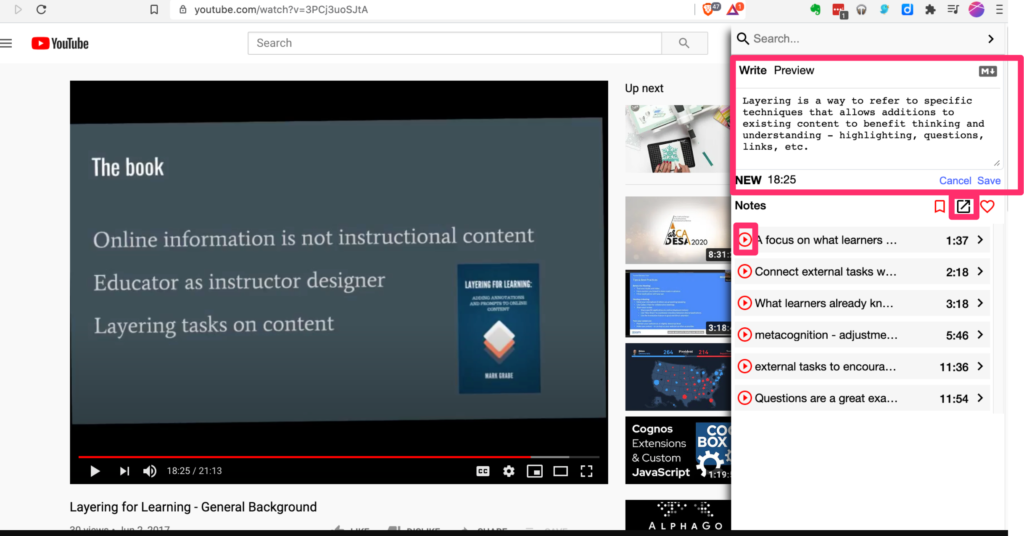
Here is the process for using YiNote. After connecting to a video source, you activate YiNote from the menubar. The combination is shown in the following image.
In this image, you see the video on the left and the YiNote window on the right. The WyNote window contains a space for taking and saving a note at the top (red box) and links to notes already taken beneath. The export icon (red box above note links) provides access to the full collection of notes and the tools for exporting these notes. The play icons to the left of note links (first one is enclosed in a red box) will return you to the time stamp associated with that note to replay the video from that point.
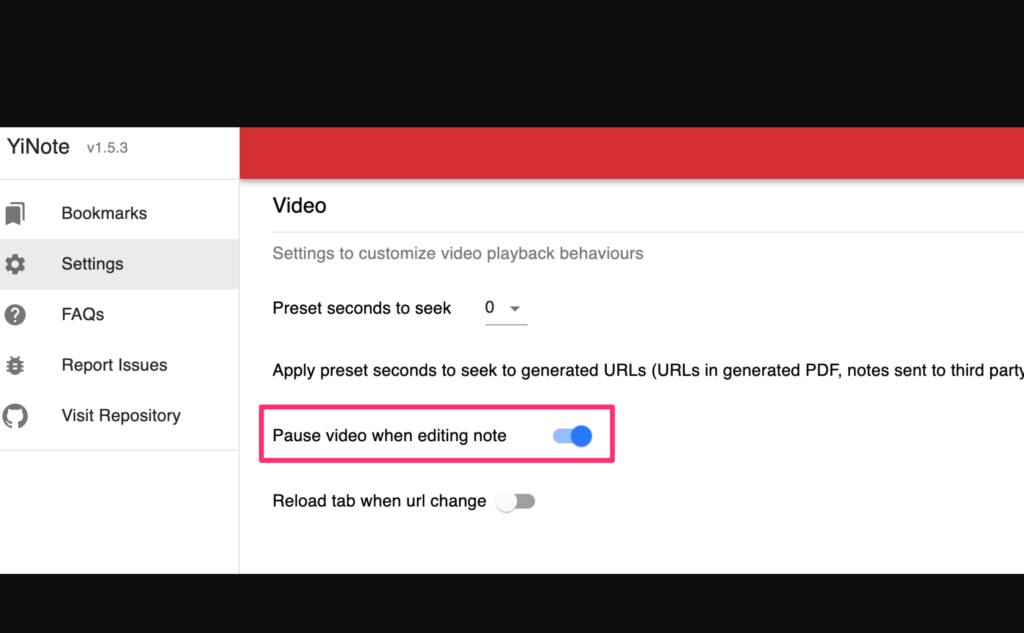
One suggestion for setting up YiNote (see settings icon which is the typical gear). Set the option that stops the video as soon as you click in the window to add a note. An advantage of taking notes with this tool instead of on paper or with another digital tool is this easy way of stopping the video so you can concentrate on adding a note. No need to dual task overloading working memory.
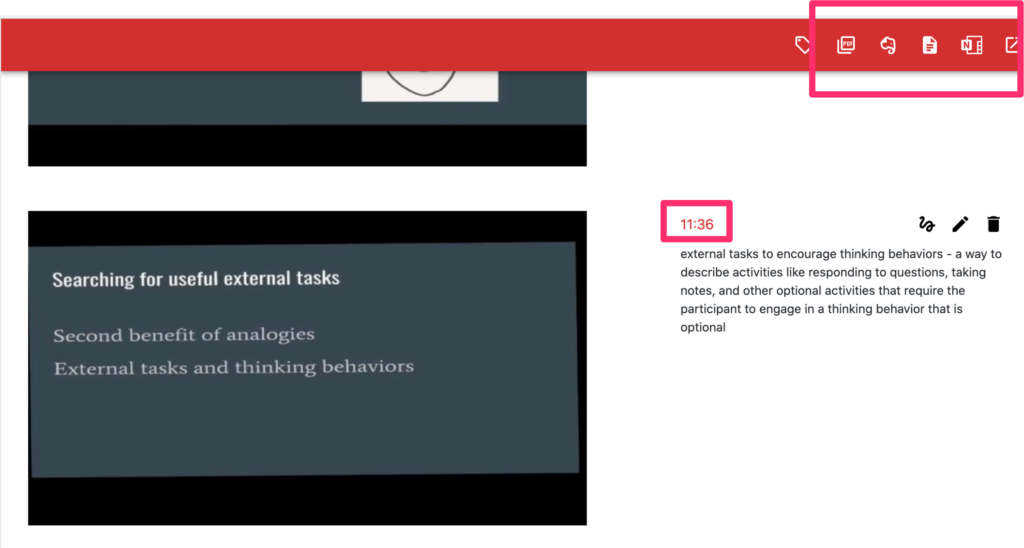
The page for exporting notes looks like this. At the top of this window are the icons for several different export options (red box).
The saved content includes a screen capture from the video, your note, and the time stamp. The time stamp is active (red box) and clicking this icon will return you to the video at this point. Note that typical behavior would involve taking a note AFTER you have heard material so the time stamp will get you to the approximate location in the video you want, but you would have to scrub back a bit to review.
One of the options for storage is a pdf. I probably wouldn’t store my notes as a pdf, but I included this file here so you can see what stored notes look like. Again, the pdf contains active time stamps that should allow you access to the video.
Back in April I started a project that I decided to conclude today. The project was an effort to experiment with solar energy and energy consumption. I promoted this project as an example of what educators might find a way to explore both electricity and clean energy.
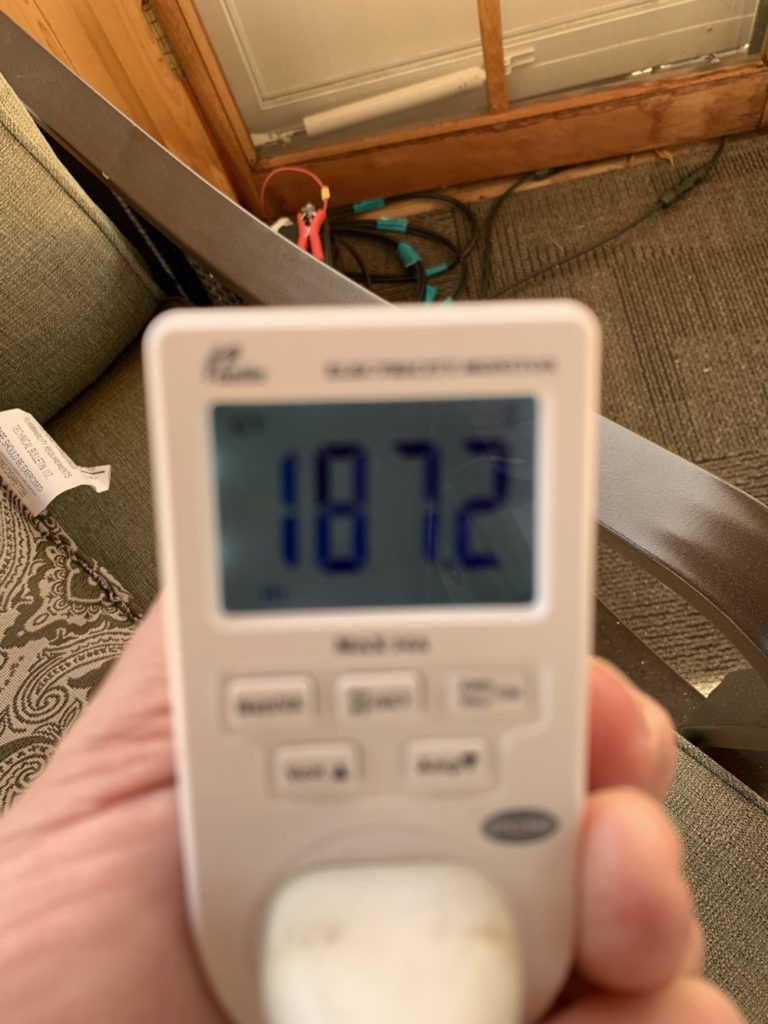
Here is a brief overview. I have a gazebo outside my house and I like to read and write in this structure when the temperature in Minnesota permits. Some years ago I purchased a solar panel and the equipment necessary to save the power generated from this panel to a battery and convert the DC to AC for use. I did very little with the equipment, but in April I purchased a device allowing the recording of the amount of energy flowing through an outlet. I decided to make use of my solar equipment to power my laptop and Amazon Echo when spending time reading and writing in this gazebo. The details of the equipment are described in the initial post.
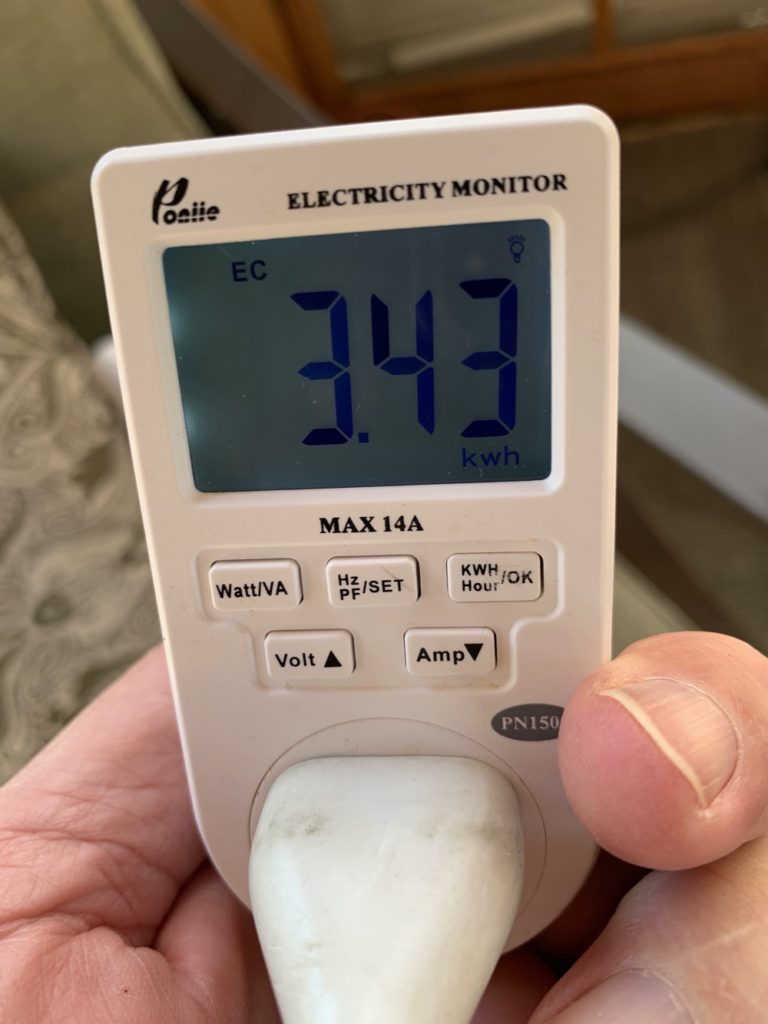
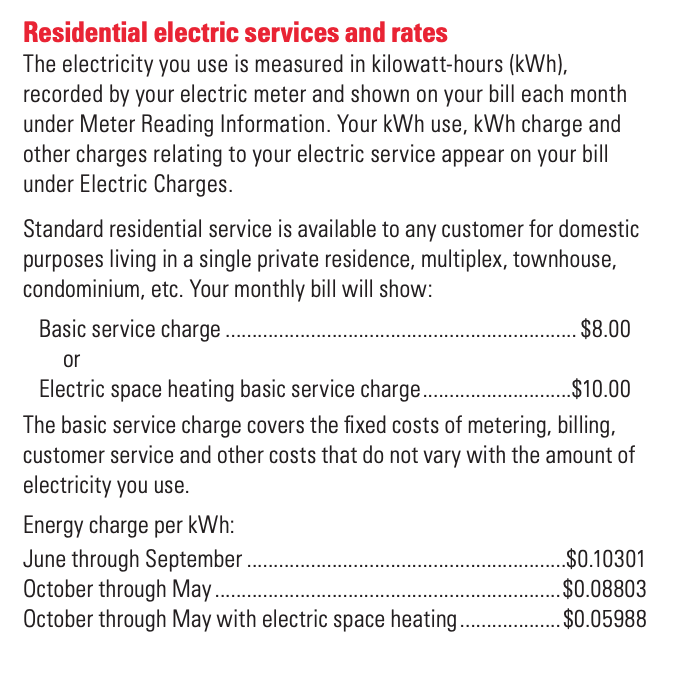
Today, I took the final readings to conclude the project. During the 187 hours I spent in the gazebo, I used 3.43 kilowatts of energy. The value of this electricity is about $.35. Laptops and the Echo are inexpensive to operate.
Cindy and I have been writing textbooks since 1996. Our main book “Integrating Technology for Meaningful Learning” was our first effort and we have been updated it since then. When the Internet became a potentially useful opportunity for K12 classrooms we wrote “Integrating the Internet for Meaningful Learning”. This second book was integrated with our first book in the third edition. In between, we wrote a version of the original book as a scaled down Primer that was shrink-wrapped with other educational textbooks for a small increase in price.
We wrote 5 editions of our textbook with traditional publishing companies – first, Houghton-Mifflin, then RiverDeep, and finally Cengage. The college textbook market has been consolidating for years with collections being sold to other companies and companies specializing in fewer areas. College textbooks are very expensive to develop with editors, market analysis, marketing, etc. and very expensive to sell as a consequence. Our fifth edition was sold for $140. Our books were always successful, but the “technology for teachers” courses are small. Fewer competing books, but a much smaller market compared to large introductory courses (Intro, Developmental, Educational Psychology in my general area of instruction).
As we were in our fourth edition, we began to imagine a different approach better suited to the niche for our books, insights into the process of writing textbooks in an area that changed very quickly, and what was beginning to build as a backlash to the cost of textbooks. We began pushing a model that consisted of a Primer, online resources matched to the Primer, and something I described as an “interactive syllabus” to tie a course together. I called it the $29 textbook project and argued educational technology would be a great course for a company knowing the future was going to move them away from the traditional book and the traditional development model to learn from a project targeting a market already interested in technology in education. At $29, we would share any risk as the authors’ cut of $29 is very different from $140.
Our proposal was based on logic aside from just the cost. Because the field of educational technology was moving so fast, the traditional three-year revision cycle was a very real problem. Authors don’t know if another edition will be allowed until maybe the end of the second year of each cycle. The author must then revise the book in approximately 6 months so that the book can go through the revision and review process and be printed to be advertised toward the end of the 3rd year. There are multiple frustrations in such a schedule. The time from the end of the author’s work until the release of a new book is probably nine months and the major periods of adoption are the second semester of the first year and the second year of sales for a cycle. Any advances in the field during this period of time are not part of a book put into the hands of students. We had multiple experiences describing a technology product that was discontinued or renamed and sold by a different company by the time the book was released.
The wait, wait, rush model does not work for authors and in my opinion results in shallow modifications. The most creativity and deep background research tends to be involved in the preparation of the initial product. I believed authors could continue to work toward additional editions continuously, but our expertise and daily work tend to take on a far narrower focus than is ideal in writing a book for a course covering a broad area. The idea in the $29 model was to pay authors a small amount (similar to the advance for first editions) to write continuously and make this content available immediately online possibly to be integrated in the next edition. This would offer learners an improved and less dated experience and offer authors the opportunity to remain active and keep exploring.
The idea of an interactive syllabus might make the most sense if you imagine it as a web site created with a product such as Google Sites. Google Sites simplifies the development process allowing development with limited learning time. The instructor controlled syllabus created in this fashion would allow the instructor to structure the student experience taking advantage of resources the instructor could piece together and provide access to these resources through links. I tend to see this resource based on the structure of the textbook, but this would not be necessary. If an instructor did use the chapter of a textbook as the base structure, the instructor would then link to any of the online resources provided by the textbook company the instructor felt suited her class and would link to other sources as well. Picking and choosing among web resources allows flexibility and keeps the size and price of the Primer down. There is an efficiency and flexibility here not possible with a large and expensive textbook.
Anyway, this is getting pretty long but identifies the major components of the commercial model that interested me. We explored the possibility of some version of this model with Cengage during the sales of our 5th edition and for a couple of additional years beyond the normal run of this edition. We never did reach the point at which anything we discussed was actually implemented. We were interested enough in our vision (this was latecareer so I had different motives than might have been the case in a junior faculty member). We finally decided we could not get to a way to implement some version of the $29 plan and Cengage gave us back the copyright for our book (both the company and the authors share copyright for textbooks).
I began implementing a version of the proposed model based on a Kindle ebook (for the Primer). This was not my first experiment in offering a book-type online resource for the undergrad education student. When wikis kind of caught the fancy of the education community, I developed a wiki I called “Meaningful Learning and the Participatory Web”. I was not using the wiki as a collaborative writing space, but I wanted the experience of developing and hosting a wiki (I operated my own server). I made use of MediaWiki the same software used for Wikipedia and used this wiki in a grad course I taught and offered it to other instructors. A more traditional web-based of this project still exists.
We have a functional model of the $29 dollar textbook, but the Primer costs $9 as a Kindle book. The web resources are available from the same server that provides this blog. The Google sites interactive syllabus exists when I teach a course for which the book is appropriate. I have always known that selling a book without the door to door salespeople and the free examination copies textbook companies provide is tough to compete with. College instructors don’t go looking for resources. They wait for someone to come to them or explore the book vendors when attempting academic conferences.
There is a lot of inertia when you have an existing book. The “wiki book” experiment received attention because of our traditional textbook. Web content we developed originally received attention because of our traditional textbook. I had hoped that this same and expanded collection of web content would work in the opposite direction with the Kindle book. It doesn’t seem to have worked in this way. A few instructors seem to have adopted the Kindle book, but are not assigning much of the web content. We also seem to sell singles of the ebook and I had assumed we would get adoptions for more classes. I have never added a traditional paper book to the ebook which Amazon makes fairly easy. We had assumed that a “teaching with technology” resource would make the most sense requiring learners to learn from a digital resource. So, there are a few things I understand about this experience and some things I still don’t.
I intend to continue my little experiment and receive enough attention to keep going. College instruction is difficult to change and I still think the course type I have worked on for so long is likely to play a role in this change. I continue to promote the model I am trying to develop and I do see some movement in the model of traditional publishing companies. Books are still too large and too slow to change, but ebooks options are fairly common. There is some increase in web-based content such as book-related videos and maybe study guides, but the traditional approach still lacks the flexibility I think is quite practical, Textbooks still costs far too much. I don’t intend to work for a textbook company again, but I understand the financial problems that plague the textbook market and I appreciate the level of support you receive (editor, photographer, paid reviewers, marketing) as an author. Part of the impetus for change is going to have to come from educators who in this case are the decision-makers when it comes to making decisions for their courses. There seems more interest in open educational resources (OER) which I just don’t see ever getting very far (have already written free learning resources) than in exploring and pushing for more options from textbook companies. I guess we will see.
I admit this a kind of click-bait title, but I paraphrased it from a source arguing that far too much ELA time is spent on comprehension skills. I did end the title with a question mark.
The article divides the development of reading skill into two pretty much sequential components – decoding skills and comprehension skills. I agree. The article does not argue that attempts to teach comprehension skills should be completely abandoned, but rather claims that these stepping stone skills are emphasized too much because the key to reading comprehension is really the development of existing knowledge. Again, I kind of agree and suggest that this research supported argument is under-appreciated by many teachers and is lacking in the understanding of such important issues as the struggles of lower SES kids in developing core academic skills.
The position taken by the authors reminds me of a post I generated just a few days ago concluding that increasing time spent in social studies at the elementary school level is more important in developing reading proficiency than variations in the time spent on reading instruction. The logic explaining this finding is that of the typical elementary subject areas, social studies is the area that best covers what might be described as general knowledge (e.g., in constrast to the specialized knowledge and vocabulary of science). Understanding what we read is heavily influenced by what we already know about a topic and general knowledge is, as the term implies, general meaning it applies more widely. Hence, it seems wrong, but possibly counterintuitive to many, to steal time from social studies to emphasize STEM. Develop learning skills first and then allow opportunities to turn these proficiencies loose on topics of personal interest.
Given the complexity of the news environment at this moment, even technology enthusiasts may have missed the massive (400+ pages) report focused on alledged anti-competitive practices of Amazon, Apple. Facebook, and Google. Four hundred pages is a lot to read, but there is an executive summary and sections on specific issues and the individual companies that may be of interest.
The report is titled – Investigation of Competition in Digital Markets. To be precise, this is the house majority report (Democrat). Party animus being what it is, the minority members of the committee may offer their own commentary. The minority wanted some issues such as their claim that conservative issues are disadvantaged by algorithms that do not appear in the report of the majority. I am also not certain that this claim can be objectively demonstrated.
I would describe the general tenor of the report as finding specific faults with all of the companies investigated. While each company operates in somewhat independent areas, the general conclusions were that:
Each company functions as a gatekeeper over a category of distribution
The advantages of this gatekeeper position is used to maintain control.
While the companies function as intermediaries, they exploit their advantages to influence opportunities for competitors and take advantage of companies who depend on the intermediary.
The committee pointed to the combined economic power of these companies in justifying potential regulations that may be necessary. The combined valuation of these companies is more than $5 trillion.
The report indicated that Google would probably be the first to face regulation. Without defending Google, I am personally more concerned about the impact of Facebook. Facebook was indicated in the report to have 1.79 billion daily users and if it has reasonable competitors, these competitors would most likely be other services it owns (Instagram). Facebook was reported to be on 74% of U.S. phones (200 million), Messenger on 184 million, and Instagram on 119 million. Facebook was reported to control 95% of time in minutes spent on social media.
Facebook’s advantages include network effects (people want to be where most other people are and as the percentage goes up the power of the network increases out of proportion to the numbers involved), switching costs (lose access to data – photos, posts, friends), and access to data (the more data the more tailored the experience).
I understand these factors, but I am concerned with the influence that Facebook has on users. It limits their capacity to make sound data and factually informed decisions because it manipulates access to facts and data based on personal biases and emotional triggers. To some degree, Google may be moving in this same direction as it has diluted the original page-rank algorithm to take into account personal preferences. How do you explain to people that what we like and what tends to activate us (content with an emotional edge) may not be accurate or good for us?
Data literacy is an educational opportunity I see as commonly overlooked. The collection and analysis of data generalize to many academic areas and the critical thinking involved in evaluating the data collection methodology in combination with the data is key to understanding so many controversial topics.
Here is a unique example which might be useful in some classroom situations. Cornell University has created a feeder watch program that encourages user participation. Cornell provides round the clock access to some of the feeders they have set up and runs a winter citizen scientist feeder watch data collection program.
With plenty of time and limited opportunity for travel, I have been running my own feeder watch program. I feed birds at both my home in a suburb of Minneapolis and a cabin in Northern Wisconsin. Some years ago Cindy gave me a bird cam – a motion-activated camera similar to the type of cameras hunters use to look for the presence of game animals in a given area. The bird cam is a different lens system designed for taking images at a short distance.
Many variables determine the type and frequency of birds you view. At our home in the city we feed safflower seed to reduce the attention our many squirrels pay to our feeder. Evidently squirrels do not like safflower seeds and it seems to work. We have many squirrels because of a large black walnut tree in our yard and squirrels love black sunflower which would normally be the seed I feed most heavily. Varying the type of food is one of the variables you can manipulate to study the quantity and diversity of birds you attract.
The bird cam I use would be great for doing bird counts. It has the advantage of recording the visitors and does not require watching in real time.
Here is a research study from the Fordham Institute that should give all elementary teachers and administrators something to think about. I will say as a preface that I know nothing of the Fordham Institute and I tend to trust studies I find published in scholarly journals more than technical reports. This is because the review process for journal publication requires the review of an article by other scholars who might identify flaws I have not considered. Still, the results of this study seem solid and the deeper question is likely why the results obtained happen. The paper itself (a pdf available for download from the link I provide) may be longer that many want to take on, but the executive summary is easy enough to consume and consider.
The study makes use of a longitudinal design following more than 18,000 k-12 students focused on the development of reading comprehension skills. The basic idea was to predict (a regression statistical approach) differences in 5th grade reading comprehension scores from variations in classroom time focused on different subject areas over the K-5 time span.
Aside from the focus on the study just the data on how student time is allocated and how it varies from school to school is interesting. Over this time span, the average daily academic time is 302 minutes. ELA (language arts) takes up consistently the most time (120 minutes) with math coming in a distant second. ELA time spent is more than the total of all other academic areas combined if math is excluded.
Even with this solid generality, time in different subjects does vary so the regression model attempts to use the time spent to predict variations in reading comprehension in fifth grade based on these variations (controlling for some other variables such as K reading assessments).
The study found that the only variable predicting reading comprehension differences was the time spent in social studies. Note that this includes variations in time spent in ELA. In addition, the researchers broke the data down by SES quartiles and found that this outcome was consistent across the bottom three quartiles, but not in the most affluent quartile.
The interpretation. The authors conclude that social studies offers the best opportunity to develop general knowledge and comprehension itself ends up highly predicted by what one already knows about a content area. I agree with this explanation based on other information I have read. One of the most persuasive study (actually mentioned in this report) involves the description of the play by play from a baseball game. Learners were differentiated based on reading skill and baseball knowledge. So, think of this as four groups – high knowledge/high reading, high knowledge/low reading, low knowledge/high reading, and low knowledge/low reading. In the study high knowledge/low reading demonstrated better comprehension than low knowledge/high reading. If you think about the importance of background knowledge in understanding, this should make sense.
Before I reached their explanation, I wondered about science. Why was time spent studying science not a predictor? The authors thought of this too and proposed that science is more about specialized and not general knowledge.
What about the SES results? Again, I found their explanation quite credible. They suggest that kids from more affluent families simply have far more opportunities to learn about the world – develop general knowledge. Students with fewer opportunities are more dependent on schools to provide background and just focusing on the strategies of reading as a skill does not provide this exposure.
The authors argue that the allocation of school time so heavily to traditional reading misses out on the opportunity to develop general knowledge important to both reading comprehension and life. The authors argue for diversion of some time (they suggest 30 minutes a day) from ELA activities to social studies. As I read this, I thought about the potential of Newsela as a way to do this. Newsela offers reading material on many topics with each article available at multiple reading levels. This would seem the type of activity relevant to both reading skill development and knowledge development.
Back to my general concern. Longitudinal studies lack the manipulated controls of the best research. Hence, longitudinal research is by design correlational and without random assignment to treatments more prone to misinterpretation because of direction of causality or biasing variables. The student attempted to control for such possibilities, but this type of bias always remains a possibility. On the other hand, longitudinal research has a certain type of validity in taking a long term perspective based in actual experiences and while expensive or at least demanding the results are appealing.
I think it will be interesting over the next months to see if this study attracts some attention. It is unfortunate that our present point in time has us focused on so many other issues.








You must be logged in to post a comment.