GPS and GIS: Interpreting Data in Relationship to Place

I have long been interested in cell phone photography as a way students could learn about GPS and GIS. The capabilities of our phones in this regard are probably now taken for granted and consequently ignored as a learning opportunity. If anything, the capability of connecting the phone to a location marked in captured images may be considered a security risk rather than a capability to be applied when useful.

Global Positioning Systems (GPS) and Geographic Information Systems (GIS) allow the investigator to search for interpretations of data related to place. GPS uses the signals from multiple satellites to allow an individual with a GPS device (hardware) to determine the location of the GPS device (place) in terms of precise latitude, longitude, and altitude. Put another way, the device allows you to determine exactly where you are standing on the earth. Typically, your position can be determined with greater than 10-foot accuracy. You may be familiar with GPS navigation because you have GPS hardware installed in your car or perhaps your phone. These devices know where you are and can establish a route between where you are and where you would like to go. The most basic function of a GPS is to locate the device in three-dimensional space (longitude, latitude, and altitude), but most map location (show location on a map), navigate, and store data (e.g., the coordinates of designated locations). Smartphones do so using true GPS (using the signals from satellites) but may also determine the location of the phone by calculating the phone’s location to multiple cell phone towers. The triangulation process with the cell towers is similar to that dependent on satellites but less accurate.

GIS is a software tool that allows the user to see the relationship between “layers” of information. In most cases, one layer is a map. Other layers could be the presence or quantity of an amazingly diverse set of things— e.g., voters with different political preferences, cases of a specific disease, fast food stores, a growth of leafy spurge, or nitrate concentration in water. The general idea is to expose patterns in the data that allow the researcher to speculate about possible explanations. 

With the addition of specialized software, some GPS devices and smartphones provide similar capabilities. The device knows your location and can identify restaurants, gas stations, or entertainment options nearby. The field of location-based information is expanding at a rapid pace. One approach involves providing useful, location-specific information. For example, how close am I to the nearest gas station? A second approach allows the user to offer his or her location as information. Being able to locate a phone can be useful if the phone is lost and some applications allow parents to locate their children using the location of the phone the child is carrying. Sometimes, individuals want to make their present location available in case others on a designated list of “friends” may be in the vicinity providing the opportunity for a face-to-face meeting. Obviously, there can be significant privacy concerns related to sharing your location.

A great example of student use of GPS, GIS, and the Internet is the GLOBE program (http://www.globe.gov/). GLOBE is an international program led by a collaborative group of U.S. federal agencies (NOAA, NSF, NASA, EPA). Over 140 colleges and 10,000 schools from over 90 countries are also involved. GLOBE involves students in authentic projects led by scientists in the areas of air quality, land cover, water quality, soil characteristics, and atmospheric sciences. 

In the GLOBE program, students in classes taught by specially trained teachers work with scientists to collect data according to precisely defined protocols. The advantage to the scientists is the massive and distributed data collection system made available by the Internet. Data gathered from precise locations (identified with GPS) can be integrated (with GIS) on an international scale. Students have access to educational materials and learn by contributing to authentic projects.

The GLOBE projects are presented in ways that have local relevance and have been matched to K–12 standards. While the topics of study most closely address standards in the areas of math and science, the international scope of the project also involves students with world geography, diverse cultures, and several languages (the project home page is available in seven languages). The data are also available online, and groups of educators are encouraged to propose and pursue related projects.

Readily available software and hardware also allow educators to design projects that are not dependent on formal, large-scale programs. We all have become much more familiar with GPS devices and many of us own navigation or phone devices that could be used in educational projects. Digital cameras tag images with GPS coordinates. Once we have a way of determining location, we might then consider what data we can match to location. Fancy equipment is not always necessary. Sometimes the data are what we see. Do you know what a Dutch Elm tree looks like? Have any Dutch Elms in your community survived? Where are they located? There are also many easy ways to use location to attach data, in this case photos, to maps. For example, Google Photos offers some amazing capabilities. If you store cell phone pictures in Google Photos, try searching for a location (e.g., Chicago). Google Photos knows where some things are located (e.g., the Bean), but will also return photos based on the embedded EXIF data that includes GPS information.  

Probes you may already own, your phone and data collection

Your cell phone has an interesting feature. It can store the exact location from which each picture was taken and other information with the same file containing the image. These data are stored as part of EXIF (exchangeable image file format). You may know that some images are accompanied by information such as the camera used to take the picture, aperture, shutter speed, etc. This is EXIF data. The longitude and latitude (I can never remember which is which) can also be stored as EXIF data.

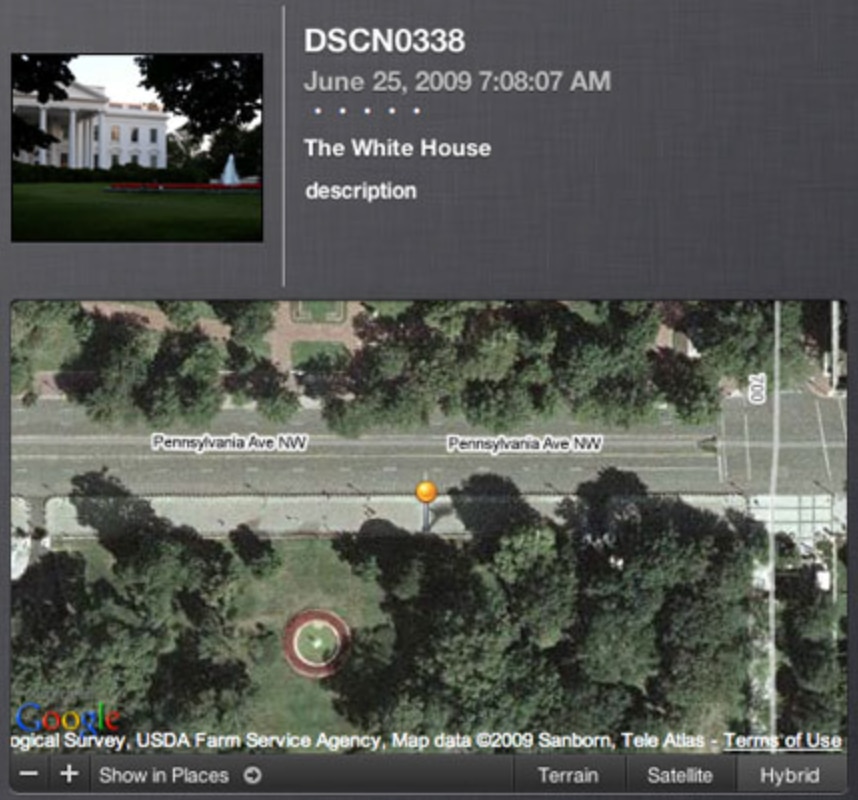
I have a record of my first experience exploring these capabilities. I was using a camera with GPS capabilities rather than a phone, but it is the personal insights about capabilities that resulted that are relevant here. In was 2009 and my wife and I were in Washington, DC, for a conference. We spent some time visiting the local landmarks and I took the following picture. As you can see, we were standing at the fence that surrounds the White House and I took the following photo. I think tourists would no longer be allowed in this location, but that was a different time. 

I used the EXIF data to add the photo to Google Maps. In the following image, you can see the image and the mapped location in street view. At first the map information confused me – no white house. Then I realized, we are standing on Pennsylvania Ave. on the other side of the fence shooting through the trees to frame the picture. We were the pin looking through the fence, over the flower bed, toward the White House. I have often said I have a different understanding of technology because I have always been a heavy tech user and experienced life as technological capabilities were added. I was there before and after and thus have a sense of how things changed. When technology capabilities are already there you often learn to use them without a need to understand what is happening and without a sense of amazement that can motivate you to seek understanding and creative applications. 

Mapping photo collections with Google services

The following is a tutorial. The specific example that is the basis for the tutorial is not intended to be relevant to classroom use, but the example is authentic and the processes described should transfer. Now retired, we were wintering in Kauai when I decided to write this post. I do a lot of reading and writing in coffee shops and I had decided to begin collecting photos of the various shops I frequented. Others would probably focus on tourist attractions, but coffee shops were the feature that attracted me.

Mapping photos in Google is best understood as using two interrelated Google services – Google Photos and Google MyMaps. If you are cost conscience and are not interested in advanced features or storing a lot of images, you can get away with the free levels of Google tools. The two-stage process involves first storing and isolating the images you want to map (Google Photos) and then importing this collection to be layered on a Google map (MyMaps).

Creating an album in Google Photos

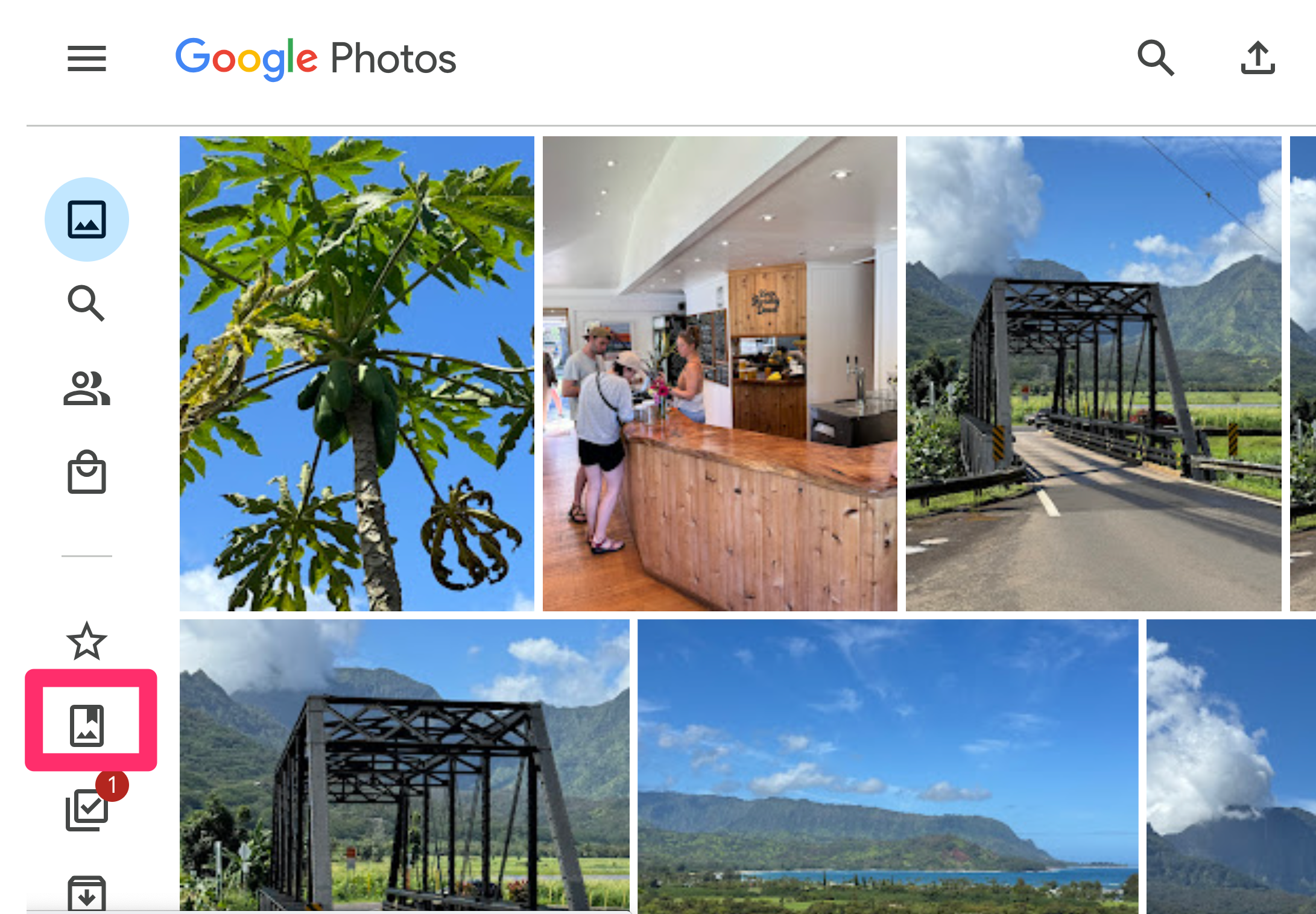
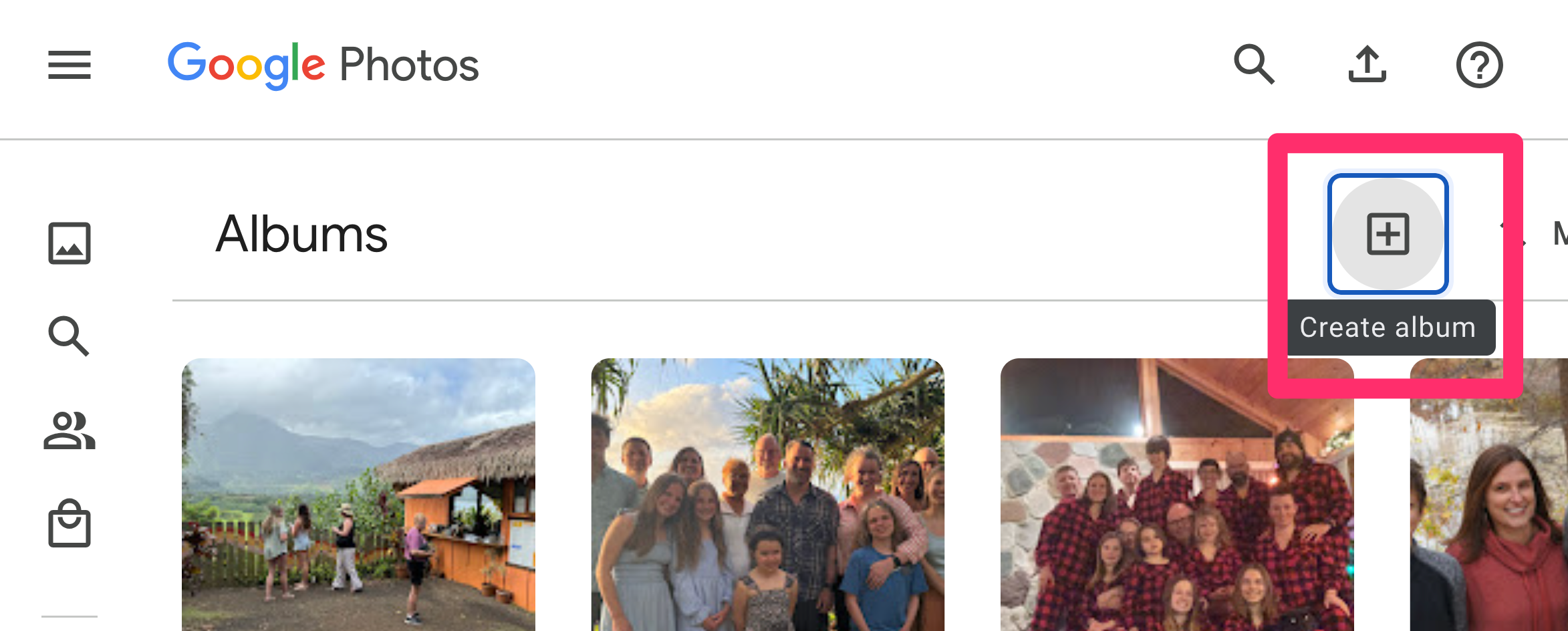
The first step involves the creation of an album to isolate a subset of photos. In the following image, you should find a column of icons on the left-hand border. The icon within the red box is used to create an album.

This icon should then display the Create album button at the top of the display.

Name the new album

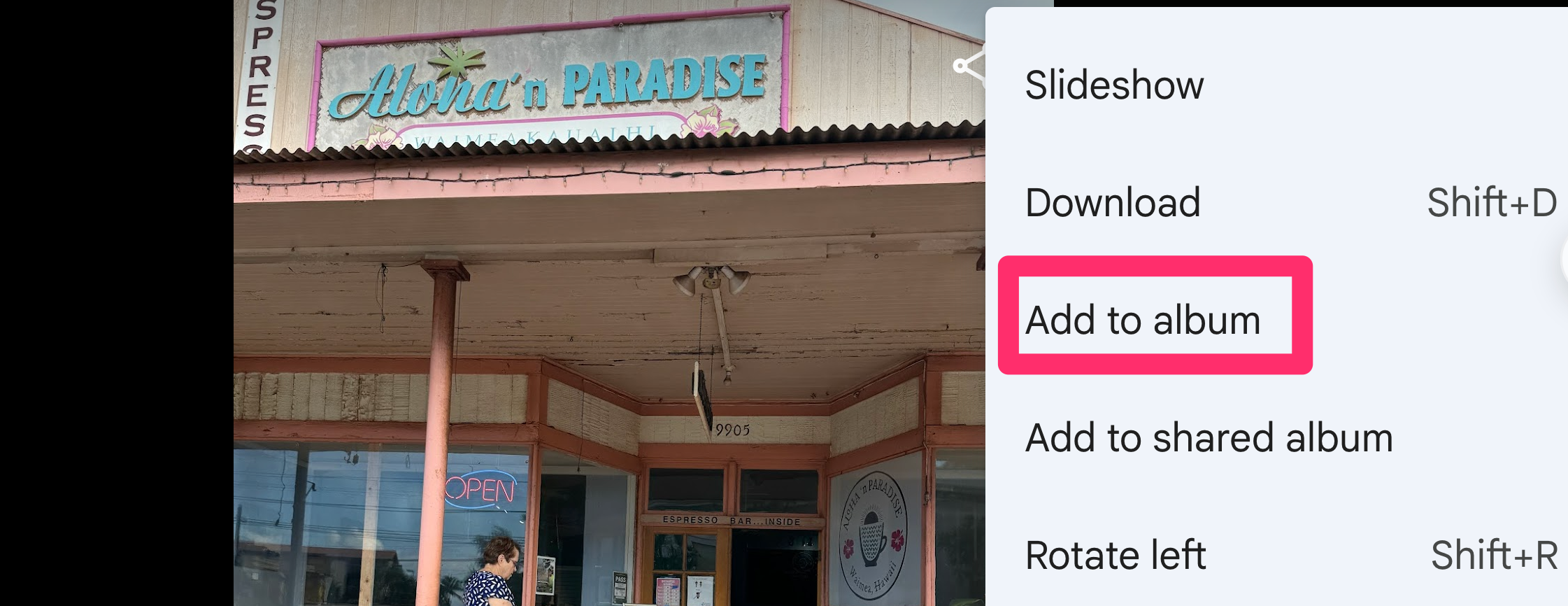
Now, return to photos and for each photo you want to map, use the drop down menu to add that photo to the appropriate album.

Continue until you have identified all of the images you want to map.

MyMaps

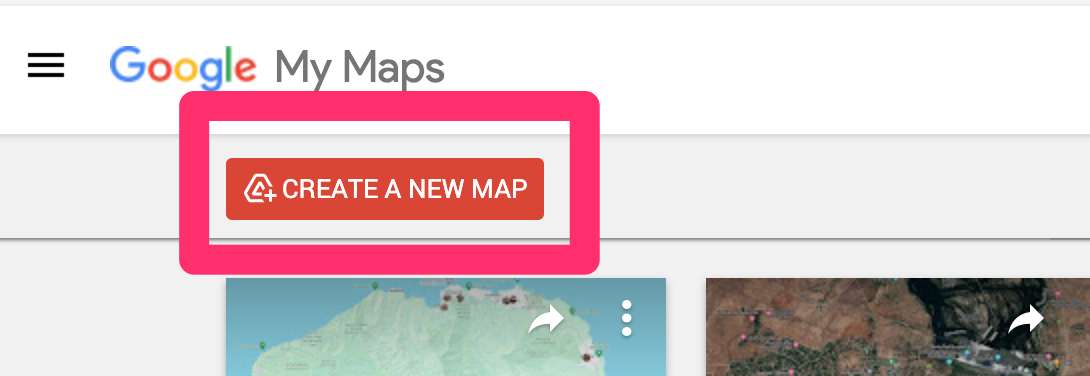
Google MyMaps (https://www.google.com/maps/d/) provides a means to create multiple personal maps by layering content (e.g., images) on top of the basic Google map. Using the link provided here, open your Google account and identify what you want to label your new personal map. 

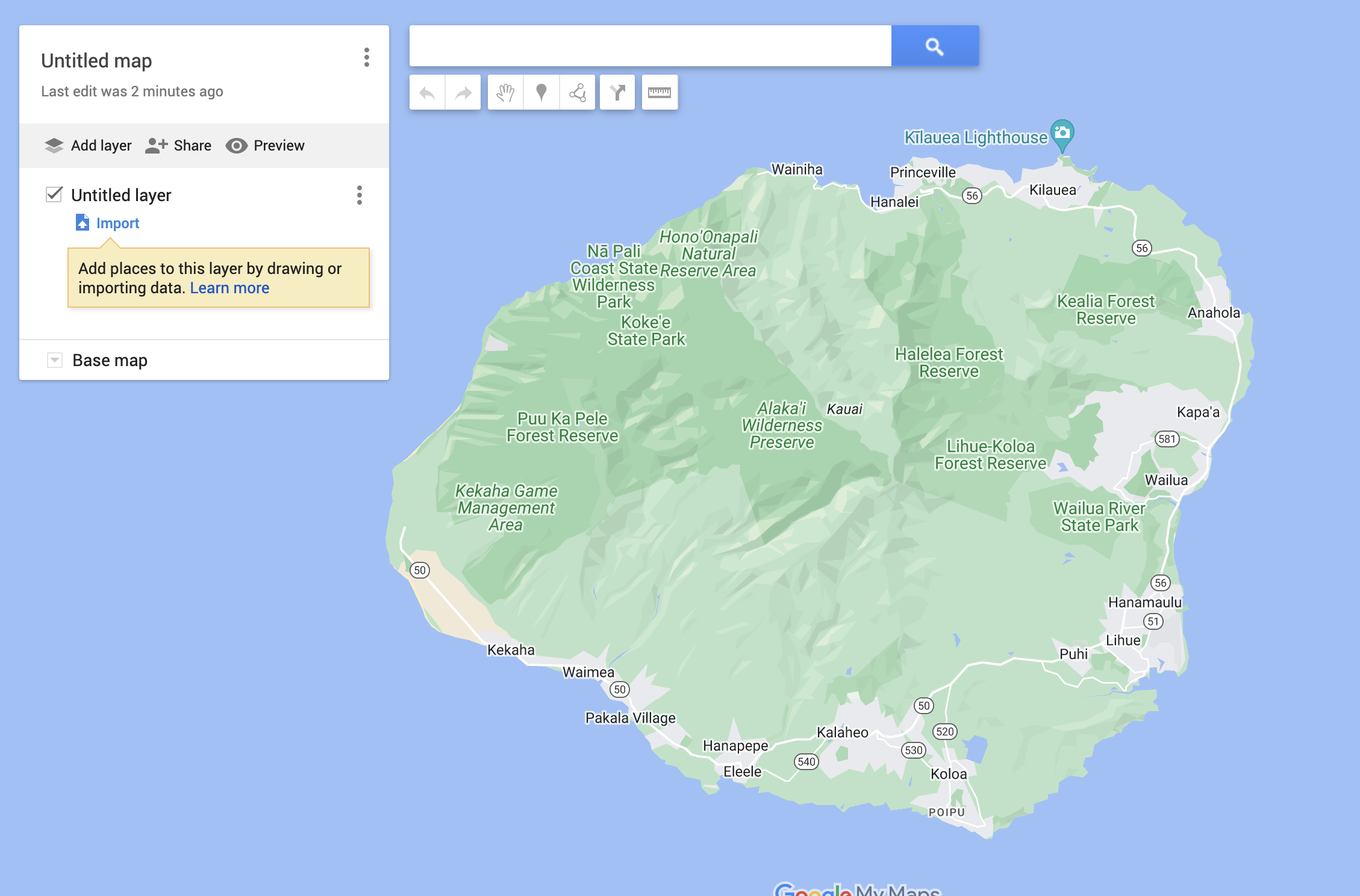
If you are adding images with GPS data, the process will automatically locate the images you provide to the appropriate location. It makes sense to me, to begin by moving the location that I am interested in to the screen. In this case, I am adding images to the island of Kauai.

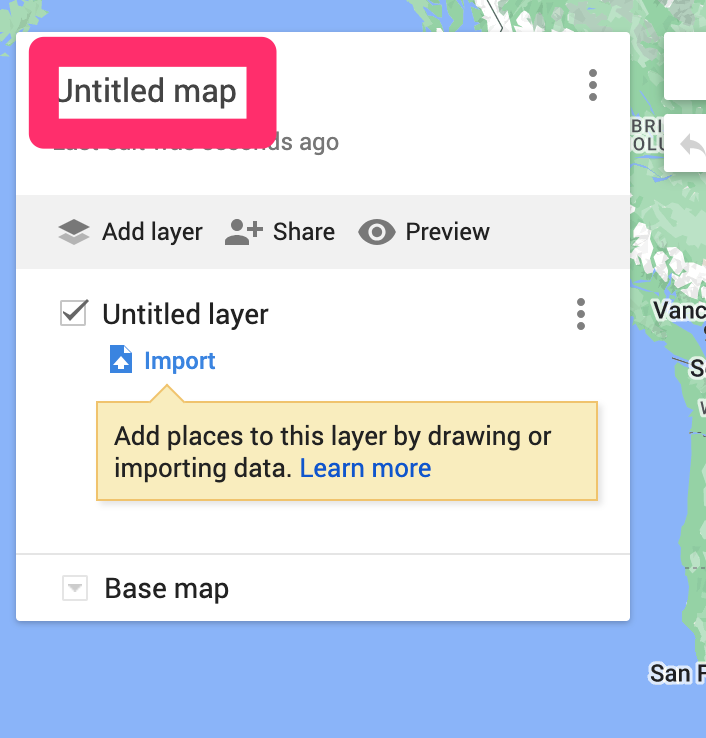
The following image is a panel you will see in several of the images that follow. The first use of this panel is to enter a name for the map I am creating. 

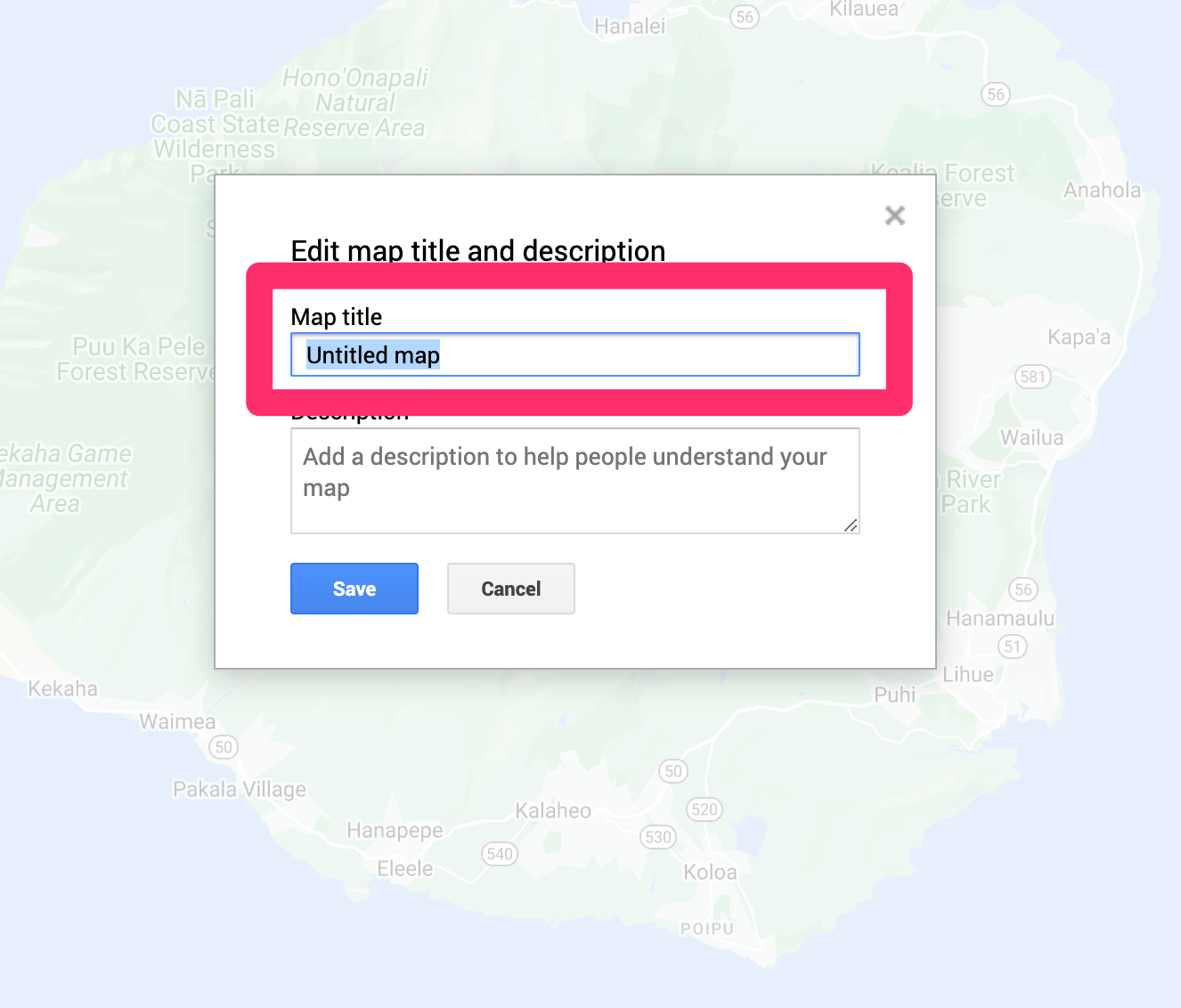
The text box to enter the name is revealed by selecting the original value (Untitled map) and this will open a box to add the name you intend.

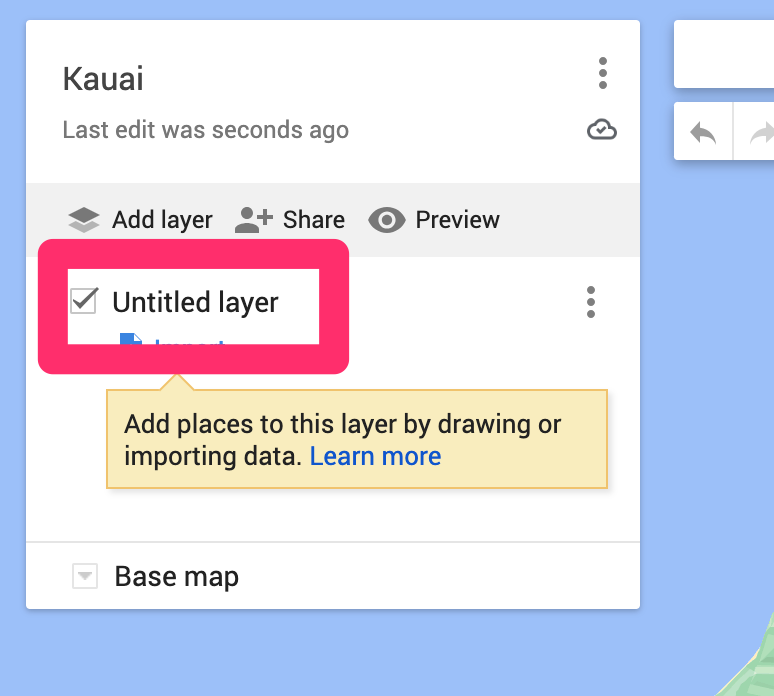
The next step is add the layer that will contain the photos on top of this map. 

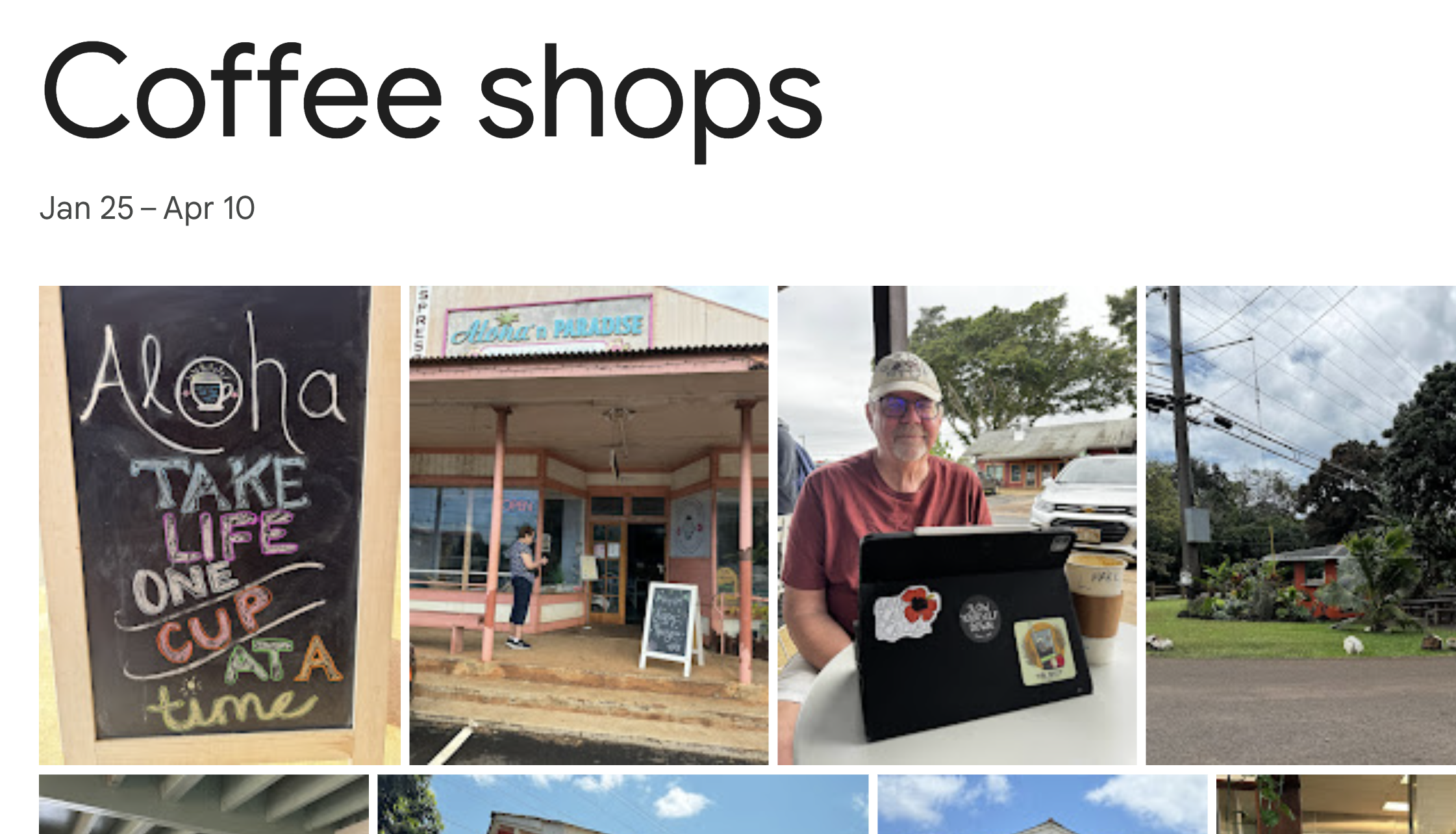
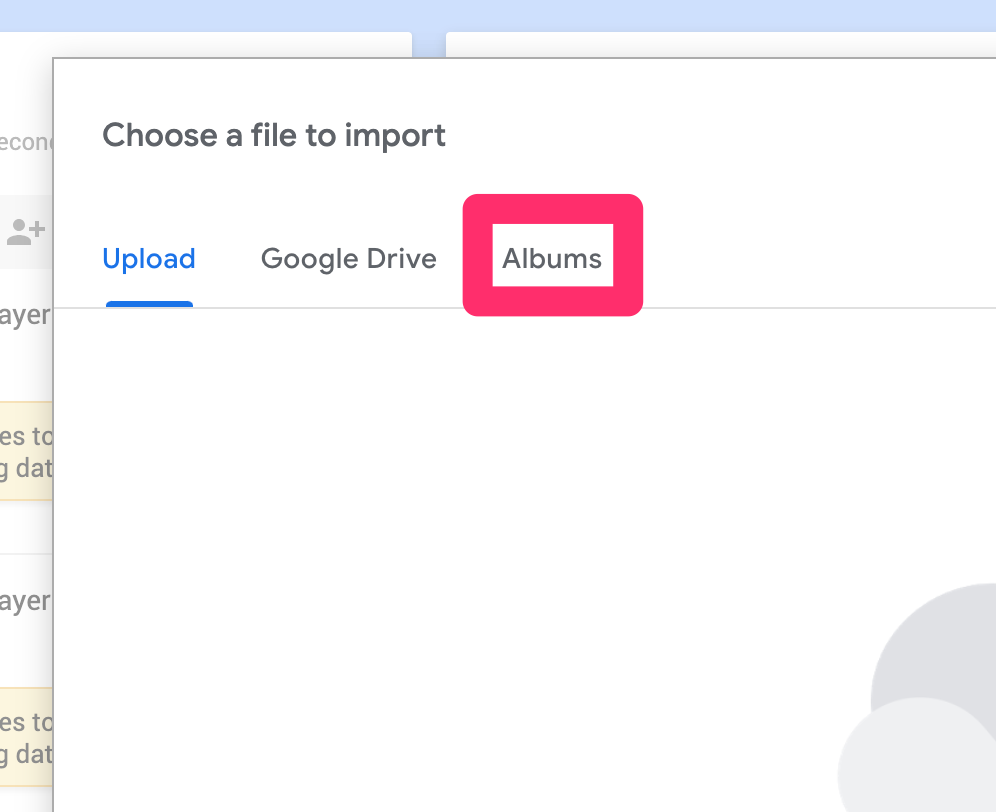
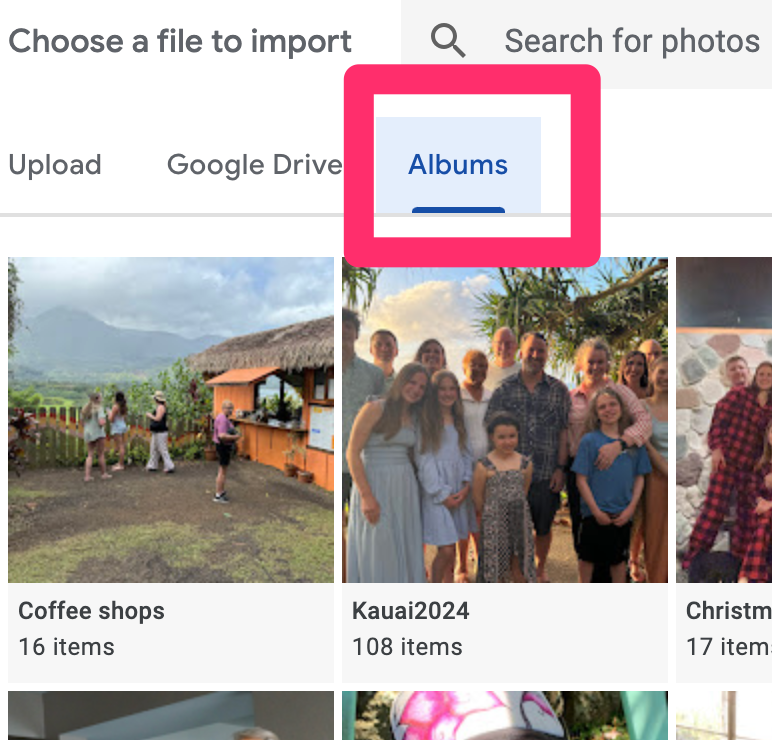
The approach I am taken is to add all of the images once and this is accomplished by referencing the Google Photos album that already exists. I select “coffee shops” from my albums.

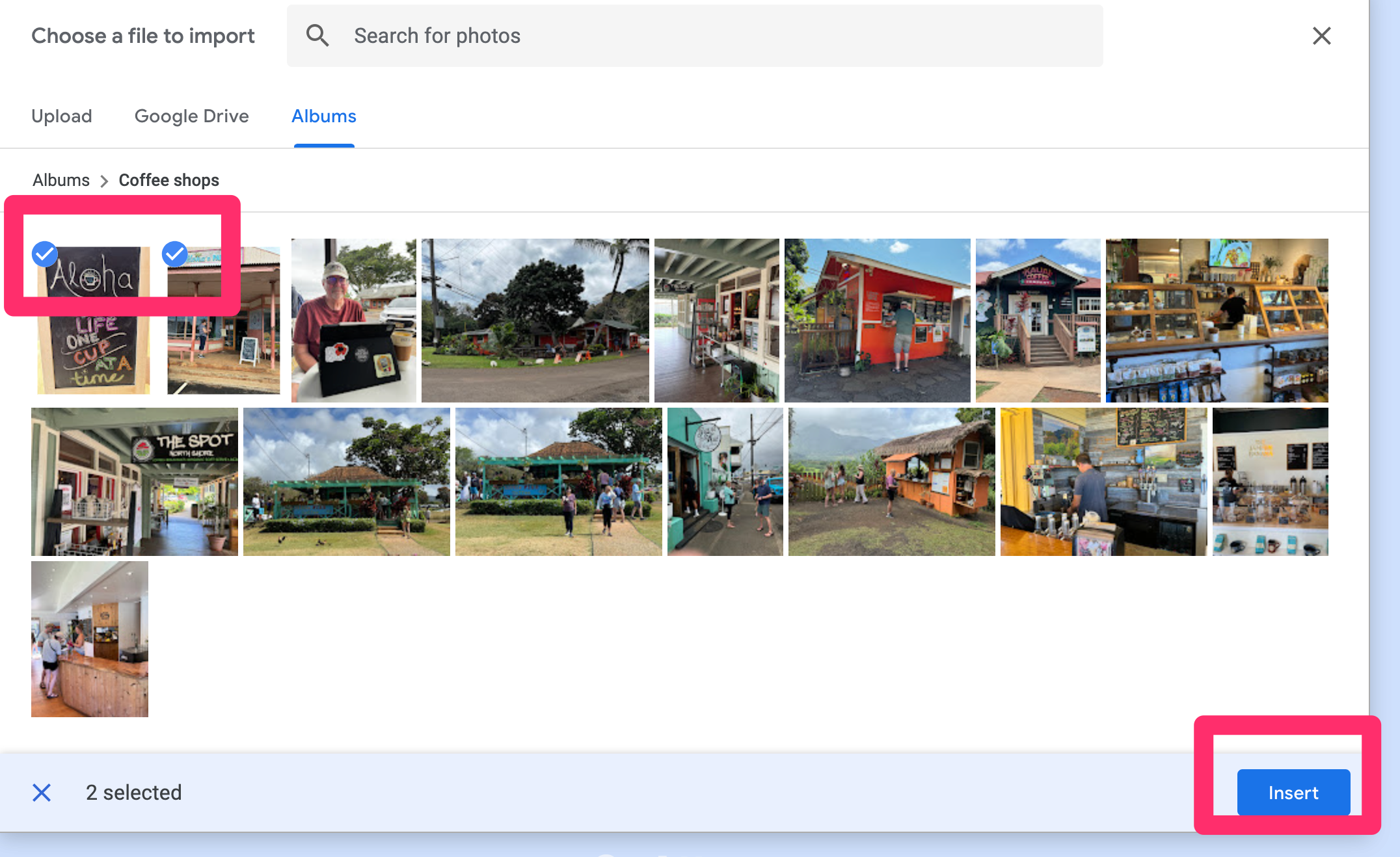
MyMaps does not assume I intend to use all of the images in the designated album so I must now select the images I want to add to the map. When finished, select “Insert”. 

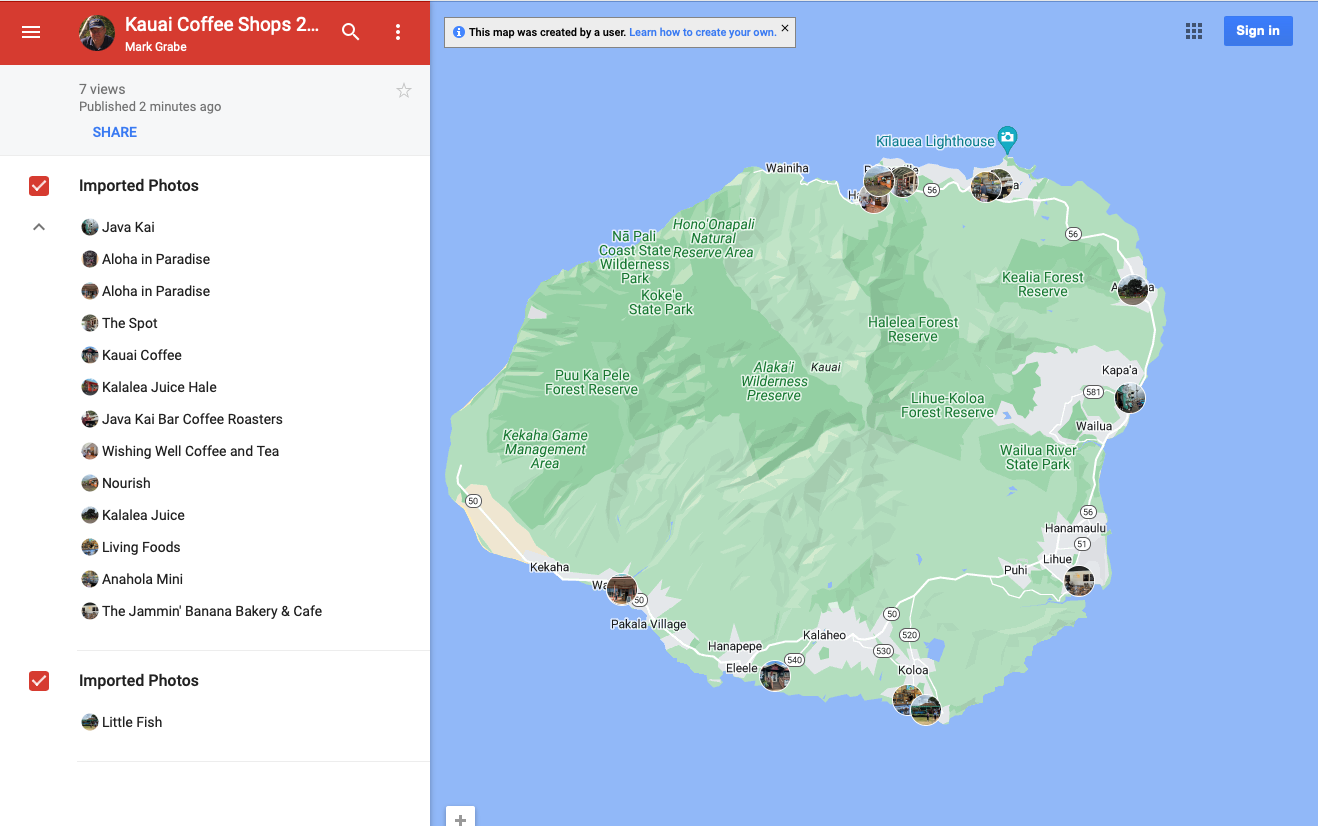
This generates the finished product.

MyMaps allows you a way to share your map with others. Try this link to see the map I have just created. Selecting one of the thumbnails appearing on the map should open a larger view. Give it a try. Without the password, your access should be “read only”.

Summary

Google Photos and Google MyMaps allow students to explore GPS and GIS. Images taken with smartphones can be added to a Google map allowing authentic GIS projects. Care should be taken to understand how to turn GPS locations associated with photos on and off. 

Loading

Improving peer editing

Clearly, the teacher is likely to be the most important source of guidance in developing the processes necessary for effective writing. However, peers are also an important resource. The generation of individual feedback is time-consuming and providing such feedback to a class of students multiple times would be extremely demanding. Our comments here reflect the proposal of writing experts who argue that peers as a group can likely respond more quickly than the teacher who would be working alone and the comments of peers can augment the feedback provided by the teacher. There is one more argument for involving peers (Bruning, Schraw & Norby, 2011, p. 300). Better writers at all ages appear to be better editors with poor writers often seeing little of substance that can be changed in their original first drafts. The learning of editing skills to provide a useful service to peers develops the same skills that can be applied to the student’s own work.

Peer editing has gained increased attention among researchers with the research offering greater insight as more specific issues are investigated. For example, Wu and Shunn (2021) note that most previous research has focused on the value of peer feedback in improving the document for which feedback was provided. This is a different issue than whether giving and receiving feedback results in improved performance on future writing tasks. In their research, which involved secondary students enrolled in an AP composition course, across multiple writing tasks, the researchers investigated both the impact of peer editing on the present and a future writing task. The study supported the positive impact of giving and receiving feedback on both document quality and future performance. 

The proposed benefits of peer editing include (Pritchard & Honeycutt, 2007);

1 A non-threatening audience,

2 Increased opportunities to write and revise, and

3 Immediate feedback – to write and revise a lot, the teacher cannot do it all.

Note the use of the qualifier “proposed”. You might argue that some students can be quite insensitive in interacting with peers and so wonder about proposing peers offer a “non-threatening audience”. Proposed here implies that skills can be developed and offer advantages when a reasonable level of competence is present.

One should not assume that effective peer editing is a simple manner of having students exchange papers and offer the comments that come to mind. Without guidance and experience, student comments may be socially awkward and focused on the most shallow of writing skills (e.g., spelling errors). 

Peers, by definition, are at approximately the same level of proficiency as those they are attempting to assist. In addition, they often lack the social skills and sensitivity to have their suggestions interpreted as helpful rather than mean. However, given some preparation, spending time responding to the written products of peers can be helpful to the peer writer and a way to develop the writing skills of the writer. (Pritchard & Honeycutt, 2007)

Here is a brief summary of a series of activities proposed by Simmons (2003) as a process for developing the skills of peer editors. 

1) Teacher models editing. If possible, offer a document you (teacher) have written. Think aloud about what improvements might be made. Make the revisions and then compare the original and the revised documents.

2) Model how feedback should be communicated. Model praise. Model questioning – what was the author trying to do? Model how to offer suggestions.

3) Use peer pairs to initiate peer feedback experience.

4) Use examples from student work and student feedback with the class.

Those who have studied the development of peer editing skills want it to be understood that this is far from a one or two-lesson process. Often early efforts are a struggle. Student editors develop skills gradually and typically begin with superficial recommendations (spelling, grammar), unmerited praise (not to be confused with encouragement), or insensitive criticism. Regarding teacher expectations, it makes sense that the priorities of review applied to the work of others would be similar to changes, if any, developing writers would make with experience in their own work. Attention paid to the metacognitive processes of considering the audience and communication effectiveness of a document as a whole is more abstract than the recognition of grammatical rule violations. Hence, purposeful demonstration, discussion, and practice are important in developing editing skills whether applied to a document developed by the student or a document developed by a peer.

 Peer comments should include and begin with positive comments. What did you like? The targeted writing skills will change as the goals of writing change either with experience or purpose.

A computer and classroom whiteboard or projector combination is a great way for the teacher to model and provide examples. Writing tools that save comments and recommendations and writing tools that allow a comparison of drafts offer the teacher an external representation of author or peer editor thinking and provide the teacher something tangible to address. What challenges were recognized and what changes were actually implemented? We provide some examples of such capabilities in our online resources.

One interesting model for upper-elementary developed by Sarah Dennis-Shaw appears on the ReadWriteThink site. This model suggests that students offer peers comments, suggestions, and corrections.

Compliments

e.g., My favorite part was ___ because ___

Suggestions

e.g., If you gave more details, I would be certain I can understand what you mean.

Corrections

e.g., I found this misspelled word – mispell

It is worth the effort to review Dennis-Shaw lessons no matter what grade level you work at as the online resources are quite specific in outlining the steps in the instructional process and also provide sample instructional materials. For example, what might a writing sample used in the training phase look like? We also recommend that you do an Internet search for rubrics or checklists that might be suited to your own instructional circumstances (e.g., Simon Williams rubric)

References

Bruning, R.H., Schraw, G.J., Norby, M.M. (2011). Cognitive psychology and instruction (5th ed). Boston: Pearson.

Pritchard, R. J., & Honeycutt, R. L. (2007). Best practices in implementing a process approach to teaching writing. Best practices in writing instruction, 28-49.

Simmons, J. (2003). Responders are taught, not born. Journal of Adolescent and Adult Literacy, 46(8), 684-693.

Wu, Y., & Schunn, C. D. (2021). The Effects of Providing and Receiving Peer Feedback on Writing Performance and Learning of Secondary School Students. American Educational Research Journal, 58(3), 492-526.

Loading

Improve AI Generated Multiple-Choice Questions

In a recent episode of the EdTech Situation Room, host Jason Neiffer made a very brief observation that educators could improve the effectiveness of AI-generated multiple-choice questions by adding a list of rules the AI tool should apply when writing the questions. This made sense to me. I understood the issue that probably led to this recommendation. I have written multiple times that students and educators can use AI services to generate questions of all types. In my own experience doing this, I found too many of the questions used structures I did not like and I found myself continually requesting rewrites excluding a type of question I found annoying. For example, questions that involved a response such as “all of the above” or a question stem asking for a response that was “not correct”. Taking a preemptive approach made some sense and set me on the exploration of how this idea might be implemented. Neiffer proposed an approach that involved making use of an online source for how to write quality questions. I found it more effective to maybe review such sources, but to put together my own list of explicit rules.

My approach used a prompt that looked something like this:

Write 10 multiple-choice questions based on the following content. The correct answer should appear in parentheses following each question. Apply the following rules when generating these questions. 

There should be 4 answer options.

“All of the Above” should not be an answer option.

“None of the Above” should not be an answer option.

All answer options should be plausible.

Order of answer options should be logical or random.

Question should not ask which answer is not correct. 

Answer options should not be longer than the question.

I would alter the first couple of sentences of this prompt if I was asking the AI service to use its own information base or I wanted to include a content source that should be the focus of the questions. If I was asking for questions generated based on the large language content alone, I would include a comment about the level of the students who would be answering the questions (e.g., high school students). For example, questions about mitosis and meiosis without this addition would include concepts I did not think most high school sophomores would have covered. When providing the AI service the content to be covered, I did not use this addition.

Questions based on a chapter

I have been evaluating the potential of an AI service to function as a tutor by interacting with a chapter of content. My wife and I have written a college textbook so I have authentic content to work with. The chapter is close to 10,000 words in length. In this case, I loaded this content and the prompt into ChatPDF, NotebookLM and ChatGPT. I pay $20 a month for ChatGPT and the free versions of the other two services. All proved to be effective.

ChatPDF

NotebookLM

With NotebookLM, you are allowed to upload multiple files that a prompt uses as a focus for the chat. For some reason rather than including my entire prompt, I had better results (suggested by the service) when I included the rules I wanted the system to apply as a second source rather than as part of the prompt.

ChatGPT

The process works a little differently with ChatGPT. I first copied the text from the pdf and pasted this content into the prompt window. I then scrolled to the beginning of this content and added my prompt. I could then ask the service to produce multiple question samples by asking for another 10 or 20 questions. I found some interesting outcomes when asking for multiple samples of questions. Even the format of the output sometimes changed (see the position of the answer in the following two examples).

**4. According to Clinton (2019), what is a potential impact of reading from a screen on metacognition?**

(A) Increased understanding

(B) Enhanced critical thinking

(C) Overconfidence and less effort

(D) Improved retention

(**C**)

**7. Which skill is considered a “higher order thinking skill”?**

(A) Word identification

(B) Critical thinking (**Correct**)

(C) Fact memorization

(D) Basic calculation

From sample to sample, some of the rules I asked ChatGPT to use were ignored. This slippage seemed unlikely in the initial response to the prompt.

What is an important consideration when designing project-based learning activities?**

(A) The amount of time available to students

(B) The availability of resources

(C) The level of student autonomy

(D) All of the above

(**D**)

Summary

The quality of multiple-choice questions generated using AI tools can be improved by adding rules for the AI service to follow as part of the prompt to generate questions. I would recommend that educators wanting to use the approach I describe here generate their own list of rules depending on their preferences. The questions used on an examination should always be selected for appropriateness, but the AI-based approach is a great way to easily generate a large number of questions to serve as a pool from which an examination can be assembled. Multiple choice exams should include a range of question types and it may be more efficient to write application questions because an educator would be in the best position to understand the background of students and determine what extension beyond the content in the source material would be appropriate.

Loading

AI Tutoring Update

This is an erratum in case my previous posts have misled anyone. I looked up the word erratum just to make certain I was using the word in the correct way. I have written several posts about AI tutoring and in these posts, I made reference to the effectiveness of human tutoring. I tend to provide citations when research articles are the basis for what I say and I know I have cited several sources for comments I made about the potential of AI tutors. I have not claimed that AI tutoring is the equal of human tutoring, but suggested that it was better than no tutoring at all, and in so doing I have claimed that human tutoring was of great value, but just too expensive for wide application. My concern is that I have proposed that the effectiveness of human tutoring was greater than it has been actually shown to be.

The reason I am bothering to write this post is that I have recently read several posts proposing that the public (i.e., pretty much anyone who does not follow the ongoing research on tutoring) has an inflated understanding of the impact of human tutoring (Education Next, Hippel). These authors propose that too many remember Bloom’s premise of a two-sigma challenge and fail to adjust Bloom’s proposal that tutoring has this high level of impact on student learning to what the empirical studies actually demonstrate. Of greater concern according to these writers is that nonreseachers including educational practitioners, but also those donating heavily to new efforts in education continue to proclaim tutoring has this potential. Included in this collection of wealthy investors and influencers would be folks like Sal Kahn and Bill Gates. I assume they might also include me in this group while I obviously have little impact in compared to those with big names. To be clear, the interest of Kahn, Gates, and me is really in AI rather than human tutoring, but we have made reference to Bloom’s optimistic comments. We have not claimed that AI tutoring was as good as human tutors, but by referencing Bloom’s claims we may have led to false expectations. 

When I encountered these concerns, I turned to my own notes from the research studies I had read to determine if I was aware that Bloom’s claims were likely overly optimistic. It turns out that I had read clear indications identifying what the recent posters were concerned about. For example, I highlighted the following in a review by Kulik and Fletcher (2016). 

“Bloom’s two sigma claim is that adding undergraduate tutors to a mastery program can raise test scores an additional 0.8 standard deviations, yielding a total improvement of 2.0 standard deviations.”

My exposure to Bloom’s comments on tutoring originally had nothing to do with technology or AI tutoring. I was interested in mastery learning as a way to adjust for differences in the rate of student learning. The connection with tutoring at the time Bloom offered his two-sigma challenge was that mastery methods offered a way to approach the benefits of the one-to-one attention and personalization provided by a human tutor. Some of my comments on mastery instruction and the potential of technology for making such tactics practical are among my earlier posts to this site. Part of Bloom’s claim being misapplied is based on his combination of personalized instruction via mastery tactics with tutoring. He was also focused on college-aged students in the data he cited. My perspective reading the original paper many years ago was not “see how great tutoring is”. It was more tutoring on top of classroom instruction is about is good as it is going to get and mastery learning offers a practical tactic that is a reasonable alternative.

As a rejoinder to update what I may have claimed, here are some additional findings from the Kulik and Fletcher meta-analysis (intelligent software tutoring).

The studies reviewed by these authors show lower benefits for tutoring when outcomes are measured on standardized rather than local tests, sample size is large, participants are at lower grade levels, the subject taught is math, a multiple-choice test is used to measure outcomes, and Cognitive Tutor is the ITS used in the evaluation.

However, on a more optimistic note, the meta-analysis conducted by these scholars found that in 50 evaluations intelligent tutoring systems led to an improvement in test scores of 0.66 standard deviations over conventional levels. 

The two sources urging a less optimistic perspective point to a National Board of Educators Research study (Nickow and Colleagues, 2020) indicating that human tutoring for K-12 learners was approximately .35 sigma. This is valuable, but not close to the 2.0 level.

Summary

I have offered this update to clarify what might be interpreted based on my previous posts, but also to provide some other citations for those who now feel the need to read more original literature. I have no idea whether Kahn, Gates, etc. have read the research that would likely indicate their interest in AI tutoring and mastery learning was overly ambitious. Just to be clear I had originally interpreted the interest of what the tech-types were promoting as mastery learning (personalization) which was later morphed into a combination with AI tutoring. This combination was what Bloom was actually evaluating. The impact of a two-sigma claim when translated into what such an improvement would actually mean in terms of rate of learning or change in a metric such as assigned grade seems improbable. Two standard deviations would move an average student (50 percentile) to the 98th percentile. This only happens in Garrison Keeler’s Lake Wobegon. 

References:

Bloom, B. S. (1984). The 2 sigma problem: The search for methods of group instruction as effective as one-to-one tutoring. Educational researcher, 13(6), 4-16.

Kulik, J. A., & Fletcher, J. D. (2016). Effectiveness of intelligent tutoring systems: a meta-analytic review. Review of educational research, 86(1), 42-78.

Nickow, A., Oreopoulos, P., & Quan, V. (2020). The impressive effects of tutoring on prek-12 learning: A systematic review and meta-analysis of the experimental evidence. https://www.nber.org/papers/w27476

Loading

Avoid Social Media Bias

In so many areas, the potential of the Internet seems subverted by the design decisions made by those who have built businesses on top of what seemed an innovation with so much potential. My focus here is on the political division and animosity that now exists. Since the origin of cable television, we have had a similar issue with an amazing increase in the amount of content, but the division of individuals into tribes that follow different “news” channels that offer predictably slanted accounts of the news of the day to the extent that loyal viewers are often completely unaware of important stories or different interpretations of the events they do encounter. 

The Internet might have seemed a remedy. Social media services are already functioning as an alternative with many now relying on social media for a high proportion of the news individuals encounter. Unfortunately, social media services are designed in ways that make them as biased and perhaps more radicalizing than cable tv news channels. 

Social Media and Internet News Sources

Here is the root of the problem. Both social media platforms and news sources can use your personal history to manipulate what you read. Social media platforms (e.g., Facebook, X, Instagram)  use algorithms that analyze your past behavior, such as the posts you’ve liked, shared, or commented on, as well as the time you spend on certain types of content. They use this information to curate and prioritize content in your feed, including news articles, which they predict will keep you engaged on their platform. You add the way algorithms work on top of the reality that those we follow as “friends” are likely to have similar values and beliefs and what you read is unlikely to challenge personal biases you hold. To reverse the Rolling Stone lyric, you always get what you want and not what you need.

News sources are different from social media in which you identify friends and sources. However, news sources can also tailor their content based on the data they gather from your interactions with their posts or websites. These practices are part of a broader strategy known as targeted or personalized content delivery, which is designed to increase user engagement and, for many platforms, advertising revenue.

Many major news organizations and digital platforms target stories based on user data to personalize the news experience. Here are some examples:

Google News: Google News uses algorithms to personalize news feeds based on the user’s search history, location, and past interactions with Google products. It curates stories that it thinks will be most relevant to you.

Apple News: By using artificial intelligence, Apple News+ offers a personalized user experience. Publishers can adapt content based on readers’ preferences and behavior, leading to stronger engagement and longer reading times.

The New York Times: The New York Times has a recommendation engine that suggests articles based on the user’s reading habits on their website. If you read a lot of technology-related articles, for example, the site will start to show you more content related to technology.

Are Federated Social Media different?

Federated social media refers to a network of independently operated servers (instances) that communicate with each other, allowing users from different instances to interact. The most notable example of a federated social media platform is Mastodon, which operates on the ActivityPub protocol. On Mastodon, you can follow accounts from various instances, including those that post news updates. For example, if a news organization has an account on a Mastodon instance, you can follow that account from your instance, and updates from that news source will appear in your feed. This system allows for a wide range of interactions across different communities and servers, making it possible to follow and receive updates from diverse news sources globally.

Your Mastodon timeline is just a reverse chronological feed of the people you follow, or the posts from people on your instance only (and not across all of Mastodon). There’s no mysterious algorithm optimized for your attention. So, with Mastodon, a news source you follow may have a general bias, but you would get the stories they share without prioritization by an algorithm based on your personal history.. This should generate a broader perspective.

With Mastodon, you can join multiple instances some of which may have a focus. For example, I first joined Maston.Social which at the time was that instance most users were joining. I have since joined a couple of other instances (twit.social & mastadon.education) that have a theme (technology and education), but participants post on all kinds of topics. An interesting characteristic of federated services is that you can follow individuals from other instances – e.g., you can follow me by adding @grabe@twit.social from other instances.

This brings me to a way to generate a news feed the posts from which will not be ordered based on a record of your personal use of that instance. Many news organizations have content shared through Mastodon and you can follow this content no matter the Mastodon instance you join. Some examples follow, but you can search for others through any Mastodon account. You follow these sources in the same way you would follow an individual on another account. 

@npr@mstdn.social

@newyorktimes@press.coop

@cnn@press.coop

@wsj@press.coop

@bbc@mastodon.bot

@Reuters@press.coop

Full access may depend on subscriptions. For example,  I have a subscription for the NYT.

So, if a more balanced feed of news stories appeals to you. Try joining a Mastodon instance and then follow a couple of these news sources.

Loading

Flashcard Effectiveness

This post is a follow-up to my earlier post promoting digital flashcards as an effective study strategy for learners of all ages. In that post, I suggested that at times educators were anti rote learning assuming that strategies such as flashcards promoted a shallow form of learning that limited understanding and transfer. While this might appear to be the case because flashcards seem to involve a simple activity, the cognitive mechanisms that are involved in trying to recall and reflect on the success of such efforts provide a wide variety of benefits.

The benefits of using flashcards in learning and memory can be explained through several cognitive mechanisms:

1. Active Recall: Flashcards engage the brain in active recall, which involves retrieving information from memory without cues (unless the questions are multiple-choice). This process strengthens the memory trace and increases the likelihood of recalling the information later. Active recall is now more frequently described as retrieval practice and the benefits as the testing effect. Hypothesized explanations for why efforts to recall and even why efforts to recall that are not successful are associated not only with increased success at recall in the future but also broader benefits such as understanding and transfer offer a counter to the concern that improving memory necessarily is a focus on rote. More on this at a later point.

2. Spaced Repetition: When used systematically, flashcards can facilitate spaced repetition, a technique where information is reviewed at increasing intervals. This strengthens memory retention by exploiting the psychological spacing effect, which suggests that information is more easily recalled if learning sessions are spaced out over time rather than crammed in a short period.

3. Metacognition: Flashcards help learners assess their understanding and knowledge gaps. Learners often have a flawed perspective of what they understand. As learners test themselves with flashcards, they become more aware of what they know and what they need to focus on, leading to better self-regulation in learning

4. Interleaving: Flash cards can be used to mix different topics or types of problems in a single study session (interleaving), as opposed to studying one type of problem at a time (blocking). Interleaving has been shown to improve discrimination between concepts and enhance problem-solving skills.

5. Generative Processing: External activities that encourage helpful cognitive behaviors is one way of describing generative learning. Responding to questions and even creating questions have been extensively studied and demonstrate achievement benefits. 

Several of these techniques may contribute to the same cognitive advantage. These methods (interleaving, spaced repetition, recall rather than recognition) increase the demands of memory retrieval and greater demands force a learner to move beyond rote. They must search for the ideas they want and effortful search activates related information that may provide a link to what they are looking for. An increasing number of possibly related ideas become available within the same time frame allowing new connections to be made. Connections can be thought of as understanding and in some cases creativity. 

This idea of the contribution of challenge to learning can be identified in several different theoretical perspectives. For example, Vygotsky proposed the concept of a Zone of Proximal Development that position ideal instruction as challenging learners a bit above their present level of functioning, but within the level of what a learner could take on with a reasonable change of understanding. A more recent, but similar concept proposing the benefits of desirable difficulty came to my attention as the explanation given for why taking notes on paper was superior to taking notes using a keyboard. The proposal was that keyboarding is too efficient forcing learners who record notes by hand to think more carefully about what they want to store. Deeper thought was required when the task was more challenging. 

Finally, I have been exploring researchers studying the biological mechanism responsible for learning. As anyone with practical limits on my time, I don’t spend a lot of time reviewing the work done in this area. I understand that memory is a biological phenomenon and cognitive psychologists do not focus on this more fundamental level, but I have also yet to find insights from biological research that required I think differently about how memory happens. Anyway, a recent book (Ranganath, 2024) proposes something called error-driven learning. The researcher eventually backs away a bit from this phrase suggesting that it does not require you to make a mistake but happens whenever you struggle to recall.

The researcher proposes that the hippocampus enables us to “index” memories for different events according to when and where they happened, not according to what happened.  The hippocampus generates episodic memories. by associating a memory with a specific place and time. As to why changes in contexts over time matter, memories stored in this fashion become more difficult to retrieve. Activating memories with spaced practice both creates an effortful and more error-prone retrieval, but if successful offers a different context connection. So, spacing potentially offers different context links because different information tends to be active in different locations and times (note other information from what is being studied would be active) and involves retrieval practice as greater difficulty involves more active processing and exploration of additional associations. I am adding concepts such as space and retrieval practice from my cognitive perspective, but I think these concepts fit very well with Ranganath’s description of “struggling”.

I have used the term episodic memory in a little different way. However, the way Rangath describes changing contexts over time seems useful as an explanation for what has long been appreciated as the benefit of spaced repetition in the development of long-term retention and understanding. 

When I taught educational psychology memory issues, I described the difference between episodic and declarative memories. I described the difference as similar to the students’ memory for a story and the memory for facts or concepts. I proposed that studying especially trying to convert the language and examples of the input (what they read or heard in class) into their own way of understanding with personal examples that were not part of the original content they were trying to process was something like converting episodic representations (stories) into declarative representations linked to relevant personal episodic elements (students’ own stories). This is not an exact representation of human cognition in several ways. For example, even our stories are not exact and are biased by past and future experiences and can change with retelling. However, it is useful as a way to develop what might be described as understanding. 

So, to summarize, memory tasks, even what might seem to be simple ones such as might be the case with basic factual flashcards can introduce a variety of factors conducive to a wide variety of cognitive outcomes. The assumption that flashcards are useful only for rote memory is flawed.

Flashcard Research 

There is considerably more research on the impact of flashcards that I realized and some recent studies that are specific to digital flashcards.

Self-constructed or provided flashcards – When I was still teaching the college students I say using flashcards were obviously using paper flashcards they had created. My previous post focused on flashcard tools for digital devices. As part of that post, I referenced sources for flashcards that were prepared by textbook companies and topical sets prepared by other educators and offered for use. I was reading a study comparing premade versus learner-created flashcards (description to follow) and learned that college students are now more likely to use flashcards created by others. I guess this makes some sense considering how digital flashcard collections would be easy to share. The question then is are questions you create yourself better than a collection that covers the material you are expected to learn. 

Pan and colleagues (2023) asked this question and sought to answer it in several studies with college students. One of the issues they raised was the issue of time required to create flashcards. They controlled the time available for the treatment conditions with some participants having to create flashcards during the fixed amount of time allocated for study. Note – this focus on time is similar to the retrieval practice studies using part of the time in the study phase for responding to test items while others were allowed to study as they liked. The researchers also conducted studies in which the flashcard group created flashcards in different ways – transcription (typing the exact content from the study material), summarization, and copy and pasting. The situation investigated here seems similar to note-taking studies comparing learner-generated notes and expert notes (quality notes provided to learners). With both types of research, one might imagine a generative benefit to learners in creating the study material and a completeness/quality issue. The researchers did not frame their research in this way, but these would be alternative factors that might matter. 

The results concluded that self-generated flashcards were superior. They also found that copy-and-paste flashcards were effective which surprised me and I wonder if the short time allowed may have been a factor. At least, one can imagine using copy and paste as a quick way to create the flashcards using the tool I described in my previous flashcard post.

Three-answer technique – Senzaki and colleagues (2017) evaluated a flashcard technique focused on expanding the types of associations used in flashcards. They proposed their types of flashcard associations based on the types of questions they argued college students in information-intensive courses are asked to answer on exams. The first category of test items are verbatim definitions for retention questions, the second are accurate, paraphrases for comprehension questions, and the third are realistic examples for application questions. Their research also investigated the value of teaching students to use the three response types in comparison to requesting they include these three response types. 

The issue of whether students who use a study technique (e.g., Cornell notes, highlighting) are ever taught how to use a study strategy why it might be important to apply the study in a specific way) has always been something I have thought was important.

The Senzaki and colleagues research found their templated flashcard approach to be beneficial and I could not help seeing how the Flashcard Deluxe tool I described in my first flashcard post was designed to allow three possible “back sides” for a digital flashcard. This tool would be a great way to implement this approach.

AI and Flashcards

So, while learner-generated flashcards offer an advantage, I started to wonder about AI and was not surprised to find that AI-generated capabilities are already touted by companies providing flashcard tools. This led me to wonder what would happen if I asked AI tools I use (ChatGPT and NotebookLM) to generate flashcards. One difference I was interested in was asking ChatGPT to create flashcards over topics and NotebookLM to generate flashcards focused on a source I provided. I got both approaches to work. Both systems would generate front and back card text I could easily transfer to a flashcard tool. I found that some of the content I decided would not be particularly useful, but there were plenty of front/back examples I thought would be useful. 

The following image shows a ChatGPT response to a request to generate flashcards about mitosis.

This use of AI used NotebookLM to generate flashcards based on a chapter I asked it to use as a source.

This type of output could also be used to augment learner-generated cards or could be used to generate individual cards a learner might extend using the Senzaki and colleagues design.

References

Pan, S. C., Zung, I., Imundo, M. N., Zhang, X., & Qiu, Y. (2023). User-generated digital flashcards yield better learning than premade flashcards. Journal of Applied Research in Memory and Cognition, 12(4), 574–588. https://doi-org.ezproxy.library.und.edu/10.1037/mac0000083

Ranganath, C. (2024). Why We Remember: Unlocking Memory’s Power to Hold on to What Matters. Doubleday Canada.

Senzaki, S., Hackathorn, J., Appleby, D. C., & Gurung, R. A. (2017). Reinventing flashcards to increase student learning. _Psychology Learning & Teaching, 16(3), 353-368.

Loading

Flashcards – I

Giving Flashcards a New Look

I thought you might appreciate a different example from the type of thing I tend to focus on explaining how a study technique used by students at all levels might be improved through the use of digital technology. When I taught educational psychology I included presentations on what I considered the classic recommended techniques – e.g., SQ3R, Cornell Notes. As I have explained in other things I have written on this general topic I would also ask how many of the students were aware of these strategies and then how many were using them in our class. Most were familiar with at least these two, but I can’t remember anyone ever saying they were using these approaches. Most took notes, but not Cornell notes and then they studied these notes. They tended to highlight the assigned reading content. 

A topic I mentioned because I knew the strategy, but did not spent a lot of time on was flashcards. I have thought about why the use of flashcards was not a topic I discussed more since. I think at the time this was because there seemed a stigma associated with learning methods that were considered rote and not the way to develop understanding and a long term benefit. I kind of see a similar attitude surfacing from time to time now and it is often in the context of “why would you expect someone to store that in memory when they can just look it up with Google”? 

I have changed my mind about flashcards. I think the students had a more realistic perspective than I did. They knew flashcards worked for them. I also think my perspective on effective learning has also changed some as I have read more about how humans learn. I have to decided to generate at least two posts on digital flashcards. I will being with what is mostly a tutorial describing a digital flashcard system I like. Eventually, I will provide additional content explaining what research has to say about study strategies that can be implemented with flashcards. 

Elementary students have used flashcards to drill on math facts for decades and I commonly see university students studying for anatomy or geology examinations using nearly the same procedure. Flashcards provide individuals or individuals within small groups a way to systematically practice retrieval and evaluate understanding both of which are important and documented ways to improve performance and retention (Rohrer, & Pashler, 2010). I assume you understand how flashcards are traditionally used from observation if not from personal experience. In a typical approach a student has a stack of cards with a question on one side of each card and a response on the other side. Elementary math fact cards may have been purchased commercially, but the review material used by college students was probably generated by the learner. When a few minutes are available, a student brings out the cards and begins going through the stack. Do you know the answer to the math problem? Do you remember the origin and insertion for the muscle listed? You flip the card over to see if you were correct. Perhaps you developed a variant of this approach you thought improved the process. You may have discarded each card after initial consideration into a “I know that” pile or a “I don’t know that pile” and then spend more time with the “I don’t know that pile” instead of going through the entire stack a second time.

Researchers have considered how the use of review techniques of this type might be optimized. These techniques might involve how frequently you view cards with information you do not know versus cards with information you do know or on how many different days you review material. Some of these findings and other inherent advantages of digital media are now incorporated in free or low-cost software or services you can find and use online or download to your personal device.

So, I might begin by asking the question, How might flashcards on the computer, a smartphone, or tablet offer advantages in comparison to the standard paper variety? I don’t think this is another version of the paper versus screen debates that now seem common, but some could see it that way.

What follows is an example of a flashcard application and then a consideration of the unique opportunities this and similar applications offer. These examples makes use of Flashcards Deluxe (information about this application and a few other flashcard options appears at the end of this segment); an app for the iPad or iPhone.

Flaschards Deluxe. A classroom example I sometimes use to explain that technology is not confined to the classroom we call the Turtle River Water Quality Project. One aspect of this project involved the collection and identification of macroinvertebrates. The prevalence of different macroinvertebrates (organisms without a backbone that can be viewed without aid of a microscope) can be used to evaluate water quality. Some macroinvertebrates can tolerate poor quality water and some cannot. So the collection and identification of macroinvertebrates allows a way to evaluate the “health” of a body of water.

Before making the trip to collect specimens, a teacher might want to prepare students by familiarizing them with the set of organisms they might encounter. This task involves learning to associate the name and whether an organism is tolerant of pollution with an image of the organism. Imagine a three-sided flash card – if there was such a thing. One side might contain an image of the organism, the second side would contain the name of the organism, and the third side would indicate whether the organism was pollution tolerant. If this were possible to create as a physical, paper card, the student would look at a picture, attempt to remember the name and tolerance of the organism, and then flip the card to check the information recalled or view the correct information. The student would then move to the next card and repeat the process.

The digital equivalent, created with Flashcards Deluxe, would work like this. The student would view the image appearing on the first card trying to remember the name of the organism and whether or not the organism is an indicator of healthy water (see Figure Front View). The student would then “tap” the image to flip the card and reveal the name of the organism and would tap the card a second time to reveal whether or not the organism is associated with healthy water (see Figure Composite Feedback). Selecting the “check mark” or “X” appearing at the bottom of the card would indicate whether the student had judged performance to be adequate or not and would move the student to the next image. When the student reached the end of the deck, all cards associated with a judgment of inadequate recall would automatically be repeated.

Front view of Flashcard Deluxe Card

Back views of Flashcards Deluxe Card

Individual flashcards are created using the following template. Text, images, and sound are added to the slots on this template representing the three sides of a card.

This video provides more details on this tool.

Digital Advantage

What case can be made for the digital version of flashcards? Here are some thoughts on potential advantages. All of these characteristics are available in some products or services, but not necessarily in all so you would want to review the capabilities of a given product before investing a lot of time.

A) Multiple media – Some digital flashcards can incorporate images and sounds (e.g., our example). If the value in multimedia flashcards is not obvious, consider situations in which the study task involves identification of orchestra instruments by the sound the instruments produce, recognition of vocabulary in a foreign language class based on listening rather than reading, or the identification of molecular structures in biochemistry. These would be study situations that would be difficult or impossible to address with paper index cards. You can create multimedia resources yourself. For example, you can collect images with your phone and use these images to create study materials. Would this be useful in preparing for biology or anatomy lab practicals?

B) Existing and shareable review materials – There are massive collections of existing review materials already available for a wide variety of academic areas. There appear to be basic standards or at least common formats for exporting sets of cards so that many of the resources developed through one service can be used on the software provided by other vendors. These collections can be downloaded, combined, and edited by individual students to best address personal study goals. It will often be more efficient to take a large existing collection and delete the cards not appropriate for your class than to create a new stack from scratch. A teacher can do the same thing and then share a set of cards optimized for a specific class with students. We include links to several vendors who store and share collections at the end of this section.

C) Data and suggested review strategies – It might be best to consider what we are describing here as study systems rather than just study materials. In addition to the information to be learned, these systems can keep track of performance on individual items and data such as the last date a given card was reviewed. If the student is so inclined, some systems can present items that cause the student difficulty more frequently or even schedule which content should be reviewed on a particular day within a designated time period. This is where our previous reference to what research can tell us about optimized review and rehearsal comes into play. Computers are good at keeping track of and applying numerical performance data. So, it turns out that free or low-cost digital resources offer more than the option of thumbing through the stack of cards you carry in your backpack. If you presently make use of “flashcards” or see such resources as having a use in classrooms that are or will be your responsibility, we encourage you to explore the following resources. I have included some resources that can be used from a computer and some from a tablet.

Resources:

Sites providing repositories of flash cards:

Flashcard Exchange

Quizlet

Flashcard products:

Quizlet is an online system you can use with your browser. Study existing stacks or create your own.

Flashcards Deluxe – This application is available for the iPad and iPhone from the Apple App Store. The application was created by OrangeOrApple.

Loading