Design learning experiences using generative activities – Layering

I have written multiple posts explaining generative activities and how such external activities encourage productive cognitive behaviors. Some of these posts describe specific classroom applications of individual generative tasks. In this post, I intend to describe how educators can apply some of these generative activities when they assign web content (pages or videos).

In many cases, online content assigned in K12 classrooms was not prepared as instructional content. For example, an article from Scientific American might offer information relevant to a specific standard addressed in sophomore biology. What activities might an instructor add to help learners understand, remember, and possibly apply concepts within this article. For example, a textbook would likely have activities inserted at the end of a chapter, added as boxes within content, or recommended in a teacher’s manual. Instructors often make additions as class assignments. What I am supporting here is similar to what educational researchers have described as adjunct questions. These were originally questions added within instructional texts or attached at the end of such texts. Embedded activities play different roles than even the same activities might play when delayed and isolated from the informative content. At the time of initial exposure, my argument is that there is a difference between information and instructional content and the connection of generative learning activities is a way to make this transition. 

A couple of years ago I became interested in a group of online services that were developed to improve the educational value of online content (web pages and videos). I developed my own way of describing what these services were developed to accomplish. Layering seemed a reasonable description because these services could not actually modify the content originally shared by content creators for ethical and legal reasons. What a layering service could do was take the feed from the creator’s service and add elements on top of that content. Elements were additions that could encourage important cognitive behaviors in a learner.

With a layering service, the content a learner encounters is a combination of the content from the content creator and additions layered on this content. Two sources and servers are involved. From the perspective of a designer, a layering service works by accepting the URL for a web page or video from the designer and then allows the designer to add elements that appear within or on top of the content from the designated source. The layering service sends this combination to the learner and this does not change the original document and still downloads the original from the server each time the combination of original and layered content is requested by a user. Ads still appear and the content server still records the download to give the creator credit. The layering service generates a link provided to learners and recreates the composite of content and designer additions each time a learner uses that link. 

Questions are my favorite example of an external activity that can be added to encourage a variety of important thinking (internal) behaviors. For example, if you want a learner to link a new concept to everyday experiences the concept is useful in understanding, you might ask the learner to provide examples that show the application of the concept. Many learners may do this without the question, but the question increases the likelihood more learners will work to identify such connections with their existing experiences. Those who think about instruction in this way may describe what they are doing as designing instruction. I offer an extended description of generative activity in a previous post. 

Depending on the specific service, the elements that layering services I am aware of include annotations, highlighting, questions, and discussion prompts. Annotations could include additional material such as examples, translations, or instructions. Questions could be open-ended or multiple-choice. A few of these elements could also be added by the learner (highlights and annotations) so elements provided to the designer could be used to encourage specific use of the elements available to students.

My personal interest in promoting layering services is intended to encourage the use of services that allow educators, educational content designers, and learners to work with this content to provide more effective learning resources and more generative learning experiences. In addition, content creators have a right to assume the server used by the content creator will be contacted each time content is requested and inclusions such as ads are included. The expectations of the content creator are not ignored when using a layering service.

I have identified several services that meet my definition of a layering service. Here, I will describe one service focused on web pages and one that focused on video. Other examples can be explored from the page linked above and I assume others exist that I have not identified. Services are constantly being updated, but I have just worked with the two examples I describe here and this information should be current as of the uploading of this post.

Insert Learning

Insert Learning is my best example of the services promoted here. I say this because it offers the most generative options and the generative options are part of an environment allowing an educator to both create multiple lessons, assign these lessons to members of multiple classes, and record data on student completion of some of the types of activity involved in individual lessons. 

The following image should give you some idea how this works. Down the left border of the image, you see a menu of icons allowing the designer to select highlight, note, question, and discussion. Highlight and note work as one probably expects. When the icon is selected text can be highlighted by the designer or learner. The note icon adds what appear as Postit notes allowing the inclusion of text, links, images, video, and whatever else works as an embed. The question icon adds questions either multiple choice as appears in the image or open-ended. The discussion icon appears very much like an open-ended question but accumulates and displays responses from multiple learners to a prompt. 

As I said, Insert Learning differentiates itself from many of the other services because the layering component is part of a system that allows the assignment of lessons to individual students organized as classes and also collects responses to questions by lesson and student. The following image shows a couple of responses to an open-ended question. I used Insert Learning in a graduate course I taught in Instructional Design. I made use of several of the tools I presented to students even when the most common use would be in K-12. This image shows how responses to questions would appear in the Grade Book. I could assign a score to a response and this score would then be visible to the student submitting a given response. 

It has been a few years since I used Insert Learning. When I did, I paid $8 a month. I see the price has now increased to $20 a month or $100 for the year. 

EdPuzzle 

EdPuzzle is a service for adding questions and notes to videos. It includes a system for adding these elements, assigning these videos to students, and saving student responses to questions. The following images are small to allow them to be inserted in this post. In the following image, the red box on the right allows the selection of the element to be added – MC question, open-ended question, and note. The timeline underneath the video (middle) is also enclosed in a red box. As the designer watches the video, clicking one of these buttons stops the video and allows the selected addition to be included. A dot appears below the timeline to indicate where an element has been added. A learner can either play the video which will stop for a response when one of these inclusions is reached or select one of the dots to respond. The second image shows the dialog box used to add an open-ended question. 

In the video I used in this example, I created a demonstration using Python to run LOGO commands and saved the video to YouTube. Again, this was a demonstration used in a graduate edtech course. Early in the video, I showed and explained the LOGO code. The video then showed the result of running this program.

When using EdPuzzle with this video, I inserted a note asking students to take a pencil and sheet of paper to draw what the LOGO program would create. Near the end of the video, I inserted an open-ended question asking that students explain how Papert’s notion of computational understanding would provide a different way of thinking about the traditional definition of circle (i.e., a plane closed figure with points equidistant from a point). 

I used the free version of EdPuzzle because I only assigned students to a few examples to experience what the service provided. You can do a lot with this service at no cost. The pro-level price is $13.50 per month. EdPuzzle Pricing 

Summary these two examples demonstrate the use of layering services to add generative activities to a web page and a web video. There are similar services available from other companies that generate similar student experiences. The value in such services is the opportunity to design learning experiences containing activities likely to improve understanding and retention.

Loading

Cornell Notes and Beyond

While a research assistant at Cornell, Walter Pauk was credited with the development of the Cornell Note-taking system. Cornell notes became widely known through Pauk’s popular book “How to study in college” first published in 1962 and available through multiple editions. I checked and Amazon still carries the text.

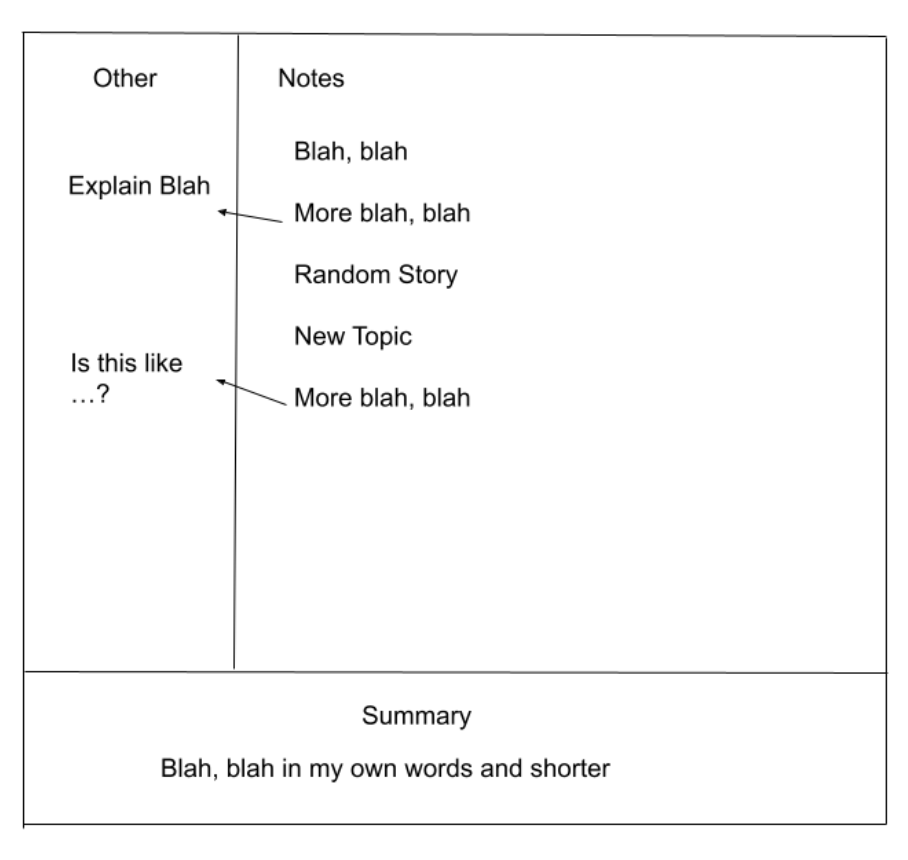
Pauk’s approach which can be applied within a traditional notebook involves dividing a page into two columns with the right-hand column about twice as wide as the left-hand column and leaving a space across the bottom of each page for writing a summary. The idea is to take notes during a presentation in the right-hand column and later follow-up in the left-hand (often called cue column) with questions and other related comments. This second pass is supposed to follow soon after class so that other memories of the presentation are still fresh. The summary section provides a space to add just what it says – a summary of the main ideas.

Paul explained the proper way to use his system as the five Rs of note-taking. In my experience, the 5 Rs are far less well-known and yet important because they explain how the basic system is to be used. I would organize and explain the 5 Rs as follows.

During class – Record

After class – Reduce

Over time 

Recite (cover notes and see what you can recall based on cues)

Reflect (add your own ideas, extensions)

Review (review all notes each week)

While the Cornell system was designed during a different time and was suited to the technology of the day (paper and pencil), those who promote digital note-taking tools offer suggestions for applying the Cornell structure within the digital environment of the tool they promote. 

Cornell notes within Obsidian 

Cornell notes within Notion 

When I used to lecture about study skills and study behavior, I explained the Cornell system, but I would preface my presentation with the following questions. How many of you have heard of Cornell Notes? The SQ3R system? More had heard of Cornett notes and a few of SQ3R. I would then ask are any of you now using either of these systems to study my presentations or your textbook. In the thousands of students I asked, I don’t remember anyone ever raising her or his hand. To test my approach, I also asked if any student made and study note cards in their classes. The positive responses here were much more frequent. I tried to get a sense of why without much luck. I think my data are accurate and I raise this experience to get you to consider this same question. Students take notes, but don’t have a system.

I think Cornell notes are frequently proposed and taught to younger learners because the design of the note collection environment is simple and easy to describe. I wonder about how the process is communicated and perhaps more importantly implemented. The structure makes less sense if students are only intending to cram rather than frequently review. Does the learner have to “buy in” to the logic or do learners understand the logic, but just are not motivated to put in the effort? How any method is taught and understood likely has at least some impact on whether suggestions are implemented.

Understanding Cornell Notes at a deeper level

Note-taking has always been a personal interest and my posts have frequently commented on note-taking. I may have mentioned Cornell notes in a few of these posts, but my focus tends to be on a more basic level. If I am describing a system, what about specific components of that system have known cognitive benefits to learners? 

I come to the interpretations of those advocating specific study strategies from a cognitive perspective trying to analyze those strategies from this perspective. I ask what about a given study strategy seems like it makes sense given what those who study human cognition have found that benefits learning, retention, and transfer (application). What in a given study strategy could be augmented or given additional emphasis based on principles proposed by cognitive researchers? I will now try to apply this strategy to Cornell notes. I don’t know enough about Pauk’s work to know his theoretical perspective when creating this approach. For the most part, the perspective I take in my analysis has followed Pauk’s work which occurred during the 1950s. Timelines in this regard do not require that research precede practice, but there is a possibility that new research may offer new suggestions,

Topics

My comments will be organized as three topics.

  1. Stages of study behavior – how should the activities intended to benefit learning occur over time. What should be done when?
  1. Generative experiences and a hierarchy of such experiences – My explanation of a generative activity is an external activity intended to encourage a productive cognitive behavior. By hierarchy, I am pointing to research that has attempted to identify more and less effective generative activities and explain what factors are responsible for this ranking.
  1. Retrieval practice / testing effect – Research demonstrates that activities requiring the recall of stored information increases the probably of future recall and also increases understanding. Testing – free recall, cued recall, and recognition tasks – are common, but not the only or necessarily the most effective ways to engage retrieval effort.

Stages of study behavior

My personal interest in note-taking can be traced to the insights of Di Vesta and Gray. These researchers actually differentiated functions – encoding and external storage, but these processes were really centered within the stages of taking notes and then review. Encoding interpreted more broadly can occur at multiple points in time and this is my point in recognizing stages.

Pauk clearly recognized stages of study in proposing that learners function according to the 5Rs. The original notes were to be interpreted, augmented, and reviewed several times between the original recording and the immediate preparation for use. 

Luo and colleagues proposed that notetaking should be imagined as a three-stage process with a revision or update stage recognized after notetaking and before final preparation for use. In addition to recognizing the importance of following up to improve the original record, these researchers advocated for collaboration with a partner. Students do not take complete notes and the opportunity to compare notes taken with others allows for improvements. Research included in the paper points to the percentage of important ideas missed in the notes most record. The authors propose that lectures pause during presentations to provide an opportunity for comparison.

This source describes studies with college students using this pause and update method. Students were given two colored pens so additions could be identified. The pause and improve condition generated a significant achievement advantage (second study). However, this study found no benefit when comparing taking notes with a partner vs alone. Researchers looked at notes added and found few elaborations.

In an even more recent focus on multiple stages as part of a model for building a second brain, Forte described a process called distillation or progressive summarization.  In this process focused on taking notes from written sources, original content is read using an app that allows the exportation of the highlighted material. This content is first bolded and then highlighted to identify key information (progressive distillation). A summary can then be added. The unique advantage in this approach is to keep all of the layers available. One can function at different levels from the same immediate source and backtrack to a more complete level should it become necessary to recall a broader context or to take what was originally created in a different direction. 

It is possible to draw parallels here between what the Cornell system allows and what Forte proposes. The capability of reinstating context and addressing information missing from the original notes is also an advantage of the digital recording of an audio input keyed to specific notes as they are taken (see SoundNote). 

Di Vesta, F. & Gray, S. G. (1972). Listening and note taking. _Journal of Educational Psychology, 63_(1), 8-14.

Forte, T. (2022). Building a second brain: A proven method to organize your digital life and unlock your creative potential. Atria Books.

Luo, L., Kiewra, K. A., & Samuelson, L. (2016). Revising lecture notes: How revision, pauses, and partners affect note taking and achievement. Instructional Science, 44(1), 45-67.

Hierarchy of generative tasks

Again, a generative experience is an external activity intended to encourage productive activities. These productive activities may occur without any external tasks and this would be best situation because there is overhead in implementing the external tasks. However, for many learners and for most under some situations, the external tasks require cognitive activities that may be avoided or remain unrecognized as a function of poor metacognition or lack of motivation.

Many tasks initiated by a learner or educator can function as a generative function. Fiorella and Mayer (2016) have identified a list of eight general categories most educators can probably turn into specific tasks. These categories include:

  • Summarizing
  • Mapping
  • Drawing
  • Imagining
  • Self-Testing
  • Self-Explaining
  • Teaching
  • Enacting

Immediately, summarization can be identified from this list as being included in the Cornell system. Self-testing would also be involved in the way Pauk described recitation.

What I mean by a hierarchy as applied to generative activities is that some activities are typically more effective than others. 

Chi offers a framework – active-constructive-interactive – to differentiate learning activities in terms of observable overt activities and underlying learning processes. Each stage in the framework assumes the integration of the earlier stage and is assumed more productive than the earlier stage.

Active – doing something physical that can be observed. Highlighting would be another example.

Constructive – creating a **product** that extends the input based on **what is already known**. For example, summarization.

Interactive – involves interaction with another person – expert/learner, peers – to produce a product.

One insight from this scheme is that there is a stage beyond what might seem to be the upper limit of the Cornell structure (i.e., summarization). I am tempted to describe this additional level as application or perhaps elaboration. Both terms to me imply using information.  

Chi, M. T. (2009). Active?constructive?interactive: A conceptual framework for differentiating learning activities. Topics in cognitive science, 1(1), 73-105.

Fiorella, L., & Mayer, R. (2016). Eight Ways to Promote Generative Learning. Educational Psychology Review, 28(4), 717-741.

Retrieval Practice

Retrieval practice is a learning technique that involves trying to recall information from memory (see also Roediger & Karpicke). There are several reasons why retrieval practice improves future retrieval, but also understanding. First, it forces learners to actively engage with the material. This helps to create stronger connections between the information and existing knowledge. I think of retrieval as looking externally into memory to try to find something connected to what I am searching to find. This makes sense if you understand memory as a web of connections among ideas. The efforts to find specific information results in the activation and awareness of other information in order to find a connection to what is desired.Exploring retrieval not only increases the strength of connection to the desired information, but also an exploration of potentially related information resulting in new insights. 

Second, retrieval practice provides feedback on what has been learned and what needs more attention. This helps learners to identify areas where they need to improve. 

Retrieval practice is sometimes called the testing effect and asking questions or being asked questions is one way to trigger the search process (e.g., Yang and colleagues), Self testing is an activity embedded in the way Pauk imagines the use of Cornell notes. I am guessing it is also a reason the strategy of making and using flash cards is such a common study strategy. 

There are however other ways to practice retrieval. Yang and colleagues speculate that retrieval practice plays in role in the proven benefits of a learner teaching and preparing to teach. Teaching represents an important link here to the more productive levels of generative learning (see previous section). The previously mentioned hierarchy attributed to Luo and colleagues recognized the value of collaboration in reviewing notes and again the addition of sharing and discussion would represent important extensions of a personal use of any note-taking system. 

 Koh, A. W. L., Lee, S. C., & Lim, S. W. H. (2018). The learning benefits of teaching: A retrieval practice hypothesis. Applied Cognitive Psychology, 32(3), 401-410.

Luo, L., Kiewra, K. A., & Samuelson, L. (2016). Revising lecture notes: How revision, pauses, and partners affect note taking and achievement. Instructional Science, 44(1), 45-67.

Roediger III, H. L., & Karpicke, J. D. (2006). The power of testing memory: Basic research and implications for educational practice. Perspectives on psychological science, 1(3), 181-210.

Yang, C., Luo, L., Vadillo, M. A., Yu, R., & Shanks, D. R. (2021). Testing (quizzing) boosts classroom learning: A systematic and meta-analytic review. Psychological Bulletin, 147(4), 399-435.

Summary – My effort here was an attempt to cross reference what might be described as a learning system (Cornell Note) with mechanisms that might expain why the system has proven value and possibly allow the recognition of similar components present in other study systems. In addition, I have tried to emphasize that the components of a system may not be understood and applied in practice. Collaboration was suggested as a way to extend the Cornell system.

Loading

Tags and stories in my first and second brains

First and second brain are terms used by those proposing strategies for learning, remembering, and applying that take advantage of external storage tools and techniques. In this descriptive system, your first brain consists of the biological organ in your body and the cognitive activities you can apply within this biological system. This combination of organ and cognitive activity accomplishes what we typically describe as remembering, thinking, and creativity. The concept of a second brain is a way of referencing external devices and activities generating some type of external representations that are intended to augment first brain functions. I purposively have made the generation of an external record a component in my description of a second brain recognizing that external activities that many might describe as study techniques exist that do not involve the generation of an external record. For example, responding to questions is proven as a way to improve retrieval and if done verbally does not involve the creation of anything permanent. Advocates of the second brain concept do emphasize the generation of a record of experiences.

I tend to equate references to the second brain with some system for taking notes. This is a simplification, but a way to quickly provide a reference for those not steeped in this topic. As I have tried to argue when referring to first brain topics, it is more than just the record that is important. It is also the variety of tactics in storage and retrieval and deciding when a given tactic should be applied that can be important.

Finally, first and second-brain proposals can and should include consideration of the interaction between these two systems. As potential users of both brains, we have some control of each system and access to a second brain implementation could change the way we make optimal use of our first brain in comparison to what might be optimal use if we had to rely on the first brain system only. 

We all or at least most of us took notes in our high school and college classes. Taking this background as a starting point, you should have a context within which to think about this topic. Now add some additional expectations. What if the goal was not to use a second brain application to prepare for next week’s exam or the paper you had to write in a couple of weeks? What if the goal was to augment your first brain function over several years in order to address life tasks you might not be even able to describe at this time? Even this later question might be applied to formal education because very few were thinking in this way when studying for that next exam or preparing for that next paper. Most of us probably cannot even find or did not keep the second brain artifacts we created while engaged in our formal education. 

Now this was a long introduction I hope was valuable in and of itself to some. Many of my previous posts concerned second-brain topics such as note-taking and second-brain technology tools. Please take a look if my introductory comments piqued your interest. I spent the time to generate this overview in order to provide a context for the content that now follows.

The application of tags in first and second brains

One of the interesting characteristics of the work of cognitive scientists and second-brain developers is how there seems to be a reciprocal impact of ideas that originate in one field on the other. While I am at it, I can see a similar reciprocity in the ideas of cognitive and AI researchers. To be clear, cognitive researchers rely on hypothetical concepts to represent yet-to-be-discovered biological functions. This is my way of thinking about the challenges of neuroscientists and cognitive researchers. Obviously, mental activity must be a function of biology, but our mastery of this field is far from being useful in addressing most human learning challenges. A hypothetical construct is a proposed mechanism for how something works that has yet to be explainable via a physical equivalent. So cognitive constructs such as short-term memory, metacognition, associative networks, links, etc. seem to be useful in understanding and even proposing effective learning strategies and this is possible without having to reference or consider the underlying biological mechanisms that must be involved. For example, we can measure short-term memory and we can propose ways to improve the effectiveness of short term without reference to actual biological structure or process. My focus in this post is on the role played by tags in both first and second brains

Shank and his focus on stories

I have been rereading Roger Shank’s Tell Me a Story. I first read the book probably 30 years ago. How I now relate to this book on human cognition and AI has changed a great deal because of my recent exposure to personal knowledge management (PKM). As the full book title indicates, Tell me a story: Narrative and intelligence is about stories serving a far different role than entertainment. Shank presents stories as playing a central role in how we think, learn, and communicate. Shank goes as far as suggesting that telling a useful story at the right time is a great sign of intelligence. He proposes that an expert is an individual who has a great number of stories relevant to a given area and has these stories indexed so that he/she can tell a useful story at the right time. He recommends that we recognize that our conversations with others often focus on stories with one individual telling a story and then the other person telling a related story to indicate he or she understands and to offer some additional element of information.

This proposal fits with my own way of thinking about human memory. In cognitive psychology, one way to describe the contents of long-term memory is to propose that meaning is retained in units of information connected by links. This web is different in each individual as differences exist in what units are stored and in how these units are linked. Explaining in detail what cognitive researchers mean by units of information can get pretty dense, but for the present purpose perhaps concepts and facts is close enough. This web is called semantic memory. In addition to the elements of meaning are episodic memories. These episodes are often described as the way we remember events and I always thought we could think of these events as stories. What I heard in class today is an episode with a progression of information. It might also be described as a story.

Some key ideas from Shank’s book:

Intelligence is an abstraction; different experts explain it and sometimes propose how it can be assessed differently. Shank argued that an individual’s use of stories could reveal a lot about how intelligent that person is. Two aspects were informative. The first is having stories worth telling and the second is being aware of which story would be effective when conveyed to a specific individual in a specific situation.

Reminding is using an input in a way that involves the prediction and generalization allowing the retrieval of relevant stored stories. Intelligence is reflected in that capacity to translate new experiences, perhaps stories told by someone else, into effective retrieval cues.

In the process of understanding, we compare experiences with what we have already experienced. This process of reminding is the basis for gaining new insights from differences between similar stories.

Thinking involves indexing. Shank proposed that a useful memory combines specific experiences and indices or labels. The more indices the better. Shank spent a great deal of effort identifying what indices people used proposing that locations, attitudes, challenges, decisions, conclusions, and other labels are used as indices.

We are not necessarily aware of the process of labeling. The application of labels can be assumed based on what individuals recall in response to an input (story/experience). A story that is recalled in response to a story told must share at least one common index.

Understanding is equivalent to the extraction of indices from an input that match the indices associated with stored stories. We learn when the identification of a match between new and old allows further analysis of differences in the stories.

Tags, links, and indices

Careful attention to Shank’s explanation of the value and role of stories is recognition that it is not the stories alone that are important, but the combination of indices and stories. The combination is important, but in addition, it is personalized through the imposition of an indexing approach that creates this productive system. Perhaps thinking about experiences searching for understanding translated as indexing.

So Shank’s importance relies on the combination of indices and stories. Cognitive researchers describe long-term memory in terms of units of information (semantic memory) and episodes linked to facilitate retrieval and understanding.  

Those developing and implementing second-brain systems offer tools (e.g., Obsidian, Mem.ai, LoqSeq) offer a digital system for storing notes, for attaching tags to notes, and for linking notes to each other. Notes are not stored as extended documents as might be the case for the handwritten notes taken during a lecture, but as individual ideas or concepts and labeled with multiple tags and one or many connections to other notes. Users are encouraged to review their notes and their system of connections periodically and to add more connections that occur to them. The goal is value over the long term.

Idea for practice

Aside from reflecting on the commonalities across these systems and how the functioning of one system might encourage how another system might be understood, here is one observation that occurred to me while completing this analysis. I don’t think the second brain advocates take advantage of the power Shank sees in how our use of the first brain relies on stories. Perhaps there is some attention to identifying and connecting examples, but I see little attention paid to the storage, tagging, and linking of stories. I told stories as examples when I lectured. In the time I have spent developing my second brain, I don’t remember ever adding and linking one of the stories I tell and I have not documented in my notes the stories I have read as examples in the sources I might translate into notes. If Shank’s argument for the value of stories is valid, not including stories in a second brain would be an opportunity missed.

Reference

Shank, R. C. (1990). Tell me a story: Narrative and intelligence. _Evanston, IL: Northwestern University Process_.

Loading

The Power of Collaboration: Enhancing Your Note-Taking Experience

This post is intended to be the final contribution in my series of posts describing generative activities and classroom applications. My previous contributions identified two hierarchical systems, SOI (selective, organizing, integrative) and ICAP (interactive, constructive, active, passive), proposing more and less powerful activities for influencing learning effectiveness. Both systems propose collaborative activities to be potentially most effective. Several of my posts have concerned how taking notes can improve achievement so I decided to conclude this series with a focus on collaborative notetaking.

Before I address the topic of collaboration, it may be helpful to provide a more general background on how educational psychologists and researchers such as me describe the process of taking notes. First, we differentiate the overall process into a storage and a retrieval phase. I assume this is obvious. A learner takes notes at one time to improve performance of some type at a later time. Second, we identify what might be accomplished during each stage. What is recorded during the storage phase determines what is available during the retrieval (study) phase. Learners may differ in how completely and how effectively they record key ideas so both completeness and quality of what is recorded could be important. The idea of a generative activity also proposes that the process of taking notes (whether available for review or not) might be helpful because of the cognitive activities that are involved. By extension, an instructor could prepare a quality set of notes and give them to students so they don’t have to take notes themselves. It matters if having personally taken notes is key to effectiveness. So attempts to determine if taking notes yourself has some unique value are useful.

Again, the importance of a retrieval and a study phase probably seems obvious. But again, there are important wrinkles that could be important. Does it matter if you review your own notes in comparison to expert notes? When in the time period between taking notes and the attempt to use knowledge should notes be reviewed? How many times and in what ways should this external record be used for review?

How might collaboration impact these processes? Some of the ways in which collaboration might modify notetaking are generative and some not. Collaboration could mean that others record notes you miss or record some things more accurately than you and access to their notes would allow you to achieve a more complete and a more accurate representation of the content. Maybe you just miss some things or misunderstand some things. When you have help, maybe you can record less and think more during the reception phase reducing the working memory demands of taking notes. These factors could be important if you don’t “slack off” knowing that you have some way to augment your own optimal efforts. These advantages are not generative. Collaboration could also involve actual interaction. Learners could discuss their understanding in reviewing their composite notes adding additional processing to what individuals might do on their own. This is what generative notetaking really proposes.

There are lots of other variations in notetaking that might be important and could be beneficial or harmful. There are postprocessing variations other than talking through notes with other students. Some systems (e.g., Cornell notes) propose a system of postprocessing?—?a secondary process of commenting on notes. Other ways of working with notes taken (Smart notes) also can be applied as part of the retrieval/study stage.

Another interesting proposal challenges the way we tend to think about taking in information during a live lecture. With asynchronous presentations that were increasingly common during the pandemic and also a way to think about the advantages of a flipped classroom, content is experienced in a recorded format. A learner or a small group of learners can control the pace of the presentation by simply stopping the playback of a video or even repeating segments of a recording reducing the working memory and note creation challenges of keeping up. With recorded content, a small group of students can even discuss as they record notes making the process more generative.

I have several motives in presenting notetaking in this way. First, I wanted those who think the processes are simple and fixed to think again. Second, I wanted to set you up for arguing that while determining if collaboration helps or not is pretty straightforward, understanding why what is observed in a dependent variable is not obvious. For example, if collaboration improves achievement, does this happen because the combination of notes is more complete and accurate or because the process of students working together led to some unique processing that would not have occurred without the interaction. Some have even observed that collaboration led to better quiz performance, but poorer implementation of the skills being taught (Fanguy, et al. 2021). These authors argued that the processing required of individual learners varied as a function of whether they had to depend entirely on their own notes. Deep understanding required for application might suffer when responsibility was shared.

I have concluded based on a review of most of the studies on collaborative notetaking that teasing apart the potential benefits does not presently allow clear conclusions. The core problem is that it is difficult to document how much actual interaction occurs and what are the characteristics of such interactions. Fanguy, et al. (2023) offer some interesting suggestions for how interaction might be operationalized, but few studies have included such data. So while studies do demonstrate the positive impact of collaborative notes (e.g. Baldwin, et al. 2019), the mechanisms responsible are unclear.

One additional factor is likely quite significant. Group comparisons between individual and collaborative notetaking ignore the individual nature of contributions within the collaborative groups (Fanguy, et al., 2023). No matter the nature of the inputs, we all learn as individuals and without a mechanism for identifying the type and extent of individual involvement, group comparisons will always be somewhat deficient. Even if group differences can be demonstrated, some within a group may benefit and some may not. The typical ending for many research articles?—?more research is needed?—?clearly applies to this topic.

One final point, I can and will suggest several digital collaborative tools for those of you who are interested, but I also caution that it is important to understand the purpose and hence perhaps the the strategies of notetaking that are to be recommended. As an academic, I studied student notetaking as would be applied to improve performance on future examinations. In my own work as an academic, I was and continue to be interested in the way I can take notes myself. There are several important differences in these circumstances. A student needs to understand the priorities of the course and instructor as would be relevant to an upcoming examination or writing project to take the most useful notes. Complete notes when requirements are unknown would seem a reasonable goal. My own goals are more self-imposed, but also are to record information that would potentially be useful over a much longer span of time. Capturing what seem to be important ideas in a form that will make sense to me several years in the future seems a different task.

Recommendations:

Google docs?—?collaborative notetaking may work with tools already familiar to educators. Multiple studies I have reviewed were conducted by assigning small groups of students (say 4–5) to a common Google doc file.

Hypothes.is?—?Hypothesis is a free tool that has been around for a while and is increasingly integrated into many LMSs used in higher ed. The tool is flexible allowing annotations and highlights to be publicly shared or shared with a designated group.

Glasp?—?Glasp is a recent entry to this category and is the tool I use for my own work. I like the tool because it is flexible in ways similar to Hypothesis and allows me to export the content I generate for long-term use in other Personal Knowledge Management (PKM) systems.

References:

Baldwin Matthew, P., Mik, F., & Costley Jamie, H. (2019). The effects of collaborative note-taking in flipped learning contexts. Journal of Language and Education, (4), 20.

Fanguy, M., Baldwin, M., Shmeleva, E., Lee, K., & Costley, J. (2021). How collaboration influences the effect of note-taking on writing performance and recall of contents. Interactive Learning Environments, 1–15.

Fanguy, M., Costley, J., Courtney, M., & Lee, K. (2023). Analyzing collaborative note-taking behaviors and their relationship with student learning through the collaborative encoding-storage paradigm. Interactive Learning Environments, 1–15.

Loading

Note-taking as a generative activity

When explaining it helps to have examples both for personal understanding and for communication. My more recent interest in long-term notes has provided a useful example that relates well to my long/term interest in generative activities. This specific collection of note collection activities is convenient because the activities are similar yet illustrate important differences. Notetaking is also an activity most have applied and comments on variations in how the activity can be applied are relatable contributing to my efforts to communicate. My more general goal is to help educators understand the purpose behind the assignments or study suggestions they make. 

Generative activities are external tasks learners engage in that encourage productive cognitive behaviors. External tasks to influence thinking activities. Several researchers have identified hierarchies that attempt to explain the benefits of the external tasks and differentiate the less and more powerful activities.

Two examples of hierarchies include the proposals of Chi (2009) and Fiorella and Mayer (2016)

Chi (2009) proposed the SOI framework – selective, organizing, and interactive.

Fiorella and Mayer (2016) proposed a similar ICAP framework (reversed here to show the parallels with Chi) – passive, active, constructive, interactive.

Some further clarification may be necessary. Selective seems self-explanatory. When reading selective is the active process of identifying important material. Constructive, when applied to taking notes, has a specific meaning. It implies the integration of new information with what one already knows. For example, thinking of an example (something you already know) associated with a concept or principle just learned creates a new representation. The learner is putting things together or finding applications. Interactive as defined here is a social process. It could relate to processes such as might be involved in cooperative learning. Both parties or even a larger group combine their individual understandings to create a superior composite.

I am relating these hierarchies to note-taking activities as might be explained by Aherns (2022). This author described notetaking in a little different way than might be assumed to apply in a school or college setting. I like to think of it as taking notes for the long term. This might describe the purpose I have for taking notes. I am not taking notes for an exam in a couple of weeks or at the end of the semester. I am not taking notes to write a paper for my instructor. I am engaging in reading for purposes that might be realized in a few years. I want my notes to be useful when in the future I have a need for the information I understood when the note was created, but may not be remembered when that information would be valuable. 

I am extending Aherns a bit here, but a sequence based on his writing might include the following:

  • Reading
  • Highlighting/ fleeting notes
  • Smart note
  • Collaborative note

Here are some clarifications of these terms. Reading (or listening) is the lowest stage and involves the exposure to information. Fleeting notes involve the recording of information with little elaboration. Students tend to take this type of notes while listening to a lecture possibly because they must get the information down while the lecturer continues to speak. Highlighting is similar in that it involves selection with little additional processing. Smart notes is Ahern’s term for notes that I remember him describing as providing sufficient context that a note would make sense to me in the future. In other words, this type of note must stand alone as a useful resource. Such notes would also be understandable by others with reasonable background knowledge.

It is important to recognize that learner engagement in generative activities involves potential rather than guaranteed benefits. Roscoe and Chi offer an interesting way of describing potential. They were writing about peer teaching as a generative activity, but the distinction they identify makes sense when applied to other activities. Their distinction is between knowledge telling and knowledge building. If learners are asked to explain a concept to a peer or summarize a concept as a note, they can repeat what they heard or read or they can interpret what they have heard or read in generating an output. Similarly, learners can merge their notes with a peer or they can compare and contrast their notes resulting in deeper processing of the content.

Because most generative activities involve the production of a product, educators can review these products from time to time to evaluate how active learners are being in thinking about what they are learning.

Insights

A few additional comments to consider as a summary. These ideas are interesting and quite concrete. In addition, the analyses are realistic in recognizing that positive results are not automatic.

First, what may seem to be a similar activity may have different consequences as a function of the kind of thinking applied

Second, it is what the student does in completing a generative task that results in learning not just the task assigned. 

References

Ahrens, S. (2022). How to take smart notes: One simple technique to boost writing, learning and thinking.

Chi, M. T. (2009). Active?constructive?interactive: A conceptual framework for differentiating learning activities. Topics in cognitive science, 1(1), 73-105.

Fiorella, L., & Mayer, R. E. (2016). Eight ways to promote generative learning. Educational Psychology Review, 28(4), 717-741.

Roscoe, R. D., & Chi, M. T. H. (2007b). Understanding tutor learning: Knowledge-building and knowledge-telling in peer tutors’ explanations and questions. Review of Educational Research, 77, 534–574.

Loading

What is generative learning?

Many of the recommendations I make for classroom and even nonschool-affiliated learning strategies are based in my understanding of generative learning. I have described a specific activity as generative in previous things I have written, but I don’t think I have ever made the effort to provide what I mean by generative. I decided I would give this background now both to explain what the term implies to me and to have something I can refer to in the future.

My applied work in educational psychology is based in cognitive psychology. Cognition is just a way of understanding thinking. Unless someone is really interested in digging into the field, I think it helps if I make an effort to translate some of the core ideas. There is always a danger making the complex simple is a bad idea and my efforts at simplification are off target, but I do it anyway. Think of thinking in terms of mental actions. Assume that learners have at their disposal mental actions they can use to accomplish the thinking and learning tasks they encounter. Learners may differ in which actions are selected to tackle a given task, how skillfully the tools are applied, and how effectively they evaluate the outcome of tool application to determine whether or not more needs to be done.  

Here are four actions with a description of the task to which each would  typically be applied:  

  • Attend – maintain certain ideas in consciousness (also called working memory)
  • Find and retrieve – locate what is already stored (also known as long-term memory) and attend to this content
  • Link – establish connections between information units stored in long-term memory  or that content active in working memory
  • Elaborate – create or discover new knowledge from the logical and  purposeful combination of active and stored memory components  
  • Evaluate – determine whether a cognitive task has been completed  successfully 

We can often take control and apply these activities without assistance, but motivation or lack of awareness of what activities might be useful can result in important activities not happening. Generative activities (Wittrock, 1974, 1990) are external to the internal mental activities of the learner but can make predictable internal activities more likely to occur. Questions about something a student is trying to learn make a good example. A question is external to the thinking of a learner. However, if I ask a question and you cannot answer, attempting to answer this question should have required you to evaluate your understanding. In attempting to answer my question, you have also probably made the effort to find and retrieve information. One related thing to consider – generative activities may encourage activities that are redundant with activities a learner have initiated on her own. This probably does no harm, but it also might be described as busy work. Cognitive activity is always the mental work of the learner with others only able to manipulate such behaviors indirectly and with less precision than a competent and motivated learner could do for themself.

What are some examples of generative activities? Fiorella and Mayer (2016) have identified a list of eight general categories most educators can probably turn into specific tasks. These categories include:

  • Summarizing
  • Mapping
  • Drawing
  • Imagining
  • Self-Testing
  • Self-Explaining
  • Teaching
  • Enacting

Summarizing – To summarize, students think about what they have just learned and then rephrase the most important information in their own words.

Mapping – Mapping is the process of converting words into a visual representation. Mind maps, tables, diagrams, and graphs are all common examples. 

Drawing – Drawing is a great way to help your students learn more deeply about the material you are teaching. When students draw, they have to think about what information to include, what to leave out, and how to best represent it visually. 

Imagining – Forming a mental representation of new information is surprisingly beneficial for learning. An example is tasking your students to imagine the process of digestion by creating mental pictures of each step.

Self-testing – Self-testing is a highly effective learning method. Educators likely recognize that retrieval practice (self-testing) is presently receiving a lot of attention. Some examples of self-testing include using flashcards and quizzes.

Self-explaining – Self-explaining requires students to recall new information and explain it in their own words. This helps students to understand the material better and to avoid simply repeating back what they have read or heard.

Teaching – Peer teaching is another active strategy requiring the recall and translation of what has been learned to present to others. Teaching involves preparation, delivery, and interaction related to the content to be learned. Most educators intuitively appreciate the unique requirements of teaching and recognize that learning for the self and to inform others involve different activities. 

Enacting – I think demonstrating is an acceptable way to explain what the researchers meant by enacting. 

Generative learning is a powerful approach to education that encourages learners to actively engage with the material, creating new knowledge and connections. This method, grounded in the work of Fiorella and Mayer (2016), and Brod (2021), among others, is centered around the idea that learning is not a passive process, but an active one that involves the learner in the creation of their own understanding.

The strategies I have listed require learners to select and organize relevant information, elaborate on the material based on personal knowledge, and integrate new information with existing knowledge.

Summarization, for instance, involves concisely stating the main ideas from a lesson in one’s own words. This goes beyond copying words or phrases verbatim from the lesson; rather, it involves selecting the most relevant information from the lesson, organizing it into a coherent structure such as an outline, and integrating it with students’ prior knowledge.

Teaching involves selecting the most relevant information to include in one’s explanation, organizing the material into a coherent structure that can be understood by others, and elaborating on the material by incorporating one’s existing knowledge.

Generative learning is not just about the creation of new content. Brod (2021) emphasizes that generative learning requires the production of a meaningful product that goes beyond the information that is an input. This means that activities like highlighting, which do not result in new content, are not considered generative.

Generative learning strategies are not just for students. They can be used by anyone looking to deepen their understanding of a topic. For example, if you’re reading a book or article, try summarizing the main points in your own words, or explaining the concepts to someone else. You might be surprised at how much more you understand the material!

Fiorella and Mayer (2016) offer one additional observation related to these eight types of activity. Four strategies (summarizing, mapping, drawing, and imagining) involve changing the input into a different form of representation.

The other four strategies (self-testing, self-explaining, teaching, and answering practice questions) require additional elaboration. This distinction contrasts ”knowledge-building” and ” knowledge-telling” (e.g., Roscoe and Chi, 2007). Knowledge telling is regarded as the weak form involving a restatement of what is known with limited activation of other existing knowledge (e.g., attempts to generate examples from personal experience) and less extensive monitoring of understanding. In knowledge-building, the strong form, the learner adds to core ideas from existing personal knowledge and in doing to reflects on the core ideas in greater depth resulting in more effective comprehension monitoring.

One additional comment about the eight categories is that the categories were explained by the scholars identifying this category system in terms what the learner could do. While learners could certainly decide to do these things without guidance, it is probably more likely that these external tasks are recommended or assigned by an educator. 

What I have described to this point is how I would likely cover this topic in an educational setting. This approach would be designed to be true to what I believe to be the origins of the ideas and learners can then apply what they find useful. Given this background, my own research and practice have both focused on a subset of this list of activities and have taken the general idea of using external tasks to encourage desirable mental activities to recommend activities that share characteristics with the tasks mentioned. I have focused on questions, summarization, teaching, and self-explaining and proposed applications that have included peer tutoring and collaborative notetaking, writing across the curriculum, computer-enabled study environments that involve testing associated with accuracy prediction and data collection that feeds the identification of specific areas needed more work back to students, and the technology-based collection and exploration of notes over extended periods of time to improve personal productivity (smart notes and personal knowledge management). Thinking of external activities that efficiently encourage important cognitive activities has proven a productive way to both think about learning and what tasks may be helpful in helping students learn.

References:

Brod, G. (2021). Generative learning: Which strategies for what age? Educational Psychology Review, 33(4), 1295-1318.

Fiorella, L., & Mayer, R. E. (2016). Eight ways to promote generative learning. Educational Psychology Review, 28(4), 717-741.

Roscoe, R. D. & Chi, M.T. (2007). Understanding tutor learning: Knowledge-building and knowledge-telling in peer tutors’ explanations and questions. Review of Educational Research, 77, 534-574.

Wittrock, M.C. (1974). Learning as a generative process. Educational Psychologist, 11, 87-95.

Wittrock, M.C. (1990). Generative processes of comprehension. Educational Psychologist, 24, 345-376.

Loading

Returning to the beginning

Have you ever had what you thought was a great idea and after getting started working on it you were distracted by an even bigger and probably more important project? Did you ever go back to the original idea?

In the early 1990s, my wife and I were involved in introducing computers to students in ways we hoped would allow students to learn through engagement in multimedia projects. One of our first projects which became known as the butterfly project involved an elementary teacher (Pam Carlson) who annually involved her students in studying butterflies. The students learned the life cycle of a butterfly (egg, caterpillar, chrysalis, adult) and both read about butterflies and raised Painted Lady butterflies. We worked with Pam to extend her existing activities to include multimedia authoring using Macintosh computers, Kid Pix, and Hypercard

We found a thematic coloring book about butterflies and digitized images. Students selected a butterfly and used Kid Pix to color the image appropriately. They also investigated their butterfly to find interesting facts including where is the country the butterfly could be found. They indicated the range on a map and added facts as audio.

Kid Pix saved content in a unique type of file. Sound and images were saved in the file as resources. I was able to use a program called ResEdit to extract images and sound from these files and paste this content into Hypercard cards. It may seem strange now, but early tech involved some hacking. I was able to create a HyperCard stack consisting of the cards created by all of the students that would play as a slideshow. This required I generate a script for each card that started playing the audio when the card opened and wait long enough for the audio to play before advancing to the next card. I created a front card for the stack that showed an insect collection box with miniatures of each butterfly that served as buttons to link to the card providing the information about that butterfly. When displayed on a large television monitor it was pretty impressive for the time.

Some months later my wife and I were attending a conference in Chicago and were exploring a large bookstore. We discovered a section containing a large number of thematic coloring books. This became the starting point for our adventure. In the front matter of a coloring book, I found that the collection of coloring books was published by Houghton-Mifflin and an address was included for the publisher. When I returned home, I used the address to propose an idea. Houghton-Mifflin should digitize the coloring books and I would write a short manual explaining how the collection of images could be used in learner multimedia projects. I explained several different types of projects.

Some time went by and we were eventually informed that HMCO did not really have a way to implement what they thought was an interesting idea. Another month or so went by and we received another contact from Houghton-Mifflin explaining that our idea had somehow been passed around the company and the editor for the higher education division wanted to visit us and see some of our projects in schools. I know quite a few book reps and textbook authors and I have never heard of this type of response. Again, at the time what we said grade school kids were creating sounded very strange.

We had a great visit setting up meetings with a couple of teachers we worked with and showing the projects. We were eventually offered a book deal with the expectation that we include our ideas about technology-enabled project-based learning within a general book for what I came to describe as the teacher training “learning to integrate technology” course. This was the big adventure that took over our work leaving behind the specific proposal for multimedia authoring to learn projects. We eventually wrote this book (Integrating Technology for Meaningful Learning) and two years later with the dawning of the Internet age Integrating the Internet for Meaningful Learning. These two textbooks were eventually merged and we published 5 editions of the resulting book over the next 15+ years.

HMCO sold its higher ed collection and eventually, we ended up publishing through Cengage. As our perspective on the ideal resource for the type of course that would best serve practicing and in-service teachers changed and as our familiarity with textbook companies increased, we proposed changing the resources offered to learners. The three-year or so revision process in a rapidly changing field like educational technology made it impossible to address current thinking and resources. The revision cycle also required that we wait and then frantically revise when a new edition was authorized.

As an alternative, we proposed a less expensive ($29) Primer focused on core ideas and a website that would be continually updated with current content. The Primer would incorporate some portions of this web content when the next edition was created and this revision process could be quicker and more effective given this approach. We could never get to an agreement on a way to do this and as we approached retirement we agreed that we would receive our copyright on our content and we ended up creating a version of our proposal as a Kindle book. Even book companies offering leasing/rental plans do not deal with all of the challenges of the textbook industry. The revision cycle combined with the reality that companies only make income on the original sale encourages companies to continually push new releases. I still think less expensive (and smaller) textbooks combined with online resources offer a good compromise solution. 

Back to the original idea

The clipart idea and multimedia projects were not actually wholly forgotten. I have always been an advocate of writing across the curriculum. My take has been to improve a text-only approach by emphasizing multimedia authoring. Writing and teaching others offer many advantages as generative activities requiring the use of knowledge and evaluation of understanding (metacognition). Authoring activities are relatively easy to implement in most curriculum areas and products can be shared as a means of encouragement. The productivity allowed by writing to learn is a reason I have mixed feelings about some AI applications. AI offers significant benefits for improving writing skills, but reliance on AI when writing to learn ruins the generative benefits that are involved. I think self-driven learners understand the difference, but those willing to satisfy assignments in the most convenient way possible will lose out when relying heavily on AI.

OWLs

Back to multimedia authoring. I had a unique opportunity to continue my interest in learner multimedia authoring. This opportunity emerged in an unusual way. My undergraduate training was in biology. I originally intended to be a high school biology teacher, but became interested in research on science teaching and was drafted for military service eventually resulting in a commitment to grad school.

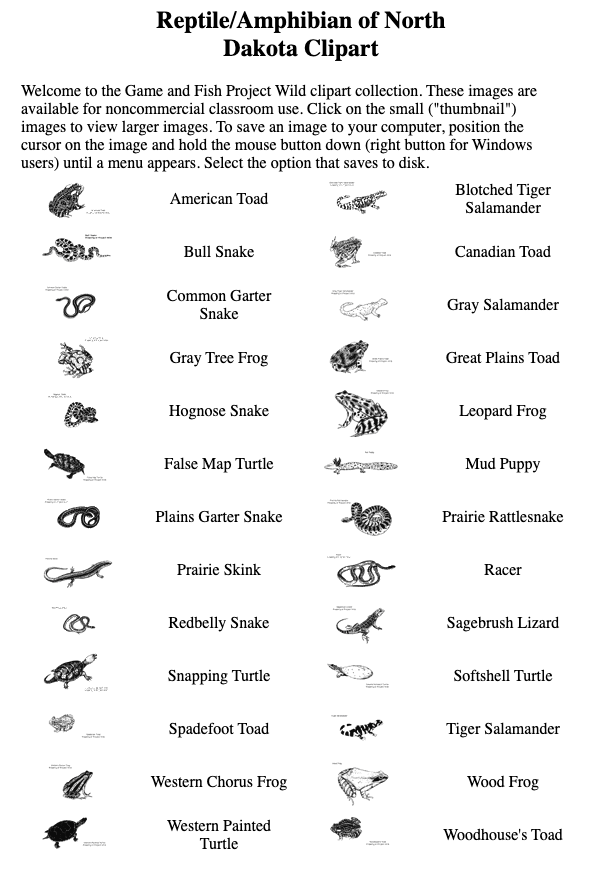
When I finished and began working at the University of North Dakota, I connected with North Dakota Game and Fish promoting a program they called OWLS (Outdoor Wildlife Learning Sites). Game and Fish provided small grants to schools for the development of prairie gardens. These were small sites planted to native vegetation potentially attracting helpful insects and watchable wildlife (the organization’s term for wildlife they did not manage for hunting). I worked with the state agency to host a web server focused on providing project information and sharing among sites. I also visited and taught workshops to promote the concept and teaching related tech skills that would apply (e.g., multimedia authoring, digital photography). I did convince the organization to pay for a collection of wildlife clipart that was originally sold for $4 and sold as a hypercard stack. Eventually, we just placed the collection online allowing anyone to cut and paste what they might find helpful.

I happened to think of this experience and remembered that I still have this clipart on my server. It is saved as bitmaps so lacks the versatility now expected. 

Useful clipart alternatives are available. I pay a small fee ($20 a year) to use images from the Noun Project and you will see these images in some of my posts. Educators interested in clipart for projects may find this source of value. The following were selected as alternatives to the images I selected from the ND CllipArt Collection

I have become a fan of digital photography and imagery as an alternative to the use of line art. With so many learners carrying smartphones, they have a high-quality camera always available. Images are also available online, but it is important to be sensible to copyright issues and look for images offered under a Creative Commons license. I make an effort to offer images I think may be helpful to others and propose that learning about Creative Commons and sharing images is a great learning opportunity. 

One more addition. Since I mentioned AI, I asked Google’s Duet to comment on the educational benefits of student use of clipart. The following is the product of that request.

———————————

Created using Google Duet AI

Help me write an article about students using clipart to develop writing projects.

Help me write an article about students using clipart to develop writing projects. Students can use clipart to develop writing projects in a variety of ways. For example, they can use clipart to illustrate their writing, to create visual aids, or to brainstorm ideas.

Clipart can be a helpful tool for students who are struggling to get started on a writing project. By browsing through a collection of clipart, students can be inspired by the images and come up with ideas for their own writing. Clipart can also be used to create visual aids that can help students to explain their ideas more clearly. For example, a student could use clipart to create a timeline of events or to illustrate a concept.

Clipart can also be used to brainstorm ideas. By cutting and pasting images together, students can create collages that represent their thoughts and ideas. This can be a helpful way for students to generate ideas and to get their creative juices flowing.

Overall, clipart can be a valuable tool for students who are working on writing projects. It can help students to illustrate their writing, to create visual aids, and to brainstorm ideas.

Here are some additional tips for using clipart in writing projects:

  • Choose clipart that is relevant to the topic of the writing project.
  • Use clipart sparingly so that it does not distract from the text.
  • Label all clipart so that readers know what it represents.
  • Credit the source of the clipart if it is not your own original work.

Loading