As the COVID pandemic resurges I am growing more convinced K12 education will look a lot different in the fall. I encountered this post offering some new proposals for models that cut classroom attendance in half in order to allow distancing. For whatever reason, my imagination had become stuck on a model in which half of the students came to the physical school on one day and the other half came on the next. I had imagined that Wednesdays would be devoted to teacher time for planning and going through student written assignments, projects, maybe a few personal contacts. The major downside I saw with this model was the double duty teachers would have to serve when half of the students were face to face and half were joining for at least part of the time online.
One of the ideas in the content I reviewed described a different approach in which half of the students attending in the morning and half in the afternoon one day and then all students were working remotely on the next. Again, Wednesday might be a time for planning and the other teacher tasks I mentioned above. The advantage in this divided day model would be the elimination of the double duty load each day. My perspective which I admit probably imagines working with older students would focus on more intense instruction for a shorter amount of time which I tend to see as more tolerable than what would seem feasible when engaged with students for an entire day.
Diigo is a social bookmarking service. The company offers the powerful service to educators and their students at no cost. The idea of an online bookmarking system is to allow a user to collect and organize links to online resources. Most of us probably started with a bookmarking system built into a browser. These systems became more powerful as the browser providers synchronized bookmarks across a user’s browsers on different devices. An online system tends to be even more powerful allowing bookmarks to be accessed using different browsers and allowing bookmarks to be stored with additional information (notes, highlights, tags) that improve search and may eliminate the need for search because of the information stored.
A social bookmarking system extends the capabilities of an online bookmarking system by allowing the sharing (collaboration) of bookmarking.
I have written previously about my use of Diigo. You can view my public bookmarks if you are interested. This post is intended to offer additional information about the classroom opportunities Diigo provides educators and students.
I would think an educator could pay for a pro-tier version of Diigo and set up groups for students. This would provide a reasonable level of security. However, the education version offers a couple of advantages and is free.
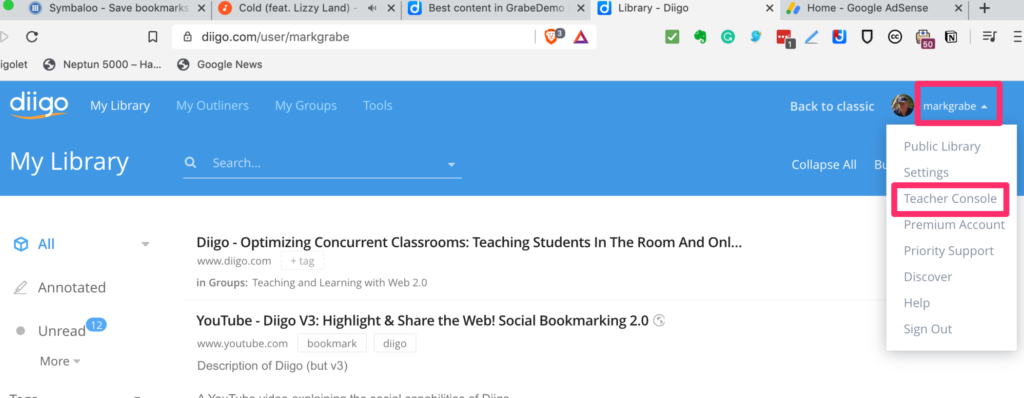
The first thing to do if you want to use Diigo with a class is to declare yourself an educator. The request page can be found at https://www.diigo.com/education. Once your request has been granted, access to the Teacher Console appears under the personal controls header.
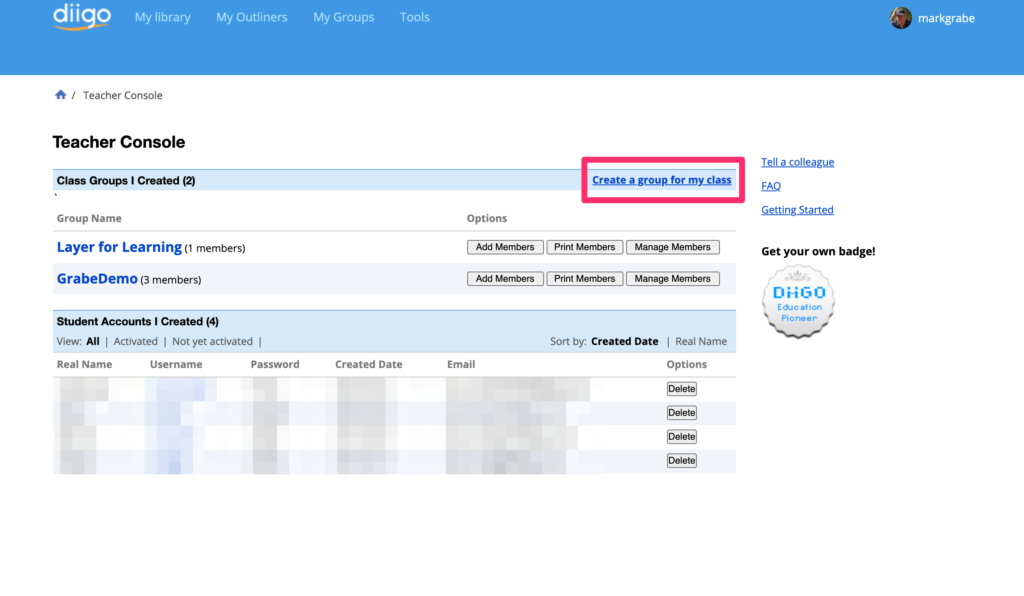
The teacher console is displayed below. From this display you can see I have two existing classes and multiple students (blurred out). The red box indicates the link to create a new class.
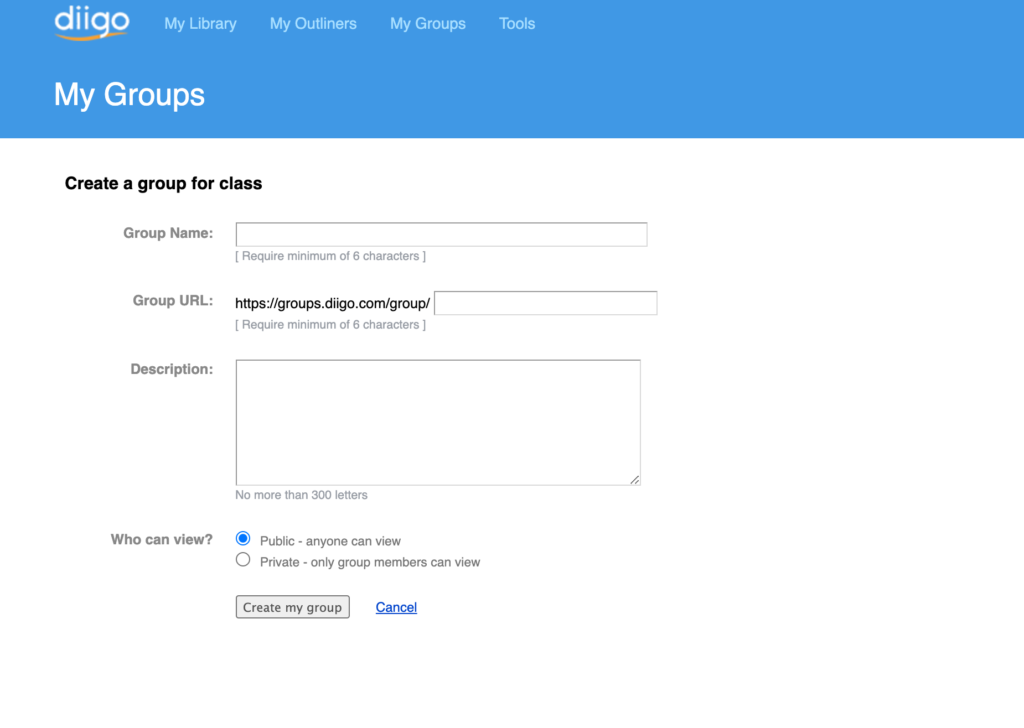
The page for creating a group is displayed below. Give some thought to what group name will prove useful over time.
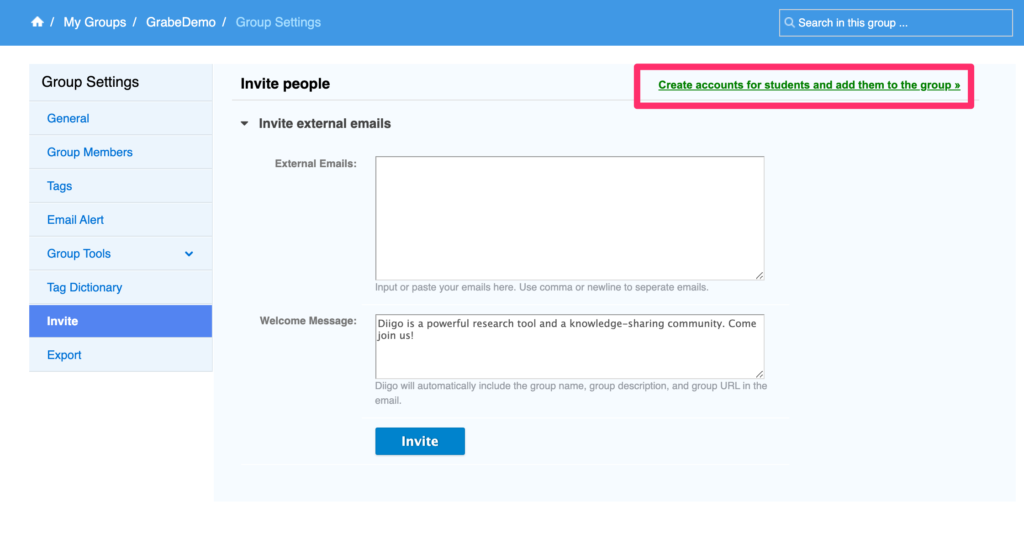
There are two ways to add students to a group. You can send out invitations to student emails (the system used with groups in the open Diigo system) or you can list students and the system will generate names and passwords.
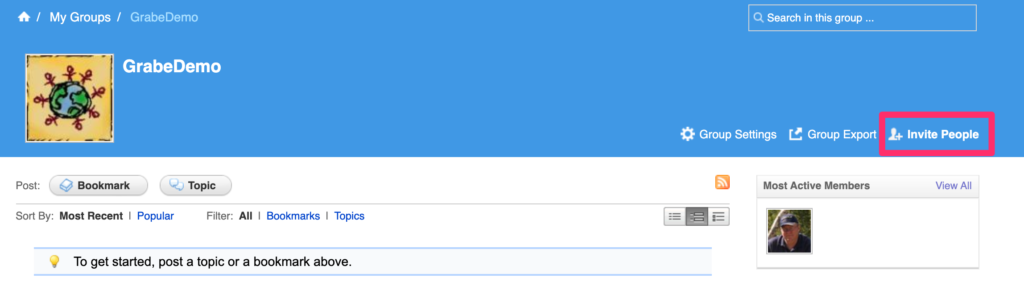
The email invite system requires you first open the group and then use the external email textbook to add the addresses of those you want to include.
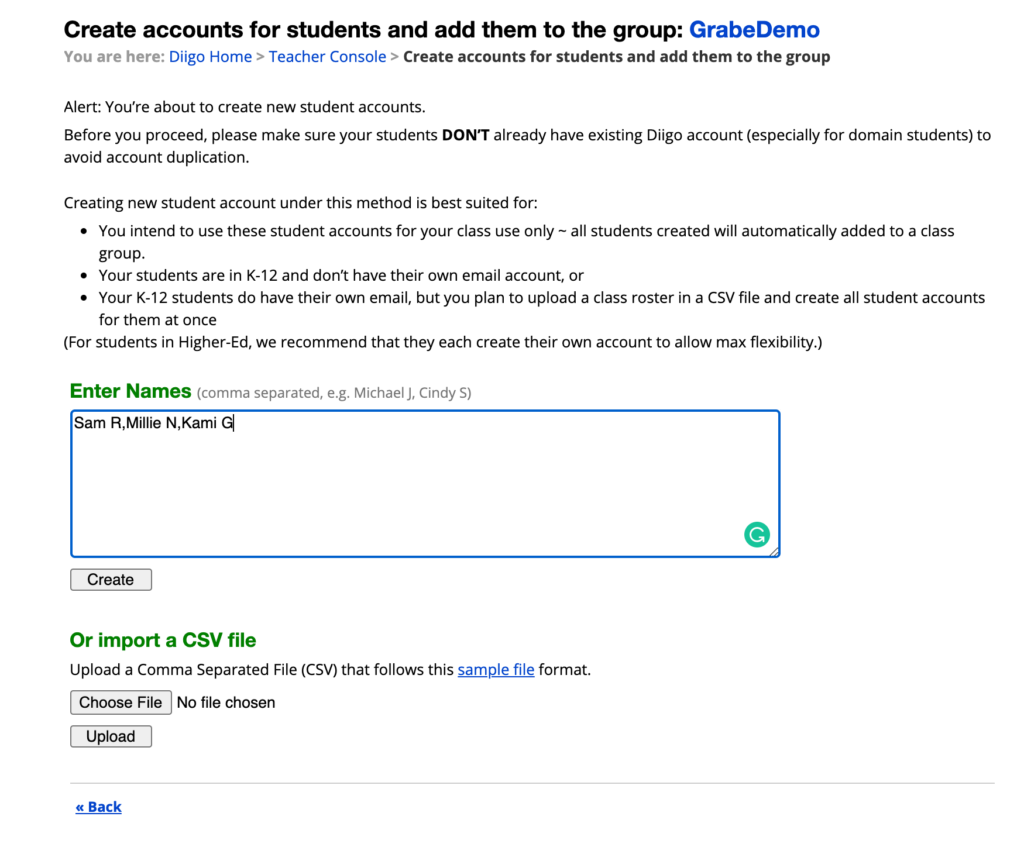
The list names without emails option continues from the page used to list the emails (see red box in the image above). This opens another page allowing the listing of student identifiers (probably not full names).
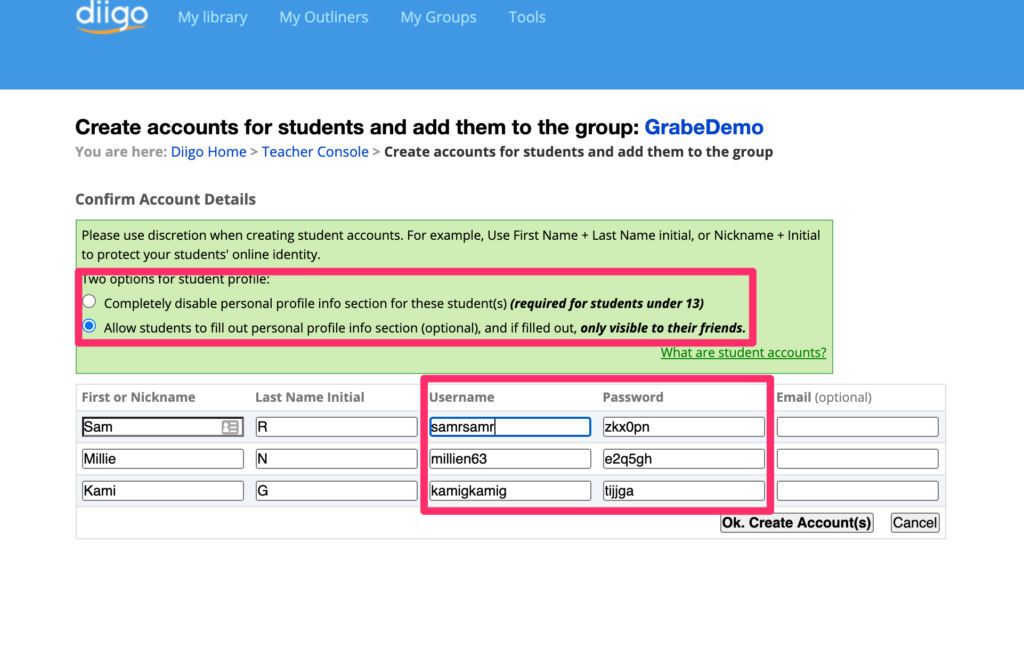
Diigo will create names and passwords from this list, but you want to modify them before assigning the names and passwords to students.
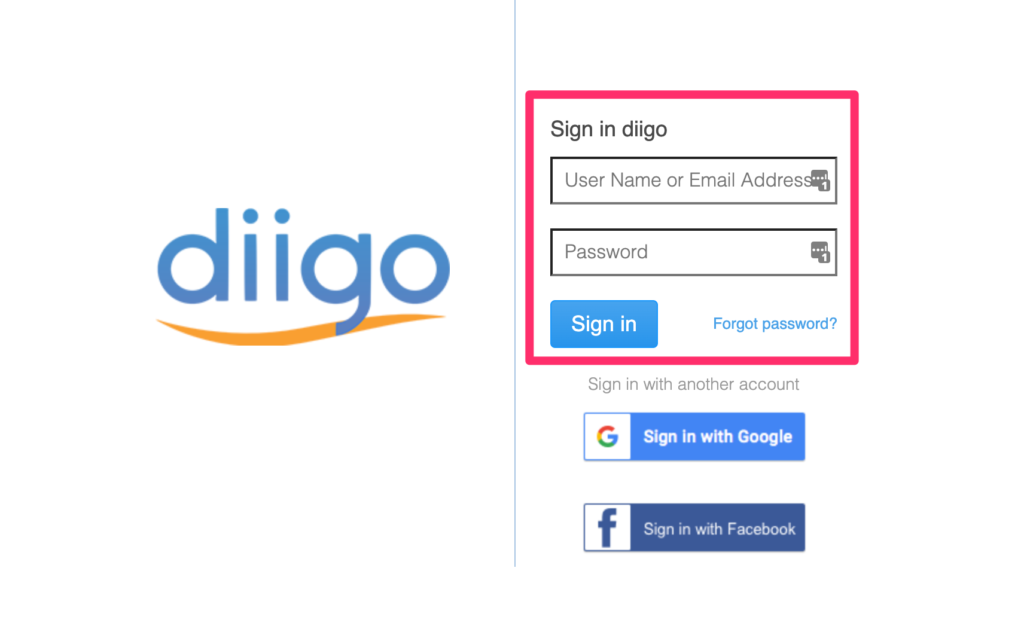
Students then sign in by responding to an invitation (email system) or using the assigned name and password.
Bookmarks are added to Diigo using a browser extension (see my original post about Diigo at the beginning of this post). Bookmarks can be private or public. Public for students is the way a bookmark is added to a class. Adults with a general account can designate the group to which a bookmark will be added.
Social bookmarking offers many opportunities. At a basic level for the classroom, the teacher might create a list of bookmarks to be reviewed by students. A group of students might also accumulate bookmarks related to an assigned topic. Those responsible for the pro and con positions in a debate might collect resources with information relevant to the position they are defending. etc.
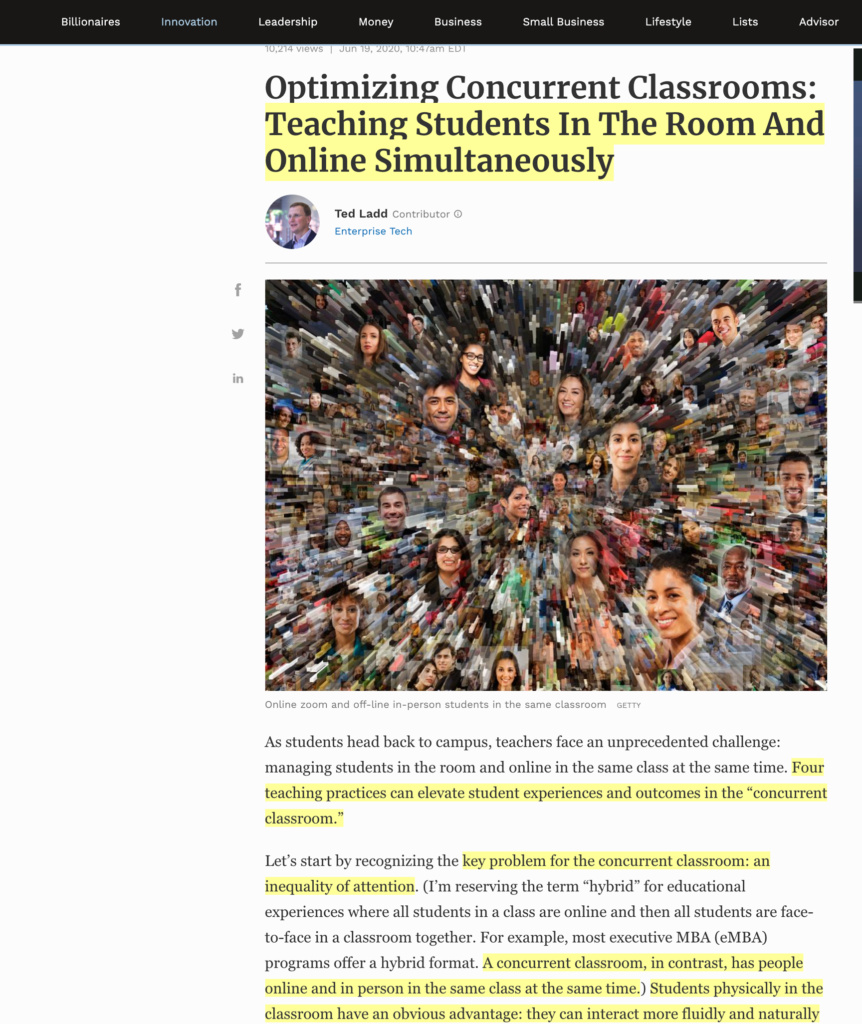
I found this resource from what I think is an unusual source – Forbes. The article identifies the challenges of teaching in a concurrent classroom. As I understand what is meant by concurrent as compared with a hybrid classroom, in a concurrent situation some students are always FTF and some always online. This would be the way I have taught my Instructional Design and Technology grad classes and I admit I never thought about the unique challenges of this arrangement. Concurrent can be contrasted with hybrid which means students rotate between being FTF and online. This arrangement seems what many K12 schools are planning for the Fall in order to reduce the number of students present in the physical classroom. Some issues are likely the same so it is worth reviewing the Forbes article for educators facing a hybrid arrangement in the Fall.
Problems:
The major problem in a concurrent arrangement is described as inequality of attention. This results from the limitations and predictable failures of being online (forgetting to mute, sound dropping out) and educator failures (tendency to focus on students in front of you, drifting out of the view of the camera).
Solutions:
Use a flipped classroom approach for any block of teacher presentation longer than 10 minutes. So students receive information presentation and demonstrations via video. The author then describe what happens with working synchronously as talk less and smile more.
Make frequent use of output-oriented breakout tasks. Students both in the FTF and online work in teams (learn how to do this in your video environment) on short duration tasks with the requirement of reporting a solution of position
Alternate gaze – Remember to focus both on the camera and students in front of you. I know this is an issue from personal experience. The article recommends even finding ways to remind yourself to do this. Calling on students is another way to do this. Call on students both FTF and online.
Asynchronous presentations – have student groups create short presentations on assigned topics/issues. Store links to these presentations in Google docs (note skills that would have to be developed). Assign students to these different presentations and ask that they add questions after reviewing the content.
The article notes that these could also be argued to be reasonable ideas for traditional classroom instruction.
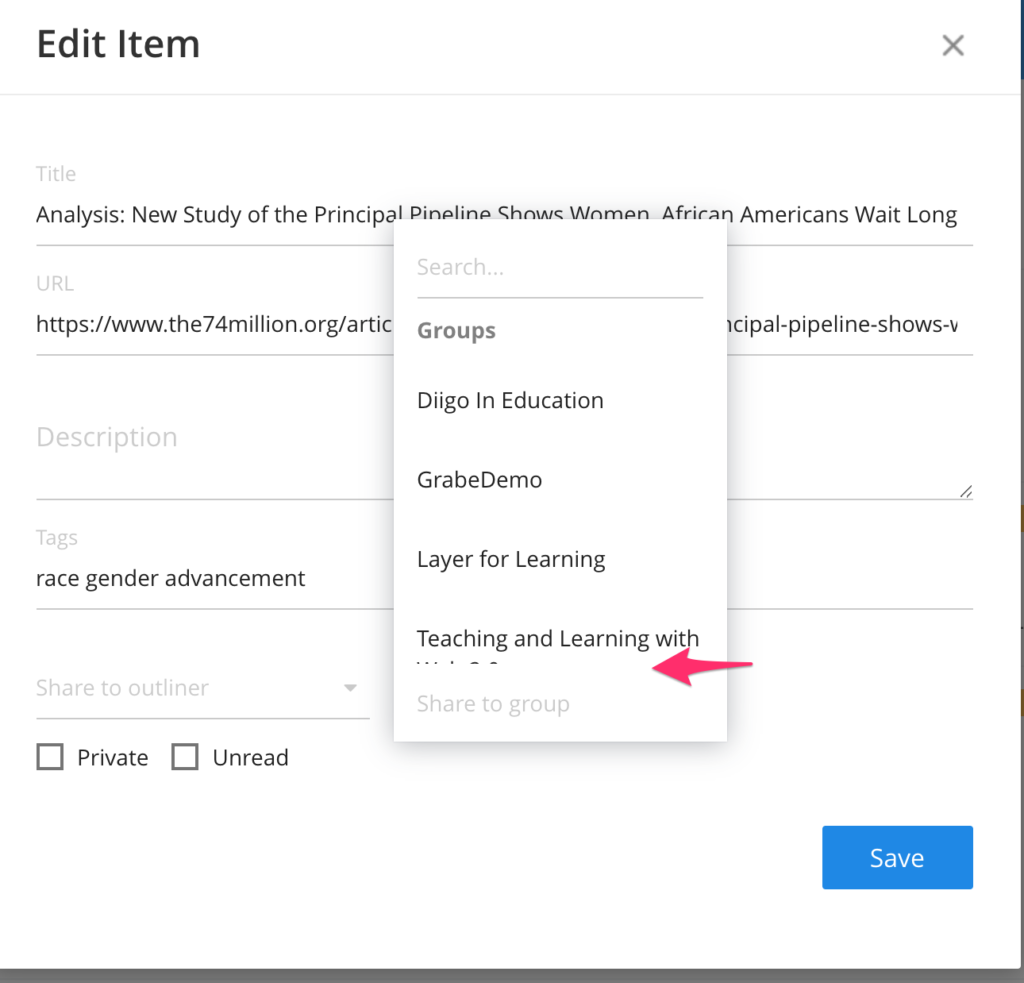
P.S. – I use a social bookmarking system called Diigo. An interesting feature (the social part) is that you can designate entries for access by the public. There is a way to offer access to a specific entry in this collection and that is what I have added below. The free Diigo extension must be installed to see the annotations of another Diigo user.
I have been waiting to generate this post until I felt certain educators would be providing at least some instruction at a distance this Fall. I have decided Fall instruction will not be like the Fall of 2019 and tools for teaching online are worth considering.
I understand that educators have been overwhelmed by suggestions for teaching at a distance. I want to limit what I add to one concept. I call this concept “layering” (explained here) which is my way of suggesting that educators should learn how to take existing online content (web pages and video) and add elements that guide the learner. Informational rich content is not necessarily prepared as learning resources. Adding elements such as questions and annotations to remember something already learned can improve understanding and application. Help the learner process the information to increase understanding and retention.
I am making some assumptions about the tools educators already have mastered. I assume that educators have learned to use a tool for managing learning and reaching students (a course management system of some type – Google classroom, SeeSaw) and video communication tools (Zoom, Google Meet). I would then suggest educators spend time with the type of tool I suggest here. The tools I suggest are versatile so that the investment of time educators and students commit translates into frequent applications. It makes sense to spend time on such tools before exploring other tools that might be used now and then.
There are several different layering tools and you need to learn a different one for video and for web pages. Here are my two suggestions.
A recent article from the Blue Skunk blog (Doug Johnson is about my age and has been blogging about as long) laments the decline of newspapers and the willingness of everyone to read original journalism. He identifies the lack of willingness to pay for a paper or two as a significant issue. There are many great books on the decline of newspapers in the last few years (I happen to be reading Merchants of Truth by Jill Abramson at this time) and all describe the struggles of news sources that employ journalists to collect the news from original sources in an era of declining revenue and free outlets that are mostly opinions and retelling of the content generated by others. There are compounding factors such as the lack of patience for investing time in long form reading and a focus on platforms such as Twitter, Facebook, Buzzfeed, etc. leading individuals to assume they are informed when they are not. Doug urges us to invest in actual news sources as a commitment to reading the news and keeping journalism alive.
Johnson’s post caused me to think about my own reading. I read a lot and a great deal of long form content (books, news articles), but I don’t subscribe to what might be described as a major national news outlet. I subscribe to the Minneapolis StarTribune which I read digitally and we pay for an Apple News+ subscription which offers to a wide selection of magazines, the Wall Street Journal, Los Angeles Times, but not the New York Times or Washington Post. I read articles from the Post and Times when articles not part of the subscriptions are available or until I have exhausted my monthly allotment.
I encourage others to look at two news aggregation services which I use and describe below.
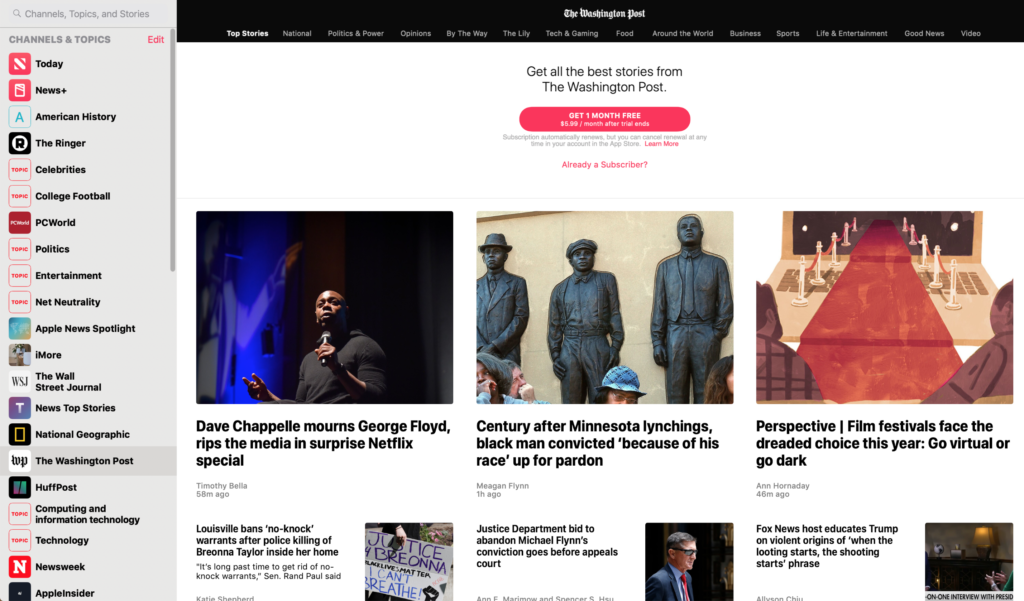
This site offers access to a wide variety of quality sources. Try the link even if you are not interested in the paid level. The site seems to work better using Safari and I would recommend this browser if you are interested in the paid level (it knows who you are across devices and this seems to make access easier).
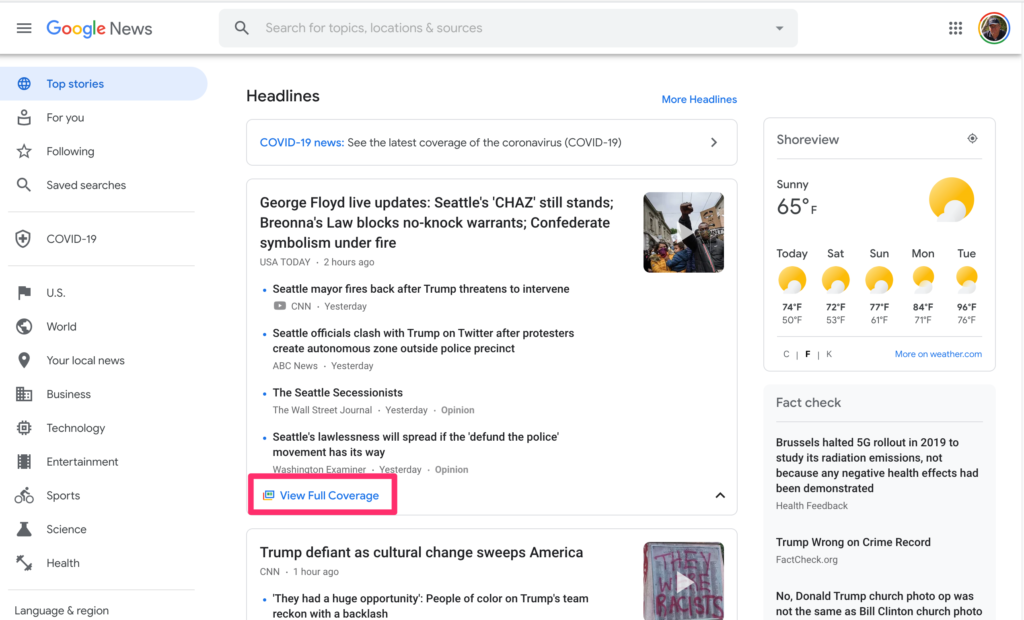
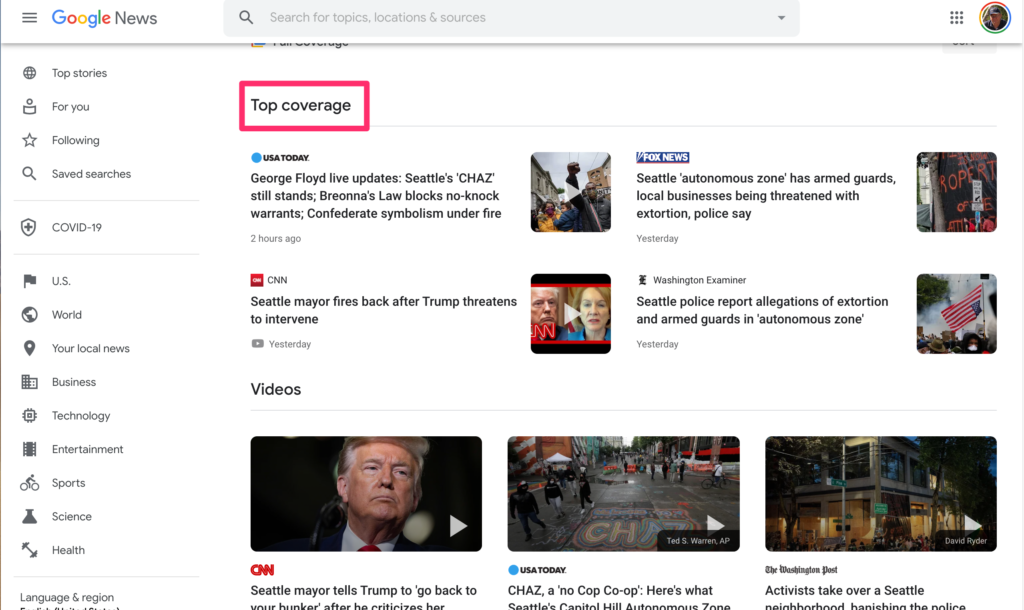
I would also recommend Google’s aggregation site – news.google.com. This site is interesting in the way it organizes content by topic with multiple sources per topic and if you are willing as a way to explore the same story from multiple perspectives.
Google news also makes it clear whether a story is available with or without a subscription to a particular service saving the time and frustration of trying to read content you will not see in full.
Academics often change their interests as new issues their training is suited to address change. To some extent this is also true of me. However, I can also identify interests that have remained core to my thinking over what is now more than a 40 year career.
When I was in graduate school I read from two sources both published in 1968 that influenced my thinking to this day. These sources from Benjamin Bloom and Fred Keller focused on ways that education could address the needs of individual learners and these ideas for me will always be described as mastery learning. The core idea of mastery learning is 1) that individuals learn at different rates and 2) if these different rates are not taken into account learners will be less efficient in what they could accomplish or more dangerously will fail to accomplish. If allowed to accumulate the knowledge and skills that accumulate serve as the basis for increasing barriers to new learning . Focusing on those with greater learning struggles, over time, this means that learning capabilities begin to differ from others both in terms of requiring more time because of aptitude AND existing knowledge.
The solutions offered by Bloom and Keller were to individualize learning in an attempt to prevent what might be described as prerequisite knowledge deficits. As a graduate student some of my earliest publications (1978 and 1981) focused on research another graduate student and I conducted with a Professor teaching the introduction to biology course at Iowa State.
The core idea of mastery also influenced some of my research nearer to the end of my career. At this point, I was interested in study behavior and how technology supported study might offer feedback to learners to influence the extent of effort they must invest to achieve higher levels of performance. In some ways this research effort quantified the reality of the different amount of time required and demonstrated over and over that it was the more accomplished students who invested in the use of the tools designed to assist students struggling to succeed. A way to succeed is intended to increase motivation, but the reality of what it takes appears to swamp the incentive to use such systems. Perhaps, the university is far too late to begin emphasizing a focus on trading effort for achievement.
I part of the heavy emphasis I invested in the role of technology in education might be described as the opportunity technology seems to offer for individualization. My thinking on this potential was agin motivated by the work of one of the pioneers I credit for kindling my original interest. Bloom conceptualized what I think of as the 2-sigma challenge. He proposed that the upper limit for the potential of educational research was likely identified in the work of tutoring. Tutors working with individuals or very small groups offered a way to respond to individual needs and the advantage demonstrated in the degree to which tutoring augmented the achievement for group-based instruction. To me, well-designed technology supported tactics provided what might be described as a “poor man’s” approximation to tutors. I don’t see technology, at least in the near future, being the equivalent of a gifted and dedicated tutor, but I also don’t see how the finances of providing human tutors as practical. Teachers working with classes of 25+ in elementary and multiple sections of this number at higher levels certainly can’t provide this level of attention.
I offer details on mastery in other content I have generated. This writing/video includes specific references to key articles. The citations below are what I described related to early and late efforts on my part.
Historical reference:
Latta, R. M., Dolphin, W. D., & Grabe, M. (1978). Individual differences model applied to instruction and evaluation of large college classes. Journal of Educational Psychology, 70(6), 960.
Grabe, Mark, and R. Michael Latta. (1981). “Cumulative achievement in a mastery instructional system: The impact of differences in resultant achievement motivation and persistence.” American Educational Research Journal, 18, 7-13.
Grabe, M. (1982). Effort strategies in a mastery instructional system: The quantification of effort and the impact of effort on achievement. Contemporary Educational Psychology, 7(4), 327-333.
Grabe, M., & Flannery, K. (2010). A preliminary exploration of on-line study question performance and response certitude as predictors of future examination performance. Journal of Educational Technology Systems, 38(4), 457-472.
I am a very experienced screen reader. This has been the case for many years. Ironically, I am interested in the screen vs. print research and I have read much of this research. The screen vs. print issue seems to pop up frequently. [Example1, Example2]. I find my own reaction to be very different in several ways from the conclusions of this research.
The literature, quickly summarized, finds an advantage for print reading over screen reading with a greater advantage for informational than narrative texts. I read nearly everything I read on a device. I strongly prefer to read on a device for informational text particularly when reading longer texts (books vs. journal articles). I understand the methodological danger in anecdotal research even when the case used as evidence is yourself so I have tried to think carefully about why I have come to ignore the research and stick with my preferences.
Here are a couple of issues I use to bring some personal understanding to the difference between my perception of my own experience and what the literature seems to be suggesting.
The research tends to focus on reading comprehension; read and then complete some measure of comprehension. Most of my reading I would describe as reading to write. I highlight and annotate heavily when I read. I find this far more practical to do on a device allowing me to search my annotations quickly and in some cases use the record of my highlights to provide a basis for creating an outline to be used in writing. The time I spend doing this kind of reading may influence my preferences. First, this type of reading is more interactive than the way one would read in preparation for a post reading assessment not allowing review. Perhaps the interactivity changes the nature of my reading in a way that avoids the skimming some see as the reaction of text on a screen. People read for different purposes (enjoyment, understanding). Reading to write as I define it seems similar to what I would describe as reading to study. I think if I were taking classes having the option of a print or digital textbook, I would prefer the digital version. The issue is not so much if I can remember something immediately or later. The issue is whether at a later time I can review effectively.
I read a lot – probably averaging more than a couple of hours a day. I read many different types of material (books, journal articles, fiction, news) and I do nearly all of this reading on a screen. This has been the case for many years. I wonder about the impact of the amount of experience with online reading of long-form documents.
I like to change the size of fonts. I find the fonts in many print sources too small. I am older and I find it easier to read with speed with larger text.
Manage Consent
To provide the best experiences, we use technologies like cookies to store and/or access device information. Consenting to these technologies will allow us to process data such as browsing behavior or unique IDs on this site. Not consenting or withdrawing consent, may adversely affect certain features and functions.
Functional
Always active
The technical storage or access is strictly necessary for the legitimate purpose of enabling the use of a specific service explicitly requested by the subscriber or user, or for the sole purpose of carrying out the transmission of a communication over an electronic communications network.
Preferences
The technical storage or access is necessary for the legitimate purpose of storing preferences that are not requested by the subscriber or user.
Statistics
The technical storage or access that is used exclusively for statistical purposes.The technical storage or access that is used exclusively for anonymous statistical purposes. Without a subpoena, voluntary compliance on the part of your Internet Service Provider, or additional records from a third party, information stored or retrieved for this purpose alone cannot usually be used to identify you.
Marketing
The technical storage or access is required to create user profiles to send advertising, or to track the user on a website or across several websites for similar marketing purposes.

You must be logged in to post a comment.