The mysterious Zettelkasten

I have tried many methods for taking notes over the years. I probably started like many academics by reading scholarly journal articles in the journals I received through subscriptions, highlighting the articles as I read, and then maybe taking a few notes on a 3×5 card that I kept in a “recipe box” under one topic heading or another. With the arrival of technology, my approach shifted to storing a version of the note cards in one system or another and shifting from reading journal articles in journals to reading journal articles I could download from my library site as pdfs. When the Internet offered more content directly I added some bookmarking application to my approach to save the links to websites I wanted to remember.

The big idea I gleaned from reading Ahren’s (2017) book (see previous post) was that it is important to record notes in my own words as I read. Too often, I highlight while I read and then lost the context that is important in capturing big ideas. Any writing task required that I recapture the ideas by starting from the original source before integrating ideas in what was to become the final product. What Ahrens recommends might be described as starting a writing process earlier in the transition from primary sources to the final product. He described first generating fleeting or literature notes while reading and then permanent notes once the reading of a source was completed.  As I rethink my “note-taking” over the years, I have decided I typically failed to make the transition from literature notes to permanent notes. Worse yet, too often my reading of a source only resulted in highlighting of the ideas that were not my own.

What Ahrens describes as a permanent note is clearly a form of writing. The idea is to create a personal summary or interpretation of a key idea that can stand alone and store such summaries in a certain way. What I mean by stand alone is that the permanent notes are not necessarily intended to end up becoming part of a final product that one already has in mind. The concept of smart notes (the title of his book) was that the ideas would be formulated and captured immediately and stored in such a way that they could be easily found and then organized with other such ideas to more efficiently create final products. I would describe this as moving part of the writing process earlier in the reading to written product workflow. 

Knowledge transforming and knowledge telling

Ahrens argues that creating permanent notes as you encounter ideas you think are interesting is more than a precursor to writing. He suggests that this notion of generating a written note that reflects personal understanding and relating this note to other notes is a way to facilitate the learning process. You end up with both external and internal storage. I would suggest that cognitive psychologists call this form of writing a generative process. The permanent note versus the “literature” note reminds me of the distinction some scholars studying writing make between knowledge telling and knowledge transforming. The distinction may be relevant to what makes a good smart note. Knowledge telling is the output of part of what was the input. Your write a close approximation to what was heard or read. Highlighting would be a crude form of knowledge telling. Knowledge transforming involves interpretation on the part of the content producer. I liked to explain the difference to educators by asking them to reflect on student answers to essay questions they have asked. Some students write everything they remember about a topic whether or not it specifically answers the question. It is like they want to argue that the answer must be in there somewhere. Knowledge transforming starts with what the question asks and crafts a response that shapes what the respondent knows to address the challenge posed by the question. Knowledge transforming is a far better indication of understanding. 

Luhman’s Zettelkasten

Ahren’s book and ideas are not his original creation, but based on the method of Niklas Luhman referred to as the Zettelkasten. I see various references to Luhman’s ideas lately and predict this will become “a thing” in education. As I understand the translation, a Zettelkasten is a box in which notes are stored and organized. Lehman called this a slip box. It is the form these notes take and how they are related to other notes in the box that is the key to what is described as a more productive workflow. I have included a video of Lehman working in his office using his slip box and a reference to a source describing the Zettelkasten for Beginners at the end of this post. 

Where is this all going?

If you read my original post, you can anticipate that I will originally explain efforts to translate this method and the physical slip box into a workflow and applications that run on a computer.  I will identify some of the tools/services I have used and some I have recently discovered that are suggested as ways to implement the Smart Note and Zettelkasten approach to writing and learning. 

Sources

Ahrens, S. (2017). _How to Take Smart Notes: One Simple Technique to Boost Writing, Learning and Thinking–for Students, Academics and Nonfiction Book Writers.

Niklas Luhman and the Zettelkasten – https://www.youtube.com/watch?v=qRSCKSPMuDc&t=2246s

Zettelkasten for beginners – https://norberthires.blog/zettelkasten-method/

Knowledge telling and knowledge transforming – Bereiter.C. & Scardaamalia, M. (1987). Two models of composing processes (pp. 1-30). In C. Bereiter & M. Scardamalia (Eds) The psychology of written Composition. Erbalaum. 

Loading

Writing to learn and more

I have a long term interest in student note-taking and how it might be improved. A somewhat shorter fascination has been the role of writing in content area learning and this is a topic I consider with a focus on the role of technology in a graduate course I teach. Recently, I read a book by Sonke Ahrens with the rather lengthy title – How to take smart notes: One simple technique to boost writing, learning and thinking – for students, academics and nonfiction book writers (reference included at the end of this post). I don’t think the title adequately conveys the breadth of what the book covers. I see it as a book about what learning is and the role writing can play in facilitating the process of learning. By including a consideration of several technology tools, the author brings together many of my interests.

I decided I would try to write several posts on this topic based on my own experiences and interests. These posts may not appear here sequentially, but I promise to offer several posts I will link in some way. My intent is to describe several digital tools I use or have used in what some might describe as a reading to writing workflow. Most academics have related experiences on this process. My focus on digital tools is more in keeping with the core focus of this blog. 

A little history

Several of the authors I have read recently mention what I consider historical perspectives on the role of technology that were already familiar to me and that I have found intriguing. 

In 1945 (no I did not read it immediately upon its publication), Vannevar Bush wrote an article for The Atlantic titled “As we may think”. Bush advocated for the importance of scientific research in the war effort and was partly responsible for what we now recognize as the National Science Foundation. In the Atlantic article, Bush offers early insight into the challenge of processing the enormous about of information that was and continues to be available. He lamented that … For years inventions have extended man’s physical powers rather than the powers of his mind. His solution was the memex – a hypothetical contraption based in the mass storage method of the time (microfilm). This device allowed a user to link together elements of information as a trail that would provide associative insights (as we may think – associative memory). The notion of links among elements of information is often recognized as very similar to the “world wide web” (internet) and the reason many tech folks recognize Bush and the fanaticized memex. The key idea here – technology be a tool for learning through the external representation of ideas and their connections.

Steve Jobs offered what became a famous analogy describing how he saw the potential of the personal computer. He described the efficiency of human movement as far inferior to other animals, but with the assistance of an external device (the bicycle) human movement was far more efficient. This is how he saw the potential benefit of the PC – a bicycle for the mind. At this point in time, the question might be how well does the present use of technology in education match with this goal? Does it facilitate the process of learning and the application of what has been learned?

Ahrens book – https://www.amazon.com/How-Take-Smart-Notes-Nonfiction-ebook/dp/B06WVYW33Y

Bush’s As we may think – https://www.theatlantic.com/magazine/archive/1945/07/as-we-may-think/303881/

Steve Jobs Bicycle for the mind – https://youtu.be/ob_GX50Za6c

Loading

Adobe Spark Video

Note: Adobe has replaced Spark tools with Adobe Express. Spark Video is part of Adobe Express.

Adobe Spark Video is a great tool for students to use to create videos. Adobe Spark is especially useful because it works through a web browser and hence is a great application for use with Chromebooks.

The following is the page you will encounter when you connect. You are going to want to create an account.

You can create various types of projects with Adobe Spark. My tutorial describes the slideshow.

The following video takes you through the basics of creating with Adobe Spark

Here is the final product from the project described above.

Loading

Explaining the counterintuitive

Once in a while, you encounter an idea that explains some things you have found puzzling. This is the case with the concept of “Desirable Difficulty“. This concept would be one way to understand my previous post on the advantages of taking notes by hand over taking notes on a laptop. Taking notes by hand is more demanding for most and learners compensate by summarizing content before recording. There are long term benefits to generating summary content over recording more verbatim information.

Bjork explains how a tendency to be misled into engaging in activities that seem to offer an immediate advantage may have less productive long term consequences. He differentiated retrieval strength and storage strength. Learning that is too easy (e.g., cramming) can result in an immediate advantage in retrieval strength, but may limit the development of storage strength. Long-term benefits depends on the development of storage strength.

This distinction can be applied to the immediate advantage of taking more complete verbatim notes over notes that require personal understanding (i.e., a summary).

As I hope is apparent, personal decisions are at the core of the problem. You tell students to space their study and not cram or work with their notes to create interpretations and not just verbatim copies of what was presented, but what easiest and falsely perceived to be more useful often win out.

One more comment – the suggestion of purposefully making things a bit more difficult must be carefully interpreted. The point is about engaging in cognitive processes that are more productive and perhaps more demanding and not to create needless struggles.

Bjork, R.A. (1994). Memory and metamemory considerations in the training of human beings. In J. Metcalfe & A. Shimamura (Eds.), Metacognition: Knowing about knowing (pp. 185-205). Cambridge, MA: MIT Press.

Loading

When less is more and when it isn’t

I am interested in the process of writing. Originally, I was interested in my own writing and how I might write more productively and efficiently. Gradually., I became interested in student writing. My first interest was in what I would describe as writing to learn and this focus came about because I was convinced what was called Web 2.0 (I called it the participatory web) provided a practical way for individuals to express themselves for an actual audience. In doing so, it made sense that the process of visible expression required deeper thought and a better understanding of what you wanted to share. An interest in the role of technology in learning to write and in collaborative writing followed. I hope this makes sense. There are multiple components here and I am trying to outline how these components are interconnected and came to be as much for myself as for anyone who reads this description. 

As I have spent time learning about writing and how the process might be conceptualized and developed, my way of thinking about what writing involves has expanded. This expansion has been useful because it allowed me to include a long-time interest in student and personal note-taking in how I came to think about writing. Recently, I have been reading a book entitled “How to take smart notes”. The full title which is much longer explains that the book is really about writing as a broad process that begins in reading/listening, moves to note-taking, and then explains how learning and creativity are involved in the progression to generating a text for others. I have found that the full model offered me a lot to consider and to write about. Eventually, some of the writing will likely appear on this site. For now, just accept my recommendation for this book.

Anyway, the topic of note-taking plays a crucial role in this book and especially a type of note-taking that I would describe as an investment in the future of personal understanding and knowledge building. By investment, I mean that the process described involves the immediate accumulation of interesting ideas and important concepts in what the text describes as a slip box. This was a descriptive term used by the originator of the process outlined in the book to describe a physical box in which short, but well-written statements were saved. These “notes” were then linked to other notes in the box through a notation system. Eventually, an author could use these linked statements to create an informative document. Of course, many of us can immediately imagine how to use technology to apply this system and this is part of the message of the book’s author, but there are some basic ideas that are of greater general value. For example, the “slips” amount to more than the highlights or edge of page annotations created while reading, but rather well-formed and personalized statements created from primary sources. Such brief summarizations or insights are closer to a core product of writing than a physical copy of a snippet of the original.

One of the comments from the book and a great example of the cognitive behavior that is at the core of why the writing process is productive was provided in a “side observation” offered by the author. This observation was that while the author kept offering suggestions for how technology might be a great way to implement the ideas from the original “slip box” process, the author suggested that the process of writing notes by hand might be more beneficial than the digital equivalent. I have been having a kind of “meta” experience as I write about my reading and relating of this idea. The author is writing about how to find productive associations among ideas and I see such an association in what I already knew about the logic of taking notes on paper (I have taken notes by hand in a decade) and why I still advocate for digital processing of the entire process of idea storage to final written products.

The author cites a study (Mueller & Oppenheimer, 2014) in support of his position. I have read this study and have existing notes on the pdf of the article I store in my collection. There were three studies in this article comparing performance (comprehension and application) following exposure to an audio lecture and note-taking. All three studies involved one group that took notes by hand and another that took notes on a computer. There are other multiple studies on this issue and because I have a bias toward the value of technology I look for several things in the methodology of studies arguing for the benefit of taking notes by hand. Is the performance test immediate or delayed? If the test is delayed, are learners allowed to review their notes before taking the exam. In comparison to just listening or reading, note-taking offers two potential benefits – external storage and a task that may involve more productive processing of the input. Taking notes on a computer typically results in more content being recorded as most of us can take notes faster on a computer than by hand. If I am reviewing my class notes weeks later, I want a more detailed account. Mueller and Oppenheimer found greater detail in keyboard note-taking, but in their third study with a delayed exam found a benefit for taking notes by hand. They argue that when faced with the reality that you cannot possibly keep up, handwriting requires you to summarize and record key ideas producing the best long-term value. This ends up being the argument used in advocating handwritten notes for the slip box. Summary and key idea notes are what is valuable in writing. It is kind of a less is more argument

I am still not a believer although I buy the notion that at some point you need to process the original input for personal meaning. The proposal that an approach that is slower (handwriting) and as a consequence encourages deeper processing (also slower) seems to argue for some approach that is must address these two limitations. Both slow and slower strain the limits of working memory. The issue with deeper processing is when this more productive processing should happen – during the presentation (as saved to summary notes) or when studying more complete notes. Here is my criticism of the Mueller study in making the suggestion for practice that appears to be made and is picked up by Ahren’s book. . Allowing a few minutes to review notes before taking an exam is not my idea of studying for an exam. Certainly, if this is all of the time allowed good summaries would be most helpful. However, if I had a day or so and at least the night before to study a large body of lecture notes I would prefer access to notes that are more complete. When doing this, I would prefer more complete notes I could think about (process for meaning and application).

I think there are tools appropriate to the task of taking digital notes and providing a better delayed experience. The two recommendations that follow record the audio of a presentation (this is the input Mueller uses) and allows for the taking of notes. The apps link the notes to locations in the audio. If on reexamining the notes to see if they make sense (hopefully initially close in time to when the notes are taken) something does not make sense. Small portions of the audio can be replayed for additional processing.

Pearnote

Soundnote

Ahrens, S. (2017). How to Take Smart Notes: One Simple Technique to Boost Writing, Learning and Thinking – for Students, Academics and Nonfiction Book Writers

Mueller, P. A., & Oppenheimer, D. M. (2014). The pen is mightier than the keyboard: Advantages of longhand over laptop note taking. Psychological science, 25(6), 1159-1168.

Loading

The day the good internet died

“The day the good Internet died” is the title of a post by Katie Ringer lamenting what she sees as the decline of the Internet. She associates the date with the end of Google Reader which she argues was not even a great RSS reader, but easy and free and functional. RSS readers allowed users to select content sources (mostly blogs) that a user sometimes has found useful and then check the reader to determine when new content has been posted to these sources. A quick scan would indicate whether the new additions focused on anything of interest and the user can then open the promising content and read further. No doom scrolling through a feed of content from folks you might know or sources you sometimes find interesting but prioritized for your viewing by algorithms not explained to you and now assumed to increase your viewing time to offer the social media service the opportunity to show you more targeted ads and make more money. 

Ringer’s observation is not unique (e.g., Wired story). RSS readers still exist and are better than Google Reader, but too few people use them. The decline of use has a secondary negative impact. Blogs are receiving less attention resulting in bloggers abandoning their independent outlets and focusing on social media aggregators (e.g., Facebook) to find an audience. Again, the reader ends up with less control of their content exploration experience. 

Things may be changing. Google is exploring adding a “Follow” button within Google Chrome as a simple type of RSS. At present the button only exists within the android version of chrome, but Google promises they are working on a version for iOS.

For the time being, try the Chrome extension from Inoreader. As an RSS reader, Inoreader can be accessed as a website or from the RSS extension. You can get a free account that will meet the needs of most people at least in getting started.

The web option looks like the following with the list of feeds and controls in the left panel and snippets from unread posts on the right.

Adding a new feed to Inoreader works this way. In the left-hand column, locate the “Add new” listing. Options for the source type will appear. Adding a feed for a blog requires you select the “Feed” option. This will open a text field for pasting the URL for the blog to be added.

The use of the chrome extension works a little differently. If you are examining a blog and want to add the feed for that blog to InoReader, select the Inoreader icon in the menu bar. This will automatically enter the URL for that site in a text box and selecting the + button will complete the process of adding that feed. Selecting the icon from the menubar also provides access to unread links from the feeds you follow. Select a subscription and you can then view any of the unread posts.

Loading

Check yourself

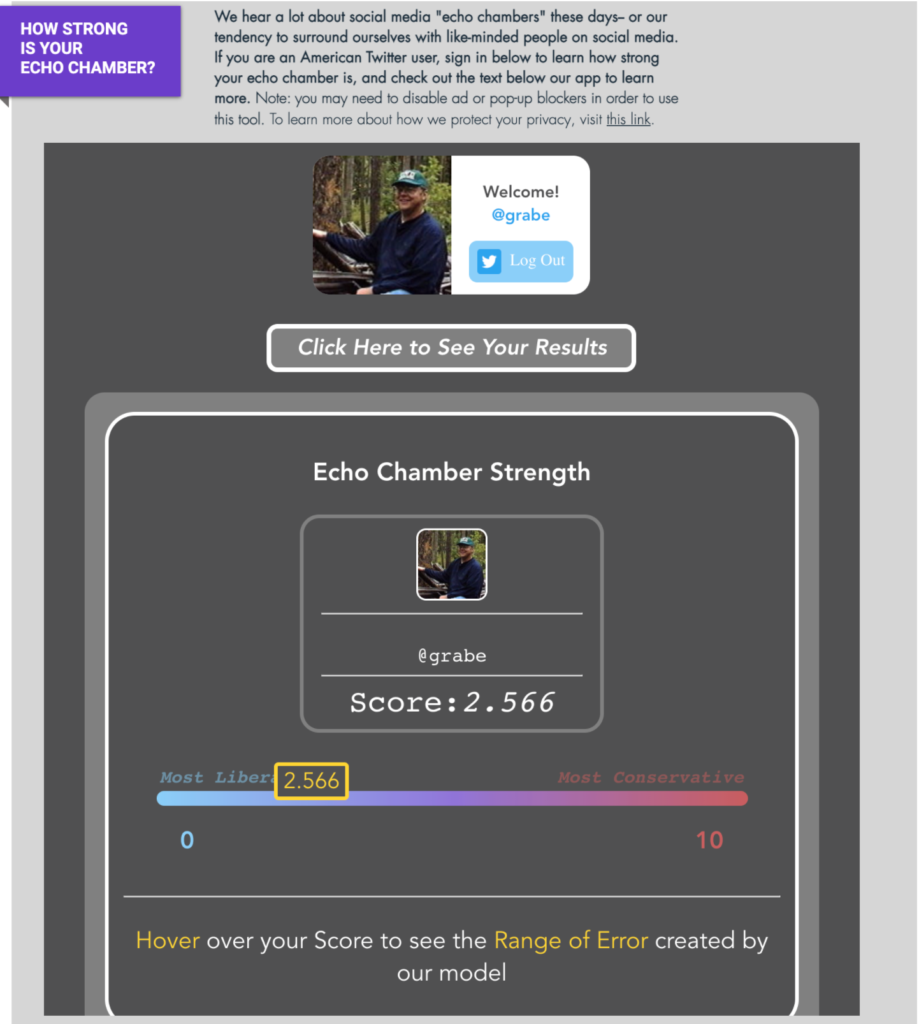
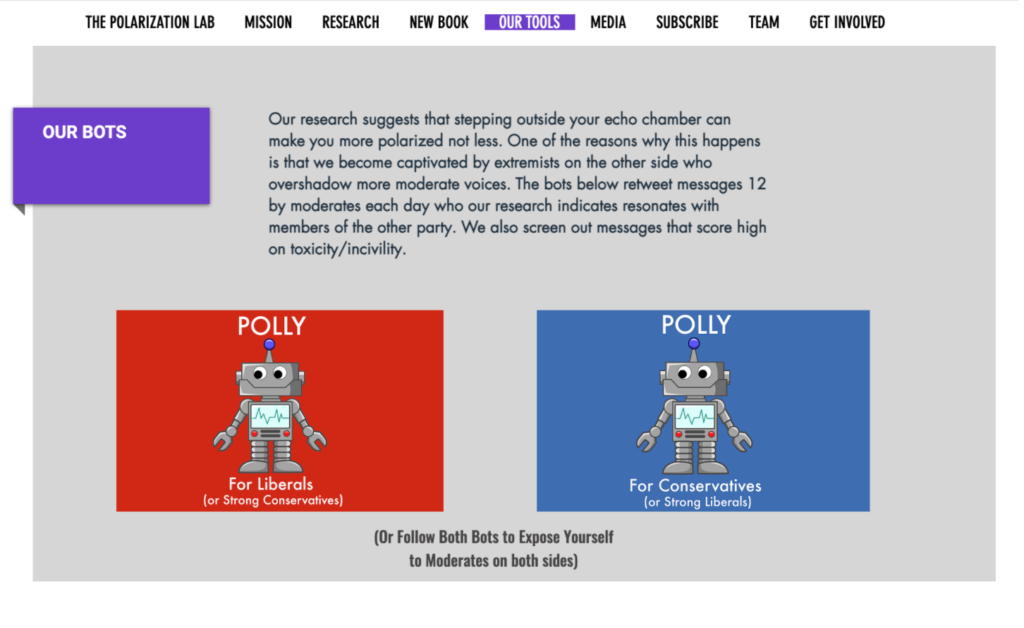
The Polarization Lab (Duke University) has conducted some interesting research on political polarization. They have developed tools you can use to estimate the orientation of your Twitter feed and bots you can use to expose yourself to positions taken with the opposite orientation. The premise of their work is that exposure to different perspectives can reduce bias.

Check my echo is a tool that compares the orientation of the politically oriented Twitter accounts you follow to prominent politicians, journalists, and advocates to generate a score on the polarization of those you follow.

The Lab offers bots to expand your perspective. The bots pass on tweets liked by prominent liberals and conservatives. The idea being liberals should friend the bot forwarding tweets liked by conservatives to gain insight into the positions taken by those unlikely to show up in their feeds.

Loading