Digital for serious reading tasks

I keep encountering colleagues who disagree with me on the value of relying on digital content (e.g., Kindle books, pdfs of journal articles) rather than content they collect on paper. I agree that their large home and office libraries are visually attractive and their stuffed chair with reading lamp looks very inviting. They may even have a highlighter and note cards available to identify and collect important ideas they encounter. A cup of coffee, some quiet music in the background, and they seem to think they are set to be productive.

I have only one of my computers, a large monitor when working at my desk, and a cup of coffee. The advantages I want to promote here are related to my processing of content I access in a digital format. What you can’t see looking at my workspace whether it happens to be located in my home or at a coffee shop is the collection of hundreds of digital books and the hundreds of downloaded pdfs I have collected and can access from any locate when I have an Internet connection. I can work with digital content from my home office without a connection, but I prefer to have a connection to optimize the use of the tools that I apply.

For me, the difference between reading for pleasure and reading for productivity is meaningful. I listen to audiobooks for pleasure. I guess that is a digital approach as well and it functions whether in my home, on a walk, or in the car. For productivity, I read to take in information I think useful to understand my world and to inform my writing about topics mostly related to the educational uses of technology. I think of reading as a process that includes activities intended to make available the ideas that I encounter in what I read and in my reactions to this content in the future. Future uses frequently but not exclusively now involve writing something. At one point when I was a full-time educator I engaged in other additional forms of communication, but in retirement, I mostly write.

My area of professional expertise informs how I work. I studied learning and cognition with an emphasis on individual differences in learning and the topics of notetaking and study behavior. One way to explain my present preoccupations might be to suggest I am now interested in studying and notetaking to accomplish self-defined goals to be pursued over an extended period of time. Instead of preparing to demonstrate what I know about topics assigned to me and with priorities established by someone else with the time span of a week or at most a couple of months, I now pursue general interests of my own preparing to take on tasks I can only describe in vague terms now but tasks that may become quite specific in a year or more. How do I accumulate useful information that I can find and interpret when a specific production goal becomes immediate? The commitment I have made to consume and process digital content is based on these goals and insights.

What follows identifies the tools I presently use, the activities involved as I make use of each tool, and the interconnections among these tools and the artifacts I use each tool to produce.

Step 1 – reading.

In my professional work, I made a distinction between reading and studying. This was more for theoretical and explanatory reasons because most learners do not neatly divide the two activities. Some read a little, reread, and take notes continuously. Some read and then read again assuming I guess that a second reading accomplishes the goals of what I think of as studying. Some read and highlight and review their highlights at a later time. There are many other possibilities. I think of reading as the initial exposure to information much like listening to a lecture is an initial exposure to information. Anything that follows the initial exposure, even if interspersed with other periods of initial exposure, is studying

My tools – Present tools/services related to this stage of processing – Kindle for books and Highlights (Mac app) for PDFs. Other tools are used for content I find online, but most of my actual productive activity focuses on books and journal articles

Step 2 – initial processing (initial studying)

While reading, I use highlighting to identify content I may later find useful and I take notes (annotation as these notes are connected to the book or pdf). Over time, I found it valuable to generate more notes. Unlike the highlights, the notes help me understand why content I found interesting at the time of reading might have future usefulness. 

My tools – Present tools/services related to this stage of processing – Kindle for books and Highlights (Mac app) for PDFs. Yes, these are the same tools I identified in step 1. However, the integration of these dual roles is accurate as both functions are available within the same tools. One additional benefit of reading and annotating using the same tool and applied to the same content is the preservation of context. The digital tools I use can be integrated in ways that allow both forward and backward connections. If at a later stage in the approach I describe I want to reexamine the context in which I identified an idea, I can move between tools in an efficient way.  

Step 3 – delayed processing (delayed studying)

Here I list tools I would use for accepting the highlights and notes output from Step 2 as isolated from the original text. I also include tools I would use for reworking notes to make them more interpretable when isolated from context, adding tags to stored material, adding links to establish connections among elements of information, and initial summaries written based on other stored information. I like a term I picked up from my reading of material related to what has become known as personal knowledge management (PKM). A smart note is a note written with enough information that it will be personally meaningful and would be meaningful to another individual with a reasonable background at a later point in time. 

My tools – Readwise to isolate and review highlights and notes from Kindle. Obsidian to store highlights and notes, add annotations to notes, create links between notes, and generate some note-related summaries an comments. I use several AI extensions within Obsidian to “interact” with my stored content and draft some content. Presently, I use Smart Connections as my go-to AI tool.  I write some more finished pieces in Google Docs. 

Step 4 – sharing

As a retired academic, I no longer am involved in publishing to scientific journals or through textbook companies. My primary outlet for what I write are WordPress blogs I post through server space that I rent (LearningAloud). A cross-post a few of my blog entries to Substack and Medium.  

My tools – I write in Google docs and then copy and paste to upload content to the outlets I use. 

Obsidian as the hub

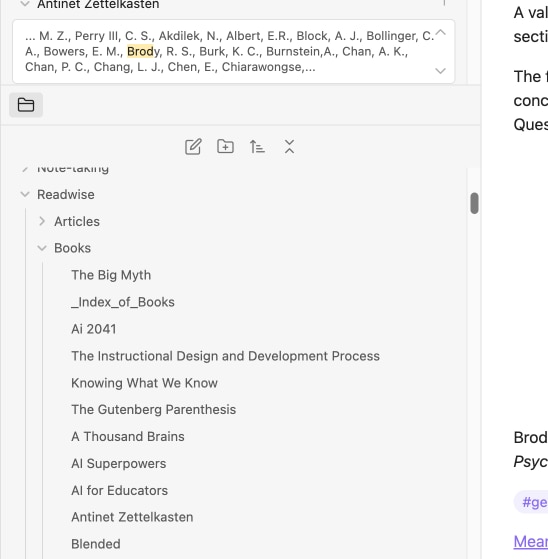
Here are a couple of images that may help explain the workflow I have described. The images show how Obsidian stores the input from the tools used to isolate highlights and notes from full-text sources.

As notes are added to Obsidian, I organize them into folders. An extension I have added to Obsidian creates an index of the content within each folder, but at some point the volume of content is best explored using search.
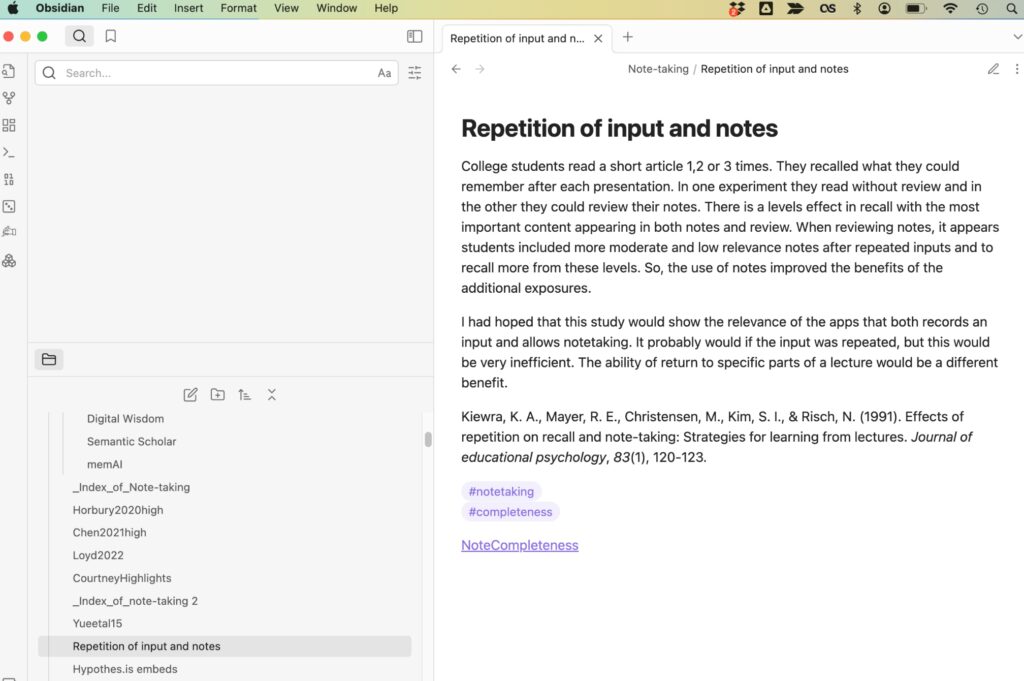
Here is what a “smart note” I have created in Obsidian looks like. The idea of a smart note is to capture an idea that would be meaningful at a later date without additional content. Included in this note is a citation for the idea, tags I have established that can be used to find related material and a link.
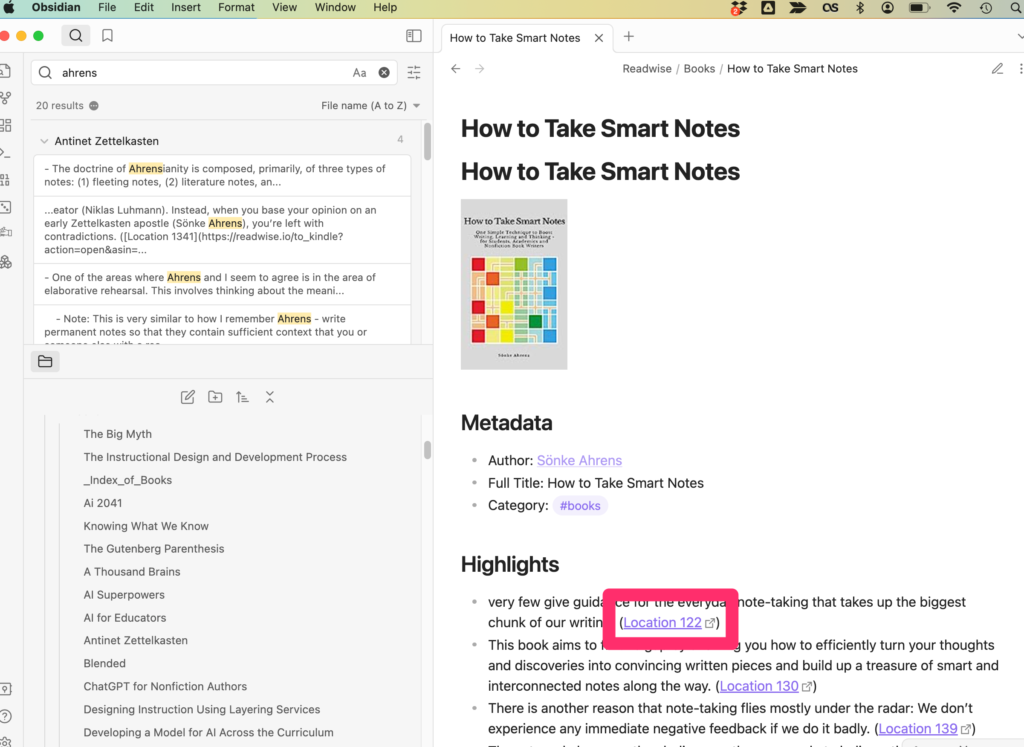
This is an example of a “note” Obsidian automatically generated based on book notes and highlights sent by Readwise. I can add tags and links to this corpus of material to create connections I think might be useful. The box identifies a link stored with the content that will take me back to Kindle and the location of the note or highlight. These links are useful for recovering the original context in which the note existed. 
Here is a video explaining how my process works.

So, the argument I am making here is that digital tools provide significant advantages not considered in single-function comparisons between paper and screen. Digital is simply more efficient and efficacious for projects that develop over a period of time.

Loading

Almost there – comment on the evolution of PKM systems

I have been exploring many digital note-taking and annotation systems for a couple of years now. My involvement might be stretched to a decade plus if you are willing to group tools such as EndNote with this category of tools. My way of thinking about using such tools has been shaped by a career as an educational psychologist with a cognitive perspective on learning applied to topics such as note-taking, highlighting, study behavior, and generative learning activities (e.g., writing to learn, summarization, questions). This background offers some insights into what features of technology-supported learning and thinking tools might be helpful. I have gleaned a few core ideas from more recent reading – progressive summarization, smart notes that I see relevant in combination with both my newer hands-on experiences and my more general cognitive background. 

What follows is a personal evaluation of the capabilities of PKM tools based on what I have just described as my personal background and experiences. I have tried to identify a title for this post. “Close, but no cigar” came to mind, but seemed too negative. I decided to go with “almost there”. What I mean by this is that I can patch together a workflow that I think works pretty well, but the system is a bit cumbersome and inefficient. I hope to offer a perspective on what an ideal tool might look like. I have based this ideal tool based on how I think Glasp should work, but so far does not.

My reading activity involves web content, Kindle books, and pdfs of scientific journal articles. Ideally, all of these sources could be stored in an accessible place (I would be willing to live with a location I control – my computer or ideally personal storage online such as iCloud or DropBox). Online storage is important for both security and access from multiple devices. As I will demonstrate in my ideal approach, a common location seems to be important for the connections I see important in the system I imagine. For example, some systems do not store the pdf from which notes are taken. With the service I have in mind (Memex), I can reexamine links between the pdf and notes I have taken if I am on my own computer, but I can only see my notes if I am working on a different computer that only provides me online access. The pdf and the notes are stored in different places with the pdf on my computer and the notes in the cloud.

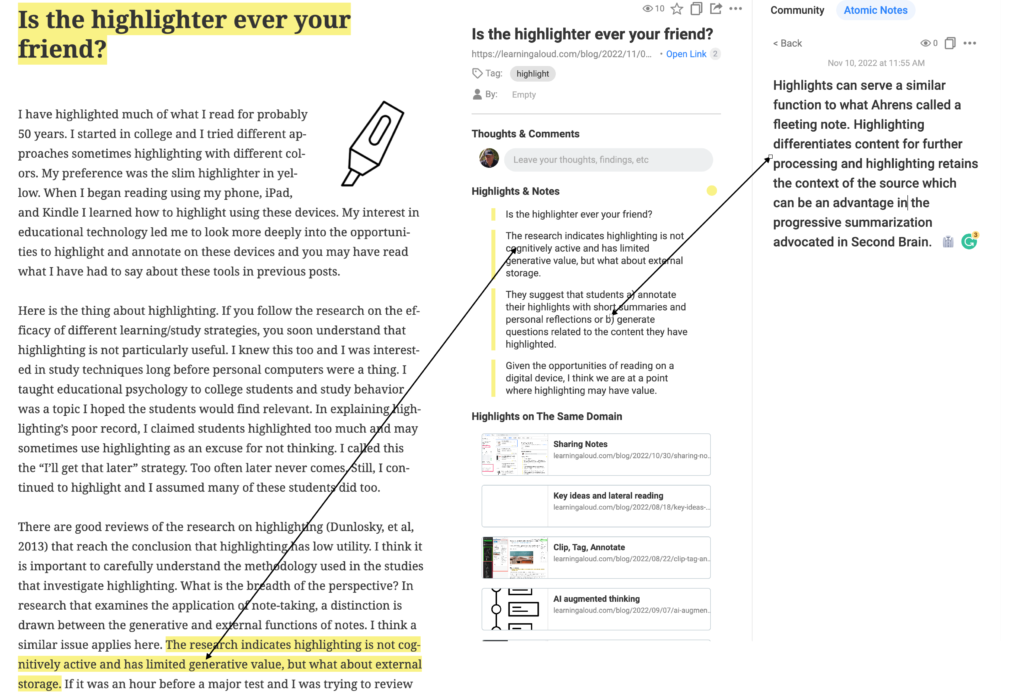
What follows is my fabricated visual description of a workflow using images from Grasp that I have merged to represent a superior fictitious system. I will be clear on what is not actually there as I proceed. The image  (below) shows three panels – the leftmost panel shows original content that has been highlighted and annotated. The second panel shows isolated highlighted and notes. The third panel shows what I now label as a smart note (after Ahrens). The arrows indicate connections across panels that are bidirectional. In other words, you can get from an isolated note or highlight in the middle panel back to where in the original document this highlight exists or where the annotation/note was connected. You can get from my personally generated, standalone, summary note back to the immediate notes or highlights. These bidirectional connections are important for maintaining what might be described as context and attribution. Attribution is important in my writing to link what I write to what others have written. Context is important in establishing the broader set of information within which something I felt was important emerged. Maybe I want to seek other ideas from this same information. Maybe I just want to check on what I concluded because later my summary seems incomplete or maybe erroneous. 

The system I describe allows for the generation of Smart Notes or Summary notes (I use such terms interchangeably) which capture an idea in a form that should make sense to me and someone else at a later point in time. The system allows progressive summarization in the sequence of forms getting to a smart note. Highlighting was not part of the progressive summarization process described by Forte, but I think it is fair to use it as a component in the physical transformation from the source to the personal summary I describe here. 

What about these descriptions is not available? Glasp cannot be used to read pdfs. This is a serious limitation for an academic who must rely of pdfs of articles from research journals. The processing of Kindle books within Glasp allows the download of highlights and notes, but you cannot link back to the location of the selected content within the context of the original ebook. The personal summary notes (called atomic notes in Glasp) are not associated with a specific original source and you cannot get to that source through links to highlights and notes added to that source. These personal notes just accumulate as one reads different sources in this independent pane. At present, I copy and paste these notes into Obsidian and Mem X to take advantage of the organizational features of these other tools. I suppose it would be ideal if such summary notes could exist in Glasp in a way that would allow the long-term storage and manipulation of these ideas independent of source material. 

To be fair to Grasp, it is still a beta service and free at this point. It is useful as is and I have found ways to integrate it with other tools to generate a reasonable workflow. Partly I wrote this post because I was contacted after writing an earlier post about Glasp and was contacted by a developer from the company. I thought I would share what I think a more complete system might look like. I hope my summary of a personal knowledge management workflow offers some insight for those unfamiliar with this expanding collection of digital tools offered to support the personal processing of source documents.

Loading

Annotating Newsela articles to develop deep reading skills

Many of my recent posts have focused on note-taking and annotation. These activities have long been a personal interest. New opportunities to use these strategies in a digital environment have rekindled my interest and I have been trying to find ways I can share recommendations that bring these skills into middle school and secondary school settings.

One important observation I have found in several of the sources I have read is that learners are seldom taught to take notes or annotate. There are now many researchers and educators writing about taking better notes for the implementation of a PKM (personal knowledge management) system or a second brain. The emphasis here is a little different than the emphasis that might apply in classrooms. With PKM, you are creating notes for your use that fit your personal goals. Perhaps you want to build up resources you can use in writing blog posts or perhaps you want to store specific methods for solving a coding challenge. With classroom applications of annotation, you are usually trying to process and store important ideas provided by someone else. Perhaps you are preparing for an examination or to complete some other assignment that will follow a reading task. Students may take notes from presentations, but often take few notes or add few annotations when reading. Whether experiences exist or not, the opportunities to learn to apply such learning strategies are few. 

I have located several sources that propose how annotation and note-taking skills can be taught to younger learners. These primarily are focused on adding highlights and margin notes to content on paper and typically these approaches suggest that educators make copies of content from sources that students can mark up without concern for damaging resources not intended for annotation. I provide several of these sources at the conclusion of this post and encourage interested educators to take the time to read one or more of these sources. The sources provide step-by-step approaches to teach the skills of note taking and annotation. 

My interest here is in proposing a digital source and opportunity for annotating and highlighting that is readily available and efficient to use. You don’t have the problem of marking up what are intended to be reusable commercial materials with digital content. Most teachers are probably familiar with Newsela. This service provides reading material for most content areas (e.g., science, current events) with the unique opportunity to assign a variation of a given article at different reading levels. This allows a teacher to individualize a reading task within a class and have all students read about the same topic. The content comes with comprehension questions and other learning activities.

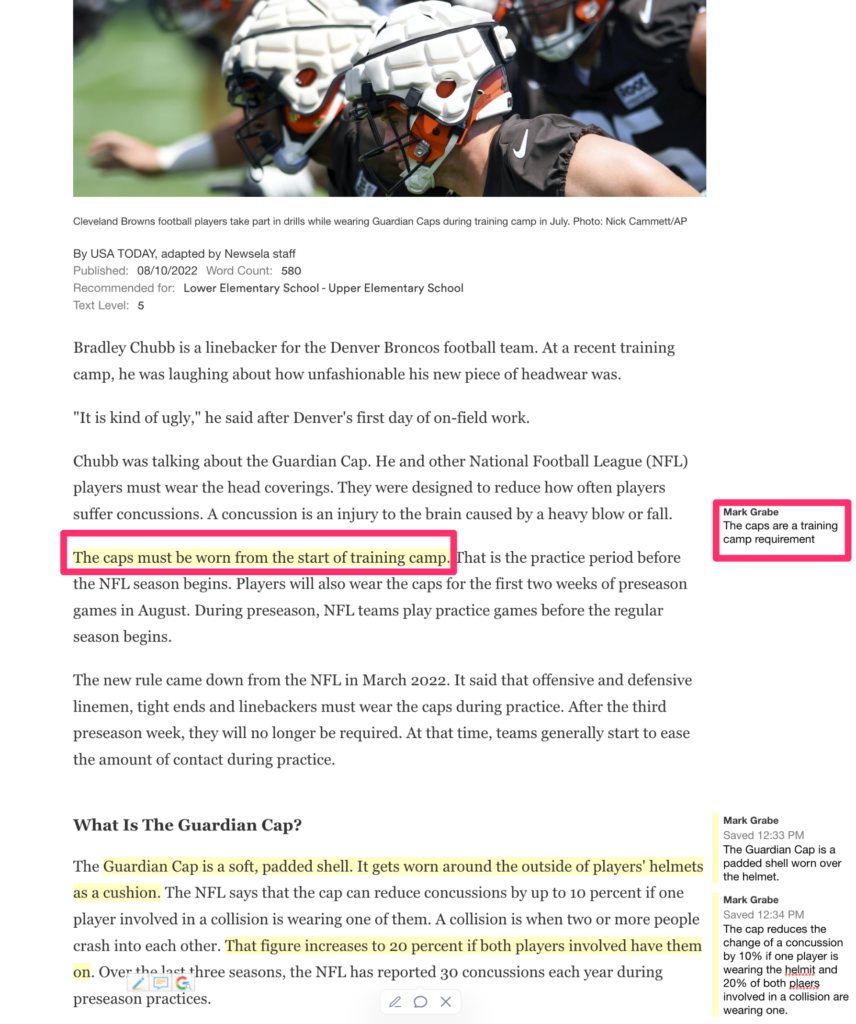
The capability of the Newsela environment that I am promoting here allows the teacher and individual students to annotate (highlight, take notes). I have written about this capability some time ago and I remembered this capability when I was trying to think of something I could suggest for educators interested in teaching annotation skills in a digital environment. Newsela provides its own explanation of how to annotate text. 

The annotation process in Newsela is very simple and I think that is what you want. When you drag content, you are provided an opportunity to select different colors for highlighting. When you highlight something, you are provided the opportunity to add a note to what has been selected.

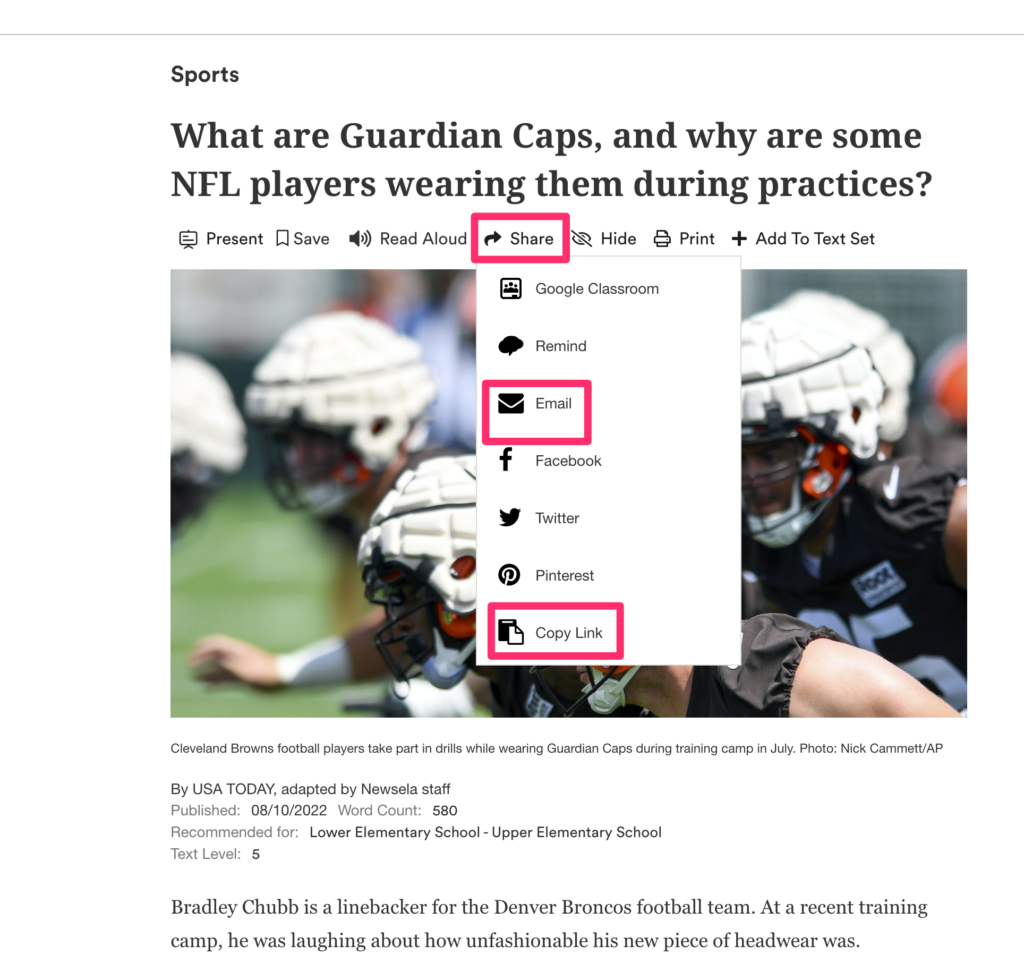
Newsela also provides a way to share annotated content. Sharing is available for both educator to students and student to educator. The opportunity to assign an annotation task (e.g., highlight the main ideas in this article) and then submit the completed task for review works through sharing.

Highlighting and note-taking in Newsela are easy to figure out. I encourage educators to take a look and imagine how this capability might be applied. I provide several sources for instructional strategies below and I will try to summarize some of these ideas in a future post.

Sources:

Cohn, J. (2021). Skim, dive, surface: Teaching digital reading. West Virginia University Press.

Lloyd, Z. T., Kim, D., Cox, J. T., Doepker, G. M., & Downey, S. E. (2022). Using the annotating strategy to improve students’ academic achievement in social studies. Journal of Research in Innovative Teaching & Learning. (early version)

Zywica, J., & Gomez, K. (2008). Annotating to support learning in the content areas: Teaching and learning science. Journal of Adolescent & Adult Literacy52(2), 155-165.

Loading

Taking Notes to Learn

I have read the following books which all focus on the processes of using notes to collect, organize, and apply information. From this collection, I would recommend Cohn for educators and Ahrens for the tech aware wanting to use technology to improve their learning and reading to application.

Cohn, J. (2021). Skim, dive, surface: Teaching digital reading. West Virginia University Press.

Forte, T. (2022). Building a second brain: A proven method to organize your digital life and unlock your creative potential. Atria Books.

Kadavy, D. ( 2020). Digital zettelkasten: Principles, methods, and examples. Amazon ebook.

Ahrens, S. (2017). How to take smart notes: one simple technique to boost writing, learning and thinking-for students, academics and nonfiction book writers. Amazon books.

Over maybe 35 years, I have used technology and whatever digital tools were available at the time to keep track of the content I was exposed to and thought I might find valuable at some future time. So, I have tried many different times tools and tactics. This more recent set of resources has identified two new tactics I thought were helpful. I described multiple tools in a series of posts I did a few months ago. In the left column of this blog, you should see a drop down menu identified as Categories. One of these categories is labeled Digital Notes and this link will identify the past posts.

New to me strategies:

Write earlier (Ahrens) – rather than read and highlight journal articles and books and then searching these same sources at a point in time that could be ten years later, I discovered the value of taking stand alone notes shortly after or while reading. The idea is to generate a note that can stand alone to explain something to me or others. Saving and linking these notes to the original source and to other notes allows a much more efficient approach for using the residue of previous reading at a later point in time.

Progressive summarization (Forte) – Forte describes a process by which the highlights and annotations created in an initial reading are digitally exported. This collection is reread and important ideas are initially bolded to identify and differentiate them. This bolded content is then reviewed and the most essential ideas are highlighted. Finally, a summary is generated from these highlights for this document. He proposes a summary consisting of bullet points. My preference would be for the smart note format I have attributed to Ahrens.

The advantage of this system is that context is maintained. If certain types of technology tools are used, you can trace a summary note back to the highlighted material, the bolded material, and then the content from the original source. Keeping these transitions connected seems a good idea.

I have not found a collection of tools that allow me to do this for the different original formats I explore (digital books, PDFs, web pages, videos), but I have patched together some combination of tools that work. I admit that I have not explored some tools that involve a subscription fee and might reduce the number of steps I presently employ. I will follow this post with at least one related post taking you through my processes.

One more thing. Notes for long term personal learning and notes for academic learning are likely different. The same digital tools apply, but there is a significant difference understanding your are taking notes in preparation for an exam and recognizing what you and your professor thinks are important may be different and notes you take to support your own self-directed learning. Yes, I understand that what I may find valuable a year from now is not necessarily what interests me today. We have all had that experience of knowing you have read something relevant to a present need and not being able to recall the details or the source. Notes, highlights, and another components that can be added to digital content by educators and learners have long been an interest of mine and I would direct you to a Kindle book I have written on the topic for greater detail.

Loading

Specialized note taking

I think of specialized note-taking tactics as approaches that go beyond the learner-controlled recording of text and maybe some basic sketches. These approaches involve some attempt to scaffold what I would describe as elaboration. I like to describe elaboration as a type of personalization that goes beyond recording information in a verbatim way involving summarization and/or the addition of examples or cross-references to other existing knowledge. A challenge here is the possible, working memory overload required to personalize the information input, and whether the circumstances of the presentation and capabilities of the individual learner allow the capacity for elaboration. The application of note taking while reading and listening to a presentation can be quite different because of differences in the opportunity to control the rate of input.

Popular examples of specialized tactics proposed for the K12 environment include Cornell notes, sketchnoting, and concept mapping. All involve either an extension or a rerepresentation of ideas from the content to be mastered. I will admit a bias in not being a strong advocate of any of these tactics with perhaps the most enthusiasm for the Cornell system. My reaction is mostly based on the increased demands on working memory these systems impose and whether the product generated in the case of sketch notes and concept maps is more useful longterm as a summarization.

For those wanting to investigate sketchnoting and the Cornell system here are some resources.

Sketchnoting video, Kathy Schrock’s sketch noting guide, and an engineering setting argued to benefit from educators at Iowa State (see references below). 

Cornell Notes

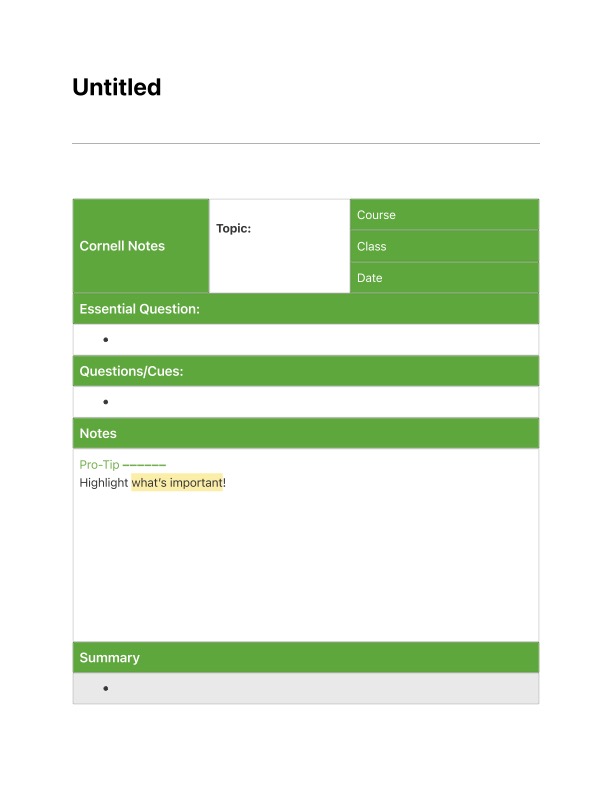
I use Evernote as an information archive. Evernote offers different templates and one is for Cornell Notes. The template offers a way to explain what I mean by a scaffold for personalization.

I have come to see note-taking as best understood as a three stage process (see references that follow). From this template, you can see how the middle stage – the after class or revision stage – would be applied. After taking notes and after class, you can generate a summary (bottom box) and generate questions (above the middle box). Developing a summary (something like Ahern’s Smart Notes) could involve elaboration. The questions could improve the effectiveness of review (study).

One final observation – I find it strange that there are so many carefully controlled research studies comparing taking notes by hand versus by a digital device and so few directly comparing these specialized note taking systems and traditional note taking.

References:

Chen, P. H. (2021). In-class and after-class lecture note-taking strategies. Active Learning in Higher Education, 22(3), 245-260.

Luo, L., Kiewra, K. A., & Samuelson, L. (2016). Revising lecture notes: how revision, pauses, and partners affect note taking and achievement. Instructional Science, 44(1), 45-67.

V. Paepcke-Hjeltness, M. Mina and A. Cyamani, “Sketchnoting: A new approach to developing visual communication ability, improving critical thinking and creative confidence for engineering and design students,” 2017 IEEE Frontiers in Education Conference (FIE), 2017, pp. 1-5, doi: 10.1109/FIE.2017.8190659.

Loading

Annotation examples

I have not written about layering in some time. I encountered something I was unfamiliar with when reading about how to help students to learn to read with technology. The content I was reading was discussing how to help students understand what the annotation of a digital text might look like and suggested that students be shown examples. One source for such examples was the annotated articles from the Washington Post.

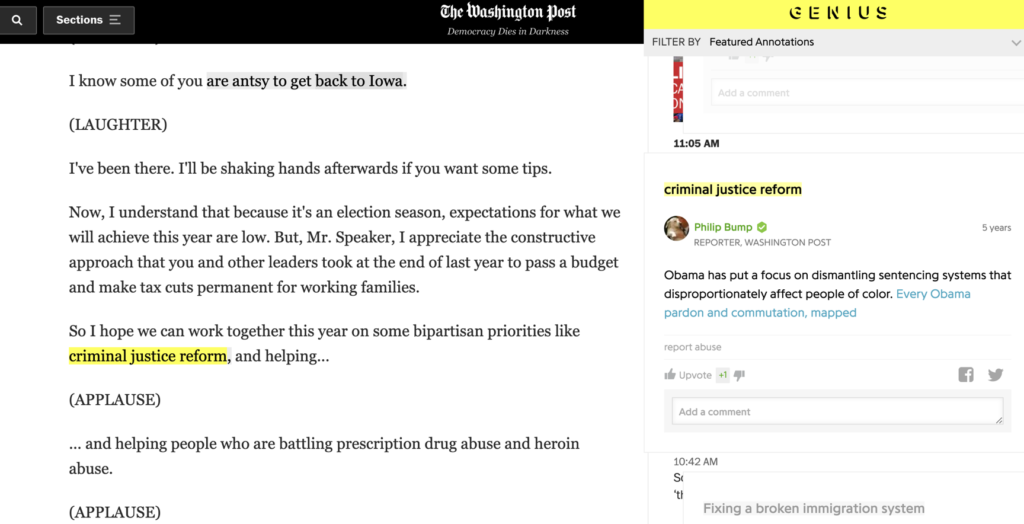
I was unfamiliar with this service, but a search revealed information about the explorations they have conducted and are being conducted by the Post. My example (see below) is from a speech by President Obama because more recent examples (e.g., a piece about Fauci) were not available as I have exceeded my free views. If you have a subscription, search “washington post annotated articles” to find other material. If you explore the linked example, click on highlighted material to view associated comments.

The Washington Post annotates with Genius. The idea is to have a commentator familiar with the issues add these annotations.

Loading

Social bookmarking

I have not written about social bookmarking for some time and like technology in general this category of apps continues to apps. Some of these advances have included the opportunity to store highlights and notes from digital books and to share this information with a specified group or with any interested party.

For the unfamiliar, here is how I see this evolution. When we started with web browsers, we were initially provided the opportunity to store links we wanted to revisit within the browser. Improvements included the opportunity to organize bookmarks into folders and to add tags and descriptions to allow a larger and larger collection to be searched. Eventually, it was possible to store such collections online providing the opportunity to work from different locations with different devices. Eventually, it became possible to share this information or at least designated subset with others. Why not share useful resources? Recent innovations include the addition of advanced note taking capabilities and automatic storage of digital book notes.

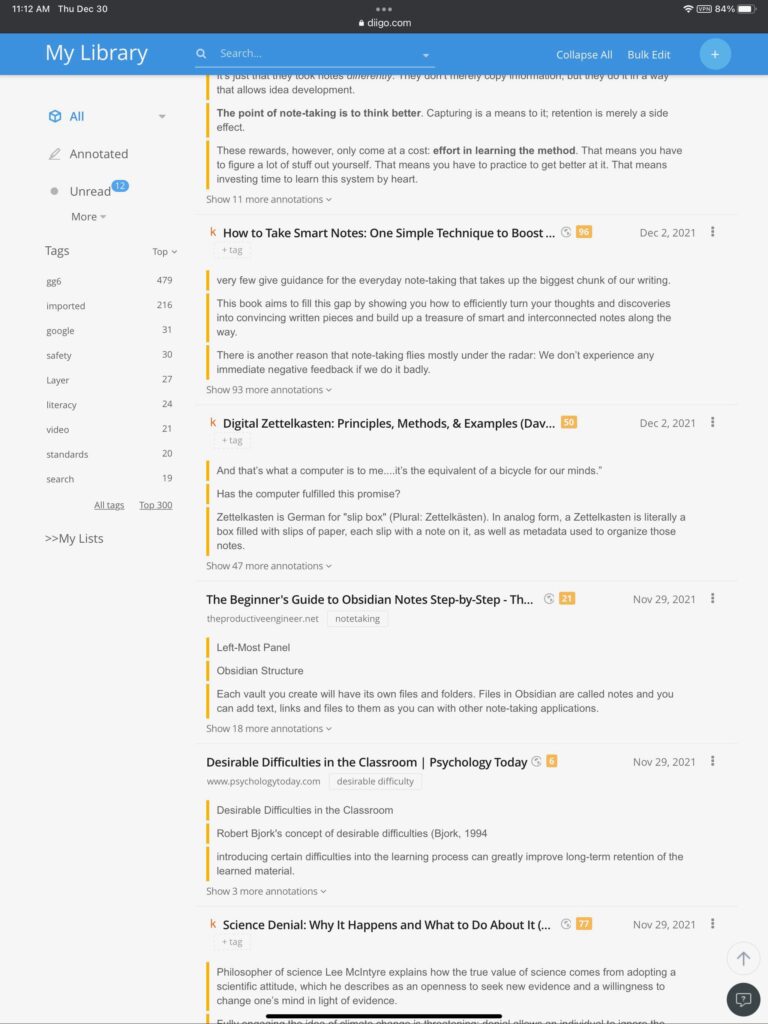
My long term favorite has been Diigo. You can explore the public potential of Diigo by examining my notes.

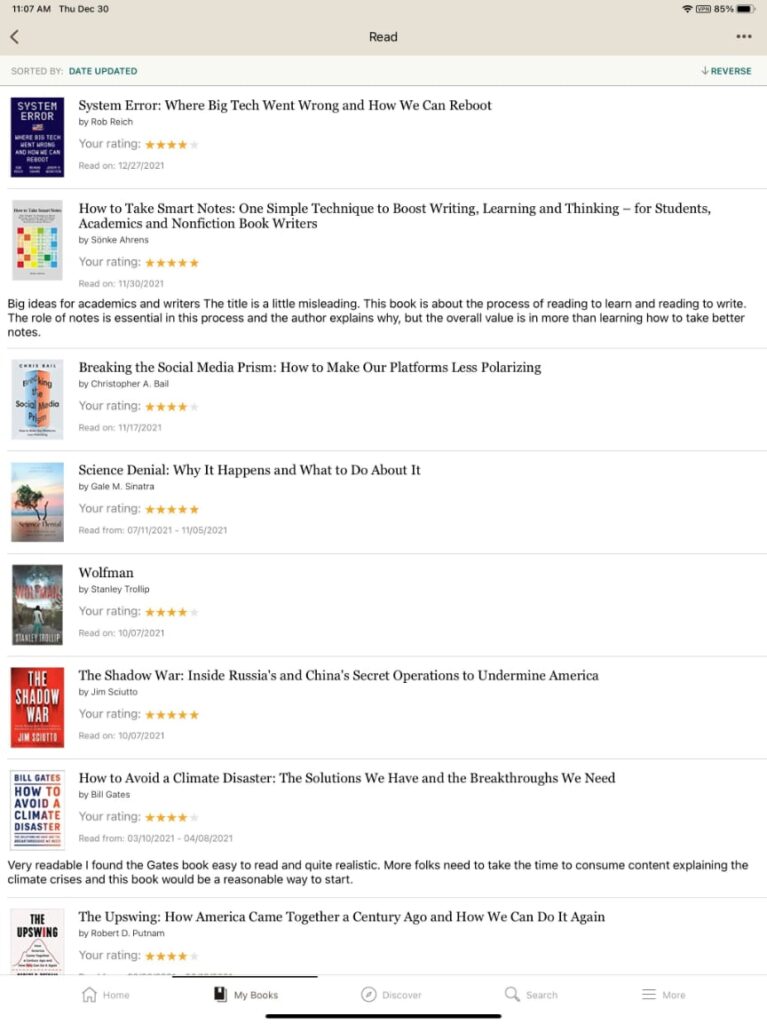
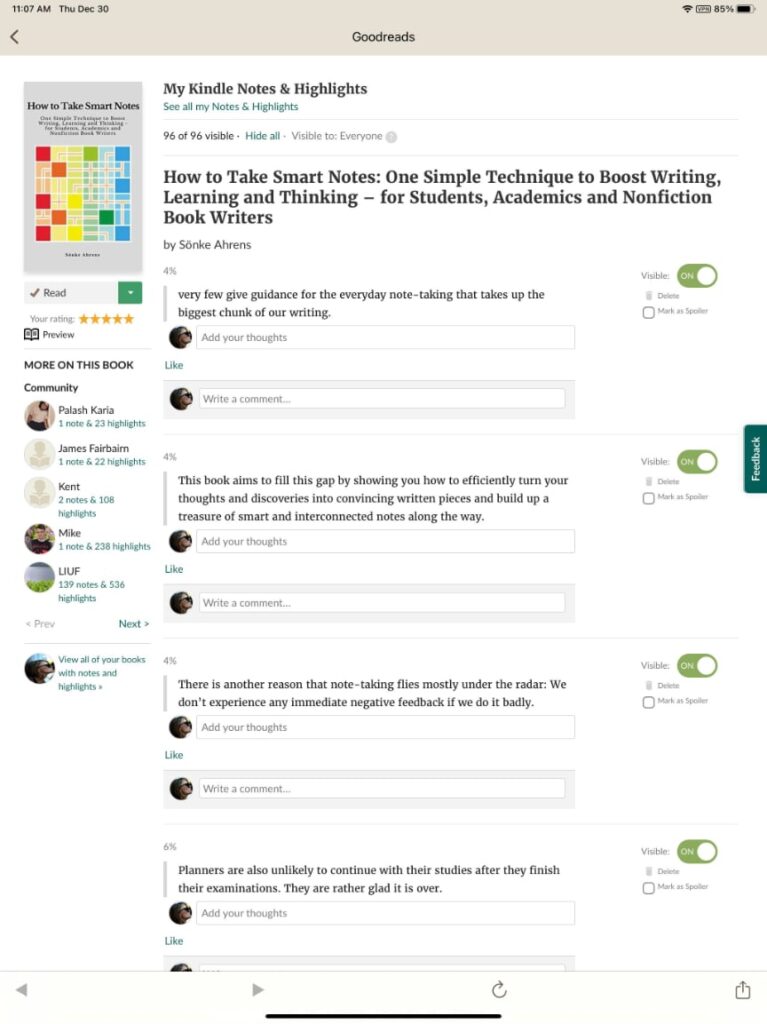
For those interested in sharing insights from books, my recommendation would be Goodreads. I have had a Goodreads account for several years, but I had not paid much attention. Recently, I learned that Goodreads allows for the storage and sharing of annotations. These annotations can be shared. I have not made the effort to download the highlights for all of my books – this is a security measure to allow individuals to decide what they want to offer as a social service. Try “How to take smart notes” to see what the sharing of notes looks like.

Applications for educators? Social bookmarking sites offer a great opportunity to share resources with others having similar interests (e.g., history teachers) or to offer a collection of resources to students.

Loading