How do most Readwise users use the service? Is it the central location in which you suck in the notes and highlights from the multiple tools you use to read the multiple categories of content you consume to review and work with that content or is it a relay station between these sources and the tools you use to store, organize, expand on, and apply this content? I can’t really remember what I was thinking when I first paid the subscription price, but over the majority of the time I have used Readwise, it was mainly as a relay station.
For those who have never tried Readwise, it may be unclear why you would want to pay the price of a subscription. The first paragraph of this post may have meant little to you even though I think it represents a reasonable description of the ways Readwise is used. Consider this example. I have made use of Kindle for years and have a collection of more than 300 books. I highlight a lot while I read and add occasional annotations. Most of this content is nonfiction and the source for what I write about. All of these highlights and annotations are out there somewhere, but how do I locate what might be helpful when it is scattered across so many sources many of which I might have read years ago? Readwise accepts the highlights from each of these books that is automatically output from Kindle and this entire body of material ends up in Readwise and can then be searched.
Now, somewhere along the way, Readwise added Readwise Reader and this addition became a major tool. With Reader I found a “read it later tool” I used mainly to collect web content I could highlight and annotate and then send the content I added or identified through the relay system to Readwise or export it depending on my whim of the moment.
Without describing other content sources, I hope you get the idea. Readwise allows the collection of highlights and notes from many different content sources.
AI Chat within Readwise
Now, like many other digital tools, Readwise has added AI. This makes sense as the AI can be used to chat with all of the content or if you choose certain designated content that has been accumulated. The AI is easy to use, similar to other AI chats, and is powered by OpenAI’s GPT-4o model. If you are a Readwise user you may not have noticed this recent addition (see the red square enclosing the small word chat at the top of the following image). I have also used a red box to call your attention to import. I will get to an important import issue at another point, but wanted to make certain you see how to get to the import options.
Selecting chat will bring you to the following page. Here you find the typical request for a prompt and some suggestions. The suggestions will change as you make use of this feature.
As an example, I entered a prompt related to a recent topic I have been exploring. I don’t generate my posts using AI, but I sometimes ask for something written in a format I might use as a model. Within the content the AI generated, you will see link (blue color). Selecting a link will show the highlight or note within Readwise that was used to encourage a that part of what the AI wrote (the second of the two images appearing below). You can get the full set of content stored on Readwise from the displayed snippet of text by selecting the snippet.
If you are a Readwise user, I assume you can easily explore the AI chat just following the simple process I have outlined. This is not intended to be a full Readwise tutorial, but many can be found by searching online.
One additional comment
Most of what I write is not based on books, but rather on journal articles. I am an academic and this is typical of how we work. We read articles from many journals and for the last 10+ years I have read nearly entirely from pdfs of journal articles. This is what I can access through my university library and more suited to my work that even getting up from my desk and walking across my office to pull a journal off a shelf. I don’t want to highlight on paper because I want highlights and notes in a digital format.
I could have included the highlights from the hundreds of journal articles I had read in Readwise to create a massive collection of content I could explore via chat. However, I have not used a pdf reader that generates highlights in Readwise if I try to import the pdfs. This appears to be a common problem as I have explored this issue online. I will first note that you can highlight pdfs within the Readwise/Reader environment, but this has not been part of my workflow. I have found a way to fix the problem which I will describe here, but it is unlikely I will now import one by one my large collection of highlighted and annotated pdfs to Readwise. I will explain the hack I have discovered for others who may want to do so.
You should recall at the beginning of this post I showed the import link for Readwise. This link will bring up the many import options. I automatically import from Reader and Kindle. There is an option to import from pdfs. It is a one pdf at a time approach and requires that the pdfs with the highlights have been stored in the correct format. The import options are shown below.
I have multiple tools to highlight and annotate pdfs. Most recently, I have used Bookends and Highlights. Both are software for the Apple environment and work great on an iPad with an Apple Pencil. Unfortunately, the storage format is not acceptable to Readwise.
However, I found that I can open my highlighted and annotated pdfs in Preview which is the universal Mac tool for opening many different data files. It turns out you can export from Preview in multiple PDF formats and the first one I tried created a file that would be read by Readwise.
So, there is a way for those frustrated with the specific demands of Readwise.
Summary
Readwise if a powerful tool that stores the highlights and notes that have been added to a wide variety of content sources (e.g., web pages, Kindle books, Apple books. pdfs). Recently, an AI chat capability has been added to Readwise and can be used to interact with the content stored by Readwise. Because the quantity of this content is immense and represents what a user has found interesting or useful, being able to ask questions of this content offers very interesting possibilities. The AI chat capability is easy to explore and may even represent a selling point for those considering paying the subscription to use Readwise and Readwise Reader.
How much of the “building” part of building a second brain is necessary? With the opportunity to direct AI at accumulated resources, how much of the linking, tagging, reviewing, and re-expressing notes is productive? Some version of this question has long bothered me. I studied classroom note-taking as an academic and became familiar with the massive research base associated with different ways to take and use notes, the cognitive and metacognitive processes associated with activities in different note-taking approaches, and individual differences in the capacity and motivation to execute specific processes effectively. While there is a great deal of speculation, multiple books, and the sharing of numerous personal processes in online posts, where is the research on PKM and Second Brains? The research on learners taking and using notes in academic settings may offer a general structure, however there would seem important differences in the use of self-directed note-taking outside of an environment that involves processes that must accomplish goals set by others to produce products or perform tasks after short time intervals (the time between exams or writing assignments).
The terminology is different. You do not find classroom-oriented research considering fleeting versus permanent notes or the ideal types of tags and links to organize notes and prepare the user for future goals and tasks that often do not exist when the notes are taken. I try to translate the proposed strategies outlined in popular books for the audience that takes notes to benefit them under these circumstances (Ahrens, Doto, and Forte). Can the research on generative cognitive processes, metacognitive comprehension monitoring, and retrieval practice serve to determine if the recommendations made by these writers are reasonable? Perhaps the strategies for creating different types of notes (fleeting vs. permanent), strategies for linking and tagging, and reviewing to find new associations are just busy work.
Does AI provide an alternative?
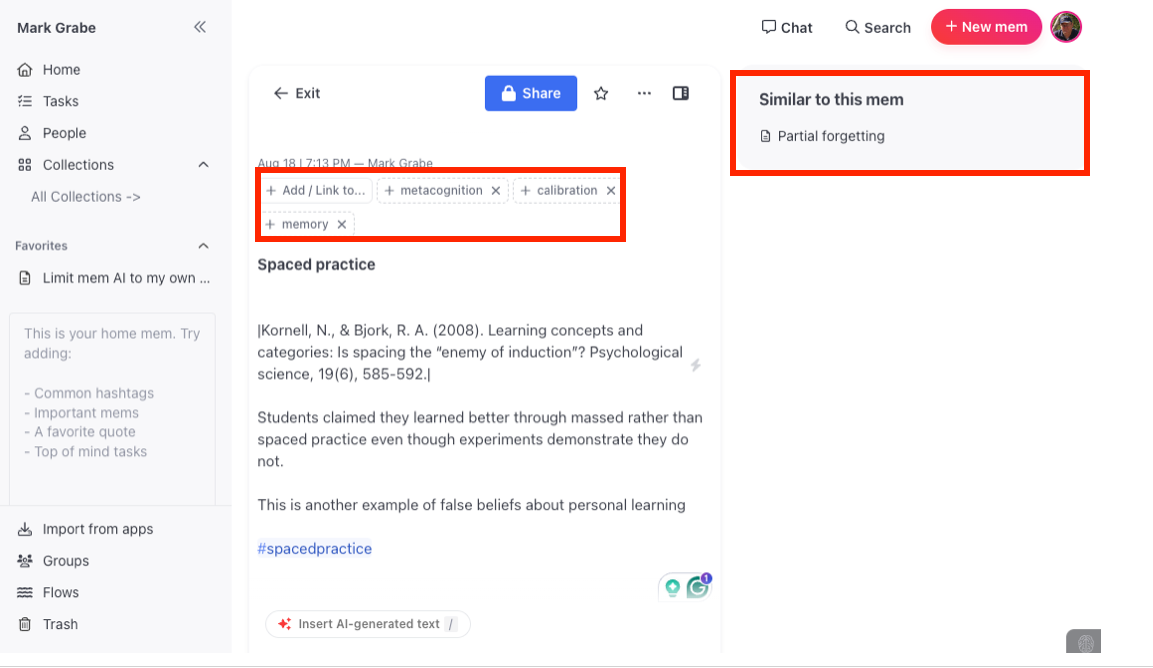
MEM.AI was the first note-taking and storage tool I used that came with an embedded AI tool. The promotional material I read before investing time and money into MEM proposed that the availability of the embedded AI offered an alternative to the tags and links in a tool such as Obsidian. MEM.AI allows the manual assignment of something similar to tags and bi-directional links. The embedded AI did a couple of interesting things. As you built up a collection of notes, the AI offered suggestions based on the material you have accumulated. Similar notes were identified based on common elements of a new note and existing notes (see red box in the following image). You could link to suggested notes if you found the suggestions of value. Tags for a new note were proposed beyond any rags that were manually added (see red box in the following image) and any of these suggestions can be accepted. I have recently written about multiple ways note-taking systems can be augmented with AI, but MEM.AI is built with some of these processes assumed rather than potentially available through the creation of clever prompts. MEM.AI proposes that it creates a self-organizing workspace which seems a reasonable description.
MEM.AI has one more unique feature that seems a powerful use of the self-organizing workspace concept. There is a built-in word-processing capability called Smart Write. When you enter a forward slash / within any existing note or within an empty note, you can then enter a chat prompt. You can ask a question or make a request. With an existing note, the AI extends what already exists in what are often interesting and creative ways relying on what appears in the note you are working on and the corpus of notes you have saved. The output appears within that note and can be copied and pasted elsewhere or left as part of that note. It can be argued that this is a way to discover connections to other material more directly than what might have been manually indicated by creating a link to another specific note.
Here is an example.
The following (Permanentnotes) is a note I created with two tags. What you can no longer see is the / and prompt that was originally inserted after the second tag. The prompt entered after the / was “Does my idea that permanent notes move more of the thinking involved in transforming notes into a final written product earlier in that writing process make sense?” Smart Write added three paragraphs based on other stored notes.These paragraphs now appear in the original note (shown below). Not all of this content seems relevant, but connections were discovered and much of what was said could be used in writing about this concept. These additions were all based on previous content I added, but I did not have to manually find these connections.
Permanentnotes
This is a key insight. Permanent notes should be able to stand alone without reference to the original content for context. Perhaps it could be described as moving part of the writing process earlier in the transition from note-taking to a final written product.
#notetaking
#slipbox
Your thought about moving part of the writing process earlier in the transition from note-taking to a final writing product indeed makes sense and aligns with the ideas presented in the writing process model by Flower and Hayes (1981). The model emphasizes the importance of planning as a foundational step in effective writing, which involves setting goals, gathering information, and organizing ideas. By integrating permanent notes into this early stage, you essentially create a structured framework that facilitates the translation and reviewing phases of writing.
The approach of using permanent notes, akin to the slip-box system described by Ahrens, enhances this framework by allowing writers to develop a rich, interconnected repository of ideas and insights. This repository acts as an external structure that compensates for the cognitive limitations of the human brain, making it easier to retrieve and connect ideas when composing a draft. The slip-box method encourages a shift from merely capturing fleeting thoughts to actively engaging with and refining those ideas into coherent, stand-alone pieces of information.
Furthermore, this method aligns with the iterative nature of the writing process. As notes are continually reviewed and expanded, they can reveal gaps in understanding or suggest new lines of inquiry, prompting further research and reflection. This iterative engagement not only aids in the development of writing skills but also fosters deeper learning and insight generation, as noted by Ahrens. Thus, your suggestion to reposition part of the writing process earlier, in the context of note-taking and idea organization, is a strategic move that can significantly enhance both the efficiency and quality of writing.
Summary
I would argue that AI capabilities can substitute for or at least augment manual processes advocated by those arguing tags and links are an essential part of the Personal Knowledge Management process. To some extent, I have found the capabilities of the MEM self-organizing workspace to be more thorough in proposing connections than I would typically be on my own.
This brings me to an issue I consider in many applications of AI. This issue is whether the AI approach allows the user to avoid important activities that are important in and of themselves. Perhaps both the manual and AI approaches here allow a note-taker to produce comparable final written products if that was the goal. Whether the activities of exploring notes to make appropriate links and adding tags that identify key ideas encourage deeper thinking about the content seems a different issue. Again, this is difficult to know. One might make the opposite argument claiming that reviewing the text generated by the AI offers a different way to explore and find relationships within existing content and the process of considering what within this new material is relevant to the intended purpose of the prompt is a unique evaluative activity performed by the user. As I have already suggested, MEM.AI does not require that you take one approach or the other. So, explore. AI capabilities are being added to many note-taking tools and the potential is worth a look.
As we explore meaningful ways in which we can make use of the AI tools available to us at any given time, we must be aware of the limitations of AI and what the consequences of promoting the products we generate might be. My personal use of AI is to support the writing I do. This is what you are experiencing here. Misrepresentations would be embarrassing, but I write blog posts so the consequences at worst are not catastrophic.
I would not use AI to generate blog posts by entering a series of prompts to shape a product. What I want AI to do is to help me organize what I have learned and lessen the time spent translating the information I have collected into an external representation of my thinking. I use an approach that first requires me to read, highlight, and annotate sources (typically books and journal articles). Next, I export the residue of this process (the highlights and notes) into a tool that allows me to rework and connect these elements of information. Finally, I focused an AI tool on this content and prompted the tool to create a first draft product that fits some of the goals I have in mind. I use a series of technology tools in this process and I will identify several options for each stage I go through as this post unfolds. First, a couple of additional important concepts.
What I intend is a process focused on my personal decision-making and content vetting. As much as possible, I want to avoid AI hallucinations and I want to take advantage of my thinking and experiences while reducing the labor required to generate the words to externalize my thoughts. I also want to draw on concepts I might not recall at the moment of content creation but that take advantage of thinking I did at another point in time.
A couple of AI-related concepts that are important are Retrieval-Augmented Generation (RAG) and Source Grounding. RAG is a way of using AI to prioritize specified designated content in contrast to the massive summary of information used to train an AI model. I think of the goal in this way (my interpretation). I want an AI tool to use its language and communication capabilities to respond to my prompts. When possible, I want the tool to respond to my prompts using just the body of information I have provided. RAG is useful in several ways. Models are fixed at a specific point in time and new information may be available. The information used to train the model may be flawed or inaccurate relevant to a specific context of application and information can be prioritized to avoid the use of such an idea. My intent is related to this issue. I want the content produced to represent information and positions I support.
Source grounding is a similar issue but approached from the opposite direction. What sources were used by the AI tool to generate a specific part of the output? If you think in terms of notes and highlights, what was the section of highlights or the note associated with a given statement in the output?
This combination while not perfectly implemented in most tools, offers a reasonable way for an “author” to vet content they intend to take responsibility for sharing.
Specific tools and processes
Source material processing. Most of the information I write about I first encountered as a Kindle book or a journal article available to me as a PDF. I use tools to read and think about this material that allow highlighting and annotation and then the exporting of these notes and highlights containing metadata allowing identification of source and location from which the items were taken. Quantity is important here. I have a personal library of more than a hundred Kindle books and hundreds of journal articles. Kindle devices or apps allow both annotation and highlighting. I have used several pdf tools to do the same thing. Highlights is my present favorite. Again, what is essential is the opportunity to export the notes and highlights as a document I can then import for the next stage of the sequence.
Storage, post-processing, and retrieval. The popular term for describing the next stage of my process might be Second Brain. This is the notion that adults outside of a school environment have long-term learning needs – they learn something at one point in time and they could apply what they once learned after a considerable delay. Without external storage, what they once understood could easily be forgotten. What they once understood in a different context might still be useful if reworked for a different situation. Digital storage allows an external representation of what was once understood and encourages review activities encouraging new insights. Digital storage allows various approaches to search that can surface forgotten insights.
I have written frequently about the implementation of this concept. To keep things simple for this post, Obsidian is my tool of choice within this category. I can generate notes to be stored by this tool as I read. I can also copy and paste notes and highlights from other tools. ReadWise is a utility that makes this process even easier. It automatically downloads highlights and annotations I create while reading using Kindle and with an Obsidian plugin automatically checks for new highlights or notes and uploads these highlights and annotations to Obsidian. So, overtime my Second Brain grows both manually and automatically as I read.
3. Discovery, exploration, and first drafts. This is the point at which AI makes an appearance in how I get from reading and thinking to writing. Typically, second-brain advocates promote strategic exploration of second-brain content as the way to get to externalization through writing. Review your notes. Search for connections among your notes. Enter new notes based on these processes of review and connection. AI applications with RAG capabilities allow a user to explore the content they have identified in a different way. You can interact with this content directly and in a speculative way. You can propose requests for analysis or comparison. In my case, some of these highlights and notes are now at least five or more years old so sometimes I rediscover ideas that would not come to mind without this assistance. Tools that offer source grounding allow easy access to the specific pdfs and comments associated with a claim generated by the AI tool and make it easy to review the context and related arguments from the original sources. You can return to specific sections of material and consider it from a new perspective.
My hope is that the structure I offer here will encourage you to spend some time with the tools I identify. I have used the following AI tools and propose they are worth a try.
MEM.ai – an online note-taking and exploration tool with built-in AI capabilities
NotebookLM – an online note-taking and exploration tool with built-in AI capabilities
These tools are different in several ways that may be of interest. While Obsidian is an open source tool and so are the two plugins I have mentioned, the plugins require an OpenAI api that requires a subscription. I have found the use of this API is very inexpensive and far more so than the $20 a month plan for say ChatGPT. Obsidian is resident on your device. MEM.ai is an online service with a subscription price of a little over $8 a month when committing to the yearly plan. NotebookLM offers the easiest approach for source grounding and the other tools require playing with the prompt to get note titles and links. The automatic transfer of Kindle notes and highlights to the note-taking tool via Readwise only works for Obsidian. So, these AI tools will do similar things, but work in different ways with different financial costs.
Comparison with example
An example may make what I have described more concrete. Recently, I wrote a post comparing two books – The Anxious Generation and Unlocked – that offer very different perspectives on the dangers of screen time and social media to children and adolescents. I read both books generating highlights and notes and then wanted to write a post summarizing each and comparing the perspectives provided by he author. This post can be found on my blog.
I have since made use of the four AI tools I list here to generate a short first draft on this same topic. In each case, I used the following prompt:
Using my notes, write a 600 word comparison of how Haidt and Etchells describe the relationship between adolescent phone use and mental health.
I include the output from the four tools here. They are similar, but for sake of completeness all have been provided should someone want to compare and contrast the products. Of course, such comparisons are inexact as the same tool would produce slightly different outputs should the tool respond to the same prompt several times. I don’t really expect anyone to read the multiple versions of output, but recommend you read the prefacing description of the tool to determine if that tool might fit your circumstances.
NotebookLM
NotebookLM allows me to most easily demonstrate the combination of RAG and Source Grounding. The challenge within my workflow is moving content from Obsidian to NotebookLM. I have found a way to do this efficiently and explain this process in an earlier post.
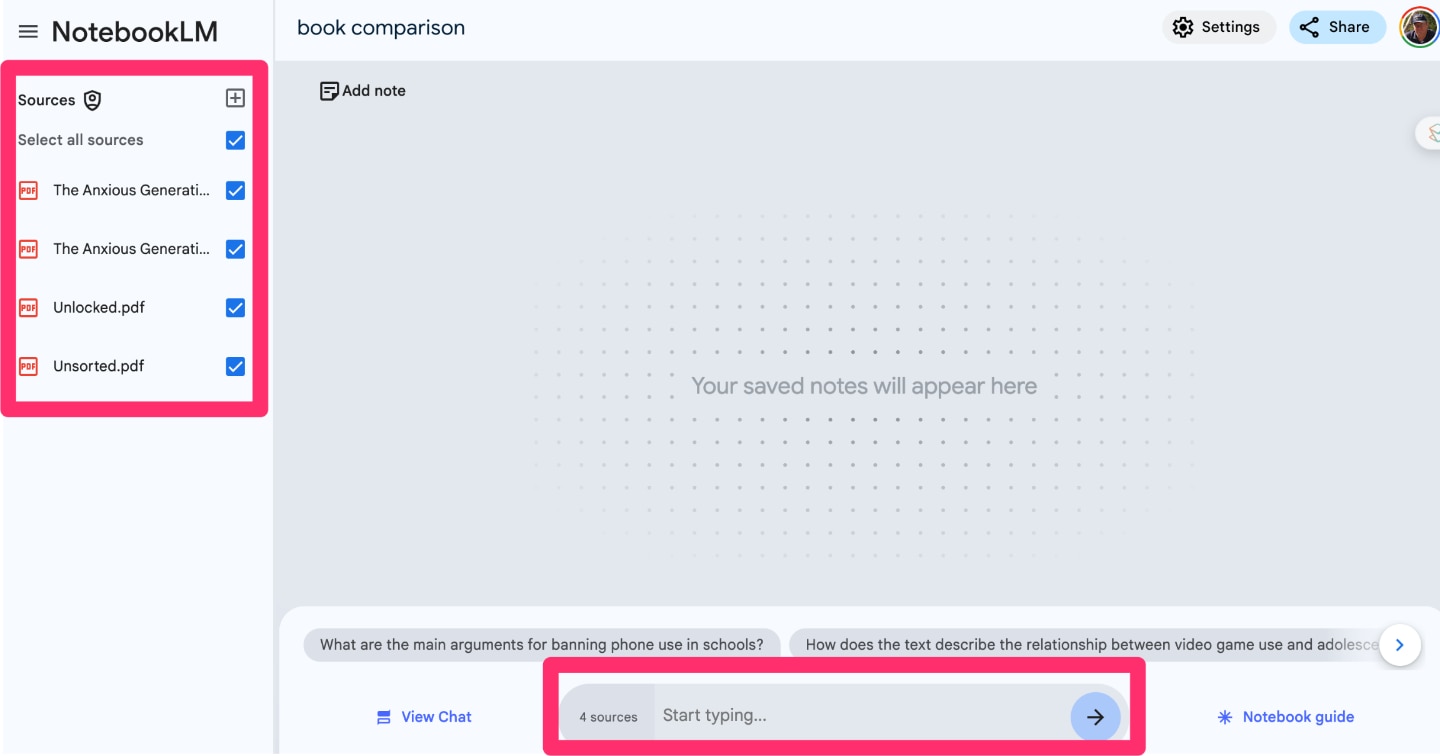
If you are unfamiliar with NotebookLM, the image that follows offers a peek at the interface. NotebookLM is a web-based tool so what is displayed is what would be seen within your browser. I have started a notebook for the specific goal of comparing my notes on these two books and I have already uploaded my collection of notes and highlights into NotebookLM. The left-hand column indicates that four sources have been added. The text box for entering a prompt to “chat” with these resources appears at the bottom of this image.
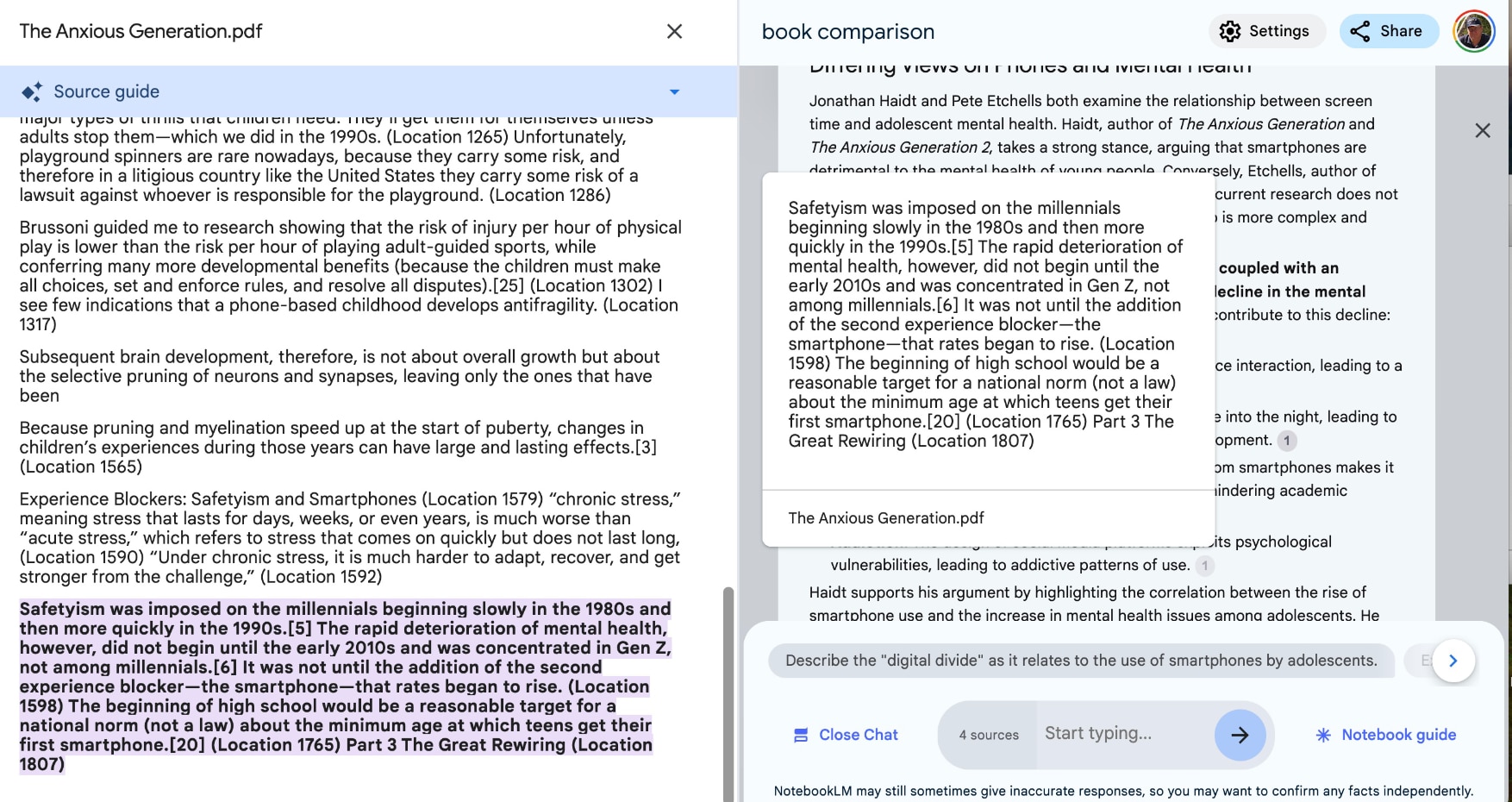
In response to the prompt, the AI capabilities of NotebookLM generates a response. The following image is complicated but shows multiple things. There is the response to the prompt which I will provide following the image. Within this content, you should see small numbers associated with different sections of the output text. These numbers when selected open a window showing the segment of the source content that was used by the AI system to produce the output. The connection of something specific from the source material with a claim made in the output is what I mean by source grounding. As you can see, I then have access to the source content and can explore the context of the designated material if I want to consider whether I agree with the interpretation made by the AI.
NotebookLM prompt response
Differing Views on Phones and Mental Health
Jonathan Haidt and Pete Etchells both examine the relationship between screen time and adolescent mental health. Haidt, author of The Anxious Generation and The Anxious Generation 2, takes a strong stance, arguing that smartphones are detrimental to the mental health of young people. Conversely, Etchells, author of Unlocked: The Real Science of Screen Time, believes that current research does not support this view, suggesting instead that the relationship is more complex and nuanced than commonly portrayed.
Haidt contends that the introduction of smartphones, coupled with an increasingly safety-focused upbringing, has led to a decline in the mental well-being of Gen Z. He argues that several key factors contribute to this decline:
Social Deprivation: Smartphones supplant face-to-face interaction, leading to a lack of vital social skills development.
Sleep Deprivation: Smartphone use often extends late into the night, leading to insufficient sleep, which is crucial for adolescent development.
Attention Fragmentation: The constant stimulation from smartphones makes it difficult for adolescents to focus on tasks, potentially hindering academic performance and emotional regulation.
Addiction: The design of social media platforms exploits psychological vulnerabilities, leading to addictive patterns of use.
Haidt supports his argument by highlighting the correlation between the rise of smartphone use and the increase in mental health issues among adolescents. He points to 2012, the year when Facebook acquired Instagram and rates of depressive episodes began to rise, as a pivotal moment in this trend. He emphasizes the importance of face-to-face, synchronous interaction for healthy emotional development, a type of interaction that social media platforms largely fail to provide. Instead, social media, with its emphasis on likes, shares, and followers, fosters conformity and potentially harmful social comparisons. Haidt is especially concerned about the impact of social media on girls, noting that the worst years for social media use for girls are between 11 and 13. He advocates for delaying smartphone ownership until high school and restricting social media use until age 16. He also argues for phone-free schools and more opportunities for unsupervised play, allowing children to take risks and develop resilience.
Etchells, however, cautions against drawing simplistic conclusions about the relationship between screen time and mental health. He argues that many studies linking smartphone use to negative outcomes rely on self-reported data, which can be unreliable and influenced by prevailing societal narratives about screen time. He points out that large-scale, longitudinal studies that track actual smartphone usage over extended periods are scarce, making it difficult to establish causal relationships. He also emphasizes the importance of considering the context of smartphone use, rather than focusing solely on the amount of time spent online. Factors such as the specific apps used, the purpose of use, and the social context of online interactions can significantly influence the impact of screen time on mental well-being.
Etchells critiques the use of anecdotal evidence and alarmist headlines in the media, arguing that such stories, while compelling, can distort public understanding of the issue. He suggests that focusing on developing healthy screen habits, rather than demonizing technology, is a more productive approach. He advocates for a nuanced understanding of screen time, acknowledging both its potential benefits and risks.
Both Haidt and Etchells agree that more research is needed to fully understand the complex interplay between screen time and adolescent mental health. While their perspectives differ in terms of the severity of the issue and the proposed solutions, both authors offer valuable insights into a topic of increasing societal concern.
Smart Connections and Copilot
Smart Connections and Copilot are both plugins added to Obsidian and both rely on the OpenAI API (requires a subscription). It makes sense to simply suggest these plugins are options that do very similar things.
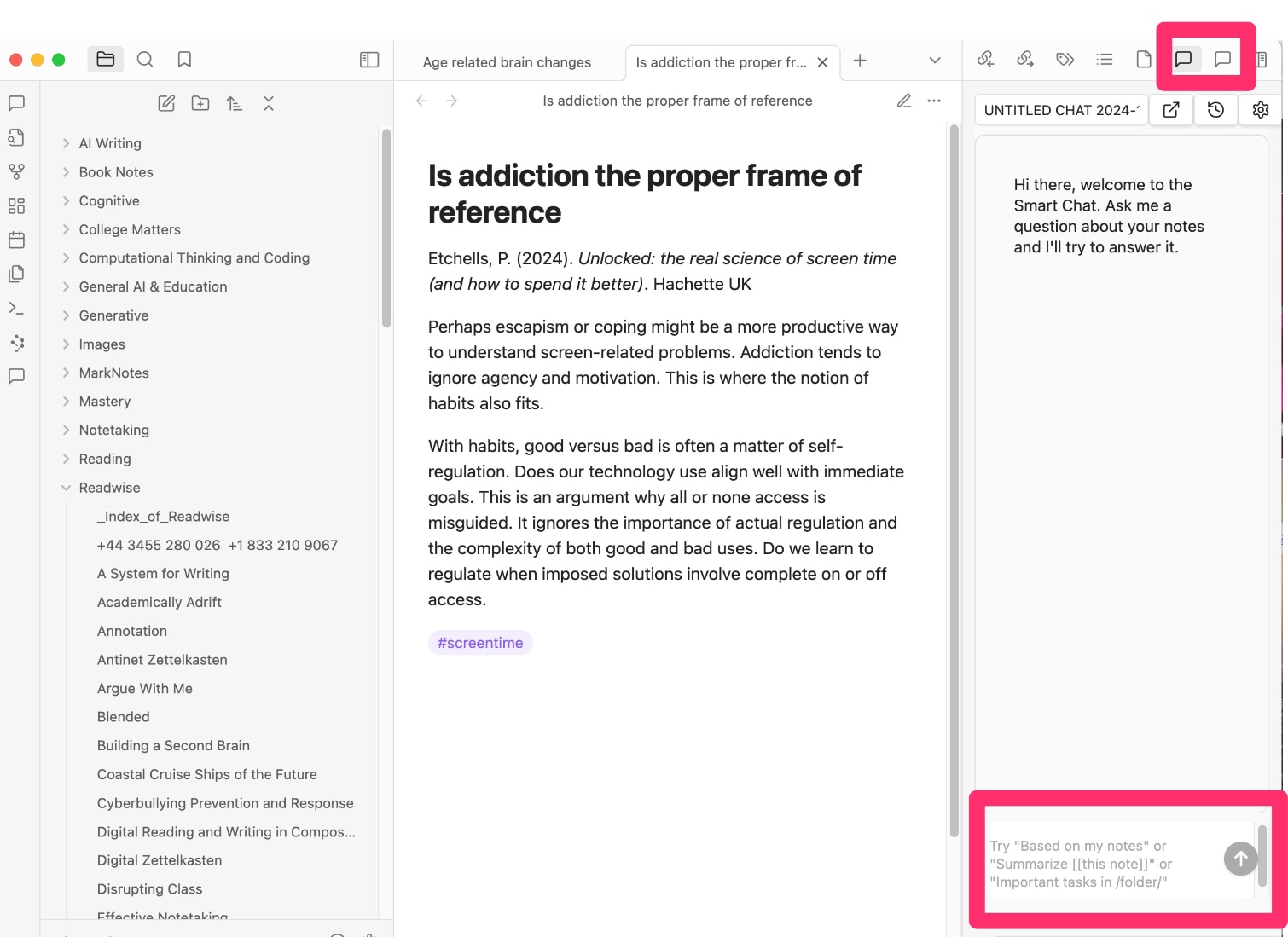
If you are unfamiliar with Obsidian, the following image is intended to show the basic functions. The left-hand (note folders) and middle column (a selected note) concern displaying, locating, and inputting notes. The right-hand column serves a variety of additional functions including accessing and using plugins. Two symbols in the red square at the top of this column allow the selection of either the Copilot or Smart Connections capabilities. The text box within the red square at the bottom is for the submission of a prompt to the AI plugin. The response to the prompt appears in the now vacant area above the prompt window.
Smart Connections Prompt Response
Based on your notes, Jonathan Haidt and Pete Etchells offer contrasting perspectives on the relationship between adolescent phone use and mental health. Haidt, in his book “The Anxious Generation,” argues that smartphones and social media have contributed to a surge in anxiety and depression among young people, particularly focusing on the impact of the widespread adoption of technology in the late 2000s and early 2010s. He proposes solutions such as delaying smartphone and social media access until high school, implementing phone-free schools, and promoting unsupervised play to address the mental health challenges faced by adolescents.
On the other hand, Etchells, in his book “Unlocked,” challenges the common narrative surrounding screen time and mental health. He argues that the issue is more complex than simply quantifying screen time and emphasizes the importance of how individuals engage with technology. Etchells suggests that some screen time can be beneficial and urges readers to reflect on their screen habits, considering factors such as content consumed, apps used, and context of use. He encourages a more thoughtful and intentional approach to technology use to support and improve mental health.
Haidt’s perspective is supported by research indicating a negative correlation between social media use and life satisfaction, particularly among younger adolescents. He highlights key dates associated with changes in technology, such as the introduction of iPhones in 2009 and the acquisition of Instagram by Facebook in 2012, correlating with a significant upturn in depressive episodes among Gen Z around 2012. Haidt’s argument is further reinforced by the addictiveness of social media, which exploits users’ identities and impacts emotional development.
In contrast, Etchells challenges the notion that screen time is a key driving factor behind the decline in mental health. He emphasizes the need to focus on how individuals engage with technology rather than solely measuring screen time. Etchells suggests that understanding and reframing screen habits, reflecting on behaviors, and being critical of information can help individuals leverage technology to support their mental well-being.
Overall, while Haidt highlights the detrimental effects of smartphone and social media use on adolescent mental health, Etchells offers a more nuanced perspective, advocating for a shift in focus towards healthy screen habits and intentional technology use. Both authors contribute valuable insights to the ongoing debate on the relationship between adolescent phone use and mental health, providing readers with different perspectives to consider when addressing this complex issue.
CoPilot Prompt Response
To write a comprehensive comparison of how Jonathan Haidt and Tim Etchells describe the relationship between adolescent phone use and mental health, we need to delve into their respective perspectives and analyses. Both authors have explored this topic, albeit from different angles and with varying emphases
Jonathan Haidt’s Perspective
Jonathan Haidt, a social psychologist, has extensively researched the impact of social media and smartphone use on adolescent mental health. Haidt argues that there is a significant correlation between increased smartphone use and the rise in mental health issues among adolescents, particularly anxiety and depression. He often cites statistical data and longitudinal studies to support his claims, pointing out that the surge in mental health problems coincides with the widespread adoption of smartphones around 2012.
Haidt emphasizes the role of social media platforms in exacerbating feelings of inadequacy and social comparison among teenagers. He suggests that the curated nature of social media content leads adolescents to constantly compare themselves to others, which can result in negative self-perception and increased anxiety. Furthermore, Haidt highlights the addictive nature of these platforms, which are designed to capture and hold users’ attention, often at the expense of real-world interactions and sleep, both crucial for mental well-being.
Tim Etchells’ Perspective
Tim Etchells, on the other hand, approaches the topic from a more nuanced and perhaps less deterministic angle. While acknowledging the potential negative impacts of smartphone use, Etchells is more focused on the context and manner in which these devices are used. He argues that smartphones are not inherently detrimental to mental health; rather, it is the way they are integrated into daily life that matters.
Etchells emphasizes the importance of digital literacy and the need for adolescents to develop healthy habits around technology use. He suggests that when used mindfully, smartphones can offer significant benefits, such as fostering connections, providing access to supportive communities, and serving as tools for creativity and self-expression. Etchells is more likely to highlight the potential for positive outcomes, such as increased access to mental health resources and the ability to maintain relationships across distances.
Comparative Analysis
When comparing Haidt and Etchells, several key differences emerge in their analyses of the relationship between adolescent phone use and mental health. Haidt tends to focus on the negative consequences, often presenting a more cautionary tale about the pervasive influence of smartphones and social media. His approach is data-driven, relying heavily on empirical evidence to underscore the risks associated with excessive use.
In contrast, Etchells offers a more balanced view, acknowledging both the potential harms and benefits of smartphone use. He advocates for a more individualized approach, considering the diverse ways in which adolescents engage with technology. Etchells is more optimistic about the potential for positive outcomes, provided that there is an emphasis on education and the development of healthy digital habits.
Both authors agree that there is a relationship between smartphone use and mental health, but they diverge in their interpretations and proposed solutions. Haidt calls for more stringent regulations and societal changes to mitigate the negative impacts, while Etchells focuses on empowering individuals through education and awareness.
Conclusion
In summary, Jonathan Haidt and Tim Etchells provide contrasting yet complementary perspectives on the relationship between adolescent phone use and mental health. Haidt’s analysis is rooted in caution and concern, highlighting the potential dangers and advocating for systemic changes. Etchells, meanwhile, offers a more hopeful outlook, emphasizing the role of education and personal responsibility in navigating the digital landscape. Together, their insights contribute to a more comprehensive understanding of this complex issue, underscoring the need for a balanced approach that considers both risks and opportunities.
MEM.ai
I started Mem.ai because it was from the beginning a note system that incorporated AI. I had to manually upload the notes I entered in Obsidian. Mem.ai proposed that the linking and tags advocated as so important in Obsidian were less necessary when one could apply AI capabilities to explore the stored notes. There seemed some logic to this proposal and I wanted to see what I thought after using both systems.
MEM.ai Prompt Response
Certainly! Let’s delve into a comparison of how Jonathan Haidt and Pete Etchells describe the relationship between adolescent phone use and mental health, using insights from your notes.
Comparing Perspectives: Haidt vs. Etchells on Adolescent Phone Use and Mental Health
The discourse surrounding adolescent phone use and its impact on mental health is a complex and multifaceted one. Jonathan Haidt and Pete Etchells offer distinct perspectives on this issue, each bringing unique insights into how digital technology influences the well-being of young people. While Haidt presents a more cautionary view, Etchells provides a nuanced analysis that considers both risks and benefits.
Haidt’s Perspective: A Warning on Digital Dangers
Jonathan Haidt, a prominent social psychologist, has been vocal about the potential dangers of smartphone use among adolescents. His perspective is largely shaped by the following points:
1. Correlation with Mental Health Decline: Haidt highlights a significant uptick in mental health issues, such as anxiety and depression, among teenagers starting around 2011. He correlates this trend with the rise of smartphones and social media, suggesting a causal link between increased screen time and deteriorating mental health.
2. Social Media’s Role in Psychological Distress: Haidt argues that social media platforms exacerbate feelings of inadequacy and low self-esteem, particularly among adolescent girls. The constant exposure to curated images and the pressure to gain social validation can lead to harmful comparisons and social anxiety.
3. Gender-Specific Vulnerabilities: Haidt emphasizes that adolescent girls are especially vulnerable to the negative effects of social media. He attributes this to the heightened focus on appearance and social comparison, which are more pronounced in female social media interactions.
4. Advocacy for Restrictive Measures: To combat these issues, Haidt advocates for delaying smartphone use among children. He suggests policies like “No smartphones before high school” to reduce exposure to potentially harmful digital environments and promote healthier developmental outcomes.
Etchells’ Perspective: A Balanced Approach
In contrast, Pete Etchells offers a more balanced view of the relationship between adolescent phone use and mental health. His analysis considers both the potential risks and the benefits of digital technology:
1. Empowerment through Connectivity: Etchells acknowledges that smartphones and social media can empower adolescents by providing access to information, educational resources, and supportive communities. This connectivity can foster a sense of belonging and enhance self-efficacy.
2. Importance of Digital Literacy: Etchells stresses the role of digital literacy in helping adolescents navigate the online world safely. By equipping young people with critical thinking skills and the ability to manage their digital presence, they can mitigate potential negative impacts.
3. Balanced Screen Time: Rather than advocating for strict limitations, Etchells promotes a balanced approach to screen time. He suggests that integrating both digital and physical activities can help adolescents develop a healthy relationship with technology.
4. Focus on Resilience and Adaptation: Etchells believes that with proper guidance, adolescents can develop the resilience needed to thrive in a digital world. By fostering emotional intelligence and critical thinking, young people can learn to navigate the challenges of social media and smartphone use.
Contrasting Approaches to Solutions
While both Haidt and Etchells recognize the significant impact of smartphone use on adolescent mental health, their approaches to addressing these challenges differ:
Restrictive vs. Empowering Solutions: Haidt’s approach is more restrictive, focusing on limiting exposure to technology as a means of protecting mental health. In contrast, Etchells emphasizes empowerment through education and digital literacy, advocating for a more nuanced understanding of technology’s role in adolescents’ lives.
Focus on Risks vs. Opportunities: Haidt’s narrative centers around the risks and negative outcomes associated with smartphone use, particularly for adolescent girls. Etchells, however, highlights the opportunities for empowerment and connection that technology can provide, suggesting that the benefits can outweigh the risks when managed appropriately.
Conclusion: Navigating the Digital Landscape
The contrasting perspectives of Haidt and Etchells underscore the complexity of the relationship between adolescent phone use and mental health. While Haidt’s concerns about the negative impacts are valid, Etchells’ emphasis on empowerment and education offers a hopeful path forward. Ultimately, the key lies in finding a balance that maximizes the benefits of technology while mitigating its risks, equipping young people with the tools they need to thrive in an increasingly connected world.
This comparison captures the essence of both authors’ views, providing a comprehensive look at their differing approaches to adolescent phone use and mental health. If there are specific points you’d like to adjust or expand upon, feel free to let me know!
—-
My goal is to offer some options you might consider. I find advantages and disadvantages with each approach and still use a couple of these tools when I think the first one could be improved.
Many of us have now had the opportunity to spend considerable time with AI tools and have sorted out for ourselves what types of applications are most productive. For my personal use, I found the greatest value in the use of AI to analyze the notes and highlights I have accumulated over the years to search for insights I might use in my writing projects. I keep most of my notes in Obsidian and one of the more popular posts I have generated focusing on AI and personal notes explained my approach to using the Obsidian AI extension Smart Connections.
As I continue exploring, I have found another approach that others may find useful. This approach uses the Google AI tool NotebookLM. This tool is presently provided at no cost and is easy to use. There is a frustrating mismatch between how most of us use Obsidian and the structure of NotebookLM. Obsidian users typically create many short notes and then create links and tags to allow these notes to be stored and used in the most flexible manner possible. NotebookLM allows the uploading of considerable content into an individual notebook to be explored with AI chats, but limits the number of files that can be included. This combination – many small files in Obsidian and a limited number of files in NotebookLM notebooks – creates a challenge.
Here is my present solution. There is an extension for Obsidian (Better Export PDF) that allows the content from multiple files stored within an Obsidian folder to be exported as a single PDF. You can probably see where this is going. Export the many files in several folders as PDFs and then add these PDFs to NotebookLM.
The Better Export PDF in Obsidian
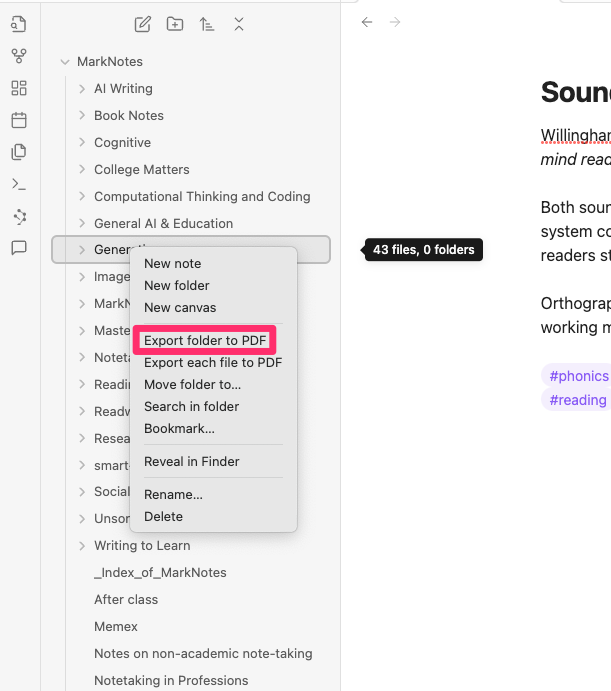
The following image was captured as I used Obsidian. You can see the multiple folders I have created. After One Better Export has been added to Obsidian, you first right-click (control click) on a folder to bring up various options. The one you want is Export folder to PDF.
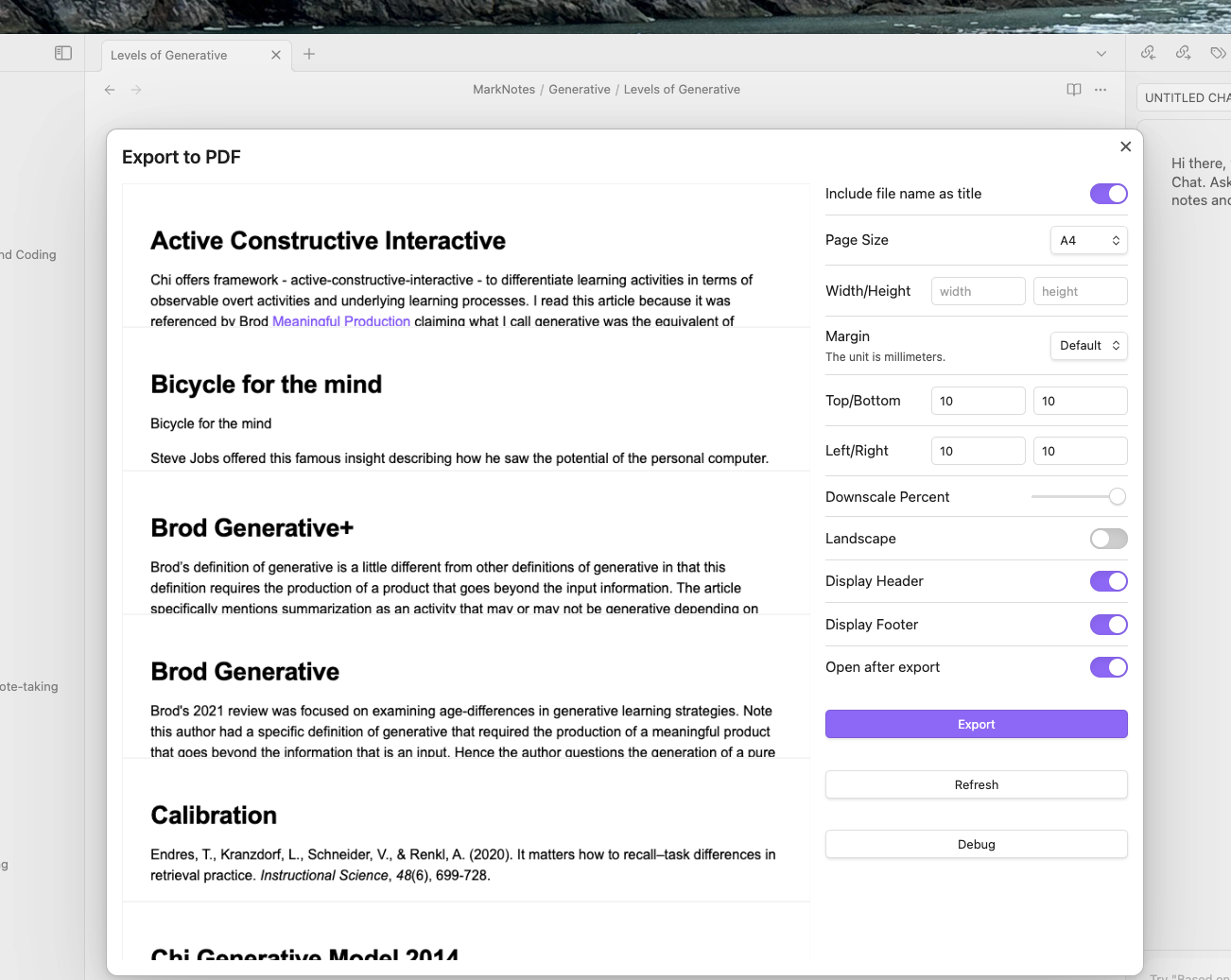
Activating this option may leave you confused as the process takes some time to accomplish. You know when things are working properly when you see the names of individual files appear towards the top of the display (red box). When the process of concatenating the files has been completed the complete PDF file will appear in what initially appears as white space. Now you export this large file.
You complete this process additional Obisian folders until you have exported the large PDFs you want to explore in NoteBookLM.
NotebookLM AI Chat
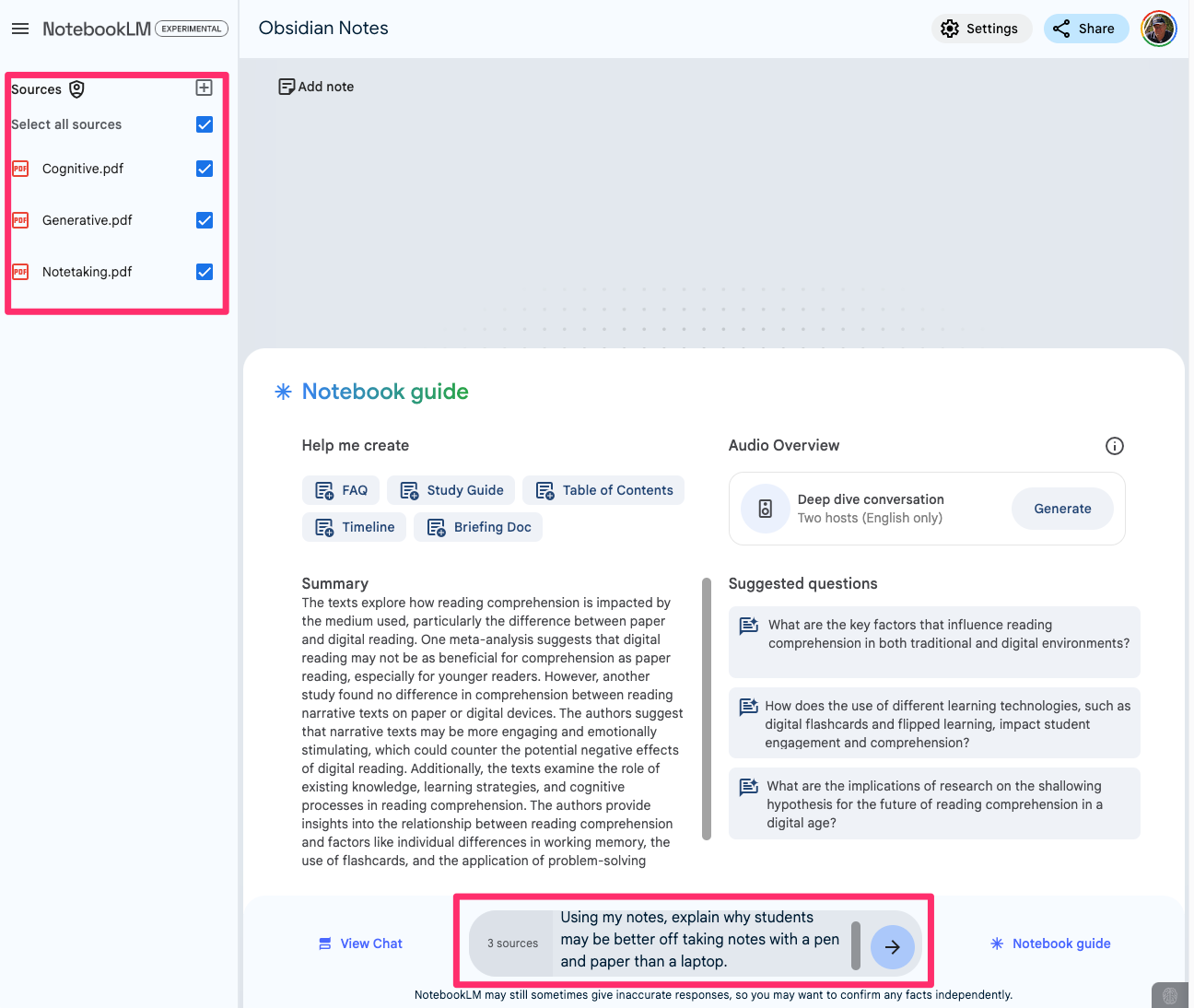
The following image shows a notebook I have created based on three PDFs (Cognitive, Generative, Notetaking). A couple of hundred individual notes are included in these three large files. At the bottom of the image, you should find a prompt I have entered.
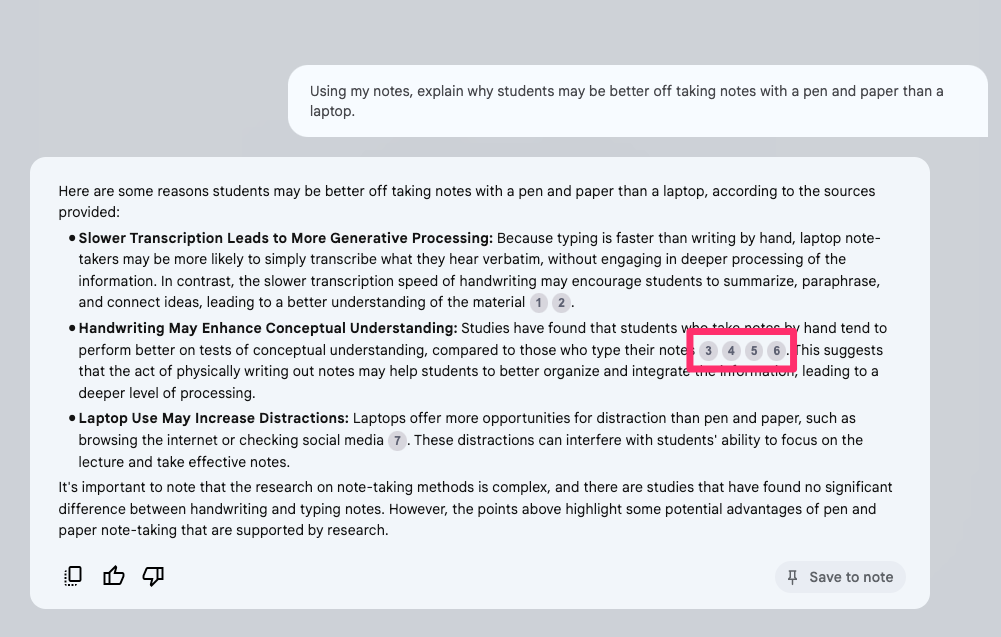
For AI tool users, everything should now be more familiar. NotebookLM has responded to my original prompt and I can accept some of the recommendations for related topics I might explore (not shown). NotebookLM offers a way to review the content the AI used to generate the prompt reply (numbers in the red box). Selecting one of these numbers takes you to the section in your input and allows you to explore that context.
Summary
So, this combination of Obsidian and NoteBookLM seems to work well. The key is the Obsidian extension Better Export PDF which allows many Obsidian notes to be combined to address the limited number of files NoteBookLM will accept as input. Give it a try.
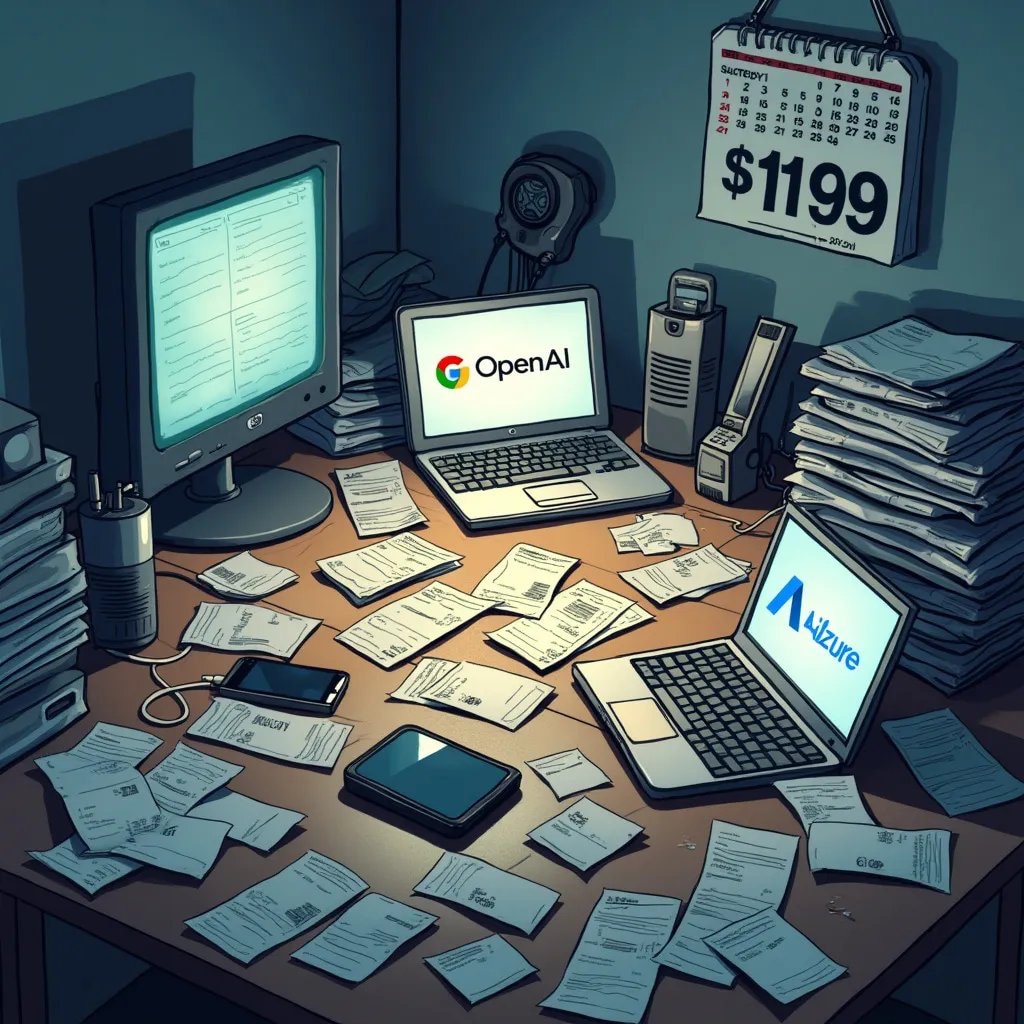
I have this issue with AI services. I have identified several services that provide me useful services (image generation for posts, edits for what I write, identification of journal articles relevant to my writing, and chats with my large collection of notes and highlights) The issue is no individual tool does a great job of all of these things and I don’t use any of the several individual tools enough to justify the $20 a month that seems to be the going rate for any given tool. I could keep telling myself that this retirement writing gig should be treated as a hobby that I can afford, but there is a principle involved here. I think of many of my posts as exploring tools for teachers and $75-100 a month in their situation is likely a bit much.
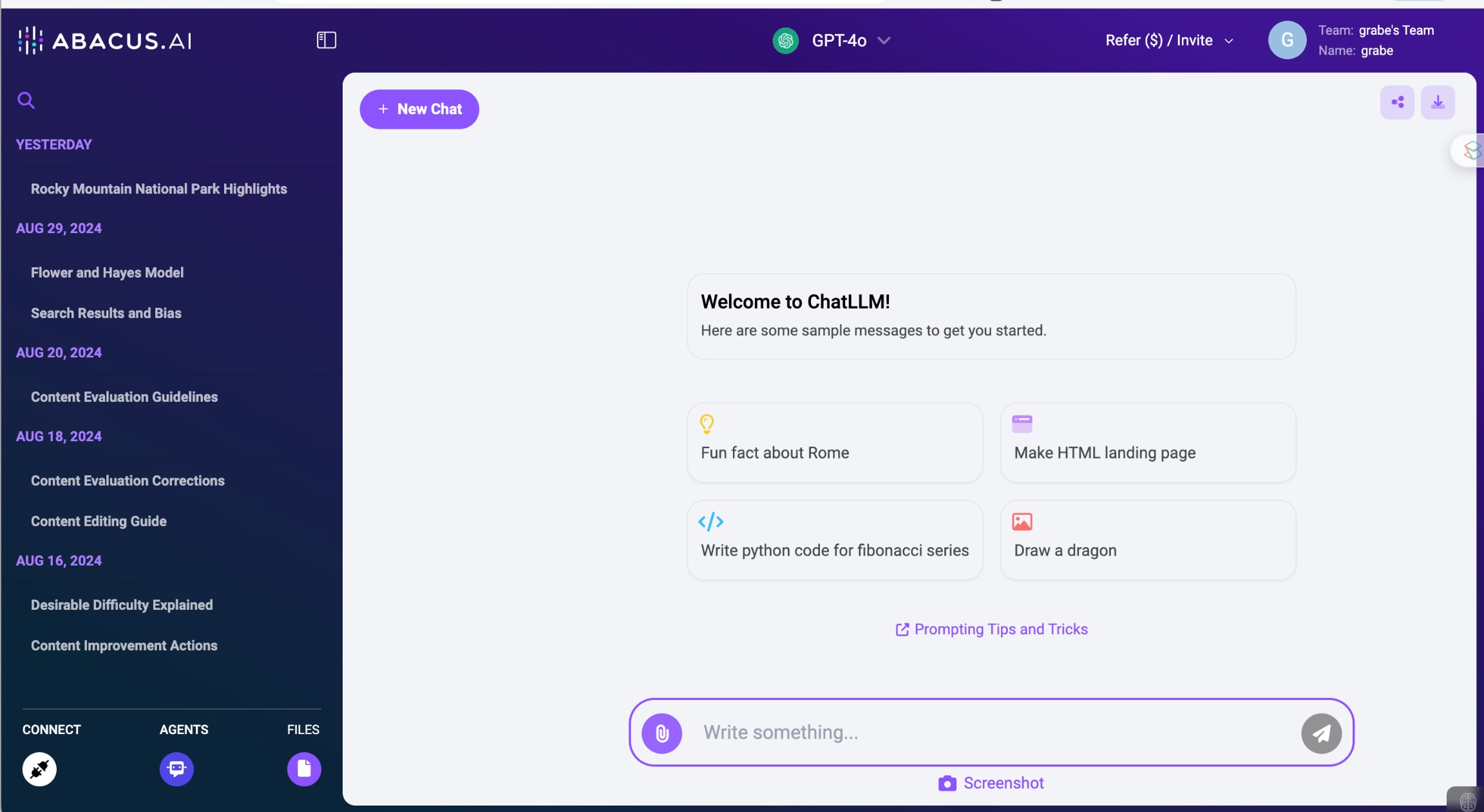
I have found a general-purpose AI service, the ChatLLM tool from Abacus AI, that I have for me what is unlimited use for $10 a month. For a month or so now, I have been duplicating my use of ChatLLM and ChatGPT and can find very little difference in what the tools generate. Abacus.AI has an introductory offer that is a little confusing. The first month is free, but you must purchase one month and then you can cancel after the first two months.
The interface is very similar to what you experience with other AI services. There is a prompt field and responses appear above. ChatLLM allows the individual series of chat interactions with a given purpose allowing you to return if you have a reason to pick up again on an earlier exploration.
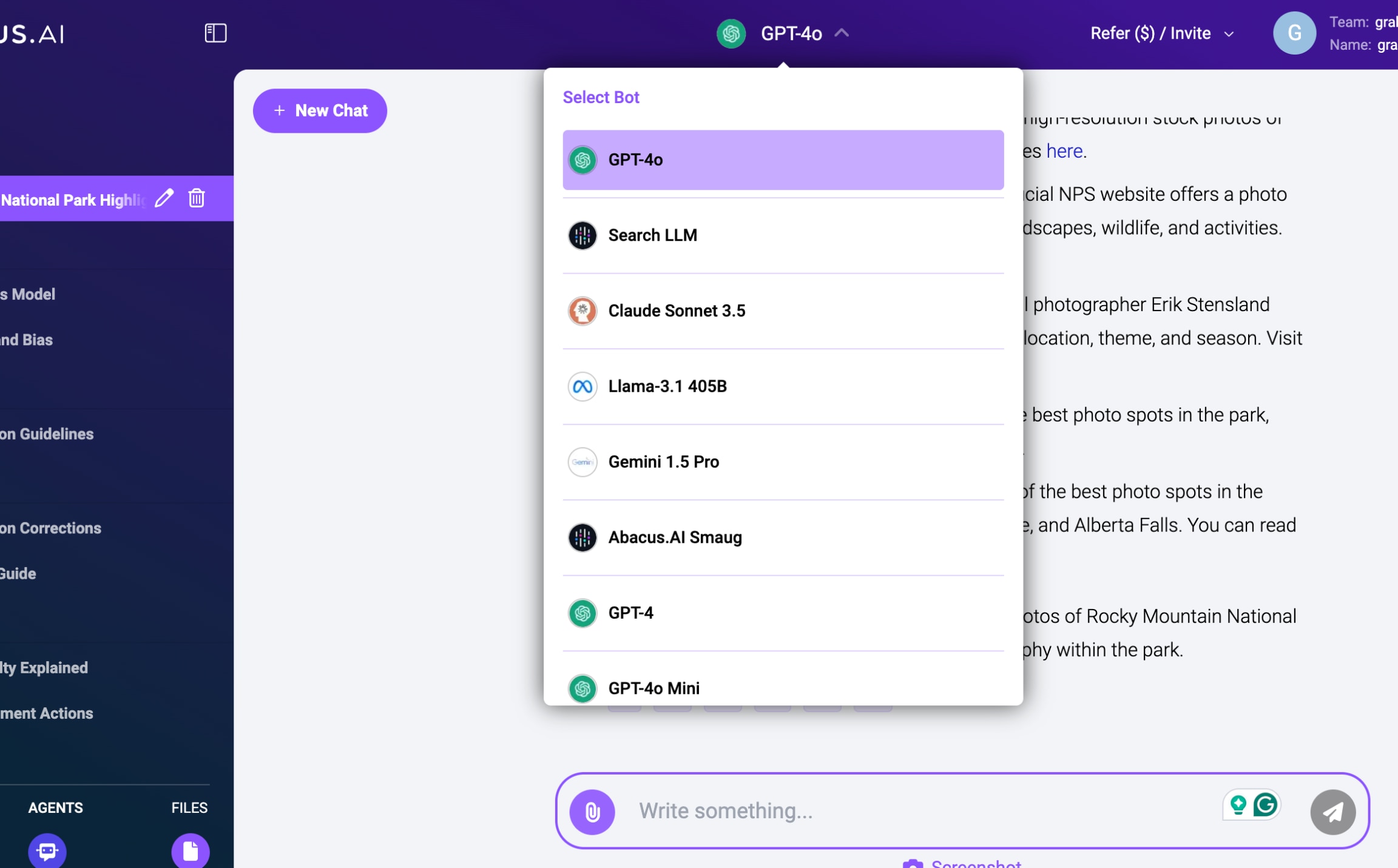
ChatLLM appears to function as an API allowing you to select from different AI services. This option seems useful for those of us who like to explore the possible differences among the AI services that are available.
AbacusAI offers many features I have not bothered to explain here in detail. I have learned what I thought necessary to meet my personal needs and it should be very easy for anyone with any experience with other platforms to get started. Here is a more complete review by another writer.
It’s not that I don’t find AI to be useful. I generate a half dozen images a month to embellish my writing. I search for journal articles I then read to examine an educational issue I want to write about. I examine what I have written to identify errors in grammar or syntax or even identify my use of passive voice which I still can’t figure out. My issue is the monthly subscription fees for the multiple tools that best suit these and other uses. It is simply difficult to justify the $20 a month fee which seems to be the going rate for each of the services and the level of use I make of each service.
I regard my use of AI as both a benefit to personal productivity, but also a subject matter I explore and write about. Writing about the intersection of technology and education is a retirement hobby and I don’t need to do what I do on a budget. However, I don’t think this is true for everyone and I can set as a personal goal an exploration of the financial issues others might need to consider. AI tools differ in how flexible they are. Often, the less flexible tools are optimized to accomplish a specific set of tasks and this narrow range increases ease of use. Users can find themselves evaluating the cost-effectiveness of options based on ease of use versus total cost.
Grammarly as an example
As someone who spends a great deal of time writing, it is worth my time to consider how AI tools can be used to improve the productivity of the time I spend writing and the quality of what I write. Grammarly is a tool suited to such goals. I have relied on both the free and pro versions of Grammarly for a quick way to edit my writing. This is a great product I find helpful. Again, the issue is the Pro version adds another $12 to the total of my monthly subscriptions bill. The free version is great for basic errors, but the pro version is necessary for complete sentence rewrites. It is helpful to compare what I said with the suggested rewrite to decide whether I want to accept the alternate version.
What I have been exploring lately is the use of more general-purpose AI tools (e.g., ChatGPT, Abacas.ai) as an alternative. I understood that many others were using such tools in this matter, but because I had already been using Grammarly I had not invested the time to explore how more flexible tools might be used to achieve similar goals. Here is the approach I have settled on. I use a multi-level prompt to specify what I want to learn from an evaluation of something I have written. I keep this prompt in a note app so that I can copy and paste the prompt at the beginning of the content I want to evaluate. The prompt appears below. The prompt is written to be flexible so that I can adapt it to different circumstances by adding or removing specific guidelines. For example, I realize I often write in passive voice and some tasks should not include text expressed in this way. The guideline “write in active voice” can be included when I think this approach is important. If writing for a specific age group might be a goal, a guideline related to this goal can be inserted.
To demonstrate what this prompt accomplishes, I will take what I written here to this point and apply the prompt.
Evaluate the following content using the following guidelines:
Correct spelling errors
Correct grammatical errors
Correct punctuation errors
Write in active voice
Suggest corrections
Only list the lines containing errors and the proposed corrections
1. **Original:** I examine what I have written to identify errors in grammar or syntax or even identify my use of passive voice which I still can’t figure out.
**Correction:** I examine what I have written to identify errors in grammar or syntax and even identify my use of passive voice, which I still can’t figure out.
**Explanation:** Added a comma before “which” to correctly punctuate the non-restrictive clause.
2. **Original:** It is simply difficult to justify the $20 a month fee which seems to be the going rate for each of the services and the level of use I make of each service.
**Correction:** It is simply difficult to justify the $20-a-month fee, which seems to be the going rate for each of the services and the level of use I make of each service.
**Explanation:** Added a hyphen in “$20-a-month” to correctly form a compound adjective and a comma before “which” to punctuate the non-restrictive clause.
3. **Original:** I regard my use of AI as both a benefit to personal productivity, but also a subject matter I explore and write about.
**Correction:** I regard my use of AI as both a benefit to personal productivity and a subject matter I explore and write about.
**Explanation:** Replaced “but also” with “and” to correct the parallel structure.
4. **Original:** Writing about the intersection of technology and education is a retirement hobby and I don’t need to do what I do on a budget.
**Correction:** Writing about the intersection of technology and education is a retirement hobby, and I don’t need to do what I do on a budget.
**Explanation:** Added a comma before “and” to separate two independent clauses.
5. **Original:** Grammarly as an example
**Correction:** Grammarly is an example.
**Explanation:** Added “is” to form a complete sentence.
6. **Original:** Again, the issue is the Pro version adds another $12 to the total of my monthly subscriptions bill.
**Correction:** Again, the issue is that the Pro version adds another $12 to the total of my monthly subscription bill.
**Explanation:** Added “that” for clarity and changed “subscriptions” to “subscription” for correct singular form.
7. **Original:** What I have been exploring lately is the use of more general-purpose AI tools (e.g., ChatGPT, Abacas.ai) as an alternative.
**Correction:** What I have been exploring lately is the use of more general-purpose AI tools (e.g., ChatGPT, Abacus.ai) as an alternative.
**Explanation:** Corrected the spelling of “Abacas.ai” to “Abacus.ai.”
8. **Original:** I understood that many others were using such tools in this matter, but because I had already been using Grammarly I had not invested the time to explore how more flexible tools might be used to achieve similar goals.
**Correction:** I understood that many others were using such tools in this manner, but because I had already been using Grammarly, I had not invested the time to explore how more flexible tools might be used to achieve similar goals.
**Explanation:** Changed “matter” to “manner” for correct word usage and added a comma after “Grammarly” to separate clauses.
The feedback I have received would normally have resulted in my making several adjustments. I have not done so for you to consider both the original and the suggestions. The feedback makes specific suggestions and I either copy and paste the suggestions to the original source material or simply retype what needs to be fixed. This is clumsier than just clicking on the recommendation offered by Grammarly and it often requires that I use the search function in a longer text to locate the offending sentence. When writing on my desktop machine I simply open a second window and move between one window with the AI feedback and the original document to make adjustments.
As I have explored and used several digital note-taking tools and examined the arguments that have been made regarding how such tools result in productivity benefits, I have identified a potential conflict in what produces more positive outcomes. The recognition of this conflict allows more purposeful execution on the part of the tool user and may better align activities with goals.
One way to identify note-taking goals is to use a long-standing approach differentiating generative and external storage benefits. This distinction was proposed long before PKM and was applied in the analysis of notes taken in classroom settings. The generative benefit proposes that the process of taking notes or sometimes of taking notes in a particular way engages our cognitive (mental) processes in ways that improve retention and understanding. External storage implies that our memory becomes less effective over time and having access to an external record (the notes) benefits our productivity. In practice (e.g., a student in a classroom) both benefits may apply, but one benefit depends on the other activity. Taking notes may not be beneficial, but to review notes one must have something to review. This is not always true as notes in one form or another can be provided or perhaps generated (for example AI identification of key ideas), but taking your own notes is by far the most common experience. In a PKM way of thinking, these two processes may function in different ways, but the classroom example should be familiar as a way to identify the theoretical benefits of note-taking.
I have written about the generative function of note-taking at length, but it is important to point out some unique specifics that apply to some digital note-taking tools. A source such as Ahrens’ Taking Smart Notes might provide the right mindset. I think of generative activities as external actions intended to produce a beneficial mental (cognitive) outcome. The idea is that external activities can encourage or change the likelihood of beneficial thinking behaviors. One way of operationalizing this perspective is to consider some of the specific activities Ahrens identified as external work resulting in such cognitive benefits. What are some of these activities? Isolating specific ideas and summarizing each as a note. Assigning tags that characterize a note. Making the effort to link notes. Periodically reviewing notes to generate retrieval practice, to reword existing notes, and to add new associations (links).
Retrieval is easier to explain. Note-taking apps with highly effective search capabilities make it easy to search and surface stored information when it might be useful. Links and tags may also be useful in this role, but search alone will often be sufficient.
What about the potential conflict?
The conflict I see proposes that some tools or approaches rely more heavily on search arguing in a way that generative processes are unnecessary.
I starting thinking about this assumption when contrasting the two note-taking systems I rely on – Mem.ai and Obsidian. While Mem.AI and Obsidian could be used in exactly the same way, Mem.ai developers argued that the built-in AI capabilities could eliminate the need to designate connections (with tags and links) because the AI capabilities would identify these connections for you. Thus when retrieving information via search, a user could use AI to also consider the notes with overlapping foci. If a user relied on this capability it would eliminate the work required to generate the connections manually created in Obsidian, but this approach would then also avoid the generative benefits of this work.
AI capabilities fascinate me so I found a way to add a decent AI capability to Obsidian. Smart Connections is an Obsidian plugin that finds connections among notes and allows a user to chat with their notes. So, I found a way to mimic Mem.ai functionality with Obsidian.
I find I have found a way to alter my more general PKM approach because of these capabilities. Rather than taking individual notes while reading, I can annotate and highlight pdfs, books, and videos and export the entire collection for each source and then bring this content into both Mem.ai and Obsidian as a very large note. Far easier than taking individual notes, but at what generative cost?
Smart Connections has added a new feature that even facilitates the use of the large note approach. Connections finds connections based on AI embeddings. An embedding is the mathematical representation of content (I would describe as weights based on what I remember of statistics). The more two notes embeddings’ weights are similar the more the notes consider similar ideas. Smart Connections used embeddings to propose related notes. Originally embeddings were generated at the note level and now at the “block” level. What this means (block level) is that Smart Connections can find the segments of a long document that have a similar focus as a selected note.
Why is this helpful? When I read long documents (pdfs of journal articles or books in Kindle), I can export a long document containing my highlights and notes generated from these documents. With Smart Connections I can then just import this exported material into Obsidian and use Smart Connections to connect a specific note to blocks of all such documents. I can skip breaking up the long document into individual notes and assigning tags and creating links.
Why is this a disadvantage? Taking advantage of this capability can be a powerful disincentive to engaging in the generative activities involved in creating and connecting individual notes the basic version of Obsidian requires.
Summary
As note-taking tools mature and add AI capabilities, it is important for users to consider how the way they use such tools can impact their learning and understanding. The tools themselves are quite flexible but can be used in ways that avoid generative tasks that impact learning and understanding. If the focus is on the retrieval of content for writing and other tasks, the generative activities may be less important. However, if you start using a tool such as Obsidian because a book such as Smart Notes influenced you, you might want to think about what might be happening if you rely on the type of AI capabilities I have described here.
References Ahrens, S. (2022). How to take smart notes: One simple technique to boost writing, learning and thinking. Sönke Ahrens.




You must be logged in to post a comment.