InsertLearning is one of my most frequent recommendations for K12 classrooms. It is one of the examples I highlight in my Kindle Primer – Designing Instruction Using Layering Services. The InsertLearning environment allows a teacher to add elements to existing online web pages and then assign this combination to students. It is a great tool for teachers wanting to “ditch the textbook” or who want to emphasize OER. The elements include comments and highlights (which are not common additions among tools of this type), but also questions and discussion prompts. I call InsertLearning an environment because it also includes a management system allowing educators to assign resources prepared in this fashion and to view individual student responses to questions. The original service was a bargain at $8 a month, but I see the new price has been increased to $100 a year. For what this service can do, this is still a reasonable price.
What had confused me about the service was that when I attempted to review the service for updates all of the content my searches seemed to surface ended a few years ago. I finally contacted one of the founders and he explained that the service had been purchased by fan.school. This company has made educational services originating in Minnesota a target of acquisition and provides a more stable for continuation of several smaller companies. InsertLearning works as a source to learn about the program and fan.school provides an access point specific to this product.
As far as I can tell, my videos describing InsertLearning still offer an adequate overview of the service. My price quote is no longer accurate.
Educators are likely familiar with the learning challenges students experienced during the COVID years when face-to-face instruction became impractical. The concern for student achievement during this period of time has been documented in declining performance on the NAEP scores. It appears that math achievement was particularly hard hit and the middle school years which set students up for the study of algebra represents a unique problem area.
I decided to focus on a resource that called attention to this problem mostly because it proposes one productive response would be to make more frequent use of mastery instructional strategies in middle school math classes. Readers who follow this blog will understand that mastery learning is one of the topics I spent time writing about. [other more detailed posts about mastery instruction can be found by selecting the category “mastery” that can be found in the left-hand column of this blog]
Mastery instruction individualizes learner experiences meeting students at the level of their understanding and advancing them as individuals when understanding has been achieved. It is an approach concerned that learning goals be met even when group-based instruction would likely move ahead leaving some students missing skills that are prerequisite to new material.
Among the other recommendations to address the middle school math challenge is to double up on math class frequency. This would be a second way to provide additional time to assure the mastery of essential skills, but it is more of a group-based approach than the individual learner emphasis on mastery learning.
Like so many, I tested the capabilities of the new AI tool ChatGPT and offered a personal assessment. While I immediately saw that the tool would have significant consequences for classroom practice and especially those educators who assigned writing to learn tasks, I proposed that a fix would involve requiring the inclusion of careful citations in work students submitted. The samples I had ChatGPT generate did not provide citations and my naive understanding of the corpus of content the AI was drawing on did not include citations for the content.
I was wrong.
It took multiple efforts to find how to phrase questions so that the material produced would contain citations and then how to actually view the full citations for the work mentioned in a generated product. The following example involved two requests and are a modified version of the topic I used as an example in my first post. I have highlighted the mention of sources.
Me: How can a semantic network explain the tip of the tongue phenomenon and list citations that support this explanation?
The tip of the tongue phenomenon, also known as TOT, is a common experience in which a person knows that they know a particular word or piece of information, but they are temporarily unable to retrieve it. A semantic network can help explain this phenomenon by providing a framework for understanding how words and concepts are related to one another in the brain.
In a semantic network, words and concepts are represented as nodes, and the relationships between them are represented as edges or links. When a person is trying to retrieve a word or piece of information, they search through their semantic network to find the relevant node. If the person is unable to retrieve the word, it may be because they are unable to find the appropriate node in their semantic network, or because the node is not well-connected to other nodes in the network.
One study that supports the idea that the tip of the tongue phenomenon is related to the organization of semantic networks is a 2013 study by J. K. Stanley and colleagues, which used functional magnetic resonance imaging (fMRI) to investigate the neural basis of TOT. The study found that during TOT, the brain exhibits increased activity in the temporal lobe, which is known to be involved in language processing and the organization of semantic networks.
Another study that supports the semantic network explanation of TOT is a 2001 study by J. M. McRae and colleagues, which used a computational model of semantic networks to investigate the retrieval of words during TOT. The study found that the model was able to reproduce many of the characteristics of TOT, including the feeling of knowing a word but being unable to retrieve it, and the ability to retrieve the word after a delay.
Overall, the evidence suggests that the tip of the tongue phenomenon is related to the organization of semantic networks in the brain, and that semantic networks can provide a useful framework for understanding this phenomenon.
Me: Provide citations that explain how the theory of a semantic network can explain the tip of the tongue phenomenon.
Stanley, J. K., Marslen-Wilson, W. D., & van Hell, J. G. (2013). The tip of the tongue phenomenon: An fMRI study. Journal of Cognitive Neuroscience, 25(6), 891-900.
McRae, J. M., de Sa, V. R., & Seidenberg, M. S. (2001). On the tip of the tongue: What causes word finding failures in young and older adults? Journal of Memory and Language, 44(4), 542-579.
I started posting about student highlighting, note-taking, and annotation as part of my observation that reading with a digital device offers some lifetime advantages over reading paper resources. The issue of comprehension vs. paper is only the initial stage of reading and the opportunities for layering personal comments on primary sources, the storage and organization of these comments, and the retrieval of these comments offers advantages for studying and written projects based on ideas from multiple sources.
Once you begin exploring digital annotations and note-taking you can move into many different subtopics. For educators, any claims related to digital annotation and related activities (note-taking, highlighting) would typically involve short-term student uses of these skills (e.g., preparing for an exam, generating a multi-source written product).
There are many investigations and analyses related to these ends. If I were to recommend a single source relevant to this topic it would be one that is a couple of decades old. It is also a study conducted with college students. Simpson and Nist made several key points in their introduction that I believe continue to be of great importance. Even though and perhaps because they worked with college learners, I think their most important observation was that treatments that involve a skill such as highlighting or annotation require the assurance that learners applying these study strategies do so effectively. They raise the same argument I have made multiple times. Have learners ever received guidance in how they should go about learning strategies such as highlighting and annotation? If those investigating study techniques in college learners are concerned with what is often called treatment fidelity, a similar concern should be raised when conducting annotation, highlighting and pretty much any study strategy with younger learners.
The Simpson and Nist study developed over a three-week period of time using the type of content college students would encounter in their classes (I.e., extended period of time and authentic content). Students were exposed to sample annotated materials, provided examples of specific types of annotations (e.g., summaries, questions of understanding, potential examples), and offered samples of their attempts at annotation for review by peers and the instructor. The comparison of multiple choice questions responses covering each target source involved the treatment group and a group asked to study and generate possible exam questions. The annotation group demonstrated a significant advantage on the MC exams.
This study made use of paper source material, but offers a realistic example of what it takes to apply the treatment strategies in a way that generates an advantage. It cannot be assumed that common study techniques such as highlighting or annotation are applied in a cognitively generative way even though some within a peer group use such strategies. It is very possible students have never been involved in a conversation focused on the use of such strategies or practiced them under supervision, Students read and write in most classes, but responsibility for developing proficiency in such skills in secondary and lower-level college classes may be one of those things assumed to be someone else’s job.
Simpson, M. L., & Nist, S. L. (1990). Textbook annotation: An effective and efficient study strategy for college students. _Journal of Reading_, _34_(2), 122-129.
I intend this post as a public service announcement of a sort for educators at all levels. If you have not personally explored AI assisted writing, you need to do so. I will explain how. I say this because your students will soon explore AI services that will generate written products for them and you will have to adjust how you think about writing assignments as a consequence.
My suggestion is that you give a service called ChatGPT a try. Sign up and get a free account. The service is very easy to use. Once you have an account, you simply enter a description of what you want into a text box and wait for a reply. I think the sophistication of what is generated is likely to shock most and this reaction should cause you to consider what access to a service like this means for the tasks you describe in your classroom.
Here are a couple of examples. These examples relate to topics I might raise in a graduate educational technology course. My point is these are challenges I might offer students first to see if they understood a topic we had covered and then if they could connect this topic to other cognitive phenomena.
Me: What is a semantic network?
ChatGPT: A semantic network is a graph-based representation of a knowledge domain. It is a way of representing structured knowledge by modeling the relationships between concepts. In a semantic network, concepts are represented as nodes in the graph, and the relationships between concepts are represented as edges that connect the nodes. This allows for the representation of complex ideas and their relationships in a clear and intuitive manner. For example, a semantic network could be used to represent the relationships between different types of animals, their characteristics, and the ways in which they interact with each other.
Me: How can a semantic network explain the tip of the tongue phenomenon?
ChatGPT: The tip of the tongue phenomenon, also known as “TOT,” is a common experience in which a person knows that they know a word or a piece of information, but they cannot recall it at the moment. One possible explanation for this phenomenon is that the information is present in the person’s semantic network, but it is not easily accessible at the moment. In a semantic network, information is typically represented as nodes in the graph, and the connections between these nodes encode the relationships between different pieces of information. When a person experiences the tip of the tongue phenomenon, it may be because the information they are trying to recall is present in the network, but the path to access it is not easily accessible. In other words, the person knows that the information is there, but they cannot retrieve it easily because the connections between the relevant nodes in the network are not strong enough.
Me: Can the semantic network explain the testing effect?
ChatGPT: Yes, the semantic network can help explain the testing effect, which is the phenomenon whereby taking a test on material improves subsequent recall of that material compared to simply studying the material. The testing effect is thought to occur because taking a test forces a person to retrieve information from their memory, which strengthens the connections between the relevant nodes in their semantic network. This makes it easier to access the information in the future.
——–
Just so you appreciate what you are reading try this. Take the final question “Me: Can the semantic network explain the testing effect?” and enter it as a Google search. You will generate plenty of hits, but the hits are not really answers to the question. The hits at the top of the list I received were explanations of what a semantic network is and represented content I would have to read to generate an understanding. I did find an explanation of what the testing effect is in another hit further down the list. I did not find a resource near the top of the list that would cover a possible connection between the two. Educators may be familiar with the testing effect, but why it works so successfully is fairly speculative. I explain it by connecting the concepts of a networked associative model of memory and the cognitive mechanisms of the retrieval process which is kind of what I would be looking for if I had asked the question of students who have discussed these concepts with me. I was impressed AI put it together in a similar way.
So, AI writing is not simply retrieving what someone else has written (search), but is building from a huge collection of content at a more abstract level.
So? Well, students can “write” impressive products by giving an AI bot instructions. They may do this because they want to read how the AI bot generates a response they would find informative (Note: Search may soon be replaced by this type of AI process because it answers questions rather than just providing resources you can use to answer them yourself). AI can be your teacher.
However, if you are teacher using writing to evaluate learning or writing skill or if you are a teacher using writing as a way to encourage student learning (writing across the curriculum), the “writing” generated by AI is a challenge for you. It does not require much from the student in terms of content review, application of writing skills, or personal understanding. Like math teachers who figured out students could take a picture of a problem the students were assigned and have an online service solve it and show a solution process, you are now dealing with a new reality. Writing extended content is also a process that is much more difficult to monitor. You can watch students write a theme in class, but a research paper is a different beast.
Let’s start with this. Take some time to explore ChatGPT. You really need this personal experience to understand present capabilities. Don’t start by thinking how you might ban access. This will not be realistic AND it ignores the positive opportunities this type of tool offers. Are there opportunities you can think of? Now, what about limitations? What about citations? This service strikes me as a very intelligent colleague who can spout off on nearly any topic, but leaves me with little I can read and consider myself. How could I as a writer even use content a service like this might generate in something I would write? How would I justify the statements made? My first reaction is that educators review what they know about the Flower and Hayes writing process and consider what tangibles they might ask students provide at each stage of the process. For example, what are the notes they generated from the sources they intend to cite in their final product. How did they put these notes together in getting to this final product?
One more thing. I wrote a previous post about ChatGPT for Medium and in this post I included the response to a question about how AI writing might limit what students learn from writing themselves I asked of ChatGPT. I thought the response was quite useful and honest (now I am anthropomorphizing). Honesty is not always something you get with human authors.
Some knowledge workers (writers) offer descriptions of their writing process using titles such as “How I work”. The benefit, I assume, is to provide others insights regarding the flow or process used by the author that might result in a beneficial adjustment to the reader’s own activity. I will begin by offering a general overview of the process I use and then will explain how the system works when I write based on a specific type of source material.
At the general level, I imagine what I am trying to do is to create bi-directional linkages between products. Those products include the original source material, stand-alone notes, and my original document that is intended to be shared with others. One additional goal in this process is important. I want to create sources in the process of writing that have value to me over time and not just for one project. By this, I mean I want the notes and original sources to be processed in such a way that I can easily use them to locate relevant information and to be more efficient to use for future projects. I make use of digital tools and digital information sources to achieve these goals.
Context
One concept that has proven useful in how I have come to think about and describe my workflow is that of context. The bi-directional linkages between products I have generated are constructed to maintain context. So, the original sources are highlighted and annotated when they are read. The highlights and notes exist within the context of the original sources. Some of these notes and highlights are extracted from these original sources to generate smart notes using a different digital tool. However, this extraction process includes links back to the original sources to maintain context. So, at a later point in time, the link associated with a smart note can be used to return to the original document and the location within this document associated with a smart note.
By the way, the definition of a smart note is an idea that is understandable on its own. So these notes which were created based on information obtained elsewhere are written so that they do not require the original source for understanding. This stand-alone capability does not mean that reviewing such notes at a later time would not prompt a return to the original source perhaps for additional information or clarification. This review can be useful. Finally, I use the Smart notes typically generated from multiple original sources to write a product (typically a blog post at this stage of my career).
Thinking about the sequence of written sources is kind of interesting. As one moves through the sequence, there is less reliance on the context of the previous source and a greater focus on my own interpretation and speculation.
Example – pdfs as sources
Much of what I write is based on journal articles that I have access to as pdfs downloaded from my library. I work within an Apple environment and I make use of iCloud as online storage I can access from my iPad and desktop computer. Because of the time invested in accumulating many annotated pdfs and other products over time, the use of iCloud provides me some measure of security for the products I generate. I do create backups for added security.
I first read the source pdfs using a digital tool. I have used Zotero, but I prefer a product specific to Apple called Highlights because it is less complicated to use and just seems more consistent. I mostly highlight while I read, but I also annotate when I know I want to create a Smart note from what I am reading.
Highlighting and annotation are processes that involve context as both processes connect a personal addition at a specific location within the source text. Both Zotero and Highlights allow highlights and notes to be exported as a file separate from the original pdf. There are options for the format in which this file is created and one is markdown. A markdown file is a text file that includes a few reserved text symbols that allow the content of the file to appear with headings and subheadings, links, tags, and other such features when opened with a tool that interprets the reserved markdown symbols. Markdown uses such symbols in a way similar to the symbols used in an HTML file. One of the core benefits of a markdown text file is that it will not eventually age out of usefulness. It is a text file and not a proprietary format so there will always be a way to open a markdown file and one does not have to worry about investing years in a tool that creates a file type that may not be useful if the tool is discontinued.
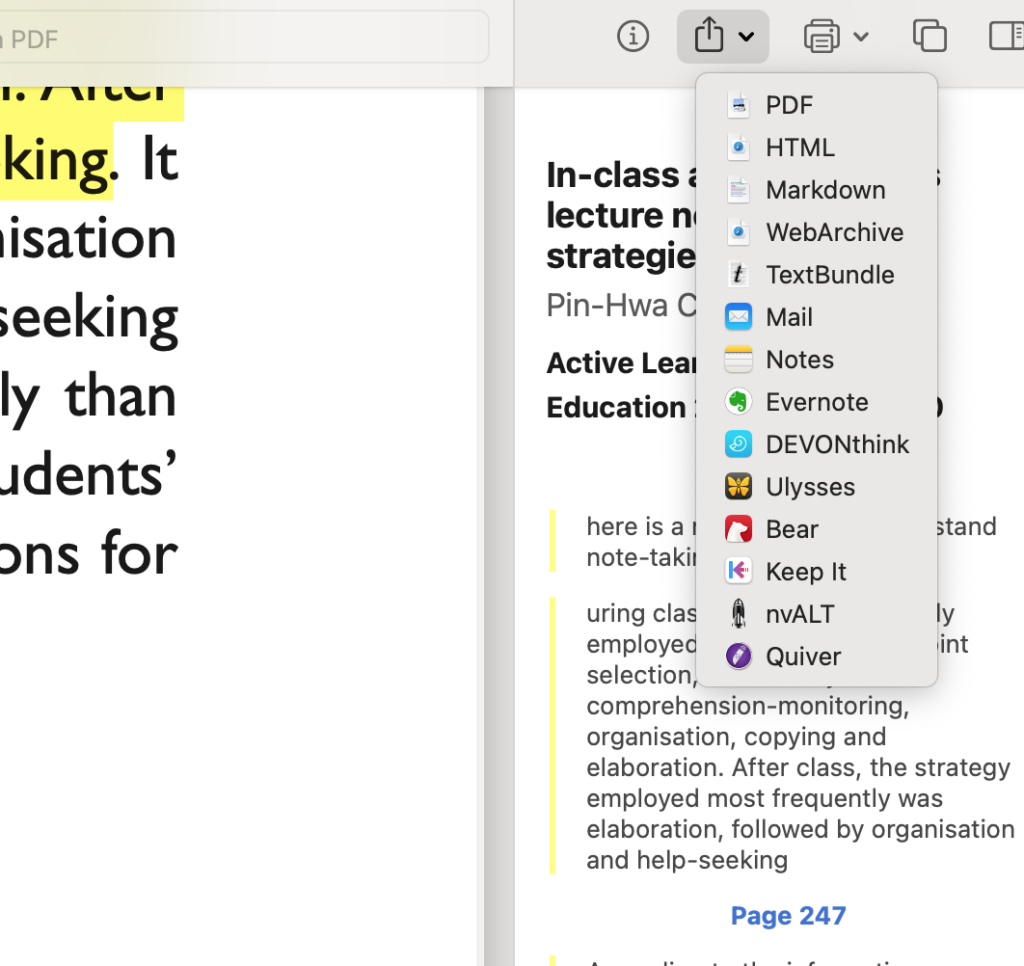
You get an idea of how Highlight works from the following image. The left-hand window shows the original pdf that has been highlighted. The highlights and notes that are added also appear in the right-hand panel and it is the content from this panel that is exported. The drop-down menu shows the various formats that can be used for export and you should find markdown near the top.
I use Obsidian to store the notes I create. Obsidian is a tool intended for organizing, cross-referencing, and tagging a large collection of notes for an extended period of time. It is a versatile tool, but I use it for storing citations and Smart notes. Obsidian works with markdown files and the content exported from Zotero or Highlights can be imported, manipulated, and stored in Obsidian.
Here is the useful capability I take advantage of when using these tools on my desktop computer. Having everything on the same machine is essential. Both Zotero and Highlights embed information about the location of highlights and notes within the original document. So, when a note is stored in Obsidian exported from one of these highlighting and annotation tools, a link will be included that will allow the Obsidian user to Zotero or Highlights and show the original text in which the highlight or note was embedded. Zotero is more specific and takes you to the exact location. Highlights takes you to the page rather than the specific location on the page.
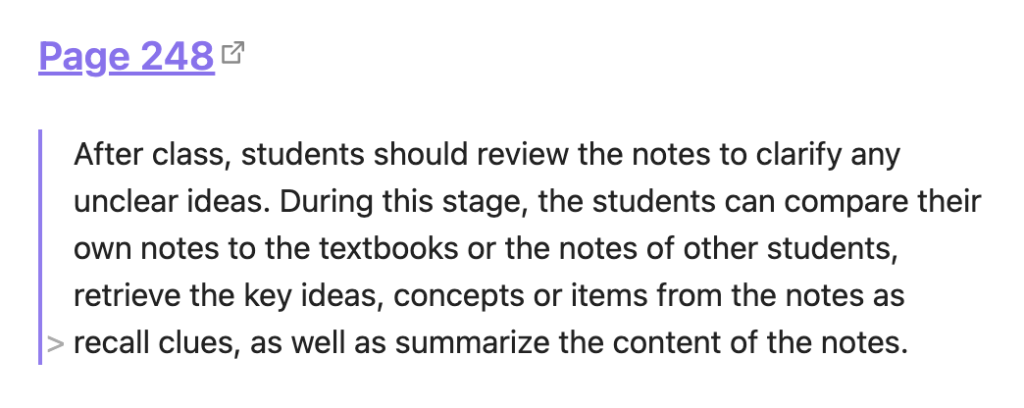
So, this is what a section of markdown might look like for a note (this from Highlights).
#### [Page 248](highlights://chen2021#page=4)
> After class, students should review the notes to clarify any
> unclear ideas. During this stage, the students can compare their
> own notes to the textbooks or the notes of other students,
> retrieve the key ideas, concepts or items from the notes as
> recall clues, as well as summarize the content of the notes.
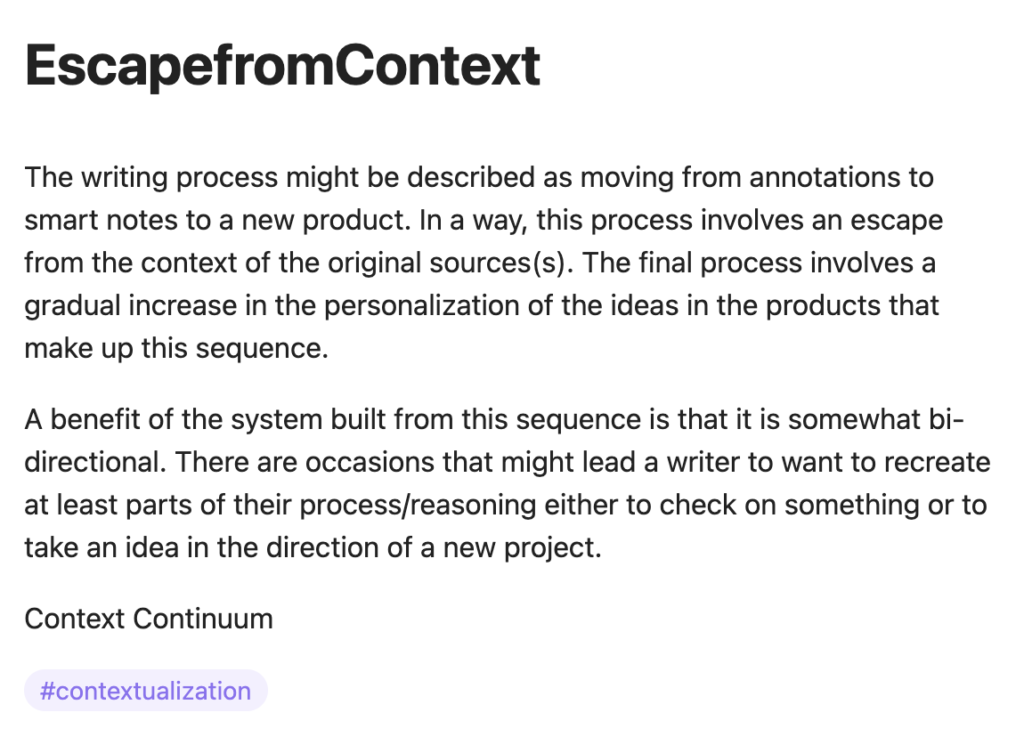
When displayed in Obsidian, the note looks like this (see following image). If you look closely, you will see the link to the original pdf stored on my computer (and in iCloud). I typically add some additional information to my Obsidian notes (perhaps the full citation associated with a note). The second image below is more what of my Smart Note looks like. In this image, you can see I have added a tag (#contextualization) that serves several functions including allowing me to find other notes tagged in the same way.
As I write something like this blog post, I use mostly the notes I have saved in Obsidian. If I am using a specific source, I will include the citation for this source at the conclusion of a post and this citation would also allow me to work back through the sequence of products I have described to review both notes and locate the original document.
The concept of generative cognition proposes that cognition is an active process of interpreting inputs, purposeful storage, and drawing inferences. The learner must apply the various cognitive processes that accomplish a generative function, but external tasks and circumstances can influence the likelihood these processes are applied.
I understand these ideas are abstract so I will offer an example. My favorite involves the use of questions. One important cognitive outcome is that learners generate applications of concepts they have acquired. It would be ideal that individuals attempt to generate these connections on their own. However, if after presenting a principle, I ask the learner “what would be an example of xxx?” the question may prompt relevant cognitive activity. Questions are an external activity that can prompt multiple cognitive behaviors. It may seem obvious, but it was important to consider the goal when such questions are asked. Yes, it might be a way to evaluate understanding, but it is also a way to encourage a specific important type of thought that may or may not have been attempted by the learner.
So, the idea of considering how specific external tasks might change the probability of important cognitive behaviors is an important perspective for educators and instructional designers. In this case, I am proposing that writing tasks can encourage important cognitive behaviors.
External tasks and the constructivist model
A focus on generative processes is consistent with what is called the constructivist model of learning. This model argues that each individual must do the mental work to create personal understanding and application and this is done through mental activities that are applied to both existing knowledge and new inputs. Existing knowledge is used as a base for interpreting new inputs. This can be both good and bad with biases being an example of how what we already think can result in the faulty interpretation of new inputs.
To understand the constructivist perspective, it is necessary to get past a pure storage interpretation of learning. We do store the memories of experiences which are described as episodic memories, but understanding requires doing something more with both these stored episodes and new inputs.
To explain what this “something” is, I tend to describe the process as building a model. Others might suggest we generate rules or abstractions (depending on the learning that has occurred). These personally created models, rules, or abstractions are used to interpret new experiences. Sometimes the interpretation works out and sometimes it falls short. Piaget described these two outcomes as assimilation and accommodation (you might remember from Intro Psychology). When a new experience can be successfully understood as an example of an existing model, the result is assimilation. When the match reveals a problem and the existing model is changed as a consequence, Piaget called this accommodation. Hence, our models become more sophisticated to handle a greater variety of examples.
Internal accomplishments and external tasks.
Different theorists propose internal accomplishments consisting of specific components. Two similar models start with the activities of selection, organization, and integration (SOI) or selection, organization, association, and regulation (SOAR). These components explain how a thinker gets beyond simple storage.
What we already know that may be relevant to new information may or may not be activated. Activation is necessary for using existing knowledge to understand new experiences and to possibly build on what is already known. Activation is necessary for organization, association, and regulation.
The process of activation has some interesting characteristics which result in the simultaneous activation of additional content that is already linked or connected with the selected or targeted information. This body of activated information (brought into working memory) encourages elaboration (going beyond just the core idea that was targeted) because of these connections. If you are aware of the testing effect, you are aware that these connections occur because of a property of the way information is stored in memory. The effort to recall activates stored content even when it is not successful in locating the specific answer to the question prompting the retrieval effort. The information recalled that is not the answer is likely to be related and bringing this related information back into awareness (working memory) is beneficial to learning and understanding.
Writing tasks of all types are built from and prompted by internal actions. This is the case even when taking notes. The writer makes selections from the stimulus material (the book or the lecture) for recording and judgments of importance guide these selections. What is selected may depend partially on what is already known (see activating of existing knowledge). Attempting to connect with what is known produces knowledge activation similar to the testing effect. If the writer attempts to record content in other than the strict form of the external stimuli, these summaries would likely involve organization. Struggles to produce a written summary that makes sense could trigger metacognitive insights.
Other forms of writing likely have goals that require the writer place even more emphasis on organization and elaboration. Examples might include requests that a writer compare and contrast issues raised as external stimuli, persuasive arguments that contest the rationale proposed in an external stimulus, or tasks that require the writer combine information from multiple stimuli (e.g., several external sources which cover different issues on a topic or even offer conflicting information).
Relevant Research
Those interested in understanding the cognitive impact of how the typical writer is influenced by writing tasks take one of two general approaches. The first approach compares a type of writing activity with a control treatment – often rereading the source is used to control for any additional time required of the writing task. When a concurrent form of writing is involved (i.e., note-taking while listening), all that is necessary is to allow the writing and the control group the amount of time required for the presentation.
The second approach compares multiple ways of acting on a written input (reading) that compares different tasks. e.g., highlighting, taking notes, written recall, and essay. (Arnold) The intent with this approach is to determine if different external tasks have different advantages and perhaps to evaluate which cognitive activities produce which benefits (greater retention, understanding, application).
Summaries of these two research approaches produce conclusions that are inconclusive which seems fairly typical for applied educational research.
Writing of different types has been found to be beneficial when compared with a control. For example, Graham and Hebert (2011) conclude that taking notes, writing summaries, and extended writing tasks provide significant learning advantages. Hebert, et al. (2014) reach a similar conclusion.
Comparing the effectiveness of different writing tasks
Arnold and colleagues (2017) propose that different dependent measures would be useful to understanding the impact of different writing tasks. For example, several different writing tasks may improve recall (writing what you remember, compare and contrast), but task differences (e.g., recall vs. compare and contrast) may result in a different outcome should a dependent variable other than memory be used. Hebert, Simpson & Graham (2013) found no difference in what was recalled from tasks requiring taking notes, answering questions, or summarization.
Klein and colleagues (2016) conclude that the differences within a genre (because of learner skills or application efforts) are more important than the differences between writing tasks. Learner responses to writing tasks are often not as task specific as researchers would prefer and as been suggested previously external tasks do not automatically result in individuals responding in an expected way or possible at all.
Why?
Writing has established benefits impacting learning and application. Educators have important opportunities finding ways to add writing tasks to the assignments they give. I became interested in the importance of different writing tasks when writing about the benefits of taking notes in a digital format. While studies on the generative benefits of note-taking are mixed, it is important to recognize that note-takers tend to have a goal beyond the accumulation of notes. Notes are intended to be reviewed in preparation for a known task such as an examination or generated with the belief that the stored information will be useful at a later time. Note-taking does not have to be justified as a generative activity although ways of taking notes that have a generative function or that are more useful for an anticipated use would be useful to develop.
——————————
Arnold, K. M., Umanath, S., Thio, K., Reilly, W. B., McDaniel, M. A., & Marsh, E. J. (2017). Understanding the cognitive processes involved in writing to learn. Journal of Experimental Psychology: Applied, 23(2), 115-127.
Graham, S., & Hebert, M. (2011). Writing to read: A meta-analysis of the impact of writing and writing instruction on reading. Harvard educational review, 81(4), 710-744.
Hebert, M., Graham, S., Rigby-Wills, H., & Ganson, K. (2014). Effects of Note-Taking and Extended Writing on Expository Text Comprehension: Who Benefits?. Learning Disabilities: A Contemporary Journal, 12(1), 43-68.
Hebert, M., Simpson, A., & Graham, S. (2013). Comparing effects of different writing activities on reading comprehension: A meta-analysis. Reading and Writing, 26(1), 111-138.
Klein, P. D., & Boscolo, P. (2016). Trends in research on writing as a learning activity. Journal of writing research, 7(3), 311-350.




You must be logged in to post a comment.