The Official Google blog just offered a post within which it was announced that several services would eventually be discontinued. Among these services was one I use daily – iGoogle.
Google describes IGoogle as a personal home page. I think “start page” or “launch page” would be a more appropriate description. Perhaps my amazement as to why this service would be discontinued is somehow related to some difference in perspective as to how we choose to describe the service. iGoogle was my home page when I launched my browser. It was customized for my needs – hence it was “personal.” Mine was built from widgets and RSS feeds. See the following image if you are unfamiliar with this service. I can obtain a quick look at information sources and then move on to the other services I use frequently. The opportunity to set a default start page seems to be going away in most browsers and it already seems this is not possible in mobile browsers.
Google made mention of Chrome and Android as justification for the decision. I wish the post would have provided more of an explanation. I use chrome as a browser and OS – the connection with the shutdown (16 more months) is not exactly obvious to me.
I went to iGoogle from NetVibes and my old page still works. I can always update that site. I suppose I could put something together in Google Sites, but I see that service as more appropriate to a public web site. I guess I assumed most folks had an Internet routine like I do and the opportunity to create a customized personal portal appropriate to personal interests would be popular. With the data Google collects, it would seem Google would know.
With so many startups looking for the next big thing, perhaps several will take a shot at improving an old thing.
P.S. It appears many have had a similar reaction. A similar sentiment from a MacWorld blogger.
Cindy and I have an ISTE tradition. We select our favorite product from a vendor positioned on an outside aisle of the exhibition hall. These vendors have a smaller and less expensive booth and typically a very small number of products. You should be able to locate most of our previous posts by searching “outside aisle”. The earliest I could locate was from 2004. I think I started blogging in 2003. I did not make an effort to determine how many of our “picks” made it to prime time.
Anyway, the selection for this year is the Swivl from Satarii. This product consists of two components – a rotating base designed to hold some type of video camera AND follow a marker/mike. Simply put, you move about with the marker/mike and you are followed by the camera. The iPhone would serve as an appropriate camera. Anyone creating videos with inexpensive equipment in classrooms or other real world situations quickly discovers that audio is the greatest challenge. The roving mike solves this problem.
This was actually more of a search than a discovery. Cindy was looking for this device as a way to study the work of preservice teachers. We ordered one so a product review will likely follow.
According to the online map service, the auto trip from Grand Forks to San Diego takes 30 hours (each way). I am guessing this depends on who is driving. My wife was doing 80 somewhere in Utah and this was legal. I was targeting a higher MPG and we might still be on the road if I drove a higher proportion of the time.
Anyway 60 hours gives you lots of time. We have a mifi and electrical plugins. The passenger has quite a few options. It gets more complicated when attention has to be shared between driving and anything else.
We pretty much exhausted our podcasts by somewhere in Nebraska. TWIT Live worked, but that was just stealing content we could have listened to on the drive back. I enjoy audio books – my wife not so much. However as the hours go on your tolerance changes and we spent half a dozen hours or so listening to Bauerlein’s “The Digital Divide”. This would not be a choice for most couples, but we have some unique common interests.
Listening to this book in large chunks (I tend to listen to books while at the gym or before sleeping under normal circumstances) gave me two ideas for posts. I decide to offer both here.
Observation 1 – a compendium on tech will be significantly dated
The concept of this book is very cool and in keeping with one core idea from the book. (BTW – the title of the book is misleading from my perspective. Digital divide implies an equity issue to me and the book has multiple foci with what I consider equity issues a minor focus). What I like about the book is the effort to offer diverse perspectives on a topic avoiding the problem of reading what we want to hear. You should find things that support and argue against your personal believes. Piaget understood these competing processes as the basis for learning. The problem of thinking we are educating ourselves by reading more of what we already believe is a Bauerlein theme.
However, attempting to provide a broad perspective by reprinting 5 year old articles in the tech area makes the authors look disconnected from reality. Much of what experts thought 5 years ago turned out to be wrong and if you are not tuned into the date issue your impressions of the content often work against applying the expert label to the author. Kind of amusing in a way.
I think the book was assembled “on the cheap” probably because getting authorities to author new content would have been a difficult sell to the authors. I had probably read 1/3 of the material already – years ago. It was stimulating stuff – then.
I do like the concept of being open to different perspectives and attempting to offer this opportunity to learners.
Observation 2 – learning vs. exploring by listening and reading
I process some professional books in digital format. Some of this content I purchase from Audible and some from Amazon. I have approximately 114 audio books and probably 40 ebooks at present. I have been an Audible member far longer. Reading/listening has resulted in some personal impressions on the advantages and disadvantages of each experience. I offer these impressions because I think they are relevant to others who advocate the use of audio/video over print ebooks and have not invested hundreds/thousands of hours in either.
I have decided the print experience is more useful for learning. I find audio to be too slow and too passive for real work. I use the format as a convenience or a way to pass time. If I were to attempt to really learn from this format it would be too slow. I am not certain what the actual WPM of audio vs. reading is, but it must be a multiple of 2-3 at least. If I really had to learn from the audio, I would have to sit and listen carefully. Far too slow. There is also the issue of control. When I read and become distracted, the words do not keep moving such that I miss things. With audio, the disconnected narrator just keeps going.
There is an overlap between my audio and “print” collection of books because when I listen to a book I think is really useful I have to purchase the print version to consider more carefully (but quickly). I see no way to address the issues of personal control and speed in a streaming format.
I have written several times about expectations regarding “free”. In most cases, my comments have concerned my reaction to what I consider the sense of entitlement that is sometimes evident. The argument that seems to occur most frequently references the music industry and suggests that the copying and distribution of music has not hurt the industry because musicians achieve greater visibility when their music is shared and this increased visibility offers new revenue opportunities when musical acts tour. I am not certain what musicians think of how others tell them they should earn their living, but I think drawing analogies from the world of musicians to justify behaviors involving other forms of content is an unwarranted stretch.
I have been reading Free by Chris Anderson. As the topic suggests, the book explores various ways in which businesses can profit from giving content away. By the way, Anderson does sell his book and he does address this point in the book. I think his argument is that free is up to the content creator and not the consumer (my interpretation). I did draw a personal insight after working my way through multiple examples Anderson provides. The consumer likely misunderstands free. There may be those who give content away as a personal contribution to the public good, but businesses are seldom acting on this motive. I think consumers would be better served to label no cost, online content or services as part of a barter system rather than as free. It may be difficult to take this perspective because it is not obvious just what is exchanged in this barter.
Consider all of the hoopla over online privacy. Just why do you think online companies who offer “free” services need that personal information? It is likely that personal information in association with the record of other online behaviors has value to the company providing the service/content or to other companies. There is money in a record of your likes and dislikes. You are offering your personal information and the record of your online activity in exchange for the services/content you receive. A second form of barter involves the exchange of “free” content/services for your attention to advertising. We have been willing to accept this exchange for years with commercial radio and television and information services such as newspapers have long been subsidized because of ads. Remember the uproar a decade or so ago when there was an offer of a free television channel to schools (Channel One if I remember correctly) and the channel contained ads aimed at young people. What did educators think – a free hour of content each morning?
Clearly the content creators are exploring many different compensation models and many traditional models will eventually lose out to some of these newer models. The point is that a business requires the generation of resources to support the work of employees. The assumptions that consumers have a right to free is misguided and often based on a misunderstanding of how the commercial online world really functions.
The cost of college, the failure of the government to come to a decision on the subsidy for Pell grants, and just the general value of a college education have come into question.
A recent 60 minute segment examined these issues and the radical proposal that young people might better prepare themselves for life in other ways. This segment is worth the watching and considering.
I see this situation from both sides – I am an academic having spent 30+ years as a college faculty member, I am a parent with three grown children with loans – two from graduate programs focused on health care (PT, OT). We were able to help our kids, but they must still cover a substantial debt. BTW – our kids are doing very well and I assume they would share my perspective that they owe some credit for their success to their educations.
I would guess that the issue is not so much whether an advanced education is helpful, but rather whether the education is cost effective. Maybe I am wrong. The notion of “open source” education seems attractive to some because it appears the resources are there to self-educate (see 60 minute segments). Do I think that self education can work. Certainly!! Would I recommend the approach? Very rarely!!
Don’t get me wrong. I think the idea of natural experiments is great. People of means might want to volunteer their kids for a few years to see how it goes. This is actually how I think this will play out. There will be some successes, but we will want to carefully examine the variables associated with these successes. How frequently will the necessary characteristics exist in most of the 17-19 year old population?
My experience working with Introductory college students suggest that few have the self discipline or the perspective to guide their own education. The students who could be successful are the students who are already successful in the existing system. This is what I think is deceptive about the perspective of the 60 minute piece (the position of the advocates). Students from good homes with supportive parents and life experiences that provide them with a perspective on the possibilities may be able to make this work. If it does not after a few years, mom and dad are their to support a more traditional development process. Many of the entrepreneurs held up as role models were not necessarily rich, but dropped out of premier colleges with generally supportive parents.
To me, this is another of those social issues society is failing to deal with realistically. College costs are high because many expect those who experience it most directly to pay for it. We cannot seem to come to grips with universal health care. We cannot seem to come to grips with universal advanced education. We are creating a selfish society that is all about us and our kids. Let everyone else fend for themselves.
Pursue your passion. Consider how many have argued against this lack of reality in many who do. Maybe you do not recognize the topic that brings this to my mind. This reminds me of the campaign to get inner city minority kids to value education and to carefully evaluate the odds of them becoming the next sports mega millionaires. Would those proposing that formal education needs a new direction argue against the advice given those who were 6’8″ and had a 40 inch vertical as 17 year olds? Now the new role models are the kids who drop out of college and self educate to achieve as entrepreneurs. The odds of becoming the next Bill Gates, Steve Jobs or Mark Zuckerberg are probably not that different than the odds of becoming the next Michael Jordan or Lebron James.
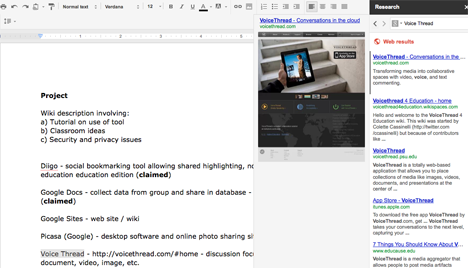
Google has added an interesting new feature to Google Docs. Under the Tools heading you will find “Research“. Select text and then select the research tool. A pane will open with the results from a search on the selected text. You can preview individual hits from the search. You can then use the tool to insert a link or cite a source for information you might decide to include in your document.
If you write much, you likely read a lot. If you read to write, you also likely have explored many systems for taking notes, highlighting, and other systems for “boiling down” your research into the ideas that you then build back up into the content you offer others. (In case this is the topic that interests you, try this.
This is not about my use of such tools. This post was prompted by a post I read that commented on ways to offer what you highlight to others. The post focuses on a Chrome extension (there are extensions available for other browsers), Marker.to, that allows highlighting and offers a link so you can share the page you highlighted complete with your marks to others. I can probably offer you half a dozen ways to do this, but what I like about this approach is that it does not capture the content from the original site. As a content creator, I hope individuals come to my site. I do not want a service to take content from my site and then provide it to others.
When you install the Chrome extension, a new tool will appear near the top right-hand corner of your browser.
This tool (the highlighter) allows you to highlight and opens a dialog box that offers a URL that you can offer so others can view the highlights you have added.
The URL (here is a sample – http://www.marker.to/YX4mLT) can be added to content you create to take your readers to the content you have highlighted.
When I find a tool I like, I always wonder how the creators will receive compensation. I must admit I am often a little concerned. Will the company go away or sell out? Is there something I am missing? I think useful tools should cost something perhaps after a trial period.




You must be logged in to post a comment.