This story about a type of app construction kit for ios is very interesting. A reasonable way to build apps from components would be very cool.
I keep seeing comments about the value of programming. Not “real” programming, but a way to allow more individuals a way to create software in some way. Some of these ideas seem an argument that tech literacy is now necessary – almost a reverse digital native notion. Push this perspective a bit more and you have a way to lure learners into programming.
The article, if accurate, still describes Apple as just playing around with this idea. Still, Apple could create software that would not be allowed from third party developers and a construction kit would be possible.
I obviously pick post titles based on what pops into my head.
This post likely has a limited audience. However, for those of us who do a certain kind of work, there is a constant quest to find a more efficient approach and I thought my experiences may be of interest to this limited audience.
Some of the work I do, researching and writing, depends to some extent on my ability to build on the work of others. The quality of my writing cannot be based solely on my own experiences. Writing textbooks requires that I do a good job of covering a lot of ground and to do this well it is important that I review and integrate what topic-specific experts can offer. Sometimes I do not think this is understood. The preparation time can far greater than the writing time. Research requires a similar approach. The method used builds on or is designed to evaluate a method used by others.
Over the years, I have attacked this problem in different ways. Often, the approach was based on the technology available at the time. When I started, it was a combination of highlighting paper copies of journal articles and creating note cards. I would organize note cards by topics and when it was time to write, I would identify useful resources using these cards and then review the related original resource to get the specifics. At some point, the notecards were transitioned to some digital equivalent. Digital offers several advantages – there is no need to place one physical card in one location under one heading and digital content can be moved from program to another with less work when an upgrade was necessary. When you do this for 30 or so years you begin to understand that you must move on to newer systems even when the transitions take time to implement.
The most recent development has really been on the content delivery side. I still get a few journals, but as I sometimes explain to those who visit my office, the journals are just a decoration. I don’t get up from my desk to go search my shelves. I download pdfs of journal articles from the library. The library has far more diverse holdings (at least for journals) and the pdfs are digital. I also must admit I do not visit the library – they cannot purchase the books I need and the pdfs I can get online. The library to me is mostly the university commitment to purchase access to digital versions of the journals. I use tools to annotate and highlight the pdfs – my present tool of choice is Skim. The unique feature of Skim I like is the opportunity to export the notes I insert and the text I highlight (when the pdf is not locked). My process might be described as a multi-stage effort to boil down and integrate ideas. The thing about Skim I do not like is that the highlighting and annotating disappear if I should up the saved document in a different pdf reader. Evidently, there is no standard way to add personal information (highlighting and notes). This limitation exists even if I open the same pdf on a different computer using the same program (unless the pdf and highlights are saved as a pdf bundle). I am not certain how the personal information I add is stored when I do not create a pdf bundle.
I have been saving and tagging hundreds of pdfs on my office desktop machine using a program called Yep. I must admit I prefer older versions of Yep. The files in the older version of Yep were moved to a location I could identify. As I understand the new version, it finds pdfs where ever they happen to be. I suppose this is somehow more useful, but I get stuck in one way of doing things and resist change when what I do makes sense to me. Combining journal articles I am saving as pdfs with all pdfs on my computer creates a mess that I must then create a tag system to address (unless I read the manual and learn the other options available).
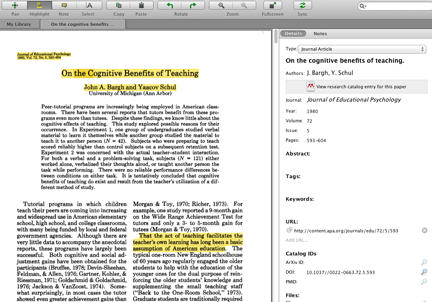
The problem with Yep is that I work from at least 4 differences devices – my office and home desktops, a laptop and a iPad. What I really want is a way to keep content in the cloud in a way that offers more than the accumulation of hundreds of files in a giant folder. I am presently exploring a service called Mendeley. Mendeley is primarily a social way to store citations and notes, but it also provides a way to store and access the pdfs associated with the citations across devices.
Screen capture of Mendeley markup window
Here is how I think about the disadvantages of Mendeley. The free version of Mendeley provides 1 gig of storage (500 mb of personal space). You should not be allowed to complain about the benefits of free. What I do not like is the cost for the lowest cost paid version. The first paid level offers 3.5 GB of personal space for $60 a year. A total commitment to this program on my part may require even more space. In defense of Mendeley, the various price points offer features beyond storage space. The citation lookup feature is nice when it works. However, if I am reading the article, the citation information is typically listed on the first page of the article and not a terrible problem to enter in the system. The system is designed for groups of users and some of these features would be of great benefit to research teams. Large graduate programs with many graduate students would be well served by such features. The free version of the program allows some sharing and this level if sufficient for my needs. When Box.net offers 50 gigs of storage at no cost (at least when I opened my account), $60 a year for 3.5 GB seems a lot. I also prefer Skim to the note taking and highlighting tools built in to Mendeley. I kind of have the same reaction to a paid account in DropBox. Here the first paid version is $100 a year. A combination of Skim and DropBox would be a great solution at $30-40.
I would like to think I am not cheap. I invest several hundred dollars each year in online services, but I still tend to think of these services as a luxury rather than a necessity. For me, it is really a matter of price point in relationship to how I see myself using the service. More features, mean higher price even if only a few of the features interest me. This is why I keep looking around and probably why companies offer different options of what seem similar services.
The issue of whether the iPad is a meaningful production device is important to many educators. The issue comes up when making the decision whether to invest school money in traditional computers or iPads (and similar devices). Traditional computers, laptops or netbooks, are versatile and the capacity to write and create multimedia as a learning experience is obviously available. The touch interface of the iPad and an operating system that works a little differently when it comes to storing and integrating media elements is unfamiliar to those of us who have a more traditional background and may have originally seemed a barrier to content production.
Apple and those who develop apps are obviously attempting to move users toward a different way of doing things. iPhoto on the iPad, a new offering, is different from iPhoto on a computer and may serve different purposes. For example, one of the cameras I use takes images that are large and it would not be practical to store thousands of these images on an iPad. I use my desktop machine to store images and upload many to Flickr. I can download images from Flickr to the iPad to take advantage of the interesting ways you can edit images using iPhoto for the iPad. I am also exploring the potential of iPhoto (on the iPad) as a way to produce content – what Apple calls “journals” in this case.
I must say that creating an iPhoto journal reminds me of the old iWeb which I thought was a useful produce/service for those who wanted a web site that looked more sophisticated than the time and background of many would allow. iPhoto Journal is obviously more image oriented because it is tied into iPhoto, but it offers the user widgets that pull in things like maps, date, and text boxes to a “collage”-like display. I can see teachers working with their students to create a journal as a final project product.
Screen capture from iPad
Here is a link to a sample product I created available via iCloud. I must say that I struggled some to arrange the objects to position them exactly where I wanted and I do not have the experience to know why. I was working on my iPad 2 and it is very possible this would work more smoothly on the new iPad. it is also possible that iPhoto for the iPad is a 1.0 product and refinements will come. In my opinion, Apple has a mixed history developing such products (e.g., iWeb and mobile me). However, the company is going to have focus in this area or be more accepting of opening up to those more focused on cloud services.
Most folks who read this blog probably are aware of the story of Salman Kahn and the Kahn Academy. The TED talk version of the story with my embellishments follows – so Kahn, a hedge fund manager, begins creating short YouTube videos to tutor his nephews who are struggling with math. Others stumble across this content, find it quite helpful, and encourage Kahn. The viral avalanche continues, money people such as Bill Gates notice and contribute, and Salman ends up with an online success.
Some object. Just what is the focus of the concerns. Salman did not begin to subvert teachers or their role. He began because kids were not getting it based on their classroom experiences. To my knowledge, no claims were made about the teachers. Kahn is obviously very bright and entertaining. I think the style ends up being repetitive, but I also understand the research on worked examples and would suggest that at least the math content fits within this approach.
Kahn does have a more complex model than I think most realize – take a look at the site and you will find the videos (now in many content areas), problems to work, and opportunities to volunteer to be a coach. So, if you are critical based on some notion that this is about replacing humans with video, click the volunteer button and be a human.
The Kahn video content has become somehow mixed together with the “flip the classroom” movement. Students could prepare from watching video and then come to class prepared to discuss, request help, etc. I suppose video could be used in this fashion.
Perhaps the point is that these are just resources and tools. There is the opportunity for flexibility here. You are not paying for an approach that locks you into a given strategy. Wait – come to think, you are not paying at all. No one is after your job. You are in control. Make your own video content students can use when they are at home attempting to complete the problems you assigned. Too much work?
There is this online site that offers video content some students find helpful (but this is where I began)
Is it possible we are in the midst of a round of competition to attract customers to cloud storage? First I see that Box.net is offering Android Users free 50 gigabytes of storage (deal ends in about a month). I am still running a server with less storage capacity.
This afternoon I see that DropBox is expanding services to include the potential for automatic photo uploads from your phone. I immediately ran outside into the early stages of a full blizzard and took some pics. By the time I got back to my office, the images were not only uploaded to the cloud, but synched down to a folder on my desktop. I immediately turned this feature off on my phone because I am not certain I want all of my photos uploaded, but it certainly nice to know the feature is there. DropBox promises 3 additional free gigs for photos.
So, from my camera to the cloud to my desktop and now to you in less than 15 min.
You can share these images by moving them to the Public folder and then requesting the link (example) for each. You can share images from the Camera Upload folder with other DropBox users.
I do my professional writing in Google docs. Using a cloud service allows me the flexibility of working from any location using pretty much whatever equipment I have available. I also trust Google storage more than I trust my own storage. I am betting my equipment and backup behavior is less reliable than the equivalent Google equipment and conscientiousness.
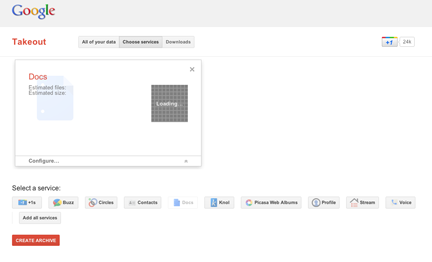
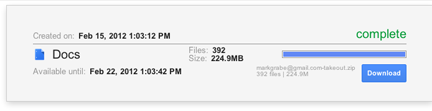
Google wants to make certain I have options. Actually, I think the concern is more that I could be able to leave Google and move on to other services if I want, but the access opportunities work out the same no matter what the motivation. There have been several options, but I just encountered a new approach that seems built in (Google TakeOut). I just made a backup of several hundred doc files and moved them to a local backup drive.
Easy peasy (or whatever the expression for it is not difficult is).
TechCrunch reports that Google + will now be available to anyone eligible for an account – anyone 13 and over. Google has added some new features which are age dependent. It reminds teens when they are posting to “public” and automatically removes them from a video hangout when an adult enters. This sounds like a nice feature but it would also limit tool value in an educational setting. Google could certainly modify this feature if Google + was used as part of Apps for Education.




You must be logged in to post a comment.