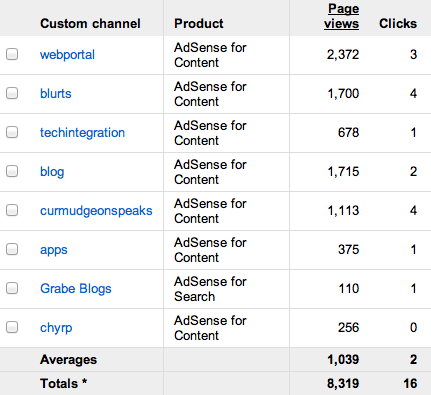
I thought some who have viewed our content may find the following of interest. You may have noticed that we place Google ads on our content (each page of the blogs and the “index” pages of our long format content). Aside from generating a little revenue (far less than the cost of purchasing the server services we use), the ads provide some data (Google analytics). The first figure shows the total number of ad displays (not page views as indicated because not all pages contain an ad) and the number of times an ad was clicked (this is what generates the revenue). If you have ever wondered what the ratio of ad views to clicks might be, this gives you an idea.
The following image offers some information regarding the relative popularity of different resources (webportal and techintegration are the long form resources. Blurts, blog, apps, & curmudgeonspeaks are the blogs. The two table summaries do not match because views of individual blog posts do not show up in the second table, but are included in the total (first chart)
You can now send documents to read on Kindle even if you use the Kindle reader on another device.
1) Items are sent to yourname@kindle.com
2) You must register the email address FROM which you will be sending documents (as attachments)
3) Enter “convert” (just the word) as the header in your email if you want the document converted to Kindle format – you probable do. Conversion is necessary for changing font size and mark up options
4) Be patient – conversion takes some time
5) Read the Kindle instructions – there was some comment about a cost if you are a heavy user. I am just exploring at this point.
It is nearly time for the holiday break, but this means it is also the time to prepare for next semester (at least for those of us who work in higher education). Some students have already asked to see my syllabus for next semester in order to make the decision of whether to take the class or not. I guess I would want to know what they are looking for before I evaluated what I think of such requests.
I just finished a piece for our resource site, describing how I would use our site if I wanted to incorporate some of the resources and I was using a different textbook or no textbook. I suggest that instructors now commonly piece together resources that might involve chapters from a traditional textbook and online content that supplements the content in the book chapters assigned. I happen to think this is the publishing model of the near future, but the focus in this post is on how to offer this set of expectations to students.
I like the idea of an online syllabus for several reasons. It allows me to make adjustments in course expectations as I go – this does require that students recognize the online syllabus as the official version for the course. Digital natives or not, I have trouble getting them not to print off a syllabus I tell them may change and then must deal with them looking only at the printed document. I also like the online syllabus because it can link students directly to the online resources I want them to review.
Commercial course management systems (e.g., Blackboard) typically have tools for building such online documents, but there is always Google Sites or similar free online tools for web site construction. Here is an example built with the Google tool.
YouTube has been willing to offer everyone the opportunity to serve video content. Being open to everyone has been both a blessing and a curse. It seems we have very different opinions regarding what represents useful and entertaining content. In education settings what might be funny or entertaining to someone in some other context ends being inappropriate and distracting. Since schools cannot control which videas are available, a common solution has been to block access entirely.
I have been working on some content explaining the educational potential of image collection and curation. A good part of the education value is likely in collecting the images (being there) and various post collection processes that use the images – organization, annotation,
Geotagging potentially represents a combination of being there and then using the location to associate other information with what is visible in the image. Potential is the key word here – there is no automatic benefit to pinning a photo on a map.
We have geotagged photos in a number of ways:
estimation based on memory or using another source that verifies the location
use of a GPS – we have a Garmin that allows us to take screen shots so we have carried tis device and our camera for some projects
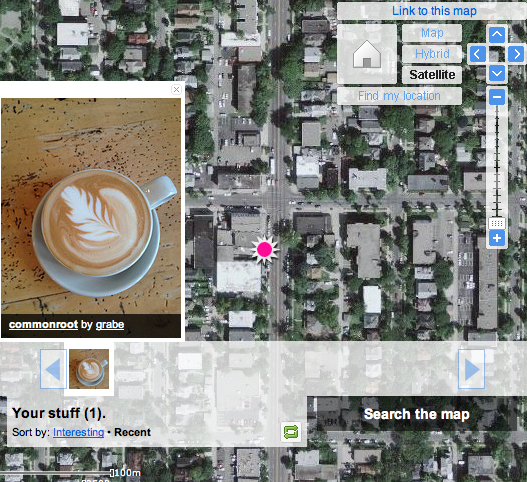
What prompted this new post is the discovery that Cindy’s iPhone 4S geotags images.When we were doing this before, we were using specialized cameras. It is my understanding that most phones use a type of cell tower triangulation rather than satellite referencing to figure out where they are (Google latitude will try satellites, cell towers or known wifi spots to determine where you are ). So, the 4S will organize images within the phone according to the location of the images and transfer this location information (EXIF) as part of the file when moved to iPhoto or Flickr (note Flickr allows you to not store the location information if you consider this a privacy issue).Here is a test shot mapped in Flickr. We did this post hoc using an image we know we collected in a specific Minneapolis coffee shop. The tag was close (wrong side of the intersection). I can’t see we have conducted the same test in open spaces (plenty of those in North Dakota), but comparing GPS and phone geotag data would be interesting. Come to think of it, comparing GPS and phone location capabilities under different conditions would make a great student project.
I wondered about my Android phone. It has location capabilities. It turns out that one can take geotagged images using Camera 360.
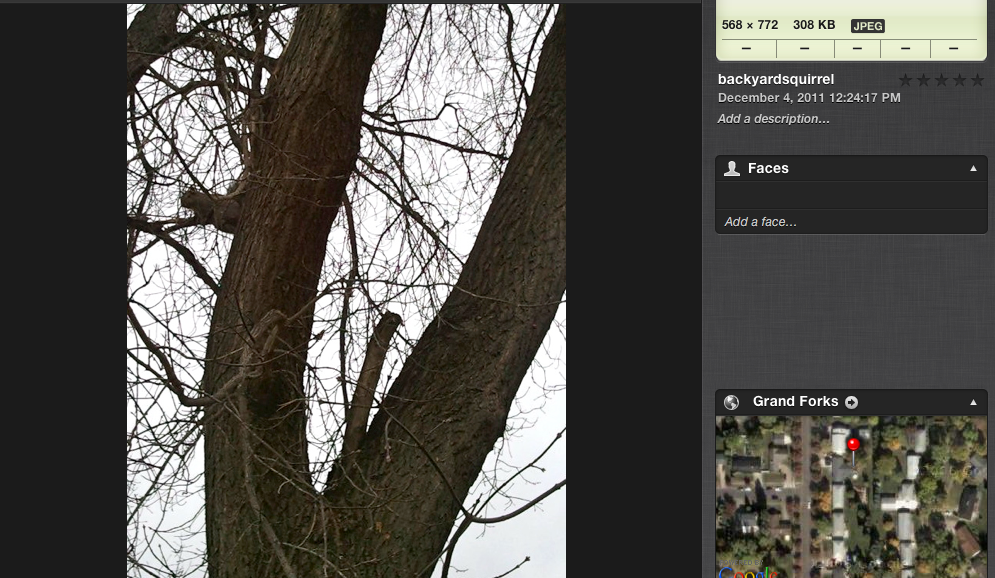
This image was taken in my backyard and uploaded to iPhoto. Check out the location in in Google and it shows the image was taken in my backyard.
So, geotags can be added with several different smart phones.
Keeping college students in town the day before a holiday break is tough. It is a tough call on holding class – many will skip and then you have to decide what to do with the half that stay. The class in question for me was Educational Psychology and since the topic of educational technology was to be covered during this part of the course, I decided to use tech to learn about tech. I created a presentation that students would be required to view and posted it to Blackboard. As popular as online courses are, most students who attend classes FTF have never had the experience of trying to learn from online experiences.
I decided to create this presentation using tech tools that would be new to me. Instead of PowerPoint, I used the Google docs Presentation tool, downloaded the slides as PowerPoint slides, uploaded this content to DropBox, and then downloaded the file to my iPad. I decided to create the presentation on the iPad using an app my wife has been raving about – Explain Everything.
I admit learning as you attempt to accomplish actual tasks has some drawbacks. The “eat your own dog food” approach assumes you can think about the project and figure out the tool at the same time. I did take a few tries (an hour + each), but most failures were my own fault. A couple of hints from my experience – remember to save (everyone should know this, but I thought saving individual slides as you go was the same as saving the project) and understand the iPad is kind of funny about exporting large files. It turns out, you cannot upload a large video file from the iPad to Dropbox (this one was not my fault). My iPad is starting to fade from use – I am still using the iPad I – and the USB method of transferring file does not work from my machine because it appears I have worn the power/USB connector out. Wifi and bluetooth are challenging. My wife is one of those tech people who just assumes there is a way and then makes it work. She was aware of this obscure Goodreader hack that turns the iPad into a server (as close as I can come to describing what she did), loaded the video file into Goodreader, and then ask me to connect to this ip number and load the file to my desktop machine. I mean really – who knows this kind of stuff.
I have attached a short demo I created using Explain Everything. I am ordering a mike I can use with the iPad, but this approach (remember $3) is impressive compared to how I might have done this same thing in other ways (remember you can annotate, show images, etc.). One final note – I did convert the mp4 file to mov and resized the movie for this demonstation using Quicktime (the old version 7).
To provide the best experiences, we use technologies like cookies to store and/or access device information. Consenting to these technologies will allow us to process data such as browsing behavior or unique IDs on this site. Not consenting or withdrawing consent, may adversely affect certain features and functions.
Functional
Always active
The technical storage or access is strictly necessary for the legitimate purpose of enabling the use of a specific service explicitly requested by the subscriber or user, or for the sole purpose of carrying out the transmission of a communication over an electronic communications network.
Preferences
The technical storage or access is necessary for the legitimate purpose of storing preferences that are not requested by the subscriber or user.
Statistics
The technical storage or access that is used exclusively for statistical purposes.The technical storage or access that is used exclusively for anonymous statistical purposes. Without a subpoena, voluntary compliance on the part of your Internet Service Provider, or additional records from a third party, information stored or retrieved for this purpose alone cannot usually be used to identify you.
Marketing
The technical storage or access is required to create user profiles to send advertising, or to track the user on a website or across several websites for similar marketing purposes.



You must be logged in to post a comment.