Linear narrative chains

I have become fascinated with what I now call linear narrative chains (Hays and colleagues, 2008). The phrase is appropriately descriptive in how we experience life including reading and listening to lectures and explains why reprocessing such inputs is important to understanding and learning. What the phrase indicates is that inputs come at us as a sequence of events and ideas. This is obvious when you consider reading a book or listening to a lecture, but it also applies to the events of daily life. One thing follows another.

An important insight related to learning is that what is stored when imagined by cognitive psychologists and to some extent supported by neuroscientists is best understood as a network with links among nodes differing in strength. It follows that some sort of processing and organization is necessary to get from the form of the input to the form of the storage.

When I first encountered this notion of changing information formats, I was reminded of something I used to present to my educational psychology classes. There appear to be different types of memory stores. What might be described as knowledge is stored as a web of concepts connected by links — semantic memory. We also store inputs using other formats, with the most relevant one for this description being episodic memories. I liked to describe episodic memories as stories as this was a convenient way to explain an approximation of this concept. We like stories, and the value of stories can be noted in the way we interact with others. Often, one person tells a story, and then the other individuals respond with a story of their own both to indicate they understand and to further the interaction. We often include stories in writing and teaching as a way to provide examples of ideas. Episodes are stored with our cognitive web linked with the abstract nodes of semantic memory.

Episodic memories (stories) have a time course or sequence. What I speculated about for my class was that stories are often processed into semantic memory and one of the issues with learning from experiences including class lectures was whether the lecture as story was processed into semantic memory. I asked about how students studied their notes and whether they repeatedly went through them and could even imagine where specific items, perhaps a graph, appeared in a location within their notebook. I suggested that this capability indicated at least some aspects of an episodic representation was being retained. The content stored in that fashion may not have been processed for understanding.

When are academic episodic representations converted? I suggested for some this may happen at the time of an exam. A question might refer to an example from class and ask for an application. If the class example had not been processed during the lecture or during study as related to a concept or principle, the student would have to go through this process of abstraction and organization in trying to answer the question.

External activities to encourage processing

I often write about generative activities — external tasks that change the probability of desirable cognitive behaviors involved in understanding and learning. The idea here is that we can understand and learn by self-imposed and self-guided thinking, but this may not happen for a variety of reasons. External tasks can be provided to increase probabilities. Questions are an easy example. Questions encourage different types of processing depending on the type of question. Some encourage recall, and others encourage application.

Some generative activities might have value in converting a linear input. Creating an outline requires a hierarchical organization of ideas. Something closer to the desired output as a web would be mind mapping or concept mapping. If you are unfamiliar, I would recommend Davies ( 2011) as a resource that would explain more than you probably want to know about mind mapping, concept mapping, and argument mapping. Among other things, I learned from this source was that there are differences among these tactics and many subtleties or variants of each. Some researchers and educators who apply concept maps go deep into fine details.

One differentiation among those who conduct concept mapping research (the general term I have always preferred) is whether maps are constructed by learners or constructed and provided by teachers/authors. Concept mapping assignments would be a type of generative activity and encourage the translation of a linear input into a representational web. The provision of a mind map in support of a linear narrative is different and is an attempt to show the structure that the presenter imagines as a way to encourage the learner to consider relationships among ideas that might expand whatever organization of ideas the learner had already established.

Smart notes and the creation of web structures

I am making a transition here that the uninitiated may have trouble following. Some of these who have made the study of note taking a serious focus have developed approaches that are quite different from the continuous paraphrasing and summarization that most learners use in recording notes in a notebook or on a laptop. I think of a smart note (a formal term as used here) as a concise note focused on a specific idea with enough context that it will still convey the original meaning at a future date to the note taker or others with a reasonable background. Think of a smart note as a building block that can then be combined with other smart notes in a cumulative way. The idea of specificity is that a given block can be combined with other such representations in a variety of ways. You can build different structures from different combinations of ideas. Notes are connected in several ways. Some of the possible connections can be attached as metadata — tags and links among notes.

Hopefully, the similarity between such notes and links and concept maps might now become apparent.

A web of notes within Obsidian

Obsidian is my personal note-taking tool, and it fits well with the idea of isolating specific ideas or concepts and then identifying connections between these specific notes over time. Rather than focus on using this tool as a learner, which has been the focus of multiple posts in the past, my intent here is more on the potential of sharing the structure of personal notes with others. So, in keeping with the theme of converting linear narrative chains, how might an instructor or author share the structure behind what they might present as a lecture or written product?

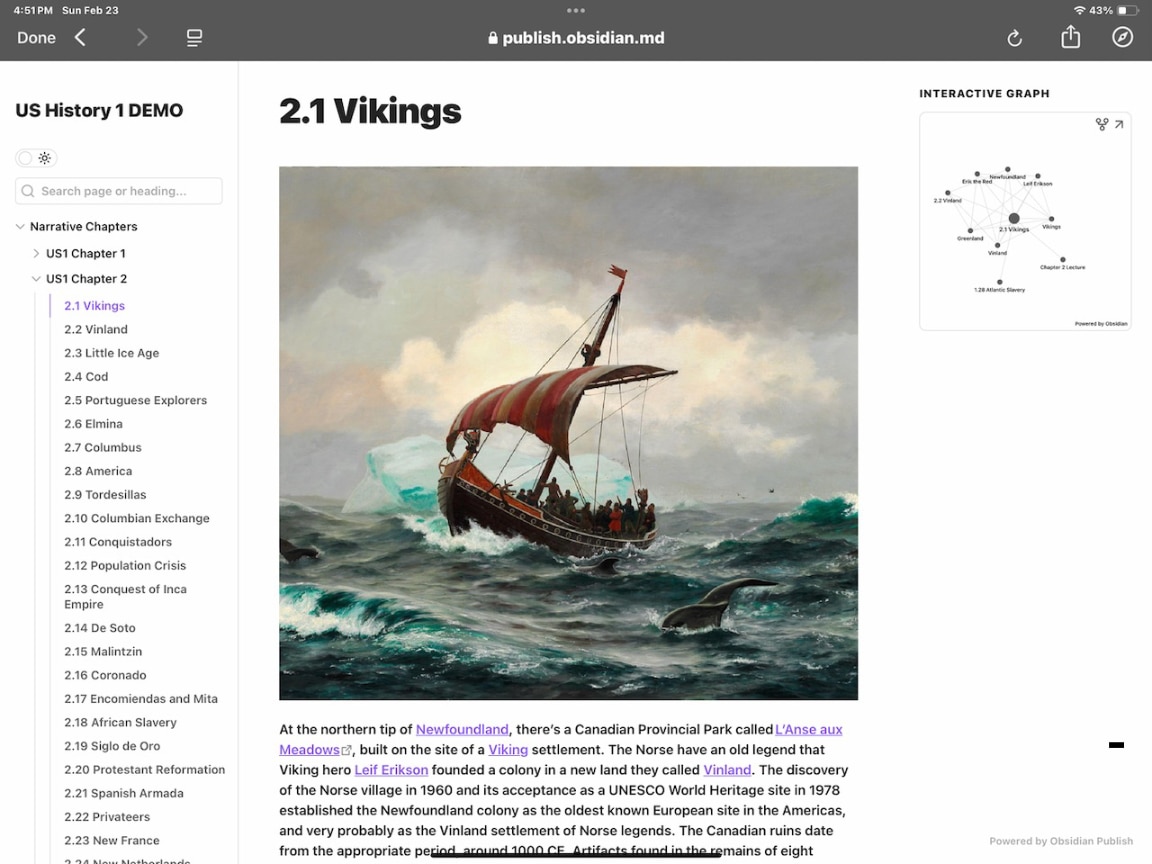
I briefly mentioned how a colleague who teaches history shares his background content with students in a previous post. Here, I want to describe the use of a mapping tool, Canvas, available as an extension to Obsidian. Obsidian includes its own tool for creating a map of notes and connections, but Canvas is more typical of what I have already described as a tool for concept mapping.

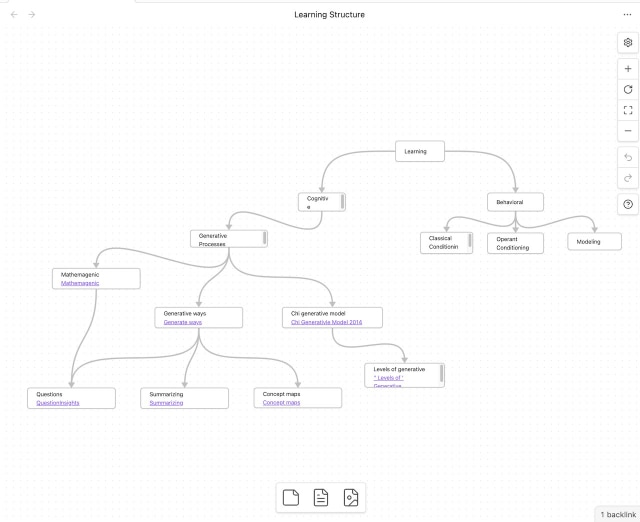
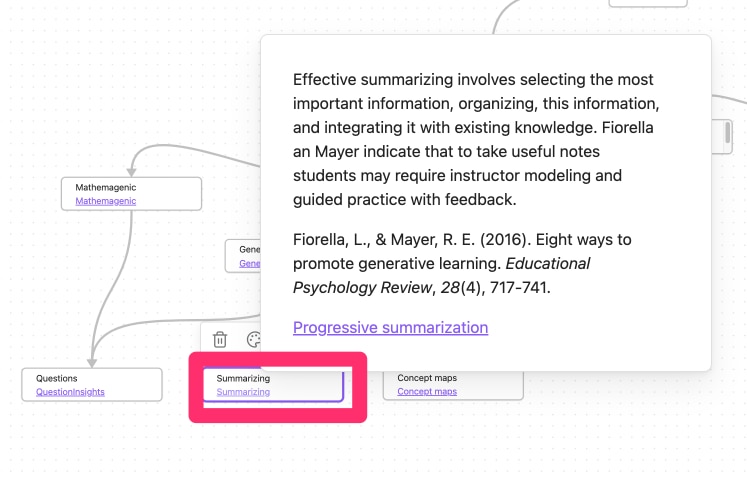
The following image shows a Canvas concept map I quickly created to show I might share the web of ideas that might be the basis for a couple of presentations I might offer describing the behavioral and cognitive models of learning. I had to find a workaround for the way Canvas was designed to work. The intention is that a Canvas web would show the entirety of notes. So, if you imagine a note consisting of a paragraph of content, you might have Canvas nodes representing concepts (as is the case in my example) linked with visible nodes containing entire paragraphs. This works fine if you are in control of a device as you can shrink and expand the content that appears on the screen very easily and expand a portion of the display if you need to make the paragraph larger so you can read it. I used a different approach, repurposing a typical text note as a node descriptor and then a link. The link would reveal the linked note layered on the basic map (second image).

To make this work in practice, you would have to pay for an Obsidian service ($8 a month) called Publish. Obsidian is a device-based tool, but Publish offers a web-based interface and storage option that allows others to view your Obsidian vault (a collection of notes). 

There are likely multiple ways in which an individual could generate a shareable web experience for students. I have been focused on how I might do such a thing based on the note tool (Obsidian) I use. As another example example, in a previous post, I explored how Padlet could be used by a middle school or high school teacher to share a web of concepts and notes. 

Summary

Students experience information as linear narrative chains even though the information within is likely based on a web of concepts and ideas. Since human memory is more web-like, the learner must transform a sequence of ideas to fit within his or her personal webs. Concept maps have been used to encourage the building of a personal web and can also be used for the author/teacher to share his/her web to assist in the construction of a personal representation. Note-taking tools based on the identification and linking of core ideas (Smart Notes) offer a related experience on the part of learners and possibly with some adaptations provide a way to share the structure the author/teacher used to generate their presentations. 

Resources:

Ahrens, S. (2022). How to take smart notes: One simple technique to boost writing, learning and thinking.

Davies, M. (2011). Concept mapping, mind mapping and argument mapping: what are the differences and do they matter? Higher education, 62, 279-301.

Hay, D., Kinchin, I., & Lygo-Baker, S. (2008). Making learning visible: The role of concept mapping in higher education. Studies in Higher Education, 33(3), 295–311.

Loading

Notes and the Translation Process

I recently read a research article (Cohen and colleagues, 2013) about students notetaking in college lectures that included interesting observations about the challenges students face. First, information comes at students quickly and to decide what to record and then manually recording what is selected is very demanding preventing little more than getting something down on paper or screen. The second challenge was what I found most interesting. The researchers proposed that students experience a linear flow of information that does not contain much of the structure of what the instructor is trying to communicate. The article proposed that students must try to create a structure after they leave the lecture hall and proposed one approach for doing so. 

This comment got me thinking about a more general model of learning from textbooks and presentations. Lecturers and authors must generate a product that is experienced linearly – i.e., presentations and books. With the exception of headings and subheadings in written material, content creators have a structure in mind that guides the creation of what they produce, but is difficult to share. I read elsewhere a suggestion that a presentation should flow from an outline and the presenter should refer back to the outline from time to time to try to communicate this structure. 

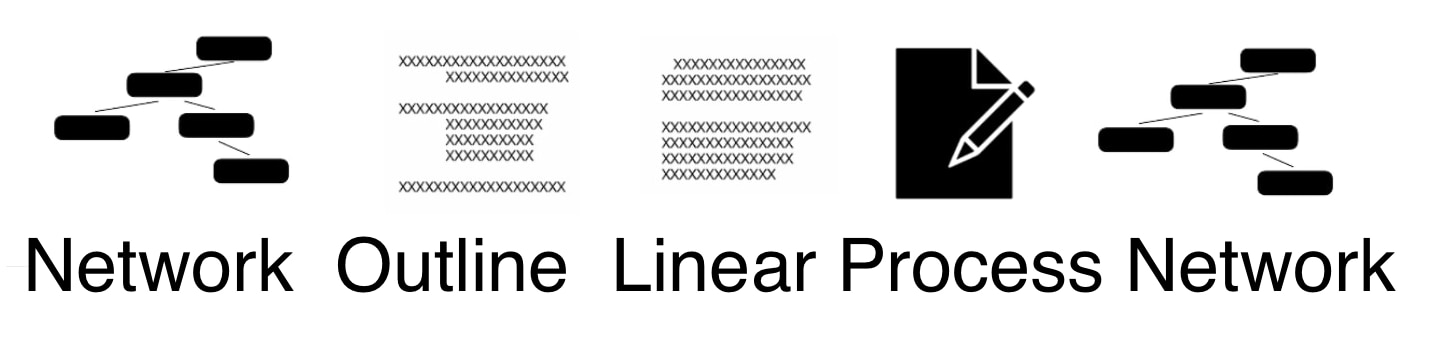
Thinking about the process perhaps at an even deeper level, I came up with the following representation. By increasing the complexity a bit, it might be possible to identify points of intervention.

So, this graphic is intended to suggest that the knowledge of a content creator is present is a cognitive network. To create a practical product for communication, the content creator has to transform aspects of this knowledge network into a hierarchically focused structure. I think an outline (physical or conceptual) is a good way to understand this transition step. This structured representation is then transformed into a linear representation that is shared in one way or another with an audience. As I suggested, a physical form of this outline may also be shared in some cases (the outline itself, or headings and subheadings). The learner then processes this input and from this processing, perhaps consisting of several steps, attempts to generate their own network of personal understanding. 

The initial notetaking or perhaps highlighting would be a basic process and perhaps many students decide this will be sufficient. However, those who propose study skill or personal knowledge management strategies focus on what other activities might be added to improve retention and understanding.

What other activities can be added to recreate the structure intended by the content creator or formed in a more personalized way by the learner? Some of these “post-processing” activities may be familiar. For example, creating concept maps, sketchnoting, the left-hand column and summary of Cornell notes, and the proposal that students take class notes on the left-hand page or their notebook and save the right-hand page for follow-up recollections and additions would fit. All of these tactics involve at least basic connections if not hierarchical relationships.

For those interested in translating the processing of information from the perspective of personal knowledge management. You can substitute a “smart note” for a node in the concept map strategy and consider the similarity of links created among notes by tags and forward and backward links. The sharing of this structure as Obsidian makes possible with Obsidian Publish offers a way to share both information and more complex structure as externalized by a content creator.

I have a book club colleague, History Professor Dan Alosso, who is building something like this for his U.S. History class. The idea is not to replace lectures but to offer related content as organized by the lecturer. Dan writes and offers videos through Substack.

So, what are the points of intervention I mentioned? Certainly, study strategy advocates have many ideas about what processing stage of the model I suggest. The sharing of a structure during or after the exposure of students to content is less frequently explored.

Reference

Cohen, D., Kim, E., Tan, J., & Winkelmes, M. A. (2013). A Note-Restructuring Intervention Increases Students’ Exam Scores. College Teaching, 61(3), 95-99.

Loading

AI in Readwise

 How do most Readwise users use the service? Is it the central location in which you suck in the notes and highlights from the multiple tools you use to read the multiple categories of content you consume to review and work with that content or is it a relay station between these sources and the tools you use to store, organize, expand on, and apply this content? I can’t really remember what I was thinking when I first paid the subscription price, but over the majority of the time I have used Readwise, it was mainly as a relay station. 

For those who have never tried Readwise, it may be unclear why you would want to pay the price of a subscription. The first paragraph of this post may have meant little to you even though I think it represents a reasonable description of the ways Readwise is used. Consider this example. I have made use of Kindle for years and have a collection of more than 300 books. I highlight a lot while I read and add occasional annotations. Most of this content is nonfiction and the source for what I write about. All of these highlights and annotations are out there somewhere, but how do I locate what might be helpful when it is scattered across so many sources many of which I might have read years ago? Readwise accepts the highlights from each of these books that is automatically output from Kindle and this entire body of material ends up in Readwise and can then be searched.

Now, somewhere along the way, Readwise added Readwise Reader and this addition became a major tool.  With Reader I found a “read it later tool” I used mainly to collect web content I could highlight and annotate and then send the content I added or identified through the relay system to Readwise or export it depending on my whim of the moment. 

Without describing other content sources, I hope you get the idea. Readwise allows the collection of highlights and notes from many different content sources. 

AI Chat within Readwise

Now, like many other digital tools, Readwise has added AI. This makes sense as the AI can be used to chat with all of the content or if you choose certain designated content that has been accumulated. The AI is easy to use, similar to other AI chats, and is powered by OpenAI’s GPT-4o model. If you are a Readwise user you may not have noticed this recent addition (see the red square enclosing the small word chat at the top of the following image). I have also used a red box to call your attention to import. I will get to an important import issue at another point, but wanted to make certain you see how to get to the import options.

Selecting chat will bring you to the following page. Here you find the typical request for a prompt and some suggestions. The suggestions will change as you make use of this feature.

As an example, I entered a prompt related to a recent topic I have been exploring. I don’t generate my posts using AI, but I sometimes ask for something written in a format I might use as a model. Within the content the AI generated, you will see link (blue color). Selecting a link will show the highlight or note within Readwise that was used to encourage a that part of what the AI wrote (the second of the two images appearing below). You can get the full set of content stored on Readwise from the displayed snippet of text by selecting the snippet.

If you are a Readwise user, I assume you can easily explore the AI chat just following the simple process I have outlined. This is not intended to be a full Readwise tutorial, but many can be found by searching online.

One additional comment

Most of what I write is not based on books, but rather on journal articles. I am an academic and this is typical of how we work. We read articles from many journals and for the last 10+ years I have read nearly entirely from pdfs of journal articles. This is what I can access through my university library and more suited to my work that even getting up from my desk and walking across my office to pull a journal off a shelf. I don’t want to highlight on paper because I want highlights and notes in a digital format.

I could have included the highlights from the hundreds of journal articles I had read in Readwise to create a massive collection of content I could explore via chat. However, I have not used a pdf reader that generates highlights in Readwise if I try to import the pdfs. This appears to be a common problem as I have explored this issue online. I will first note that you can highlight pdfs within the Readwise/Reader environment, but this has not been part of my workflow. I have found a way to fix the problem which I will describe here, but it is unlikely I will now import one by one my large collection of highlighted and annotated pdfs to Readwise. I will explain the hack I have discovered for others who may want to do so.

You should recall at the beginning of this post I showed the import link for Readwise. This link will bring up the many import options. I automatically import from Reader and Kindle. There is an option to import from pdfs. It is a one pdf at a time approach and requires that the pdfs with the highlights have been stored in the correct format. The import options are shown below.

I have multiple tools to highlight and annotate pdfs. Most recently, I have used Bookends and Highlights. Both are software for the Apple environment and work great on an iPad with an Apple Pencil. Unfortunately, the storage format is not acceptable to Readwise.

However, I found that I can open my highlighted and annotated pdfs in Preview which is the universal Mac tool for opening many different data files. It turns out you can export from Preview in multiple PDF formats and the first one I tried created a file that would be read by Readwise.

So, there is a way for those frustrated with the specific demands of Readwise.

Summary

Readwise if a powerful tool that stores the highlights and notes that have been added to a wide variety of content sources (e.g., web pages, Kindle books, Apple books. pdfs). Recently, an AI chat capability has been added to Readwise and can be used to interact with the content stored by Readwise. Because the quantity of this content is immense and represents what a user has found interesting or useful, being able to ask questions of this content offers very interesting possibilities. The AI chat capability is easy to explore and may even represent a selling point for those considering paying the subscription to use Readwise and Readwise Reader. 

Loading

The Space Between Encountering Information and Application

One way to characterize Personal Knowledge Management (PKM) is to suggest it involves the analysis of actual and potential tactics applied between encountering information and the application of that information. I came to this topic with a background in the development and evaluation of technology tools for academic studying which involves considerable overlap with PKM. I think it fair to say that studying offers an advantage to interested parties because it has a superior theoretical framework and a large volume of theory-driven research. PKM seems to have developed within a framework I could describe as logical rather than research-based, but it is related to methods of considerable longevity (e.g., commonplace books, note-taking within procedural systems such as the Zettelkasten). 

This post was prompted by the announcement and availability of a new version of Mem.ai. There are many digital note-taking tools available, but for some time I have concentrated on two – Obsidian and Mem.ai. My rationale has been that I wanted to invest sufficient time in creating and using a personal knowledge management system so that I could offer credible comments on the tools I use and the tactics that are recommended and that I have employed. Part of this involves building a significant collection of notes over an extended period of time. Many recommended practices cannot really be evaluated with a small body of material used for a short period of time. 

When I started using Mem it was because I wanted to explore how AI could be applied within a PKM system. With time, Obsidian extensions allowed several different ways to add AI to Obsidian so there was no longer a unique difference, but I have continued to use both nonetheless. 

Comparing Obsidian and Mem.AI

When comparing how Obsidian and Mem serve writers between reading and writing, there are distinct approaches each platform takes to facilitate the transition from note-taking to writing.

Obsidian

Obsidian is known for its flexibility and emphasis on linking notes to create a network of ideas. It supports a bottom-up approach to writing, where notes are interconnected through backlinks and tags, allowing users to discover relationships between ideas organically. This method aligns with the slip-box or Zettelkasten approach, which encourages the creation of permanent notes that can stand alone and be easily integrated into future projects. Obsidian’s use of markdown files and its ability to handle large volumes of notes make it a powerful tool for writers who prefer a structured yet flexible environment for developing their ideas.

Mem

Mem, on the other hand, focuses on enhancing the linking capability through AI-driven suggestions. It extends beyond manual tagging and keyword searches by proposing related ideas and documents, which can come from the user’s own mems or those shared by team members. This AI-driven approach aims to improve the retrieval and linking of information, making it easier for writers to access relevant content and insights. Mem’s design is centered around the concept of a “second brain,” where storage, retrieval, and linking are optimized to support the writing process.

Key Differences

  • Linking and Organization: Obsidian relies on manual linking and tagging, while Mem uses AI to suggest connections.
  • Flexibility vs. Automation: Obsidian offers more flexibility in how notes are organized and linked, whereas Mem provides automated suggestions to enhance the linking process.
  • User Experience: Obsidian’s interface is more suited to users who prefer a hands-on approach to organizing their notes, while Mem’s AI features cater to those who appreciate automated assistance in discovering connections.

Both platforms offer unique advantages depending on the writer’s preferences and workflow. Obsidian is ideal for those who enjoy a more manual and customizable approach, while Mem provides a more automated and AI-enhanced experience. 

When is the process the product?

Part of the marketing for the original Mem.ai made the argument that the AI capabilities freed users from some of the process requirements of other note-taking tools. The differentiation of notes into folders and the connecting of notes by manual links was not necessary. You could search and chat with your notes to accomplish your goals. Such capabilities were there (@ in Mem to create a link instead of the [[]] in Obsidian), but were claimed to be unnecessary.

The AI can do it for you is what concerns practitioners in some domains for some purposes. Educators may be concerned that students use AI to complete homework assignments. Writing assignments can easily and reasonably be completed by giving an AI tool a prompt. With writing there are two interrelated problems. As a skill writing needs to be learned, so practicing the subskills (procedures) involved in skilled writing are not practiced when the work is done by the AI. A separate concern is that writing is a way to process the content that can be the focus of the assigned writing task and this processing does not happen when the AI provides and assembles the content. There are counters to these concerns as AI can contribute in different ways allowing some subskills that are involved to be ignored so that others can be emphasized, but this possibiity is making my example unnecessarily complicated.

With note-taking, I think of the argument for what I am calling the manual approach is based on the assumed value of generative cognitive processing. I describe a generative activity as an external task that is likely to increase the probability of an internal (cognitive) process. When proposing an example of a generative activity, I use questions. In theory, connecting new concepts with experiences is an important learning process. Individuals may or may not do this on their own. If I request that they provide an example of concept XXX, it is fairly likely they will think and come up with something. Hence, questions function as generative activities

The organization of notes into folders or categories and the searching for connections to be made permanent with links involves thinking and decision-making that is less likely without the commitment to tasks that require such thinking. These actions may also serve generative functions. While educational researchers have proposed and evaluated many manual processing activities associated with note-taking as part of studying, to my knowledge such research does not exist for some of the procedures recommended by recent, digital note-taking gurus (see an earlier post on the lack of such research). So, unlike the abundant research on the benefits of provided and self-generated questions, the specific activities associated with digital (and manual) note-taking skills are largely untested. This is partly the reason I continue to duplicate my collection of notes within both Obsidian and Mem. Personal experience is a weak research tool, but better than nothing. 

This is what I mean by questioning whether the processing requirements of the various note-taking tools strongly contributes to the eventual application. The recent development of systems such as Obsidian and Mem seem more likely driven by the long-term use of information in comparison to what might be associated with academic studying, Purpose and length of the exposure to use processes may be important differentiators. What is interesting about Mem is that it has come out with the argument that AI can eliminate many of the activities focused on and debated by Obsidian users.

Summary

This post attempts to identify and differentiate two note-taking and note-using approaches that can be associated with two specific products. While both systems can now be used in the same ways, the proposed differences are interesting. How important are the manual actions AI can eliminate? I will offer one observed advantage to the AI capabilities that can be applied with either system, with the large collection of notes I have now accumulated, I have found that AI prompts surface useful notes I would not have identified based on the manual links I had accumulated. I suppose there might have been benefit in a continuation of exploration by the use of links, tags, and search, but I must deal with the reality I could not necessarily make the effort. Perhaps continuing to use both and adding links to connections identified by AI makes the most sense.

Loading

Reader’s Notebook, Commonplace Book, and Note-Taking Systems

Many of my posts describe tools and methods for externalizing and encouraging learning by recording some form of written notes. Recent versions of the approaches and tools have emphasized digital tools and concepts such as Smart Notes and a Second Brain. Note-taking has a long history with a large volume of research focused mainly on the use of notes in academic settings. This setting and this research were a major focus of my professional career. Now, with more time, I have broadened my focus beyond the classroom and the format of notes typically recorded in that setting. Other formats have unique practitioners and approaches that often exist in silos and it seems possible greater awareness of these different traditions offers new opportunities. 

I am not going to review past posts here that have emphasized taking digital notes, but propose that such approaches can be compared with two other categories commonplace books and readers’ notebooks (used here as a formal term). 

Commonplace books have been around forever and the commonplace books kept by famous creative people are sometimes explored for their historical significance (e.g., Da Vinci ). Commonplace books are often divided by topic and thus are different from a diary which is organized sequentially by date. Commonplace books were often collections of quotes copied from books and organized into topics. 

A reader’s notebook is a tool used by readers to track their reading, reflect on texts, and engage more deeply with literature. It is often used in classrooms, book clubs, or personal reading routines. While the specific components of a reader’s notebook can vary depending on its purpose, here are the most common components. 

  1. A reading log: books that have been read (title, author, date read) and books to be read. What was the personal rating of the book?
  2. Book summaries and notes: Important quotes, key ideas, themes
  3. Reflections and responses: reactions and potential applications. Would book be recommended? 
  4. Characters and plot: Appropriate for works of fiction.
  5. Vocabulary: unfamiliar words with definitions encountered while reading
  6. Questions and predictions: Questions related to the text. What is the author trying to say? How do I think this will end? Am I interpreting this correctly?
  7. Connections: Text-to-self. Text-to-other texts. Text-to-life or world experiences
  8. Visuals: charts, diagrams, drawings copies or created. 
  9. Related books: other books by author or related relevant works. Author bio. 
  10. Discussion notes: class or book club notes from discussions.
  11. Production goals: are there projects that might follow from the content of the book?

These components could be headings entered in a blank notebook (paper or digital) or could be scaffolded in some way. One common technique used in K12 classrooms making use of Google Classroom is to create and share a Google Slide file with slides prepared as templates for different assigned components. The user (student) can then duplicate slides from the templates as needed to create their Notebook. A cottage industry has sprung up among educators preparing and selling the collections of templates on outlets such as “Teachers Pay Teachers”. 

For those interested, here is a tutorial outlining how to set up Readers’ Notebooks, a great example of the type of template collection one could find and purchase, and just so you don’t get the impression this learning tool only applies in K12 a higher ed example.

Readers’ Notebooks and Commonplace Books are both tools for recording and organizing thoughts, ideas, and information, often related to reading or personal reflection. While they share some similarities, they also have distinct purposes and methods of use. Here’s a breakdown of what I think are frequent differences in practice.

Basic Comparison of Reader’s Notebook and Commonplace Book

Reader’s NotebookCommonplace Book
Primary PurposeEngage with and process textbooks and personally selected booksProcess and store content from a variety of sources
Learning goalsPrimary use is typically focused on assigned texts and improvement of reading skillUsed to collect and synthesize knowledge across interests
Typical contextMost commonly used in educational settings or book clubsUsed by scholars, writers, and thinkers to compile knowledge
FormatCan be freeform, but commonly structured using templates in educational settingsCommonly freeform
Intended durationIn academic setting, duration is the length of a course or to tract reading interests and performance through multiple gradesIntended for long-term accumulation of potentially useful information and thoughts.

The Continuum

I wonder if Readers’ Notebooks, Commonplace Books, and Tools for building long-term notetaking systems might be positioned along a continuum with different goals being emphasized within transitions that all are based on the desire to document learning experiences. Transitions might be applied that include level of formal structure, unit of information and means of connecting, expectations of the modification of source units over time, likelihood content will be shared directly with others, and degree to which approach is intended to feed into external products versus documenting and examining personal experiences. 

One of my personal interests has always been whether learners are taught and coached on their efforts to externalize learning experiences. As a college prof interested in the hows and whys of taking notes, I observed that so many students just kind of wrote stuff down without previous formal discussions concerning specific tactics and explanations of why specific tactics were being promoted. I wonder if the template-oriented approach of the Reader’s Notebook with the common practice of sharing with classmates and the teacher might represent a way to develop insights and skills related to taking notes. 

Loading

Notetaking in the lab and the wild

Human behavior can be scientifically studied in the laboratory and the wild. This is the case with notetaking and other study behaviors. When politicians use the phrase “the science of learning” it can be misleading to the public because science in laboratory settings and in the wild can seemingly lead to different conclusions and related recommendations. I believe that the controversy of the “science of reading” is related to this issue, but I have greater experience with notetaking and study behavior so I will stick to explaining how this works in this more familiar area.

I have been referencing Daniel Willingham’s work a lot lately, and the following quote offers a good introduction to my point. In commenting on textbook companies building in proven study opportunities within their textbooks as aids to students, Willingham offers the following comment:

… if the readings include learning aids such as chapter outlines, chapter previews and summaries, boldface or italicized terms, or practice test questions, don’t try to use these learning aids as a replacement for reading the text. The funny thing about these features is that there’s very good research evidence that they work. Publishing companies paid to have high-quality research conducted; researchers had people read textbook chapters (with or without the learning aids), and they found that people who used the learning aids understood and remembered more than those who did not.

But the psychologists Regan Gurung and David Daniel pointed out that students “in the wild” will not necessarily use such materials the same way they were used by students in the laboratory. Gurung and Daniel suggested that some students use learning aids not to supplement the reading but to avoid it. They read the summary, look at the boldface terms, and then try to answer the practice test questions to see whether they understand enough to we skip the reading.

Willingham and other researchers (e.g., Gurung) note that educational research conducted under carefully controlled conditions may not predict applied situations. Applied situations often involve interactions as individuals make personal decisions about how learning strategies are applied. They may have different goals, different abilities, or different goals and life situations which cause them to use strategies in ways not intended or maybe not at all. Also tactics intended for the classroom situations may not encourage the development of personal skills that would be most likely used in life situations.

When I was still teaching, I sometimes contrasted attempting to do science with humans in contrast to what are often described as the “hard sciences” by note that the chemicals in a chemical reaction don’t decide if they feel like interacting. 

In looking back on my own research which was conducted in applied settings I was continually frustrated by this type of issue. I focused a lot of what I did on trying to create adaptive computer-supported study environments. The idea was that a computer can offer questions related to learning goals and use student accuracy and answer confidence to identify areas of weakness and to provide direct connections to the related textbook material. The idea was to identify heat maps of more difficult material for individual learners, to provide questions related to the areas of difficulty more frequently during a study session, and even to provide access to the question related content on the screen if the student wanted. Built into the online delivery system were ways to record the amount of use, the question performance and awareness of understanding, the use of the online content and the delay following wrong answers. My frustration arose from the findings that the system was really designed to assist less capable students (lower reading ability, poorer metacognitive awareness of strengths and weaknesses) who as it turned out were far less likely to use the system and to use it in ways the research would suggest were helpful (e.g., taking advantage of the feedback following wrong answers and especially wrong answers readers thought they understood). The failed opportunity to use the system to try to recognize the lack of understanding makes a good example of what Willingham, Gurung, and others have described. Even when investing time, these learners answered question after question without taking advantage of the opportunity to process feedback.

Understanding Why Tactics Work

Those situations in which learners invest time, but do so in an inefficient way are what I find most fascinating. Motivation makes a huge difference in learning, but would seem less of an issue with these individuals. Perhaps motivation is reflected in how hard in comparison to how long a learner works. This way of thinking would seem similar to Willingham’s “Outsmart your brain” suggestion that the brain interprets easier as better. It could follow that a possible remedy would be better understanding of how a given tactic works in addition to simply learning how to perform certain tactics. Answering questions is harder than rereading but works better because answering questions requires greater effort in actively engaging memory and thinking. Taking notes is better than highlighting because taking paraphrase notes requires more cognitive thinking. Etc.

I can’t help thinking about the fascination and process-oriented debate those interested in Personal Knowledge Management have with tools and tactics in comparison to most students in formal learning settings. Perhaps this is just an impression on my part, but it seems generally to be the case. If I am correct, I think the difference is in the opportunity self-directed learners have to set personal goals and as a consequence invest time in trying to understand why differences in processes matter. The only alternative I can imagine would involve more direct instruction and how to study instruction is not emphasized or cut when resources are in short supply. 

References

Daniel, David B., and Debra A. Poole. “Learning for life: An ecological approach to pedagogical research.” Perspectives on Psychological Science 4, no. 1 (2009): 91-96.

Grabe, M., & Flannery, K. (2009/2010). A preliminary exploration of on-line study question performance and response certitude as predictors of future examination performance.  Journal of Educational Technology Systems, 38(4), 457-472.

Grabe, M., Flannery, K., & Christopherson, K. (2008). Voluntary use of online study questions as a function of previous minimal use requirements and learner aptitude. Internet and Higher Education. 11, 145-151.

Grabe, M. & Holfeld, B. (2014). Estimating the degree of failed understanding: a possible role for online technology. Journal of Computer Assisted Instruction. 30, 173-186.

Gurung, Regan A. R., and David B. Daniel. (2005).  Evidence-Based Pedagogy: Do Pedagogical Features Enhance Student Learning? (pps. 41–55). In Best Practices for Teaching Introduction to Psychology, Dana S. Dunn and Stephen L. Chew (eds.), Mahwah, NJ: Erlbaum.

Loading

Notetaking – Your brain is lazy

My favorite writer who focuses on classroom learning is Daniel Willingham. He has a way of explaining and applying research that is both approachable and actionable. My interests and vocational focus overlap with the topics of his books allowing me to be appreciative of his insights and his creative way of communicating the mindset of educators and writers and the behaviors of both highly motivated and more casual students. 

Willngham’s most recent book, Outsmart Your Brain, considers notetaking multiple times as he examines several learning challenges (the large lecture, lengthy textbook assignments, labs and other hands-on activities). Taking notes in formal educational settings can differ in important ways from the writing I do about autonomous lifelong learners involved in what is often described as Personal Knowledge Management or Building a Second Brain, but he speculates about important cognitive processes rather than just offering “here is what you should do” tactics. I assume that processes generalize and with so little research focused on learning outside of formal educational settings, the commentary I offer is largely based on using what classroom-focused researchers find that would seem to apply to learning on your own. 

The meaning of Willingham’s title, “Outsmart Your Brain”, is that what seems to be an easy to accomplish tactic is often the wrong choice. He differentiates the notetaking choices made when listening to lectures and reading. In contrast to many, it should be noted that Willingham supports the lecture as an important educational strategy. It is efficient as a way to communicate information, and face-to-face efficiency seems to offer better effectiveness than recorded and distributed content. The major challenge with lectures is that we tend to speak much more rapidly than individuals can write and in a large group setting feedback to a presenter is difficult to generate and would varies greatly from listener to listener. The related issue on the part of listeners is that many are unable to sort out what should be retained in notes. Often what is written is what is understood which is understandable, but an example of doing the easier thing. He notes that collaboration or instructor-provided notes offer a solution, but proposes that these resources should be used in addition to taking notes which is a generative cognitive and thus beneficial process.

Willingham supports the researchers arguing that taking notes with pen on paper to be superior to taking notes using a digital device and as proposed in the “desirable difficulty” hypothesis proposes that the insight that more can be recorded on a keyboard provides a false sense of accomplishment. This is another example of the brain making the wrong decision. I disagree on this point and argue that Willingham ignores the opportunity a digital device can provide a written record and link audio to notes in ways that allow missed information to be re-examined. A link references the corresponding location in the audio when a note was taken. Willingham does recognize and discuss recording lectures, but discusses this opportunity as inefficient unaware I assume that the connections some apps store between notes and audio (or video) allow learners great control of how the audio is used. 

Willingham discusses note-taking as a useful addition to reading recognizing that with reading the learner does not have to deal with the lack of control present when listening. The flawed option he calls out is highlighting which again offers the learner a false sense of accomplishment. He cites an interesting study in which multiple used textbooks from the same class were examined and the finding that the text selected as important varied greatly. I could not help thinking of the “most common highlighted” option available with Kindle books. 

A common issue with both lectures and books is that both tend to be hierarchical, but are experienced as sequential experiences. I interpret this problem to be one that understanding is the construction of a model of how things are interrelated. Lectures and writers tend to have this model and organize what they offer accordingly, but the experience of the learner is sequential and building a hierarchical model in real time is often too demanding. Imagine an outline that is used to develop a lecture or written product and in which the product shared moves through each part of the outline from higher to lower elements as a sequence and you can imagine the issue of reconstructing the outline. Learners can rework the content they have stored in search of this structure and presents can help by offering an overview and referring back to this overview as the presentation unfolds. Willingham speculates that learners possibly read textbooks based on their experience with fiction.

Willingham proposes two additional strategies making use of notes often ignored by students. The first is the sharing and discussion of notes within small groups. Again, this is not to replace the task of taking notes, but a way to identify ideas that have been missed or misunderstood. The second is a cross-examination of notes taken from lectures and from assigned readings. Too many seem to assume that the elimination of one source is a possible opportunity, but he argues that cross-referencing sources like cross-referencing with peers allows for additional active processing.

Summary

This was intended as more than a book review, but it is a recommendation that both educators and learners read this book. Many reviewers have noted that it should be assigned reading for new college students faced with the challenge of taking more responsibility for their own learning. The notion that the brain leads us to do things in the moment that are not necessarily the best for the future is important to recognize and the assumption that taking notes or reading a book could benefit from the consideration of nonobvious strategies deserves careful consideration. When are important study skills taught and which educators are responsible for helping learners develop these skills? 

Loading