AI and Confirmation Bias

Everyone needs to be aware of confirmation bias. This cognitive tendency is responsible for our focusing more on those ideas and facts that support our existing way of understanding the world. It applies to what information we select when given a choice and to the information that “sticks” when perceived. When I try to explain the second issue, I often describe what we already know as a model or perhaps an outline and new information that fits with this model or outline is easier to store and recall. This characteristic of human information processing is described as a bias because it argues that we find information that does not fit our existing way of seeing the world as less likely to influence us. We might argue we are open minded, but we still must work to identify and process challenges to existing ways of thinking.

Technology has long been argued to work in ways that support confirmation bias. Back in the early days of online search, there was a concern for what was called a filter bubble. This was the notion that search engines tracked our preferences and would bias hits appearing early in the list of possible sources based on our past choices as we responded to search results. Did we select results from the top of the response list or not? I read about this “problem” and struggled to find a way to test it. After reading accounts of the problem, I decided I could use my own online history as a test. I spent a lot of time searching and reading about technology and had made use of Apple equipment for years. It occurred to me that the word Apple was ambiguous — it could mean a computer company or a fruit. I reasoned that if I searched anonymously and when using a browser aware of my identity and searched for “apple” I should get different hits at the top of the search results. The results were fairly inconclusive and always favored computers. I may have been wrong about anonymous searchers, or perhaps just the notion that more people would want to know about apple the fruit.

AI and Confirmation Bias

I have tried to identify ways in which AI prompts might generated personally biased responses and started with some searches. The first warning I discovered argued that the prompts themselves could be an unrecognized problem. Psychology Today reported that Confirmation Bias could already exist at the stage of writing a prompt, so of course, the response from the AI tool would attempt to provide the information requested.

A recent announcement from ChatGPT led me to explore a different possibility. The new capability involved the opportunity to turn history on and off. I am still not certain of the intent of this control, but it got me thinking about the filter bubble issue I had tried to investigate in the early 2010s.

Before trying my original internet history strategy, I thought I would just ask ChatGPT about potential bias. If you just read the following, you may not note what I did, but it was clear that the AI tool knew quite a bit about me and used this information in responding.

Here is the reply to my prompt:

Great question, Mark.

When history is turned on, ChatGPT uses your prior conversations and context across sessions to tailor responses more personally. When history is off, each prompt is treated in isolation, with no memory of past conversations or preferences. Here’s how that difference plays out:

? With History ON

  • Personalization: ChatGPT may remember your preferences (e.g., your interest in educational psychology, your writing style, your teaching context) and adapt replies accordingly.
  • Continuity: It can refer to earlier parts of a conversation or even previous sessions if memory is active (e.g., remembering that you’re revising a specific slide deck).
  • Efficiency: You don’t have to reintroduce background details repeatedly; the system can “pick up where you left off.”
  • Persistent memory (if enabled): You can allow ChatGPT to remember things long-term, like your goals or recurring projects.

? With History OFF

  • No personalization: ChatGPT won’t recall your identity, preferences, or past queries.
  • Each prompt is standalone: Even within a single session, it treats each message without prior context unless you include it explicitly.
  • Privacy-first: The content of your chats won’t be stored or used to improve models.
  • More generic answers: Responses will tend to be more neutral or general-purpose since there’s no way to reference or build on prior knowledge.

? Same Prompt, Different Responses

Let’s say you prompt:

“Give me three ways to explain working memory to pre-service teachers.”

  • With history on, ChatGPT might recall that you’re preparing a university-level course for future educators and tailor examples accordingly (perhaps referencing your slide deck or prior discussions of models like Baddeley & Hitch).
  • With history off, it might assume a general audience and provide broader educational examples (e.g., working memory in classroom tasks like copying from the board or doing mental arithmetic).

Aside from the information itself, note several indicators it was tailoring the response to me. It identified my vocation as an educational psychologist. It used examples that would be helpful to someone who wanted to understand a general topic based on their background. So, it used educational examples.

Back to the “Apple” test.

I wanted to generate my own test of biased feedback and tried a version of the approach I had tried with search results. I tried to think of a topic I approach in a unique way and that might bias an AI response based on my personal history.

I am interested in the use of digital technology that seems different from more popular representation. For example, should class notes be taken by hand or on a laptop? Should people read from paper or a tablet screen? I think I can make a case for a digital approach because it is easier to store and utilize by-products of experiences over extended period of time. So digital notes and highlights can be exported and retained in ways that are easier to search, interrelate, update, etc.. Yet, this is not position taken in public sources offering advice to students, teachers, and decision makers.

My history of prompting AI to offer content are biased by my way of viewing such issues. For example, I might use the following prompts:

I am interested in comparing note-taking by hand and on a digital device. What are the advantages of digital notes when those notes are intended for use over an extended period of time

I am interested in comparing note-taking by hand and on a digital device. What are the advantages of digital notes when the goal is to discover connections among ideas recorded on different systems

Now for my test. What if I create a more neutral prompt and submit this prompt with my history turned on and off?

Summarize the research comparing note-taking by hand and on a laptop. What should a college instructor recommend?

With memory on

Research comparing handwritten and laptop notetaking focuses on how each method affects learning outcomes such as comprehension, retention, and conceptual understanding. Below is a summary of the key findings and instructional implications.

Key Research Findings

1. Encoding vs. External Storage

  • Notetaking supports learning through encoding (processing while writing) and external storage (referring back to notes).
  • The method of note-taking influences encoding quality more than external storage.

2. Handwriting Promotes Deeper Processing

  • Mueller & Oppenheimer (2014): Students taking notes by hand performed better on conceptual questions than those using laptops.
  • Explanation: Typing leads to verbatim transcription, while handwriting encourages summarizing and processing.
  • Follow-up studies confirmed that handwritten notes promote deeper understanding, especially for material requiring synthesis or inference.

3. Laptop Notetaking and Verbatim Transcription

  • Laptop users tend to transcribe lectures verbatim, which is a shallower form of processing.
  • Even when told to avoid verbatim notes, laptop users often struggle to summarize effectively.

4. Distraction and Multitasking

  • Laptops introduce distractions: Web browsing, messaging, and multitasking impair learning for both the note-taker and nearby students.
  • Sana, Weston, & Cepeda (2013): Nearby students also performed worse when seated near multitasking laptop users.

5. Volume vs. Depth

  • Laptops allow more content to be recorded, but more content doesn’t always equal better learning.
  • Handwritten notes tend to be shorter, more selective, and encourage rephrasing, which benefits comprehension.

6. Review and Revision

  • Laptop notes are easier to organize, search, and revise, which can aid long-term study.
  • Handwritten notes may encourage memory consolidation, especially when rewritten or summarized later.

Recommendations for College Instructors

1. Promote Purposeful Notetaking

  • Encourage students to summarize and paraphrase regardless of method.
  • Teach effective notetaking strategies such as the Cornell method or concept mapping.

2. Consider a Handwriting Default

  • Suggest handwriting for lectures emphasizing conceptual understanding or discussion.
  • Provide explicit rationale (e.g., “This will help you understand and remember better”).

3. Allow Laptops with Conditions

  • If laptops are allowed, encourage use of apps that limit distractions.
  • Consider designating laptop zones to reduce spillover distraction.

4. Support Note Review

  • Promote post-lecture activities: reviewing notes, rewriting, or using notes to answer practice questions.
  • Share outlines or slides to reduce pressure to capture everything.

5. Adapt to Context

  • For highly detailed or technical lectures (e.g., coding or statistics), typing may be more efficient.
  • Consider hybrid approaches (e.g., typed notes with handwritten annotations).

Final Takeaway

Recommendation: Encourage handwritten note-taking when feasible, especially for classes involving complex reasoning or discussion. If laptops are used, guide to avoid verbatim transcription and minimize distractions. Whatever the method, emphasize that note-taking is a learning activity — not just a record-keeping task.

Would you like citations or slides to support this summary in a teaching context?

— — — — — —

With memory off

Summarize the research comparing note-taking by hand and on a laptop. What should a college instructor recommend?

Sure! Here’s a concise summary of the research comparing hand note-taking and laptop note-taking, plus a recommendation for college instructors:

Research Summary:

  • Handwritten notes tend to enhance learning and retention better than typing notes on laptops.
  • Writing by hand encourages processing and summarizing information, leading to deeper understanding.
  • Laptop note-taking often leads to verbatim transcription, which can reduce comprehension and critical thinking.
  • Some studies find that laptop users are more easily distracted by unrelated activities (social media, browsing).
  • However, laptops allow for faster note-taking and easier organization or review, which can benefit some students, especially those with certain disabilities or faster speaking lectures.

Recommendation for College Instructors:

  • Encourage students to take handwritten notes, especially for conceptual understanding and long-term retention.
  • If laptops are allowed, instructors should coach students to avoid verbatim typing and focus on summarizing.
  • Consider a hybrid approach: use laptops for occasional digital resources, but emphasize active listening and synthesis in notes.
  • For accessibility, allow laptop use when needed but promote best practices to maximize learning.

Would you like me to draft a brief instructor note or syllabus statement based on this?

Comparison Summary

You can examine these two responses and reach your own conclusions. My interpretation is very possibly biased by my effort to demonstrate an impact of history. My analysis follows.

  1. Without access to personal history, the prompt response is significantly shorter. This was predicted when I asked ChatGPT directly about what to expect with history on and off.
  2. I would say the response with personal history on still favors nondigital notes, but there is more recognition of differences and some concessions to situations in which digital content may provide an advantage.

So what?

I think it possible to argue both approaches demonstrate a type of bias. Perhaps there is value in understanding this and recognizing that the individual prompting the AI must still be sensitive to personal bias. Simple prompts may also elicit simple responses, and more sophisticated issues end up being ignored.

Loading

Learning Now That We Have AI

I have been exploring and writing about AI now since the release of ChatGPT. I think about AI both as a user and as an educator and believe I have enough experience and a perspective from which to offer an overview. The tools have improved to a level at which I find them quite valuable as a research and writing assistant. My main approach is to use a tool that allows me to interact with my own digital notes collected over maybe a decade to assist in many of my writing projects. I count myself among those who advocate for the professional value of AI.

My thoughts on AI in education are more complex and it is this perspective I will try to share here. Let me start with what I think is an essential assumption and that is students will find ways to use AI. Whatever the perspective of individual educators is, I argue it is necessary to begin accepting this assumption. Trying to think across many different content areas and skills, it seems reasonable to stipulate that there are certain skills that must be practiced directly to develop (e.g., writing, reasoning, problem solving) and elements of information that may not be life changing whether retained in an individual’s memory or not, but that the general benefit of existing knowledge which is about stored information and the connections that exist within this information offer advantages in understanding and reasoning. Any given fact can certainly now be searched when needed, but this option does not account for the general benefits of what I would describe as general knowledge. We accumulate general knowledge by interacting with our world, but the purposeful accumulation of important information is more efficient through the process we commonly call education. Let me add one more assumption to this position statement. We cannot learn for others nor can we make them learn. We can at best provide access to information and provide external tasks that have the potential to influence the processes of learning. Ultimate responsibility must be placed on individual learners and this is often a requirement at a time when individual learners lack the background and perhaps cannot make decisions understanding how learning works and how skills and knowledge may influence their futures. 

Here is my thinking about AI. Educators have a limited amount of time during which they can directly influence learners. They must depend on the cooperation of learners and perhaps their parents when attempting to influence learning during other times. I would describe this reality as important in making decisions about how this time of maximum influence will be spent. For example, I write a lot about study behavior. Educators and sometimes do use class time for studying. When they make this commitment, they are also reducing the time available for other experiences – presentation of information, experiences such as science labs, peer interactions such as guided discussions and debate. Some reactions to AI suggest that class time be used to some extent to control the use of AI. For example, writing a theme during class rather than at home or study hall or completing math problems during class rather than as homework. If the limitation of AI is determined to be significant enough, this can be done, but this will then replace other activities.

So, I believe that the development of some skills and a general knowledge base cannot be eliminated because of AI and this development can only be guaranteed during the time during which an entire class would have to be prevented from using AI. To be clear, I am not advocating for this option. I am trying to identify the benefits and costs of options which I believe cannot be individualized; e.g., educators cannot really differentiate what is required of different individuals in a classroom situation.

Much of what we are playing with involves decisions about when to attempt to exert control over personal goals and motivations. I was a university prof and there is a common approach at this level that differentiates the requirements for a major from general education requirements. We don’t allow students to decide if they want to develop basic writing skills because we require a couple of semesters of composition. We expect a basic level of function in mathematics, but allow individuals to make decisions as to whether the basic course will be what amounts to a high school level course in algebra or the Introduction to The Calculus. 

How strongly do we as educators believe we should ignore personal goals and motivation? This is a question for us and for other stakeholders in the educational process. We certainly cannot control learners, but we can arrange evaluation processes to recognize when some mandatory proficiency has not been achieved. Politicians and the general public already tend to blame educators when basic proficiencies do not match those existing in other countries or when graduates seem unprepared for vocations or for civic responsibilities. What consequences do those who are critical suggest for educators or what are they willing to tolerate for the learners who are ultimately responsible? 

When I write about this topic it becomes clear to me that the issues I address are very complex and perhaps that is a useful message for others who have simplistic positions on the process of education or the issues educators face. I am a big fan of research informing practice. One challenge with the type of issues described here is that most involve cumulative effects over an extended period of time. Longitudinal studies may eventually provide useful insights, but the downsides could impact an entire generation before the research makes this outcome clear.

Is a summary possible?

I am willing to say that AI offers great benefits to supplement human actions. We all should be prepared to take advantage and guided experience in developing AI-related knowledge and skills should now be a component of what we teach. 

Reliance on AI in place of tasks that develop skills is detrimental. You cannot learn to write if AI replaces your attempts to write. You cannot develop critical thinking or reasoning skills if you do not struggle with tasks that require these skills. The issue then is whether the skills are important to the individual and when is the optimal time to make this decision. Perhaps even this is too narrow of a perspective. What are the commitments each of us owes to each other when it comes to basic knowledge and skills?

If forced to take a position, I would suggest that individuals be required to learn and be able to develop knowledge and skills AI-unaided and be able to demonstrate they can apply AI in ways appropriate to the tasks they presently must accomplish. The notion of tool or augmentation seems useful here and it would seem curriculum developers could differentiate cognitive skills from tool proficiency accordingly. 

Note: I find that as I write about this topic I encounter the complexities that I think are important to consider. I certainly welcome comments that address these complexities and possibly provide me when ideas I can address in response.

Loading

NotebookLM Fully Loaded

Google recently offered NotebookLM users an exciting opportunity. Personal Notebooks can now be shared with others. The shared version is read-only, so the curator need not worry that unknown individuals could modify the existing work. Collaborative use of such a tool would represent a different opportunity.

I have written multiple posts focused on note-taking, collaborative note-taking, and the focus of AI on personal notes. These posts were related to, but a side focus of a career as an academic investigating study behavior and examining the application of cognitive theories of learning to taking notes. In a way, I have taken notes for years, focused on note-taking research. I have access to digital notes and highlights associated with hundreds of journal articles and books.

In a recent post, I described my approach to uploading a large body of these notes into NotebookLM, and now I can offer this content to any interested individual. I encourage you to take a look. What might be unique about my content is the amount of material and the personal process of generating this content through annotation and highlighting. My hope is that others will make similar offers.

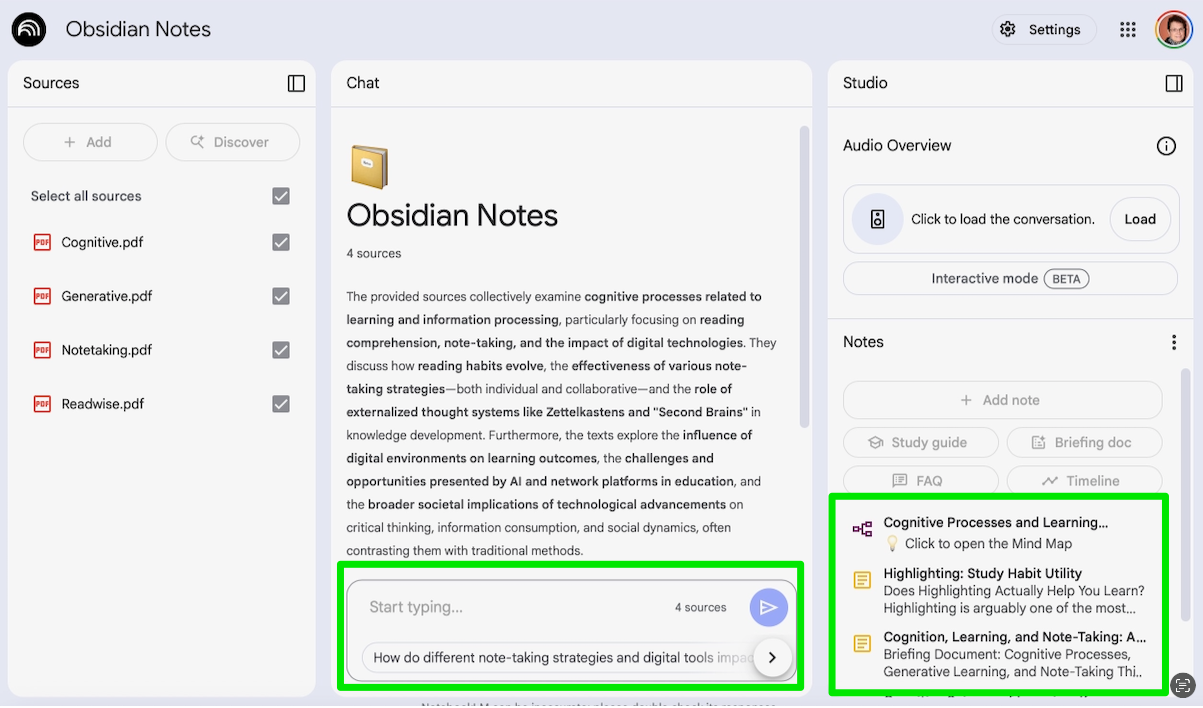
When you use the link I provide (end of post), you will encounter the following interface. Ignore the references to Obsidian — this is the tool I use to accumulate digital content. This material was uploaded to NotebookLM. Try chatting with my content — green box in the middle, or use some of the suggestions made under the rightmost Studio column. I accumulated content mostly focused on study behavior, classroom applications of technology, and reading skills.

Here is a sample prompt you might try — How does the effectiveness of taking notes on paper compare with taking notes using a digital device?

Here is the link for access. It is not necessary, but if you have a reaction, I would appreciate a comment. Again, I think there is an opportunity for sharing here and hope offering my notes will provide an example.

Loading

A comparison of AI chats with and without the inclusion of curated content

My recent focus on losing an author’s perspective when consuming AI-generated content, particularly the AI response now preceding the typical hits generated by a search query, has encouraged a personal exploration of what might be a middle ground. I frequently use AI tools to chat with the notes and highlights I have generated in reading hundreds of journal articles and books. This body of content has a perspective of sorts because the notes I generate and the content I identify through highlighting reflect my personal way of viewing my field and represent ideas that both support and oppose scientific concepts and theories important to these topics. Any researcher who has relied on the accumulation of relevant articles over the years and makes use of PDFs rather than paper could do a similar thing to make extended use the content they have accumulated over the years. This accumulated body of content seems a great example of what the personal knowledge management advocates describe as a second brain. 

Here, then, is what I believe to be an interesting question. Do AI chats with personally curated content provide different insights than a similar AI chat without this curated focus? Perhaps a more concrete example would be a better way to communicate my issue. So, I have the highlights and notes I have accumulated from years of reading in a designated area (e.g., educational applications of cognitive psychology), and I can chat with this content using identifiable services (e.g., NotebookLM). Would the reply to a prompt applied under these circumstances yield different insights than the same prompt applied using an AI tool not focused on a designated body of content (e.g., Perplexity)? 

At first, this might seem a silly comparison. Certainly, one could find a biased assortment of resources taking a common flawed view on a topic, and then show that AI limited to consolidating this content would yield different prompt replies than similar prompts asked of an unfocused AI tool. But this does not seem to be what those building a second brain think they are doing. They would likely be offended by the suggestion that their efforts were for naught, and AI queries would yield more accurate information. They would probably suggest they are doing exactly the opposite. They are using their expertise to identify high-quality sources, and their notes would address both the strengths and weaknesses of the sources they curate. I am not certain the outcome of my proposed comparison is obvious. 

My Test Case

I write a lot about study behavior and have found the controversy involving whether learners are better off reading and taking notes using paper or digital content of some interest. While many researchers suggest paper is superior, my personal experiences and focus on the benefits of previous learning experiences over time, see a unique value in digital processing. Simply put, highlights and annotations saved and organized offer advantages over a year or 50 years later that most would find difficult to replicate with paper. Even over short periods, studying is more than simple review, and digital tools offer unique opportunities for “post processing”. 

The specifics here are important only if the type of information generated in pursuit of the information I encounter would change as a function of how I might use AI. I provide the background material because the topic could interact with the different uses of AI I identify in ways I cannot anticipate. Part of what I propose is that others with different collections of digital content might replicate the test I am applying to their own material and share their observations. There are so many uncontrolled variables I assume that while this is an interesting issue, personal preference will always be the deciding factor. Variations in topic, tool, and prompt could result in different conclusions. 

The Prompt I used follows. The variation of the prompt I used when engaging a non-focused use of AI simply eliminated the phrase “Using my notes and highlights”. 

Prompt: Using my notes and highlights, write a 400 word blog post comparing the advantages and disadvantages of reading and taking notes from paper and digital devices. 

I used the directed prompt with Mem.AI, NotebookLM, and Smart Connections (Obsidian plugin). Perplexity was used as the nondirected AI tool. I will offer my observations first and provide the full prompt responses at the end as Appendices.

Sources – Perplexity is unique in comparison to other chat tools in that it provides specific sources for comments it generates. These tend to be what I would call secondary sources (see list following the Perplexity example). In contrast, see the sources in the Mem.AI responses. The names that appear are a crude version of the citation method academics use to reference journal articles and books (which were the sources I highlighted and annotated). One way to think about this may be that Perplexity is accessing the summaries generated by various individuals who have read primary sources, while Mem is accessing my personal summaries of similar sources. If identifying primary sources is important, it is easier to do this when you can show what these sources were. 

Identification of unique insights – It would seem that an AI analysis based on specific notes, highlighting, and source selection would generate an output more useful for tasks you want to pursue. While obvious if the content of interest was selected with a task in mind and based on a small amount of material, this is not the way a “second brain” is built. The hundreds of sources I have collected represent a wide range of topics in my field. Specific topics of interest emerge within this process of more general learning, and part of the assumption in using a second brain is that the broader background will reveal connections that may not have been anticipated. The hope is that the application of AI, rather than basic searching, will help surface such connections. 

With the exception of the sources cited, much of the information in the two types of searches was similar. Perhaps asking for a 400-word blog post as an outlet was not the best way to reveal subtle differences. I will direct your attention to sections I have highlighted in the NotebookLM and Perplexity prompt responses. Both NotebookLM and Perplexity provide citations that do not appear when copying the text. Because I was looking for comments related to the use of content over time, I was paying attention to any mention of searching or other mentions of delayed activity. The Perplexity response did not offer a citation. The NotebookLM output mentioned export, organization, and search. In addition, there were multiple citations, and the linked citations identified notes and highlights in the digital form.

Summary

AI tools with various capabilities are now available. For those of us who read digitally, we have the opportunity to export highlights and annotations that can be stored over time. AI can be used to chat with this stored content. My interest here was an attempt to determine if there was a unique value in applying AI to such content in comparison to asking questions of AI without this targeting of curated information. 

I doubt the effort I describe here would convince anyone to change their existing strategy, but my hope is that I have offered an approach they might try to explore the options that are available. 

************

Appendices

Mem.ai

The debate between reading and taking notes on paper versus digital devices is a nuanced one, with research highlighting various advantages and disadvantages for each medium. While digital tools offer convenience and speed, traditional paper methods often promote deeper cognitive engagement.

Advantages of Digital Reading and Notetaking

Digital devices offer several benefits. For instance, digital note-takers tend to record more content, including more verbatim lecture strings, due to faster typing speeds compared to handwriting Luo et al 2018. This increased volume of notes can be beneficial for later review, especially when notes are not immediately studied Luo et al 2018. Digital platforms also facilitate collaborative note-taking, allowing students to share the cognitive load and potentially create more complete notes Courtneyetal2022. Furthermore, digital tools can offer features like multimedia integration and online research capabilities, enriching the learning experience Yamac et al 2020. For example, digital writing instruction with tablets has been shown to improve writing performance and knowledge in primary school students, partly due to features like class blogs and multimedia components Yamac et al 2020.

Disadvantages of Digital Reading and Notetaking

Despite the advantages, digital reading and note-taking come with notable drawbacks. A significant concern is the potential for distraction. Studies suggest that the perceived advantage of longhand note-taking in some research may be attributed to the distractions inherent in digital devices, such as web surfing and social media Voyer 2022 summary. This can lead to shallower processing of information SingerAlexander2017b. Research indicates a “screen inferiority” effect, where reading comprehension can be lower on digital devices, particularly for informational texts and under time pressure Delgado2018. This effect has even been observed to increase over time Delgado et al 2018. The lack of physical cues, like the feel of pages, in digital reading can also hinder the formation of a mental map of the text, impacting comprehension of chronology and temporality Mangen et al 2019.

Advantages of Paper Reading and Notetaking

Paper-based methods often foster deeper engagement and better retention. Handwriting, being slower than typing, forces individuals to process and summarize information, leading to a more generative encoding of knowledge MuellerOppenheimer2014. This deeper processing can result in better performance on conceptual questions 

MuellerOppenheimer2014. The physical act of writing and the tactile feedback from paper contribute to a stronger mental representation of the material Mangen et al 2019. For instance, studies have shown that paper readers are better at recalling “other relevant information” and performing better on questions related to key points SingerAlexander2017b.

Disadvantages of Paper Reading and Notetaking

While beneficial for deep processing, paper note-taking can be less efficient in terms of speed and volume compared to digital methods Luo et al 2018. It also lacks the inherent searchability and organizational capabilities of digital notes, which can make retrieval and restructuring of information more challenging SmartWisdom. Converting highlights from paper to more elaborate notes can also be a more cumbersome process Highlighting&fleeting.

In conclusion, the optimal choice between paper and digital depends on the specific learning goal and context. For tasks requiring deep comprehension and conceptual understanding, paper often holds an advantage. However, for efficiency, volume, and collaborative efforts, digital tools offer compelling benefits, provided distractions are managed effectively.

************

NotebookLM

Here’s a look at the advantages and disadvantages of reading and taking notes using paper versus digital devices, drawing from the sources provided:

The rise of digital devices has shifted how many people read and take notes. However, research comparing reading from paper and screens reveals a complex picture, with nuances depending on the text type, reader’s age, and even the specific device used. Several meta-analyses indicate a general advantage for reading comprehension when reading from paper compared to screens, particularly for informational texts. This paper advantage has even been found to increase over time. However, this difference is often not seen with narrative texts, and studies comparing reading on tablets specifically have sometimes found smaller or no significant differences compared to print.

When it comes to note-taking, there’s also ongoing debate about the best method. Some studies comparing handwriting and typing notes have found a benefit for handwriting notes, particularly for understanding concepts. This has been attributed to the slower speed of handwriting, which may encourage more summarization and paraphrasing rather than simply transcribing verbatim, leading to deeper cognitive processing. However, other research and meta-analyses have found inconsistent results or no significant overall difference between handwritten and typed notes. Some studies suggest that typing can lead to more complete notes, and note completeness can be related to better performance.

Digital tools offer powerful affordances for reading and note-taking, such as the ease of highlighting and adding annotations directly to the text. Digital notes and highlights can be easily exported, organized, and searched later. Digital environments also facilitate collaborative annotation and note-taking. However, digital environments can also present challenges. They may be more prone to distractions, and frequent use of digital media, particularly for quick interactions with short texts (like social media), may contribute to the development of shallow reading habits like scanning and skimming. Some online content may also have lower linguistic quality.

Ultimately, the effectiveness of reading and note-taking, whether on paper or digitally, depends significantly on the strategies and cognitive processes employed by the reader. While paper might offer some advantages for deep comprehension of informational texts and handwriting for conceptual processing, digital tools provide powerful functionalities for capturing, organizing, and retrieving information, as well as facilitating collaboration. Focusing on how one engages with the material and utilizes the tools, rather than just the tool itself, is likely key to effective learning.

The following is a screen capture of the original view of the highlighted section described above.

****************************

Prompt: Write a 400 word blog post comparing the advantages and disadvantages of reading and taking notes from paper and digital devices.

From: Perplexity

Comparing Reading and Note-Taking: Paper vs. Digital Devices

Choosing between paper and digital devices for reading and note-taking is a personal decision shaped by convenience, effectiveness, and lifestyle. Both formats offer distinct advantages and disadvantages.

Advantages of Paper

  • Better Comprehension and Retention: Studies show reading from paper leads to higher comprehension and test scores. Students who read print books outperform those who read digitally, and handwritten notes often result in better memory retention compared to typing[1][6].
  • Fewer Distractions: Paper books and notes keep things simple—no pop-ups, notifications, or temptations to multitask, which helps maintain focus[1][6].
  • Emotional Connection: Many readers find a deeper emotional bond with physical books, appreciating the tactile experience and the satisfaction of seeing their progress[1].
  • No Power Needed: Paper never runs out of battery and is always ready to use[1][6].

Disadvantages of Paper

  • Storage and Portability: Physical books and notes take up space, can be heavy, and are cumbersome to transport, especially when traveling or moving[5].
  • Accessibility: Finding a specific book or note can be time-consuming, and you must visit libraries or bookstores for new material[5].
  • Environmental Impact: Paper production contributes to deforestation and environmental harm[5].
  • Vulnerability: Paper can be easily lost, damaged by water or fire, and is harder to back up[5][6].

Advantages of Digital Devices

  • Convenience and Accessibility: Digital libraries offer instant access to thousands of titles and notes, all stored on a single device. Searching for information is quick and efficient[3][4].
  • Eco-Friendly: Digital reading and note-taking reduce paper usage and environmental impact[3][4].
  • Interactivity and Multimedia: eBooks and digital notes can include videos, images, and interactive elements, making learning more engaging[3][4].
  • Collaboration and Organization: Digital notes are easy to organize, search, and share. Real-time collaboration and version control are possible, which is ideal for group work[4].
  • Accessibility Features: Text-to-speech and adjustable font sizes make digital content more accessible to people with different needs[3].

Disadvantages of Digital Devices

  • Distractions: Devices can tempt users with games, notifications, and other apps, reducing focus[6].
  • Lower Retention: Typing notes can lead to lower retention compared to handwriting, as it often encourages verbatim transcription without deeper processing[6].
  • Dependence on Power: Devices need batteries and charging, which can be limiting in certain situations[6].
  • Cost: Digital devices are more expensive upfront than basic paper and pen[6].

Conclusion

Paper excels in comprehension, retention, and simplicity, while digital devices shine in convenience, organization, and collaboration. The best choice depends on your priorities—whether you value focus and memory or accessibility and efficiency. Many find a hybrid approach, using both formats as needed, offers the best of both worlds.

Sources

[1] The benefits of printed books – Junior Library Guild https://www.juniorlibraryguild.com/blog/post/the-benefits-of-printed-books

[2] Benefits of Notetaking? | Student Skills Workshops https://sites.austincc.edu/student-skills-workshops/taking-effective-notes/benefits-of-notetaking/

[3] Top 7 Benefits of Digital Reading in 2025 – Kitaboo https://kitaboo.com/what-is-digital-reading/

[4] 6 advantages of digital note-taking: unleash your productivity https://beingpaperless.com/unleash-your-productivity-6-advantages-of-digital-note-taking/

[5] Paper Books Vs. Ebooks https://www.doradolist.com/blog/paper-book-vs-ebook/

[6] Typing vs. Writing: The Pros and Cons of Both Note-Taking Methods https://titantimes.live/2025/02/19/typing-vs-writing-the-pros-and-cons-of-both-note-taking-methods/

[7] Digital reading: Pros and cons of reading on devices – tablets & e … https://teachinginhighered.com/2017/09/11/digital-reading/

[8] Taking Digital Notes: The Pros, Cons, and Best Practices – Ask.com https://www.ask.com/news/taking-digital-notes-pros-cons-best-practices

[9] Evidence increases for reading on paper instead of screens https://hechingerreport.org/evidence-increases-for-reading-on-paper-instead-of-screens/

[10] Benefit of Handwritten vs. Digital Note Taking https://www.mrsblackwell.com/journal/note-taking

[11] Will you learn better from reading on screen or on paper? https://www.snexplores.org/article/learn-comprehension-reading-digital-screen-paper

[12] Unlocking the Brain: the Cognitive Benefits of Digital Note-Taking for … https://www.marshmallowchallenge.com/blog/unlocking-the-brain-the-cognitive-benefits-of-digital-note-taking-for-students-sounds-great/

[13] Advantages And Drawbacks Of Both Paper And Pixel Books https://tracycooperposey.com/paper-and-pixel-books/

[14] Digital Notes vs. Paper Notes: The Pros and Cons – SchoolHabits https://schoolhabits.com/digital-notes-vs-paper-notes-the-pros-and-cons/

[15] What are Top Pros and Cons of Online Reading in 2025? – Kitaboo https://kitaboo.com/pros-and-cons-of-online-reading/

[16] Digital vs. Handwritten Notes: Pros and Cons for Professionals https://leadavid.com/digital-vs-handwritten-notes-pros-cons/

[17] Reading On Screens vs Paper: Which Is Better? – Unplugged https://unplugged.rest/blog/reading-on-screen-or-print-which-is-better

[18] Paper vs. Screen: Note-taking at Dartmouth https://www.thedartmouth.com/article/2023/10/paper-vs-screen-note-taking-at-dartmouth

[19] The Advantages of Using a Digital Note Taking App – Box Blog https://blog.box.com/advantages-of-using-a-digital-note-taking-app

[20] Do Students Learn More by Reading From Paper or Screens? – EWU https://online.ewu.edu/degrees/education/med/reading-literacy/reading-from-paper-or-screens/

[21] Pros and Cons of Typed, Digitally Handwritten, and Paper Notes https://guts.wisc.edu/2020/11/19/pros-and-cons-of-typed-digitally-handwritten-and-paper-notes/

[22] Pros and Cons of eBooks: Is Digital Reading Right for You? https://www.wrightbookassociates.co.uk/blog/pros-and-cons-of-ebooks/

[23] Truth about Digital Note Taking vs Paper Notes (PROS/CONS) https://www.youtube.com/watch?v=4nw4Z2cwm30

[24] PROOF POINTS: Paper books linked to stronger readers in an … https://hechingerreport.org/proof-points-paper-books-linked-to-stronger-readers-in-an-international-study/

[25] [PDF] Reading on paper and screens: advantages, disadvantages, and … https://pdfs.semanticscholar.org/f5d3/be4309ea16cede980900c13e65ac48aad6d3.pdf

[26] Pros and Cons of Digital vs. Traditional College Textbooks https://www.honorsociety.org/articles/pros-and-cons-digital-vs-traditional-college-textbooks

[27] Reading on Screens Worsens Comprehension for Younger … https://www.edweek.org/teaching-learning/reading-on-screens-worsens-comprehension-for-younger-students-what-can-teachers-do/2024/01

[28] 7 Scientific Benefits of Reading Printed Books for Better Brain Health … https://www.howlifeunfolds.com/learning-education/7-scientific-benefits-reading-printed-books

[29] Evidence increases for reading on paper instead of screens: Most … https://www.reddit.com/r/books/comments/n3uc66/evidence_increases_for_reading_on_paper_instead/

[30] 10 Benefits of Reading Print Books, According to Science https://www.realsimple.com/health/preventative-health/benefits-of-reading-real-books

[31] The important thing is to read. Advantages of digital reading https://richmondsolution.com/en/ventajas-lectura-digital/

[32] Digital reading: benefit or risk for child literacy? https://school-education.ec.europa.eu/en/discover/news/digital-reading-benefit-risk

[33] Turning the Page: What Research Indicates About Print vs. Digital … https://oej.scholasticahq.com/article/125437-turning-the-page-what-research-indicates-about-print-vs-digital-reading

[34] E-books vs Printed Books: The Disadvantages of E-books https://web.4hatteras.com/hatteras-news/e-books-vs-printed-books-the-disadvantages-of-e-books

[35] The benefits and drawbacks of reading digitally https://webbcanyonchronicle.com/9378/scienceandtechnology/the-benefits-and-drawbacks-of-reading-digitally/

*****

Loading

What does AI search lack? It is the shared perspective.

In a recent post, I lamented the feeling that what I write becomes part of some anonymous glob that feeds “search AI” [Will anyone read my words?]. I admit that when I do a Google search I first read the AI response and that may provide just what I was looking for. So, ignoring the feeling of personal invisibility that comes with this reality, I began to think about what, in my comments, offers something of value to others. What in following bloggers using RSS did I lose in this transition from following a writer on topics of personal interest did I really lose in being able to apply AI search to address personal interests? 

As I considered this question, my mind flashed on an argument I made several years ago in an attempt to justify textbooks and other long-form informative texts. [Why a textbook?]. Ignoring the cost issue and whether or not college students actually study assigned textbook material, I recognized that, mostly to save students money, profs often felt it helpful to create a course syllabus/outline with the reading assignments linked from elements in the outline to free online content. My counter argument was that learning is about each student building a personal model of understanding and there was unique value in a single integrated source as this source was a model of how an experienced learner (the author) had tried to export his or her model of how the many ideas in a course fit together. If I had to argue with myself, I would probably suggest that the job of the professor in creating the outline and presenting on his/her model of the course repeatedly was trying to do a similar thing. I have since decided that, now that I must function as a self-directed learner, I benefit from exposure to a book that provides a more complete and integrated model of some topic. For example, Ahrens’ book – How to take smart notes – offers a better integrated model of the whys and hows of notetaking than the many individual comments I might find searching online.

How do I explain this opinion and why I think it has value? I have decided that what I want is a perspective, and this is what you get from a single source sharing long-form content (perhaps in the form of multiple posts). Elements of information can be combined in multiple ways, and perhaps this is the difference between how we use the concepts of information and knowledge. Knowledge is the way a given individual has organized selected elements of information to provide meaning or usefulness. 

Perhaps you can anticipate then how I see the difference between the output of AI search and the more idiosyncratic perspective of a single writer. Both provide information, and on most topics, when there is something specific I want to know, the homogenized summary of many inputs offered by AI may be accurate and possibly superior. However, in building my own personal knowledge of a complex topic, I think it is useful to follow how one knowledgeable individual selects and organizes information. Could a diligent individual create personal understanding from either source? Definitely. I still think there is something unique and useful in following how one individual I trust puts ideas together.

Loading

Smart Connections finds note connections

Smart Connections discovers and reveals related notes in Obsidian. I started using the Obsidian plugin Smart Connections because I wanted a way to apply AI interrogation of my own notes. I wanted to request cross-note summarizations and generate a variety of sample written products (e.g., blog posts) based on my personal notes and highlights. I ignored an important capability that is claimed based on the product’s name — the identification of note connections. 

Without an AI-based method for identifying possible connections among notes, Obsidian relies on the user to establish connections via links and tags. I was aware that other services (e.g., Mem.ai) suggested that a note retention system could do better and offered tags and links, but also made the claim that AI would help surface connections. Some would argue that exploring your Obsidian content repeatedly and finding connections are important parts of the process of personal knowledge management. Constantly working with your notes is an active cognitive activity that encourages connections between what is internally retrievable at a point in time and what you are accessing in Obsidian. New connections first brain to second brain and within Obsidian may emerge. This constant interactive process is suggested by what I would describe as the Zettelkasten practitioners. I don’t think this advice must be rejected for users who want to use AI to surface new connections.

Smart Connections makes use of AI, and the AI creates a numerical representation of the content of each note and stores these as what are called embeddings. You must subscribe to an AI provider via an API, which is far less expensive than a subscription to such a service. You have the option of basing such representations on blocks within notes rather than entire notes. I make use of this option because I store lengthy notes containing book and pdf highlights, such that a representation of an entire note does not represent a level of detail that is very useful for finding something useful in such lengthy notes. In the content that follows, I will show where to turn on block embedding.

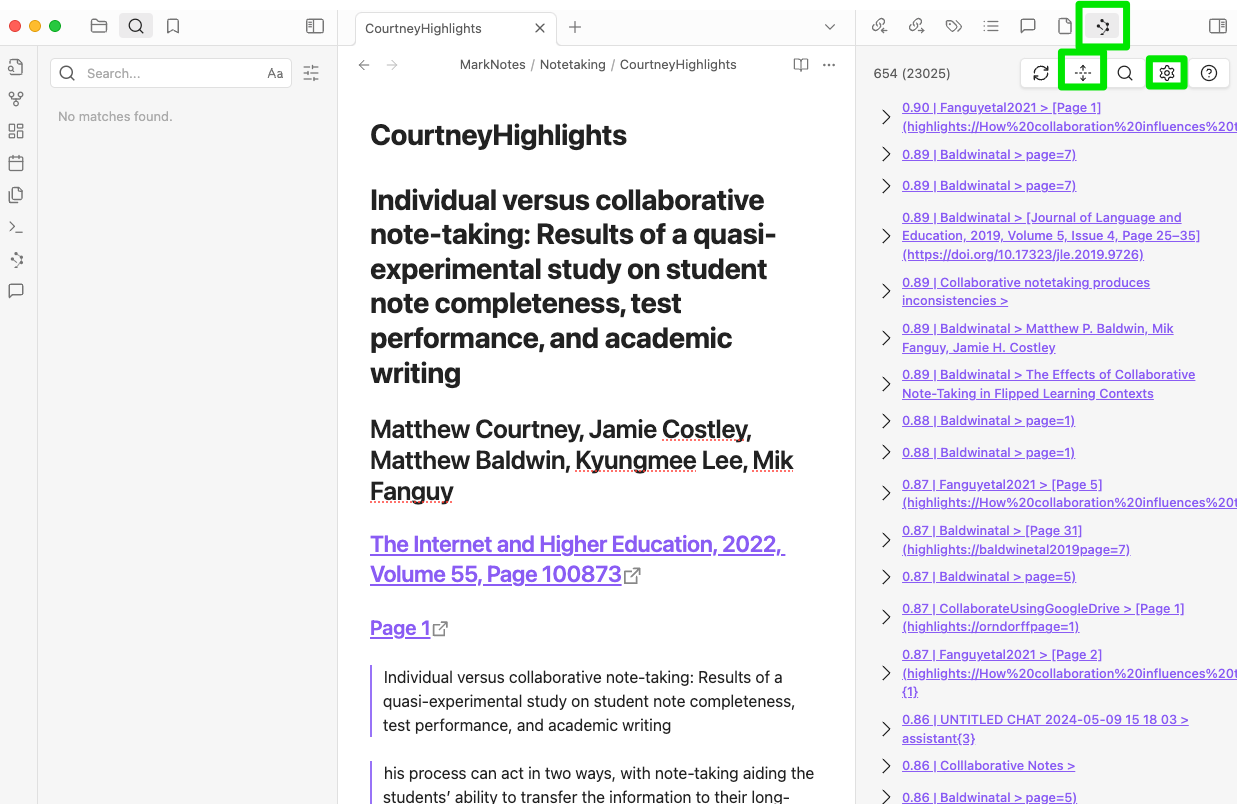
Smart Connections works by requesting connections for a note that you have selected. The following image shows Obsidian with Smart Connections active. The green rectangle in the menu bar is used to activate the Connections as opposed to the Chat capability of Smart Connections. The up/down symbol allows you to scroll through the associated notes/blocks from most related to less related. The gear symbol is used to access settings for Smart Connections. The middle panel is the active note, and the right-hand column represents a hierarchy of related notes/blocks. 

Getting back to how I think AI may supplement the more hands-on use of Obsidian, I would recommend that in examining connections to a given note that you then use tags or links if you want to create permanent connections.

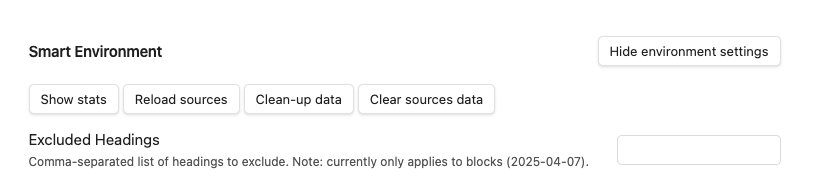
The extension of Smart Connects from note to note to note to block is worth doing if you do not keep atomic notes. Start with the Gear icon (see image above). This will reveal multiple setting options. What you are searching for are the environment settings. Open these settings with the button shown below. 

Once more settings have been revealed, you are looking for Smart Blocks (see below). You turn this option on and specify a minimal length. I did not keep a careful record of the source for advice I followed and I apologize to the author, but I entered 300 characters, and that seems to work well. There are many other settings and I have mostly stayed with the defaults. 

Summary

Smart Connections is an Obsidian plugin (free) that allows AI capabilities to be applied to the notes stored in Obsidian. Chats allows a user to generate AI prompts that are applied to the contents of Obsidian. Connections generates a list of notes (note blocks in the setup I have described) associated with a selected note and is helpful in the identification of such relationships in a large collections of notes. 

Loading

Sharing Notes

I have been retired for several years and miss the social experience of sharing the research process with graduate students and faculty colleagues. Many of my interests are still very similar, but after moving to a different city, I no longer have day-to-day acquaintances with those kinds of interests. This has resulted in an interest in tools that offer note-sharing capabilities.

There is still the challenge of finding others with similar enough interests that sharing is attractive. This post will describe Glasp as a solution. At present this app is free. It offers several ways to share public notes without first having to go through a familiarization process to identify others with related interests, and the type of interaction that follows is up to you. Finally, Glasp has a built-in AI tool that offers an effective way to explore both someone else’s and your own notes. 

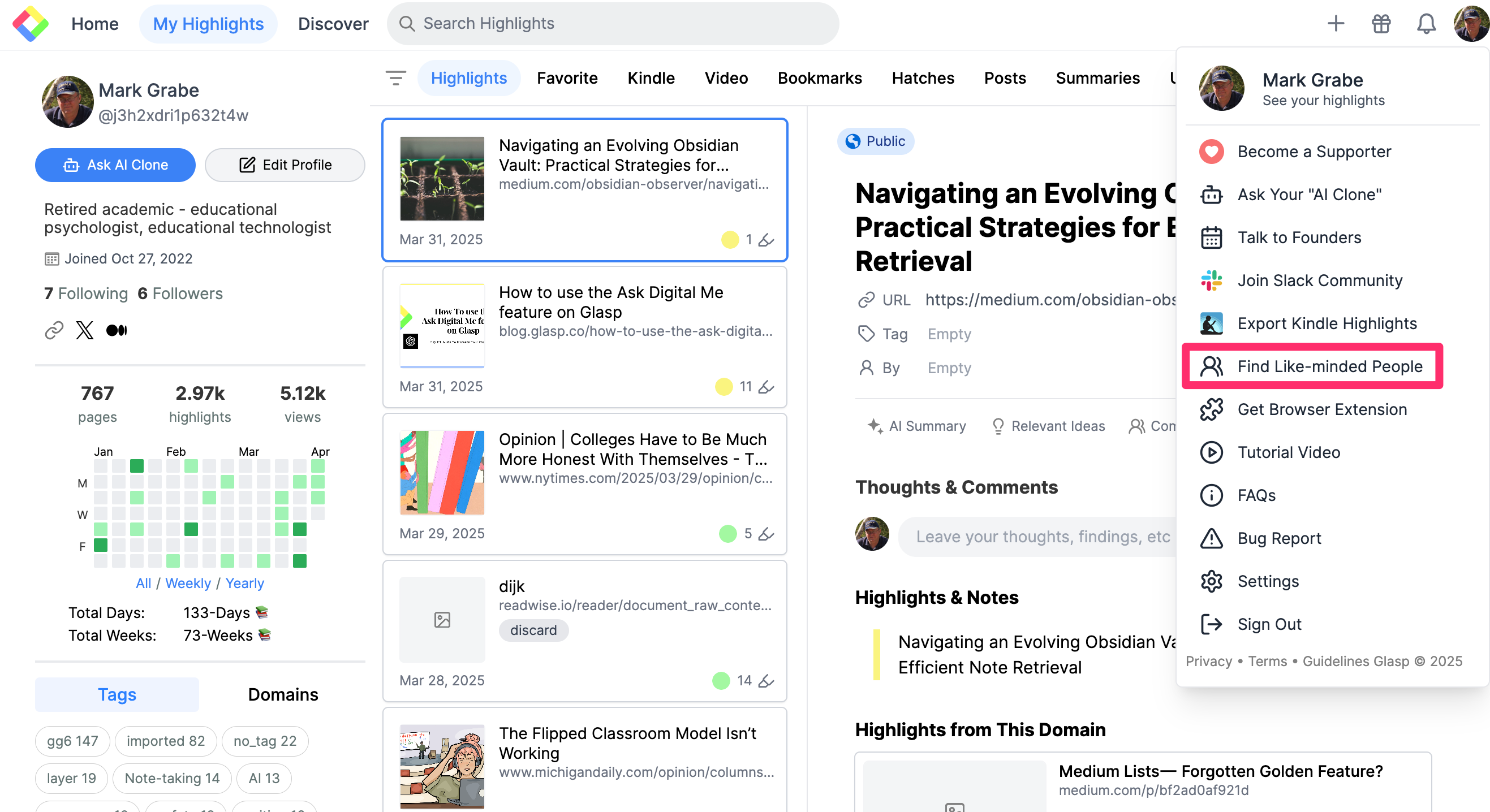
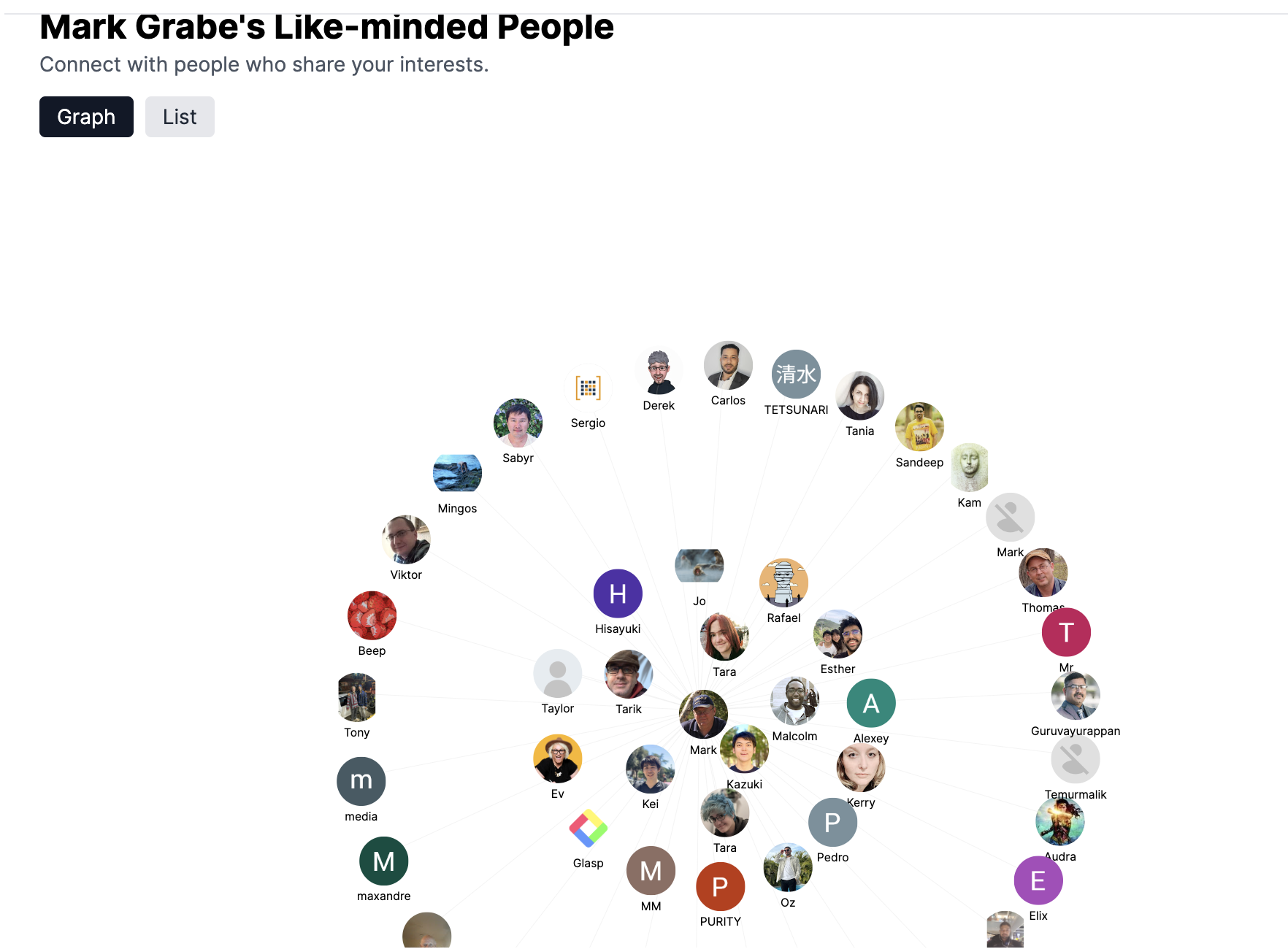
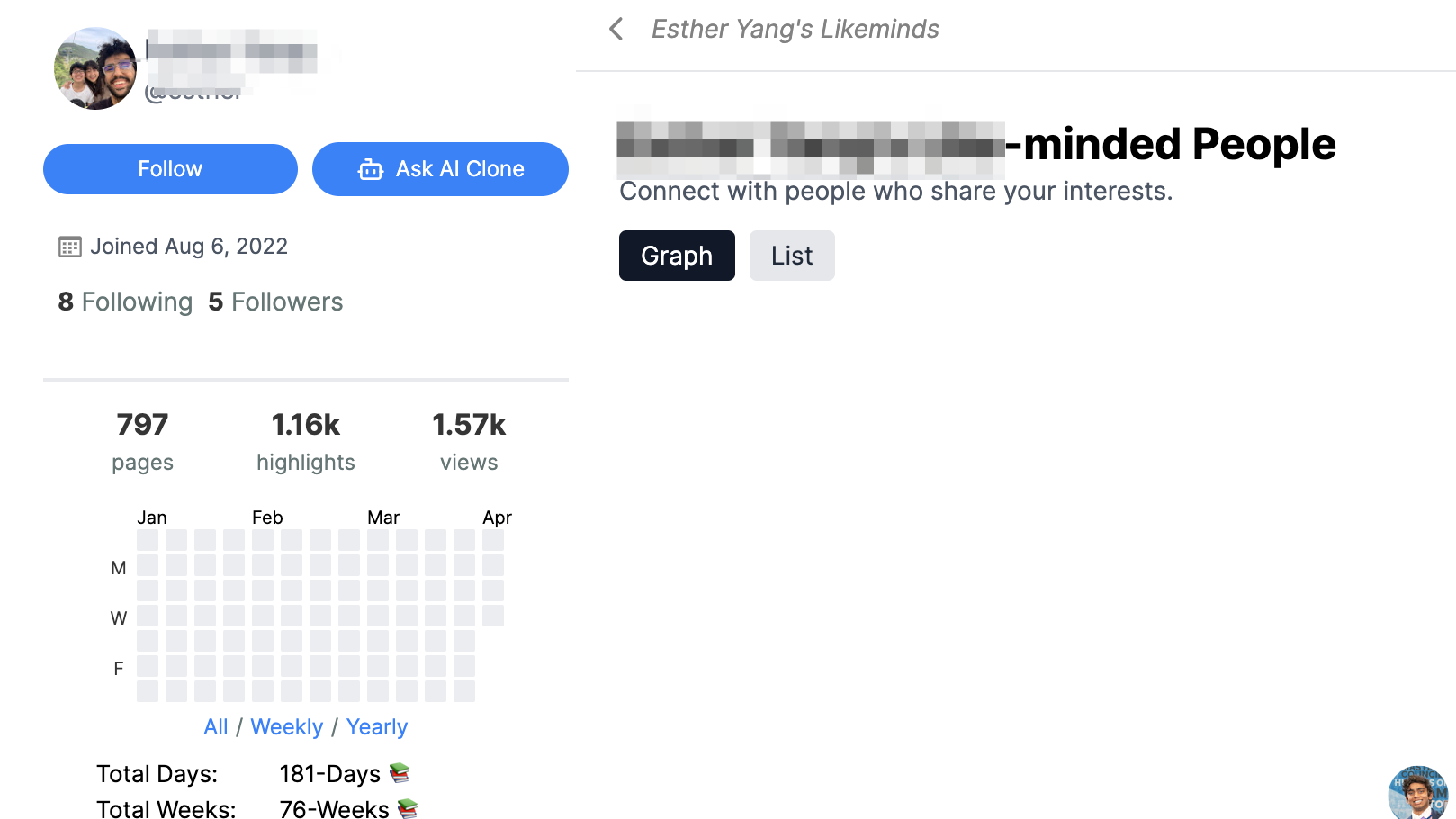
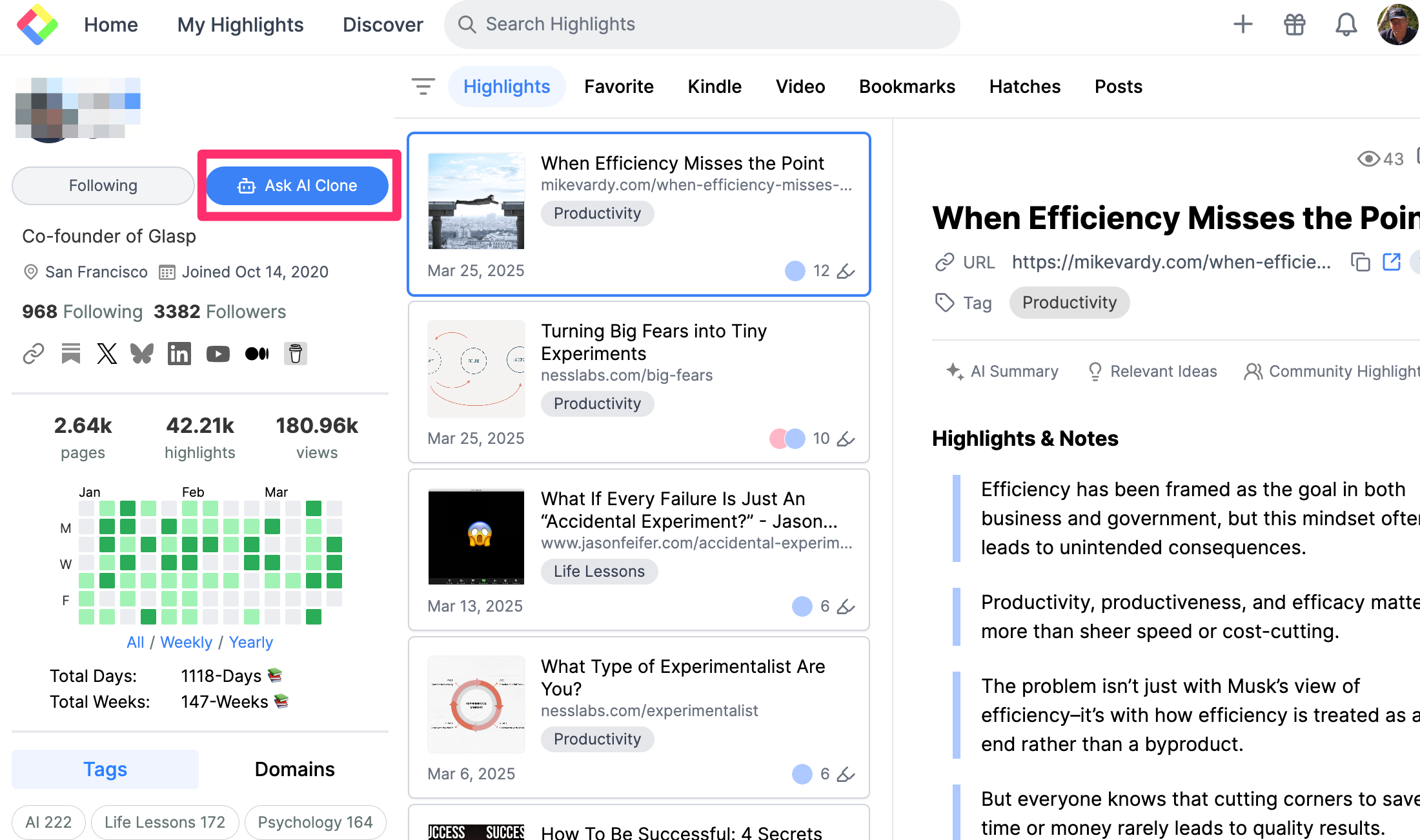
The following shows Glasp. From left to right, the first column contains personal information and basic controls, the second column lists thumbnails of the pages I have annotated (these are web pages, and other sources such as Kindle books are accessed from an icon on the heading). The final column contains the highlights and notes from a selected source. The drop-down menu is what I wanted readers to understand as it includes a link for locating “like-minded users” (second image). Glasp analyzes the content you have stored and recommends other users with similar interests. I should make clear that you store content as public or private and when you use social capabilities it is only the public content that is visible. 

When you select another user, you are provided access to their site (read only) and you select to follow if you are interested. 

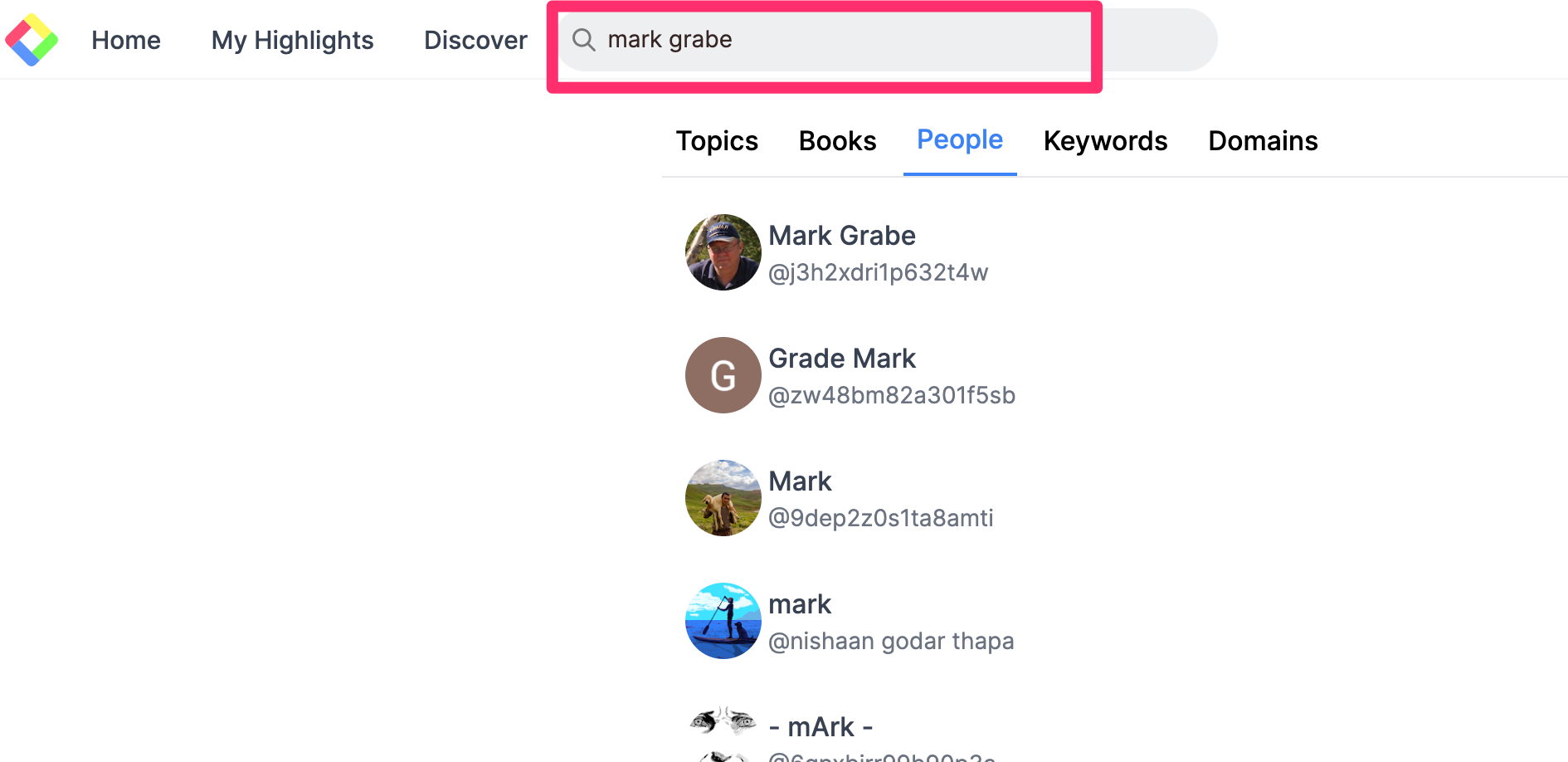
If you identify other Glasp user by other means, you can simply search for that individual and then access their site to follow that individual.

The AI feature

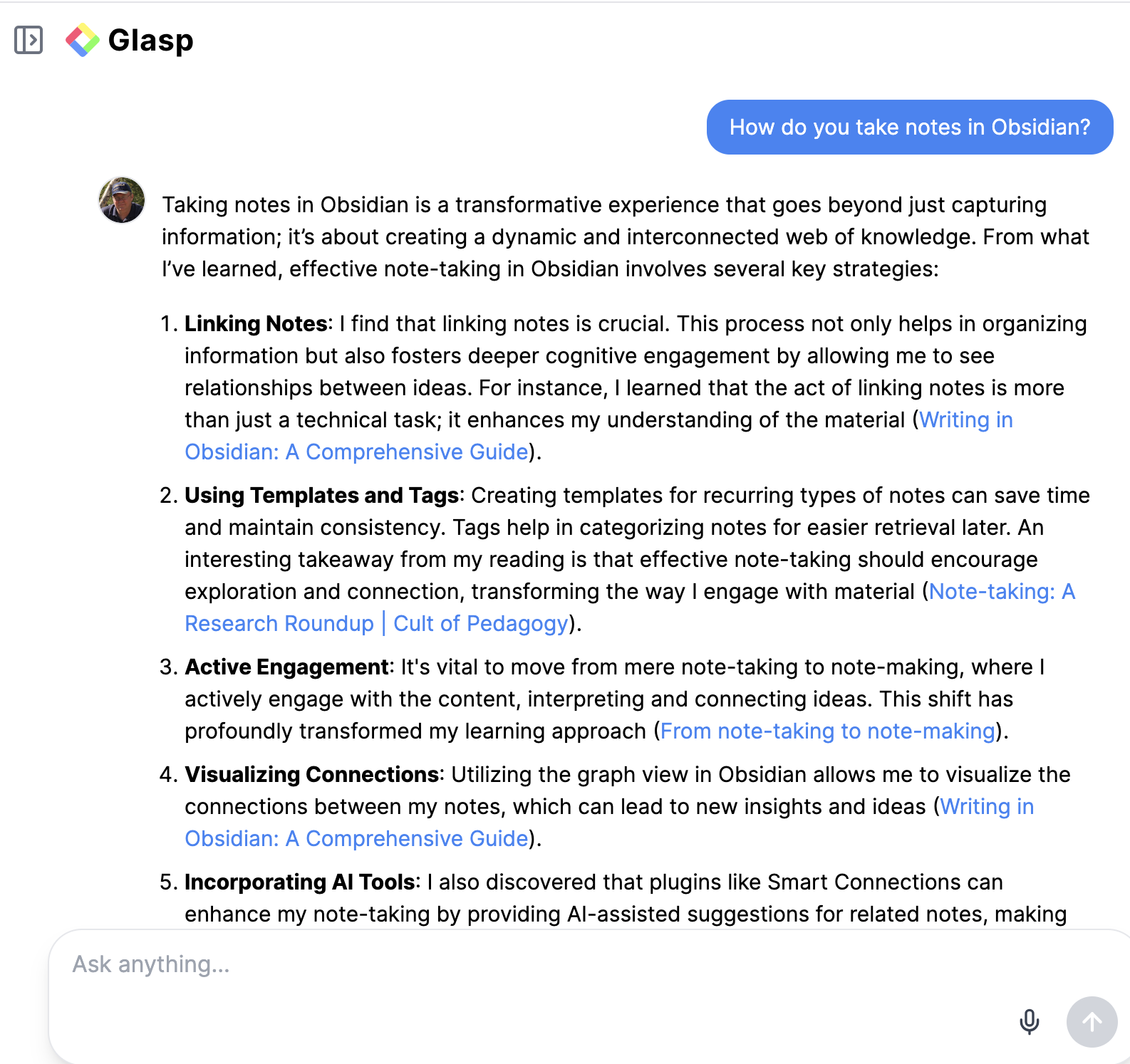
On your own site or the site of someone you have followed, a button located near the image icon of the site owner, allows access to the AI tool (following image). This is where you submit a prompt to chat with the content on that site (second image).

AI is a good way to explore a collection of content that is unfamiliar to you. With Glasp, you can use the output from a prompt to identify the source notes and move from there to the sources.

Connecting

I am interested in connecting with anyone who finds this tool interesting. You do need to create a Glasp account (free) to follow through. Without adding content to generate recommended matches, you can view my content by entering Mark Grabe in the search box to follow me. Glasp also offers a link that takes you directly to the AI prompt page for a designated user (link to my prompt page). This only connects if you have a Glasp account, but I guess it is provided so you do not have to identify yourself as a follower if an existing user wants to share content in this way. 

I like Glasp and would have likely invested more time in the site for my professional reading (mostly journal article PDFs) if I had not already invested many hours highlighting and annotating with a different tool that does not transfer the highlighted content to Glasp. Glasp does include the highlights and notes I have generated from web pages and from Kindle books. 

Loading