Smart Notes in Padlet

An idea for developing Smart Note skills

I have some interest in note-taking for K12 students. Learning to take notes has to start at some point. I doubt most students ever receive instruction in how to take notes and what type of notes might be best suited to different situations. This goes for longhand or keyboard notes. What follows is somewhat speculative, but I hope to offer at least one idea. 

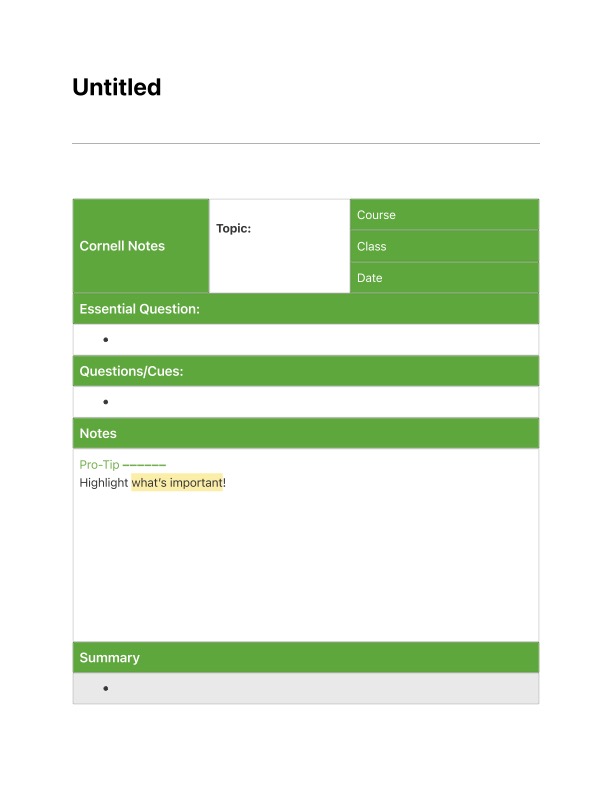
As I have become more interested in what I have taken to calling smart notes, I have begun thinking how this approach might be developed over time. My understanding of the basics of smart notes, suggests that such notes should:

  • Be personalized or at least a summary rather than a verbatim copy of important ideas or concepts
  • Be linkable in some way so that the learner could consider how individual notes could be built into something larger
  • Be shareable for the purpose of feedback or collaboration
  • Be saved in a format that would allow usefulness over a long period of time

Once students reach high school and perhaps a bit earlier, I would suggest use of the same tools I might use now. What about younger learners? Here is more of a concept that would take some effort to implement. One caveat – one limitation to consider is access to a recommended tool or service if a student is younger than 13. Some tools of this time can be created by the teacher and shared with students or in the use case I have in mind individual students. This makes the process somewhat cumbersome, but my point here is to propose an approach.

I hit on this idea while reading about tactics for introducing students to note-taking. The focus of these suggestions was on paper rather than digital strategies, but in exploring some of the suggestions I flashed on a category of digital multimedia tools I thought would offer both power and flexibility. It was easier than I expected to locate note-taking ideas for K12 by searching online. I have included a couple of resources at the end of this post.

I thought that what my wife and I described as embellished documents in our textbook might offer a way to explore note-taking with some (but not all) of the features of smart notes I listed above. My demonstration here makes use of Padlet and the Canvas templet, but Wakelet or Glogster might offer similar capabilities. The Canvas template is important with Padlet because it allows individual notes to be linked within the same embellished document.

If you are unfamiliar with this type of tool, think digital cork board with the opportunity to add notecards or photos and maybe explore different links among the different elements of content. The most important point about Smart Notes for younger students is probably to identify specific ideas or concepts from external sources and then write a personal summary of each idea. In traditional note-taking one might just record these ideas one after the other. Even thus would be an improvement over verbatim transcriptions and personalizing notes as summaries or interpretations based on personal experiences is what makes just the taking of notes a learning experience. 

I have developed tutorials for both Padlet and Glogster previously so there is no real need to duplicate the basics of using these tools here. 

The following are few images specific to the activity I am proposing. First, the Canvas template adds a capability to link different elements added to a padlet. Once individual idea notes have been created, they can be moved about on a padlet and then connected to show relationships. Doing this is a little tricky unless you understand that you have to use Shift/Right Click on one element to create a link to another element (see the images that follow).

I have created an example padlet with ideas suited to an adult audience to offer an example of how ideas might be generated and then linked.

As I said, it is valuable to be able to share padlets for the purposes of feedback or collaboration. You can view the actual padlet you see above using this link. It is very possible this link will stop working at some point. I don’t really have a use for a paid version of Padlet. The free account allows me to create and recreate up to 3 padlets. It is possible I will delete the one you see here some time in the future to stay within this limit.

Padlets can be shared and developed collaboratively. What I am suggesting here would require a teacher to create a padlet for each student and then share the padlet with that student. This would then technically be a collaborative arrangement under the ultimate control of the teacher. I understand this would be cumbersome, but Padlet accounts are not appropriately available to individual users under the age of 13. The cost for a classroom account allowing unlimited padlets is $8 a month. Padlet is a very versatile tool and what I describe here is just one of many possible classroom uses. Obviously, multiple students could collaboratively generate notes on a topic.

Note sources

Cult of Pedagogy – https://www.cultofpedagogy.com/note-taking/

Illinois Literacy – http://www.illinoisliteracyinaction.org/uploads/4/0/7/1/40712613/summarizing_and_note_taking_handout_v2.pdf

Loading

History of notetaking research

Notetaking and highlighting were topics of research interest when I began my academic career. Because these were common activities among college students and students really had no instruction in how these activities could be most productively applied I was attracted by potential benefits of research to determine how best to perform these common behaviors. At that time, K12 students could not mark in their textbooks and while I guess students may have taken some notes they did so largely without guidance.

Questions of how best to apply digital devices has brought some of these same topics back into focus. Are notes best taken in a notebook or on a digital device? What approach to taking notes is most productive? Perhaps I am just one of those old guys characterized as focused on the good old days, but it seems to me that the rich, pragmatic research on notetaking is largely ignored by the new, active crop of researches. Since I have been writing about the potential of digital notetaking recently, I thought a few comments about the research from the ’70s and ‘80s might be helpful.

For a nice review of the notetaking research, I would recommend Kiewra (1985). Kiewra argues that researchers investigated notetaking as a process and a product. As a product, the focus was on the qualities of notes that would best serve a learner in review – typically the preparation for an examination taken weeks or months later. This became known as the external storage function. It would not be possible to listen to presentations again and it would not be practical to reread assigned readings, so what type of notes could be prepared to allow delayed study. 

The process function suggested that the activity of taking notes could benefit the learner. The term encoding was typically used to describe the cognitive activity involved. The assumption was that the notes taken would involve some type of processing and this processing was more beneficial than a basic transcription of the input. I have taken to using the term generative as a broad term for the potential benefits of activities applied to information to improve retention or understanding. Perhaps it occurs to you that notetaking for external storage and to encourage deeper cognitive processing may not be the same type of notes. This is part of the challenge.

The research questions of the day were very practical. Was information from a lecture recorded in notes better recalled than ideas not contained in the notes? Was notetaking superior to just listening if retention or understanding was tested immediately (a test of the generative function)? Does the density of critical idea notes to more general notes matter? 

Eventually, a secondary level of research began to emerge. Are expert notes better than personal notes? The instructor could distribute notes or have a grad students take notes and allow students to just listen. If the generative function does not work well for all (students less familiar with the content or capable as learners), perhaps having a good set of notes provided by someone else would be better. When should notes first be reviewed and could they be improved if reviewed immediately? Proposals such as Cornell notes followed from this type of question. 

Some of my own thinking on the potential of digital notes follow from these questions. For example, I recommend that learners use a digital notetaking tool that records audio at the same time students are taking notes. Such tools link notes to audio with some type of invisible time stamp. When reviewing notes that are puzzling or seem incomplete, the learner can use the  connection between a note and the audio to review the original input to improve the notes when a student has more time to think. 

I regard the question of generative processing to be unresolved, but of potentially the greatest value. We clearly have many ways to address external storage with the opportunity for instructors to share PowerPoints slides (an external storage function) or the audio recording capabilities I have just described. The real time, generative processing may be impractical for many learners because of working memory issues related to the speed of information input. However, again, immediate review with the aid of stored original content may be a way to address this challenge. Then, learning how to take notes that involve interpretation, summarization, and personalization will be key. When and how do we teach learners to involve themselves in productive generative activities? 

Kiewra, K. A. (1985). Investigating notetaking and review: A depth of processing alternative. Educational psychologist, 20(1), 23-32.

Rickards, J. P., & Friedman, F. (1978). The encoding versus the external storage hypothesis in note taking. Contemporary Educational Psychology3(2), 136-143.

Loading

The advantages of digital reading

In the past year or so, I am guessing educators have become aware of a controversy related to whether learners are best able to learn from content presented on paper or a screen.  I am certain some researchers will continue to compare the comprehension of content appearing in a book versus on a screen, but whether or not such research reaches a conclusion one way or the other (see reference from recent meta-analysis), we have already switched to heavily relying on information we can access from our devices. It makes more sense to accept that learning with a phone, tablet, or computer will be involved in a significant proportion of our learning experience and consider how best to use the unique capabilities of these devices. What does digital reading look like and what presently neglected skills are being ignored that educators can help learners acquire? 

I do many different kinds of reading and I think this is true of many learners. I read for pleasure and I read to learn. Those who study reading probably can come up with many more meaningful categories, but these two are sufficient for my argument. I like to describe these reading activities as associated with shallow and deep goals. Some who study different reading activities seem to describe deep reading a little differently than I do. My use of the term implies the intent to learn, retain, and apply information gleaned from reading. I also see an opportunity for digital reading when retention and application follow initial exposure to text by longer periods of time than would be involved in the delay until the next examination. A unique advantage of digital reading is the opportunity to externalize immediate insights and personal interpretations in ways that take advantage of storage, organization, and search capabilities of technology. Some describe this as using technology as a second brain. Accept that human memory is far from perfect. If we think about reading a little differently and consider that reading could also involve efforts at external storage, the time invested in reading to learn may have a bigger return on investment in the future.

What follows are four books (linked to the Kindle version from Amazon) that take on the notion of digital reading. Yes, I have included one of my books among them although this book is focused more on how educators can take advantage of technology to facilitate how students learn when they read. All of these sources explain what I mean by the externalization opportunities technology make available. If you want a single recommendation, it would be “How to Take Smart Notes: One Simple Technique to Boost Writing, Learning and Thinking”. I find the title a bit misleading as the text is concerned with far more than taking notes. The author considers learning from reading and learning more generally. I make this recommendation because offers both solid theory and concrete suggestions for practice. 

Grabe – Designing Instruction Using Layering Services: Educators and students guiding learning

Cohn – Skim, Dive, Surface: Teaching Digital Reading

Kalir & Garcia – Annotation

Ahrens – How to Take Smart Notes: One Simple Technique to Boost Writing, Learning and Thinking – for Students, Academics and Nonfiction Book Writers

My Diigo account should provide me notes on all of these books.

Reference:

Furenes, M. I., Kucirkova, N., & Bus, A. G. (2021). A comparison of children’s reading on paper versus screen: A meta-analysis. Review of Educational Research, 0034654321998074.

Loading

Annotation examples

I have not written about layering in some time. I encountered something I was unfamiliar with when reading about how to help students to learn to read with technology. The content I was reading was discussing how to help students understand what the annotation of a digital text might look like and suggested that students be shown examples. One source for such examples was the annotated articles from the Washington Post.

I was unfamiliar with this service, but a search revealed information about the explorations they have conducted and are being conducted by the Post. My example (see below) is from a speech by President Obama because more recent examples (e.g., a piece about Fauci) were not available as I have exceeded my free views. If you have a subscription, search “washington post annotated articles” to find other material. If you explore the linked example, click on highlighted material to view associated comments.

The Washington Post annotates with Genius. The idea is to have a commentator familiar with the issues add these annotations.

Loading

Social bookmarking

I have not written about social bookmarking for some time and like technology in general this category of apps continues to apps. Some of these advances have included the opportunity to store highlights and notes from digital books and to share this information with a specified group or with any interested party.

For the unfamiliar, here is how I see this evolution. When we started with web browsers, we were initially provided the opportunity to store links we wanted to revisit within the browser. Improvements included the opportunity to organize bookmarks into folders and to add tags and descriptions to allow a larger and larger collection to be searched. Eventually, it was possible to store such collections online providing the opportunity to work from different locations with different devices. Eventually, it became possible to share this information or at least designated subset with others. Why not share useful resources? Recent innovations include the addition of advanced note taking capabilities and automatic storage of digital book notes.

My long term favorite has been Diigo. You can explore the public potential of Diigo by examining my notes.

For those interested in sharing insights from books, my recommendation would be Goodreads. I have had a Goodreads account for several years, but I had not paid much attention. Recently, I learned that Goodreads allows for the storage and sharing of annotations. These annotations can be shared. I have not made the effort to download the highlights for all of my books – this is a security measure to allow individuals to decide what they want to offer as a social service. Try “How to take smart notes” to see what the sharing of notes looks like.

Applications for educators? Social bookmarking sites offer a great opportunity to share resources with others having similar interests (e.g., history teachers) or to offer a collection of resources to students.

Loading

Online Privacy Demonstration

I have been reading a book on privacy (System Error) with a story and recommendation of a demonstration site I thought others might find interesting. The issue considered is how information we think to be shareable can still be used to identify us.

Latanya Sweeney, then an MIT graduate student, and anyone else who wanted, had access to the record of Massachusetts hospital visits by all state employees. These data contained no information assumed to identify individuals – name, address, social security, etc. The governor of Massachusetts contended that the privacy of those associated with these records was secure. Sweeney did not agree. She purchased a list of all registered voters in Cambridge that contained the names of voters as well as their birth date and gender. There were six people in Cambridge with the same birthday as the governor, three of these were male, and one lived in the same zip code as Weld. Sweeney cross referenced the medical records by birthday, zip code, and gender, located the governor’s records and sent him a copy.

Sweeney contends that 87% of Americans can be identified based on zip code, birth date and gender. These are variables we commonly provide without concern.

Sweeney now works at Harvard’s Data Privacy Lab. The lab offers an interesting demonstration. You enter your birthdate, zip code, and gender. I tried the demonstration and found that I could be identified as unique. This may seem amazing, but work through the math. There are likely at least three gender categories and 365 days in the year. I am 73 years old. Even though there are 35,375 individuals in my zip code, the combination of my age, gender, and birthdate identifies one person.

These data do not offer up my name. I suppose this could be determined from voting records as Sweeney demonstrated. For other purposes, this is demonstration of just how easily we can be targeted with ads or information.

Reich, R., Sahami, M. & Weinstein, J. (2021). System error: Where big tech went wrong and how we can reboot. HarperCollins.

Loading

Writing the public product

This is the final post in the series describing my own writing process. I will admit that putting the ideas you have collected together for a public product can be very time-consuming, but less dependent on tools/services others have not encountered. I write mostly in Google docs. I write most blog posts in WordPress (the same tool that organizes and presents my posts to the public). I have experimented with other writing environments and for those wanting to try something different I will describe my favorite.

Scrivener

Scrivener is a tool for organizing resources and turning these resources into a final product. You can try the tool at no expense, but I did purchase my copy at the educational rate of $40.

I would describe Scrivener as a tool for larger projects that involve the organization of many resources, exploring what your final product might look like, and working on a product that will take some time to complete. I wrote this series of blog posts using Scrivener (the total of all the posts was a major project) and I wrote one edition of our textbook using this tool. Because of its system for storing and organizing resources, Scrivener could be used to explore the Smart Note writing process before fully investing in the multitool process I have described over the past several posts.

The three panel system shown below works this way. The binder (leftmost panel) provides access to content (background, original written products). The content selected appears in the middle panel (this happens to be the previous post in this series). The right-most panel provides access to metadata associated with the content in the middle panel (tags, notes, etc.).

Scrivener has other tools (views) for working with and organizing ideas. The following is the corkboard which allows the identification of ideas that can then be organized and expanded into text.

Scrivener is expandable and has an active community contributing templates for various types of products (blog posts, screenplays, scientific articles, etc.). Templates establish the organizational structure of the Binder. If you want, the content of a Scrivener project can be composed and output in formats for different purposes. For example, you can output the product you are working on in a format appropriate to upload to Kindle (.mobi). This is a very powerful tool I admit I use to introduce some variety into the time I spend writing. I have learned enough about the product that I can use it from time to time and move content back and forth to other tools without a lot of wasted time.

Loading