In the past year or so, I am guessing educators have become aware of a controversy related to whether learners are best able to learn from content presented on paper or a screen. I am certain some researchers will continue to compare the comprehension of content appearing in a book versus on a screen, but whether or not such research reaches a conclusion one way or the other (see reference from recent meta-analysis), we have already switched to heavily relying on information we can access from our devices. It makes more sense to accept that learning with a phone, tablet, or computer will be involved in a significant proportion of our learning experience and consider how best to use the unique capabilities of these devices. What does digital reading look like and what presently neglected skills are being ignored that educators can help learners acquire?
I do many different kinds of reading and I think this is true of many learners. I read for pleasure and I read to learn. Those who study reading probably can come up with many more meaningful categories, but these two are sufficient for my argument. I like to describe these reading activities as associated with shallow and deep goals. Some who study different reading activities seem to describe deep reading a little differently than I do. My use of the term implies the intent to learn, retain, and apply information gleaned from reading. I also see an opportunity for digital reading when retention and application follow initial exposure to text by longer periods of time than would be involved in the delay until the next examination. A unique advantage of digital reading is the opportunity to externalize immediate insights and personal interpretations in ways that take advantage of storage, organization, and search capabilities of technology. Some describe this as using technology as a second brain. Accept that human memory is far from perfect. If we think about reading a little differently and consider that reading could also involve efforts at external storage, the time invested in reading to learn may have a bigger return on investment in the future.
What follows are four books (linked to the Kindle version from Amazon) that take on the notion of digital reading. Yes, I have included one of my books among them although this book is focused more on how educators can take advantage of technology to facilitate how students learn when they read. All of these sources explain what I mean by the externalization opportunities technology make available. If you want a single recommendation, it would be “How to Take Smart Notes: One Simple Technique to Boost Writing, Learning and Thinking”. I find the title a bit misleading as the text is concerned with far more than taking notes. The author considers learning from reading and learning more generally. I make this recommendation because offers both solid theory and concrete suggestions for practice.
Furenes, M. I., Kucirkova, N., & Bus, A. G. (2021). A comparison of children’s reading on paper versus screen: A meta-analysis. Review of Educational Research, 0034654321998074.
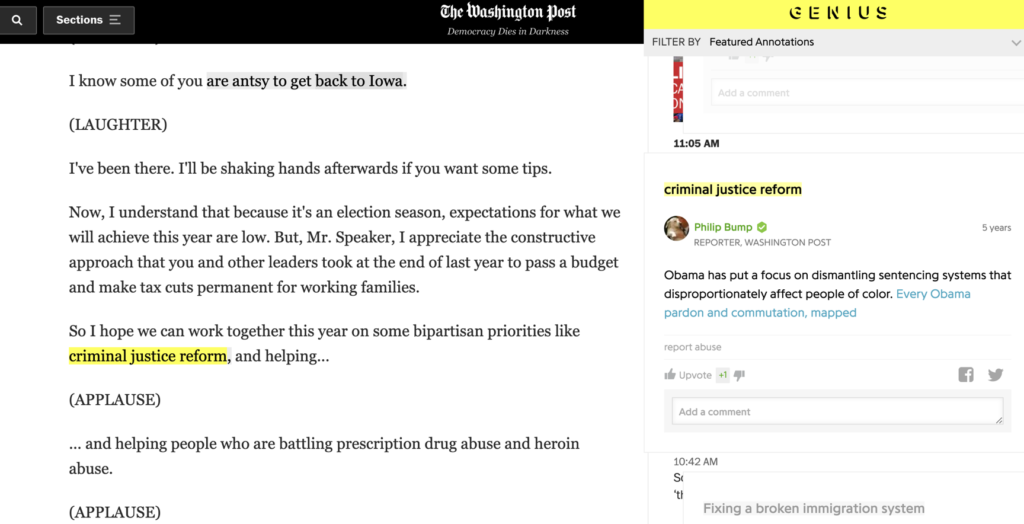
I have not written about layering in some time. I encountered something I was unfamiliar with when reading about how to help students to learn to read with technology. The content I was reading was discussing how to help students understand what the annotation of a digital text might look like and suggested that students be shown examples. One source for such examples was the annotated articles from the Washington Post.
I was unfamiliar with this service, but a search revealed information about the explorations they have conducted and are being conducted by the Post. My example (see below) is from a speech by President Obama because more recent examples (e.g., a piece about Fauci) were not available as I have exceeded my free views. If you have a subscription, search “washington post annotated articles” to find other material. If you explore the linked example, click on highlighted material to view associated comments.
The Washington Post annotates with Genius. The idea is to have a commentator familiar with the issues add these annotations.
I have not written about social bookmarking for some time and like technology in general this category of apps continues to apps. Some of these advances have included the opportunity to store highlights and notes from digital books and to share this information with a specified group or with any interested party.
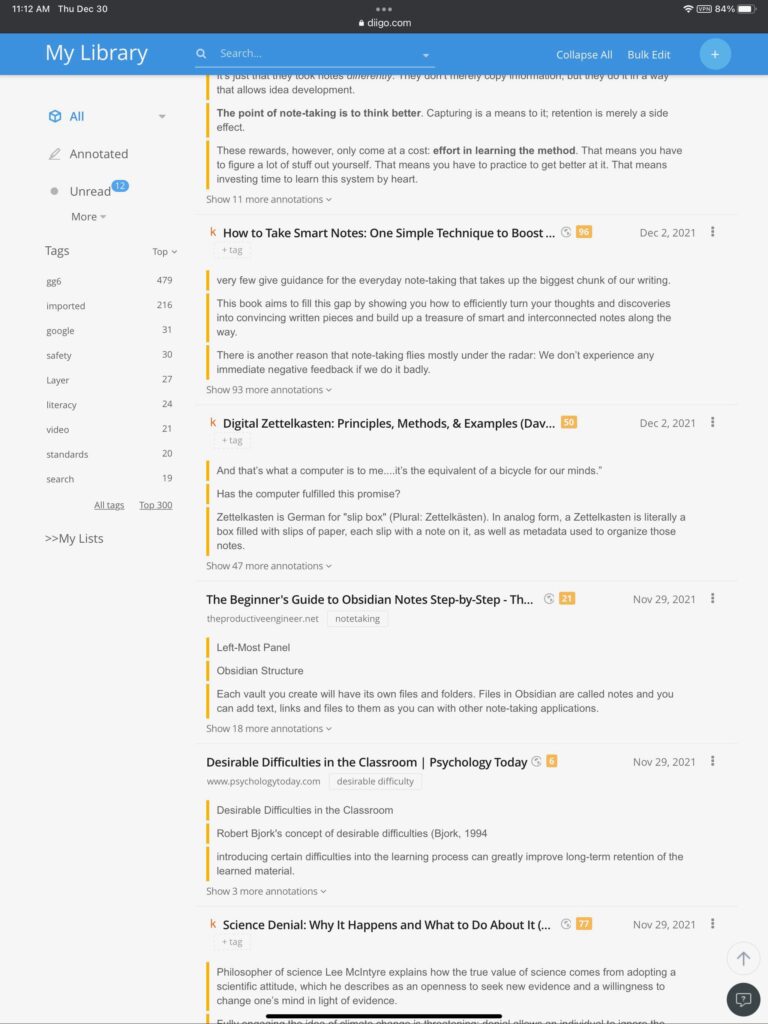
For the unfamiliar, here is how I see this evolution. When we started with web browsers, we were initially provided the opportunity to store links we wanted to revisit within the browser. Improvements included the opportunity to organize bookmarks into folders and to add tags and descriptions to allow a larger and larger collection to be searched. Eventually, it was possible to store such collections online providing the opportunity to work from different locations with different devices. Eventually, it became possible to share this information or at least designated subset with others. Why not share useful resources? Recent innovations include the addition of advanced note taking capabilities and automatic storage of digital book notes.
My long term favorite has been Diigo. You can explore the public potential of Diigo by examining my notes.
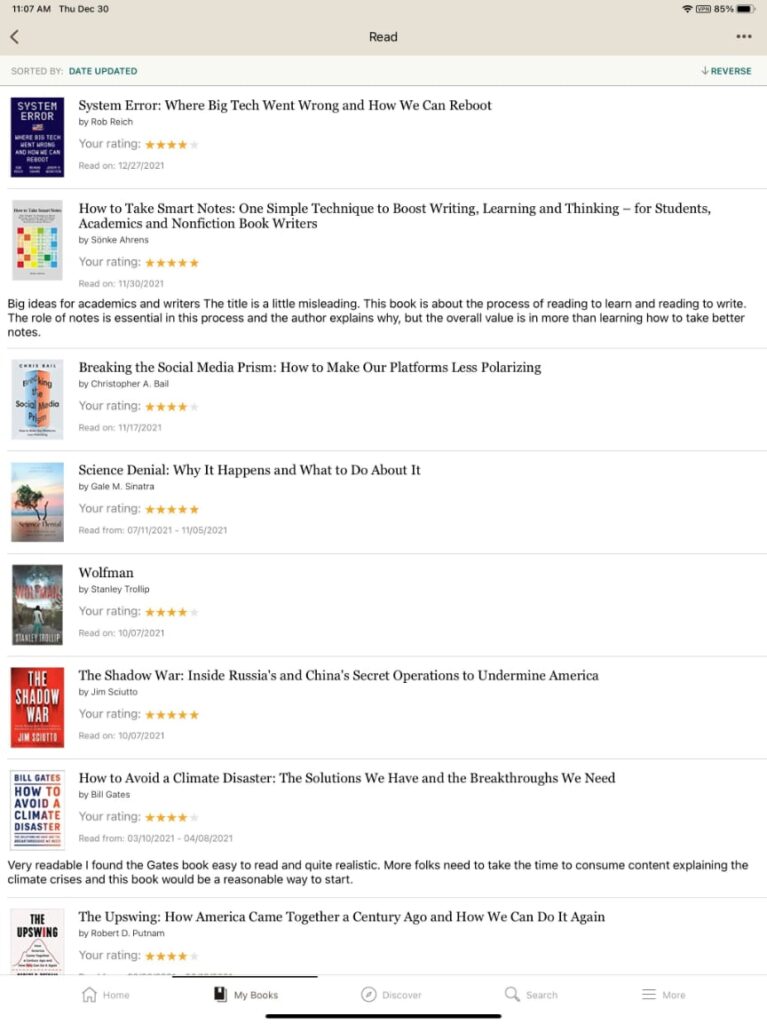
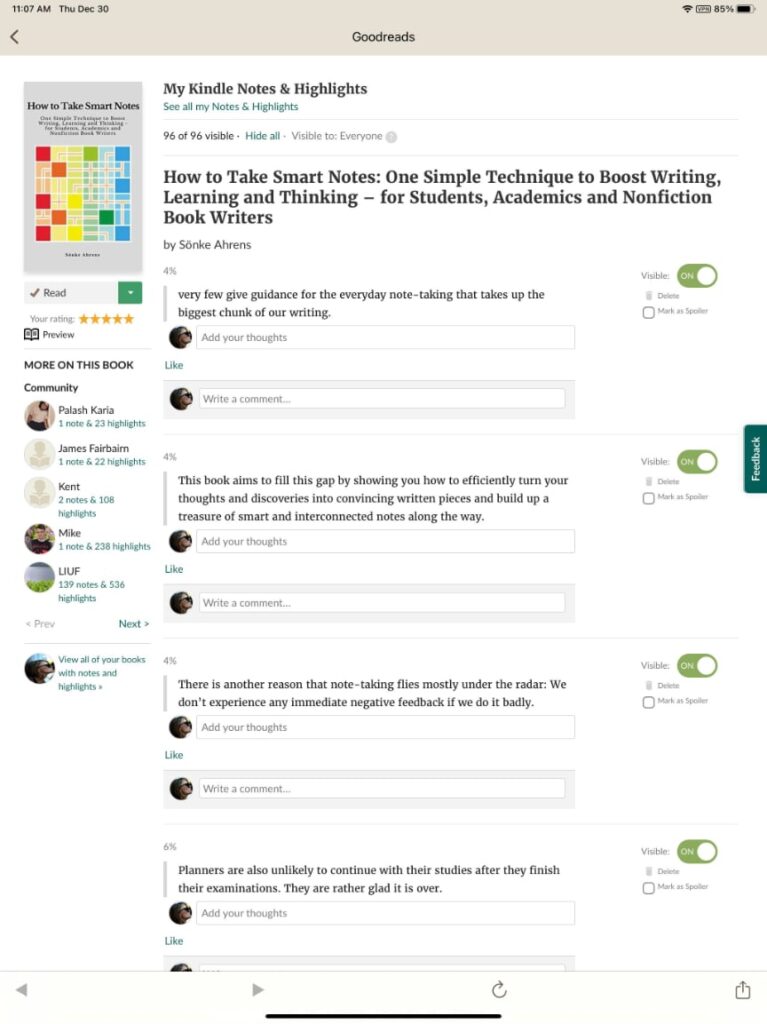
For those interested in sharing insights from books, my recommendation would be Goodreads. I have had a Goodreads account for several years, but I had not paid much attention. Recently, I learned that Goodreads allows for the storage and sharing of annotations. These annotations can be shared. I have not made the effort to download the highlights for all of my books – this is a security measure to allow individuals to decide what they want to offer as a social service. Try “How to take smart notes” to see what the sharing of notes looks like.
Applications for educators? Social bookmarking sites offer a great opportunity to share resources with others having similar interests (e.g., history teachers) or to offer a collection of resources to students.
I have been reading a book on privacy (System Error) with a story and recommendation of a demonstration site I thought others might find interesting. The issue considered is how information we think to be shareable can still be used to identify us.
Latanya Sweeney, then an MIT graduate student, and anyone else who wanted, had access to the record of Massachusetts hospital visits by all state employees. These data contained no information assumed to identify individuals – name, address, social security, etc. The governor of Massachusetts contended that the privacy of those associated with these records was secure. Sweeney did not agree. She purchased a list of all registered voters in Cambridge that contained the names of voters as well as their birth date and gender. There were six people in Cambridge with the same birthday as the governor, three of these were male, and one lived in the same zip code as Weld. Sweeney cross referenced the medical records by birthday, zip code, and gender, located the governor’s records and sent him a copy.
Sweeney contends that 87% of Americans can be identified based on zip code, birth date and gender. These are variables we commonly provide without concern.
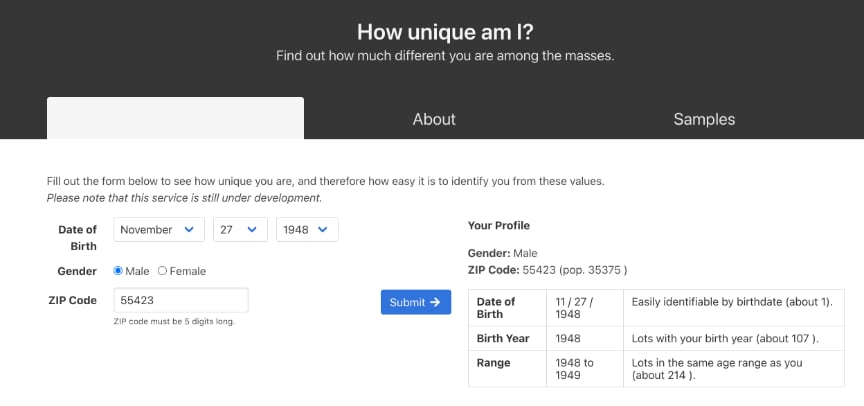
Sweeney now works at Harvard’s Data Privacy Lab. The lab offers an interesting demonstration. You enter your birthdate, zip code, and gender. I tried the demonstration and found that I could be identified as unique. This may seem amazing, but work through the math. There are likely at least three gender categories and 365 days in the year. I am 73 years old. Even though there are 35,375 individuals in my zip code, the combination of my age, gender, and birthdate identifies one person.
These data do not offer up my name. I suppose this could be determined from voting records as Sweeney demonstrated. For other purposes, this is demonstration of just how easily we can be targeted with ads or information.
Reich, R., Sahami, M. & Weinstein, J. (2021). System error: Where big tech went wrong and how we can reboot. HarperCollins.
This is the final post in the series describing my own writing process. I will admit that putting the ideas you have collected together for a public product can be very time-consuming, but less dependent on tools/services others have not encountered. I write mostly in Google docs. I write most blog posts in WordPress (the same tool that organizes and presents my posts to the public). I have experimented with other writing environments and for those wanting to try something different I will describe my favorite.
Scrivener is a tool for organizing resources and turning these resources into a final product. You can try the tool at no expense, but I did purchase my copy at the educational rate of $40.
I would describe Scrivener as a tool for larger projects that involve the organization of many resources, exploring what your final product might look like, and working on a product that will take some time to complete. I wrote this series of blog posts using Scrivener (the total of all the posts was a major project) and I wrote one edition of our textbook using this tool. Because of its system for storing and organizing resources, Scrivener could be used to explore the Smart Note writing process before fully investing in the multitool process I have described over the past several posts.
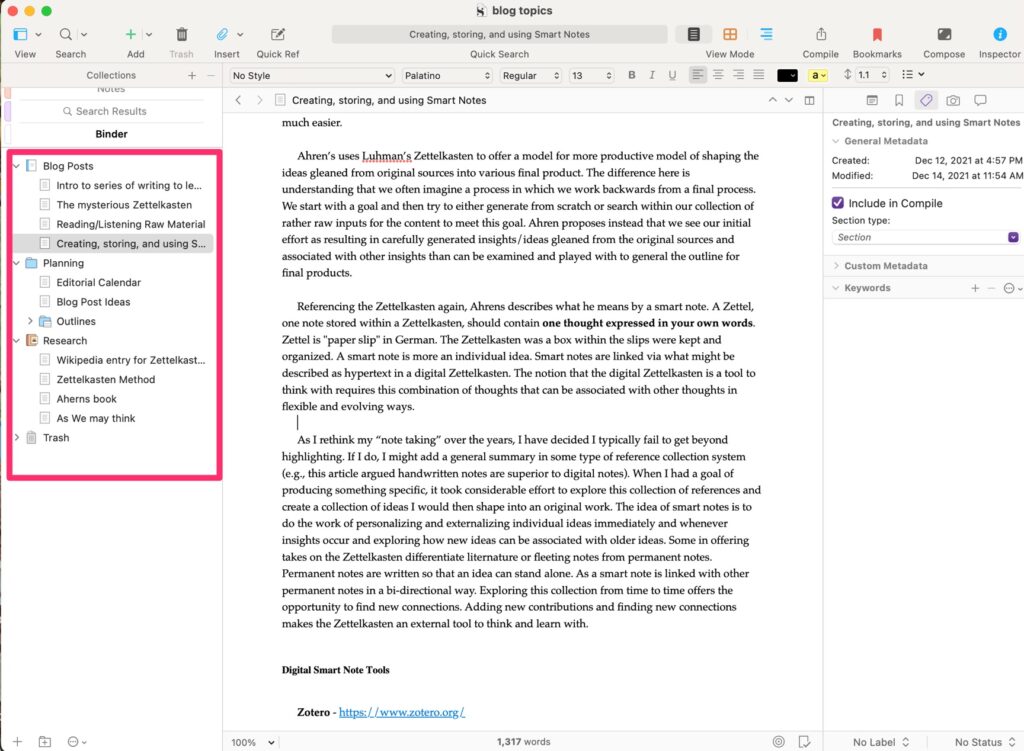
The three panel system shown below works this way. The binder (leftmost panel) provides access to content (background, original written products). The content selected appears in the middle panel (this happens to be the previous post in this series). The right-most panel provides access to metadata associated with the content in the middle panel (tags, notes, etc.).
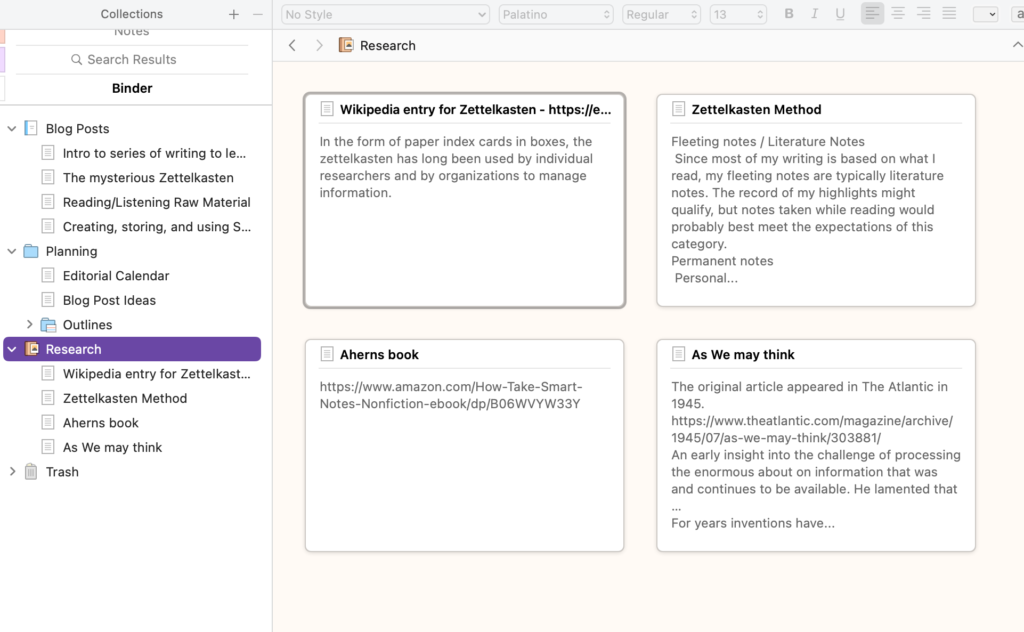
Scrivener has other tools (views) for working with and organizing ideas. The following is the corkboard which allows the identification of ideas that can then be organized and expanded into text.
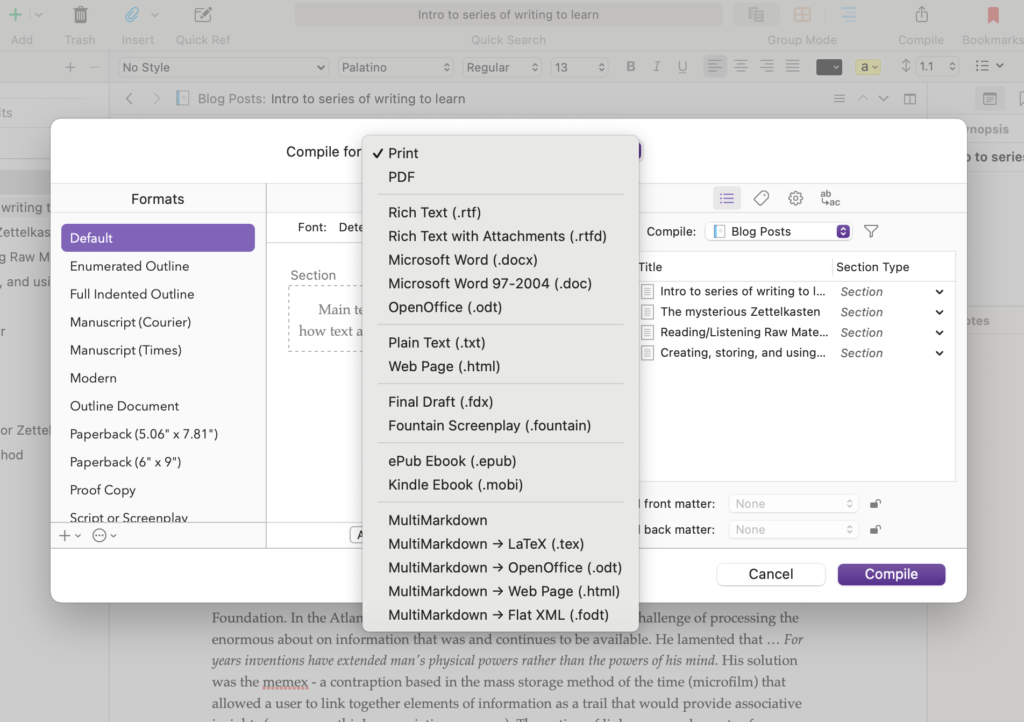
Scrivener is expandable and has an active community contributing templates for various types of products (blog posts, screenplays, scientific articles, etc.). Templates establish the organizational structure of the Binder. If you want, the content of a Scrivener project can be composed and output in formats for different purposes. For example, you can output the product you are working on in a format appropriate to upload to Kindle (.mobi). This is a very powerful tool I admit I use to introduce some variety into the time I spend writing. I have learned enough about the product that I can use it from time to time and move content back and forth to other tools without a lot of wasted time.
The impetus for writing this series of posts was a couple of insights I gained from Ahren’s book (How to take smart notes) which I have described in past posts (a link to the Amazon source for this book is included at the end of this post). I have tried to convey several of these insights in this series. Perhaps the most important insight was that writing is a process (not really that new) and what most think of as writing should begin earlier in this process. Smart notes are what we should be writing earlier.
It is not uncommon to engage in the highlighting and annotation processes I described in an earlier post and it is not uncommon to try to use the ideas selected by these processes in later writing. What is missing for most writers is the opportunity to identify, externalize (write), and organize individual ideas as an intermediate step that makes the transition from the input of reading to the output of writing much easier.
Ahren’s uses Luhman’s Zettelkasten to offer a model for a more productive model for shaping the ideas gleaned from original sources into various final products. The difference here is understanding that we often imagine a process in which we work backward from a final product. We start with a goal and then try to either generate from scratch or search within our collection of rather raw inputs for the content to meet this goal. Ahren proposes instead that we see our initial effort as resulting in carefully generated insights/ideas gleaned from the original sources and associated with other insights that can later be examined and played with to generate the outline for final products.
Referencing the Zettelkasten again, Ahrens describes what he means by a smart note. A Zettel, one note stored within a Zettelkasten, should contain one thought expressed in your own words. Zettel is “paper slip” in German. The Zettelkasten was a box within which the slips are kept and organized. A smart note is more an individual idea. Smart notes are linked via what might be described as hypertext in a digital Zettelkasten. The notion that the digital Zettelkasten is a tool to think with requires this combination of thoughts that can be associated with other thoughts in flexible and evolving ways.
As I rethink my “note-taking” over the years, I have decided I typically fail to get beyond highlighting. If I do, I might add a general summary in some type of reference collection system. When I had a goal of producing something specific, it took considerable effort to explore this collection of references and create a collection of ideas I would then shape into an original work. The idea of smart notes is to do the work of personalizing and externalizing individual ideas soon after the initial encounter while reading and exploring how new ideas can be associated with older ideas. Some in offering takes on the Zettelkasten differentiate literature or fleeting notes from permanent notes. Permanent notes are written so that an idea can stand alone. A smart note is linked with other permanent notes in a bi-directional way. Exploring this collection from time to time offers the opportunity to find new connections. Adding new contributions and finding new connections makes the Zettelkasten an external tool to think and learn with.
Zotero is a free tool, but provides a limited amount of online storage at the free level (300 MB). For 2 GB, you would pay $20 annually. Zotero allows the storage of a lot of different types of files including pdfs and web snapshots. If you store this type of information, 300MB will not be sufficient. I store all pdfs in other ways so I am waiting to see how fast the free storage capacity goes.
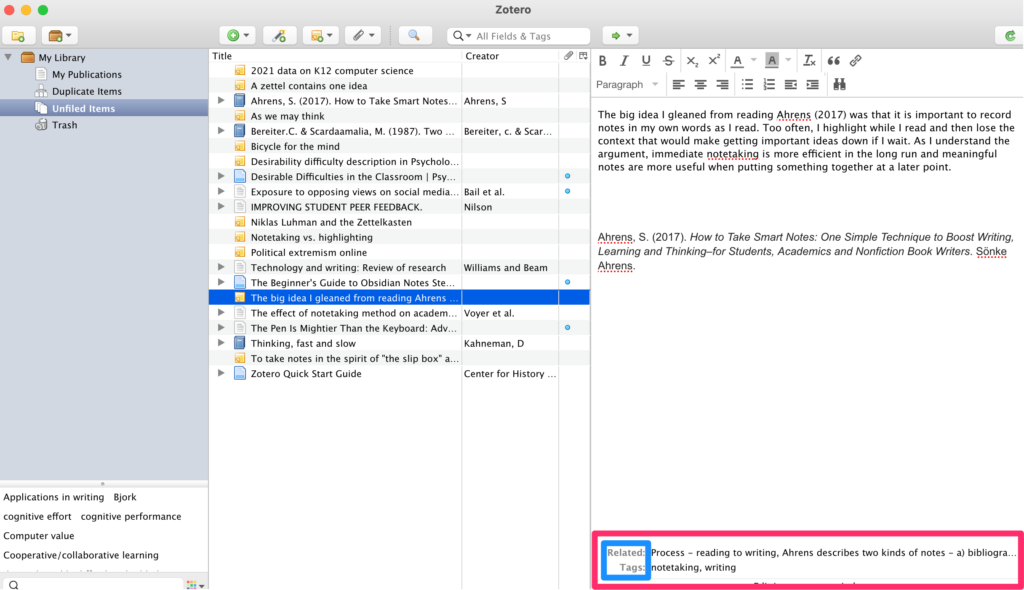
I am using Zotero to store my summary insights and references. I can store links to the other sources such as annotated files stored in Diigo (previous post). The right-hand panel in the image below shows what one of my notes looks like. The key to Zotero use are the additions stored in the area at the bottom (the red box). Here I can add tags and links to related notes in the system. A tag cloud also accumulates and can be seen at the bottom of the left-hand panel. So, this might be considered a version of a Zettelkasten and the idea would be to build this collection and periodically visit to explore ideas and add links among ideas.
Obsidian is another tool recommended as a Zettelkasten. It is a free tool and I can store the files it generates in a way that is local, but is also synched to the cloud (iCloud). This means I have cloud storage and that I can access my resources from other devices that access this same online storage.
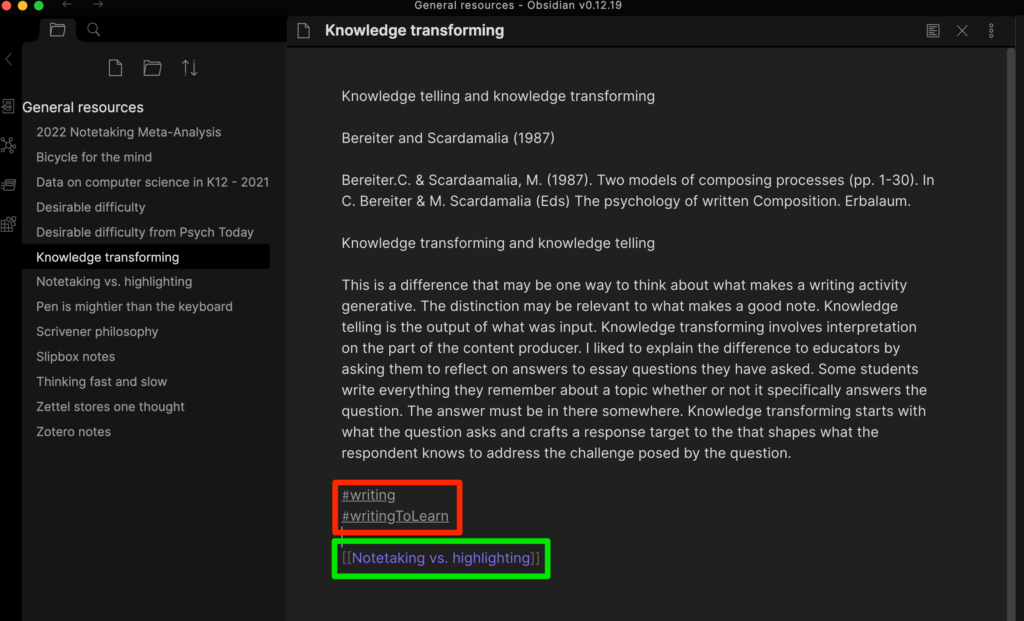
The files used in Obsidian are written in markdown text. A system such as this should be familiar to any older tech folks who used tags to add links and text styles in the early days of HTML use or wiki tools. You can see some of these tags if you look closely at the bottom of the top image. The red square surrounds tags that can serve as the target of searches (#tagname) and the green box surrounds an internal link to another note [[file name]]. Other tags provide external links, text style, etc. You can get by just learning three or four tags so adding these additions is not difficult.
While a markup system may seem primitive, the great advantage is that the files that are stored (each entry ends up as a separate file) can be read by pretty much any tool (e.g., word processing program, text editor). The concern is about longevity. Should something happen to Obsidian, the files stored in a safe way (locally and in the cloud) and can always be salvaged.
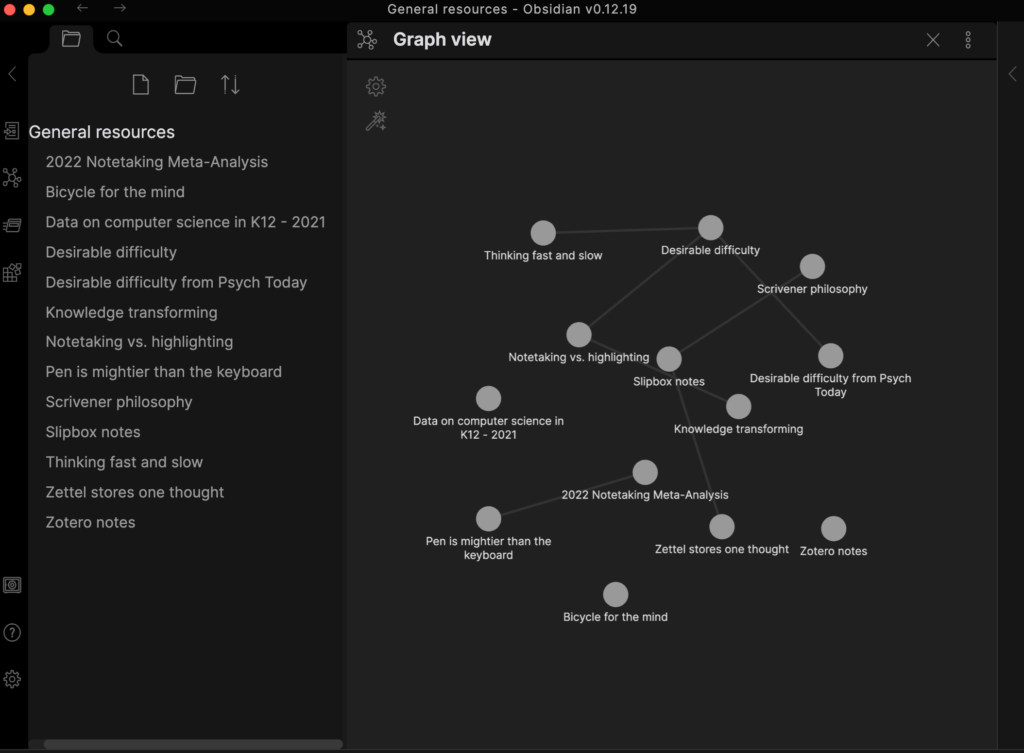
Obsidian creates backlinks any time two files are linked. It is possible to visually see and explore the system of files that is created (see below) and these visual representations can be refined using a filtering system.
The longevity issue
The idea of a Zettelkasten is intended to create a manageable repository of content that will exist for maybe decades (see the comment about text markup in my description of Obsidian). This may sound grandiose, but for any of us at the tail end of a career that involved information problem solving for several decades the struggle to transition from one system to another is real. I had notes on paper note cards in a box and a file cabinet filled with highlighted copies of journal articles with other articles still in the decades of journals on my office shelves. A collection of pdfs was the next stage. Then various systems such as EndNote for trying to manage the collection of pdfs. Now, I am trying something new. With digital content, I think there are advantages and ways to build on what you have and not start over.
Getting started
It is possible to be attracted to new tools and spend too large a proportion of time learning the tools. I see some role in the latter stages of my own career to be exploring tools so that others do not have to do this on their own. So, how would I get started? I think I would start with a pdf tool and a tool for organizing and saving ideas/insights. You could use Mendeley Desktop (pdfs) and either of the tools I have described here at no cost.
Little that I write comes originally from my own thoughts. Ideas mostly start with things I have read and occasionally heard. Giving credit when possible is a value I learned early.
My comments in this series are based on an analysis of my own writing process with an eye toward improvements I might make. This is not a new goal as I have experimented with aspects of this process and how I might support it with technology for years. I have explained the more immediate impetus in a previous post.
This post concerns the various tools I use to collect and process ideas from various inputs. The goal of what I am working on in my most recent process upgrade is to try to move aspects of writing earlier in this process. My intention is to use the note-taking capabilities of many of the tools that follow more aggressively and to feed these notes forward to the newest stage I will explain in the post that follows. The following material is organized by input source. You may have more of an interest in some of these inputs than others depending on how you contact information in your life,
Listening
I have included listening more based on past experiences than on present practices. I used to take notes during presentations I would attend. Often these presentations would occur at conferences I attended. If you are younger, you may be attending classes and taking notes as part of that type of formal learning environment.
The two tools I list here have an interesting capability I think most could benefit from applying. The tools record audio and link locations in the timeline of this audio to any notes that are taken. The benefit here is that should the notes be vague at later consideration, the original audio can easily be reviewed for clarification. I also suggest that when the note taker realizes that something is slipping past them they simply enter some marker in their notes – “I am confused here”.
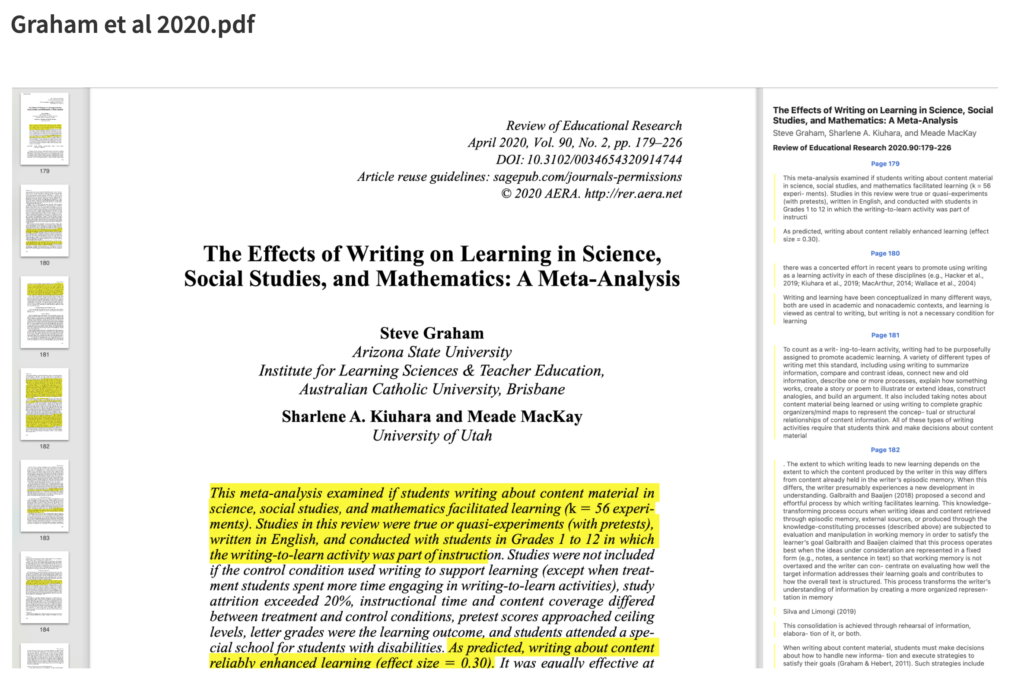
I am a retired academic so much of what I read and still write about is originally encountered in journal articles. For years now, university libraries offer online access to these journals allowing the download of the pdfs of articles. I used to joke that I would use my computer to download what I wanted to read before I would walk across my office to find the same article in a journal I had on my shelves. I used to use EndNote to read and highlight articles. I had issues synching the annotated content between my textbook computer which is the machine I prefer for writing and my iPad which is the machine I prefer for reading. After some experimentation, I settled on BookEnds and Highlights for these purposes. I use them together as each has advantages. The unique value of Highlights is that highlights and notes are easy to export as a separate document should you want to use this content separate from the original pdf (the image below is from Highlights). I believe these are primarily Apple tools and both require a subscription fee.
The following is the display when highlighting and annotating in Highlights. The highlighted content and notes generated appear in a separate panel on the right and can be exported.
Other pdfs
I do read other content as pdfs. My tool for this is Mendeley based in a more organized setting called the Mendeley Desktop. If you are trying to avoid paying for a service that both organizes and allows the annotation of pdfs, this would be my recommendation.
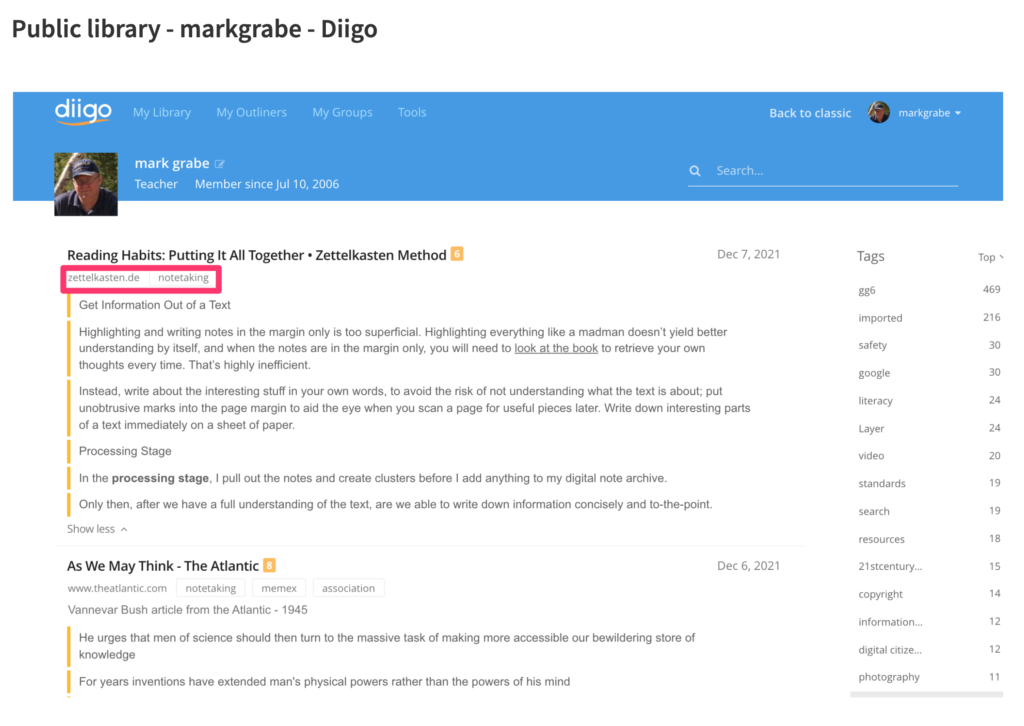
Diigo is considered a social bookmarking tool. It is social because stored bookmarks (and contents) can be made available to others. A user can set the default to private and then uncheck a box that would add the annotations/highlights for a given site to make the content public. The bookmark itself stores the web address of the original content, Highlights and annotations are stored as part of the bookmark. Bookmarks can be tagged (see terms within the red box) and these tags can be used to search for other bookmarks within the collection. This is a powerful tool I have used for years mostly when was focused on sharing resources with others. Lately, I have become more serious about the other opportunities (e.g., an outline tool that allows the organization of content from multiple bookmark content as an intermediary stage before writing). I offer access to my public notes in one of the links I provide here. I pay an annual fee for the Pro version of this tool. I could get by with the free version (e.g., I could delete each outline I construct to stay within the number of outlines allowed at the free level), but I am pushing myself to use more of the capabilities of this service.
I don’t think I have purchased more than one or two physical books in the past decade and in most cases, this is because I happened to be attending a book signing. I average purchasing about a book and a half a month in digital form. I use Amazon exclusively and while I understand other similar services are available I stick to one environment as a matter of convenience.
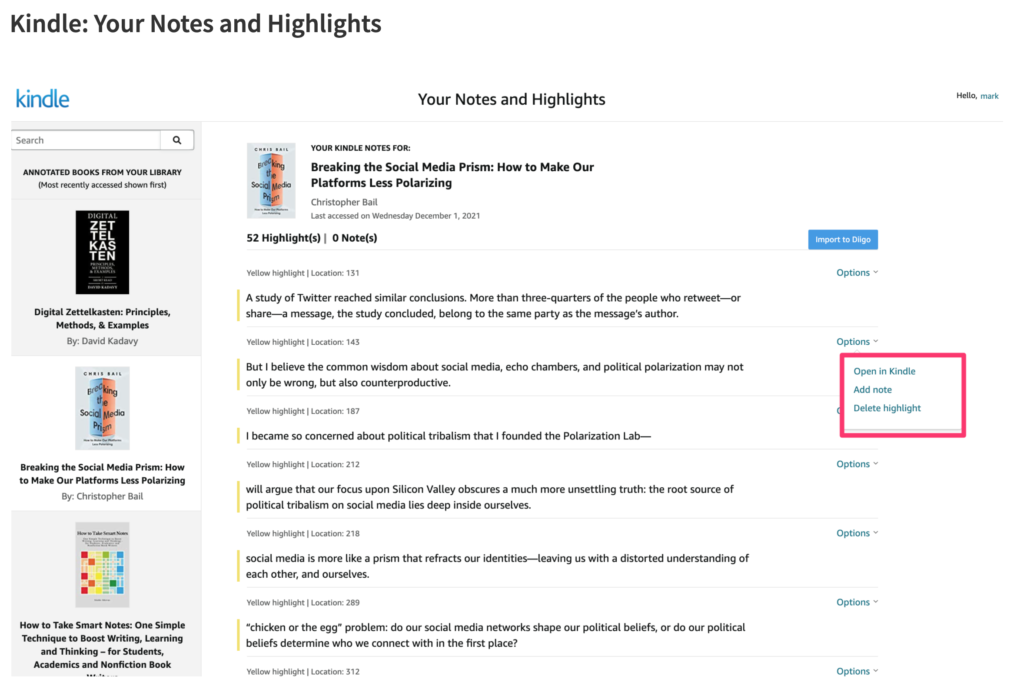
The Kindle (on one of several devices I use) allows highlighting and note-taking. What some may not realize is that Amazon stores all of your highlights and notes online and there are several ways to access this content.
Highlights and notes generated while reading a Kindle book can be exported. This content can be found online – https://read.amazon.com/ – and can be edited further (add a note, delete the highlight) online. Kindle and Diigo have a unique relationship in that those who pay for the Diigo service can send their highlights and notes from Kindle to Diigo with the click of a button (see the blue button – Import to Diigo) in the image that appears below.
One final comment – I think it is important to give some thought to sustainability. Services come and go and the process I am attending to describe in total assumes that value comes over an extended period of time. Some issues to consider. First, are resources stored in a format that is independent of the service using the resources. Pdfs seem to meet this goal. Another format, I will discuss in the next issue is markdown text. This is essentially a text file containing common symbols to trigger things like links and tags (e.g., [[]] and #). If the worst happens and a service goes away, pdfs and markdown files can be opened using several other tools. Second, store in multiple places and backup. I try to use services that generate content I can find on a local machine and also exists with reputable services “in the cloud”. I use DropBox and iCloud for online storage. I trust these services and at worst assume I would have some warning if I would have to find a different online storage service.
Manage Consent
To provide the best experiences, we use technologies like cookies to store and/or access device information. Consenting to these technologies will allow us to process data such as browsing behavior or unique IDs on this site. Not consenting or withdrawing consent, may adversely affect certain features and functions.
Functional
Always active
The technical storage or access is strictly necessary for the legitimate purpose of enabling the use of a specific service explicitly requested by the subscriber or user, or for the sole purpose of carrying out the transmission of a communication over an electronic communications network.
Preferences
The technical storage or access is necessary for the legitimate purpose of storing preferences that are not requested by the subscriber or user.
Statistics
The technical storage or access that is used exclusively for statistical purposes.The technical storage or access that is used exclusively for anonymous statistical purposes. Without a subpoena, voluntary compliance on the part of your Internet Service Provider, or additional records from a third party, information stored or retrieved for this purpose alone cannot usually be used to identify you.
Marketing
The technical storage or access is required to create user profiles to send advertising, or to track the user on a website or across several websites for similar marketing purposes.

You must be logged in to post a comment.