Mem Note Taking

I don’t know if the time has come for specialized note-taking tools for students, but some of the emerging capabilities used in these tools (e.g., AI) point to important future opportunities. My comments on these services in other posts have mostly focused on the long-term advantages of developing a large store of information that can be repeatedly examined to address immediate needs. There is no reason that this capability could not be an opportunity for students of any age, but younger students tend to be more focused on the next assessment challenge. So the adoption of the type of capability I describe here will likely move over time from grad students to college students to secondary students.

The impetus for this post came from a post I read on the Mem site. This post explained how Mem could be used as a note-taking tool for college students. I have been a Mem user for some time and thought I would create a post on this same topic. A couple of points first. I use the Mem X version which costs me $8 a month for the annual plan. I made this investment because I was interested in exploring the AI capabilities. There is a free version without this capability and reduced prices for students. It makes sense to start with the free version before going all in.

It occurred to me that students may be hesitant to trust an online service that is unfamiliar for their notes. I think it far more likely students would lose a notebook than lose access to their online notes. Students who take notes using a more familiar application can easily continue to do so and then copy and paste their notes into Mem. Mem does offer input and export capabilities so there is no permanent commitment if having your notes locked into a system outside your own computer is a concern.

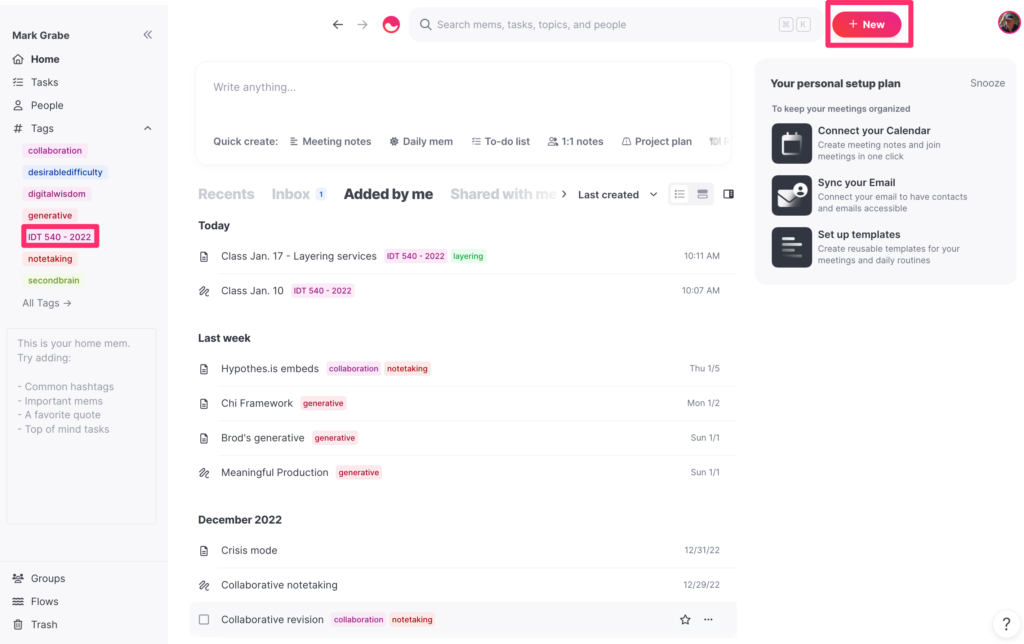
I have tried to decide how to explain the note-taking method that makes sense for this service in an efficient manner. I am ignoring a description of downloading Mem and an overview of the service and will begin with what to do with a blank note (the create a note button appears in the upper right-hand corner of the following image).

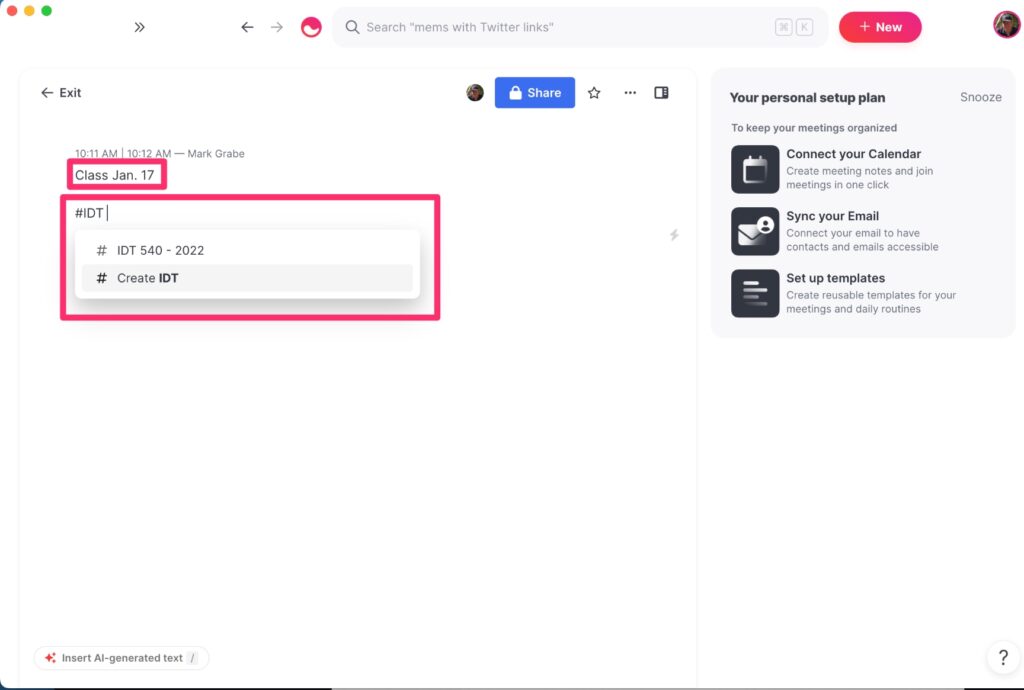
Mem does not rely on a hierarchical storage approach which most tech users might imagine as a hierarchical system of folders. Because the notes taken for a given course needs some efficient way to differentiate the notes for that course, the mechanism I describe in Mem takes advantage of tags. Mem uses what is called markdown to add capabilities to raw text (like the tags in HTML). For tags, the markdown symbol is #. My example is set up for IDT 540 which is a course I teach, so I am using #IDT 540 – 2022 as my tag for the notes for this course. One nice feature of Mem is that it begins to offer suggestions as soon as it can guess what tag you may be entering (this is what you see below). You can enter tags at any location on a Mem “note”. Mem also treats the first text on a note as a label or title so I don’t want the tag at the very top. At the top I enter a title that is appropriate for the notes from a specific date. There is no reason only one note could be generated for a date. It might be more effective to focus on topics covered and differentiate the notes taken on a given day with some addition to the title text.
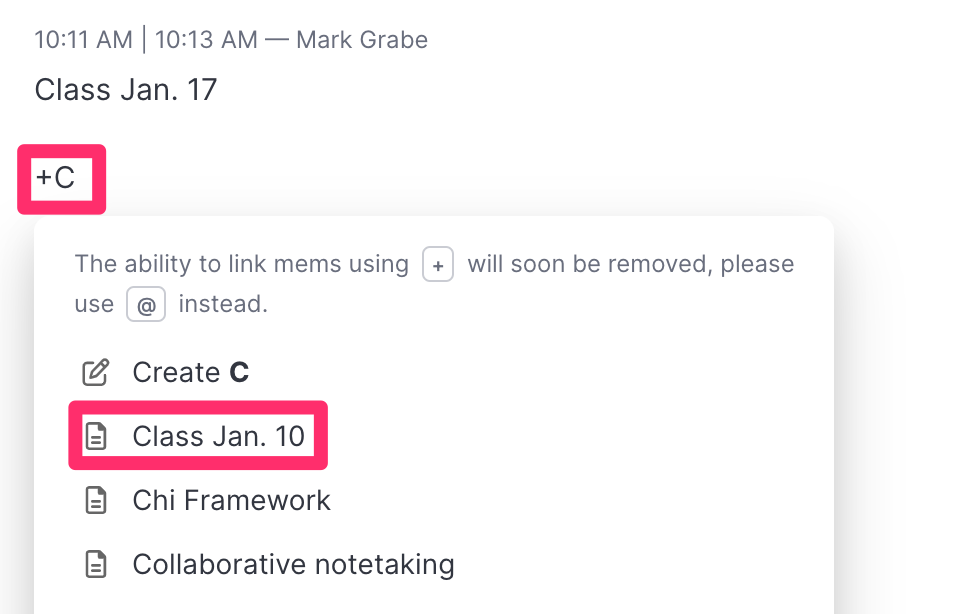
Here is the other adaptation it is useful to make to a Mem note. A learner will eventually want to “page” through their notes for study. The easiest way to do this is to link notes from adjacent classes. Notes can be found in other ways using search, but this is a handy technique that does not depend on search. Internal links in Mem use + as the markdown indicator for a link. Enter the + and begin entering the title for the preceding or following day’s note and the dates of notes will appear (again this is the anticipation text entry feature) and select the appropriate target or enter the entire title if none appears.
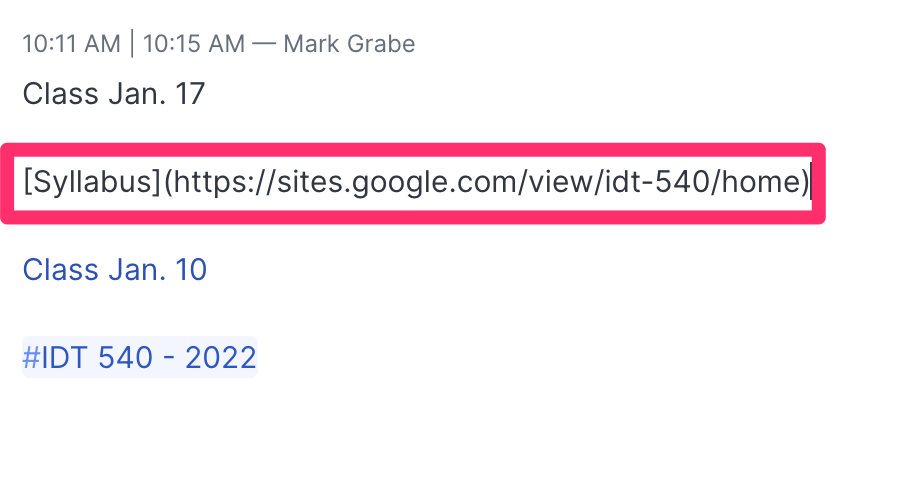
One more markdown technique that may be useful. For external links, the format is [text](URL). So, to link to the online syllabus for this course, I use the Syllabus for the text and the URL for the Google Site for my syllabus.
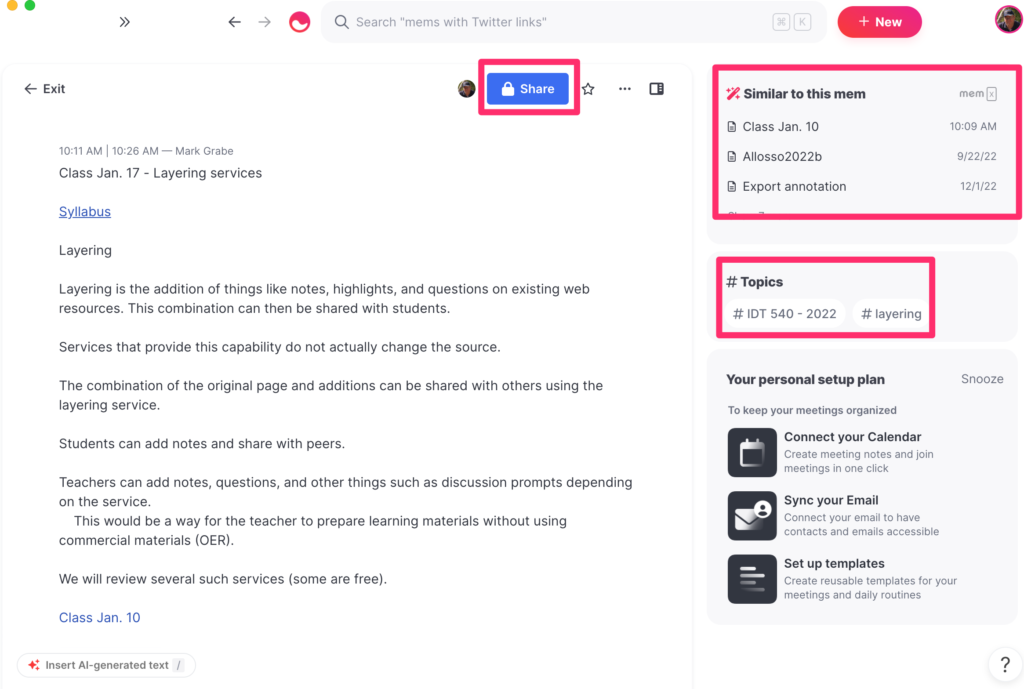
These three techniques should take care of the basics of taking notes. The screen view while taking notes is shown below. You should be able to identify the title, the link to the syllabus, and the internal link to the other existing note at the end. Other features on the screen include the button to control the sharing of notes and similar notes Mem has found among those I have stored (the system is using information in the present note to find related information in other notes).
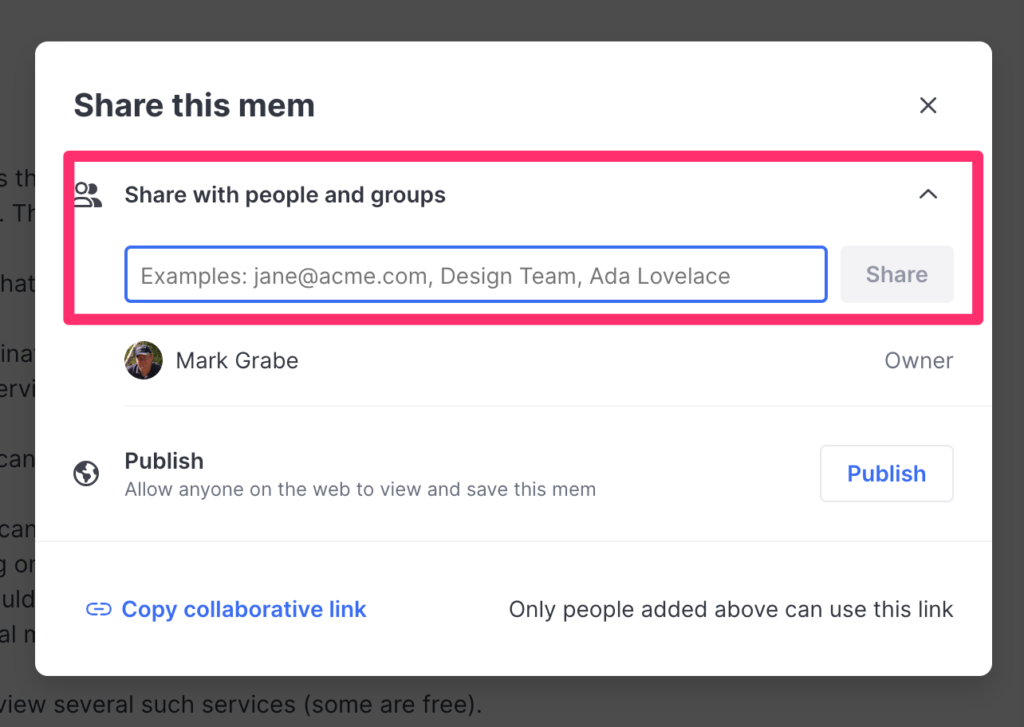
The share feature could be useful if the teacher or student peers wanted to share notes. The previous image identified the share button that brings up the following window. Once you have identified other users or teams of users you share by entering the identity of the user or the team. You can also identify a share target using their email address. There are lots of interesting applications for sharing notes and Mem makes sharing easy among users.
This is the Mem home screen. I include it as a reminder that Mem has been designed as a location for all your notes over an extended period of time (i.e., years). Using Mem or a single course during that course would just scratch the surface of the power of this service. A couple of things to note from this image. The tags are displayed in the left-hand column. Most popular tags are visible and there is a link to all tags. The new note button appears in the upper right-hand corner.
Taking notes in this system is easy and requires only a couple of new techniques. The free version is the way to get started. Copying text from another existing note-taking approach (word processing document) would allow students to easily transition to using Mem “live” in their classes.

The link in the first couple of paragraphs to the Mem blog provides some other suggestions.

One more thing. Taking notes often benefits from including images or sketches. Mem note can include images. If the instructor provides access to her lecture slides, you can screen capture the parts of a slide you think would be helpful and then drag the image file onto a Mem note.

Loading

Generative Hierarchy

I happened on this Medium post describing what the author called the Explanation Effect. The article itself was about strategies we can apply to learn and understand and the explanation effect sounded very similar to what I have previously described as Teaching to Learn. Teaching and even preparing to teach are great generative learning activities as most teachers will tell you. You must understand something to teach it well. The explanation effect implies more than the one-way act of teaching others and might be more accurately described as an educated discussion in which the parties involved share and perhaps even argue about something. Hence there is an exchange of information, accurate or not, about something. The Medium post argued this type of experience is one of the best ways to learn.

Generative learning activities have always been a personal fascination and the explanation effect would be an example. It is an example of an activity in which engagement in an external activity provides a likely way to manipulate important cognitive behaviors involved in retention and understanding. Many of the behaviors learners engage in as study activities are intended as generative activities.

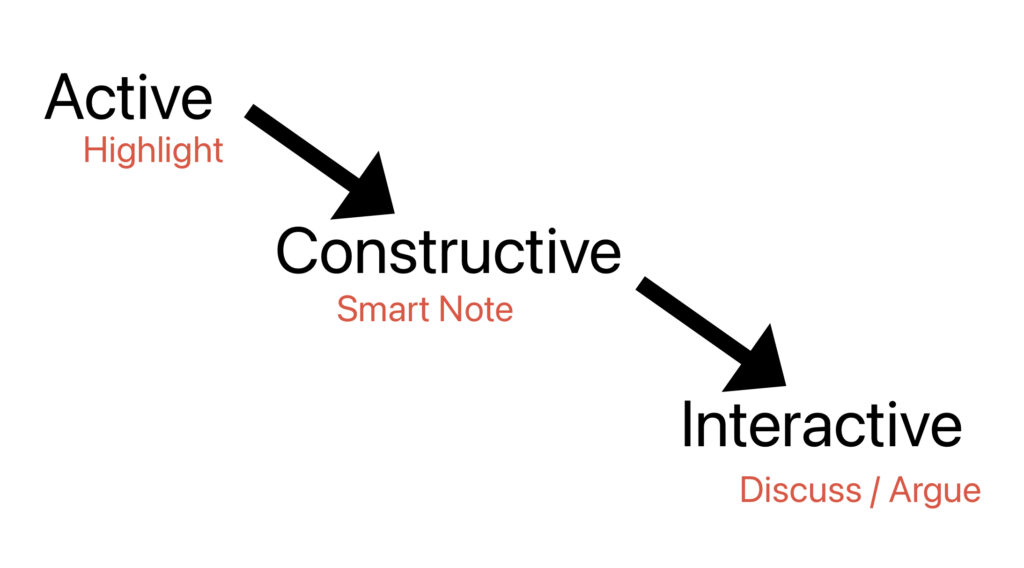
To understand why engaging in tutoring (as a learner) or peer teaching (both parties are really learners) is proposed as a superior generative activity, it might be helpful to consider a hierarchical framework of generative activities proposed by Chi (citation included at end of this post). In this hierarchical framework, higher-level activities integrate lower-level activities and as one advances through the hierarchy it is proposed that activities at that level are more productive. In the following image, I have identified the stages of this framework and added an example of each level I assume would be familiar to most educators.

Smart notes require that a learner summarize and extend an input with personal insights or examples. So, a student might highlight a concept in a textbook (active) and then construct a note that summarizes what was highlighted as the learner understands it based on existing knowledge and perhaps include an example. Hence, additional cognitive activities would be included in the construction of a note. It is important to recognize that an activity (e.g., creating a note) may or may not involve productive cognitive behaviors (e.g., copying the text into a notebook) or may involve other cognitive activities leading to even more enhanced understanding and application. As an educational device, external activities are assigned with the expectation that the use of the activity will be productive, but the cognitive connections are always under the control of the learner.

I like to describe interactive activities as involving secondary inputs. If students discuss or argue about concepts from a book, the information in the book is the original input, but the comments from a peer or a tutor are a second input. The second input may add something new for the learner to add to an existing understanding or challenge the understanding the student has originally generated and now force a reconsideration and possible modification.

Chi and others have engaged in research to justify the proposed advantages I have described here. When researchers offer insights that hopefully will influence practice, the impact tends to depend on how practitioners translate general recommendations and how practical it seems it would be to come up with activities matched to these insights. I think educators understand practices such as guided discussion or issue debates and I hope the way in which I have explained the benefits of seeking activities at the constructive and interactive levels of Chi’s framework is persuasive

Chi, M. T. (2009). Active?constructive?interactive: A conceptual framework for differentiating learning activities. Topics in cognitive science1(1), 73-105.

Chi, M. T., & Wylie, R. (2014). The ICAP framework: Linking cognitive engagement to active learning outcomes. Educational psychologist49(4), 219-243.

Loading

Most Popular in 2022

Identifying the most popular posts from the previous year is a common thing for bloggers to do. We like looking at our stats and perhaps others may have missed a popular post for one reason or another.

Here are my top three posts on this blog for 2022

Hotspots with Google Slides.

Shape-shifting Portfolio People

Hyperdocs, WebQuests and Other Teacher Created Designs

Here is the interesting thing about these posts. None were written in 2022. I was puzzled by this discovery until I looked at some of the other stats for the year. These stats include the referrer for visits to this blog. People might just bookmark this site and visit it to see what I have written. A related approach would be to use an RSS reader that follows multiple blogs and shows when anything new has been posted. This is the primary way I identify new content on other blogs. Twitter and Mastodon are linked to this blog and a short announcement appears when I write something new. So, there are connections from social media announcements. Finally, blog posts are followed by search engines and posts may appear in the list of hits when a search engine is used.

The most frequent way for others to come to this blog is through the use of a search engine. This is probably the reason older posts are most frequently visited. It might also mean I have not cultivated enough Twitter followers. It probably indicates I am old school in relying on RSS to follow bloggers and this discovery method has fallen out of favor.

Whatever the access method, I appreciate your attention to the topics we both seem to find interesting. Happy New Year.

Loading

Class Disrupted

This is a recommendation for the Class Disrupted podcast. This podcast is now in its 4th season and is hosted by Dianne Tavvener and Michael Horn. I follow several podcasts that include a focus on mastery learning in k12 settings and this wide-ranging podcast does frequently discuss mastery learning topics.

Aside from mastery learning, I am fascinated with this series because there is a lived historical element there for consideration. The podcast started in response to the COVID disruption. Rather than first listening to the most recent episodes or to episodes that have an interesting description, I would recommend listening from the first episode on. If you have an interest in technology and the now related topic of the reaction of many educators to the forced use of technology during the “learn from home” years or are intrigued by what has to have been one of the most disruptive periods in our lives and the long term impact of this disruption, there is plenty to consider by working your way through the episodes from the beginning. What were our expectations? What were our plans? How are things working out?

Loading

InsertLearning Update

InsertLearning is one of my most frequent recommendations for K12 classrooms. It is one of the examples I highlight in my Kindle Primer – Designing Instruction Using Layering Services. The InsertLearning environment allows a teacher to add elements to existing online web pages and then assign this combination to students. It is a great tool for teachers wanting to “ditch the textbook” or who want to emphasize OER. The elements include comments and highlights (which are not common additions among tools of this type), but also questions and discussion prompts. I call InsertLearning an environment because it also includes a management system allowing educators to assign resources prepared in this fashion and to view individual student responses to questions. The original service was a bargain at $8 a month, but I see the new price has been increased to $100 a year. For what this service can do, this is still a reasonable price.

What had confused me about the service was that when I attempted to review the service for updates all of the content my searches seemed to surface ended a few years ago. I finally contacted one of the founders and he explained that the service had been purchased by fan.school. This company has made educational services originating in Minnesota a target of acquisition and provides a more stable for continuation of several smaller companies. InsertLearning works as a source to learn about the program and fan.school provides an access point specific to this product.

As far as I can tell, my videos describing InsertLearning still offer an adequate overview of the service. My price quote is no longer accurate.

Loading

Addressing middle school math

Educators are likely familiar with the learning challenges students experienced during the COVID years when face-to-face instruction became impractical. The concern for student achievement during this period of time has been documented in declining performance on the NAEP scores. It appears that math achievement was particularly hard hit and the middle school years which set students up for the study of algebra represents a unique problem area.

I decided to focus on a resource that called attention to this problem mostly because it proposes one productive response would be to make more frequent use of mastery instructional strategies in middle school math classes. Readers who follow this blog will understand that mastery learning is one of the topics I spent time writing about. [other more detailed posts about mastery instruction can be found by selecting the category “mastery” that can be found in the left-hand column of this blog]

Mastery instruction individualizes learner experiences meeting students at the level of their understanding and advancing them as individuals when understanding has been achieved. It is an approach concerned that learning goals be met even when group-based instruction would likely move ahead leaving some students missing skills that are prerequisite to new material.

Among the other recommendations to address the middle school math challenge is to double up on math class frequency. This would be a second way to provide additional time to assure the mastery of essential skills, but it is more of a group-based approach than the individual learner emphasis on mastery learning.

Loading

I was wrong about ChatGPT

Like so many, I tested the capabilities of the new AI tool ChatGPT and offered a personal assessment. While I immediately saw that the tool would have significant consequences for classroom practice and especially those educators who assigned writing to learn tasks, I proposed that a fix would involve requiring the inclusion of careful citations in work students submitted. The samples I had ChatGPT generate did not provide citations and my naive understanding of the corpus of content the AI was drawing on did not include citations for the content.

I was wrong.

It took multiple efforts to find how to phrase questions so that the material produced would contain citations and then how to actually view the full citations for the work mentioned in a generated product. The following example involved two requests and are a modified version of the topic I used as an example in my first post. I have highlighted the mention of sources.

Me: How can a semantic network explain the tip of the tongue phenomenon and list citations that support this explanation?

The tip of the tongue phenomenon, also known as TOT, is a common experience in which a person knows that they know a particular word or piece of information, but they are temporarily unable to retrieve it. A semantic network can help explain this phenomenon by providing a framework for understanding how words and concepts are related to one another in the brain.

In a semantic network, words and concepts are represented as nodes, and the relationships between them are represented as edges or links. When a person is trying to retrieve a word or piece of information, they search through their semantic network to find the relevant node. If the person is unable to retrieve the word, it may be because they are unable to find the appropriate node in their semantic network, or because the node is not well-connected to other nodes in the network.

One study that supports the idea that the tip of the tongue phenomenon is related to the organization of semantic networks is a 2013 study by J. K. Stanley and colleagues, which used functional magnetic resonance imaging (fMRI) to investigate the neural basis of TOT. The study found that during TOT, the brain exhibits increased activity in the temporal lobe, which is known to be involved in language processing and the organization of semantic networks.

Another study that supports the semantic network explanation of TOT is a 2001 study by J. M. McRae and colleagues, which used a computational model of semantic networks to investigate the retrieval of words during TOT. The study found that the model was able to reproduce many of the characteristics of TOT, including the feeling of knowing a word but being unable to retrieve it, and the ability to retrieve the word after a delay.

Overall, the evidence suggests that the tip of the tongue phenomenon is related to the organization of semantic networks in the brain, and that semantic networks can provide a useful framework for understanding this phenomenon.

Me: Provide citations that explain how the theory of a semantic network can explain the tip of the tongue phenomenon.

  1. Stanley, J. K., Marslen-Wilson, W. D., & van Hell, J. G. (2013). The tip of the tongue phenomenon: An fMRI study. Journal of Cognitive Neuroscience, 25(6), 891-900.
  2. McRae, J. M., de Sa, V. R., & Seidenberg, M. S. (2001). On the tip of the tongue: What causes word finding failures in young and older adults? Journal of Memory and Language, 44(4), 542-579.

Loading