Wakelet

The world of computer services is cutthroat. There are only so many users and with some categories of online service it becomes very difficult to compete with an existing service even if your app is better. Everyone wants to be where everyone already. It is great that some are willing to keep trying new approaches.

Wakelet thought it found an opportunity when Storify decided to close up shop. Finding that services you think are useful are shutting down is also a reality. Just getting folks to use your service is only part of the challenge. At some point, you also must find a way to make money so you can pay for programmers, servers, and bandwidth. Anyway, Wakelet, not yet at that point where paying the bills was the primary problem, made an effort to attract Storify users by offering an easy way to transfer user content.

I wonder how Wakelet will monetize what seems like a powerful and intuitive service. Classifying many online services is sometimes challenging because others based on personal needs may see the service in a very different way.

I would describe Wakelet as a tool for curation. Some might use a curation tool to meet a personal need (Evernote, OneNote). As I write for other educators, my typical process is to review multiple online sources I might want to cite/link and I need a way to accumulate these sources before the writing process beings.

I see most educators using Wakelet more as a tool to organize resources for others. For example, an educator might come up with an interesting task, locate some great online resources appropriate to this task, and then share the task description and resources with the students. One educator might do something similar to share resources with colleagues – an introduction explaining the goal and then the collection.

Wakelet would describe these curated resources as collections. What might differ from situation to situation is whether the curator wanted the collection to be private, shared with specific individuals, or available to the public. This is pretty much what Wakelet allows.

Wakelet can be used from various devices. The most general application I have in mind involves the collection and organizations of online resources. For this purpose, it is most convenient when Wakelet can be added to a web browser as a plugin/extension. I use it from the chrome browser. Find a useful resource, click the Wakelet icon that appears in the browser to bring up a dialog box to select the desired category from among those you have established. Or, just save the resource and worry about categorizing it later.

Wakelet icon allowing access to Wakelet extension in Chrome browser.


Wakelet security options – private, unlisted, public.

A Wakelet collection – description followed by multiple resources.

Sharing a Wakelet collection with others. My example is public, but this collection could also be shared with only individuals you designate.

My example of a Wakelet collection

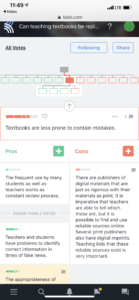
Some ideas for classroom use from Ditch the Textbook.

Loading

MeWe – another new social service

I admit to being a sucker for new social media services. I explore them to see what they offer so that I can inform others and I also keep looking for useful implementations of services I think have unique value. I am also just opposed to “natural monopolies” described by some as a result of the network effect. I would summarize a network effect as – people go where people are and once there accept the actual services as provided with all existing faults because coordinating a move to something better service does not seem practical. I should probably work on that description, but I assume you get the idea. So, Facebook is a natural monopoly. I liked Google+ and Diaspora better and thought the opportunity to control who you shared what with (circles in Google+ and instances in Diaspora) was a superior way of doing things. Google+ is shutting down soon and Diaspora has never attracted the critical mass I think is needed. I do encourage you to take a look at Diaspora.  

My new fascination is MeWe. MeWe is a collection of services – chat, groups, a personal timeline (like Facebook), and online storage (for files, images, etc.). It is free for basic services with a business model based on selling users extras – space for storage, pages, emojis, etc. If you won’t make money on ads and selling user information, you must have access to other revenue sources. I do not attempt to predict the success of online business models, but I do believe there must be an income stream of some sort to maintain infrastructure and support innovation. I wish MeWe success.

A feature I think should be of great interest to educators is the mechanism for control of access. In some ways, MeWe shares this perspective with Google+ and Diaspora. You make this decision for individual user experiences. For example, you can offer a public group or invite specific participants to a group. You can maintain multiple groups and set access opportunities for each depending on the audience you want to be involved. 

I have decided to create a public group focused on one of my personal interests. I describe this interest as “layering for learning”. This description is my way of identifying online services that allow educators to embellish existing online content to improve the potential of the original content sources as instructional resources. I argue that these services are consistent with the goals of those who want to use open access content rather than textbooks and with approaches that emphasize the role of “educator as instructional designer”. I have written a Kindle Primer on this topic, but I have also written many blog posts and created YouTube tutorials that are freely available. My hope is to seed the group with some this existing free content and invite insights and suggestions from educators who see something of interest in these ideas. I am uncertain how else to get a group started from scratch.

Getting a group started is a challenge. When I am teaching, I can show such resources to students. Now that I am retired, getting educators to take a look is much more of a challenge. This is bucking the network effect in action. I hope you will take a look.

Layering for learning group


Loading

Understanding through ownership

Open source software

I have become a fan of the power of what I have decided to call “understanding through ownership”. I believe embracing this concept provides anyone both a sense of autonomy and a better understanding of how digital technologies works within our lives. I am not a supporter of the universal value of “coding for all” as I regard programming as a vocational skill unique to specific professions. I do believe that digital literacy is a far more important life skill and coding alone does not provide the necessary skills and understanding to deal with the changes technology is bringing to all of our lives.

I have written previously about what might be described as the benefit those of us who participated in the emergence of personal computing have enjoyed. Those who have entered this revolution at some point along the way lack the understanding that comes from having experienced more primitive versions of things and having to do more for yourself. I miss the days I enjoyed being able to quickly convert any Mac I was working on into a working server. It is true that I enjoyed the advantage of working at a university which allowed me the advantage of a dedicated IP, but even a computer that assigns the IP as you connect would work as a server until you disconnected again. I understand the security issues in those with limited technical knowledge operating a server, but this understanding also illustrates the point. I understand security concerns because I personally had to deal with them. I am not advocating going back to this level of control, but having had such experiences has strongly influenced my thinking.

What I think makes sense for the educational setting is the purchase of shared server space. This is relatively inexpensive – I would budget the cost at about $10 a month. When you own a server, you can take risks and exercise control at multiple levels. Most hosting plans allow me to install tools by running host provided scripts. Anyone can do this. Push a button and follow instructions and you can set up a wiki, a WordPress blog, or a Weebly web site. You own the service and the content and the headaches. One of the realities of services is that flaws continually emerge and some flaws allow vulnerabilities. If you want, most services have mechanisms that will automatically update your installs. Middle school on, I think some students could manage such a site for their peers.

Just to be clear. You do this type of thing not because it provides you access to the most powerful version of services, but because it offers you greater control of versions of a particular service. I suggest that you use open source software when possible. Unless you install the open source software from a source external to the hosting site, you have some satisfaction in knowing that most groups providing this software are receiving some support through the stipend you pay to the hosting site. Dealing with how online experiences are funded is an important lesson for all to learn and learners are more likely to think about such issues when they are putting a little money into their experiences.

Loading

Screentime and neuroscience

I have spend my life attempting to understand and improve human learning through the lens of a cognitive psychologist. Originally trained in biology, I understood that the hypothetical constructs used by those with a cognitive perspective had to somehow translate into the biological perspective of the neuroscientist, but when I investigated what the biological field offered I have found little of practical value. The findings of neuroscience were interesting, but offered me little beyond my existing cognitive perspective when it came to practical matters.

The concept of plasticity offered a difference of some potential. It posits that experience can result in fundamental changes in the human brain at the biological level and as I understand this proposal these changes are relatively permanent. By permanent, I mean it takes some time to modify such changes. I do think this concept has been abused. For example, the proposal in the popular “mindset” book suggests that students be encouraged to move from a fixed to a growth mindset because you can change your brain through continued effort. While my “intro to psych” understanding of plasticity would argue this is theoretically true, the actual investment of effort would be beyond the likely level of commitment of any believer. However, there are situations in which this level of commitment exists. The exposure of most of us including children to technology would meet this level of exposure.

A 2010 Kaiser Foundation study showed that elementary aged children use on average 7.5 hours per day of entertainment technology, 75 percent of these children have TV’s in their bedrooms, and 50 percent of North American homes have the TV on all day.

This is a tremendous amount of time and few of us would change an existing routine at this level.

So, if there is something about this exposure to technology that provides a unique brain experience, it would be an issue of interest and possibly concern.
What might this unique brain experience be? I have heard it described as continuous partial attention. The idea that while engaged in a primary task, we continually divert our attention to a different task. If the brain adjusts to make this attentional flexibility more powerful, as a consequence, the capability for focused attention would be diminished. We would find ourselves more distractable. Tasks requiring sustained attention would become more difficult to perform well.

My description here has been simplified and focuses specifically on attention because I believe this would be the cognitive variable most impacted by extended periods of time encouraging attentional switching. I am trying to setup an  introduction of the proposal in two books by Maryann Wolf – Proust and the Squid and Reader come home: The reading brain in a digital age. Neuroscience and brain plasticity are at the core of the author’s focus on learning to read, the long-term benefits of reading, and the impact of large amounts of screen time on reading.

Among the claims of her books:

Reading is not a cognitive skill our brains are preprogrammed to do. We reprogram our brains in order to read. Learning to read takes advantage of brain plasticity to change the way the brain works at multiple levels. A consequence of this change is not only that we learn to read, but we also become capable of more powerful thinking skills as a consequence of this reprogramming. Reading would be one of those tasks to which we devote a considerable amount of time.

Wolf proposes that heavy use of technology devices may work counter to some forms of brain development encouraged and sustained by reading. This different brain organization encourages a “skimming” approach to reading, difficulty in sustained attention, and possibly a decline in other thinking capabilities that come from and require deep and prolonged focus. Among the skills listed is empathy – the capacity to reflect on how others me see a situation from a perspective that differs from our own.

Concern for activities that compete with focused reading have been noted for as long as I can remember. This concern did not depend on a biological perspective. Don’t have the television on while you study was an admonishment I heard in my day as a student. Certainly, cognitive psychologists have long known the issues of limited capacity short term memory and attention and have understood the impact on the performance of a primary task. The altered brain position of the neuroscientist suggests it is more than that. The limited capacity perspective would suggest the remedy is to remove the secondary task; e.g., don’t talk on the phone while driving. This is not the same as proposing your driving skill has been changed whether or not you have happen to be on the phone. A relativity permanent change in function is what is suggested if the brain does alter the way it functions.

Is reading from paper and reading from the screen of an iPad different? I see this question at two levels – the immediate impact and the brain alteration argument. In both cases, I also try to understand why there would be a difference. I don’t see how the surface on which words appear could matter. I understand that what one can do with the paper and the iPad while reading are different. I have a similar reaction to the question of whether students should be allowed to take notes on a laptop during a lecture or should be required to write in their notebooks. While some may argue the surface on which one works matters, the option of using one surface in multiple ways and not the other seems far more obvious. If you get bored during a lecture, you can use your laptop to check Facebook. You can’t do this with your notebook. Similar options exist while reading on the iPad, but not a book. Just for the record, this would not be the same with a Kindle which pretty much limits you to reading and marking up the content (notes, highlighting) as optional activities.

Wolf suggests we have a different set while reading on a device and I think she is correct. She contends we are used to using devices to switch between tasks. We look something up. We check our email. We see if anyone has posted something to our Facebook timeline. The device whether it has to be or not is associated with frequently changing among tasks. I suppose this is true. The issue I have might be described as does this result in bad habits we carry over into new settings or does this result in an altered brain that nearly forces us into a different way of behaving. Are different habits of acting the same as different capabilities?

I don’t think the research at this point can answer the questions I have. I am willing to acknowledge that bad habits have been introduced. I admit that I do other things when reading on my iPad than when reading a book. Ironically, I read both of Dr. Wolf’s books on my devices (a Kindle and an iPad). I admit I looked up some things while reading. I also took notes and highlighted in a way I can now search from my devices or a different device than I used originally. I am not convinced my supplemental activities were destructive in the short or long term. I suppose my device-based reading activities are different than most, but I would suggest this is a professional habit rather than a difference in how my brain works.

Loading

Collecting geolocation data with the iPhone camera

I have wanted to do this video for a while. The present version of iOS changed how the collection of location data by the iPhone camera is turned on and off. I think that there are many educational uses for being able to position information in space and taking photos is one way to collect the data necessary to do this. Some are concerned about sharing their location along with photos so it is important to know how to turn this capability on and off. I have the process figured again so I thought I would share the process.

Loading

Geolocating your travel blog posts

This post may have a limited audience, but it explains a capability I thought added a great deal to my travel blog. My travel blog has the focus you might expect – I write posts based on the trips my wife and I take.

A travel blog by definition describes experiences at many specific places. The location is part of the context for each post. I use Blogger for this particular blog and after several years of writing posts about traveling, I finally noticed that Google allows the author to associate a location with each post. I am guessing few Blogger bloggers use this feature, but I thought it might be worth exploring.

The text box to enter the desired location appears when you select the “Location” icon appearing in the right-hand column of the Blogger authoring page. What you enter here can be general (the name of a town) or more specific (a complete address). Because I try to include photos in most of my posts, if I use a photo captured with my phone, I use the location data stored by the phone in the EXIF data included in the photo file.

The location you enter will appear at the bottom of the post. This location is also a link that offers access to the location you specify as it appears on Google maps.


Loading

Brave New World

I enjoy exploring new services and products that have the courage to challenge well established existing companies. Brave is a new cross-platform browser available as an alternative to whatever you are using now. A classic tech business model seems to be doing what your competitors don’t and for alternatives to Google Chrome (Apple Safari, Firefox) this seems to be blocking ads and protecting against the collection of personal information. Brave is in this camp. This makes Brave very fast and it offers convenient controls for avoiding ads and cookies.

The image above shows the security controls and yes there are ads (I always use the Free Tech for Teachers site when I want to check for banner ads, but these are not the type of ad that is based on your browsing history).

I have mixed feelings about ads as a content producer. Users seldom click on the Google ads that accompany my posts so I make very little money from my offerings. This is not a concern to me, but I am interest in what this could mean to others committed to generating reasonable compensation for producing their content.

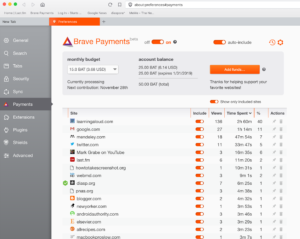
Brave has a plan for this situation. Brave intends to allow users to offer micropayment to the sites they visit. I have encountered this one time before. The idea is that as a user you commit a certain amount per month and this money is then offered to those you visit (and designate). I am interested in doing this as a consumer, but I am waiting to I am home and have access to my desktop machine because it appears that the synchronization of multiple platforms is yet quite primitive and the cross-platform payment option is not yet available. Payment and collection requires bit currency systems and I assume this will be an impediment until things are easier.

Reports I have read on the Brave business model have me confused. This ComputerWorld description seems to imply that Brave will partly fund itself by substituting its own vetted ads for existing ads. I read the Brave material as offering this as an option and not a requirement.

I promise a followup to this post as I have time to explore the funding model. For the time being, I think that Brave is worth exploring just for the speed advantage it offers. Note that many of the plugins you count on when using Chrome will not be available, but these enhancements will likely be coming if the company takes off.

Loading