Geotag your camera photos

Technology in education is often associated with several stereotypes. One of specific interest to me is the assumption that technology ties a learner to a computer in a classroom in a way that reduces social interaction and physical exploration of the world. I believe I can make the case for exactly the opposite position. K-12 learners actually have few opportunities under existing circumstances to explore their world and technology can bring learners into connection with people and settings outside of the classroom. I am particularly interested in recording data and this translates into opportunities involving audio, images, and the forms of information that can be captured with probes. Think of this as capturing experiences that may always have been there, but that were not previously processed very effectively.

Part of my model for processing experiences involves the significance of context (I understand this is getting a little abstract). One aspect of context in our daily lives is location. Objects and experiences exist in physical space and where things are located can have important implications. Do you know that supermarkets are less likely to be located in areas of economic poverty? Who cares? You might if you had to walk some distance to get fresh vegetables which are seldom available from convenience stores. The broad application of GIS/GPS across disciplines allows investigations of the role of location.

In this post I am particularly interested in associating images with locations. Perhaps these images result from photographs taken of full service supermarkets in your community. I have written previously about the unique capacity of phones to capture GPS info, described how to upload images to Flickr in a way that would assure the GPS data were included, and offered examples (images in Google Earth). I feel like I am reversing course here – instead of explaining that you can do interesting things with a phone in place of a camera, I want to explain how you can now geotag camera images.

Unless you have purchased a special camera, your images are not geotagged. This is the case even with expensive cameras. Ironic isn’t it, my Canon 7D does not know where a photo I take comes from, but my phone does. Anyway, most of us have cameras and use them. Whatever the convenience of a cell phone as a camera, dedicated equipment has special advantages. I am never going to get the closeup of an eagle in flight with my phone.

A reasonable way to tag camera images makes use of a phone and an app (Geotag Photos). The concept is simple. Cameras time stamp images, but do not have gps capabilities (using satellite or cell tower data). Phones have gps capabilities and an app can time stamp these data. A second app can match the gps data and photo by time and rewrite the exif metadata of the photo to include these location coordinates. This is the way the Geotag Photo works. You put an app on your phone and you download software to your computer. The phone app records the GPS data and the computer app uses these data to modify the exif of the image files offloading from the camera.

The phone app is displayed here with a second image representing the route taken while collecting the images.

geotagpro1


geoptagpro2

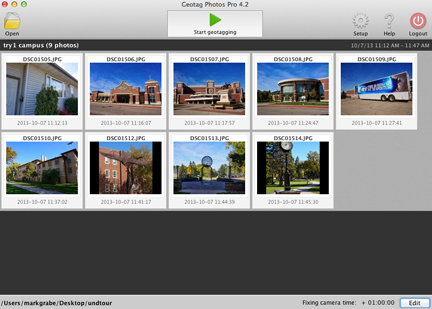
Here is the computer software that merges the data from the phone with the individual images.
geotagprodesktop


The final product might be generated using the map feature in iPhoto (the pins here represent the location of the images). Clicking a pin reveals the image.

iphotogeotagpro

Loading

I act on my liberal values with my kids, but not yours

The  massive iPad adoption in California caught the attention of most tech enthusiasts and then came the glitch. Students figured out how to hack the iPads and use them in ways that we’re not intended. Schools have reacted by restricting use of the devices.

Some prominent education bloggers responded to this action by pretty much putting down the school and praising the skills and motivation of the students. Reminds of a kind of “anti-establishment” position often adopted in the 60s. Stick it to the man.

I think this position is ill-advised and damaging. Cute, but not smart. It puts the schools in a bad position.

Anyone following my posts knows my general approach to things is quite liberal. However, I think there are limits to how I act on these beliefs. I can certainly advocate for my beliefs. I can act on them when it comes to my own kids. It can become inappropriate when I go too much further. I should not encourage children by ridiculing their parents (I might argue with the parents but not in front of the kids). I kind of feel the same way about schools.

Here are two related thoughts:
1) These are school computers and not the computers of the students. I think schools have a right to control how equipment is used in the school. Schools are judged by those they serve and the general public. If parents want to take responsibility (which I am not certain they can) for what students do with the computers in schools this would be a different thing. If parents want to take responsibility for what students do in the home, this is a different thing. Just as a matter of practicality – how would situational differences in actions be accomplished. You can’t really hack and “unhack” the device depending on the location. I guess filtering kind of does that.

2) I have published several papers (actually as a second author to one of my graduate students) investigating cyberbullying. This was not a primary interest of mine, but kind of a necessary reaction to the restrictions of filtering in schools. I felt the technology applications I propose were very difficult to implement because of filtering and I argued that the data on cyberbullying justified this position. Very few incidents of cyberbullying utilize school equipment (you never say never, but the percentage is estimated at about 4% if I remember correctly). Restricting the use of equipment that was not the source of the problem seemed a political reaction and not an actual fix in my way of thinking.

I cannot justify this argument with phones and tablets. What is actually happening on these devices simply cannot be monitored in the same way school personnel can monitor what appears on computer monitors. I am not necessarily against BYOD models, but the argument I was willing to make in favor of more open access is far weaker in this situation. As the strength of the argument switches drastically I am far less judgmental of school actions that seem more conservative. School personnel cannot really give up their responsibilities to all of the children and to all of the parents. I am not certain what the appropriate course of action is in this situation, but let us at least not be cute by implying that school personnel are uninformed, backward, or stodgy.

Loading

The Inequity of STEM


Alt title: Some personal comments on STEM from a reformed biology teacher or quality education cannot be simplified

STEM educators have many advantages some of which I will try to identify. My general concern is that all educators function with limited resources and mostly compete with each other for a larger portion of this undersized pie. I have met few that seem to lament the inequity in this situation. I suppose this is the way of human nature. I seldom think about the fact that I make a little more than a high school teacher. However, inequities within a system tend to be more damaging than the inequities across systems. It is something to recognize. Administrators seldom help matters. They chase the available money and seldom suggest that funds are not necessarily available where funds are most needed. Better something than nothing I suppose.

Here is probably my biggest beef with the approach taken to STEM. It is one of those “elephant in the room” problems. No one seems willing to identify an obvious issue because we do not want to give the appearance of favoritism, or elitism, or some other ism even though a focus on STEM already is an example of all of these isms.

Simply put, I think we offer a watered down versions of STEM to all rather than focus on more advanced opportunities for some. Do not interpret this the wrong way. I believe basic understanding and skills are necessary in many areas. My focus is on the reallocation of resources either purposefully or unknowingly across areas.

Here is how I think we backed ourselves into this situation.

Certainly STEM has a great deal to do with international economic competition and solving very real problems. My concern is that those suited to make unique contributions in these areas are a limited proportion by aptitude and motivation. In the context of No Child Left Behind, resources end up focused on a peculiar portion of the student population – those near the demarcation of adequate yearly progress. In a fixed system, this moves resources away from both high achieving students and students unlikely to meet the expected standard.

My wife has longed suggested the mantra – move every child forward. Any model based on this perspective would be more difficult to evaluate in a simplistic way; i.e., what proportion of students perform above a specific level. However, we seem unable to allow students to identify their passions and offer them opportunities at a level appropriate to advancing unique talents. It would seem obvious this should be the way to focus on STEM, but why not in all areas.

Loading

Getting started

I do nearly all of my computer work online. So, to be efficient, I want to open a browser and get started. I want the browser to open to a page that organizes the options I use most. I may want information (news, weather) or to access a tool (social tool, writing tool, clipping tool, email) to accomplish some task.

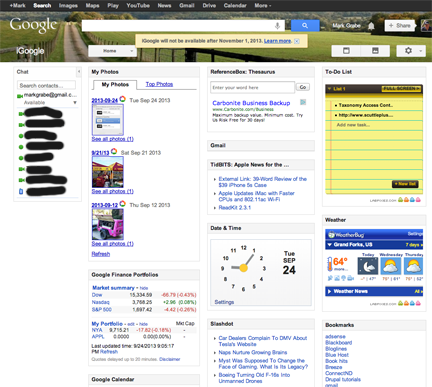
iGoogle was perfect for my needs. It was a web page I could use as a start page and it was easily modified with ready made widgets and feeds.

igoogleGoogle abandoned iGoogle in a recent attempt to become more efficient and I have been looking for a reasonable replacement since. To this point, I have found nothing I regard as equivalent. However, here is what I use as a work around.

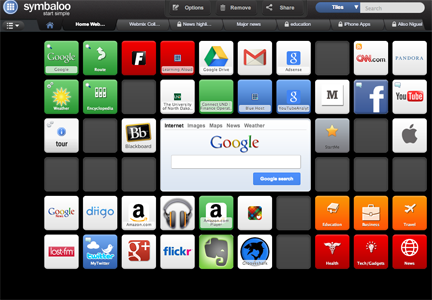
First, I use what I would describe as a “launcher” to organize the links I use most frequently. These could be links to tools or sites. The tool I use for this purpose is Symbal00. The launcher makes use of tiles that serve as links. Many of the tiles offer clipart readily identified with an online site, but you can also generate tiles with just a title for sites Symbaloo has not associated with artwork.

symbaloo

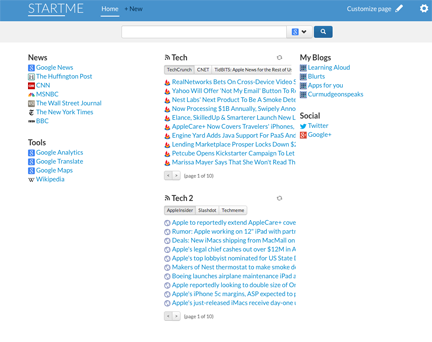
As a launcher, Symbaloo works great. What Symbaloo does not do is give an immediate display of information from key sources I commonly review. My present strategy is to designate one tile within Symbaloo to launch a site that offers me quick access to the “headlines” from several RSS feeds. The site is Startme. I use a feedreader to go through my complete collection of feeds, but StartMe offers an efficient way to get to sites and headlines I review most frequently.

startme

I am still waiting for my ideal start page. StartMe could get there by offering widgets for services – weather, stock quotes, a clock. Symbaloo is great for what it does, but the tile approach limits the display of information.


Loading

Schools and Sports

I knew this had to be coming. As I have watched and participated in the discussion of public education – the cost and the productivity. I have been waiting for a discussion of the range of tasks schools are asked to perform and the resources devoted to these different tasks. Most of the priorities are set with the full cooperation and even urging of parents. Sooner or later, I thought, someone was going to begin asking questions about extracurricular activities and sports in particular. This happened to be the focus of my dissertation so many years ago. Little has changed. It seems a cultural thing that we accept and promote and then argue about the lack of accomplishments in other areas.

I was watching “Good Morning Joe” today and one of the guests was the author of Smartest Kids in the World (Amanda Ripley). She commented on her article in the Atlantic – the Case Against High School Sports. In my opinion, what happens during high school is the least of the problems. Take a careful look at what some elementary school kids are doing.

I knew this was coming.

Loading

Box.com

I pay for multiple services. In fact, I pay for services I forget to use. One of the nice things about getting a new credit card is that it invalidates my old card and I am contacted by these online services again. Sometimes, I pay again and sometimes I end my association what that service.

One complaint I have about many online services is that the gap between the free account and the least expensive paid account is too great. This may be a personal matter and based on my personal technology environment. The services I have committed to for one reason or another limit my interest in other services. I have purchased a Chromebook Pixel and this comes with 1 terabyte of online Google storage for three years (the computer was expensive). I also pay $60 a year for the online backup service Carbonite and use this with my home computer. Between these two options, I have a lot of online storage capability. I pay for Evernote, Amazon, iTunes Match, TroveBox and Flickr. These are specialized services, but again I can store music and images in several locations. What price do I think would interest me for the additional storage and unique capabilities? I am thinking about $25 (the price I now pay for Flickr).

My concern here is with DropBox and Box. Both are great services. My original preference was for DropBox, but I am becoming more an impressed with Box. I originally thought of DropBox as kind of flash drive in the cloud. I could put files there and get them again from a different machine in a different location. I think my original interest was sparked by the opportunity to save content I created on the iPad to DropBox and then access this content from another device. The opportunity to get content into and out of the iPad was and is still kind of an issue.

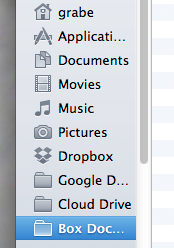
It seems to me that Box has done a lot to catch up with DropBox. I can use either service to access or upload files from any of my computers. Both show up as folders when I reveal the file structure from my Desktop (Macintosh). I can drag files to either folder and the files then are available online (when given a short time to synch). I can open either folder to find files I have stored.
accessfromdesktop
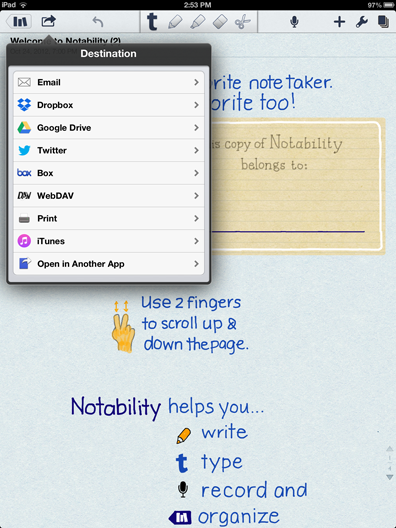
The option to store share files to and from the iPad has also been more equivalent (the example below shows the options from Notability).

notabilityconnect
Box already allows expansion via both internal (from the same company) and external (3rd party) apps. This is an interesting feature and is similar to the way a browser can be supplemented with plugins or extensions. I sometimes use Box Edit. This internal app allows Box open in a browser to connect to Microsoft applications (Word, PowerPoint) on your desktop or Google docs. The content created is stored within Box. I wonder sometimes how valuable this is – you need the Microsoft software or the account for it to work so you could first create the content and then move it to Box yourself. I guess the app saves you some time.

Box promises new advances. I am currently on the list to evaluate the beta version of Box Notes. This collaborative service seems to be roughly equivalent to the collaborative potential available within Google docs.

As I have suggested many times, it is valuable for users to have multiple developers competing for their attention and money. This competition drives innovation. My personal circumstances aside, Box is impressive and worth your exploration.

Loading

Chromecast

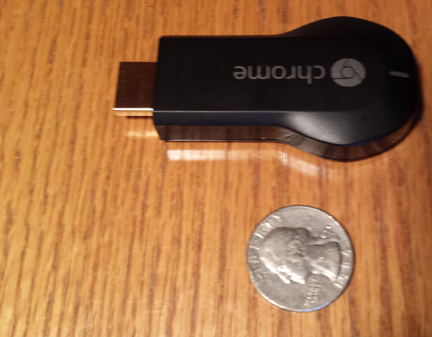
The Chromecast is a small device that can be inserted directly into one of the HDMI ports (you may have only one) on your television. The device needs to be powered through USB so there is going to be a cord leading to the microUSB connector on the device – the other end of the USB cable either connects to a USB port on the television or to a traditional power adapter plugged into an electric outlet. The device does need to be powered.

chomecast

The Chromecast costs $35 and it was this cost that attracted our attention. For personal use, we have a television in our lake place that is located where we cannot connect to the input from the satellite in a way we would find acceptable. If we used a splitter, I would have to watch Dancing with the Stars rather than the ball game should my wife be using our main television. I think there are great applications in the classroom. The device is inexpensive, portable, and can display content from a wide range of devices to a television. One might contrast the potential with that of the Apple TV.

Here is how I think about what you can do with a Chromecast. Think of the Chromecast as connecting to the Internet (via wifi) and you controlling what you connect to using a phone, Pixel, chrome browser, tablet, etc. Perhaps the comparison to a television remote would be helpful. If this approach makes little sense (you are not sending the content from the device to the Chromecast), note that once the programming is selected (e.g., a video), you can move on to the the phone, tablet or computer for a different purpose.

Control is exerted through Chromecast apps or Chromecast as an extension within the Chrome browser.You download the app to tablets/phones and the downloaded app works with other specific apps (YouTube, NetFlix, Google Movie and Music, Pandora). Note not every possible app that displays content is supported. Note also that the Chrome browser on tablets and phones are not expandable with extensions. Hence, it does not seem you can display browser content from phone or tablet (at least as far as I can tell). In contrast, you do not add apps to your computer, but you can add the extension to the chrome browser on a computer. The extension allows the content the chrome browser displays in a specific tab to be displayed on the television.

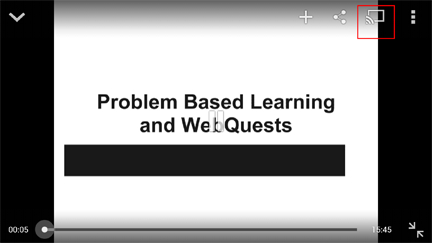
If the extension is installed, you stalled you should see the “cast” button (see red square below) and the use of this button allows the content of that tab to be displayed.

chromecasttab

Here is possibly a way to think about what I have said. Say you wanted to watch a YouTube video on your television. If you were using a tablet or your phone, you would use the combination of the ChromeCast and YouTube app (you would need to have both installed). On your computer, you would use the Chrome browser (with the Chromecast extension) to view YouTube.

I believe it also accurate to suggest, you could not view a Vimeo video on your tablet, but you could from the Chrome browser on a computer.

This explanation is based on my personal experience with a Nexus 7, Chromebook Pixel, iPad, Samsung S4, and chrome on several computers. Expect future developments as modifications are made to existing apps (see this Verge article).

Loading