As the pendulum swings

Sometimes things annoy when perhaps the should not. Right now all of the tech types who have “found coding and making” kind of annoy me. When you do what I do for a long time you develop a sense of history about things and this perspective includes the ideas that have come and gone and the topics various people have promoted. I would avoid  the promoters (those who want to come to your school and help teachers learn to promote coding) and consider those with actual experience – those who teach computer science or are experienced programmers (I like the 10,000 hour rule). It would be great if those experienced teaching such courses also had experiences solving applied problems by programming, but I would imagine this would be a small pool.

What makes sense to me:

  1. An extended experience with programming (a class).
  2. Elective programming experiences – in school or out.
  3. Realistic expectations for what will be accomplished by a reasonable amount of experience programming.

Related issues – I have commented on these issues elsewhere, but allow me to summarize here:

  1. Those who promote a new “class” have to argue for the opportunity. If it is assumed that the class should be taken by many students, it might be useful to understand that the curriculum of schools is somewhat of a closed system. In other words, if you want to add something, what should be deleted. Would the math department allow a programming course rather than one of the more traditional courses? Who would teach the course? This issue is less of a challenge if programming is offered as an elective course.
  2. In general, I think we must be conservative in our expectations for the breadth of transfer from learning experiences. When finished with a programming course, the level of proficiency in writing code is what has been accomplished. There may be some transfer to other programming languages and some insight into the use of programming (computer literacy or some more general term implying insight into uses of technology), but I would hesitate to make addtitional claims. Computer literacy or learning about and not with technology was once being discouraged. I am not certain why, but this is still pretty much what you get. There is nothing wrong with such outcomes as long as this is what we want.

It has become popular to describe the goal of coding as “computational thinking”. Here is an extended discussion of what ISTE thinks this means. A similar perspective was being advanced with LOGO was in vogue and considerable research activity was generated. I followed this research quite closely and included a chapter on programming in our textbook edition of the mid-90s. My review of this research is still what shapes my thinking regarding expectations and transfer (see what makes to me). Connected limited programming experiences to the development of generalizable, higher order thinking skills is a significant stretch. I actually thinking writing to communicate is a better candidate for the development of higher order thinking skills (read my review of the requirements for transfer) – it is versatile and experience can be developed across the curriculum. Hence, I think you learn to program if you want to learn to program. Using programming to develop other skills would likely require more time than the K-12 setting can make available for most students.

Loading

The Ecobee – remote tech in action

For this post, I must first get you in the right frame of mind. We are spending the holiday break at our cabin in northern Wisconsin. It has been very cold so each morning when I get up I check our Ecobee to see just how cold it is. It was -27 this morning (this translates as it is probably too cold to get the car started). The Ecobee also posted a warning message which could be summarized as – your furnace is not working.

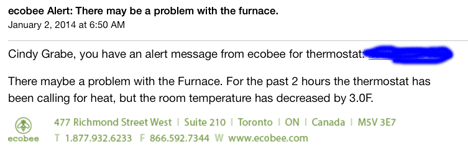
This is precisely the reason we installed this device. Most of time we would not be in the cabin and due to one issue or another the heat may not come on resulting in frozen and possible burst pipes causing all kinds of damage, etc. The Ecobee is “smart” (see my description of the data it collects on our heating and cooling) and sends us an email should there be a problem we need to address. Sure enough, an email arrived.

ecebeewarn


This system seems to work great unless the power is out which knocks out our wifi making the system pretty much useless. I would think the company could ping the thermostat and send us an alert that our protection system was offline. Anyway, it worked great this time.

The problem turned out to be a lack of propane. We have a contract that is supposed to result in our tank being filled without our intervention, but evidently there was an issue with getting this done. They explained that they had planned to fill our tank on the 18th. Their usage calculations evidently do not adjust for very cold weather. I am thinking this might be a long term problem so some discussions are in order.

Loading

The meaning of “circle”

This is my contribution to the week of code.

One of the things I remember from reading Papert (Mindstorms I think) was his explanation of different ways of understanding. He claimed that computation offered a different way of understanding. One example which I think was from the same source concerned the understanding of circle. The demo goes something like this.

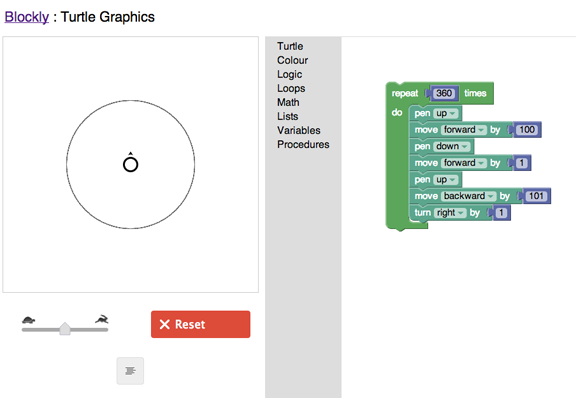
Most of probably remember the definition of circle – a closed plane figure consisting of all points equidistant from a point. The ability to produce this definition does not really mean we understand it. He proposed the following demonstration (I hope I am remembering the source appropriately). You can turn this definition into a program (logo).

blockly


This demo was generated in Blockly. If you follow the code, you should be see how the code expresses the definition.

Loading

Mastery learning


The theory and application of mastery learning has long been a professional interest. The origins go back to the 60s and some crude variants to even earlier models of instruction/learning. I have also presented some of these ideas in my educ psychology classes for years as an alternative way to understand learner aptitude (time to learn). In recent years I have added a component focused on the Kahn Academy. My students find Keller and Bloom to be what they call “theoretical” (even though there were clearly applications of each), but they are intrigued by Kahn. One student wanted the link today because he wanted to try the modules on biochemistry.

I have watched with interest the evolution of the Kahn Academy. By evolution, I mean the earliest version did not promote the flipped classroom (a different use of class time) and mastery learning (very similar in my thinking to Keller’s PSI). I wonder about this evolution. Is what we see now closer to the original “grand plan” or have those developing this system found that what was being developed were great ways to implement existing “big ideas”?

I do discover something new each time I prep for my presentations and visit the site to review the features. This time I discovered the separate content on programming. Educators (e.g., Maker movement) have been rediscovering programming and the Academy offers an interactive experience based in Javascript.

Loading

Should students be encouraged to control a turtle or grow radishes?

I struggle with the concept of a new “maker culture”? I really like the concept as suggesting new educational options, but I struggle with the assumption that makers are “technology-based”. There are lots of ways to make things that do not include programming or robots or a soldering gun. Nothing wrong with programming or construction of technology devices, but we learn by making other things as well. We make something when we write. Writing and programming share the use of a symbol system to create a product. Writing, which also benefits from the use of technology, is not among those processes included by those who claim to belong to the culture of makers. One concern that I have with the popularized version of being a maker is that the examples given will not be of interest to all students or all students. I would prefer all students have the opportunity to pursue a self-identified passion.

How educators are encouraged to apply technology is somewhat schizophrenic. Educators seem caught between two platitudes. On hand they are encouraged to recognize that “it is not about the technology, it is about the learning” (a common educator twitter admonition). Of course, makers seem to argue the opposite position. Are we back to teaching a version of computer literacy or the concern that we must program or be programmed?

Perhaps students should be offered options. I mean options beyond electives such as art, music and athletics. As I have encouraged expanding the allowable electives, I have proposed developing and studying school gardens or habitats. Many may be surprised that there are such things as school gardens, but these activities are more common than many might think and have a very similar literature. One of the realities of involving all students in any supplemental activity is that students seldom accomplish more (note the plural students) than develop an awareness of the content area. I do not think this is what is intended. It makes more sense to me to find ways to allow those students with a real passion for such topics to explore in depth rather than provide all a superficial exposure.

I would encourage close reading of the following two reviews (the first is an analysis of logo programming and the second of school garden projects). These are reasonable reviews of the benefits of teaching programming (logo) and gardening. Just what kind of transfer has resulted from such learning experiences?

Salomon, G. & Perkins, D. (1989). Rocky road to transfer: Rethinking mechanisms of a neglected phenomenon. Educational Psychologist, 24(2), 113-142.

Williams, D.R. & Dixon, P. S. (2013). Impact of a garden-based learning on academic outcomes in schools: Synthesis of research between 1990  and 2010. Review of Educational Research, 83, 211-235.

Loading

Customize Chrome App Launcher

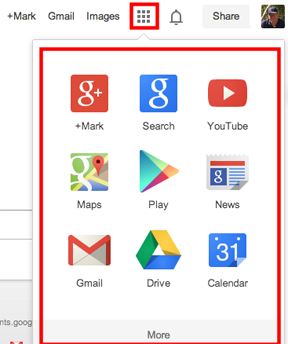
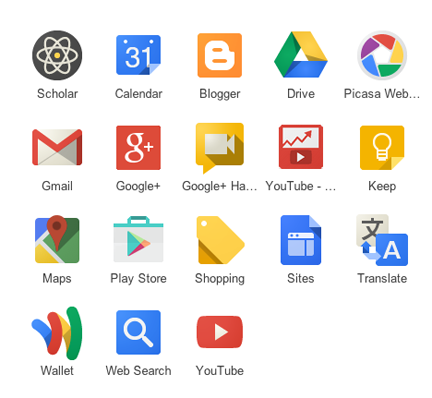
If you use the Chrome browser and Google services, you are likely familiar with the app launcher. The launcher is available from the square of blocks appearing in the header and provides easy access to the services Google must think are used most heavily.

applaunch1


The limitation with the launcher has been that these are not necessarily the subset of services that you use and the apps within the two sets of nine apps are not necessarily organized to meet your needs. It is now possible to customize both the Google services and the order of these services using App Launcher Customizer.

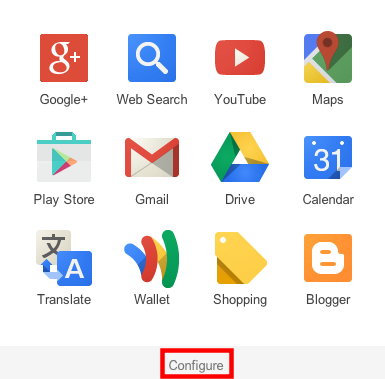
Once you add this extension to Chrome, the app launcher can be configured.

applaunch2


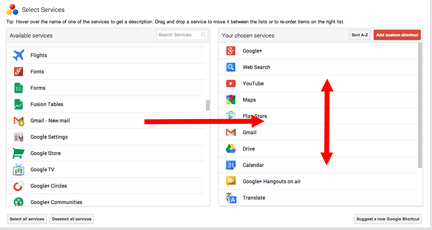
Selecting the “configure” link gives a user access to icons representing Google services and the services presently available from the launcher. You drag to add services and to reorder where they will appear in the launcher.

applaunch3

For example, I frequently take advantage of Google Scholar in the work I do. I can add this service and position it for easy access when I open the app launcher. This is a must have extension for heavy Chrome users.

applaunch4

Loading

Google+ Photos

As far as the big technology companies go, I am probably more a fan of Google than any other company. This admiration reflects how I value their products, but also how I value their way of going about doing business. Just for the record, I do not consider myself a freeloader. I pay for Google services (Google Music and general storage space) and I have purchased severely overpriced products (Chromebook Pixel) just because I wanted a particular development effort to move forward. My point – I do not expect technology companies to provide me services for free and this not the reason I support this company.

Google is obviously changing, some would say maturing, and a possible interpretation might be that they have become more focused. One tactic in implementing a more focused approach has been to cut several services. At least some number of individuals will have been users of these services and this will cause frustration.

Recently, I encountered a campaign to reconsider changes made to PicasaWeb. This service allows Google users to store photos online (a reasonable number at no cost and more storage for a small fee). I had noticed this change in that my efforts to access images I had stored as Picasa folders resulted in redirection to Google+. In my opinion, Google wants to build up Google+ as an alternative to Facebook and is making efforts to position Google+ as a kind of hub for multiple services.

By the way, you can avoid the Google+ redirect, but the work around is not intuitive – https://picasaweb.google.com/lh/myphotos?noredirect=1

The post (ironically on Google+) was brief, but it seemed to urge those who use PicasaWeb to encourage Google to maintain this service and to maintain it separate from Google+. Those who agreed were urged to + the post. Given the history of Reader, I would not be optimistic. Felix Binsack, the originator of the campaign, does have a point in indicating that he paid for PicasaWeb and I suppose while the time period covered by the payment was limited, you put work into a paid service assuming it will be continued.

I write mostly to inform those interested in the educational uses of technology and I think PicasaWeb has a number of important and useful features.

  1. I like the connection between software on the desktop and storage in the cloud. Google provides free software you can download (Picasa) and this software can be used to take photos off your camera, organize photos, and upload those you want to store in the cloud and possibly offer to others. You can work entirely in the cloud, but if you work with hundreds of photos at a time, I think this local software is helpful.
  2. Picasa is cross platform. I like iPhoto as well, but  when you write for a broad audience (teachers) it is important to offer tactics they might apply no matter what the hardware provided for their use.
  3. The desktop software allows flexibility in location of images on the computer. Picasa takes an approach different from iPhoto. You can store your photos where you want on your computer and still work with them using Picasa.

My experience with Google+ had not included a lot of activity using the built in photo tools. I admit after a little exploring I was more impressed. Google+ does allow the organization of photos in folders and allows the sharing of photos with a designated circle (or the general public). The organization, annotation, and sharing of photos are major issues for me when it comes for the educational potential of digital photography.

Here is a brief explanation of how to organize Google+ photos into folders. On the iPad, the process of organization would work something like this. While viewing a photo, select the “gear” icon and then select the “copy to folder” option from the options you are presented.


ipadplusphotoa


You will then select an existing folder or be allowed to create a new folder.

ipadplusphotob


The process from a computer works a little differently. With a photo selected, you should have access to a “More” menu and you select “add to a folder”.


deskplusphoto1

Clearly, creating folders and adding images to folders can be accomplished within Google+. I will also accept that the batch processes available from Picasa would make the process of organization more efficient.

Loading