I have long been an Evernote user and I make heavy use of Evernote in collecting and organizing information for the various forms of writing that I do. I have a Premium account which costs me $50 a year (through iTunes). This is among the most expensive annual tech commitments I make, but I use the service daily and I use many of the advanced features. Unless the company makes a drastic change I am likely to stay a loyal customer.
I am writing this tutorial on the use of Google Keep because I am a fan and I understand that many may not want or need to use a service such as Evernote. In addition, Evernote recently announced that it is reducing the capabilities of its free version and increasing the cost of the paid versions. At $70 per year, I may downgrade my own commitment to the lower cost version and adapt my typical work flow to include different tools to accomplish similar ends. I believe in paying for apps and services, but I do apply a personal cost/benefit analysis.
What follows is an explanation of how I would use Google Keep to collect and organize Internet content as part of my writing process. This description does not explore all of the capabilities of Keep and you may find personal value in other capabilities as well. Google Keep works across platforms, but does work a little differently and offers some different tools depending on the platform. What follows describes the use of the chrome extension on a desktop computer.
If you have the Keep extension installed, you should see this icon in the top of the Chrome browser.
Selecting the icon will store a link to whatever web page is active. You can add a descriptive title at this point.
The content will appear within keep as a “card”.
You can store specific content from a page (text or image) by selecting the content and then clicking on the Keep icon.
Organization of the “cards” can be accomplished in a number of ways. Select the “edit” icon for various options.
If I am collecting content I intend to result in a blog post, I add a label to the content.
I use “blog” as the label for this content and the label then appears in the left side bar and on each note to which the label has been attached. Either the side bar or the embedded label can be used to retrieve the cards with the label.
As content accumulates and I want to retain some of the content without cluttering the Keep main page, I can either archive or save content to Google docs.
Archived content is stored within the Keep system and can be located using the label or looking through the archived content (link in left-hand side bar). Content saved to Google docs is accessed through Google docs and I use this technique for long-term organization (I add the material on a single topic to a unique folder) and long-term storage. I delete material from Keep more frequently than I delete content from Google drive.
The following comment is based on my personal experience in following a few hundred Twitter users and bloggers. It is possible what I have observed is limited to this sample and does not reflect the broader K12 population. It is an observation you can check against your own personal experiences.
Why is it educators and tech support personnel make so little online mention of technology applications in high school? It is possible high teachers or those who work with these teachers are modest and see no reason to share the activities of their students. With the exception of a few teachers who describe or support personnel who endorse flipping the classroom, one might think there is nothing going on.
There are so many interesting possibilities for older students. I would think science teachers would make heavy use of data collection (digital probes) and analysis (simple spreadsheet based statistics and graphical representation). How about GIS and GPS activities? Writing activities of all types work at any grade level and older students should be capable of journalistic efforts at a level capable of informing and influencing the general public. Students should be eligible for course-length computer science experiences with some creating impressive products demonstrating what older students can accomplish. Online access to primary source content should be a boon for the multiple history courses students take and place-based historical inquiry could allow a contribution to the resources that are available.
I am not discounting the instructional opportunities technology makes available, but I would think all of the pro making, project-based, problem-based, and computational thinking proponents would be showcasing what is happening in high school classrooms.
Just as a reminder, my reasons include the following:
Programming is an important vocational skill
Coding is a way to gain greater insight into how technology works
Computational thinking transfers
While I have made a significant effort to locate quality data in support of these reasons, I must say that the task was not easy and this to me indicates a problem. As I provide the data I have located, I have decided to offer related comments and some counter arguments. In the system I am using, a counter argument weakens an argument. The intent in argumentation is both to offer arguments with sound evidence and to weaken the arguments of a competing position with solid reasons and/or evidence.
Employment of computer and information technology occupations is projected to grow 12 percent from 2014 to 2024, faster than the average for all occupations. These occupations are expected to add about 488,500 new jobs, from about 3.9 million jobs to about 4.4 million jobs from 2014 to 2024, in part due to a greater emphasis on cloud computing, the collection and storage of big data, more everyday items becoming connected to the Internet in what is commonly referred to as the “Internet of things,” and the continued demand for mobile computing.
Thoughts on counter-arguments. The qualify of this evidence might depend on a couple of factors – a) what level of training is necessary to obtain such employment and b) what employment options would there be with a comparable level of training. Coding in the classroom can mean so many different things that relate to these factors. What training opportunities are available in schools (note that the short elementary and middle school experiences generate little progress toward the level of training that is necessary)? Do secondary schools offer CS courses?
Coding is a way to gain greater insight into how technology works
The benefits of coding for what used to be called computer literacy might be expected to be evidence rich. Again, work on making this connection (say in contrast to direct instruction of computer literacy topics) is difficult to locate. The topic seems close to some subtopics in the area Lye, et al (2014) call computational perspectives (one of three dimensions these authors argue make up computational thinking). The one example Lye offers to address this dimension is the observation that students can use some of the specialized coding environments to tell stories. To be fair, the focus was on the use of coding and not the insights coding might provide about issues such as privacy, the vulnerabilities inherent in code, etc. Counter argument – the issue of efficiency would seem relevant here. The use of software or learning about issues such as ethical practices or online vulnerabilities may not require that one have an appreciation of the code making online activities possible. If this were possible, it is then relevant to consider the level of coding proficiency that would be necessary for such insights.
Computational thinking
The long-standing debate regarding computational thinking (this is a newer term but the notion has at least a 20+ year history) seems to generate the most buzz. I suppose that unlike coding as a professional development investment, computational thinking promises a benefit for all. The interpretation of this vague term is important and varies a bit with theorists. I would point interested parties to Lye and Koh. (2014) for a nice summary. Since Papert in the 1980s, I have described the position as supporting debugging and problem solving. If you have ever attacked a substantial goal as a programmer, the notion of solving a problem should make some sense. One definition of problem solving can be translated as the situation in which the present situation is not the desired situation. Clearly, this is the case when beginning the process of taking on a programming challenge. The key issue here can be interpreted as one of transfer – does solving programming problems make it more likely someone with programming skills can better solve other types of problems?
Again, I must say that I was unable to locate much in the way of recent work substantiating this claim. I provide the best of what I was able to locate summarizing recent work. Reading of these summaries provides very little in the way of recent work (I provide citations for these reviews below and invite your own contributions if you think my search has been incomplete). One review, pretty much substantiates my own position that the best work in this area was completed in the past.
Cognitive aspects of children and novices learning computational concepts were studied extensively in the 1980s—issues such as development of thinking skills (Kurland, Pea, Clement, & Mawby, 1986); debugging (Pea, Soloway, & Spohrer, 1987); problems with transfer (Clements & Gullo, 1984; Pea & Kurland, 1984); use of appropriate scaffolds for successful transfer (Klahr & Carver, 1988), to name a few. That body of literature should be brought to bear on 21st-century CT research. [from Grover and Pea, 2013).
To be complete, Lye and Koh (2014) cite a study by Kazakoff and Bers (2012) indicate that experience programming a robot does develop improved sequencing skill that can be demonstrated in a very different type of task.
I do believe there is some support for transfer from extended programming experiences. I believe Salomon and Perkins (1987) best summarizes the original research. As a counter argument to the “hour of code” approach that is so widely supported, I would also point to this same review. This summary pretty much says that short term coding experiences accomplish little. Transfer comes either from a) substantial programming time applied to a variety of programming challenges or b) purposeful approaches that identify the skills involved in programming and how they also are involved in other problem solving tasks. Are educators willing to get behind either or these approaches? Do those involving students in coding tasks have the background and experience necessary to take the more direct instruction approach? How does efficiency apply the development of the skills that may transfer – variables, sequencing, debugging, modularization, etc.
Grover, S., & Pea, R. (2013). Computational Thinking in K–12: A Review of the State of the Field. Educational Researcher, 42(1), 38-43.
Lye, S. Y., & Koh, J. H. L. (2014). Review on teaching and learning of computational thinking through programming: What is next for K-12? Computers in Human Behavior, 41, 51-61.
Kazakoff, E., & Bers, M. (2012). Programming in a robotics context in the kindergarten classroom: the impact on sequencing skills. Journal of Educational Multimedia and Hypermedia, 21, 371+.
Older work on programming and transfer
Palumbo, D. B. (1990). Programming language/problem-solving research: A review of relevant issues. Review of Educational Research, 60(1), 65-89.
Salomon, G., & Perkins, D. (1987). Transfer of cognitive skills from programming? When and how? Journal of Educational Computing Research, 3 (2), 149–169.
This is the continuation of my coding vs. argumentation debate. Argumentation requires that those involved consider more than their own positions. The capacity to recognize the reasons and rationale for competing positions is required and represents a developmental advance in reasoning/critical thinking.
Argumentation requires that those involved consider more than their own positions. The capacity to recognize the reasons and rationale for competing positions is required and represents a developmental advance in reasoning/critical thinking.
Reasons:
Reasons to support coding
Programming is an important vocational skill
Coding is a way to gain greater insight into how technology works
Computational thinking transfers
Reasons to support argumentation
Capacity to analyze reasons and evidence essential when multiple information sources must be evaluated
Process of science involves reasoning from evidence
Argumentation is a productive social process increasing understanding when positions differ
The identification of reasons is just the beginning. While reasons are not always identified, the validity of a reason must be established.
As my example advances and I try to do my best to take both competing positions, things get even more challenging. This would not typically be a requirement of a classroom exercise, but I am taking on this challenge to provide a more realistic example. I do have a personal opinion regarding the strength of these two positions (given my challenge that schools take on one addition to the curriculum or the other). I would certainly welcome additions if you feel your own position has been slighted.
What must be established:
Is there evidence to support a reason? What is the evidence?
When is one reason superior to another? What can be claimed to dispute the weight of a reason?
There are multiple ways to search. Crowdsourcing search implies that you rely on the popularity of resources within a group to identify what you want to review. There are various ways to do this. For example, Nuzzel identifies links shared by those you follow on Twitter. Those links shared most frequently rise to the top and might then encourage your examination.
I use a similar approach with the social bookmarking site Diigo. In this case, I am searching the stored bookmarks of other Diigo users by frequency within a designated period of time. I use one year for most searches.
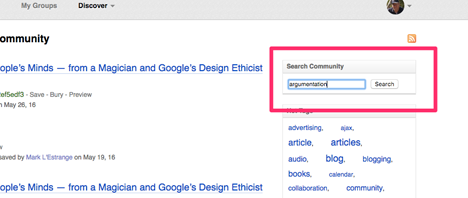
Here is the process. Under the Discover heading, use the Community option.
This will take you to the most popular bookmarks, but I want to search these bookmarks for a specific term. In this case, I am searching for “argumentation”.
The search returns hits on the search term. Each snippet includes other information I can use – the number of hits, the date the link was first saved, etc. I can then visit the pages, review the content, save as a bookmark in my own Diigo account, etc.
Hardware is or perhaps already has become a commodity. Nearly any device produced – laptop, tablet, phone – is capable of reaching the online services provided by multiple providers and more than meets the needs of a very high proportion of users. The money put into such devices brings a dismissing return. Once you get past $300-400, a larger investment adds little to what you can accomplish. This reality is reflected in the diminished interest in these same devices. If it were not for difficulties with the wired-in batteries, most of us could extend our replacement cycle by several years. The speed of a connection is far more important than the speed of the CPU, drive, or bus.
The trend I describe here is not a reflection of the use of this technology. We might have moved more of our attention to mobile, but we have not diminished the focus of our attention on digital content.
These trends make it difficult for companies that are focused primarily on hardware. The multiple companies involved in generating hardware assure reasonable value for money spent. I use mostly Apple devices, but I understand that I am purchasing this hardware at a premium and for little advantage when it comes to my work. I am worried about the future of Apple hardware.
It seems Apple already realizes the challenges I have identified and are making every attempt to diversify. My frustration is that Apple fancies itself a design and hardware company and ignores the potential in content (with the exception of music) and online social. I wish that Apple would challenge Amazon in the ebook market. iBook Author is a great tool but largely ignored as a development environment because Apple refuses to make the necessary investments to take the content generated cross platform. Anyone writing for group adoptions (e.g., textbooks) cannot make a commitment to developing in iBook Author. Instructors making book decisions cannot put students in the situation of having to own the hardware from a specific company.
My complaints with the Amazon model beyond the general objection to the lack of competition is the simple format of the content that must be prepared for the Kindle. Generating content for the Kindle is not easy and the commitment of Amazon to its own low end devices limits the use of multimedia in the content created. I understand that Amazon is moving toward a more diversified textbook authoring platform, but derivations of pdfs are not what I find impressive. The Kindle devices are simply not suited to video or to integrating web and book content.
So Apple, you have the money to create a presence in the content environment. You will soon be out of the education market if you focus only on hardware.
Newsela has not been around for long, but the company has become quite popular as a way for educators to meet the literacy needs of classrooms serving a wide range of reading levels. The service offers the same “news” stories written at multiple reading levels.
Newsela now offers an additional approach that meets the challenges of what some have described as a “new literacy”. Most of us increasing turn to online resources to meet our information needs and we locate this information using search. What search returns are multiple hits and we tend to fashion an understanding from a review of several of these sources. In keeping with this notion that we build a personal understanding by combining information from multiple sources, Newsela now provides a resource called Paired Texts. Two articles that address a common theme are provided. Students are provided a writing prompt that is best addressed by combining information from the two resources.
As far as I can tell, the articles are selected to provide different information and not contradictory perspectives. This would seem to be the next step – what do you do when a search provides information that is not consistent and you are asked to take a position?




You must be logged in to post a comment.