Consumption/production and transfer

We are on a transatlantic cruise and the passage gives me plenty of time to read. I have had the opportunity to spend a little more time than usual with my Kindle. The book I am presently working on is Mitch Resnick’s Lifelong Kindergarten.

I would describe the book as Resnick’s attempt to make the case for maker culture which I tend to translate as “production” culture. When translated to the school environment, I would describe the theme as “too much consumption, not enough production”.

I started thinking about my own efforts in “consuming” his book. I probably go through an average of 2-3 books a month and I think I have purchased one “paper” book in the last several years. That was necessary because the book was not available in a digital format. I am committed to the digital format as an important part of what I consider my workflow. I do read some for pleasure, but I also still spend a lot of time reading to give me something to write and speak about. So, my consumption and production are tightly connected. An example might be this post. I would not be writing about Resnick’s ideas unless I had first read his book.

Even my process of consumption is far from pure. I like the digital format because I can highlight and annotate, search for my additions later, and copy my embedded content to my external products (writing). I understand that some argue reading on a device is inferior to reading a paper version, but I think this assessment must be considered carefully as to the purpose to be served. Reading as an active experience is certainly cognitive construction, but the thinking can also be simultaneously externalized as annotations and highlighting. Often, reading is not independent of external productions.

It seems reasonable to me to consider the consumption/production processes as linked. This was certainly the logic behind the language experience approach (reading/writing, speaking/listening) that has been used as a way to understand the development of reading proficiency. What I think is important to consider is which areas is this consumption/production process can be emphasized. When does consumption/production develop something beyond the content of interest (critical thinking, problem-solving, etc.) and how far does the development of these higher level skills transfer (near transfer, far transfer)?

The issue of transfer is important and the research on the extent of transfer should play a role in the educational focus on production. What I mean by this is that the educational setting does not have the time to provide production experiences in every possible consumption/production area. When should production be emphasized as an elective and when as a requirement? Consider the possibilities that are seldom examined. Most individuals enjoy the consumption of music, theater, photography, and food.

There are two questions here. First, which production areas should be emphasized if the time necessary to develop related thinking skills can be accomplished by any production experience. Most research suggests that the time necessary to assure transfer is significant. This is one of the concerns with the use of coding to develop higher order thinking. Most research shows that limited exposure is not enough. Second, there is the issue of which areas should be required of all if near transfer is all that is produced. Again, choices have to be made.

My thought is that we have been doing it right all along. I would propose that we emphasize the reading/writing connection which probably means students don’t do enough writing. The processes of reading and writing have such wide utility that has not diminished over the decades and probably needs enhancement. I would focus on the arts, coding, and making as electives. These questions are a matter of balance and it should not be assumed that earlier questions of emphasis resulted in the wrong decisions.


Loading

The Padlet Story

I hope that recent revelations regarding social media, particularly Facebook, has caused reflection focused on what we can expect when using a free service. I thought that the reaction to Cheryl Sandberg’s reply to what Facebook would do to provide an ad free space – charge a subscription – was telling. So many seemed shocked probably because they have not  given a thought to how Facebook maintains its infrastructure and pays its many employees.

This is not a post about Facebook, Twitter, Google or other services that have relied on ads and the sale of personal data. This is a post about the reaction to the announcement from Padlet that it must cut back its free offering and charges schools or teachers. To be clear, Padlet will maintain a free “level” – three pads with ads. However, the level at which many teachers used the service will now require payment.

The reaction on the part of many was not that understanding and in response (I assume) to this reaction the Padlet Founder offered a detailed explanation of their plans and their decision. His comments are worth considering.

My one negative reaction to the Padlet announcement which seems common to most paid edtech services is the lack of intermediate offerings between free and the lowest subscription. A counter example would be InsertLearning which offers a monthly fee. My guess is that the bookkeeping required might be thought not to be worth the effort to offer some type of tiered model. As the Founder suggests, the cost for the subscription model is reasonable for those classrooms that make extensive use of Padlet. They have good data on patterns of use and have used these data in setting the price for their paid tier.

I do wonder about the ads in the Padlet free plan. Didn’t Channel One receive a lot of criticism for their ads on their educational television channel.  Who will be the targets for these ads – the adults or the students?

Loading

Diversify your social media presence

Present awareness of the collection of user private data by social media giants has increased public awareness of security concerns and led some to look for alternatives. While I do make some use of Twitter and Facebook, I have been exploring alternative services for several years. I have a mixed reaction to the present concerns. On one hand, I am bothered by my data being used in ways I did not anticipate. On the other hand, I understand that the companies providing these services have expenses and are expected to be profitable. I agreed to the use of my data, but to a lesser degree than I understood.

Simply put, I use the social media giants because this is where people spend their time. This is a present reality. My concession to what I consider the limitations of these services is that I limit my use to specific purposes. I use Facebook mostly to argue my political views. I use Twitter to discover educational resources being promoted by others and I automatically post notices when I add something to one of my blogs.

One of the dark realities of social media is that it seems to encourage a winner take all process. People are attracted by people rather than be superior experiences. Taking this into account, my recommendation is that people cross-post. Encourage innovation by supporting new services while you continue posting to popular existing services. It is your content so put it as many places as you want.

My present recommendations would be Mastodon as an alternative to  Twitter and Diaspora for Facebook. One innovation of these alternatives is that they use an approach called federation. Rather than relying on one source, both services combine access provided by multiple instances. You join an instance, but can also explore content added to all instances in the federation. I am a member of diasp.org and mastodon.social.

Growing alternate social media requires more than adding content. The process of making connections takes some time. I make the effort to star and share content each time I connect. Using hashtags is important with diaspora as the use of hashtags offers a way to identify other users who post on a common interest. Use hashtags and learn how to follow a hashtag (e.g., education).

So, if you are interested in innovative uses of social media I encourage your exploration of alternative social media services. My motivation for my activation is part technological interests, but also the belief that fostering alternatives is a way to encourage companies to be more responsive to consumers.

Loading

HyperCard rising from the ashes?

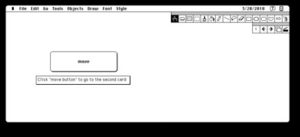
Maybe, just maybe, the best learning to code environment still has life. HyperCard, the Apple project that launched hypermedia, is the focus of an open source project called ViperCard.

Vipercard is web-based and you can do many of the same things you could do in HyperCard. The scripting language originally called Hypertalk seems to work as I remember it.

The developer is looking for support to fund his planned additions to the project. The developer has written an explanation of his efforts.

Loading

Reading is not studying

I think professionals find shorthand ways to identify key ideas that they use frequently. Reading versus studying is one such key idea for me. Even though I worked with college students, I know that many of them I encountered did not understand this distinction. They would assume that reading was enough or they read several times and assume they were studying. I try to explain this key idea to educators in the hopes it will be a way they can use concepts I assume are familiar to guide their own thinking and practice. Sometimes this works and sometimes it does not. Perhaps what is important here is coming up with your own ways to understand important issues. Perhaps teachers are using a concept such as “deep reading” in the same way I use studying.

If exposure to ideas is not enough (reading, lecture, videos, hands-on tasks), what can educators do to facilitate learners learning. How can educators facilitate studying and perhaps help learners learn to studying without facilitation? Yes, you did notice that I went beyond reading to list other versions of information exposure. In doing so, I may have gored some of your own sacred cows by implying these other learner experiences are equivalent to the information exposure involved in reading. I do think the magic of making and other forms of experiential learning is nothing more than information exposure. Like reading, these experiences with content expose learners to information, but the tactics without more cognitive activity on the part of learners do not do enough. Students need to study, process deeply, think or whatever concept you will accept in order to learn.

This has been a lengthy way to introduce you to a second distinction I find helpful – information vs educational content. I find this distinction relevant in thinking about the “abandon the textbook” tactic some find meaningful. I can argue each side of this tactic. I do think it important to consider why anyone thinks this is a good thing to do. Textbooks are costly? Textbooks are easily dated? Textbooks are not how adults learn? These pronouncements may be accurate, but textbooks are also produced from a single perspective, written in an integrated fashion, carefully vetted, and developed purposefully as educational content rather than information. If you are willing to move beyond the textbooks, there are unique challenges when making this transition.

As a textbook author, I have thought about the limitations and advantages of a textbook. My own efforts as an author have encouraged me to move beyond the traditional textbooks I once wrote to more of a hybrid product that addresses some of the weaknesses I and others have identified. As a cognitive psychologist interested in learning challenges and technology, I have also explored options for how information content might be transformed into educational content.

 In many ways attempting to help learners bridge the gap is what textbook authors and teachers try to do. They try to help learners study. A distinction I often draw between secondary education and higher education is that in secondary education teachers often study with their students. In higher education, teachers assume students will study on their own. As I mentioned above, the assumptions of college teachers are not always appropriate. We expect the skills of studying to have been developed from the shared activities of secondary teachers and students and this has not always happened. So, if we can acknowledge that exposure to content is not enough, where along the line and whom will help learners move from educator facilitated studying to learner guided studying?
I sense a way to get educators to understand this issue and to provide learners opportunities to acquire study skills. In a way, moving beyond the textbook should encourage educators to carefully consider their roles as the designers of learning experiences because they cannot assume this role is the responsibility of the textbook author. I like to describe this expanded role as teacher as designer. Of course, this is what educators have always done intuitively and perhaps mindfully. Because the process is so tangible, MODIFYING CONTENT TO CREATE A LEARNNG RESOURCE is a great exercise in thinking about helping students study and perhaps passing on tactics for studying to students.
I have identified a category of tools intended to be applied to online information resources suited to this purpose. I describe the design process as “layering for learning” because the educator as designer accepts the online information as it exists and “layers” activities/tasks/prompts on this information to encourage deeper thinking and specific forms of cognitive processing (studying).
You can gain a feel for some of these services by taking a look at product tutorials I describe online. This post has already grown too lengthy so I will generate a related followup description of these services and how I see them being used by educators.

Loading

Heart in your hand

AR and VR are supposed to be the next big thing. Augmented reality has always made sense to me. Most of the examples of VR I have seen to this point I would describe as “early days”. You can see the potential, but the experience was still pretty crude.

The Merge Cube will likely change the minds of many educators. We purchased some at Walmart (this is another story and I will explain at the end of this post). The Cube is a soft cube you hold in your hand and the cube interacts with apps on your smartphone (both iOS and Android) when you point the phone’s camera at the cube.

A few apps are free, but most likely to be of interest for classroom application cost a dollar or so. We have tried an anatomy app and a space app so far. Here are some screen captures from the phone from the anatomy app. You can insert your phone in a viewer for a 3D perspective, but just the phone works and that approach is less expensive.

Brain showing brain stem.

Heart external and internal views. The heart is beating. You can see the cube through the transparency of the internal view. A given view is manipulated by rotating and turning the cube. Moving between layers is manipulated from the screen of the phone.

The Walmart story

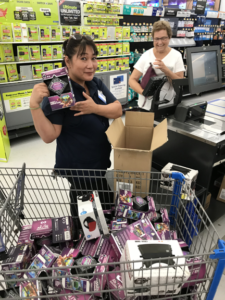
The Merge Cube and viewers are/were available at Walmart. Cindy learned from the Leslie Fischer blog that the cubes were being sold at Walmart for $1. We happen to be taking a winter break on the island of Kauai. This island has one Walmart. We made the trip to the store and purchased every cube they had (the stock for the entire island). The workers in the electronics department were completely mystified. We tried to explain these would be used in classrooms, the desire for all of their stock was perplexing. They asked where we were from and explained that there were probably Walmart stores were we live. We said it would be a while before we got home and the cubes might all be sold by then. We had a great time with the store staff.

Now to figure out how to get all of this stuff back to the mainland.

Loading

Google Photos – Local and Remote

We are in Kauai, HI, and I am finding so many things to photograph. I have a nice camera, but I also always have my camera in my pocket and also like the GPS data stored with iPhone photos. As my local (camera) photo collection has grown, I have started investigating the options for storing photos remotely on Google Photos. I have never uploaded all my camera or phone photos to Google and I must also now contend with very slow Internet so there are multiple reasons to be selective. I think I have the local to remote options down so I thought I would write a tutorial.

Three lines or three dots

In the following content, I may make reference to three lines or three dots. This is a reference to icons that appear on the left (lines) and right (dots) when the Google search box is open at the top of the Google Photos display. The icons to control important actions drop down from the three lines and the three dots icons.

Is it local, remote, or both

The display of your photos on your phone provides some information about where a photo is actually stored. If you examine the lower right-hand corner of a photo in thumbnail mode, you may see a circle consisting of two arrows. This means the photo is on your phone, but has not been uploaded to your Google photos account. If you select one of these folders and then select Backup from the three dot icon, you will upload this specific photo to Google.

If an image has no such circle of arrows, the image has been backed up. To test this distinction for yourself, connect to your photos.google.com site from a computer and compare what you see on the computer versus the phone.

Here is the interesting thing. If you have the Google Photos app on your phone and connected, you will still see photos you have deleted from your phone (deleting photos from the phone does not happen just because you backed up) because the thumbnail for the image will still be downloaded and displayed. Selecting the thumbnail will display the image by download. If your phone is offline, you will not see images stored only remotely. So, images can exist locally, remotely, or in both places.

Free up space

There are two ways to delete local photos. A photo that is stored in two locations can be deleted by using the three dot drop-down menu and selecting delete device local. (see image above for options to backup and delete original)

An option for free up larger amounts of space by deleting local images is available under the three line drop down menu (free up menu).

Remember, some folks claim that a file that exists in only one location is not actually backed up. I certainly trust Google to keep the files stored only on their servers and they must have backups of these backups, but if you are paranoid, I am just telling you what some folks say.

BTW, you can reverse the backup and delete process by displaying an image that has been deleted locally (meaning you see it from the Google server) and selecting download from the three-dot menu. I guess this would be a way to determine if both options I describe above applies – no download=both, download=remote only.


[I am going to cheat a bit here so I don’t have to include pictures of all possible variations that appear under the three dot icon. Options come and go depending on the image viewed. So, backup will not appear if the image has already been backed up. Download would appear if the image has been backed up and the local image deleted.]

Backup vs. archive

When you select the three dot icon, the drop-down menu will list both backup and archive. Archive is for photos you do not want to display (locally or remotely). For example, I share my photos with my family and I may want to not bother them with work photos. This is what archive accomplishes. You will not see archived images remotely or locally. Fear not, the images still exist and you can locate them by using the download from archive icon available from the three line icon.

Loading