I have written about RSS readers and the value of setting up such readers several times. I is time to try again because I know few individuals I write for (mainly teachers or teachers in training) that understand or use an RSS reader.
Simply put, an RSS reader allows you to select online sites your value and then keep track of whether this site has changed so you can check on new content. The advantage of this combination of features allows you to follow a high number of sites you personally value without having to take the time to check each just to see if new content is available. Summary – RSS readers are about personal choice and efficiency.
My main use for RSS readers is to follow blogs. This is an ideal type of content for this technology because bloggers come and go and some post infrequently. It would be very time consuming to keep going back day after day to see if a blogger who posted on average once a month had been visited by his or her muse the day before. RSS can be applied to other content (static web pages that are changed from time to time, podcasts), but for me blogs are the ideal content for the use of an RSS reader.
If I could convince you to use an RSS reader, I would probably suggest Feedly (https://feedly.com) or Reeder (http://reederapp.com/). However, if you don’t see the value in setting up such a service, these suggestions would likely do little good. I want to try something different. I want to try to give you a feel for what I see using an RSS reader. Perhaps there will be some value in getting you to imagine how I might benefit from making the effort to use an RSS reader.
I enjoy having control of the technology tools I discuss. I have put in the time to develop some skills in running a personal server and I pay to rent server space as part of what has become a hobby. You don’t have to do the same, but I make the effort because it gives me a better sense of how things work. I came across an RSS system I could run on my server. I could use it to invite others to use this tool, but this is not really my interest. What this particular service allows is the opportunity to share access to what I experience using RSS. Users other than me have only “read” privileges, but seeing what I can encounter on a daily basis might be persuasive for some (try Feedly or Reeder if you are convinced).
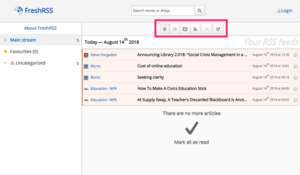
The tool I have installed is called FreshRSS and you can take a look at
Take some time to explore the buttons that allow different views of the content (the simple list vs. the excerpts view). Note that when I view the excerpts and scroll from one excerpt to the next, the excerpts I have scrolled through will disappear (I can save by selecting the star icon). This is the idea in an RSS reader. You see what is new, can access the original source if what you see looks interesting, and the system then removes access to what you scroll past as the focus of the tool is on identifying fresh content you might like in an efficient way.
I have been reading Machine, Platform, Crowd, a book written by Erik Brynjolfsson and Andrew McAfee. It is not a book written for educators and the process of education receives little attention. I would describe it as a book about how technologies result in innovation and about the role AI will play in our futures and how AI will combine with human capabilities and expertise.
I must admit some of the insights from the book surprised me. I often protect my own self-interests by imagining that technology will advance human capabilities by taking care of the routine and the data-intensive and allow humans to take advantage of expertise and intuition. The authors immediately dispute the notion that human expertise is more productive than carefully constructed rule-based AI systems. Humans are biased and prone to stick to personal insights even when proven wrong. It is not the rule-based AI systems however that the authors see dominating the future. It is the type of AI that finds relationships in massive amounts of data resulting in effective predictive models they see presently offering the greatest opportunities.
I don’t necessarily recommend that educators read this book because of the discussion of the major approaches to AI, but because of the insights offered regarding technology and innovation. Allow me to offer a perspective without spoiling (or attempting to remember) all of the big ideas from Brynjolfsson and McAfee’s book.
Technology and Innovation
History does offer some opportunities for seeing present circumstances through analogy. The book begins with a description of the transition from steam power to electrical power in driving major manufacturing and in sorting out which major industrial powers survived and which did not. Huge companies and fortunes were developed based on being the first to master the use of steam power. Being first allowed the accumulation of wealth needed to continue to lead in the application of steam-based infrastructure. To be effective, a single power source (the steam engine) was used to run coordinated equipment through complex systems of pullies and belts. Plants with multiple levels were constructed to take advantage of this single power source. When electricity and the electric motor was introduced, some tried to just use it as a power source for the same approach. This fit well with the existing infrastructure and provided a small increment in efficiency. Of course, this is not the approach that ultimately ended being most effective and flexible. Modern assembly lines on a single level were more suited to multiple electric motors and required a different building design. Multiple motors also allowed greater flexibility in that an entire process did not have to be reworked should there be a better way to execute one of the components of that process. Hanging on to the one power source model and the expensive infrastructure that supported this model ended up resulting in the ruin of many once powerful companies who were too big to change or at least too afraid to innovate.
Educators might take different lessons from this description. Mine is likely different from most. I imagine the student as the factory. My take on learning – a form of constructivism rooted in the science of human cognition – sees the productivity of learning resulting from the individual learner (hence the learner is the factory). What the learner needs to be most productive is to be able to arrange the use of tools to optimize the use of his or her learning factory. Depending on the goals of the factory and the needs of the goal specific learning processes, one size does not fit all. Many educators might see the inflexible factory as the system of education, the school, or even the classroom. My recommendation – begin by attempting to understand the work of the learner and not the work of the environment surrounding the learner.
My point – we have yet to make use of technology to respond to the needs of the individual learner. Technology should be thought of as a way to individualize the learner experiences. Noting this opportunity is not new. I think my take on individualization prioritizes different things that many education pundits promote. In considering my personal recommendations for individualization, I have decided that I see the education as meeting the goals of both learners and society. I am not a proponent of learn whatever you want whenever you want to know it. The self-indulgent model fails to recognize the importance of some common goals to society.
Individual differences technology can presently address:
Starting point
Aptitude differences in speed to learn
Individual differences in content interests
The classroom may fail to support the individual learner in these ways. I often argue the first two factors which interact in practice as demonstrating the need for mastery learning (an old term, but why change the term when the problems remain the same). These are lockstep systems (group-based instruction) which operate with limited regard for what learners already know and for differences in their speed of learning. More than this, when the optimal speed of learning is ignored many learners are either held back in what is possible or develop greater starting point problems (lack of background knowledge). For the second group of students who are constantly left behind, learning becomes so frustrating because of the lack of background knowledge or skills that declines in motivation kick in creating all kinds of further problems. To use the presently popular notion of mindsets, how can you convince someone to approach learning with a growth mindset when their personal history lacks any evidence that such an approach is realistic?
Content interests mean that learners are allowed to pursue different things. There are shreds of this logic in allowing students to select course options, to pursue different majors, 20% or passion projects, or to select a different book to meet a reading practice expectation. I do think it important to consider when the goal is to encourage the development of different declarative knowledge or procedural skills and when the goal is to encourage the development of specific declarative knowledge and procedural skills in the different ways. These are very different issues. We may want all learners to be effective critical thinkers and problem solvers or to understand the basics of our system of government. We may also want some students to be able to explore computer programming and others to explore instrumental or vocal music. These are different categories of goals, both are important, and both can benefit from the benefits technology offers learners.
I attempt to acquaint students in the grad courses I still teach with the notion of blended approaches to education because the concept allows most of these ideas to be integrated. Technology is what allows the transition toward a blended approach much in the say the electric motor allowed a transition away from the less flexible steam powered approach to manufacturing.
I have required that students in one of my graduate technology classes (Digital Media and the Internet in Schools) add a tutorial on a self-selected web tool or service to a wiki. As the Fall semester approaches, I have thought about the value of this requirement. The interest in and perhaps the value of wikis just isn’t what it used to be. For example, Wikispaces, a service used by many educators, will cease operation at the end of this month. Of course, there is Wikipedia, but I even imagine I see fewer mentions of this resource.
I like my wiki assignment within the context of my course because it required experience with a wiki and it gave the students the opportunity to explore a tool or service appropriate to their own needs. This was intended as a two for one authentic task. It offered the additional benefit of offering a resource to other educators and the students from my class to explore what students from other years had investigated.
What has become of the wiki? Here are some thoughts.
The notion of a participatory web benefitting from the wisdom of the crowd may have waned. Perhaps we have become jaded by recent developments when it comes to collaborating for free to benefit each other.
Perhaps the wiki as a tool has been replaced by other tools that are simply easier to use. I make use of mediawiki which is the same tool used to offer wikipedia, but this tool seems more difficult to use for collaboration than say a shared Google doc. I admit I have not made the effort to determine if there is an easier to use version of mediawiki.
The tech in your pocket offers many opportunities. Sometimes it is important to explain that integrated technology goes far beyond sitting and watching something presented on the screen.
I was walking in our yard this morning and I spotted this unusual thing flitting from flower to flower on a potted petunia plant. It sounded and moved like a hummingbird and I first thought it was a baby hummingbird. This made sense to me. I took a few pictures.
After collecting a few images, I looked up hummingbird babies just to check. It did not look exactly like a baby of the hummingbirds we see daily. The list of sources from my search for baby hummingbird included hummingbird moth. Using this link, I learned and confirmed the identity of what I had observed and photographed. The photo in the online article was nearly identical to the image I had just taken,
When I encounter and photograph an unusual animal or insect, I upload the information to my Project Noah site. Project Noah is a citizen science site I have promoted previously. It offers a great resource for learning from personal observations and for offering information that may be of interest to scientists and others interested in nature. My sighting may be somewhat unique as the range map contained in the site I used to identify the moth does not show sightings in Northern Wisconsin.
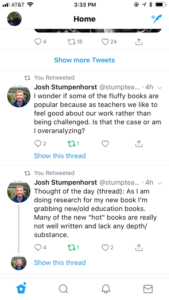
My wife alerted me to a series of tweets authored by Josh Stumpenhorst. I don’t know this individual and have no idea if he would support my own views on educators and educational practice. I know he is an author, has been recognized as an outstanding teacher, and used to blog. I have not read his book or his blog, but I have looked back through his recent Twitter posts.
My comments here concern a recent sequence of tweets, two of which are displayed below.
These tweets resonate with me because I read many of the popular books intended for consumption by practicing teachers and I also find them mostly fluff. What struck me about Mr. Stumpenhorst’s position was his rationale for why this kind of content is popular. He suggests that teachers long for a way to feel good about themselves and somehow these books provide a way to counter the lack of respect they perceive.
I have no quarrel at all with the sense that the profession of teaching in public schools seems to be slipping in public respect. Teachers are underpaid as professionals (for example, compare to nursing which I used to see as similar in providing society with important and necessary services). Politicians have attacked the right of educators to be members of unions to give them some leverage in salary and work condition negotiations. Teachers must endure public assumptions about their summers off and stories of the occasional deadbeat teacher. The list of affronts is far longer, but since I write mainly for teachers, I will allow them to add their own personal pet peeves.
Anyway, what Stumpenhorst claims is that working in this type of environment results in an unfulfilled need and certain types of content they can purchase or review online provides relief. I will suggest two themes that I believe are commonly part of this narrative. I am guessing Stumpenhorst might disagree with the first and would probably agree with the second. I don’t really know.
Fluff themes:
If you aren’t a teacher you don’t know and you have little to contribute to the effort to improve K12 education.
We should form our own in-group club and we will change things. We will explain to the profession how things should work.
I guess in considering these two themes I can see that they may be interrelated. However, the mechanisms by which they offer positivity are different.
We are the only ones that really know and should determine practice. My reaction –
It is important to remember that there are multiple, legitimate perspectives on k12 education. Teachers have a perspective. So do students, parents, taxpayers/politicians, and researchers. It is problematic when those supporting any one of these perspectives assumes their perspective is superior. Balance and openness are important. The community (nation, state, district) that pay for education have a legitimate perspective. Those that depend on student preparation (higher education, employers, fellow citizens) have a legitimate perspective. Certainly, the learners themselves have a legitimate perspective. Since I am most involved in preparing and supporting the continued education of educators, I would also argue that educational researchers have a legitimate perspective. Much like the relationship between physicists and architects, the creative process generates better outcomes when the approach or approaches emphasized take into account the best available understanding of underlying principles (cognition, motivation, etc.).
In group focus. My reaction –
In regard to my second point, it is true that identity is important in any profession. When a large organization such as Apple or Google wants to take on a challenge and officials within the company are not certain there is widespread support for confronting this challenge in a particular way, they may organize a skunkworks group. Smaller groups do have some advantages in comparison to larger groups. A smaller group can be more efficient and does not have to deal with the overhead of trying to convince and involve the entire group. The group isolates itself from the larger organization which allows the group to operate more independently, but often results in animosity among those who are not included and must carry on as usual. Tech skunkworks teams are famous for literally flying a pirate flag certainly more for their sense of identity than for the benefit of the entire organization. Portraying yourselves as pirates or hackers and interpreting this as signifying your independence, specialness, and unique commitment may be a rallying or motivating tactic. There is always potential danger in an isolated group assuming the basis they see as making them unique is legitimate rather than just a way to differentiate their group. There is also the related long-term goal. If an individual or group is dealing with public or larger group opinion, for actual change/innovation or whatever motivates the skunkworks group, it is the others that really matters. I think it most beneficial if the skunkworks group suggests that its purpose is to explore an option without taking the position that this option is obviously better than what most practitioners are doing.
This is likely to be one of the longest posts I have written in the 16 years I have been a blogger. Let me explain the focus and you can decide if it will be worth your time. This post explores four online services I could use to collect information mostly while exploring online resources. These services include:
This review was initially prompted because my payment for the premium version of Evernote was coming due and I have been evaluating whether the $50 yearly subscription was worth the cost. The Premium tier is listed at $69, but I think my cost is $44 or so plus tax through the Apple subscription service.
I use Evernote heavily mostly as I write blog posts and the two Kindle books I try to keep current. It works well for my purposes, but I am retired and I am beginning to consider the costs of the multiple services I purchase to create content for educators. The problem I have with so many of the services I use and many I recommend to educators is the size of the gap between the free tier and the various or only paid tier(s). I believe strongly in paying for technology. I tend to use services I find very useful. However, I use quite a few such services and nearly all are heavily bloated with regard to the uses I have for that service. The capabilities of a given service probably are fairly priced for those who need many of these services, but when a much simpler tool at a lower price would meet my needs just as well, it can get frustrating.
This is the same situation I see for many teachers. It is as if the company providing the service assumes the service will be the only service a teacher would use, but the teacher may have a specific use for a service as well as other specific needs for another half dozen or so services.
So, I am framing the following investigation is evaluating given my pattern of activities, how easily I could switch away from Evernote.
Requirements:
1) Storage of text and images from multiple online sources to be later used in various ways in writing tasks. This includes the use of screen captured images in tutorials.
2) Access to stored material from multiple devices and multiple platforms. I do my heavy writing from a Mac desktop, but I collect content from iOS devices and my Chromebook.
Here is how these requirements immediately impact my decision. When creating a tutorial I may store a dozen or more images captured from an online service. I may collect these images from various devices because it could be useful to show that what I am explaining works a little differently on a tablet, a chromebook, and a traditional laptop. There is a free version of Evernote, but it presently allows two synched devices and has a limited monthly storage capacity. Neither the monthly storage max or the number of devices could accommodate the task I describe here. My Evernote subscription data claim I have 16 synched devices. I assume this is because I have had the account for quite a few years, but I could easily use two macbooks, one chromebook, an iOS tablet and phone, and a desktop machine on a given project. Two synched devices is nowhere close to what might be ideal for me. Yes, I know this sounds like a “first world problem” and one might think worrying about $50 is silly. I guess it is kind of the principle of the thing.
Reaching a decision regarding which service to invest time and possibly money in should involve a little thought regarding just what type of service you are looking for. I decided that I am looking for a way to collect content. To me, this is different from a bookmarking service or a curation service which both imply a longer-term commitment. I have other ways to collect bookmarks and store resources I might want to use some months in the future. I need a way to collect pieces of content I intend to use in writing tasks that might be quite substantial, but that I plan to complete within the next month. After these tasks are completed, I will use my written products rather than the pieces from which these products were created for any future activities.
Enough background.
All descriptions that follow are based on the use of the service on a Mac OS platform and as an extension of the Chrome browser. As stated previously, I make some use of each service using other operating systems and platforms.
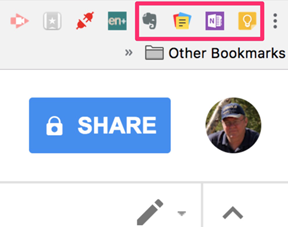
The button bar on my Chrome browser looks like this. When collecting content, the services are activated using these buttons. From left to right, Evernote, Zoho Notebook, OneNote, Google Keep.
Evernote
I presently rely on the premium version of this service. More accurately, I use this service in combination with the Skitch web clipper. Skitch is a free tool from Evernote and can be used independently of Evernote.
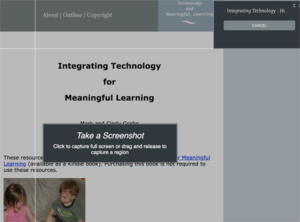
Selection of the Evernote button from the browser menubar opens this menubar allowing several options for collection – the full web page, a simplified version of the page consisting of the core text and images, or the portion of the page appearing in the browser window. It is possible to select a user designated portion of the page from this menu, but I prefer to use Skitch because it offers tools for marking up what I select. What you see below is the tool within Evernote that allows the selection of a section of the screen for storage.
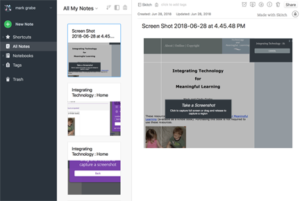
Each element collected is then stored by Evernote. Evernote offers ways to organize, search, and even share these in multiple ways. My focus here is on what I use of what Evernote offers. What you see here is a column offering a thumbnail of the content and selecting that thumbnail opens of the resource in full size.
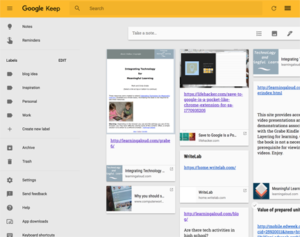
Both Evernote and Google Keep have built in ways to keep the entire article or a specific portion (text or image). Google keep allows you select and save specific text, but I use a workaround to save an image.
Microsoft OneNote
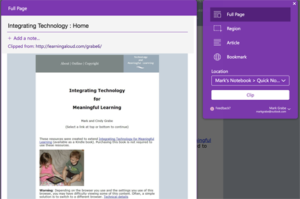
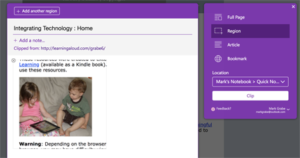
OneNote offers most of the same features I use in Evernote. Selecting the browser button bar button allows the storage of the full page, a simplified version of core elements or the section of a user controlled region.
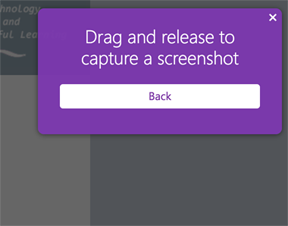
The screenshot option allows the selection of a specific area of the screen.
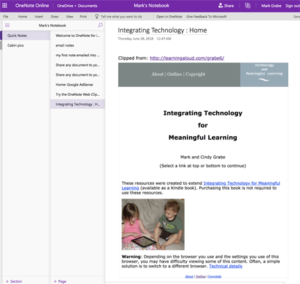
Content is stored in OneNote in a manner very similar to Evernote – a short text statement based on the page name from which the content is taken and a second window that displays the content when one of these text statements is selected. Again, OneNote allows these to be organized as collections.
Google Keep
I have one tip for using Keep. I found it difficult to clip an image to save in Keep. Here is what I finally ended up doing. Selecting the Keep icon opens a window for taking notes. Saving what you enter in this window will be saved to Keep with a link to the page. It is easy enough to select text from the page and transferring to the Keep note using cut and paste. I could not get copy and paste to work with selected images.
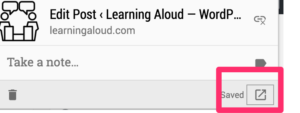
My word around works as follows. Use screen capture to save the image you want to store to the desktop. On the Mac, you use Cmd-Shift-4 to save the image you want to the desktop. Use the menubar button to save a link to the online source to Keep. This will open a note as a separate window within the browser. Use the “Open in Keep” icon (see below). This will display the blank note within Keep
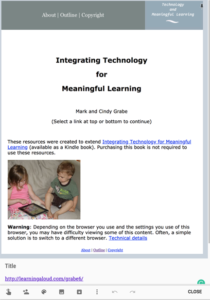
At the bottom of this Note window, you will see buttons for adding content to this note. Use the image button (see below) to access the image you have screen captured to the desktop. This will add the image to the Keep note and you then have the image saved to Keep.
You should now have a note that includes the link to the original source, the image you have added, and any other comments you care to enter.
The collection of notes in Keep will be presented as shown below. You click on a note to access the full sized display.
I can’t say there is an easier way to collect images within Keep. What I have described here works.
Zoho Notebook
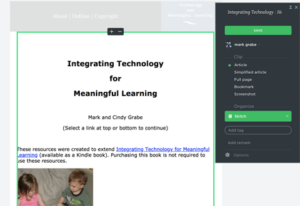
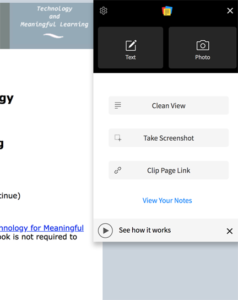
Zoho Notebook presents similar options to the other notebook services examined here. “Clean view” is equivalent to the Evernote “simplified article” and “take screenshot” is equivalent to the Evernote “screenshot”. I am unaware of a way to clip part of the screen image.
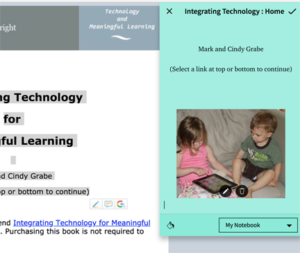
Select the clip tool from the icon bar. To drag and image or a section of text into Zoho NoteBook, open the NoteBook button pages and select text or photo. Drag the text or photo into the window that appears. Yes drag an image or text from the browser window into the Zoho NoteBook one window. You can make multiple additions to what is brought into the NoteBook window and you can bring an image into a text window (see below).
If you want to bring in a screen capture as an image, use the same technique I described for Google Keep. On the Mac, use command-shift-4 go select an area of the screen and save the selection to the desktop. Then, use the NoteBook button to open Notebook and select the Photo button. You then load (not drag) the photo file from the desktop.
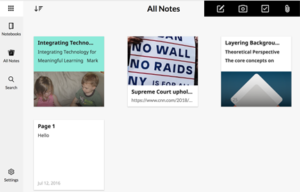
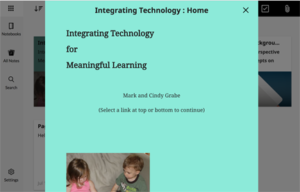
Your stored notes will appear within a NoteBook as thumbnails. Select a thumbnail to see the full sized version of the content.
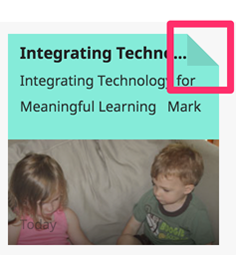
One more tip to head off possible confusion. Some capabilities associated with the NoteBook thumbnails are revealed by clicking on the “dog ear” of a thumbnail. Actions such as delete are made available in this way.
So this is my both lengthy and brief introduction to four online notebook tools. I am not certain I have resolved my personal situation. I do believe that Evernote is the most powerful of the services I have reviewed. Yet, all would meet my personal needs with a little more experience on my part. Hopefully, this introduction will encourage your personal exploration as content collection is something I think most educators do from time to time.
I think that learning to effectively engage in arguments is the most universally needed skill of our time. Yes, it is far more important than coding, biology, chemistry, art, etc. It is ignored because arguing has a bad reputation and is typically misunderstood. It is ignored because educators are unaware or see it as not relevant to what they teach. It is ignored because educators feel unable to lose control of the process when teaching the skills. Defining arguing as debating may help some. Debate is regarded as more refined although obscure. This is also a major part of the problem, meaningful arguing (taking a position, explaining your reasons for this position, and offering evidence for each reason) is not what so many understand arguing to be. Arguing is not shouting louder than the other guy. Arguing is intended to be combative as an effective way to explore issues and in many situations to seek the truth. Science is about arguing. It is the use of data and data collection to advance a position by correcting inaccurate positions that are completely wrong or need to be extended. Politics should be about arguing, but often is not.
I write about arguing a lot and you can acquire some details by searching this site and considering what I say and following the links I provide.
This post has a slightly different purpose. It proposes that students can learn critical thinking and argumentation and can learn about important issues by observing those skilled in specific areas debate/argue about these areas. It may sound something like the bewildering activity of kids who watched skilled gamers play the games that interest them. It is similar to other uses of modeling in education.
As I have explored argumentation I have found tools and services that I see as offering ways to develop the skills of argumentation. I think observation with guidance can contribute. I think that the guidance, some might say scaffolding, is important. Have learners identify the reasons and evidence used by each side. Have learners identify if participants attempt to refute the reasons and evidence of the opposing side or simply continue to add their own reasons and evidence. Such scaffolding represents the types of tactics I think educators should be good at. The goal is to get students to think about the general strategy and eventually to try out the skills themselves.
I suggest educators might find the recorded debates provided by Intelligence2Debates to be very useful. Educators will likely benefit from the listening themselves (e.g., Can students learn from games?, Is social media good for democracy?), but should also see the potential for use with their students.
The summer is a great time for educators to consider new ideas for next year. Whatever your discipline, check out the list of topics available from the site I reference and consider how you might use some of these resources in your classroom.







You must be logged in to post a comment.