Digital for serious reading tasks

I keep encountering colleagues who disagree with me on the value of relying on digital content (e.g., Kindle books, pdfs of journal articles) rather than content they collect on paper. I agree that their large home and office libraries are visually attractive and their stuffed chair with reading lamp looks very inviting. They may even have a highlighter and note cards available to identify and collect important ideas they encounter. A cup of coffee, some quiet music in the background, and they seem to think they are set to be productive.

I have only one of my computers, a large monitor when working at my desk, and a cup of coffee. The advantages I want to promote here are related to my processing of content I access in a digital format. What you can’t see looking at my workspace whether it happens to be located in my home or at a coffee shop is the collection of hundreds of digital books and the hundreds of downloaded pdfs I have collected and can access from any locate when I have an Internet connection. I can work with digital content from my home office without a connection, but I prefer to have a connection to optimize the use of the tools that I apply.

For me, the difference between reading for pleasure and reading for productivity is meaningful. I listen to audiobooks for pleasure. I guess that is a digital approach as well and it functions whether in my home, on a walk, or in the car. For productivity, I read to take in information I think useful to understand my world and to inform my writing about topics mostly related to the educational uses of technology. I think of reading as a process that includes activities intended to make available the ideas that I encounter in what I read and in my reactions to this content in the future. Future uses frequently but not exclusively now involve writing something. At one point when I was a full-time educator I engaged in other additional forms of communication, but in retirement, I mostly write.

My area of professional expertise informs how I work. I studied learning and cognition with an emphasis on individual differences in learning and the topics of notetaking and study behavior. One way to explain my present preoccupations might be to suggest I am now interested in studying and notetaking to accomplish self-defined goals to be pursued over an extended period of time. Instead of preparing to demonstrate what I know about topics assigned to me and with priorities established by someone else with the time span of a week or at most a couple of months, I now pursue general interests of my own preparing to take on tasks I can only describe in vague terms now but tasks that may become quite specific in a year or more. How do I accumulate useful information that I can find and interpret when a specific production goal becomes immediate? The commitment I have made to consume and process digital content is based on these goals and insights.

What follows identifies the tools I presently use, the activities involved as I make use of each tool, and the interconnections among these tools and the artifacts I use each tool to produce.

Step 1 – reading.

In my professional work, I made a distinction between reading and studying. This was more for theoretical and explanatory reasons because most learners do not neatly divide the two activities. Some read a little, reread, and take notes continuously. Some read and then read again assuming I guess that a second reading accomplishes the goals of what I think of as studying. Some read and highlight and review their highlights at a later time. There are many other possibilities. I think of reading as the initial exposure to information much like listening to a lecture is an initial exposure to information. Anything that follows the initial exposure, even if interspersed with other periods of initial exposure, is studying

My tools – Present tools/services related to this stage of processing – Kindle for books and Highlights (Mac app) for PDFs. Other tools are used for content I find online, but most of my actual productive activity focuses on books and journal articles

Step 2 – initial processing (initial studying)

While reading, I use highlighting to identify content I may later find useful and I take notes (annotation as these notes are connected to the book or pdf). Over time, I found it valuable to generate more notes. Unlike the highlights, the notes help me understand why content I found interesting at the time of reading might have future usefulness. 

My tools – Present tools/services related to this stage of processing – Kindle for books and Highlights (Mac app) for PDFs. Yes, these are the same tools I identified in step 1. However, the integration of these dual roles is accurate as both functions are available within the same tools. One additional benefit of reading and annotating using the same tool and applied to the same content is the preservation of context. The digital tools I use can be integrated in ways that allow both forward and backward connections. If at a later stage in the approach I describe I want to reexamine the context in which I identified an idea, I can move between tools in an efficient way.  

Step 3 – delayed processing (delayed studying)

Here I list tools I would use for accepting the highlights and notes output from Step 2 as isolated from the original text. I also include tools I would use for reworking notes to make them more interpretable when isolated from context, adding tags to stored material, adding links to establish connections among elements of information, and initial summaries written based on other stored information. I like a term I picked up from my reading of material related to what has become known as personal knowledge management (PKM). A smart note is a note written with enough information that it will be personally meaningful and would be meaningful to another individual with a reasonable background at a later point in time. 

My tools – Readwise to isolate and review highlights and notes from Kindle. Obsidian to store highlights and notes, add annotations to notes, create links between notes, and generate some note-related summaries an comments. I use several AI extensions within Obsidian to “interact” with my stored content and draft some content. Presently, I use Smart Connections as my go-to AI tool.  I write some more finished pieces in Google Docs. 

Step 4 – sharing

As a retired academic, I no longer am involved in publishing to scientific journals or through textbook companies. My primary outlet for what I write are WordPress blogs I post through server space that I rent (LearningAloud). A cross-post a few of my blog entries to Substack and Medium.  

My tools – I write in Google docs and then copy and paste to upload content to the outlets I use. 

Obsidian as the hub

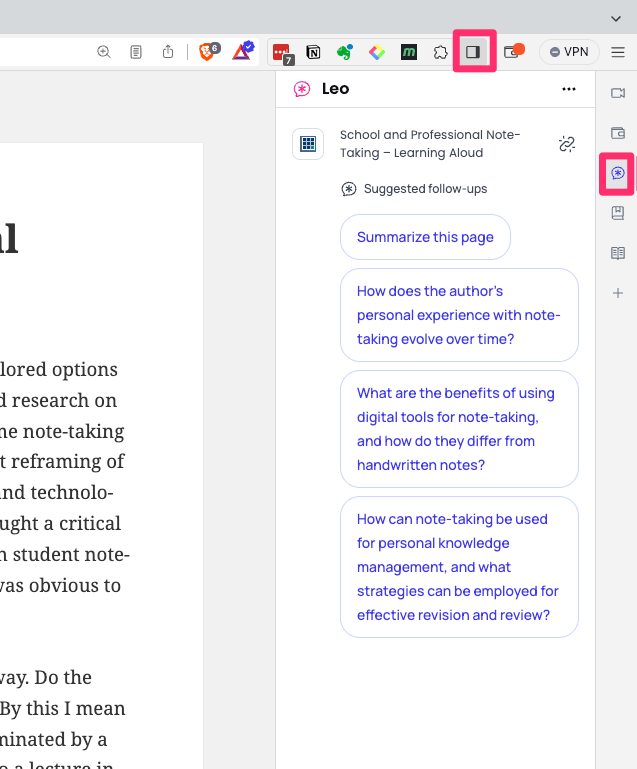
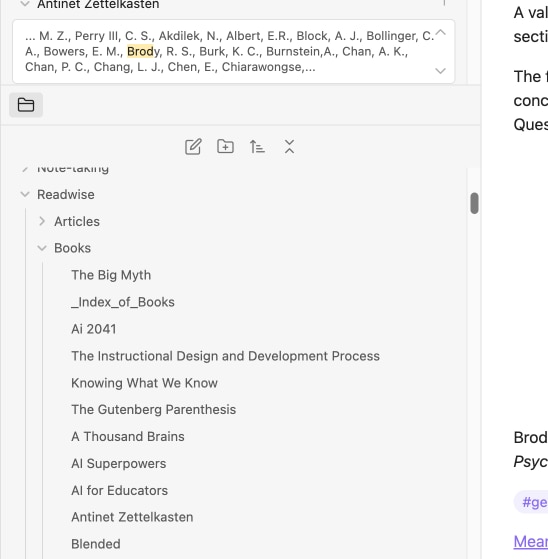
Here are a couple of images that may help explain the workflow I have described. The images show how Obsidian stores the input from the tools used to isolate highlights and notes from full-text sources.

As notes are added to Obsidian, I organize them into folders. An extension I have added to Obsidian creates an index of the content within each folder, but at some point the volume of content is best explored using search.

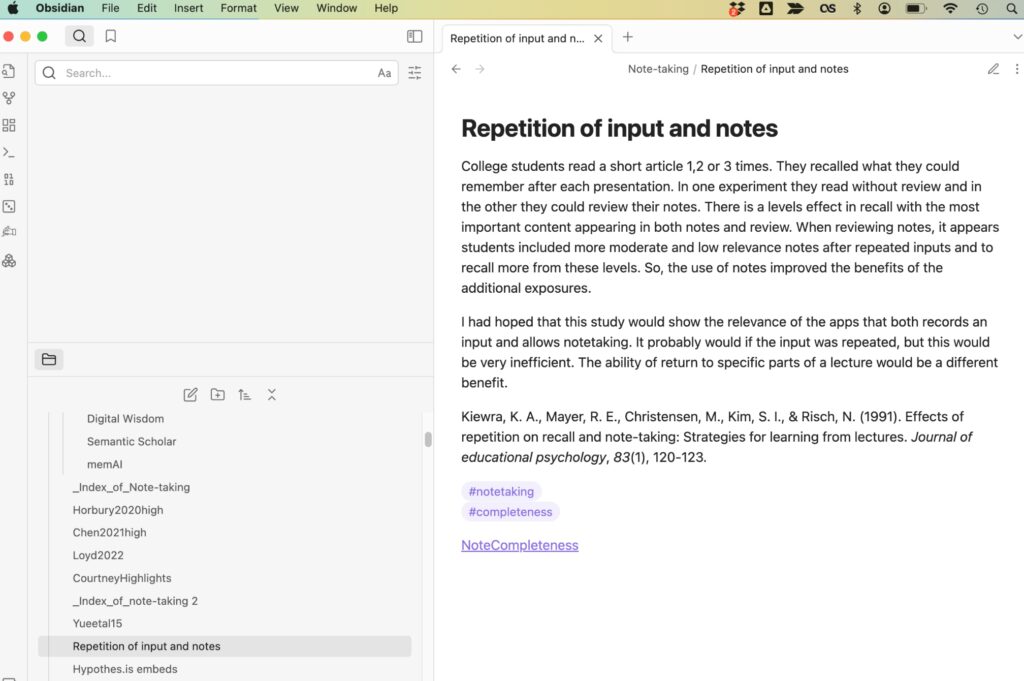
Here is what a “smart note” I have created in Obsidian looks like. The idea of a smart note is to capture an idea that would be meaningful at a later date without additional content. Included in this note is a citation for the idea, tags I have established that can be used to find related material and a link.

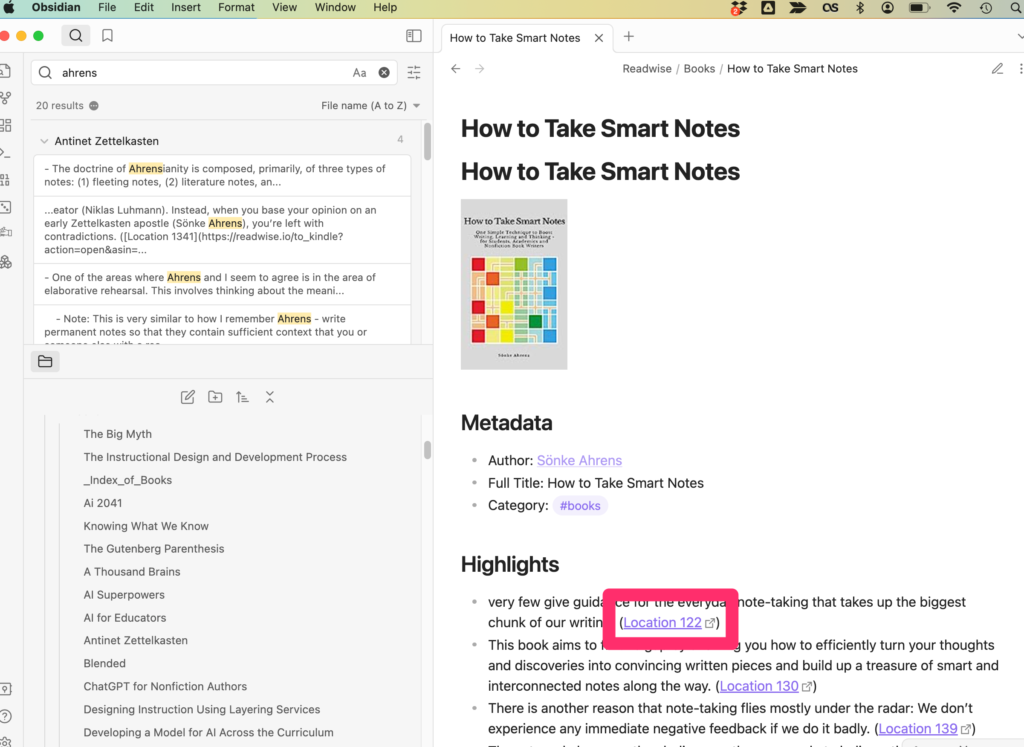
This is an example of a “note” Obsidian automatically generated based on book notes and highlights sent by Readwise. I can add tags and links to this corpus of material to create connections I think might be useful. The box identifies a link stored with the content that will take me back to Kindle and the location of the note or highlight. These links are useful for recovering the original context in which the note existed. 

Here is a video explaining how my process works.

So, the argument I am making here is that digital tools provide significant advantages not considered in single-function comparisons between paper and screen. Digital is simply more efficient and efficacious for projects that develop over a period of time.

Loading

Modern Languages Association Paper on AI and Writing Instruction

We have passed mid-summer and educators are beginning to think about their fall classes if they have been doing so for some time. AI is one of those innovations that may be dominating the thinking of some. Do I ignore AI or address it directly? What am I going to do about cheating? Are there specific tools or tactics I should be teaching (or avoiding)? 

If you think I have the answers, it is time to move on to another writer. I have been using AI a lot myself and I have been doing my best to locate and review articles on AI in classrooms. I have made a few personal decisions and I have written about them in previous posts. I have decided for now my own work will make use of AI tools that allow me to focus AI on content I designate. So, I am using tools that require that I submit a pdf to be the target of my prompts or that work within a note-taking system I use and can be focused on my own notes and highlights. This works for me. I don’t get assigned tasks from someone else that I must submit to be evaluated. My productivity goals and thoughts about why I benefit from writing guide my choices. Educators may have similar goals for their own work, but also are looking to develop the skills of their students and it is this responsibility that makes things much more complex.

Here is a resource that may be useful. It is not heavy on specific recipes for the use of AI in your classroom, but may be useful if you want a good explanation of just what generative large language model AI services are and an analysis of concerns and opportunities for the application of such services by those who teach writing. If I were to quibble with the authors, it would involve failing to pay enough attention to what I would describe as writing to learn and learning to write. I apologize for that turn of a phrase, but it is one in my bag I like to pull out. My work has often involved researching and proposing the classroom use of generative learning activities. I like to describe generative activities as external tasks intended to encourage productive internal (cognitive) behaviors. So, tasks a learner performs that require productive thinking activities a learner may or may not exercise on their own. Writing to learn is an example and it is based on the expectation that writing requires organization and communication of information you have or can acquire as a benefit to understanding, retention, or application in a way that might not occur if you just tried to think about this information. By definition, it is labor (thinking) intensive and may not be the most efficient way to accomplish understanding, retention, and application. It works because the tasks involved in writing to communicate require work focused on the manipulation of the to-be-learned content. Here is my thought related to AI – tools that make the processes of organization and description less labor intensive may eliminate the cognitive work that may be productive in the process of learning. Producing a better written product or writing more efficiently are different goals. Offloading subcomponents of writing may be helpful in writing and the purposeful control of this offloading may help develop the skills of writing. Hopefully, this differentiation makes some sense and is meaningful.

So, what do those who study the development of writing skills have to say about AI. The source I am recommending here was developed by experts from the task force associated with the Modern Languages Association charged with developing a working paper on AI and writing instruction. As I have explained already this product steers clear of specific classroom recipes, but identifies legitimate concerns, likely benefits, and proposed actions to benefit writing educators. I will summarize these areas, but encourage writing people review this document. It is not unnecessarily lengthy and to my eye represents a balanced analysis.

The advantages of AI for writing are as follows:

  • Personalized feedback and support for language learners: AI can provide personalized feedback to language learners, helping them to improve their writing skills. This can be especially helpful for students who are struggling with a particular aspect of writing, such as grammar or punctuation.
  • Ability to analyze large amounts of text for literary scholars: AI can analyze large amounts of text, helping literary scholars to identify patterns and trends. This can be helpful for research and for understanding the development of literature over time.
  • Ability to assist students with tasks such as generating ideas, organizing their thoughts, and identifying errors in their writing: AI can assist students with tasks such as generating ideas, organizing their thoughts, and identifying errors in their writing. This can help students to improve their writing skills and to produce higher-quality work.
  • Potential to democratize writing and make it more accessible to a wider range of learners: AI has the potential to democratize writing and make it more accessible to a wider range of learners. This is because AI can provide personalized feedback and support, and can assist students with tasks such as generating ideas and organizing their thoughts.

The disadvantages of AI for writing are as follows:

  • Risk that students may rely too heavily on AI-generated outputs and miss out on important writing, reading, and thinking practice: There is a risk that students may rely too heavily on AI-generated outputs and miss out on important writing, reading, and thinking practice. This is because AI can generate text that is grammatically correct and that sounds good, but that may not be accurate or well-informed.
  • Risk that students may submit AI-generated work as their own, which could lead to issues with academic integrity: There is also a risk that students may submit AI-generated work as their own, which could lead to issues with academic integrity. This is because AI can generate text that is indistinguishable from human-written text.
  • Potential for bias in AI systems: Finally, there is the potential for bias in AI systems. This is because AI systems are trained on data that is collected from the real world, and this data may be biased. This means that AI systems may generate text that is biased, which could have negative consequences for students and for society as a whole.

 The MLA also provided the following policy recommendations.

  • Writing instructors should recognize that there may be equity issues in the use of AI tools and work to provide equal access to all students.
  • Writing instructors should engage in ongoing professional development to stay up-to-date on the latest developments in AI and writing instruction.
  • Writing instructors should collaborate with colleagues, students, and other stakeholders to ensure that the use of AI in writing instruction is effective and ethical.
  • Writing instructors must emphasize the ethical responsibility that comes with the use of AI tools and spend time with students to consider the misrepresentation of authorship.

Source:

MLA-CCCC Joint Task Force on Writing and AI Working Paper: Overview of the Issues, Statement of Principles, and Recommendations. Available online: https://hcommons.org/app/uploads/sites/1003160/2023/07/MLA-CCCC-Joint-Task-Force-on-Writing-and-AI-Working-Paper-1.pdf

Loading

Humata

Humata AI is another of those AI tools for exploring designated content. It is being promoted as a tool for researchers, but its use is not limited to any specific category of content explorers. An easy comparison would be ChatPDF as the service allows a user to upload and then interact with a pdf. However, the “pro” version also allows a user to interact with a collection of documents (see my description of other services with this capability). 

You can presently explore the capabilities of this service at no cost for individual documents. The Pro version is $15 a month for 250 pages and an additional penny a page after that page allocation is exhausted. 

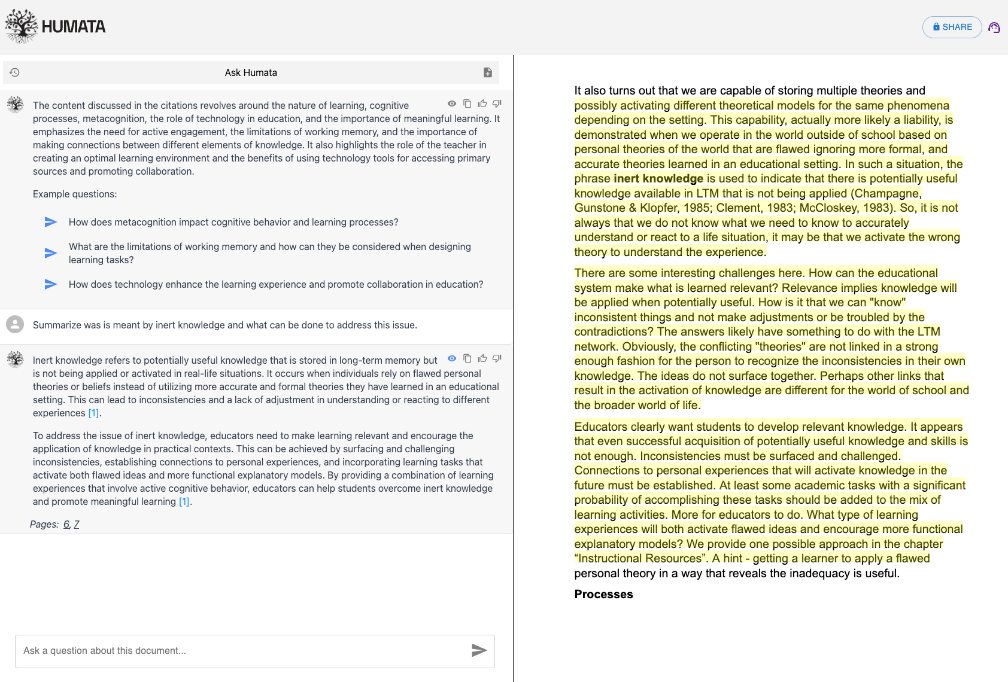
Humata automatically generates a short summary of the document uploaded and proposes some questions. It is not clear to me which large language tool is being used to power this service. The product description proposes that a user can ask for descriptions (summaries), ask questions, and generate responses and write material based on the content that is uploaded. If you have used other AI tools, you can use this tool in a similar way and just see what it will do in response to requests.

The one feature I found uniquely useful in comparison to most of me experiences with other tools is that it assumes you may want to connect the content generated with the source material. It will both highlight and link to this material in an adjacent window (see image). 

Here is another description of this product.

Loading

Applying AI to Discuss Your Own Content

I have moved past the initial stage of awe in connection with access to large language models such as ChatGPT and after considerable exploration have begun to focus on how I might find value in what these systems can provide. I presently use AI tools to support the research I do to inform my writing – blog posts such as this. I have found that I feel uncomfortable trusting a tool like ChatGPT when I simply prompt it to provide me information. There are simply too many situations in which it generates replies that sound good, but are fabrications when checked. 

The one task most trustworthy requires that I focus the AI on a source of content I control and can use to check if something seems off. In this post, I will identify three such tools and explain a little of how you might also find these tools helpful.

ChatPDF

As the name implies, ChatPDF allows a user to interact with the content of a designated PDF. Much of the content I personally review consists of scientific journal articles available to me as PDFs from my university library. This has been the case now for many years and I have a collection of hundreds of such files I have read, highlighted, and annotated. The link I provide above explains how ChatPDF allows me to explore the content of content in such files. Because I read and annotate such files anyway, I actually don’t interact with journal articles in this way very often. The link I have provided describes the use of ChatPDF as a tutor applied to a textbook chapter. The intent of the description was to describe multiple ways in which ChatPDF could benefit a learner trying to understand and store important ideas from a document.

The other two examples here describe AI tools available to allow a user to interact with collections of notes. One tool works with notes saved in Obsidian and the second with notes in Mem.AI. These are digital tools for storing and organizing personal notes and digital content. The tools are designed for the organization and exploration of such notes, but as AI has become available new ways to make use of what can become large collections of information can also be applied. 

Smart Chat Obsidian Plugin

I have prepared a video to offer some idea of how Smart Chat prompts can be applied to the content stored in Obsidian. If you are unfamiliar with Obsidian, the video also offers a glimpse of Obsidian itself. One point I think is important Obsidian and differentiates it from Mem.AI is the way it stores content. Obsidian stores content as individual text files which include content as text and what is called markdown. Markdown is a simple set of tags that allow a user to establish links, tags, and text embellishments such as bolding, size, etc. The benefit is the independence of the files from any specific tool. So, if Obsidian was to go away, you would still have a collection of documents with your information you could salvage. In contrast, Mem.AI stores content in what I think of a database in the cloud. There are ways to export your content, but I find value in knowing I have my content on my computer in a format I can access if necessary.

The Smart Chat plugin requires that you have an Open.Ai account and add some money to cover the cost of your AI activity. I don’t consider the investment that large and have been contributing $5 a month which has covered the cost of my activity.

Mem.AI

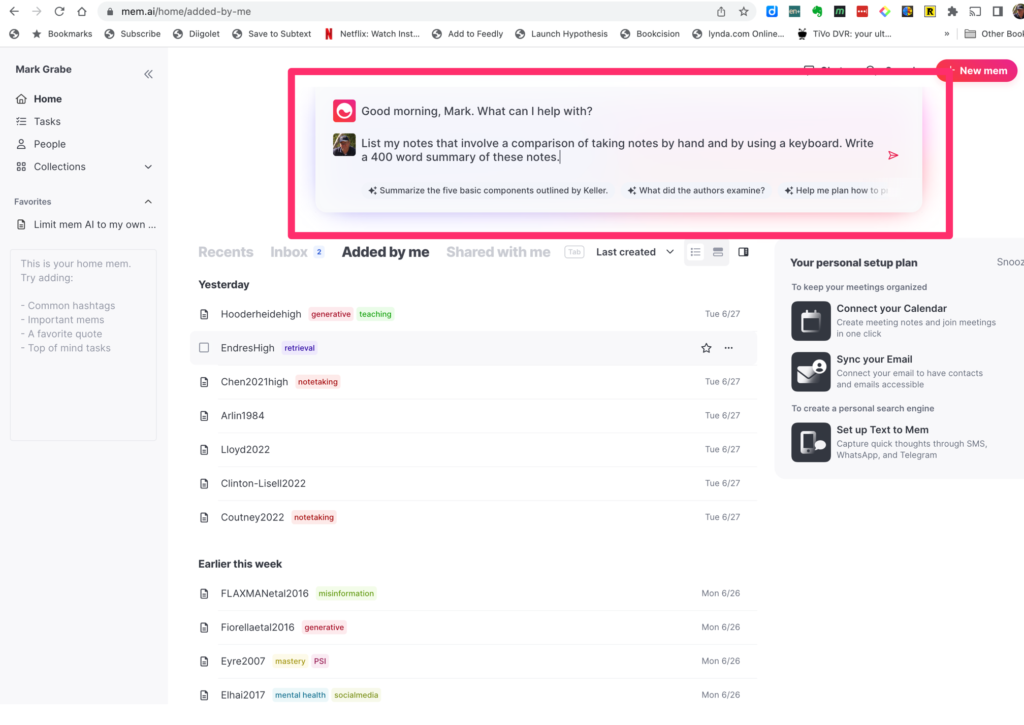
This image shows the home screen for Mem.AI. At the top of the screen, you can see the AI prompt window. I pay $10 a month for MEM.AI, but the AI feature is included. The following prompt (same as I used for the Smart Chat plugin in Obsidian) generated the following response. The content of my two note systems is similar, but not completely identical. You see some differences in the content that was generated.

Prompt

List my notes that involve a comparison of taking notes by hand and by using a keyboard. Write a 400 word summary of these notes.

Response

Based on your knowledge base, there are two notes that involve a comparison of taking notes by hand and using a keyboard:

  1. Horbury2021: This study compared the performance of 10 and 11-year-olds taking notes by hand or using a computer. The study found that conceptual understanding was superior when taking notes by hand. The authors speculated that keyboarding may have produced greater cognitive load, especially for children who may have less experience in keyboarding.
  2. Writing a paper step by step: This note mentions a study by Mueller and Oppenheimer (2014) that found no difference in terms of the number of facts students were able to remember whether they took notes by hand or by typing them into their laptops. However, in terms of understanding the content of the lecture, the students who took their notes by hand performed much better.

Here’s a 400-word summary of these notes:

The method of note-taking, whether by hand or keyboard, can significantly impact a student’s understanding and recall of the material. A study by Horbury (2021) compared the performance of 10 and 11-year-olds taking notes by hand or using a computer. The study found that students had a superior conceptual understanding when taking notes by hand. The authors speculated that keyboarding may have produced greater cognitive load, especially for children who may have less experience in keyboarding. This suggests that the physical act of writing might help students process and understand the information better.

On the other hand, a study by Mueller and Oppenheimer (2014) found no difference in terms of the number of facts students were able to remember whether they took notes by hand or by typing them into their laptops. However, in terms of understanding the content of the lecture, the students who took their notes by hand performed much better. This suggests that while the amount of content stored may not significantly differ between handwriting and keyboarding, the process of handwriting might lead to a deeper understanding of the content.

These findings have several implications for educational practices. Given that handwriting seems to lead to a deeper understanding of the content, educators might want to encourage students to take notes by hand, especially during complex lectures or discussions. However, it’s also important to remember that what works best might vary from student to student. Personalization of learning strategies, taking into account individual strengths and preferences, could also be a valuable approach.

In conclusion, while technology has its place in the classroom, these findings suggest it should not completely replace traditional methods. A balance between digital and analog methods could be the key to effective learning. Furthermore, students could benefit from explicit instruction on effective note-taking strategies, such as focusing on understanding over verbatim transcription. The cognitive load of keyboarding for younger students or those less familiar with typing should also be considered when deciding on note-taking methods.

Loading

How will AI tutoring change

With the recent attention paid to AI because of large language tools such as ChatGPT, my title’s promise to describe change my surprise most educators. Tools for AI tutoring have been deployed and evaluated for some time. I provide a citation in support of this claim at the conclusion of this post. This paper is worth exploring because it offers insights into what has been meant by AI when applied to tutoring and even some insights into human tutoring. For example, I have often quoted the work of Bloom who argued that human tutors probably represented the ideal in teaching and suggested that dedicated intensive tutoring provided a two-standard deviation advantage to those tutored and this advantage represented the best educational interventions could accomplish. I have read the papers in which Bloom made this claim. Kulik and Fletcher offer a different interpretation explaining that Bloom’s data actually involved a combination of tutoring and a mastery approach and the mastery approach may have accounted for at least half of the benefit in this research. That aside, tutoring still offers learners a significant advantage.

Before AI was based on large language models, the AI involved in tutoring was based in a technology-supported system based on a model of what was to be learned, a model of the individual learner, a model of effective instructional strategies, and an interface allowing communication with the system. I had AI generate a description of what the researchers explained these three models involved.

  1. Learner Model: This model represents the student’s knowledge, skills, and learning preferences. It helps the ITS to adapt its teaching strategies to the individual needs of the student.
  2. Teacher Model: This model represents the teaching strategies and pedagogical knowledge used by the ITS to guide the student’s learning process. It helps the ITS to provide appropriate feedback, hints, and explanations.
  3. Content Model: This model represents the subject matter being taught by the ITS. It includes the concepts, relationships, and problem-solving procedures relevant to the domain.

The Kulik review found generally positive benefits for the AI studies, but indicated impact was smaller when the dependent measure was a standardized test rather than local tests, the sample size was small, learners were from the lower grades, the subject was math, MC tests were used as the dependent variable, and the tool studied was Cognitive tutor. For those interested in this type of approach, the review identifies a number of the systems available for use.

My interest in the potential application of the AI tools now available takes a somewhat different approach and suggests that educators and researchers begin with an analysis of the techniques used in successful studying and tutoring and attempt to translate these techniques into tasks that students or educators can apply using AI. I purposefully focus on the research on studying as a general way to think about the cognitive activities of learners following initial experiences which could involve lectures, readings, or any observation of what happens in the world. Simply put, learning requires the processing of external experiences for understanding, retention, and application whether entirely internally and unaided or encouraged by additional external activities (e.g., taking notes, answering questions, discussions with a partner). The natural language capabilities of large language AI allow approximation of these external activities. I have attempted to demonstrate what some of the activities might look like in an earlier post

My prediction is that companies serving the education market will quickly combine the type of AI approaches I have described here (the multi-model approach with the more flexible capabilities of large language models) because of the resources required to do so. You may already see the direction in which this is going be taking note of the efforts of the Kahn Academy (Kahnmigo). 

I do think there are immediate opportunities to take advantage of the tools now available. One distinction that I think educators should consider involves whether activities are applied to the knowledge base used to train the models or applied to designated content. For example, you have ChatGPT ask you multiple choice questions about mitosis or you can ask some AI tools to ask you questions about a pdf or designated content about mitosis. My prediction about commercial ventures will likely be more like this second option as a textbook company would like to focus an AI tutoring approach focused on individual textbooks. There is nothing inherently wrong with either system. I do believe there are more errors when using the more general knowledge base. I also see advantages in controlling the scope of experiences to a designated body of content as a way to control the depth of the experiences. What I mean the discussion of mitosis in a sophomore biology class will be different than in a graduate class because the knowledge base would be different.

I have explored the use of ChatPDF (not ChatGPT) in engaging with the content of a pdf in a previous post. I have been exploring Mem.AI as a way to engage in similar interactions with notes I have taken within this service (you do need the $8 a month version). What I like about this system is that it allows a user to focus the AI prompts on specific material. For example, I could use the service to take class notes on a given day, tag these individual notes or a large page of notes with the date, and then write a prompt to engage with the content identified by this tag. I could also tag notes with a class identifier (PSY101) and then write prompts focused on this tag to review for exams covering more material. I have included several different types of interaction in the material that follows. This material includes my prompts and the AI responses. 

***********************

Me: Using only my knowledge base with tag generative, write a summary of the activities that are classified as generative. Include a list of notes providing this information.

Generative learning activities involve actively engaging with the material to create new knowledge and connections. Some key strategies that promote generative learning include summarization, teaching, self-testing, self-explaining, and notetaking with revision and elaboration. These strategies require learners to select and organize relevant information, elaborate on the material based on personal knowledge, and integrate new information with existing knowledge.

Here are the notes from your knowledge base with the tag “generative”:

  1. Brod’s generative
  2. Summarize my notes on generative learning
  3. Cognitive Activities

These notes provide valuable insights into generative learning strategies and their effectiveness across different age groups, as well as the cognitive processes involved in these activities.

Me: Using only my knowledge base with tag june9, write a summary of the models the author described

Based on your knowledge base with the “june9” tag, here’s a summary of the models described by the author:

In the review by AlShaikh and Hewahi (2021), the authors discuss the development of Intelligent Tutoring Systems (ITS) and their use of multiple models. These models include:

  1. Learner Model: This model represents the student’s knowledge, skills, and learning preferences. It helps the ITS to adapt its teaching strategies to the individual needs of the student.
  2. Teacher Model: This model represents the teaching strategies and pedagogical knowledge used by the ITS to guide the student’s learning process. It helps the ITS to provide appropriate feedback, hints, and explanations.
  3. Content Model: This model represents the subject matter being taught by the ITS. It includes the concepts, relationships, and problem-solving procedures relevant to the domain.

These models work together to create a personalized learning experience for the student. However, the authors note that recent large language models and conversational approaches offer new possibilities for influencing learning without built-in strategies, which could be an important difference in the application of newer general tools.

Me: Using only my knowledge base with tag june9, write a multiple choice questions for me to answer.

Based on your knowledge base with the “june9” tag, here’s a multiple-choice question for you to answer:

In the context of Intelligent Tutoring Systems (ITS) described by AlShaikh and Hewahi (2021), which of the following models is responsible for representing the student’s knowledge, skills, and learning preferences?

A. Learner Model B. Teacher Model C. Content Model D. Language Model

Me: A

That’s correct! The Learner Model in Intelligent Tutoring Systems is responsible for representing the student’s knowledge, skills, and learning preferences. Great job! If you have any more questions or need further clarification, feel free to ask.

References

Kulik, J. A., & Fletcher, J. D. (2016). Effectiveness of intelligent tutoring systems: a meta-analytic review. Review of educational research86(1), 42-78.

Loading

Summer – time for relaxed exploration

Summer is a great time for educators to do a little reading and explore a bit in preparation for next Fall. Our grandkids are either out of school or will be within a week. The educators in our family are soon to have more time. I usually offer some suggestions for technology-related and classroom relevant summer explorations at about this time of the year.

I seem to be spending so much of my time lately exploring and writing about AI. It is hard to get away from this topic and the uncertainty related to applications and challenges. Everything about AI seems mysterious and as a consequence, unsettling. As I have written previously, I have been unable to find a book that provided the insights I felt I needed and my related recommendation was to explore a combination of personal experimentation and online blog posts and resources as most productive. What follows are recommendations based on this perspective.

I have divided my recommendations based on two goals. First, I want to understand a bit about how AI works and to understand general “how to do it” skills. I don’t like the feeling of not understanding how things work the way they do. Without some sense of understanding, I have trust issues. At the other extreme, I want specific recommendations I can implement. I want examples and variations on these examples I can apply to content and topics of my choosing.

Second, I want specifics related to applications in education.

Here are some recommendations related to the first goal. The content is free with the exception of the Udemy course which I have found useful. I tend to differentiate Google Bard applications from OpenAI applications in my explorations. It is worth spending some time with each, but because I have decided to use several OpenAI API applications (applications built on the model that AI approach used in ChatGPT) I pay to use, I am more experienced and have spent more time with OpenAI-related resources. Hence, I am more confident in these recommendations.

The AI Canon (Andreessen Horowitz)

Generative AI learning path (Google)

ChatGPT complete guide (Udemy – $15?)

As an educator, you may or may not feel the need I feel to invest time in developing a sense of how and why. The following are sources specific to education. The resource from the Office of Educational Technology focuses on AI in education, but lacks the specifics I want. It is a reasonable overview of the potential of AI in education. I am also somewhat put off by the constant emphasis on the message that AI will not replace teachers and humans must remain in the loop, which I find obvious and unnecessary if there is a successful focus on useful applications. It seems there is a concern that those who would read the document in the first place need to be convinced.

I have included one blog post I wrote a couple of months ago. I added it because it is the type of effort I want to read because of the focus on how AI might be used for a specific educational goal. I cannot evaluate the quality of this offering, but I think efforts concerning concrete uses educators can try and/or assign now are the type of thing educators are looking for. I don’t believe in recipes, but my effort was intended to focus on opportunities to address a need and to encourage exploration. I think we are at this stage with AI use in classrooms and the summer is a good time to explore.

Artificial intelligence and the future of teaching and learning (Office of Educational Technology)

Google Bard for educators (Control Alt Achieve)

AI tutoring now (me) 

Loading

$20 a month is too much

I am intrigued by large language AI applications, but I admit I am confused. It is not so much trying to understand at a deep level how these services do what they do. I gave up on investigating the “how” question long ago. I am confused by pricing. What am I likely to have to pay say six months from now when we get past the free experimental stage? I understand that ChatGPT Plus is $20 a month. This seems like a lot. What makes it seem like a lot is the price I pay for the various services I pay for as an API allowing access through some other service.

It has taken me some time even to figure out which AI activity I use through some service other than ChatGPT or Bard, I actually am paying for. I know I have an OpenAI API account (so Bard is not included) and I know I have had to generate and attach licenses to other services. I should have labeled the licenses from the start. That would have made identifying where my charges come from easier. However, whichever services generate a cost, I can’t seem to run up much of a bill.

I am not a heavy user of AI services, but I do spend time each day exploring. So far, my bill for the month is a nickel. If the rate for ChatGPT Plus is the same as for the API use, I can’t imagine what it would take to run up a $20 bill.

For the curious, the following is the OpenAI Usage page allowing users to set a limit. I originally thought this limit was just a sum I would allocate and then utilize, but it turns out it is the limit I set for myself for a month. Obviously, this is far too high, but you pay only for what you use (sounds like a television ad). I have no idea how usage fees will be set in the future, but for now you get a lot of activity for little money.

I have tried to find clear descriptions of fees online, but I cannot find a useful summary of pricing and options. I did finally decided just to ask ChatGPT.

What is the difference between OpenAI API prices and ChatGPT Plus?

OpenAI API prices and ChatGPT Plus are two different products, with different features and pricing models.

OpenAI API is an artificial intelligence platform that provides developers with access to a wide range of state-of-the-art models, including natural language processing, machine learning, and computer vision. OpenAI API pricing is based on usage, with different rates for each API endpoint. Developers are charged based on the number of requests made to the API, with pricing starting at $0.001 per request.

ChatGPT Plus, on the other hand, is a specific natural language processing tool that uses the GPT-3 language model. It is designed for chatbot development, and includes features such as sentiment analysis, entity recognition, and conversational response generation. ChatGPT Plus is priced per month, with different pricing tiers based on the number of API calls and the level of support provided.

In short, OpenAI API provides access to a wide range of AI models with pricing based on usage, while ChatGPT Plus is a specific chatbot development tool based on the GPT-3 model with monthly pricing.

Loading