Adolescent Screen Time

I have been working for a couple of weeks on a lengthy analysis of adolescent screentime, adolescent health issues, and surveillance capitalism. This effort is intended as an addition to our textbook project. My writing focuses on the educational use of technology. Like the topic of cyberbullying, the screentime debate is focused on out of school technology use, but educators may offer opportunities to address these issues. The following is a small segment from the section of this project dealing with research on screentime.

The general public receives alarming messages regarding adolescent use of devices (e.g., Twenge, 2017) and certainly, there is reason for concern. However, simplistically rejecting technology use is not a reasonable response. What we all experience with technology is a combination of good and bad. Realistically, the online world is not going to disappear and will attract young users no matter what adults might believe or desire.

Given the mixed consequences of technology use, it makes the sense to take a deeper look at the relationship between time online and consequences. Przybylski and Weinstein (2017) provide an interesting perspective. These researchers have generated a research project intended to contrast two hypotheses – the displacement hypothesis which proposes that the time spent with media replaces other productive activities – exercise, face to face interaction with friends, etc. and the Goldilocks hypothesis which proposes that the use of technology can lead to advantages at some level of use due to access to information and access to peers. As is the case in the story of Goldilocks and her visit to the home of the three bears, some moderate level is the most pleasing and productive.

Using a sample of more than 100,000, 15 year-olds, the researchers related a measure of technology use to mental well being. Their approach sought to determine whether the measures were related and what was the nature of the relationship. The displacement hypothesis should predict a linear relationship – well being should gradually decline with increasing use of technology. The Goldilocks hypothesis would predict a more complex relationship with some level of use being associated with positive (not neutral) consequences and high levels of use associated should be associated with negative consequences.

It was the Goldilocks hypothesis that best fit the data. The data offered something more. The data allowed the calculation of what were described as inflection points – at what point did the relationship shift from positive or neutral to negative? This could be a way to quantify what could be suggestions for guidelines. The research found this shift at 1 hour 40 minutes for weekday video-game use and 1 hour 57 min for cell phone use. Watching videos and using a computer were shown to be less disruptive as the inflection points more than 3-4 hours. The authors speculated the differences were related to how difficult it was to switch away from a given category of technology activity and then back. In other words, the time spent using a computer and watching videos allows the user to break away and is not a complete escape from other activities.

There would likely be multiple factors found to be involved in the dangers of “screen time”, but research similar to that of Przbylski and Weinstein (2017) represents what will likely become a useful approach in developing guidelines.

Przybylski, A. K., & Weinstein, N. (2017). A large-scale test of the Goldilocks Hypothesis: Quantifying the relations between digital-screen use and the mental well-being of adolescents. Psychological Science, 28(2), 204-215.

Twenge, J. M. (2017). IGen: Why Today’s Super-Connected Kids Are Growing Up Less Rebellious, More Tolerant, Less Happy–and Completely Unprepared for Adulthood–and What That Means for the Rest of Us. Simon and Schuster.

Loading

Exploring solar power

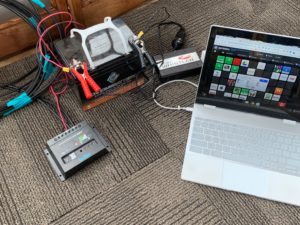
A few years ago I purchased some basic equipment that would allow me to investigate solar energy. I bought a solar panel, a charge controller, a battery, and an inverter for changing the DC stored in a battery to the AC required for many devices. Finding a system of this type on Amazon was easy. It is my impression that such systems are commonly sold to individuals wanting to add a power source to campers for situations in which campers want a setup that allows them to set up a trailor without hookups. Folks must find all kinds of ways to use a source for electricity that most of us do not consider.

My plan was to set this system up at our lake place and just explore what I could do with the “free” electricity I could generate. I got the system to work, but did not really do much with it because I could not find a good location to permanently position the panel. The trees and my own hesitancy to mount the panel on our two-story tall roof limited by progress. I put the equipment out of sight and pretty much forgot about my project.

I did not lose interest in solar energy. We got as far as having an installer come to our home. He took a look at our energy bill and the usable space on our roof. He estimated they could place 7 panels on our roof, but because our consumption of electricity was low it would not be a financial advantage. We heat and cook with gas and we spend a lot of time in other places so we don’t buy much electricity. We decided to go ahead anyway as a matter of principle, but he then said we should first replace our shingles because once you pay for the installation of the panels you don’t want to pay to have them removed and then reinstalled when you upgrade to new shingles. We decided to put off the solar panels for a few years.

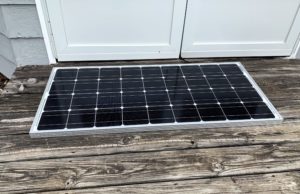
A week or so ago, I came up with a way to try my project again. We have a gazebo outside our home. We don’t use it a lot, but it offers some interesting opportunities. I decided I could just lay the solar panel on the small back deck of the gazebo, run the cables through the opening between the French doors into the gazebo, and position the other equipment inside. No climbing on a roof and no drilling holes through walls. No new costs. This arrangement would not be permanent, but it would do for a couple of months or so.

I wish I had some way to measure the amount of electricity I generated. Your house obviously as a meter that quantifies your consumption. There must be some way to do this on a smaller scale, but there is a limit to how much stuff I want to purchase at this point. I decided my goal would be to see if I could keep my devices charged using “free” solar energy. This is what researchers in my profession might call a “proof of concept project”.

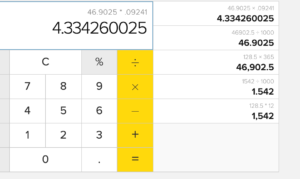
I searched online to see if could find a way to estimate just how much my devices might use. I found a source estimating the amount of electricity and the related cost of keeping an iPhone, iPad, and laptop going. I looked up the cost to me for electricity and recalculated what my cost would be using the approach outlined in this source. According to my calculations, I pay about $4.33 a year to keep my laptop charged. Clearly with my battery, panel, and other equipment, I am not committed to a money making deal here. Just to keep a battery capable of storing electricity going over multiple years, I would be spending far more on equipment than I make on the electricity I use.

Still, I think this has been and will continue to be a useful exercise. I cannot help imagine how a classroom teacher or school might duplicate this project and use it with students. The needed equipment is certainly inexpensive enough if viewed at this level. What if you did the same project and used it to charge the laptops for 25 students? What might you learn about energy production? What data could you collect and analyze? Terms such as ohm, watt, and inverter would have meaning.

Loading

Teen data

I have multiple occasions to make use of descriptive data on adolescent online activity. These data can be difficult to obtain because the data describe typical activity and do not directly involve issues of great interest. The Pew Research Center does survey research and is a source I use frequently. This research center did their previous focus on adolescent social media use in 2014 and things change fast enough in this area that I was becoming hesitant to rely on this past study. PEW has just released a replication of that past survey.

There are few findings I would describe as startling but is nice to be able to cite precise numbers. Ninety-five percent of those in the 13-17 age ground report having access to a cellphone which is slightly higher than their reported access to a computer. Access varies significantly with family income level when it comes to a computer, but very little when it comes to a cell phone. Phone access is up from 73% reported in 2014. When adolescents claim to their parents that everyone has a phone, they are making an accurate claim.

PEW tried to assess just how heavily cell phones are being used by asking teens to classify their use into descriptive categories – almost constantly, several times a day, less often. The almost constantly description rose from 24% in 2014 to 45% om 2018.

The most common social media platforms teens use are YouTube, Instagram, and Snapchat. The focus on Facebook has fallen off since 2018.


Loading

Will educators use textbook options

Cindy and I had a commercial textbook, Integrating Technology for Meaningful Learning, through 5 editions which would be approximately 15 years. Nearly 6 years ago now, we proposed to Cengage, our publisher at the time, that we explore a different model for college textbooks. We thought that our concept would be reasonably explored with our textbook because we were involved with a field that was moving very quickly at the time and because educational technology deals with helping learners via technology making our message delivered via a traditional textbook kind of disingenuous.

What called what we were proposing the $29 book project. The basic idea was to write a shorter book at a much lower cost ($29) and combine this resource with online material. The book which we referred to as a Primer would contain the content we thought was core to how technology could benefit learners and was assumed to have a three-year life cycle. The online content would contain product/service demonstrations, student project descriptions, and new content written as it surfaced. The two components were to be bound together by an “interactive syllabus” created by the instructor that would reference the Primer, link content selected for the student population from the online content we provided, and links to other content selected by the instructor.

We spent several years with Cengage discussing this project and how it might be implemented. We finally agreed to disagree and we were given the copyright for our existing content. We implemented our idea as a Kindle book, web content from the server I lease, and the suggestion that educators use Google Sites to create the interactive syllabus. The book is $9 (ebook only) and the online content is free to all.

The commercial version never materialized for multiple reasons. The price point was too low if the online content would be free. The book company wanted to professionalize the online content including using generic educational video they were producing. We wanted to create the online content using the same tools we wanted teachers to use with their students and we wanted to use project examples based on the classrooms and the teachers we described in our writing. They wanted to pay us to write every three years and I wanted to be paid to write continuously rather than every three years so that new content would constantly be available online.

I am not upset we no longer sell a $140 textbook and appreciate the professors adopting our $9 ebook for their students. The one issue that I find frustrating is the amount of use our online content receives. Cost, flexibility, and keeping content current are common complaints about college textbooks. Our free online content is available, but not used at the level we expected given the use of the Primer. I still see this flexibility as useful.

I was thinking about our content model when I just had to remove material from our online resources. This was not possible when we included obsolete content in our traditional textbook. I was a big fan of Google+ in combination with Google Hangouts. What I felt was uniquely useful in Google+ services was their idea of circles. Individual users (students) could be assigned to multiple circles depending on the content/service to be provided – students in a school, students in a class, students working on a common project. This seemed an effective and highly efficient way to control access. Once a student was in the system, it the association of students with specific circles was an easy process. I guess Google just could not find enough situations in which assignment to multiple content resources and services was that important.


Loading

The mixed promise of crowdfunding K12 education

I spent my career working in higher education and securing external funding was a fact of life in this environment. Making the effort to write grant requests and occasionally secure a grant was a part of our merit pay process. As the pressure to find funding sources to support research and research-related infrastructure and to reduce student tuition has increased, expectations have increased. In some institutions, it is a requirement to secure a certain type of grant (translate as – a grant that provides lots of overhead which is money that goes to the institution to support institutional needs, in addition, to support for the researcher) to be granted tenure or perhaps to be promoted to full professor. The differences across disciplines in the amount of this type of money that is available makes this a very unfair practice, but this is a topic for a different discussion. Let be sufficient to just state that profs in higher ed are frequently expected to secure external support for their work.

What about K-12? While the pressure is far less, K12 administrators and educators may search for funding sources beyond those available through their schools. There are grants. Most of these grants target specific goals and depending on the needs that exist within a given school, the likelihood of being funded is heavily influenced by whether a school has the need the grant was designed to address. Most grants at this level are far less competitive than the grants in higher education, but someone must do the work to apply and there is no guarantee that funds will be available for all who might qualify. Larger districts often have an individual responsible for responding to this type of opportunity and it might be an administrative responsibility in smaller districts.

There is a second type of external funding that might be described as “crowdsourcing”. In higher education, the crowd being approached tends to be the alumni of the institution. In K12, it is likely to be community members and even others interested in supporting needs which they find important. The Internet provides an increasing number of ways in which such appeals might be launched. Again, my experience with crowdfunding has been in higher education and I know that any efforts we might want to make to solicit funds from our alumni required that we go through the alumni association. Our efforts had to first be cleared with university officials to assure that our requests were consistent with university priorities.

K12 educators have multiple online services that provide a way to solicit funds (this article from EdSurge offers an in-depth summary of this issue in K12). This article identifies issues related to crowdsourcing and the opportunities for educators. Many public K12 institutions are underfunded and crowdsourcing offers individual educators a way to secure additional resources for their classrooms. Whether or not requests made by individual teachers meet district priorities is an issue similar to what I have described in higher education. Individual differences in opportunities for learners created by such funds across classrooms is another issue. Are educators expected to secure funds to create needed circumstances in their own classrooms? From a broad view, do the successful crowdsourcing efforts of some teachers relief the public of their responsibility for public education. 

Loading

AI for ID


Some of the following content first appeared on my travel blog – grabetravels.blogspot.com. Here I have appended additional content explaining the educational potential of using identification keys and apps for identification of plants and animals.

———–

For anyone from the midwest, photographing the flowers of Hawaii becomes a constant activity. The flowers are everywhere even this time of year and they are truly beautiful. At some point, you exhaust yourself on the artistic value of your growing photo collection and you start to think beyond the vibrant colors and the huge blossoms. You begin with simple questions. I wonder what this plant is called? You may wonder about other things as well. How does this flower grow in the crook of this tree without having roots in the soil?

I started mixing tech with photography a long time ago. My biology background even plays a role in both my plant photography and my interest in technology. I began exploring apps on my phone that claimed they could be helpful in plant identification. Point your camera at a plant and the app would tell you what that plant was and direct you to additional information about the plant. I have read about face recognition and the role artificial intelligence plays in making this possible. It made some sense that the same technology might be applied to plant identification.

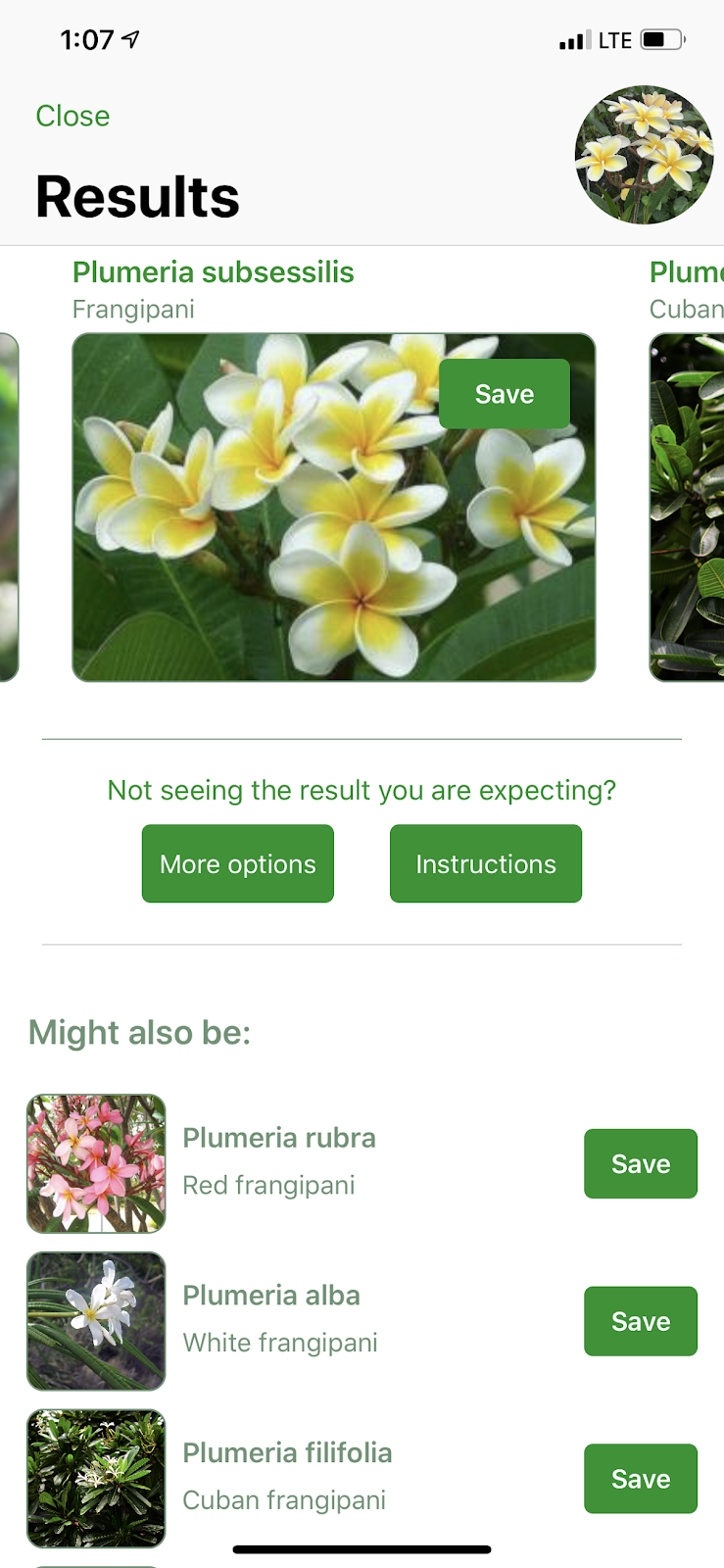
During last year’s visit to Kauai, I explored an app called PlantSnap. This year I added iNaturalist to my app collection. Both work in a similar way. You take a photo and the app makes a guess as to what appears in the photo. The app also offers some other possibilities and relies on you to evaluate the first choice and the alternatives. If nothing makes sense, the app farms out your photo to the public that follows the app to see if anyone has an idea. Selecting a choice offers a way to get additional information.

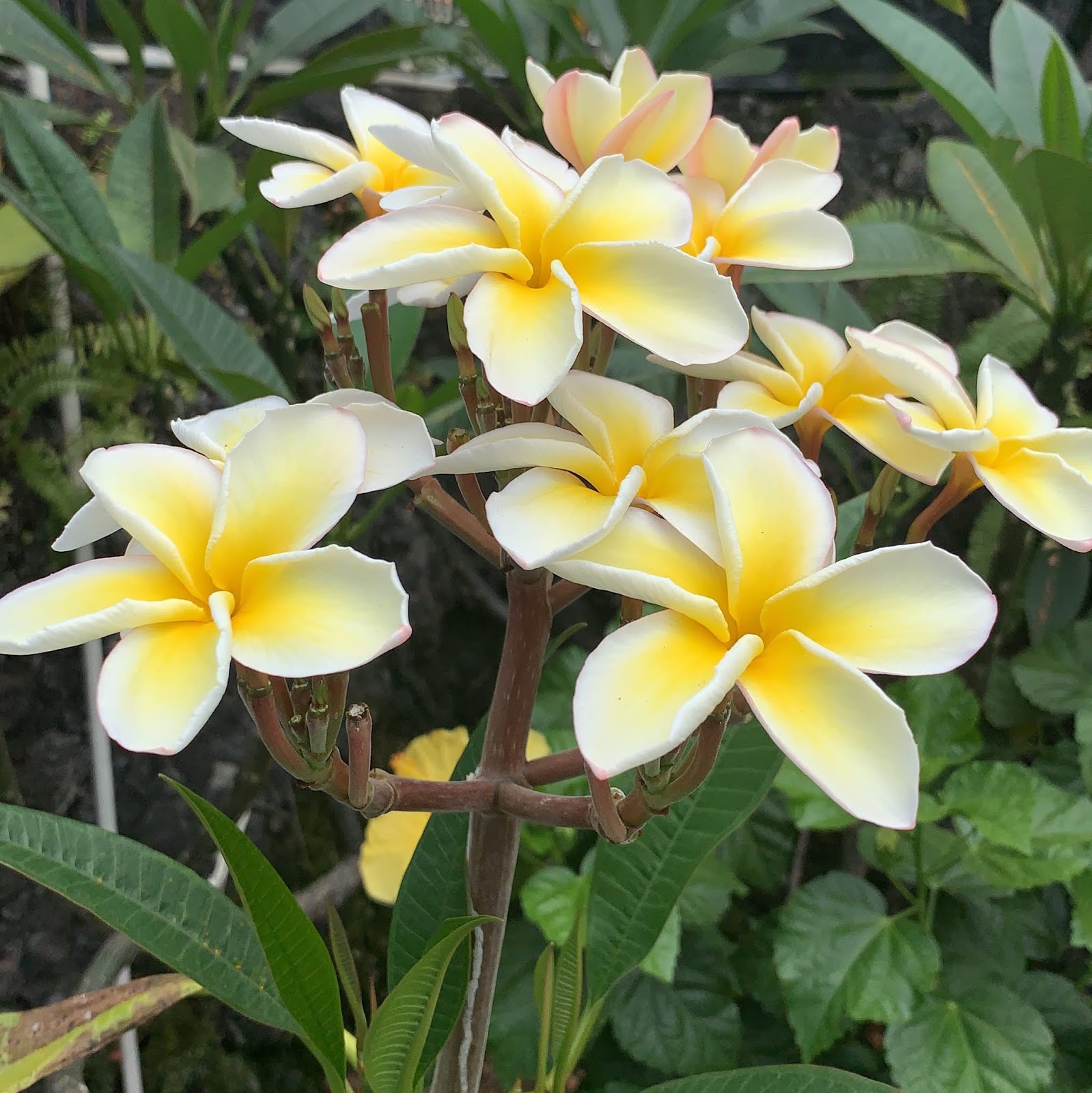
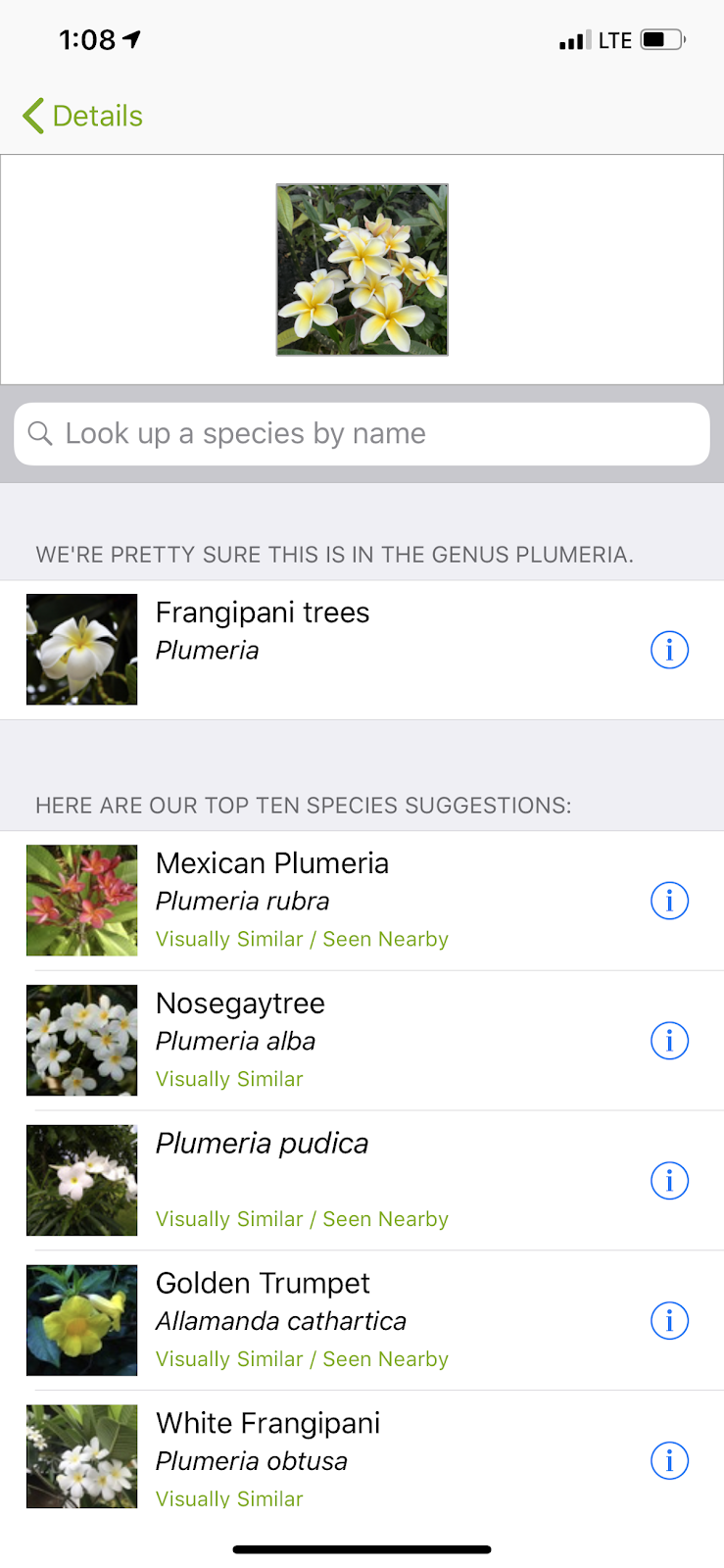
Evaluating these apps presents a problem. You must know what you are looking at in order to determine if the app made a correct identification. Here are three photos I took walking home from the coffee shop and the top choice offered by each app.

[PlantSnap]

[iNaturalist]

[PlantSnap]

[iNaturalist]

[iNaturalist]

I know both apps were correct with the genus. I am not capable of evaluating the accuracy at the species level.

There are other ways to do this. You can purchase a plant identification book. There are even online keys that offer an identification approach based on color. I have decided the flowers are probably easy, but I wonder what happens when the app is asked about a plain green plant. I don’t have any examples and I am not certain I would be able to check the responses, but I have a few more days here and plenty of specimens I can photograph.

There may be no post tomorrow. We have to move out of our condo and into a hotel. Two of our kids and their families did not have a Spring break option during the two months we originally booked so we had to find a way to extend our stay. I hear there is still snow and flooding in the midwest so this has worked out well.


I started my career as a biology major and the preparation to teach biology in high school. My interest in science education and learning (and the army) led me another direction. Many of my original interests remain and pop up in some of the things I write.

Some of my zoology, entomology, and botany courses required that I identify specimens in the field or lab. To make these identifications, we were taught to rely on dichotic keys. A key works something like a “choose your own adventure” story. Instead of a segment of text that ends with a decision point offering options and the option selected determines the next segment of text read. In an identification key, the key asks the user to make an observation to answer a dichotomous question – do smaller branches appear along a larger branch opposite each other or from alternating sides of the larger branch? Depending on the option that applies to the specimen to be identified, the user is sent to different follow-up questions. Eventually, the process arrives at what the key assumes is the species to be identified. Creating such a process would obviously be a tremendous challenge, but for the user a key offers a practical way to make an identification. Note that a key works in a different way from the identification resources you might purchase to identify birds, wildflowers, insects, etc. A key is supposed to be an algorithmic as opposed to a heuristic approach to solving a problem.

Identification of an unknown is a skill one learns in several sciences (e.g., geology). Exploring the process of identification using several approaches would make a great biology lab. Bring in several “mystery” specimens and have students use a key, an identification book, and maybe an app to see what they can accomplish (here is a simple online botany key). A good related exercise is to consider what the might be the advantages and disadvantages of the approaches I have identified.

Loading

Notion – collect, organize, annotate, and share

Over the past few years, I have tried several different online tools to support my blogging and other writing tasks. Especially for blogging, I now pay for a subscription to Evernote. I have also tried OneNote, Google Keep, and Zoho Notebook. I find Evernote perfectly suited to what I do and find the subscription price reasonable. My subscription price is $43 a year at least according to the feature within iOS that keeps track of my subscriptions and what each costs. As I will explain in a bit, this amount is kind of confusing as the public subscription price seems to be $8 a month and I am not sure if I have an educator’s discount or am grandfathered in. I pay through Apple, but I doubt that would give me a lower rate.

I do keep track of similar services as a way to communicate to educators just what options are available within what I think of as a category of services – those allowing collection, organization, and annotation. I assume most educators have a need to collect online resources to support their instruction. Occasionally, this could also involve sharing resources with students and it would be nice if the same service could support both tasks.

I have been exploring the free level of Notion. To simply my explanation, I will outline one process for using Notion in this way and then explain some of the steps in greater detail. Notion is very flexible and this is just one simple strategy for how it might be used.

The process.

  1. Create an account
  2. Add the web clipper if working from a desktop machine. Set up sharing if working on a phone or tablet. With iOS this just means you activate the setting associated with sharing that allows the connection to the Notion app.
  3. Create a page in Notion
  4. Use the clipper or the app sharing technique to bring a page into the page you have created (think of this as a sub-page)
  5. Highlight content imported if desired
  6. Turn on sharing for a page and set desired permissions. Copy the share link and send it to those you want to provide access

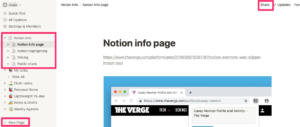
This image shows what Notion might look like after you have it set up and have been using it. Several things can be noted here. You can see two panels – the panel of the left shows existing pages and allows them to be moved about and embedded within other pages. I have used a red box to highlight several pages I have collected in preparation to describe Notion. One of these pages appears in the larger panel. You would highlight and read the content in the larger panel.

At the bottom of the left-hand panel you see a button for creating a new page (red box at bottom). This would be the button used if you wanted to first create a page within which other pages would appear.

At the top of this image, you see the “share” button within a red box.

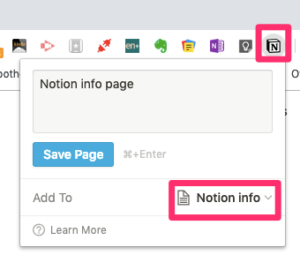
Content from other web sites is moved into Notion in different ways depending on whether you are working on a laptop or a mobile device. On a laptop, you will need to add the Notion extension to the Chrome browser. Only Chrome is supported as of this date. When the extension is added, the Notion icon appears in the browser menubar. You select this icon when you are browsing a web page you want to copy to Notion. A dropdown box will appear (see image) and you select the page on Notion within which you want to add the new content. On a mobile device (at least iOS devices), you use a browser to find the content you want to store and then use the share icon to share to the Notion app. On iOS, you must first add Notion to the share options iOS will access.

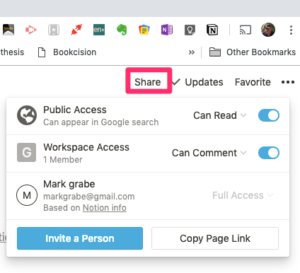
This image shows the share options within Notion (see first image to see the positioning of this icon). When the share icon is selected, you get this dropdown window for the to be shared page. You can set permissions from this window and also get the link to provide others access.

If you are interested, here is a link for a page I have shared publically.

https://www.notion.so/grabe/Notion-info-page2a557aa589a84824bc7c5859b8b36c49

Loading