My Maps is a Google service allowing users to add personal layers to Google maps. Google Map Maker was a popular and easy to use service educators and students used to create personalized maps, but Google discontinued Map Maker. My maps is a reasonable substitute.
I have offered a description of My Maps elsewhere. The purpose here is to include a short video that makes clear the technique of using the GPS data stored with a photo to locate an image on a Google map.
My past couple of posts have returned to a topic I have addressed several times over the years – technology can made practical the benefits of personalized mastery learning. To conclude this focus and offer an example to justify my claim of practicality, I want to bring attention to legislation recently passed in the state of North Dakota. I spent a good part of my working life as an academic in North Dakota. I don’t regard North Dakota as a progressive state for educational innovation, but perhaps that is my point. Innovation can be a function of the efforts of individual innovators as administrators or educators with administrative support and such individuals can be quite influential.
North Dakota just passed legislation makes it easier for districts wanting to institute personalized approaches to pace and the demonstration of competence in meeting graduation requirements. In addition, the state will facilitate the development of a learning continuum as a resource for those schools wanting to offer students an alternative to the more traditional time-based definitions of courses and progress.
Shall facilitate the development and implementation of a North Dakota learning continuum in collaboration with the department of career and technical education, upon the recommendation of the kindergarten through grade twelve education coordination council.
Here are a couple of resources explaining the intent of the legislation.
My point in this post is to offer the suggestion that the concepts and procedures identified in the two previous posts about standards for hybrid learning and plans for personalization instruction through what I refer to as mastery methods are being implemented in locations and this activity may not be familiar to many educators.
Mastery learning is described in some detail in previous posts over the years. Here are a couple of important topics for this post. First students vary significantly in what might be called “learning rate”. The word “aptitude” would be my personal preference, but this term is less descriptive. While the origins of differences in learning rate are perhaps disputed (e.g., is it what was traditionally called intelligence), I don’t think any practitioner would dispute that students acquire knowledge and skills at different speeds. An important issue is whether the instruction that students receive accommodates these differences. If instruction moves on to new material before a student has learned the present focus of instruction, students at best would have a knowledge or skill gap and at worse would be missing the background to learn something new that is based on or assumes other learning has been accomplished. Over time, these gaps accumulate, increasing the variability of learning rate. The frustration students experience in dealing with demands they are ill-prepared to master only magnifies the problem.
There have been attempts to deal with the variability in the rate of learning through practices such as ability grouping (tracking) and tutoring. Ability grouping comes with multiple difficulties such as labeling and equity issues and tutoring while very successful is prohibitively expensive.
Mastery instructional techniques have been investigated for years. My personal study of this topic begins with publications in 1968 – Bloom’s group based mastery and Keller’s personalized system of instruction (PSI). I provide greater detail on these approaches elsewhere. Interest in such approaches seemed to wane likely because of practical issues and because the systems required alterations in traditional educational practices rather than because of lack of effectiveness. The potential of technology for taking on some of the components of mastery instruction increasing efficiencies and changing attitudes of educational practice may encourage reconsideration of mastery approaches possibly with different terminology and different variations on the components of a mastery approach.
I consider the components of PSI and Bloom’s group-based mastery strategies to be – a) clearly stated and integrated objectives/goals, b) small units of instruction, c) mastery before progress, d) multiple, nonpunitive assessments, and e) remediation keyed to individual needs. When I work with graduate students on this topic, I typically ask them to explain how these components appear in PSI and Bloom’s group based mastery, but also in new instructional approaches that mention a commitment to typical mastery goals.
Briefly, here are a couple of examples of more recent instructional approaches with mastery characteristics. The Kahn Academy is a recent example of a technology-enabled approach that Kahn began to label as mastery (e.g., see One World Schoolhouse). My focus is not on the Kahn Academy here, but it seems to me to be similar to PSI when implemented as a full-blown system (using the short videos, competence checks, and hierarchical linking of learning units).
A second example I want to highlight is called the Modern Classroom Project. The modern classroom model is based on three components – blended instruction, self-paced learning, and mastery evaluation. Blended instruction proposes that educators replace face-to-face lectures to a group with short videos – think flipping the classroom. The idea is lecture involves limited interaction so why waste valuable face-to-face instructional time when videos can be viewed whenever a learner wants. Keller had the same idea in 1968 which he captured in the title of his paper – Goodbye teacher … The title might be misinterpreted if the paper is not actually read. What Keller noted was that lecturing to a group was not productive when students could read (back in the day when reading the textbook was assumed preparation for class). Reading could be completed whenever and to give Keller credit for an important insight reading was under the control of the learner – content could be reread if necessary and at the pace required by the learner.
Self-paced learning in the Modern Classroom to me is similar to Bloom’s group-based method of instruction. Bloom did not employ a pure mastery system absolutely requiring mastery before progress, but divided content into units often of two weeks. At a point during this time, students completed a formative assessment (you may have heard this term – this is where it comes from) on essential content. Those who passed this check were often moved on to self-guided supplemental activities while the teacher worked on the most essential skills with those not meeting the expectations of the assessment. A summative unit concluded the unit and all moved on. The Modern Classroom includes content identified as must do, should do, aspire to do. Students have great flexibility when they attempt to demonstrate competence of the related skills with the instructor keeping an eye on things and working with the students most needing assistance.
Mastery assessment is pretty much what it sounds like. Performing at the expected level of the knowledge/skill checks. While this is the only use of the work mastery in descriptions of the Modern Classroom, I hope that you can see the system applies other of the core mastery components I have identified under other labels. Technology plays a second role in the Modern Classroom in tracking goal accomplishments and helping the teacher identify those most in need of help.
Advocates of the Modern Classroom urge creativity in educators applying the core concepts they have identified. So, examples of implementation come in many different shapes and sizes.
The Modern Classroom Project is an organization offering resources and mentorship to interested schools. A free tutorial on the core concepts is available.
This post continues my effort to examine guidance offered should teacher training and professional development efforts focus more specifically on preparing educators to teach online. An observation I made when reviewing the National Standards for Quality Online Teaching was that those responsible for developing these standards emphasized the individualization of instruction to include what I would describe as “mastery learning” concepts such as competency-based progress in a way not apparent in standards more typically used to guide the preparation of future teachers to use technology (e.g., ISTE Standards). The blended learning competencies make similar goals very apparent.
Blended Learning Teacher Competency Framework
As I have continued my search for guidance in this area I have discovered the iNACOL Blended Learning Teacher Competency Framework (note iNACOL is now the Aurora Institute) which offers a similar, but more general perspective. Their use of the description “blended learning” does not assume all instruction will occur online, but does assume a similar focus on differentiated and personalized instruction which they contrast with “time-based” approaches to instruction. Again, the expectation of an instructional approach that is differentiated and personalized emphasizes different capabilities of technology as core in the development of teaching thinking and skills.
The organization responsible for authoring this guidance explain their preference for educator “competencies” in contrast to standards to expand needed teacher characteristics to include habits of mind and I would say values rather than limiting their guidance to what I would describe as knowledge and skills. They identify four areas – mindsets, qualities, adaptive skills, and technical skills – as competencies. The technical skills category is most similar to what I see as most similar to what I have described as standards and what for the sake of brevity I will emphasize here. The document I reference does offer details on these other areas and how they might be developed. I found the effort to explain competency development to be very interesting with a greater emphasis on modeling, coaching, and reflection for the areas other than “technical skills”. The full document is well worth a thorough examination.
Technical Skills
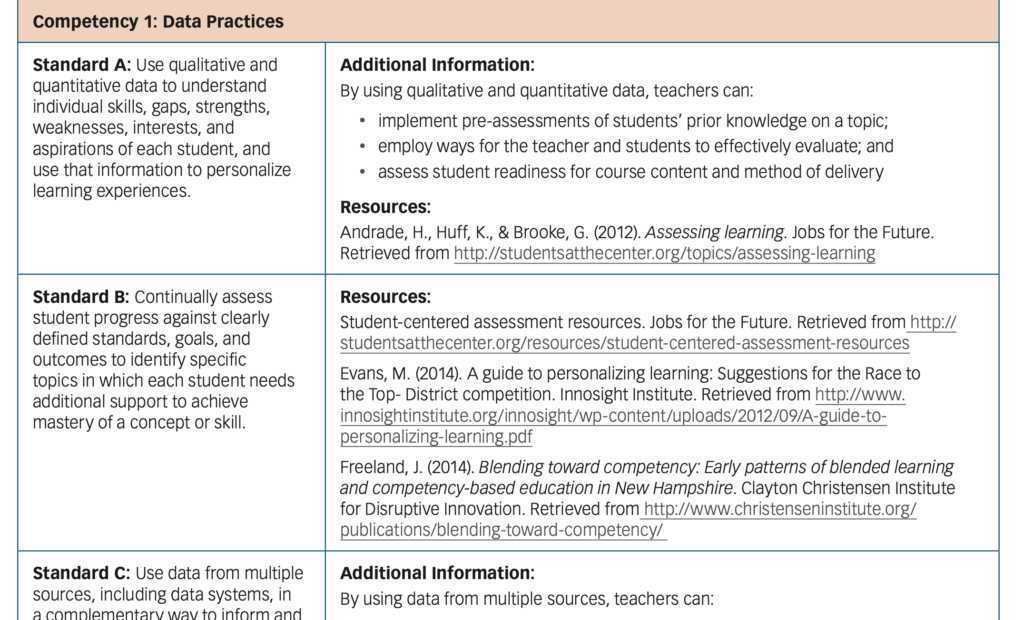
Competency – Data Practices
Standard A: Use qualitative and quantitative data to understand individual skills, gaps, interests, and use this information to personalize learner experiences.
Standard B: Continually assess student progress toward specific goals to identify when individual students need additional support.
Standard C: Use data from multiple sources including data systems to inform individual instruction and grouping.
Standard D: Help students consider their own data to promote independence.
Standard E: Evaluate instructional strategies to determine effectiveness.
Competency – Instructional Strategies
Standard A: Provide resources to enable independent and group work.
Standard B: Provide resources to generate evidence of skill and knowledge.
Standard C&D: With students, create customized learning pathways linking goals and experiences.
Standard E: Create learning experiences that promote content-area relevant problem solving and collaboration.
Standard F: Develop valid assessments, projects, and assignments that meet standards criteria and allow evaluation of the mastery of learning goals.
Competency – Management of Learning Experiences
Standard A: Manage face-to-face and online components of lesson planning
Standard B: Provide student opportunities for asynchronous and synchronous interaction
Standard C: Develop, model, and practice respective behaviors
Standard D: Demonstrate and model technology troubleshooting
Competency – Instructional Tools
Standard A: Use learning management systems and collaboration tools to organize learning environment
Standard B: Demonstrate skill in the selection and use of instructional materials, tools, and strategies and engage students in such processes.
Standard C: Provide assistive technologies
I have shortened and interpreted these standards for the sake of brevity. For serious consideration, please refer to the original document.
The authors include a section of this document to expand and explain the standards associated with each competency. A snippet of this section is included here to give an idea of what the authors have made available.
This post is a follow up to the previous post asking there should be specific skills taught to preservice or inservice teachers involved in online teaching.
The Covid Emergency forced many face-to-face educators into teaching at a distance (e.g., online teaching). The challenges for these educators and for their students (and parents) were many and the lack of training and time for preparation were among the difficulties the educators faced. The issue I raised in my original post was that if aspects of online education for K12 students continues after COVID should there be different expectations for the training and certification of educators emphasizing remote experiences. I would like to use remote experiences in a more general way than some might assume as online credit recovery and speciality course experiences may be experienced by students within a school facility even when the educator is located elsewhere.
In a way this is a question of the importance of the specificity of preparation. Most students coming out of colleges and universities into the teaching profession have experienced a “technology for teachers” course and perhaps other experiences based on standards that were developed to define expected expertise in the understanding and use of technology in instruction. The ISTE standards are likely the most common example. By specificity, I am asking whether the ISTE standards are necessary given the training of K12 teachers are already guided by standards emphasizing content area knowledge and pedagogical skills. Given the ubiquity of technology in education, why haven’t the existing bodies responsible for teacher skills and knowledge already incorporated the topics ISTE addresses. Moving to the present question of more specific standards, one might ask a similar question. Are the ISTE standards specific enough to cover the skills and knowledge for teaching remotely? I am really asking the questions – who is responsible for making the adjustment to address new circumstances of instruction and what roles do they have in mind for those they prepare?
As someone who is expected to use standards and benchmarks to guide my work, I must admit I often find standards frustratingly vague. I have a version of this same reaction when I review online activities and lessons that are tagged as satisfying specific standards. Often, I can kind of see a relationship, but wonder whether the connection to the standard is specific enough. It often feels like an educational Rorschach test – what do you see in this example and what does this say about your motives and personal understanding of knowledge and skill goals.
Anyway, I have been exploring whether standards specific to teaching at a distance exist and how these standards might compare to what I see as the more general ISTE standards. I pick the ISTE standards because when our book was sold through a commercial publisher I was expected to mark in the margins of pages the standards that applied to the content in our book. Maybe the application of standards works like that old joke describing the response when a baseball umpire is asked about the basis for calling a pitch a ball or a strike and he responds that the pitch is nothing until I call it.
Below, I identify two sources for standards that address the use of technology in education – ISTE and the National Standards for Quality Online Teaching. I think of standards as a hierarchy that moves from general to specific. Personally, I have to move several layers down in this hierarchy before I feel comfortable with my own level of comprehension. I am not going to get into attempting to differentiate standards, benchmarks and assessment methods as those who get deep into this model of guidance do, but I like to at least see attempts to explain concepts and give examples. You should get a sense for this hierarchy in my attempts to use snippets of the hierarchies from the two sources for teacher technology proficiencies I am using. You should find a very general area of competence, an effort to break this area down (as indicated by the identification of “substandards), a short effort to provide a description, and then perhaps a few examples. I have tried to identify an area in which the skill/knowledge covered would at some level seem very similar. For full appreciation of these efforts, you will have to use the links I provide to the online content provided by the responsible organization.
1 Learner – Educators continually improve their practice by learning from and with others and exploring proven and promising practices that leverage technology to improve student learning.
2 Leader – Educators seek out opportunities for leadership to support student empowerment and success and to improve teaching and learning.
3 Citizen – Educators inspire students to positively contribute to and responsibly participate in the digital world.
4 Collaborator – Educators dedicate time to collaborate with both colleagues and students to improve practice, discover and share resources and ideas, and solve problems.
5 Designer – Educators design authentic, learner-driven activities and environments that recognize and accommodate learner variability.
5.1 Use technology to create, adapt, and personalize learning experiences that foster independent learning and accommodate learner differences and needs.
Personalized learning – Capitalize on technology’s efficiencies and functionality to meet students’ individual learning needs, for example, scaled tests and quizzes; adaptability tools and features; software data that can capture when students are struggling or spending the bulk of their time; competency-based learning resources; ….
6 Facilitator Educators facilitate learning with technology to support student achievement of the ISTE Standards for Students.
7 Analyst Educators understand and use data to drive their instruction and support students in achieving their learning goals.
Standard A: Professional Responsibilities The online teacher demonstrates professional responsibilities in keeping with the best practices of online instruction.
Standard B: Digital Pedagogy The online teacher supports learning and facilitates presence (teacher, social, and learner) with digital pedagogy.
Standard C: Community Building The online teacher facilitates interactions and collaboration to build a supportive online community that fosters active learning.
Standard D: Learner Engagement The online teacher promotes learner success through interactions with learners and other stakeholders and by facilitating meaningful learner engagement in learning activities.
D.1 – The online teacher uses digital tools to identify patterns in learner engagement and performance that will inform improvements to achieve individual learner growth.
Explanation – The online teacher needs to be able to analyze and interpret a wide range of activity and performance-level data provided in LMSs, adaptive software, and other digital tools. Further, the online teacher needs to be able to identify patterns in the data that can inform interventions geared towards maximizing each learner’s growth.
Examples:
The online teacher uses a mastery dashboard to keep track of whether learners need remediation, are near mastery, or have achieved mastery (as well as what defines an individual’s level of mastery based on growth). Data from the dashboard are used to determine who needs 1-1 sessions with the instructor, learner grouping, etc.
The online teacher uses activity data with the course LMS or dashboard to identify how often a learner logs into the system and what areas/objectives the learner is spending instructional time on. This data helps the teacher in a goal-setting consultation with the learner.
Standard E: Digital Citizenship The online teacher models, guides, and encourages legal, ethical, and safe behavior related to technology use.
Standard F: Diverse Instruction The online teacher personalizes instruction based on the learner’s diverse academic, social, and emotional needs.
Standard G: Assessment and Measurement Assessment and Measurement – The online teacher creates and/or implements assessments in online learning environments in ways that ensure the validity and reliability of the instruments and procedures. The teacher measures learner progress through assessments, projects, and assignments that meet standards-based learning goals, and evaluates learner understanding of how these assessments measure achievement of the learning objectives.
Standard H: Instructional Design These standards are considered optional, as instructional design does not always fall under online teaching responsibilities.
So, are these two sources unique enough and important enough to both be applied in the preparation and certification of educators intending to teach at a distance? Because I study and write about these topics I do see some uniqueness. I find the standards for online educators more focused on individualization (some might say personalization). When I hit the example mentioning mastery dashboards, I immediately think of the Kahn Academy dashboard and the potential for an individualized mastery approach the Kahn dashboard, mastery structure, and assessment system makes available. It is not that mastery, individual progress, and assessment systems could not be used in face-to-face classrooms, it is that this model is rare and I think present goals for online instruction (e.g., credit recovery) make consideration of such approaches more likely. Our present book does discuss the potential of individualization, but I would probably expect those preparing to work entirely online would be more likely to encounter such tactics if intended to work for an organization with an online mission. The decision is how many of these areas could I identify and what number would encourage consideration of a separate course and practical experiences (e.g., student teaching).
I am trying to make a decision. I am beginning work on a revision of our textbook (Integrating technology for meaningful learning) and I am trying to decide how much to include about teaching online (remotely if you prefer). This decision has ramifications for how I spend time and whether the content produced is deemed relevant by those who make decisions regarding what textbook they assign in their classes. Clearly, nearly all k12 educators have now had a taste of teaching at a distance. Most had no preparation for working this way and neither did the students and families they served. The timing of my decision is awkward. Will the future bring a complete return to normal or will some of what is now the new normal carry over? Hard to say isn’t it? K12 education is very traditional as a rule, but so many say many aspects of normal (e.g., shopping, office work, entertainment) will likely be altered so why not K12 teaching and learning? Anyway, this is what I am thinking about.
It is not that I am inexperienced in teaching online. Working in higher education engaged with preservice and inservice teachers, I worked at a distance a lot. Often I went to where teachers were or at least near where they were. This was mostly a function of teaching grad students in education or providing professional development workshops. Mostly I drove, but because I worked most of my career at a university with a leading aviation program sometimes I flew. When I was lucky, we took a jet. Technology changed this approach and from specialized television to the personal computer approaches we now all use, we met from wherever we were. I have had no experiences teaching young learners in any of these experiences and while my experiences may have focused on preparing educators to use technology, little involved preparing educators themselves to teach at a distance. In evaluating the content I explored with educators that might be relevant, the one topic that seems relevant might be the recent interest in “flipping the classroom”.
I have been exploring traditional sources to see what others have done. There are some sources and the anecdotal accounts collected from recent experiences. Too many of the recent anecdotes seem to be negative – too much work, lack of engagement, problems with equality of access, etc. Organizations one might expected to have offered guidance to the preparation of future and practicing teachers seem to be scrambling just as I am. For example, ISTE seems to have little existing guidance when it comes to the standards that might be expected to guide teacher preparation focused on this situation. There just hasn’t been enough need with general instruction and niche topics – credit recovery, access to unique courses, home schooling, etc., providing the areas with the most development and guidance. What of this can be used to guide a possible new normal? I wonder what other textbook authors are considering at this point. Will they stick with traditional topics or will they make an effort to incorporate new themes?
Anyway, I likely will write about this topic more as I decide what I will do.
I have been exploring a bit and I thought I would offer one resource I found interesting. When I made the transition in my own experience going from driving or flying to workng with educators online, I read a couple of books to get some ideas.
Kearsley, G. (2000). Learning and teaching in cyberspace. Belmont, CA: Wadsworth.
Ko, S., & Rossen, S. (2001) Teaching online: A practical guide. Boston: Houghton Mifflin. McKenzie, J. (2001, March). How teachers
I list these references only because in searching for work on the preparation of K12 educators to teach at a distance, I encountered one of these authors/researchers again.
Kearsley, G., & Blomeyer, R. (2004). Preparing K—12 Teachers to Teach Online. Educational Technology, 44(1), 49-52.
Reading this article (the journal no longer exists, but university libraries likely can provide access), I found the advice and predictions quite enlightening. I find what could be described as futurists’ recommendations to be quite interesting when examined in hindsight. Here are a few things I thought others might enjoy.
The authors examined who might be suited to distance education and the skills and attributes that would be important. The authors commented on the likely workload of content preparation and 24/7 availability. They warned that educators interested in this approach be prepared to sit at a computer for several hours at a time. Keyboarding skills should be well developed.
The strategies likely to be successful online included: student-centered activities; problem-based learning; collaborative learning; and peer evaluation.
The authors also recommended that educators should have experiences themselves learning at a distance as part of their preparation. This is a recommendation I have seen many times in the literature predicting whether K12 educators would make much use of technology with their students leading to questions about how educators involved in preservice teacher training made use of technology themselves.
One final issue that I admit I had not considered involved certification. What exactly should be experiences/skills involved in the certification of educators teaching at a distance and what should be done to assure that there was some commonality in these expectations from one state to the next. Commonality was more critical than with more traditional instruction because students would often be from different states.
I have been writing about online services that allow content elements (e.g., highlighting, notes) to be layered on existing online pages and videos without modifying the content as intended by the original author. The options for both layering web pages and online videos have grown since I began commenting on this type of service. Because I mostly write for educators, there comes a point at which it might be useful to rank or at least differentiate these services. For example, what is the best free service? What is the best service no matter the cost?
My early interest in this category of tools was encouraged by an exploration of Hypothes.is. I think I remember the origins of this service promoting “annotate the web” with a general emphasis on general interaction focused on the content the web made available. Fair or not, I think companies, even open source efforts, can become limited by their early vision. At this point, this service seems a general application with relevance to education, but not necessarily designed specifically for education. The tool options – highlight and annotate – seem limited in comparison say to the tool set available from a similar service – Insert Learning. So, for example, while Hypothes.is.’s annotate function could be used to ask questions or encourage discussion, Insert Learning has tools specific to annotation, questions, and discussion. The Insert Learning tools are flexible (e.g., a multiple choice tool) and can send the responses from individual students back to a dashboard from which the educator can see who has responded and who has not and assign grades or easily keep track of participation. This differentiation of tools and integrated data collection system is educationally very useful. Of course, Insert Learning is a paid service.
In some ways, I still see Hypothes.is as driving developments in this field. It is a service with roots in a research community and I think this base is important for productive developments. These roots come with what might seem limitations to some as a noncommercial approach has limits on the resources necessary for rapid innovation. For example, the Hypothes.is blog describes the Indiana University social annotation project and interest in using learning analytics to investigate annotation.
I find myself working and writing at the intersection of research and practice and I can appreciate both of the services I have described here from these perspectives.


You must be logged in to post a comment.