This seems to be the time when many content creators offer their best of the year. You can translate this as “I am tired and this is one way to generate an easy post during the holidays”.
I admit I do not have data on my blog posts, but I can easily identify the most popular YouTube I generated. I doubt the popularity of this effort has anything to do with my production skills or the deep thoughts explained in the video. I am guessing that coding was in this year and demonstrating how Ozoblockly could be used to control an Ozobot was something educators wanted to understand. I also noticed an increase in hits this past week or so. I am guessing Santa brought some Ozobot and parents now wanted to know what to do with them.
I am working on a new book that explores how tech tools can add value to existing resources. I call the approach “layering”. More about this project in a few months.
In exploring what might be coming, I have been considering what is available when it comes to augmented reality. This is adding information to what is visible in the world. The version of augmentation that offers information about a location is easy. How about adding information about unfamiliar objects.
The most basic form of information about an object would be identification. I knew that there are some services that attempt to identify images. I read that Wolfram had an advanced image identification service so I thought I would give it a try.
I admit that the following image is upside down and the image would be difficult to match to a database, but the image is not a shark.
I then tried what I thought was an iconic image from my wildlife collection.
Again, the Wolfram service was wrong, but suggested several different birds none of which were loons. It seems the Wolfram service attempts to learn from errors and it allowed me to describe the image. I hope I was helpful.
I did try the Google photo search with the loon image. It suggested it was a bird. Not that helpful.
Maybe I will have to offer examples of the futuristic stuff in the second edition.
I have been suggesting for some time that I doubted the actual value of the existing approach to edchats. Several of my issues were focused on the choice of Twitter as the microblog platform of choice for these conversations. Specifically, after viewing and sometimes participating in many of these chats, it seemed to me that the 140 character limit of Twitter severely limited what actually was being said. In general, there seemed to be a lack of real substance in conversations. I also found the public nature of what were often one-sided conversations to be annoying. If you are a Twitter user and not participating in a specific chat, what is the value of that flow of partial comments from some of the individuals you follow? This is somewhat like listening to the speaker side of several conversations going on from the self-centered types who feel it appropriate to site in a coffee shop and do business their business. This is just not necessary.
While listing issues with TwitterChats was easy, I have it found it somewhat difficult to offer an alternative that would be practical for educators in K12. I have finally found what I think is an ideal solution to the two issues I mention – the service offers a 500 character limit and it has a private conversation mode. The service is called Mastodon (evidently this is a favorite band of the developers). You can signup very easily and I would recommend moving a chat group to this service for exploration.
Mastodon uses a TweetDeck-like interface. I have highlighted a longer submission (a toot) and the button for setting public or private toots. Simple to use, easy to join, and superior as a platform for conversation.
What? Thanks for being late. Those who are always late annoy me to no end. They seem to assume their time is somehow more important than my time.
Tom Friedman says I should relax and appreciate the opportunity to look around and reflect. Of course, he is right. Certainly, if I am sitting in a coffee shop with my iPad, he is right.
Friedman probably has done more to shape my world view than any other author. I believe I own and have read every book he has written. Some I have gone through several times. Some folks just have a way explaining things I find both insightful and approachable.
Friedman has a way of staying consistent to certain key ideas. Some complain he has really written the same book a dozen times, but I don’t see it this way. Without intending to address critics, he says something in this most recent book that explains why this may seem to be the case. In describing what an effective opinion writer does, he proposes that the writer must create a personal understanding of what I like to call the “big picture” (he calls it the “Machine) and the writer then uses this perspective to persuade others to action. The capacity to generate a solid model of how the world works and to propose how we might push this model in a more positive direction is what opinion writers do. The big picture we create for ourselves and explain to others should always be a work in progress, but it is essential to decide what is important to address and then to explain related positions to others.
This makes sense to me and I can see the components of Friedman’s machine emerge across his more recent books (The World is Flat; Hot, Flat and Crowded; That Used to be Us; Thank You for Being Late). In the most recent book, he identifies what he calls “accelerators”. Similar “forces” are identified in the series of books I have identified. Core accelerators include technology, globalization, and mother nature (climate change). These factors impact everyone in both positive and negative ways. Friedman also writes often about the role of education as a force important in how society ends up being impacted by the accelerators.
Understanding my similar view of the big picture, my reaction to the most recent election should make some sense. I believe that technology is and will continue to play a dominant role in all aspects of our lives. We must learn to adapt to the strengths and weaknesses of these influences. Who will work in what jobs and where they will work have changed dramatically and we better adapt. Technology has interconnected us as never before. It is foolish and self-centered to assume that any country can operate independently or dictate to others. Those days are long gone and should be. Climate change is likely one of the most important challenges we face. We have created this problem and we must fix it should we want our children to live in a world without escalating problems. The science of this reality needs to be accepted and switching to new energy sources should be embraced as an opportunity for innovation and economic opportunity.
Educators – you play a key role here. How do you see the “big picture” and what are doing as an influencer to move everyone in a more positive direction?
I encourage your attention to the books I mention here. I say this no matter what your vocation. Your reaction to these books and your understanding may be quite different from my own, but I do think Friedman has a way of identifying important ideas that we all need to consider.
Rewordify offers several tools focused on reading proficiency. One particular tool works as a plugin/extension with several browsers and allows the text from a web page to be simplified. You may have found online content you would like to have students read, but you recognize that the vocabulary may be too difficult for some of your students. The Rewordify extension will attempt to simplify the most difficult works.
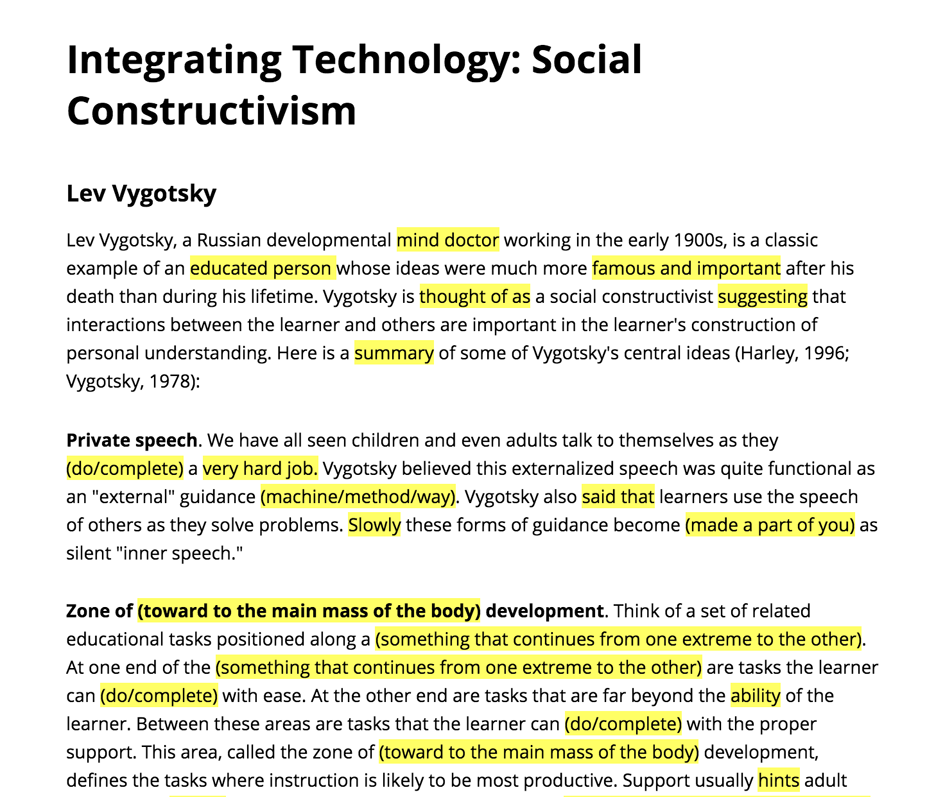
I used a page I had written on social constructivism to try the service. This would not be a topic assigned to your average fourth grader. Some of the changes are not what I would recommend – psychologist became mind doctor. However, most of the changes make sense.
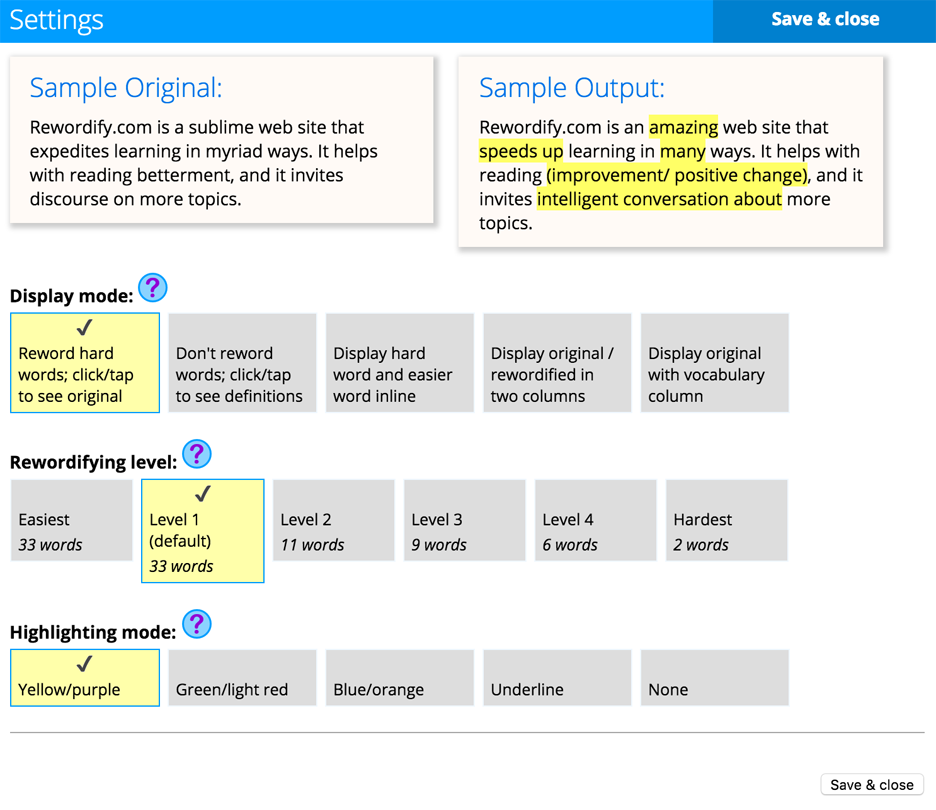
The approach Rewordify takes allows some customization.
The browser extension does not provide all of the features available from the Rewordify site, but adjusting web sites to meet the needs of individual students is a special challenge and the extension offers an approach worth trying.
The prominence of “fake news” has gained a lot of attention in the wake of the recent election. It may have been even worse than this. I could argue that you bring fake news on yourself. You receive fake news from a site such as Facebook or Twitter because you follow someone who posted the fake story. You contribute to the problem if you retweet or reshare. You may end up as a victim of such falsehoods, but at least, in this case, you can blame the individual you followed for leading you astray. It may eventually be possible to flag suspect stories much in the way Wikipedia now includes notices with stories that fail to satisfy certain standards.
What you may not realize is that you may be targeted in an effort to manipulate you in some way by a completely independent source. Facebook allows what are called “dark posts“. As I understand the dark post, it is essentially an ad the source sends to a subset of users. What is allowed as an “ad” appears to be much more open to interpretation than you might expect. This NYTimes opinion piece by McKenzie Funk claims dark posts were used by the Republican presidential election committee to “micro-target” users either to encourage a vote for their candidate or to discourage those opposing their candidate from voting. The detail in the Funk article is helpful in explaining how this was done. This wmicro-targeting was based on a massive database accumulated on millions of us by Cambridge Analytica. Forbes takes a similar position. The Forbes article provides greater detail on the different approaches taken by the Democrats and Republicans, but while noting the greater use of micro-targeting by Republicans provides less information regarding how this was done.
I assume must of us recognize that the social media ads we see are based on our own behavior. In theory, we supposedly see ads we want to see. The dark-ad feels different to me. I wonder what disclosure is required and if you or I received these ads whether we realized the source. That message that is required at the end of television ads is certainly absent or less prominent when we are targeted online. Without an awareness of the source we have less information to interpret intent.
So, as educators, we attempt to develop critical thinking skills in preparing students for what they will encounter in the “less friendly” real world. How distrustful should we assume we must prepare future citizens to be?
Shortly after the conclusion of the uniquely contentious 2016 Presidential election, Buzzfeed released a disturbing report on the prevalence and popularity of fake stories related to the election.
You may have seen this chart somewhere.
The chart describes the shares, reactions, and comments for the top twenty fake election stories and the top 20 stories originating from actual news services in the run-up to the election. In the critical period before the election, fake stories generated more “engagement” (the term Buzzfeed used to describe their composite variable). A large proportion of the popular fake stores were pro-Trump or anti-Hillary (17 of 20) and this disparity in combination with the contentious election led to public outcry directed at Facebook and concern that the public has been manipulated by the content they encounter online. Take a look at the article for links to some of the fake articles.
In an era in which social media has become a major part of the battlefield for politics, the credibility of content raises serious questions related to how voters make decisions (a similar NYTimes story on twitter bots and fake information). Given the outlandish comments made by the candidates, perhaps no one should be surprised. Social media promises to open political conversation to everyone at low cost, but more and more the opportunity for individuals is overpowered by the promotion of falsehoods.
Social media users are partly at fault. Some months ago the Washington Post described a study demonstrating that approximately 6 of 10 individuals posted a story consisting of gibberish. The implication posted stories are often not read by the individual recommending the stories. Consider this in combination with the Buzzfeed study and consider how this works. As the election neared more and more individuals made their personal decision and were attempting to influence others. It seems likely it was assumed more extreme stories would be more persuasive. The titles of articles were likely as far as many so motivated to influence got and sharing is so easy. No fuss, easy, and completely fabricated. It is difficult to know if anyone really read these articles, but the titles may have provided the message.
As educators, we go on and on about the importance of information literacy. We try to teach learners what to look for and how to be critical thinkers. Here is what I think is a new concern. The issue with social media is a little different than the issue with search. It is one thing to find resources on your and then evaluate the credibility of these resources, but this is different from the challenge of encountering resources endorsed by someone you may trust. I wonder if this difference between found and endorsed resources has been considered.
I am beginning to develop a personal perspective on this problem. I think sharing is far too easy. Amazon has a thing with product reviews that indicates whether the reviewer is known to have actually purchased the product. It is too bad that there is no way to indicate whether a shared source has actually been read. My recommendation would be to avoid any recommendation that does not include some message of justification from the individual promoting a resource. Free speech should at least require you say something yourself.






You must be logged in to post a comment.