Content Collection Services Compared

This is likely to be one of the longest posts I have written in the 16 years I have been a blogger. Let me explain the focus and you can decide if it will be worth your time. This post explores four online services I could use to collect information mostly while exploring online resources. These services include:

This review was initially prompted because my payment for the premium version of Evernote was coming due and I have been evaluating whether the $50 yearly subscription was worth the cost. The Premium tier is listed at $69, but I think my cost is $44 or so plus tax through the Apple subscription service.

I use Evernote heavily mostly as I write blog posts and the two Kindle books I try to keep current. It works well for my purposes, but I am retired and I am beginning to consider the costs of the multiple services I purchase to create content for educators. The problem I have with so many of the services I use and many I recommend to educators is the size of the gap between the free tier and the various or only paid tier(s). I believe strongly in paying for technology. I tend to use services I find very useful. However, I use quite a few such services and nearly all are heavily bloated with regard to the uses I have for that service. The capabilities of a given service probably are fairly priced for those who need many of these services, but when a much simpler tool at a lower price would meet my needs just as well, it can get frustrating.

This is the same situation I see for many teachers. It is as if the company providing the service assumes the service will be the only service a teacher would use, but the teacher may have a specific use for a service as well as other specific needs for another half dozen or so services.  

So, I am framing the following investigation is evaluating given my pattern of activities, how easily I could switch away from Evernote.

Requirements:

1) Storage of text and images from multiple online sources to be later used in various ways in writing tasks. This includes the use of screen captured images in tutorials.

2) Access to stored material from multiple devices and multiple platforms. I do my heavy writing from a Mac desktop, but I collect content from iOS devices and my Chromebook.

Here is how these requirements immediately impact my decision. When creating a tutorial I may store a dozen or more images captured from an online service. I may collect these images from various devices because it could be useful to show that what I am explaining works a little differently on a tablet, a chromebook, and a traditional laptop. There is a free version of Evernote, but it presently allows two synched devices and has a limited monthly storage capacity. Neither the monthly storage max or the number of devices could accommodate the task I describe here. My Evernote subscription data claim I have 16 synched devices. I assume this is because I have had the account for quite a few years, but I could easily use two macbooks, one chromebook, an iOS tablet and phone, and a desktop machine on a given project. Two synched devices is nowhere close to what might be ideal for me. Yes, I know this sounds like a “first world problem” and one might think worrying about $50 is silly. I guess it is kind of the principle of the thing.

Reaching a decision regarding which service to invest time and possibly money in should involve a little thought regarding just what type of service you are looking for. I decided that I am looking for a way to collect content. To me, this is different from a bookmarking service or a curation service which both imply a longer-term commitment. I have other ways to collect bookmarks and store resources I might want to use some months in the future. I need a way to collect pieces of content I intend to use in writing tasks that might be quite substantial, but that I plan to complete within the next month. After these tasks are completed, I will use my written products rather than the pieces from which these products were created for any future activities.

Enough background.

All descriptions that follow are based on the use of the service on a Mac OS platform and as an extension of the Chrome browser. As stated previously, I make some use of each service using other operating systems and platforms.

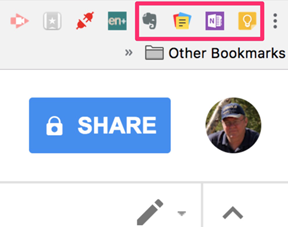
The button bar on my Chrome browser looks like this. When collecting content, the services are activated using these buttons. From left to right, Evernote, Zoho Notebook, OneNote, Google Keep.
Evernote

I presently rely on the premium version of this service. More accurately, I use this service in combination with the Skitch web clipper. Skitch is a free tool from Evernote and can be used independently of Evernote.
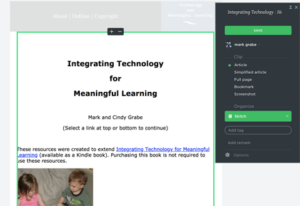
Selection of the Evernote button from the browser menubar opens this menubar allowing several options for collection – the full web page, a simplified version of the page consisting of the core text and images, or the portion of the page appearing in the browser window. It is possible to select a user designated portion of the page from this menu, but I prefer to use Skitch because it offers tools for marking up what I select. What you see below is the tool within Evernote that allows the selection of a section of the screen for storage.
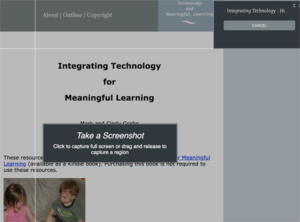
Each element collected is then stored by Evernote. Evernote offers ways to organize, search, and even share these in multiple ways. My focus here is on what I use of what Evernote offers. What you see here is a column offering a thumbnail of the content and selecting that thumbnail opens of the resource in full size.
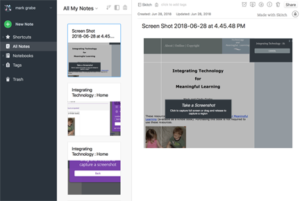
Both Evernote and Google Keep have built in ways to keep the entire article or a specific portion (text or image). Google keep allows you select and save specific text, but I use a workaround to save an image.

Microsoft OneNote

OneNote offers most of the same features I use in Evernote. Selecting the browser button bar button allows the storage of the full page, a simplified version of core elements or the section of a user controlled region.
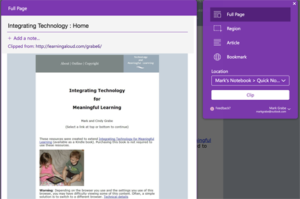
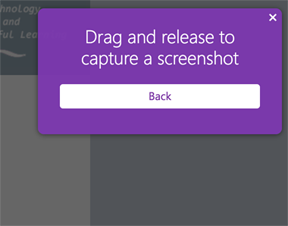
The screenshot option allows the selection of a specific area of the screen.
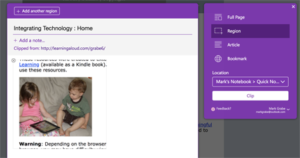
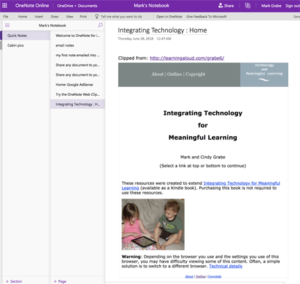
Content is stored in OneNote in a manner very similar to Evernote – a short text statement based on the page name from which the content is taken and a second window that displays the content when one of these text statements is selected. Again, OneNote allows these to be organized as collections.
 

Google Keep 

I have one tip for using Keep. I found it difficult to clip an image to save in Keep. Here is what I finally ended up doing. Selecting the Keep icon opens a window for taking notes. Saving what you enter in this window will be saved to Keep with a link to the page. It is easy enough to select text from the page and transferring to the Keep note using cut and paste. I could not get copy and paste to work with selected images.

My word around works as follows. Use screen capture to save the image you want to store to the desktop.  On the Mac, you use Cmd-Shift-4 to save the image you want to the desktop.  Use the menubar button to save a link to the online source to Keep. This will open a note as a separate window within the browser. Use the “Open in Keep” icon (see below). This will display the blank note within Keep
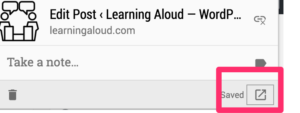
At the bottom of this Note window, you will see buttons for adding content to this note. Use the image button (see below) to access the image you have screen captured to the desktop. This will add the image to the Keep note and you then have the image saved to Keep.
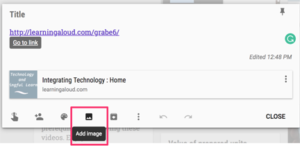
You should now have a note that includes the link to the original source, the image you have added, and any other comments you care to enter.
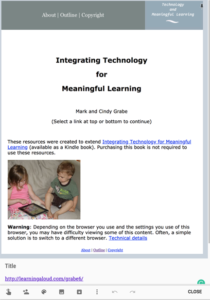
The collection of notes in Keep will be presented as shown below. You click on a note to access the full sized display.
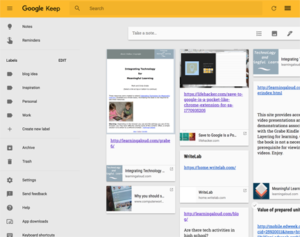
I can’t say there is an easier way to collect images within Keep. What I have described here works.

Zoho Notebook

Zoho Notebook presents similar options to the other notebook services examined here. “Clean view” is equivalent to the Evernote “simplified article” and “take screenshot” is equivalent to the Evernote “screenshot”. I am unaware of a way to clip part of the screen image.
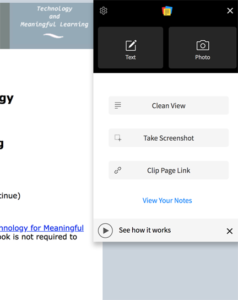
Select the clip tool from the icon bar. To drag and image or a section of text into Zoho NoteBook, open the NoteBook button pages and select text or photo. Drag the text or photo into the window that appears. Yes drag an image or text from the browser window into the Zoho NoteBook one window. You can make multiple additions to what is brought into the NoteBook window and you can bring an image into a text window (see below).

If you want to bring in a screen capture as an image, use the same technique I described for Google Keep. On the Mac, use command-shift-4 go select an area of the screen and save the selection to the desktop. Then, use the NoteBook button to open Notebook and select the Photo button. You then load (not drag) the photo file from the desktop.
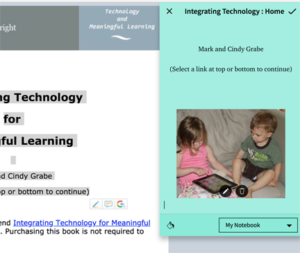
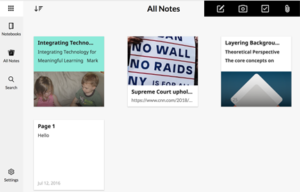
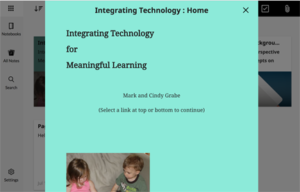
Your stored notes will appear within a NoteBook as thumbnails. Select a thumbnail to see the full sized version of the content.
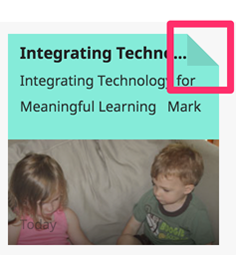
One more tip to head off possible confusion. Some capabilities associated with the NoteBook thumbnails are revealed by clicking on the “dog ear” of a thumbnail. Actions such as delete are made available in this way.

So this is my both lengthy and brief introduction to four online notebook tools. I am not certain I have resolved my personal situation. I do believe that Evernote is the most powerful of the services I have reviewed. Yet, all would meet my personal needs with a little more experience on my part. Hopefully, this introduction will encourage your personal exploration as content collection is something I think most educators do from time to time.




Loading

Observing arguments

I think that learning to effectively engage in arguments is the most universally needed skill of our time. Yes, it is far more important than coding, biology, chemistry, art, etc.  It is ignored because arguing has a bad reputation and is typically misunderstood. It is ignored because educators are unaware or see it as not relevant to what they teach. It is ignored because educators feel unable to lose control of the process when teaching the skills.  Defining arguing as debating may help some. Debate is regarded as more refined although obscure. This is also a major part of the problem, meaningful arguing (taking a position, explaining your reasons for this position, and offering evidence for each reason) is not what so many understand arguing to be. Arguing is not shouting louder than the other guy. Arguing is intended to be combative as an effective way to explore issues and in many situations to seek the truth. Science is about arguing. It is the use of data and data collection to advance a position by correcting inaccurate positions that are completely wrong or need to be extended. Politics should be about arguing, but often is not.

I write about arguing a lot and you can acquire some details by searching this site and considering what I say and following the links I provide.

This post has a slightly different purpose. It proposes that students can learn critical thinking and argumentation and can learn about important issues by observing those skilled in specific areas debate/argue about these areas. It may sound something like the bewildering activity of kids who watched skilled gamers play the games that interest them. It is similar to other uses of modeling in education.

As I have explored argumentation I have found tools and services that I see as offering ways to develop the skills of argumentation. I think observation with guidance can contribute. I think that the guidance, some might say scaffolding, is important. Have learners identify the reasons and evidence used by each side. Have learners identify if participants attempt to refute the reasons and evidence of the opposing side or simply continue to add their own reasons and evidence. Such scaffolding represents the types of tactics I think educators should be good at. The goal is to get students to think about the general strategy and eventually to try out the skills themselves.

I suggest educators might find the recorded debates provided by Intelligence2Debates to be very useful. Educators will likely benefit from the listening themselves (e.g., Can students learn from games?, Is social media good for democracy?), but should also see the potential for use with their students.

The summer is a great time for educators to consider new ideas for next year. Whatever your discipline, check out the list of topics available from the site I reference and consider how you might use some of these resources in your classroom.

Loading

Separate social and news

I have been thinking about how we ended up with the situation in which our online information services feed our personal biases. As an old-timer, I remember the time when we hoped the online world would make us better informed and more aware. I think we thought this was a good thing as we would have a more accurate understanding of the world that surrounds us. We could search or explore and be accurately informed. This was before the claims that we lived within a filter bubble and were likely consuming fake news.

I found Google’s original page rank algorithm appealing. As an academic researcher, I was familiar with the use of citation frequency to service the most influential work. Of course issues bias were identified, but the approach seemed reasonable. Page rank is actually more sophisticated and attempts to weight the importance of the source of the links rather than just counting the number of links. It didn’t take long for this system to be gamed by creating links simply to falsely promote content without actually using the content in any way. The weighting of links based on the importance of the linking pages somewhat mitigated this problem, but even this would be played. Pages of meaningless links connecting to pages of meaningless links limited the value of noting the weighting of the link source. Google we not on to add other signals in an attempt to improve the weighting algorithm.

In my opinion, Google lost its way or gave in when it began to use personal history as a signal. Once you start biasing what you want to see rather than focusing on the quality of the content, the slope of decline accelerates greatly.

Other information sources came later to the game and jumped immediately to biased content. Once the user self-selects information sources (friends), biased content is pretty much assured.

Perhaps the fundamental flaw in the present information system is the conflation of social with information source. Tools such as Twitter and Facebook are used both to socialize and to learn. While it is certainly useful to discuss and debate important sources of information, but this should follow exposure to balanced information sources rather than information sources biased toward one legitimate position of another.

I think the Google News finally has a good idea. Google will provide content based on personal biases, but it also provides selected content delivered to all users. There is value in making this distinction and making the difference clear to users.


Loading

Summer reading for teachers

I see several bloggers have offered summer reading suggestions for teachers. I also see a less frequent message that teachers should not be shamed into working during their summer break by those making such suggestions. I come down on the side of the summer is a time to reflect and develop personal skills. Of course, there should also be time for family and recreation.

I am a big advocate of reading. This seems one of the most cost effective and deep ways to consider important topics and get ideas for application. Summer also offers the opportunity for attending a conference or two. I considered attending ISTE this coming week, but decided I could read 200 Kindle books for my estimation of the travel, lodging, and registration costs. There is simply no way ISTE could offer me anywhere close to the same quantity, depth, and variety of information.

I read a lot of different things and much of what I read is not intended to inform my vocational focus on educational technology. I have more general interests in politics, equity, the economy, and healthcare. All things considered, these topics are likely more important to the process of educations and the support of the next generation than what is covered in the educational content I consume. Just for the record, I am presently rereading the following two books mostly because I intend to assign them in my Fall grad course.

When I select books for students in my educational technology classes, I tend to look for two kinds of books. I have been searching for terms that describe these two categories of books. I have settled on textbooks and trade books. What I have in mind does not fit the typical definition of a trade book which implies the book is written for a general audience. I decided to stick with these two terms because the two terms have been used in the way I intend by others.

I have written both types of books and just updated what I would describe as my (actually our) textbook. If reading is assigned for a grad course, I would argue that the first priority should either be a textbook or primary source (research articles) content. A trade book or two might then be used to focus on a specific topic. My reasoning is related to what I think these two options are designed to accomplish.

My classification scheme is based on the assumption of the following characteristics.

A textbook covers multiple interrelated topics for readers of a given level of experience and background. For each topic. It covers any important differences of opinion with supporting evidence for alternate positions. It offers a few examples of applications so readers can develop a basic understanding of what that topic suggests and what differences of opinion associated with that topic mean for implementations.

A trade book makes an unapologetic argument for a position but typically makes little attempt to argue the strengths of competing positions. Contrasting positions might be identified but typically only to point out weaknesses. Trade books often discuss the application of the targeted position in depth and are more likely to provide specific examples suited to different environments for these applications (grade level, content area).

When making personal decisions, I suspect that practitioners gravitate toward trade books and to specific books based on what they hear from colleagues and social media. As an individual selecting required reading for these same individuals, I want to make certain that practitioners understand the strengths and weaknesses of positions they might be exposed to elsewhere. If the evidence clearly supports one position or another, I see it my obligation to say so. If there are competing positions with credible support, I assume I should be more neutral, but maintain a commitment to help practitioners understand some of the complexities that are important to acknowledge.
My own writing contains an example of each type of book.
  • Layering for learning explains tactics educators can use to add prompts of different types of online content to facilitate learner processing of that content. In other words, this book considers how to modify online content to become an educational resource.
  • Integrating technology for meaningful learning is our long-time textbook for preservice and in-service teachers.
Sometimes identifying a problem is, in fact, a contribution. I wish I knew how to address this challenge. If I have a concern related to the professional reading of practitioner, it would be this. Practitioners are likely to gravitate toward trade books. There is nothing that really provides a critical context. Textbooks are typically not appropriate as they are written for formal instructional circumstances that are assumed to cover multiple topics. What is typically not available is a source that takes a given topic and explores the multiple recommendations advanced for classroom actions associated with that topic. I can point to this type of review for researchers, but not for practitioners. There is a third meaningful category that seems not to exist probably because there is little interest in paying for this type of content.

Loading

News for all, news for you

The filter bubble is a tough adversary. It is seductive. You see what you want to see and what you want to see is what you like rather than what challenges you. Technology has learned how to make us feel good about what we believe. Unfortunately, this is a problem. It makes us feel certain in our own biases.

Like so many teach questions, Google uses its algorithms to learn about what we want and to deliver what we want on demand. In what I think is a bold move, it has recognized the way it pushes our own biases and has created a solution.

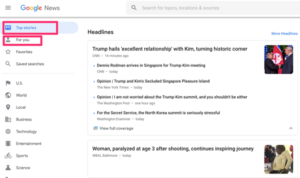
Google News has a new look and works in a different way. If you were a News user, you may have noticed the change and been baffled. Here is how I understand the change. Google offers us a way to follow our favorites and a way to review more independently curated important news of the day.

If you look at the left-hand column, the topmost entry is Top Stories. The stories are considered by the editors to be important to know AND in most cases allows links to multiple sources (News for all). The second entry is “For You” and is responsive to your preferences (News for you).

The core idea is that all should have a perspective on common important news and should understand this information in an unbiased way. I would suggest that this is innovative, but it might also be thought of as a return to the days of Edward R Murrow or Walter Cronkite when most saw the same stores presented from the same perspective. If one takes the time to read a couple of perspectives on the most important stories, the new model may be even better. Even if you study the New York Times or the Wall Street Journal you are subjected to consistent, but minor biases. Read both and you would have a complete picture from quality journalists.

Loading

A realistic look at the concept of a growth mindset

For a time, educators have been enamored of the growth mindset. Now, it appears that the concept, like so many other educational fads, has limited value. Research show little benefit from promoting the idea with students

It is/was an idea educators liked. For me, it was a new term applied to an old idea with a twist (the strange notion that Dweck somehow integrated an old idea with some flawed interpretation of brain plasticity). The brain plasticity thing was promoted as a way to encourage sticking with the effort focused on learning because science tells us you can change the brain through repetition. This is kind of true, but the repetition required to “rewrite” the brain is far more than an extra hour or so of studying.

As parents, coaches, and educators we like to promote the notion of “trying”. When I was a kid, the sportscaster used to sign off his daily show by saying:

A winner never quits and a quitter never wins.

For me, the fixed and growth mindset idea was a simplification of attribution theory. I liked attribution theory better as it seemed more complete. I liked to explain an attribution as an explanation for performance given to others and to the self. This is pretty clear what “to attribute” means. The four categories of attributions were luck, other, ability, and effort. Ability and effort seem similar to fixed and growth. Attribution theorists also noted we attribute success and failures to others and to luck. A considerable body of research exists with something called attribution retraining. Again, the goal was to get the individual to be changed to move toward effort attributions. Note the similarity of encouraging a growth mindset.

One of the issues with this model is that some behaviors are in fact influenced by ability (I prefer aptitude). The reality is that in many competitive life situations some goals will not be met. Some premeds will not be admitted to medical school. Some high school students will not make the 12 player varsity basketball team. Life does force us into accepting an aptitude attribution. When I teach this model, I like to suggest that dealing with accepting a lower aptitude is life’s way of suggesting we should focus on something we are good at. This can be a good thing. What happens to the premed who fails to accept the Cs in calculus and chemistry and persists? What about those of us advising such students? Knowing the odds even with retaking these courses, if a student is really giving his or her best effort, should the student be encouraged to continue to invest time and money.

I tend to think about situations like this as a function of a whether a goal is competitive or not and whether the environment can be changed or not. I don’t think it appropriate to suggest anyone can get into med school or make the varsity team. I do think it appropriate to suggest everyone can learn to read or learn important mathematical skills. This final optimism comes with the commitment to assure that the environment will accommodate the effort that will be required. Encouraging a growth mindset without assuring that sufficient time will be provided is unfair. For some students who struggle to keep up with their classmates this expectation is unfair. This is why I have always been a fan of personalization through mastery learning and why I have been interested in technology as a practical way to make mastery possible.

Without adapting the environment, the growth mindset thing is a label adults use to make themselves feel like they have done something when they have only encouraged certain learners to struggle with an impossible challenge.


Loading

Firefox no like COOKIES

Internet companies are all fighting for a niche. In doing so, they collectively represent a great example of the tragedy of the commons. The combined consequence of serving their individual personal interests may end up destroying the shared opportunity that is the Internet. This will be a long post, but I promise to try to bring all of the topics together at the end.

FireFox (and Apple Safari) have found their niches by offering users security. Taking advantage of recent legitimate user concerns related to privacy, the newest Mozilla FireFox browser offers a technique for blocking cookies and as one consequence avoiding the display of one technique for displaying targeted ads. This technique can be fine-tuned by the user, but comes with the cookie blocking feature turned on. There are several ways to tune this capability, but the easiest approach is just to use FireFox as is.

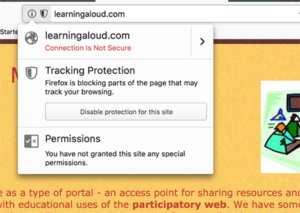
Here is a very brief tutorial that should be sufficient to use the most basic capabilities. Remember the default is to block cookies. There may be situations in which this is an issue. It is unlikely you want targeted ads, but you may be other services you want that do take advantage of cookies. To the left of the address bar, you should see a shield and an i within a circle. Selecting this area of the browser should reveal a drop-down menu. One of the options allows you to turn “tracking protection” on (or off again).


Just to be clear, ads and cookies can be related or independent “problems”. Cookies offer the mechanism allowing targeted ads. The cookies allow the collection of information about your online behavior and this information can be used to provide you ads suited to your interests. You probably recognize this method as the method by which Google sells ads (to those willing to purchase them) and provides you ads you might find useful. It is also one method by which other companies collect information about you. You could allow Google to set cookies and block others, but who wants to learn how to do this or to take the time.

Ads do not require the use of cookies to collect information. As an example likely to be familiar to my readers, the site FreeTech4Teachers displays multiple banner ads alongside the entire blog. These are not targeted ads in the way Google ads are targeted and visitors all see the same collection of ads. The ads are assumed to be of interest to educators, but are only targeted in the way specialty magazines or television programs offer ads based on their audience. Turning cookies off will not prevent the display of these ads. To explain in a simple way, these ads are simply images that serve as links to the companies promoted. You can’t really turn this off because using images as links is basic HTML and serves may other functions on other sites.

The issue I would like to point out here is related to the need for content producers (anyone who wants to use ads to support the effort to provide content) and service providers (the companies who offer a free service in return for potential ad revenue) to generate revenue. Google makes a lot of money, but also pays many individuals and has many infrastructure expenses. Google supports its need for revenue by targeted ads (which depend on cookies). Some content providers take the same approach and addition rely on users to offer free content (e.g., Facebook).

Two things could happen if everyone would block cookies:

  • Companies such as Google would have to attempt to develop countermeasures (not provide services to users unwilling to accept cookies), or
  • Go out of business.

Countermeasures are easier to implement than you might think. For example, I could add a small segment of code in the header to this site that would determine the browser requesting access and refer the user to a different page if the browser was Mozilla Firefox. This second page might ask that anyone wanting to view the content on the first page access this information using Chrome. I am certain that the Google coders could come up with techniques that are far more sophisticated.

At present, Google is not likely to do this type of thing because FireFox has such a small share of the market. If FireFox had Chrome’s share of the market, Google would have to try something to protect its business model.

I don’t know where this is all going. There is no free, only different ways to pay. My long-term predictions would be a move to micropayments. This would be a system by which users would have to set up an account and the money in this account would be drawn on depending on what they viewed. New companies would serve as intermediaries to provide this service (something like a credit card company). The cost per page would be very small (a cent or so), but this is pretty much what Google generates through its present ad model. The cost could vary from site to site and some would probably be free. Imagine reading anything you wanted from the New York Times for a few cents per article. There would be no need for a subscription to the entire information source. Sites attempting to sell you things (e.g., Amazon) would be free because that service would have another way of generating income.

Loading