PEW Report on Adolescent Use of Social Media

The PEW Internet and American Life Project has released another report on Teens and Social Media. The report released just a few days ago is based on data collected in 2006 and allows comparisons with similar surveys from 2004 and 2000.The report indicates:

  • 93% of adolescents report using the Internet (hence the data reported on “Internet users” need be adjusted downward only a bit to reflect general adolescent use)
  • 64% of 12-17 year olds participate in at least one content-creation activity
  • 39% share artistic creations (including photos)
  • 28% have created a blog
  • 27% maintain a personal web page
  • 55% have a profile on a social networking site (mostly MySpace)

In general, participation has increased since 2004 (see chart)
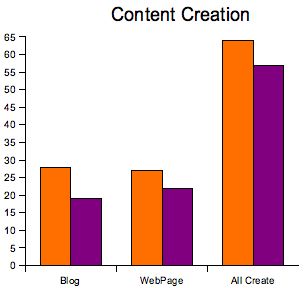
2006 PEW data

One of the points the authors argue is that content creation is often a way to start conversations. Teens report a high proportion of their media receive comments.With the exception of video, girls are more likely to produce content (e.g., 35% vs. 20% for blogs).There is some evidence of an awareness of safety issues. For example, uploaded photos are offered to only some potential observers (restricted access) most or some of the time (77%).

There are data on contact with strangers in a separate document describing the survey and offering question by question data. If PEW keeps to past practices, there will be a later report on online safety.

I found some of the data in available in the description of the questionnaire to be of interest. Here are a couple of items not included in the report.

Location of access:

I find this variable of interest partly in reaction to filtering that often occurs in schools. If students access from locations outside of schools, it might be argued that filtering access within schools ignores issues students are likely to encounter elsewhere.

Access at any time:

  • 89% from home
  • 75% from school
  • 70% from home of friend or relative
  • 50% from library

It seems strange that 25% claim not to access the Internet at school (this % has increased since 2004 – school is less likely to be an access point).

Location of most frequent access:

  • 77% from home
  • 18% from school

I wish someone was doing general studies of school technology use like Becker did a decade ago. The PEW data are very general and leave many of my questions unanswered.Issues raised the data cannot answer:Very little really provided about educational use.

  • Was access from school related to a class assignment or is it more likely the school provides access used to meet nonacademic needs?
  • How frequently was access from home related to a school task?
  • What proportion of the content creation was related to school assignments/activities?

It is reported that blog activity is quite common.

  • What is the post frequency?
  • How frequently is blog activity located within a social networking site.
  • What topics do adolescents address in their blogs?

Lenhart, Amanda, Mary Madden, Alexandra Rankin Macgill, and Aaron Smith. “Teens and Social Media.” PEW Internet & American Life Project.

Loading

Our XO IS HERE

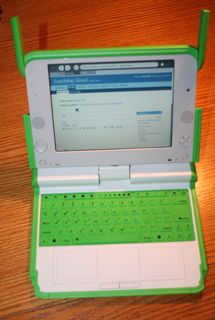
Our XO arrived this evening. I was beginning to worry. We will be on the road for the holidays and I had hoped to have the computer along so I could explore. It showed up just in time.

XO

One of the first things you notice is just how small it is. I am writing this post from the new machine and I am making more keyboarding errors than usual. I do understand that the machine was intended for children and not for adults. I have been following Doug Johnson’s experiences as he has been commenting on experiences with his new machine. He is correct in noting that if you made the commitment to purchase the pair of OLPC XOs you should not expect the traditional experience. He describes his package as containing the computer, the power supply and a couple of sheets of sketchy instructions. Unless I was so excited in opening the box that I discarded some of the contents, I do not think our package came with instructions.

The lack of specific instructions will likely be an issue. I was able to connect to our wireless after a lot of trial and error. For some reason, I was unable to figure out which combination of attributes should be used to describe the protection scheme we use on our network. I was able to finally make the connection, but I am still unsure that I understand exactly what I did. Unfortunately, this pattern of learning seems to be typical leaving me in a constant state of exploration. Perhaps the exploration is supposed to be part of the fun.

OLPC Wiki

See also One Laptop Per Child site.

OLPC Forum

Loading

Break Something / Fix Something

My “break” officially begins today. I now have a couple of weeks to relax and catch up on tasks I have been putting off.Today, I decided I should update the software that runs this blog (WordPress).

The maxim “if it ain’t broke, don’t fix it” doesn’t always apply to open software. Patches for various problems, including security issues, are constantly being incorporated into new versions and it is considered irresponsible to operate vulnerable software. The downside of upgrading is that things that worked before often break.

The software that operates this blog was created by many talented people. There is the main program that is capable of operating a basic blog, but also plugins that perform special functions. Unfortunately, sometimes plugins that worked before conflict with changes made to the basic software. That is what has happened to me. The plugins I have been using to “tag” my posts, generate a tag cloud, and retrieve posts by tag no longer work. I have found a replacement, but I now have to decide if I want to retag my posts. There are more than 1000 posts so it will be a considerable amount of work. Still, I added the original tag plugin only a year or so ago and many original posts could not be located by tag.

I guess I will start and see how far I get. Working backwards is probably the best strategy. If I decide to abandon the task, at least the most recent and probably most relevant material will be tagged.

Loading

The Listening Project

During the past half dozen years, the book that has probably had the greatest influence on my thinking about education and many other issues has been Friedman’s “The World is Flat“. I carry the audio version on my ipod and still listen to sections from time to time. Part of the message is that all of us need to understand how we are interconnected. There is no way to isolate ourselves from the troubles that exist elsewhere or to worry that we are somehow being taken advantage of. The reality is that we must understand the flat world and adjust to its demands and opportunities. If you have yet to read the book, buy it for yourself as a holiday present.

Here is another suggestion. In the months ahead, keep your eye open for a documentary called “The Listening Project“. The film follows several Americans as they travel about and ask all kinds of people “What do you think of America?” The locations, the people, and the answers to the question are all interesting. Take a look at the trailer and some of the sample material. The documentary intends to create a dialog (see opportunities to contribute via blogs, Youtube) and it will be interesting to see what participation follows.

We are proud to say that our son served as an editor for this documentary.

Loading

Posters as Presents

This is a reprint of a post from approximately a year ago. I like this idea for holiday gifts.

I have the newest version of iPhoto and was able to get the poster script to work with 10.4.11 OS. Here is a more recent post that explains the process. Follow the instructions carefully. I did encounter the “Error Can’t get item 1 of {}/ (-1728)” message” several times. When I manually selected the images to be included and not just the folder containing the images, the procedure worked.

MacWorld had an article describing how to use the Automator to generate a 20X30 poster from images stored within iPhoto. This article prompted me to generate a blog entry. The article provided access to an automator script that users can activate to generate the giant pdf poster.

Now this only works for those with access to a Mac, but if you are searching for a present your class can generate for each other or for friends and you have been collecting digital images throughout the year, this script does a great job.The idea is really that you would print out the pdf on a large form printer or send the pdf off for printing (we did this last year). However, the script saves the pdf back to iPhoto and you can then export the image in whatever size you like (see below for sample created from recent China photos).

Sample Poster

The script has been updated for a more recent version of iPhoto (Versions for iPhoto 5 and iPhoto 6 are available online). If you try this project make sure you are patient. The script may take 10+ minutes to reach completion. Read the MacWorld article (link above) for complete instructions.

Loading

Spam for the holidays

Offer any opportunity to participate in a web application and it seems you must be prepared to deal with spam. For all practical purposes, the comment portion of this blog has been shut down because of spammers. The hoops one must jump through before you are allowed to offer comment probably eliminates all but my students.

I am now having to deal with spam on my social bookmarking site. I have a simple”Scuttle” site that allows registered users to add bookmarks. I have also modified the basic code to allow users to evaluate the quality of the sites that can be accessed. The site is intended to organize links to sites focused on educational applications of technology.

Recently, groups of users have signed up using fake names with what appears to be the intent of creating links to commercial sites. My site has some protection measures, but these individuals clearly know how to circumvent the protection. I am not certain I understand their motivation. I know that some attempt to spoof Google into thinking many sites link to a target site in order to boost the page rank for that site, but spamming Scuttle sites seems a labor intensive way to go about such a strategy. The spam appears to be added manually and once I notice the changes it takes me only a few seconds to eliminate inappropriate links. I keep thinking there must be something I am missing about this strategy, but nothing obvious occurs to me.

Loading

PageFlakes for Educators

I make use of personal web portals and while I was aware of Pageflakes, I have always classified it as another personal portal. By personal portal, I mean a web page hosted on a remote server that users can easily customize with “widgets” (or whatever the host companies calls function specific modules that can be selected and positioned on a page) to serve as their browser home page. The idea is to bring together information sources (RSS feeds for news, weather, blogs, images), email, commonly used links, etc. in one location.

Now, I learn that PageFlakes can be used to create a “page” for sharing and some special flakes have been included in a version for educators/students (Mashable). If you don’t understand what this might mean, recognize that it allows a user (teacher/student) to create a page that can include powerful functions you don’t have to understand how to create yourself. Select a “”flake” from a long list of possibilities, position it on the page where you think it is most appropriate, and edit flake “parameters” to adjust the function of that flake to your own needs.

I have created a sample Page for your exploration (http://teacher.pageflakes.com/markgrabe).

Access control is an important issue when educators involve students with online resources. PageFlake can be private, public, or available to a designated group of participants. I have not included examples of flakes that might be among the more useful for classroom group (e.g., blog, notepad) because I must make my example public for you to be able to access the page. Unless I am missing something, I could not determine how I would turn off “comments” and similar response opportunities under these conditions.

One flake allowing personal content creation even under the public condition is the “anything flake”. This flake amounts to a simple web page authoring tool (see upper left-hand corner of my page). The tool is very easy to use and saves a fully functional html “mini” page that is really part of the full page.

Some have already developed simple tutorials for PageFlakes (e.g., PageFlakes for Education Wiki). The best way to understand this environment is probably to explore (http://teacher.pageflakes.com) as a personal portal and then, if this proves to be a productive experience, progress to the creation of pages for sharing.

Loading