Two-year old, grand daughter Addison received a Dora digital camera for Christmas. She can turn it on, point it at something, and take pictures. She looks at pictures on the lcd screen, but you can off-load the pictures.
Sometimes, she misses (brother Preston). However, she uses the same approach that I employ. Take enough digital pictures and some turn out.
I have tried to use Twitter for several months and I am still frustrated with what for me are limitations. I will probably hang on because the system appears popular with so many, but I have shifted how I use the system.
I know that other educators find value in Twitter and have attempted to explain to the rest of us what of educational value this system has to offer. My reaction to these suggestions is pretty much my reaction to those who propose that the cell phone, the old Palm, or classroom clickers are of educational value. To me, these systems are drastically under-powered and often are cumbersome to use. “Better than nothing” should not be our goal.
I do recognize that “group microblogs” offer some opportunities. The traditional blog (e.g., this one) discourages the participation of others (mostly to prevent spam and inappropriate comments) and may offer so many opportunities that some are intimidated. I think there is another factor involved. Many simply do not want to spend the time to generate lengthy posts and post after post of 140 characters or less would appear pretty anemic within a community devoted to more lengthy offerings. Short comments are the only option available within the Twitter community.
My quarrel is not so much with microblogs as it is with Twitter. A post of less than 140 characters is limiting. What can really be accomplished through short posts. A simple request and response pattern is sometimes helpful. What can you tell me about XXX? Here is what I know. Here is what I use. etc. I do understand the notion of a conversation but I react the same to Twitter as I do to the experience of attempting to run a chat with more than a couple participants – the noise to information ratio is limiting to meaningful conversation. One way around this is to limit participation. For example, Room 24 uses Twitter to carry on a conversation or at least generate an on-going record of ideas within a classroom. The key is to connect to http://twitter.com/room24 instead of http://twitter.com.
I also don’t like the focus on text. What is the value in such a minimalist approach? Rather than text-only, I prefer the tumblr approach. Tumblr attempts to differentiate itself from blogs by encouraging posts of a specific type – a text comment, an image, a link. Tumbler attempts to explain the difference as a scrapbook vs. a journal. The idea of self-defined groups (think friends or followers) combined with simple, but diverse post types make sense to me.
It is sometimes difficult to overcome inertia. Some would argue that more recent social bookmarking services offer superior features to del.icio.us. However, the value of a service extends beyond the software to the community using that software. Perhaps the same is true with Twitter. Folks are afraid to switch from an active, but limiting system to a less popular, but more powerful environment.
I have developed my own compromise. I am using an open source microblog called Chyrp (my Chyrp site). One feature that can be activated within Chyrp allows the announcement of a Chyrp post within Twitter. Others I follow on Twitter appear to take a similar approach combining some Tweets and links from another service. I am not certain how this approach will be accepted. When I first noticed this approach, I was somewhat annoyed but what appeared to be an effort to broadcast posts across several formats. After struggling with Twitter for a few months, I now have a different perspective.
As I head into break I wanted something I could use to hold and read files (pdfs, docs) on my iPod Touch. The screen is a little small for my old eyes and I prefer to mark on documents as I read, but there are situations in which just reading will do. Apps for the Touch are less than $10 so using something a few times is acceptable.
I looked at two apps – FileMagnet and DataCase. Reviews (Appletell) had similar things to say, but the approach was a little different. FileMagnet makes use of software loaded on the computer to transfer files and a Mac will recognize DataCase as a shared device. My original interpretation of this distinction was that the Touch had to be tethered – a reading error on my part because both use wifi.
I purchased DataCase. I could not get the app to work at the office. UND requires email authentication for wifi access. Even if the computer and the Touch have access, the computer does not see the Touch. Perhaps the port matters – beats me. I had a feeling that it was the weird authentication requirement and when I got home I found there was not a problem. Drag and drop worked to move files from my computer to the Touch.
Nice product – easy to use and the visual appearance of the content is of high quality.
Google comes up in the debate over net neutrality. ISPs have complained that Google should pay more because the content they offer fills up bandwidth out of proportion to the fees they pay. Net neutrality is a tough issue because the illustration offered is not necessarily at the core of the motives of ISPs. For example, in prioritizing bit types to thwart bandwidth hogs, companies could also protect their self interests (e.g., cable providers could slow online video to protect a primary service they offer).
While this is how I have previously understood the intertwined motives and challenges of providers, the Wall Street Journal just published an article that presents a position I find confusing. Google wants providers to offer them a fast lane. Now, the situation is growing more complicated. Providers may offer priority delivery of bits provided by paying customers (e.g., Google). Would allowing this business practice also allow cable providers to slow the video bits competing with the paid video business of the same cable company? These situations are different, but once the provider can slow/speed one category of information, will any justification for doing so be necessary?
You might not expect that the issue of which bits receive priority when passing through the Internet would seem an important political issue for the new administration, but the analysis offered by the WSJ may surprise you. The article notes that Google CEO Schmidt is a member of the transition team. The new Google position would seem just as much a violation of net neutrality as the thinly hidden agenda of the cable providers. One of the cool things about the Internet has been the role inexpensive access has provided in encouraging innovation. Hope this is not another of those “pay to play” political/business games.
We are in the middle of a two-day blizzard. So, we have lots of time with nothing to do. Actually, I knew this was coming and brought plenty of work home. But, work is work and blizzards are for having a good time.
I had to do play around a bit to overcome the limits of WordPress.
My son tweeted this morning about spending a tough night with a couple of friends (technical writers) who were just laid off. He has been working independently rather than for a production company most of his career and his life style is probably what more and more of us have to look forward to. At one time, he valued the opportunity and flexibility working for yourself allowed. He happens to be pretty good at what he does, but the stress of finding the next gig is always there.
If we are moving in this direction, I really wonder what happens when being hired as a temp to complete specific assignments becomes the norm. My fear is that a new normal will only increase the power/wealth/creativity gap. When most folks must scramble to find the next task, those who now relish their opportunities to be creative will find themselves in a much different situation. Creativity without security is not that common. Must be a Maslow hierarchy thing or something.
I know there is a similar trend in education. Tenure and security are out – possibly victims of public sentiment that regards those with secure positions as free loaders taking advantage of the system. Funny as I comment this morning (Saturday) on this topic there are three people in their offices on my floor – average age about 60.
High standards, new ideas, and creativity – supposedly what we need to compete and advance. Is that what you get when those with the most experience must accept their assignments from administrators with their own agendas? There really is a very significant difference between the commitment you see in those who work to live and those who live to work. Working to live means you complete assigned tasks and then go home. Living to work means you take a break to complete a blog post because you can and then you return to what you do weekend or not. Some of us are lucky.
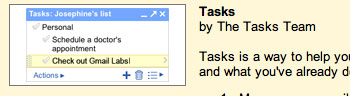
If you spend a great deal of time using GMail, you may want to take note of a new feature. This feature adds a simple to-do list (called tasks). TechCrunch provided the first description I read.
My experience in trying the feature was a little different so I will attempt to explain the activation procedure as I experienced it.
I found that the feature had to be activated from Settings (top of GMail screen). The beaker symbol did not appear for me until I had activated “Tasks”. I am guessing the beaker symbol does not appear until you experiment with one feature.
Under the settings heading, you want to activate “Tasks”. This is the to-do feature.
When tasks is activated, a link (Tasks) will appear in the left sidebar under contacts.
Selecting the “Tasks” link opens a window allowing the input, deletion, and prioritization of tasks.
Manage Consent
To provide the best experiences, we use technologies like cookies to store and/or access device information. Consenting to these technologies will allow us to process data such as browsing behavior or unique IDs on this site. Not consenting or withdrawing consent, may adversely affect certain features and functions.
Functional
Always active
The technical storage or access is strictly necessary for the legitimate purpose of enabling the use of a specific service explicitly requested by the subscriber or user, or for the sole purpose of carrying out the transmission of a communication over an electronic communications network.
Preferences
The technical storage or access is necessary for the legitimate purpose of storing preferences that are not requested by the subscriber or user.
Statistics
The technical storage or access that is used exclusively for statistical purposes.The technical storage or access that is used exclusively for anonymous statistical purposes. Without a subpoena, voluntary compliance on the part of your Internet Service Provider, or additional records from a third party, information stored or retrieved for this purpose alone cannot usually be used to identify you.
Marketing
The technical storage or access is required to create user profiles to send advertising, or to track the user on a website or across several websites for similar marketing purposes.









You must be logged in to post a comment.