A strainer for my aggregator

It is hard to keep up with blog feeds. I kind of run hot and cold on whether I think reviewing blogs provides me information useful to my professional interests. Perhaps I value the process of writing more than reading. Having said this, I am also afraid I will miss something. I have decided I need a strainer for my aggregator(s). I think some folks use Twitter in this way. They rapidly scan and look for things to follow-up on. I am not convinced this helps – you are processing shorter prompts, but you read more comments of limited relevance.

I keep searching and exploring attempting to either create a system or locate a tool that will prove useful. Here are the two tools I am presently exploring.

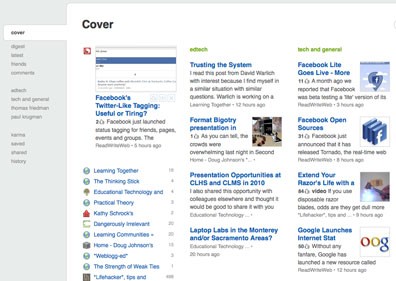
Feedly

Feedly is a Firefox plug-in that synchs with Google reader.

Feedly asks that you classify your themes into categories and that you differentiate favorite and non-favorite feeds within categories. Your actions when using feedly (selecting items to share, what you favorite) influences what is selected for most immediate access.

Optimize use of Feedly

Fever

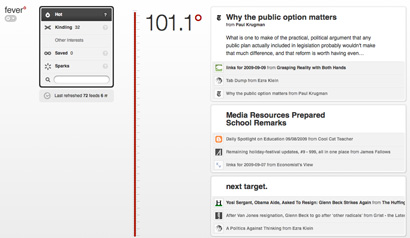
Fever uses a different and somewhat mysterious approach to “straining”. This one is not free ($30) and requires that you have access to a server (PHP and MySQL). I am a sucker for tools I can run on my own servers.

There are some similarities – with fever you differentiate those feeds you follow intently (kindling) from those which you sometimes examine (sparks). What fever identifies are trending themes – what topics are hot (I am trying to keep with the fire theme here). How this works is a little unclear. I have included a couple of related articles and one speculates that the categorization process may be based on common “out links” – links of high overall frequency generate a higher temp and also serves to organize posts into themes. Makes some sense.

Practical Practice
Alex Payne

Both of these services allow you to read feeds in a conventional manner. Feedly offers an advantage if Google Reader is your traditional tool because of the synchronization. If you use multiple “strainers”, you may end up spending more rather than less time. What you star, share, or save (or whatever) with one tool does not carry over to the other tool. So, what I am doing here is still experimenting.

Loading

A Message of Responsibility

After all the hype and the controversy, the speech is underway. It is unfortunate that some will not be able to share in the enthusiasm of the moment. Just a few minutes in length, the message was simple and not at all political. Don’t let yourself down – life requires responsibility. Do some disagree? Do a few parents really think their opinion on instructional experiences should over rule common opinion and common sense? Shouldn’t they then make personal decisions for their own children?

When it was over, it was back to class. Where to go next? What period is it now?

Loading

How many companies like this are out there?

The ideas and the options that show up on the Internet are simply amazing. I try quite a few.

Here is my first product from a company called Animoto.

30 second productions are free. Longer productions and the opportunity to download rather than stream your products costs $30 a year. I wonder if there is a way to add a voice over?

I had this image collection from a podcast I did. The pictures were taken last year at about this time.

Some ideas for more sophisticated products from the langwitches blog. Insert text slides to tell a story.

Take 2:

You can integrate titles, but each counts as a slide and the total number is very limited in the free version. Might be worth $30 for a class account.

Loading

Evaluating Search

For most of us, search makes use of the same tool and the simple process of entering a couple of words we think will surface useful information. Nothing very sophisticated even when advance options are available for our use.

We encourage students to explore search options by trying the same search with different search engines.

This process has been automated through a clever hack by Michael Kordahi. BlindSearch submits a search to three search engine and returns the results in three columns without identifying the search engine responsible for each search. The idea is to examine the results and identify the column you feel provides the most useful results. The search engine associated with each column is then revealed. A link on the search page offers a running total of best search performance for the past 8 weeks.

searchoptions

I tried several different searches and my selections of “best” results were all over the place. This would make a useful classroom activity.

Loading

Personal data mining and possibilities for discovery

Late last evening after exploring lala, I tweeted the following:

Wow – you can now scrobble from lala to last.fm – update for the digital natives. Check under beta.

It was kind of a challenge from one 60-year-old to the digital natives of the world.

For those needing a translation (digital natives included) – LaLa and Last.Fm are online music services with interesting features. LaLa allows you to purchase music for download (or in CD format), but you can also play any song once for free and for 10 cents play any song any time. In addition, LaLa knows what music you own (if you enable the LaLa music mover) and you have access to these songs without payment even when accessing from different machines.

Last.Fm is a social music service. It offers streams based on your interests and  your neighbours (British company), but the feature I like most is that it keeps track of the music you play on your computers (I guess to be more accurate I also have an app on my iPod and other apps may exist for other devices). I have been a pro member since Nov. 2006 (you need not pay the $4 per month if you want fewer services) and in this time it knows I have listened to 82944 songs. It knows my favorite artists and songs (Guns N Roses – Sweet Child of Mine with 80 plays). I can examine data for the last week, 6 m., year and for the duration of my membership. Lots of data to mine.

lastfmdata

The discovery feature works this way. The service uses your musical preferences to identify those with similar interests. You can visit their public profiles and possibly identify new artists/songs you may want to investigate and purchase. When I explain the use of online social tools as opportunities for discovery, I tend to use this example. Imagine visiting the home of someone with similar tastes and browsing through their CD collection. Would you locate something new? Of course! Might it interest you? Perhaps.

Discovery works in a similar fashion across different tools (Twitter, blogs, social bookmarking) and content domains. Identify individuals with similar interests and pick up on what else they are reading, listening to, or viewing.

Scrobbling? Try Wikipedia for a formal definition. I think of it as a centralized accumulation and aggregation of data about your behaviors. LastFM accumulates and aggregates information about the music I listen to whether I use LastFM, PandoraFM, or iTunes. Until recently, Lala did not offer scrobbling and I really liked the LaLa features and cost. Not an unusual tech dilemma – stick with a service you have invested a lot of time in and have used to accumulate a lot of useful information or move on to a better system (think delicious vs diigo). Anyway, LaLa added scrobbling so I am happy (BTW – you find the scrobbling option by going to edit personal information and then selecting the Beta tab (not the easiest feature to discover).

lalascrobble

And that, digital natives, is how to get your geek on 😉

Loading

Multiple personas (my weak attempt at a psych joke)

D. Warlich offered a post in which he commented on Personas – a MIT Media Lab application that categorizes Internet “references” to an individual. I guess he liked the representation of himself (looks like a genetic representation to me) and is using it as a header for his blog. Clever.

I decided to create a persona and contrast it with the persona of the individual I think I now best (cg).

grabepersona

Now, I am attempting to understand what the categories mean and what about our online presence would reveal differences. My wife is certainly more social and she has cause to be more involved with medical issues, i.e., she is a two time cancer survivor. I think the “books” priority for me makes sense (although Cindy’s Kindle did arrive today). Giving me any credit for “fashion” seems foolish (I guess one cannot assume mentions are necessarily positive).

BTW – your genetics seem to change a bit with each run – not sure what that means. I must be mutating.

Loading

The financial challenge of online instruction

I noted a couple of weeks ago that my professional responsibilities had changed as a function of my new role as department chair. The one component of this position that may be relevant to this blog is my administrative role associated with two department online programs (a graduate program in forensic psychology and the undergraduate major). The forensic program has been operating for a couple of years, but we are just rolling out the online undergraduate program. As I indicated in my previous post, my administrative role offers a different perspective than my previous roles as online instructor or graduate faculty member preparing other academics to teach online or design for online instruction.

Here is a concrete example – the financial challenge of an online program.

As a department, we have committed to a faculty in which all members are involved in teaching, research and service. We believe these roles are interdependent in that each is necessary and each role supports the others. When we moved last year to the initiation of the online major, we started by having existing faculty teach a few courses as overloads (with pay). However, this year with have added three faculty members. These individuals are not in tenure-track lines, but are given some expectation of stability. These individuals are expected to teach 5 “group” courses during the year (a 3-2 or 2-3) and all have research expectations. Nearly all of us are involved in teaching online courses, so the new hires both teach online and cover FTF courses when tenure-track faculty members teach online.

Here is a mathematical description of the money challenge. One can calculate the amount of return from tuition (approx. $225 per credit) that must be generated to cover instruction. We must generate approx. $13,300 per 3 credit course. The department receives approximately 55% of tuition dollars after money is taken out for Continuing Education and the college so we make about $370 per enrolled student. We do make some additional money in fees from 300-400 level courses. Here is the problem. We do very well in lower division courses and a few other courses taken by many majors. The problem is that we cap courses at 40 students and we must enroll approx. 36 students to cover instructional costs. So there is little room on the up side to generate a little extra money for administrative costs and GTA support (40 students online is a challenge and far more time consuming than 40 students FTF). When we get to courses likely to be taken by majors only we do receive an additional fee ($50 per credit), but we have far fewer students. The limited upside in fully enrolled courses does not compensate for the struggles to generate enrollments from online majors. We are pretty much breaking even.

I think we are doing what we should be doing to offer a quality program. We want those who take online courses to experience the same faculty members campus-based students experience. I offer this information as a concrete way of explaining what it takes. If our experiences are typical, universities need to be doing this because it is the right thing to do and not because they anticipate large financial gains.

Blogged with the Flock Browser

Loading