The trend that concerns me – youth people are showing less interest in blogging. In 2006, about 28% of 12-17 year olds blogged. Now, only 14% make the effort to generate lengthier posts about things that interest them. I thought that microblogs (Twitter mostly) would have taken up the slack, but this does not appear to be the base. Only 8% of this group post to the 140 character and less sites.
Social network sites (e.g., Facebook) appear to be the newest trend. Four years ago, 55% used such sites and now the proportion is approaching 75. Did I imagine this or were younger users once blocked.
Of course, Facebook is versatile. You can add a little or a lot depending on your mood. You are also connected to just that group that interests you. Finally, there is the option of accessing your site on the go (hence the title of the report – Social Media and Mobile Internet Use). Approx. 75% of teens own a cell phone and 58% of 12 year-olds have this resource. Amazing.
I find the decline in what the article describes as “long form” posts to be discouraging. Things now appear to be moving toward mobile commenting. This seems more a way of connecting than communicating. Not that the social component is important. Obviously, social connections are extremely important at all ages and particularly to adolescents. However, the benefits of crafting more well thought out comments appear to be in decline.
This blog has some strange characteristics. One seems to be that few follow this blog as a feed and a good deal of the traffic comes as a result of search. I guess I am not certain why this is the case. Perhaps this is because some of what I offer consists of tutorials. The most popular posts seem to be tutorials. It may also be that the ability to comment has been limited. I did this as a defense against what mostly was spam and not responses to the posts. I noticed that someone seemed to be attempting to respond to a post in which I outlined some of the findings of a recent Generation M study. Among other things I questioned the interest of some in the educational value of video games. I can see how some would want to reply. I do say things to challenge and I should do more to encourage response. I have tried to relax the settings to make it easier to respond. You still do need to register.
When I did my last post, I intended to quickly follow it up with another about storage applications. As is often the case, as I explore things in depth, I first become more confused and then learn something. As the name of the blog implies, I then attempt to explain what I have discovered.
So, I have been exploring applications and services suited to short term storage, organization, and transport. This is the type of thing you might do while working on a month long project. This is not general backup which would involve a lot more content and would likely be accomplished automatically in the background. Nor, is it what I would describe as a web clipping service – a tool used while working with web content to organize URLs, sections of text, and screen captures (e.g., Evernote).
The two products I will describe are Shovebox and Dropbox. Shovebox is a Mac product and Dropbox is cross platform. I use both connected between my Mac(s) and my iPod Touch. Dropbox is suited to sharing files across multiple computers and Shovebox is not.
What confused me while doing the background research for this post was my assumption that Shovebox was storing content in the cloud. I spent a considerable amount of time searching to determine the storage capacity you were given for the $25 you spend on the software and I could not find the number. It turns out that I had been using Shovebox under an incorrect assumption. There is no capacity limit because the product is designed to improve your workflow by offering an approach to storing content on your machine. Luckily, I had other backup options for the content I had stored. My recently, I became aware of Dropbox. This software does store content in the cloud (and on any synched machine). You get 2 gigabytes storage at no cost and the software is free (you do pay for the iPod app). If you want more than two gigs, you pay big time – $100 a year for 50GB. Seems strange there is nothing between free and $100 a year. Note my previous post on the capacity Google makes available for $5.
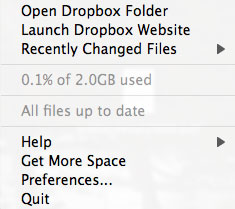
On the Mac, both Shovebox and Dropbox are available from the monitor bar (I am not certain what to call the bar at the top of the screen).
(left – dropbox, middle – shovebox)
Shovebox is intended to offer a strategy for intense work sessions. You pretty much drag files onto the icon and organize them later.
Files from a work session appear within the inbox. You then move them to folders that identify your projects.
Shovebox synchs with the iPod Touch via wifi. The synch process can be a little tricky depending on the wireless lan. I have trouble at the office, but things work fine at home.
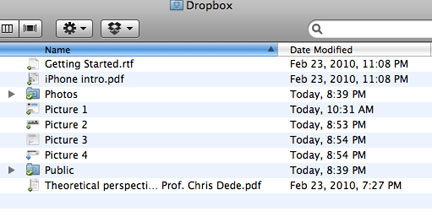
Dropbox works as if you are dragging files into a folder. The icon allows access to the folder. Open the folder and then drag the files. The files are synched across devices and also saved on the web. You can access your web folder from machines without the software.
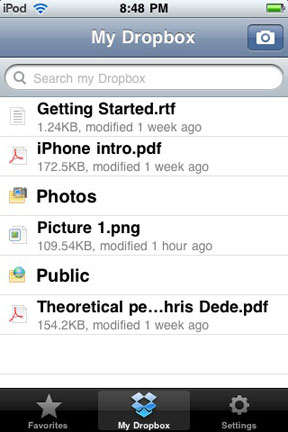
The iPod Touch makes use of wifi to synch.
You can do some other interesting things with Dropbox (drag files into a public folder and share them as web content), but this post is already too long.
I think many of us try many things and make use of only a few. I have files stored all over the place and both of these applications offer some useful features and some limitations. I guess finding the right mix of features at the right price point for a sufficient number of end users is the challenge for developers.
We all should consider off-site storage. I suppose that backup would probably be the first justification, but I am going to ignore this priority in my comments. Instead, I am going to focus on convenience. I mean convenience as in I have multiple computers and devices scattered all over the place and I often want to continue working on something elsewhere on a different machine. I mean convenience as in I used to just keep active files on my desktop, but that made my monitor look cluttered so I have been looking for an alternative. There seems to be an ever increasing number of options in reaction to such situations. If there are folks out their generating solutions, I take this to mean this must be a common problem. I can’t resist trying and even paying for several of these solutions. I have accumulated enough that I have found I can no longer remember how some of the first I purchased worked or even what unique niche within this niche they were designed to address. So, I decided to take the time to explore my existing purchases and share some insights. Rather than doing this all at once, I decided to divide this topic into multiple episodes that will be offered on an unpredictable basis.
I use my MobileMe account most frequently. It has been around for several years and I use MobileMe for several purposes. It does cost $100 per year. This would not be my present recommendation for others interested only in storage. Recently, Google allowed Google Docs users to upload file types that may or may not be suited to conversion to Google Docs (document, presentation, spreadsheet). In other words, one can just store files. This new service would be my present recommendation for general cloud storage.
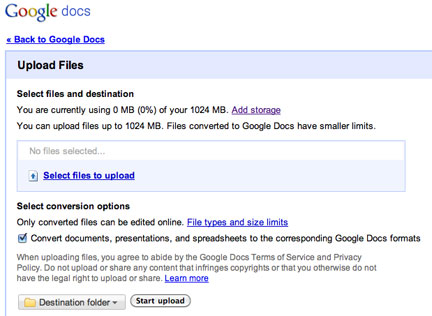
On the Google docs site, look for an upload button (top left). This brings up a page (above) allowing files to be uploaded. For this demo, I uploaded an image because Google docs is not designed for this file type.
In addition to just using Google docs to store and transfer files, you can share files with others.
Google mostly relies on ads for revenue. So, they to continue to add services simply to attract users. You can store 1 gigabyte of data (in addition to the traditional Google docs files) at no cost. This small amount of free storage at no cost is fairly common among the applications/services I have explored and it is probably all that many looking for convenience need. What makes Google docs file storage different is that the cost for additional storage is very reasonable – $5 for 20 gigabytes per year. This seems very reasonable to me.
Sharing files among device types is important to some. Mostly – I want to share files between computers, but others may also want to move files between a computer and a handheld (phone, wifi device). I was able to view the file I uploaded from my iPod Touch, but I am not aware of a way to download or upload files from this device. This does not mean this is not possible and I will likely hear from someone if there is a way to do this.
Disclaimer: I do serve as a Psychology department chairperson. However, just to put my comments in perspective, I did start my academic life with a biology degree. In the following post I ask lots of questions. If the answers were obvious I would be watching the olympics rather than writing.
I seldom comment on general K12 curriculum issues. This topic originated in an unusual way. I was asked to speak at a Psychology club meeting as part of a panel considering career opportunities in Psychology. For whatever reason, I asked the group if anyone was preparing to teach Psychology in high school. No one responded. Lots of interest in graduate programs, but no one in the group interested in high school teaching. It was this lack of response that started me thinking. There are a few high school psychology courses. I wonder if the instructors major in something else. Probably. I would guess there are more history or sociology majors teaching psychology than the other way around.
What accounts for the distribution of secondary courses anyway. Why multiple math, science, and history courses? What level of mathematics is necessary for general functioning as an adult. I don’t mean as an engineer or actuary, but as your average citizen. Is that senior year course in calculus really the best 4th year selection for the bright kids? What would be the justification for world history over a psychology course? I mean this in terms of relative value given you could take one or the other. The reason I wonder is that there is such a contrast with the college setting. I do understand the popularity of psychology courses in the college environment. Even though not a general requirement as might be the case with English composition so many students take so many Psychology courses – premeds, nursing majors, pre-OT and PT, and on an on. Far more credit hours generated than the math and science topics that dominate high school attention. An even greater differential when considering the fore-mentioned History. My department is the largest credit hour generator in the college of Arts and Sciences.
I am not necessarily arguing this is the most desirable situation. One of difficult situations I find myself in is allocating resources across service courses, experiences for majors, and graduate education. Few other departments contend with the pressure for service course instruction and focus more on their majors and graduate programs. Of course, I mean this in a relative way. Professional programs even have the luxury of using my department as a proving ground for their students allowing them to focus their attention on those students who have met some standard of performance.
So, my question is what accounts for this difference. High school kids need advanced math, but college students need Psychology? How does this make any sense? What about history? What college programs require their students to take the college version of the history courses they are required to take in high school? Why now is something very different a much higher priority?
The logic of the focus on STEM escapes me. The same is true of history. Connecting the general focus on STEM with international economic competitiveness seems misguided. It is great if you happen to work in math or sciece, but what we likely need are advanced programs for some students with a special interest or aptitude. This is what is likely to drive economic development. Perhaps the general focus is needed to justify the expense. One should not confuse politics with sound planning or an honest assessment of needs.
So, really, are there explanations for these priorities? Perhaps, since we are in a time of examining the purpose and value of education, we should ask some hard questions about the sacred cows.
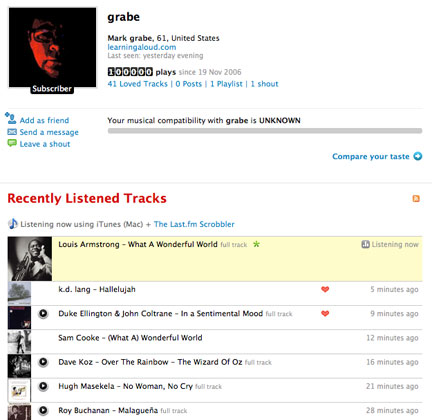
I reached a milestone this evening. My LastFm account reached 100,000 songs. LastFm is a social music site that keeps track of the music you play from your computer and your mobile devices. I started using this system in November, 2006, and tonight the number of songs this system has monitored hit 100,000.
The 100,000th song was “What a wonderful world” by Louis Armstrong. I like my computer’s choice for the special occasion.
Using this site over the years has helped me think through the notion of both data aggregation and social influence. I do explore the musical tastes of the users that the system identifies as similar to me. I tend not to contact other people. Somehow being contacted by a 61 year old because you both have been listening to the Avett Brothers, Kings of Leon, or The Black Keys would likely scare a few folks. Still, this process help me think through the differences between search and discovery.
It is also interesting to use the data the system stores to consider my own interests.
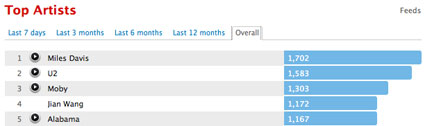
Miles Davis is evidently my favorite artist and I listened to 1702 songs by Miles in the last few years.
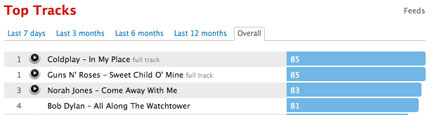
My favorite songs (reminds me of high school in the 1960s) turned out to be “In my place”, “Sweet child of mine”, “Come away with me”, and “All along the watchtower”. If that set tells you anything about me, you are a better psychologist than I. Try listening to “Sweet child of mine” 85 times and see what you think.
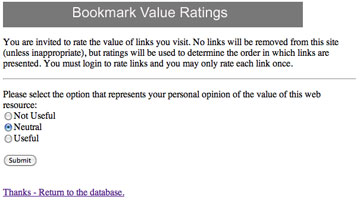
I have my own social bookmarking site I have built from an early version of Scuttle. I liked Scuttle, but wanted a system that would prioritize links based on a system of use and rated value. More popular and valued links would appear at the top. As a bookmarking system grows and becomes complicated you need a way to tap into others for assistance. Just going through all of the links to see which still function would take hours. The value rating (the checkmarks) allows others to help. Rate a site as “not useful” and I will eventually take a look.
One problem in creating a system that is built on participant contributions is that you will soon encounter spammers and worse. So, I created a login system that allowed authentication. I encountered the problem that Scuttle already had a simple login system so I had a login system protecting a login system. It was a mess and too complicated for all but the most hardy.
I have finally had the time to work on the site. I have modified the login system so that only one login is now required. My site is certainly not as polished as Diigo or Delicious, but it has a specific focus and it improves with the activity of those who participate.
Manage Consent
To provide the best experiences, we use technologies like cookies to store and/or access device information. Consenting to these technologies will allow us to process data such as browsing behavior or unique IDs on this site. Not consenting or withdrawing consent, may adversely affect certain features and functions.
Functional
Always active
The technical storage or access is strictly necessary for the legitimate purpose of enabling the use of a specific service explicitly requested by the subscriber or user, or for the sole purpose of carrying out the transmission of a communication over an electronic communications network.
Preferences
The technical storage or access is necessary for the legitimate purpose of storing preferences that are not requested by the subscriber or user.
Statistics
The technical storage or access that is used exclusively for statistical purposes.The technical storage or access that is used exclusively for anonymous statistical purposes. Without a subpoena, voluntary compliance on the part of your Internet Service Provider, or additional records from a third party, information stored or retrieved for this purpose alone cannot usually be used to identify you.
Marketing
The technical storage or access is required to create user profiles to send advertising, or to track the user on a website or across several websites for similar marketing purposes.


 (left – dropbox, middle – shovebox)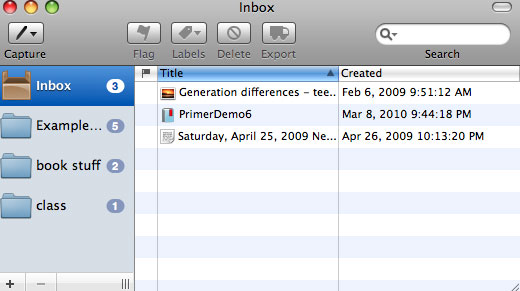




You must be logged in to post a comment.