THINKING about privacy within Facebook

I do have a Facebook account. I guess I have this account because people I know make heavy use of Facebook and having an account connects me with them. I spend very little time in Facebook, but I send excerpts from the content I generate elsewhere to Facebook so “Facebook only” acquaintances see this content.

Facebook initially annoyed me because of a personal bias. The phrase “digital native” and the unique qualities ascribed to those who happen to fall within this group by function of their birth date seemed elitist and simply wrong. Perhaps I was jealous of an attribution that was beyond my control. To me, Facebook became the face of the digital native. Facebook as a place where many spend great amounts of time often doing things that seemed frivolous. I did not argue the generational difference in the time spent, but I did contest the value of spending this amount of time.

I have been following issues related to user privacy on Facebook for some time. The problem of control has long been an issue with naive users failing to appreciate the longevity of inappropriate content shared online. After listening and reading about recent developments, I have additional concerns.

We drove 500+ miles last Friday and that means that Cindy and I listen to many hours of podcasts (when the Twins are not playing). We happened to listen to a TWIG program (This Week in Google – and the cloud) that got heavily into an analysis of Facebook privacy challenges AND what appears to be a strategy of collecting user data of several categories within the Facebook environment. Part of the conspiracy theory is that these two issues are inter-related; i.e., Facebook is purposefully making it difficult for users to control who can view their data in order to increase the amount of data Facebook can collect and organize.

If such issues interest you, the following resources may be helpful.

The issues with Facebook are evolving beyond whether instructors should friend their students or whether educational organizations should maintain a Facebook presence. I admit to distrusting consolidation, but I am trying to decide if this is something more.

Loading

There must be a lesson here somewhere

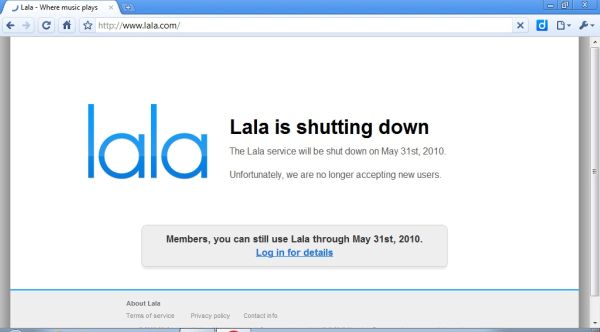
The news broke today that LaLa was shutting down. I have been a loyal LaLa user for a long time and have invested several hundred dollars so I could play the music I wanted to listen to online. I knew Apple had purchased them. I suspected this would happen, but I assumed existing commitments would be honored.

Apple is going to give me credit at the iTunes store. First, LaLa did not allow the download of a song, but gave you access for 10 cents. Apple wants to sell you the song for $1+. I do not want to have 1/10 the number of songs on one computer. At the very least, the appropriate thing to do would be to credit my credit card, not my iTunes account. I already have thousands of songs I purchased through iTunes. What I wanted was to be able to play my music from any computer connected to the Internet. This is what I paid for.

So, what is the lesson. Is it you can’t trust online companies to provide the service users pay for? Clearly some companies go out of business and can no longer honor their commitments. This is not the same thing. It looks like you get a better deal and commitments you have made no longer matter.

It has been a tough week for those who make a commitment to online services. First, Ning discontinued the free service it provided stranding those who had used this service to offer large amounts of user created content. OK, so users did not put any money into this company and maybe you get what you pay for. This situation with LaLa is a little different.

Loading

Structure

The more recent Learning and Leading has an article authored by Judi Harris and colleagues. There are certain writers who have promoted core ideas that appeal to me and Harris is one. She has a concept – activity types – that makes sense to me as an important idea in professional development. Rather than promoting specific examples she proposes that educators think in terms of categories of activities. I have always understood the purpose of this approach as an attempt to steer folks away from the duplication of specific examples which may or may not be appropriate for their unique situations. Instead, the idea is to understand tasks at a more general level. I am guessing the use of examples in instruction is typically not attempt to promote the exact same task, but does it come across in this fashion? Harris and others have established a wiki to outline the various activity structures they have identified.

So, this distinction between activity types and examples has caused me to consider what structural variables guide my own thinking. Sometimes I think such organizational patterns exist but we fail to reflect enough on our own thinking to externalize these patterns. Here is an initial effort.

I think I organize my take on tech integration in terms of:

  • Conceptual frameworks – e.g., authoring to learn, 21st century skills
  • Tools
  • Tactics (something like activity structures),
  • Examples

So, authoring to learn is a general generative framework that assumes students can be encouraged to process content they have experienced by explaining this content to others. This process can be accomplished using various tools (e.g., podcast, wiki, blog). Various pedagogical strategies (cooperative learning, editing, discussion) can be employed in implementing a given project. Of course, to explain various nuances of the combination of framework, tool and tactic, it is likely useful to use multiple examples to illustrate various combinations and the strengths and weaknesses of each.

I wonder how teachers make instructional decisions. Is there a process to what they decide to do? Would a structured approach help?

Loading

Lots could change

I just purchased Barcode Scanner for my Droid phone. It works great. Scan the barcode on a book and sure enough it identifies the book. Scan the barcode on a 9.5 oz box of Hot Tamales and it informs me that I can get this box for $3 from Amazon and $1.79 from alwaysdirect.com.

Not impressed? Consider this. Walk into the bookstore and check out the prices on the textbooks needed for next semester. I bet you can find a better price and simply order from your phone.

Game changer

Loading

Office2 HD

I noticed today that this product has been updated (Apr. 22). I downloaded the upgrade and tried for about 30 minutes the routine that had produced corrupted files previously. At this point I have been unable to recreate the same problem so I am optimistic that the problem has been fixed. The web site did indicate that the file corruption problem had been corrected in the update.

My post on my difficulties using the Office2 Pro app to edit Google docs has attracted quite a few hits. My experience appears to be in contradiction to the experience of others. I feel bad because my report documents the struggles I have had attempting to get this app to work without success and I am unable to explain why others are not experiencing the same problem. I want people to know I have experimented with this app extensively as late as last evening and I continue to have the same problem. The files are somehow corrupted and the app then freezes. The problem seems “random” and as a programmer these are the kinds of bugs that are most frustrating. It may be something as simple as an upload problem (to Google docs) that fails to complete some kind of process within a certain time period leaving the Google doc in a flawed state. My experience has been that if I continue to edit and save a doc to Google docs this will eventually happen. All I can say is that the app/Google doc combination is too iffy for me to trust and if you are using Google docs for “work” I am urging caution.

I have explored other options of this app and have stored documents in my mobileme account. I have done this without problems, but doubt this is a serious solution for many people.

I have submitted my bug report to the company and this morning received the following reply:

The corruption of Google Docs documents is a result of something that Google changed in the last few days that highlighted an incompatibility with the way we write DOC files and the way Google interprets them. We’ve found a solution however and have already submitted it to Apple, so we expect it to be available in a few days time. For more information, including how to recover documents, please see http://www.bytesquared.com/products/office/ipad/google_corruption.asp

Loading

Disregard previous post – there may be hope

I have edited this post multiple times as my experiences with this product and the upgrade to the product have resulted in different impressions.

I noticed today that this product has been updated (Apr. 22). I downloaded the upgrade and tried for about 30 minutes the routine that had produced corrupted files previously. At this point I have been unable to recreate the same problem so I am optimistic that the problem has been fixed. The web site did indicate that the file corruption problem had been corrected in the update.

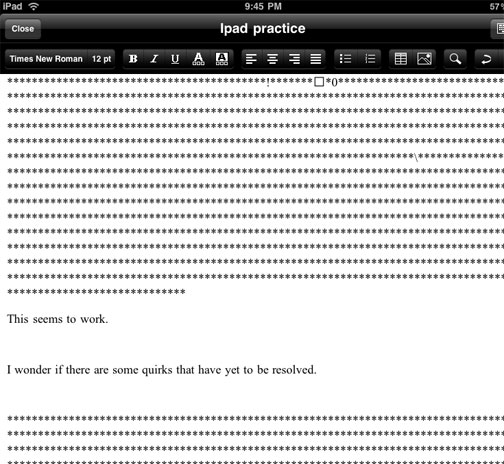
I am rescinding my endorsement of this product. I am experiencing consistent problems when resaving documents after an initial upload. This issue may be something I am doing wrong, but it seems consistent and I would not want to encourage purchasing of this product until I can figure this out. (Apr. 11). The image below illustrates the problem. My initial text (This seems to work.) seems ironic when saved as part of attempting to add new text to the file. The additional characters seem to be the type of content you see when opening a word processor generated RTF file with a text editor.

——————————-

Sooner or later, the answer always seems to appear.

Disregard my previous post indicating you could not edit Google docs from the iPad. A post from from jkontherun described the Office2 Pro app – for editing Google docs and other sources. Works fine.

Loading

Initial Comment on the iPad

Everyone who has an iPad seems already to have posted something to explain their initial impressions. I guess this should not be a surprise – there seemed to be a great deal of commentary, both pro and con, before anyone actually had the opportunity to use one themselves. Why would this change when the iPad became available. I have been trying to determine what I might add based on my brief experience with the device.

How about this – a pre-experience issue within the educational community concerned whether the device would encourage production as well as consumption. In other words, it seemed obvious that the device would be a great way to read books, explore web resources, and watch videos. However, information consumption according to some is over emphasized in education – for some reason listening to lectures is too passive and even reading books seems to be on the outs. Man – seems like just a few years ago we were worried that Johnny could not read and now we are concerned that learning from books is over emphasized. Experiences relayed from experienced and recognized authorities are possibly less valuable than personal experiences. This post is not about this “discussion”.

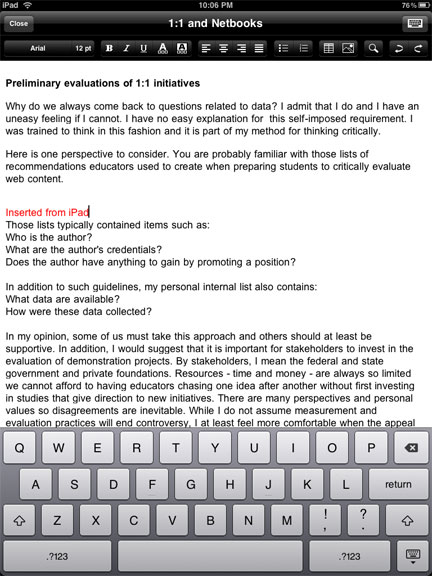
What about the production capabilities of the iPad? Well, it is widely known that you cannot take pictures or video. You can record audio. I was disappointed that I was unable to write in Google docs and I am not sure why. You can actually enter data in a spreadsheet (use the desktop and not the Google Mobile option), but I cannot find a way to enter text in Google docs. This disappoints me – I do most of my writing in docs. You can do gmail, Twitter apps, and blog entries (with one of my blog apps I could enter text in HTML, but not WYSIWYG mode). I do not understand these inconsistencies. I have been impressed by Pages (the $10 word processing app from Apple).

ipadnetbook

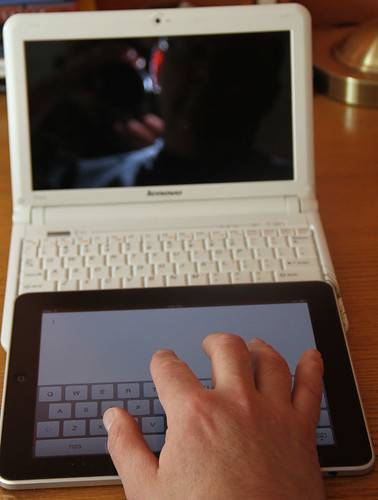
Here is a comment I have not seen addressed elsewhere. What about the ease of entering text? You can add an external keyboard, but what about the build in keyboard? I find that it was as easy and possibly easier to enter text using the on screen keyboard than from the keyboard of my netbook. Neither, in my experience, is as easy as using a standard keyboard. I had a hunch about why this was my experience so I lined up the iPad with my Lenovo S10. I would suggest that the iPad keys are larger and more widely spaced on the iPad. If you look at the image I have provided, you should be able to see why this is the case. The netbook keyboard is a bit wider, but the netbook “wastes” this extra space and more on keys the iPad does not have. The letters on the iPad are actually larger and more widely spaced.

Do note the size of my hand relative to either keyboard and it is probably obvious why I do better on a standard keyboard. Both the iPad and netbooks force me out of my well practiced keyboarding style. Still the iPad is a reasonable device for text input at least equivalent to a netbook and superior to mobile handheld devices (smartphones) some are willing to argue are effective in an educational setting.

Loading