Copyright responsibility

There was a time when the tools and blank media for copying records – blank tapes and tape recorder – were assumed as tools to violate copyright. The argument that the tools and media could be used for something else, e.g., recording your own voice, seem to relieve the pressure on those selling to products.

There several tools for “saving” web content and “making web content easier to read” that pose a similar ethical challenge. Evernote, an app I really like, comes to mind. Do I as a consumer have the right to subvert the format intended by the author? The most obvious intention might be to avoid viewing ads. A second intention might be to avoid the time limit the original is available to encourage a purchase of a subscription allowing long term access.

I am not certain about these concerns and admit I save resources. An option in such services that must be a copyright violation according to my interpretation is the sharing of content via RSS or some form of granting access to a specified group. If someone else gets content from me that I did not create, this seems pretty obvious. I am not arguing whether such a feature has value, I am just wondering how the practice could be considered legal.

Loading

2010 Top 10

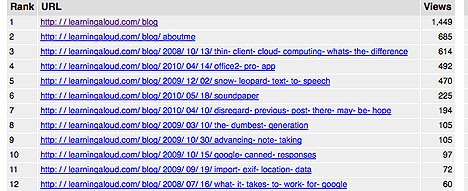
It is time for top 10 lists. Here are the top ten posts from this blog for the past year. The list includes 12 entries, but I am discounting the home page and the aboutme page.

This blog generates most of its traffic via web searches rather than RSS feeds. The most frequent hits appear to be for tutorial-like posts – e,g., how to write to Google apps from the ipad, how to do text to speech in snow leopard. Perhaps people search for tutorials and read opinion posts via RSS.

BTW – these data were generated with mybloglogone of those services Yahoo is eliminating.

Loading

Yahoo readies to jettison services

It appears that Yahoo! plans to shut down several services. I happen to make use of one of the more obscure services – mybloglog. Many who read this blog will likely be more interested in the predicted demise of Delicious.

I am guessing Delicious is the most popular social bookmarking site. It allows users to store, tag and annotate links to web sites. It also allowed access to the link collections of others who had stored the same link and were willing to share their resources. In this way, users have the opportunities to discover some of the “finds” of others with related interests. The Delicious approach was simple and while not as powerful as similar services that followed it had the advantage `of being on the scene at an early point and it engaged a large number of users who invested enough time they were likely reluctant to give up on the service. I guess there was simply no way to monetize the service. Too bad it is not being given/sold to some other company. There would seem to be a base of users worth acquiring.

Delicious would not be my first choice, but I use it because it seems tied in with iPad apps I use to read my RSS feeds (e.g., NewsRack). I can add to my bookmarks as I go through the feeds. If Delicious is not saved, there were will be repercussions for other products.

If you have invested a lot of time in Delicious, you should export your bookmarks. Shutting down Delicious is not a certainty, but it appears many are concerned. The link at the beginning of this post contains information about how to export the resources you have accumulated. Exporting Delicious links and then inputting them to Diigo was easy to do.

P.S. – Within a day or so of this Yahoo! news, Yahoo indicated that it did not intend to shut down Delicious, but rather to abandon it  (find a new home). As I originally noted, this makes sense and it would seem to be a valuable resource because of the user base. However, the clumsiness with which this was handled probably has done a lot to erode this base. I have already moved on to Pinboard which was promoted by a number of prominent bloggers. It appears that this was a fairly common response, but Pinboard was struggling to keep up.

I am hedging my bets at present. Anything I send to Delicious automatically gets forwarded to Pinboard. I guess we will see what happens.

Loading

Night Photography

I enjoy taking photographs late at night. Must be a personality flaw.

Many folks find night photography to be very difficult. Don’t use flash. The key, of course, is to use longer exposures and a wide aperture setting. A tripod (actually a monopod for this photograph) is also pretty much mandatory.

See my post on “fireworks photography” for information on a similar topic.

Loading

The iPad and new opportunities for new age groups

We decided to give the iPad as a family gift to each of our three children. Writing about this decision here will not spoil the surprise because we told them to prevent them from making the same purchase for a spouse.

We decided to purchase this gift after watching the young children in two of the families interact with one of our iPads. If you have an iPad and doubt the persuasiveness of such experiences, find a young child, purchase a few appropriate apps and just watch. There is something about how the intuitiveness of the interface encourages exploration that is difficult to describe. I am not certain how young this goes, but preschool children seem to know what to do – touch stuff and see what happens.

I know not everyone agrees with involving you children with technology. I wrote about this years ago because a close high school friend of mine wrote a book arguing against technology for young children. I wonder what he would think watching kids exploring an iPad. When you manipulate something with your hands does that make a difference?

Others are commenting on iPads and different age groups. Here is an article on young children on iPads and here is another I encountered focused on centenarians on iPads (iPhone). Quite an age difference but the functionality seems to be obvious in both cases.

BTW – I don’t claim to have a professional opinion on this issue and I realize that the attentiveness of young children does not guarantee that the experiences to which they are attending are good for them. I am guessing there are PhD students working as I write to understand this phenomenon.

We gave the newly married daughter an iPad too. We are equal opportunity tech providers.

Powered by ScribeFire.

Loading

iPad Options

Ah, the holiday break, a blizzard, and some time to write.

Back in April I generated a couple of posts about writing with the iPad. I liked the iPad a lot and I was particularly interested in ways to connect with Google docs which has been the way I have done most of my writing for the last year or so. I pay some attention to which of my blog posts get the most attention and that post has remained one of the most frequently viewed.

It is time to update my position. There have been some new developments that require that I make different recommendations.

Just use a browser

There is actually no need to use a specialized app to work on Google docs from the iPad. Google has made some internal modifications that allow writing using the Safari browser that comes with the iPad. So, the update here was a Google change and nothing that Apple did.

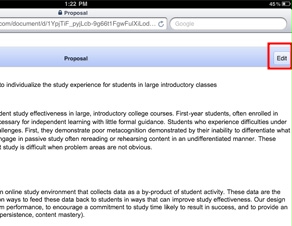
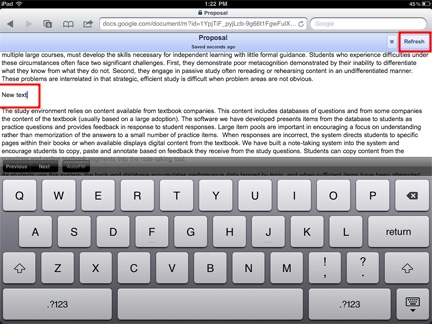
There are only a couple of differences from the use of docs on a desktop or laptop. First, you could always open Google docs on the iPad, but you could not edit or write. Now, when you open a document, you will notice the edit button in the upper right-hand corner. Tap this button and then tap where you want to enter text.

Google docs automatically saves, but you can also tap the “refresh” button.

Elements and DropBox

Before Google updated the docs tool, I found another way to write with the iPad and I still prefer this second option.

Elements is a writing product from Second Gear available for the iPhone or iPad. I don’t have an iPhone (I live in North Dakota which AT&T evidently does not understand has become a state) and really cannot imagine writing much with a device this small. I do take an occasional notes on my iPod Touch.

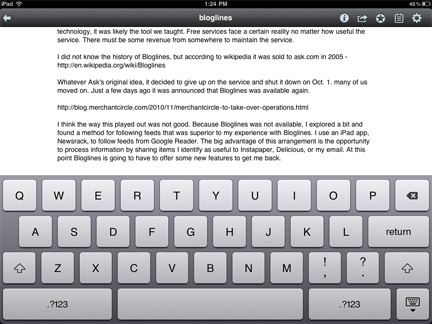
Elements on the iPad works great. It is pretty much a text editor – how much formatting do most of us do anyway?

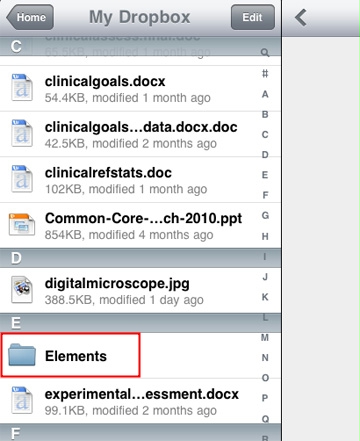
The cool thing about Elements is that it automatically uploads files to a special folder in DropBox. This cross-platform tool creates a folder on each device and then links files between these devices. Elements files end up stored within a folder within the DropBox folder and end up being available on any device from which you make use of DropBox. So, I can write on my iPad and the files I create are available from my office computer. Pretty cool.

There is a free version of DropBox which everyone should have. It is a great replacement for a flash drive. Elements is $5.

Powered by ScribeFire.

Loading

Four Years with LastFM

Today is the 4 year anniversary of my LastFM membership (I am a subscribe – $4 a month). LastFM has data on nearly 125,000 listens over this period of time. It is interesting to look at the history – what did I listen to last week, month, year, etc.

It might seem that LastFM would have little to do with any insights I might have for the use of “the cloud” or social sites for educational ends. This is not necessarily the case. I think there is always the opportunity to generate insights when you explore tool applications outside of your own area of expertise. Within your area of expertise, your models limit your perspective. There are opportunities to see new things when your models are not in play.

I am fascinated by the amount of time it would take to listen to 125,000 songs. At 3 minutes per song that is 6250 hours. What does 6250 hours exposure to anything, no matter the level of attention involved, do to you. I see that I have listened to “Sweet Child of Mine” (Guns N Roses) 93 times in the past four years. Why?

I enjoy exploring the music of my neighbours. The idea of finding common interests and then exploring the differences (what else I might explore) is a general idea with some carry. I must admit to limiting my social involvement – the idea of a 60+ matching with people in their 20s is a little freaky.

Loading