I have added a RSS feed to the sidebar of this blog (near the bottom to be less distracting). This feed offers the titles of the 15 most recent blog posts I have saved at my feed reader site. I am presently reading blogs using a self-hosted aggregator called Fever . Fever offers some interesting features I am evaluating. The feed identifies the posts of others I have saved for later review. I guess this feed would be similar to recent additions to the public view of a social bookmarking site.
Do you have to send the same email to many individuals on different dates? If this is a common experience, it is worth learning how to use Google Canned Responses.
Here is my situation so you get the idea. Cindy and I offer a free online resource (book) focused on participatory web applications in K12 settings. The book is part of a suite of resources some of which allow users to contribute material. For security reasons, we want to make certain that those who have access to this content and who can add comments or links are educators. Our biggest problem has been scammers who add links to unrelated commercial sites. We are using a protection scheme that requires users to authenticate (within Drupal) using an email address associated with an educational institution.
I find myself sending a large number of emails to applicants who do not provide an appropriate address. This may happen 5-10 times a day. I end up typing a similar message into each of these emails. I heard an explanation of a Gmail feature during a podcast that allows the insertion of a stored comment in an email, but could never find the feature. Today, I happened across a comment from Google on “lab” features and found that “canned response” was a lab product. I have now had an opportunity to explore and here are some instructions if this feature sounds useful. I do not claim mastery but I have been able to get the feature to work. For all of the great tools Google provides they do not seem to invest a lot of effort in tutorials. I guess this comes with “free”.
Canned Responses
The feature I thought was available and could not find within Gmail is called Canned Responses. The feature must be enabled before it is available. Hence, the explanation for why I could not locate it. To activate canned responses, a Gmail user must go to settings and open the “Lab” features (be forewarned lab features potentially may be changed, may not work, or may be discontinued). I guess this is the way Google coders experiment with features and you are invited to participate. Any given AVAILABLE lab feature must be enabled before it is available.
It then took me a while to see what changed when the feature was enabled (again, do not expect a tutorial explaining how to use the different lab features – you have to search and explore).
Finally, I found something with pictures and it became obvious that Canned responses had something to do with the “Canned responses” link that had appeared under the Subject dialog box available when composing an email. Here I am still a little uncertain. What I finally got to work may employ some behaviors that psychologists refer to as superstitious behaviors – some things are necessary, some are not, but the actor does not know which is which. The Canned responses link opens up a box revealing “Insert, Save, and Delete). Under Save, there is an option for “new canned response”. So, I wrote the response I wanted to use repeatedly, used the save now button (this is normally used to save a draft), selected the “new canned response” option and generated a label for my response. I then started over as if I was going to write a new email, went to “canned responses” and selected the entry now available under insert. It seemed to work.
I admire the exploratory nature of the Google approach. Some serious folks probably would be frustrated by the exploratory nature of things and the lack of clear documentation. Too time consuming. I think exploring with Google is worth the effort.
I have been reading an Educational Researcher article titled “Web 2.0 and classroom research: What path should we take now” (vol. 38, 246-259). The article is too wide ranging for me to summarize here.
The section that is the focus for this comment is titled “Cultivating academic lives online and social scholarship”. This section is more focused on educators and how web 2.0 options have the potential to change the way we do our work. The section begins with a description of a faculty member requesting that a student review the faculty member’s Delicious site in preparation for the student’s scheduled meeting with the faculty member. I guess the idea was that the student might learn a lot about the faculty member’s priorities and background by reviewing what the faculty member had been reviewing. I must admit, I can’t see myself making such a request. The authors used this introductory anecdote to transition into the notion of social scholarship. The concept suggests that scholars might broaden their scholarship which traditionally has focused on the generation of “scholarly publications” to include additional information about what they are doing and why they are doing it. Social bookmarking was the web 2.0 tool used as an example of the beginning of such a process. So scholars might “open up” their work, at least to other scholars outside their inner circle, by allowing others a peek into what sources they are reading. The example given was CiteULike. In investigating this service, I was surprised to learn that I already had an account. There was little there, but I did have an account.
I have noted on several occasions that the bloggers I read are not researchers and the researchers I follow do not seem to blog. I wonder if the same is true of social bookmarking. Perhaps Delicious and Diigo appeal to one category of user and CiteULike to another. I review a great amount of online material but I have yet to become disciplined enough to create a system for organizing my notes or citations that is worth much to me or anyone else. Perhaps my blogs serves this function. I tend to take notes within my blogs and I then search the blogs when attempting to remember something in the future.
Actually, my personal “system” is not very social. I download pdfs of the articles I read into a PDF organization system called YEP. Even when I own the journal it ends up being more convenient to download the pdf of articles through the library system at UND. I then use a tool called Skim that allows me to highlight and take notes “on top” of the pages of the pdf. Between YEP which allows me to create collections of pdfs around topics I am working on and also tag individual PDFs and Skim which allows me to take notes, I have created a workable system. The danger with my approach is that these tools may go away leaving me with a giant folders of PDFs. Every time I see something like CiteULike I can see how it might be quite useful but with the investment I have in my present “system” it is difficult to move to something different. I guess this is why “standards” would be helpful and why CiteULike can import and export using standards I barely recognize (e.g., BibTeX). I am guessing professionals, i.e., librarians, understand these things.
My latest exploration in following online content involves a “rss reader” called Fever. Fever appealed to me because it attempts to aggregate posts in a way that identifies “hot topics” (Fever – get it). The idea is that I would be certain to note trending topics. I also liked the opportunity to run the software on my own server. I am hoping enough folks showed an interest in the first effort that the programmer will continue to improve the product. Anyway, this brings me back to the idea of social scholarship. Fever offers a feed of the content “saved” by individual using the software. So, if anyone cares, here is my Fever feed – http://studytools.psych.und.nodak.edu/fever/?rss=saved
I wonder if we define ourselves by the tools we use. The social web has yet to solve the challenge of cross-tool exploration.
I have been home by myself for about two weeks while Cindy has been doing her thing in Russia. I like watching professional sports and there have been some very interesting games during this time. The Twins are involved in a bid for the Central division championship that looks like it may fall just a bit short (they did win today). The Vikings are off to a great start. The end of the game on Sunday was just short of miraculous and if the pass thrown by Favre (in case you missed it) would have ended a playoff game would have rivaled the Montana to Rice throw that is is still shown to this day.
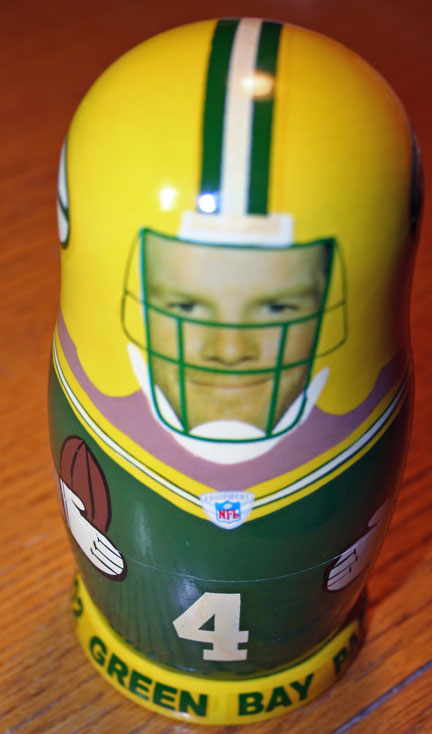
So, within a day of this event, Cindy tells this story of being in factory in Russia that creates maturska dolls (those wooden dolls that are nested within each other). She sees one in the display of past works that catches her attention and she asks if she can purchase it. The doll was specially ordered in 2002 and she is told it is not for sale. When she is leaving, someone brings her the doll and she buys it for $18.
Wrong colors, but for the time being the right quarterback. It does bother me that it resembles what I remember as a tackling dummy.
Google introduced a feature within the Google Toolbar that allows users to comment on web sites. Other Google users can then review these comments. In the image below, I have identified the toolbar (in the case added to Firefox) and a comment I added to my own web page. The service is called Sidewiki.
Here is perhaps the most useful post I found on sidewiki (Danny Sullivan).
This idea is not exactly new and reminds me of some of the features of Diigo. Most others have compared sidewiki to other services so perhaps they are seeing something different in this product.
It is important to note that this service has already drawn criticism. Jeff Jarvis, normally a Google advocate (What would Google do?), predicts this will generate criticism of Google. I think the issue is that I as creator of content cannot control whether this service is linked to me content or not. I might welcome the interaction and see this is easier than some other add-on (e.g, tinychat), but I might also prefer that others not add to what I offer and perhaps encourage links elsewhere. The point is I am not in control. Google offers other services based on the inclusion of a small bit of code within the HTML of a page, this approach might have solved the lack of control issue. (Follow-up post from Jarvis)
BTW – the Google toolbar has other interesting capabilities. For example it, allows the translation of a page into other languages. Cindy is in Russia at the moment. So, babe – see if someone can read this.
I have solved a problem and want to share. It is likely a problem for very few others. YET.
Here is the problem. We have a digital camera with an interesting feature. It has a built-in GPS and stores the exact location from which each picture was taken. These data are stored as part of EXIF (exchangeable image file format) in the same file as the image. If you are a Flickr user you may know that some images are accompanied by information such as the camera used to take the picture, aperture, shutter speed, etc. This is EXIF data. The longitude and latitude (I can never remember which is which) can also be stored as EXIF data.
The location data are very exact and allow images to be connected to a map (e.g., the map available within Flickr). I have been unable to get this to happen automatically (based on the EXIF data) and have had to display the data in iPhoto and then manually associate these coordinates with images once in Flickr. Some Google searches finally led to me the problem and solution.
Evidently, geo-locating images is possibly a security/privacy issue and the default setting in Flickr must be to not import location data. To allow these data to be uploaded with the image, you must locate “privacy and permissions” under the “your account” settings. There is a setting for “Import EXIF location data”.
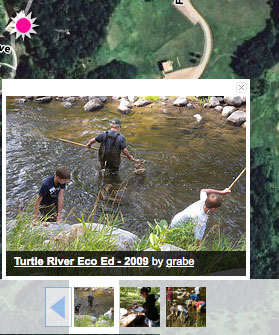
The results are impressive. Here the position of the image (the pink dot) is positioned on the “hybrid” view of the map within Flickr.
It does make sense that you would not want the location of every image you upload to Flickr to be available to the public. Here is the technique I discovered for entering the same precise information for individual images.
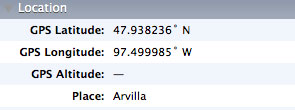
I keep my images in iPhoto. You can connect images to a map location within iPhoto, but it is a little difficult to find the actual coordinates. Under the “photos” menubar heading, there is a feature “Show extended photo info”. This opens an information window that contains location information.
You then use the “add to your map” from the appropriate image in Flickr and enter 47.938236,-97.499985. The image will be added to your flickr map.
Just took Cindy to the airport and she is off on another of her “adventures”. This one is a two-week follow up to her previous trip to Russia to do some presentations and visit several schools. Cindy seems to have the right combination of technological and pedagogical knowledge, presentations skills, and personality to repeatedly be supported for these ventures. She tends to be very unassuming and unimposing unless some salesperson in a big box tech store or trade show vendor exhibit makes assumptions about what some 60-year old grandmother from North Dakota could possibly know about technology.
I have been waiting to write this post because with all of the illness about we both were somewhat concerned the trip would not happen. International travel with all of the equipment she carries, the multiple stops, and the sometimes “planes, trains, and automobile” transitions is exhausting beyond the point at which I would describe the experience as exciting. At least, I can now say she is no longer “in the house”.
The reference to the former USSR and/or a Beatles song may seem somewhat inappropriate (since Russia is different from the former USSR). I would have used a different lead to be more PC, but Cindy’s interpreter sent an email using the same phrase – “So, its back to the USSR?”
Stories and photos to follow – Cindy is not a regular blogger, but she does write some interesting material when she travels (With Eyes Wide Open).







You must be logged in to post a comment.