This post originated in a way you may find unusual. My wife was reading our AARP magazine and came across an article about Bill Zimmerman. She remembered using the web site he had created and made sure I read the article.
Bill Zimmerman decided when he retired that he wanted to learn new things. Among the new skills he took on were learning to sketch and new techniques for teaching. Bill worked as a professional editor, but became interested in teaching because he also had taken up teaching English to immigrants. Because he loved comics, he came up with the idea of using comics to teach reading and writing. Out of these beginnings came the Make Beliefs Comix site.
Make Beliefs Comix offers a wide variety of ideas for teaching writing in the classroom. Among this collection are the tools for creating comics and comic strips.
I had to give one of these tools a try. I can’t draw. Bill’s commitment to learning new things in retirement far surpasses my own so I was happy to use his create a comic strip tool. He has me by a few years (Bill is 78), but I will stick with my present set of hobbies.
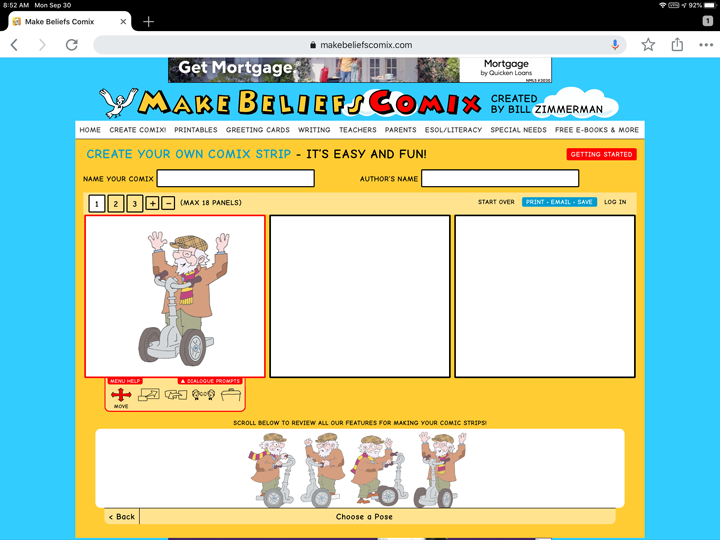
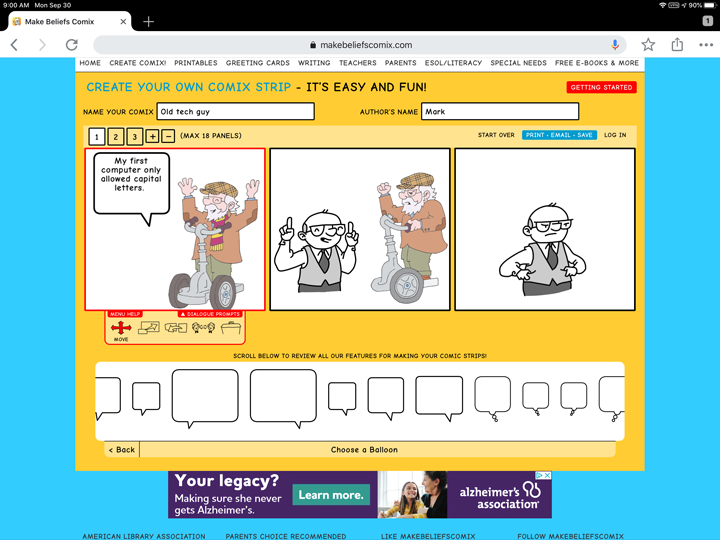
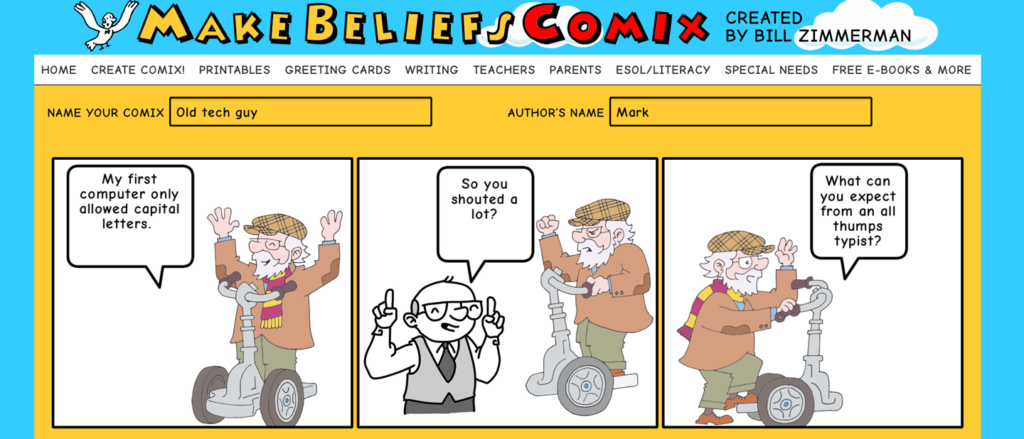
Here is what you do. You designate the number of cells in your strip. You add characters to the cells. You add balloon bubbles and text to the characters. You can actually add more elements, but you can use these basics to get started. Mail the final product to yourself or someone else.
Give this site a try. Even old dogs teach the young dogs a few things.
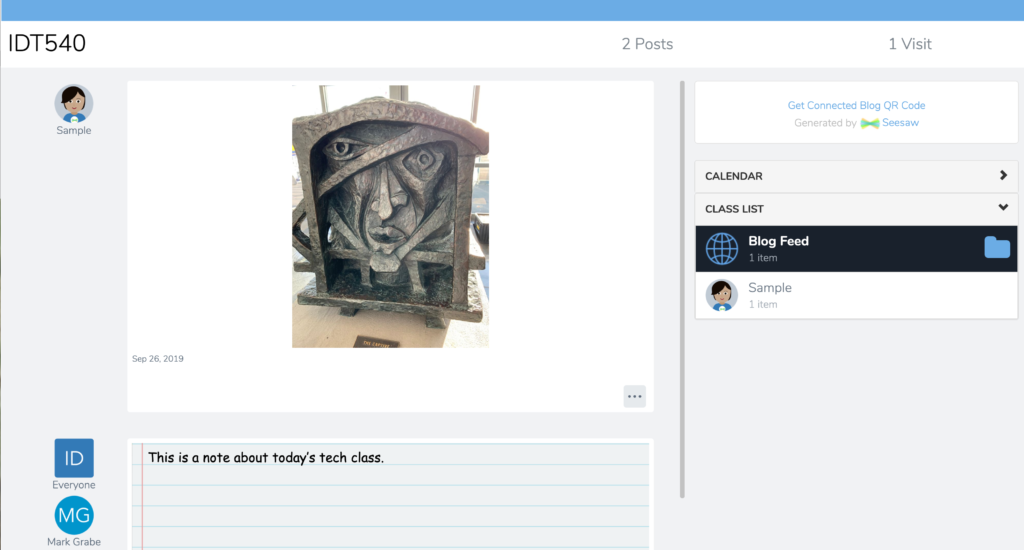
I encourage teachers I work with to write, read, and make use of blogs in their classrooms. Typically, my recommended platforms are Blogger or WordPress. I recently became aware that SeeSaw includes an embedded class blog tool. This tool allows control of public access, teacher moderation, and control of commenting. The video that follows provides a simple description of this tool.
Social media has as a function of encouraging interaction can also invite inappropriate comments. Twitter is no exception. With Twitter, you can always block individuals who you feel go beyond what you consider an acceptable level of civility, but this still means others who follow your tweets would see the reply or replies that caused you to make the move to block. In reality, you may be more concerned with what others think than with your own reaction.
Twitter has a new approach. You can now hide a comment. This does not actually delete the comment, but readers would have to take the step of making the effort to “view hidden comments” if they wonder whether or not you have hidden responses.
The process works like this.
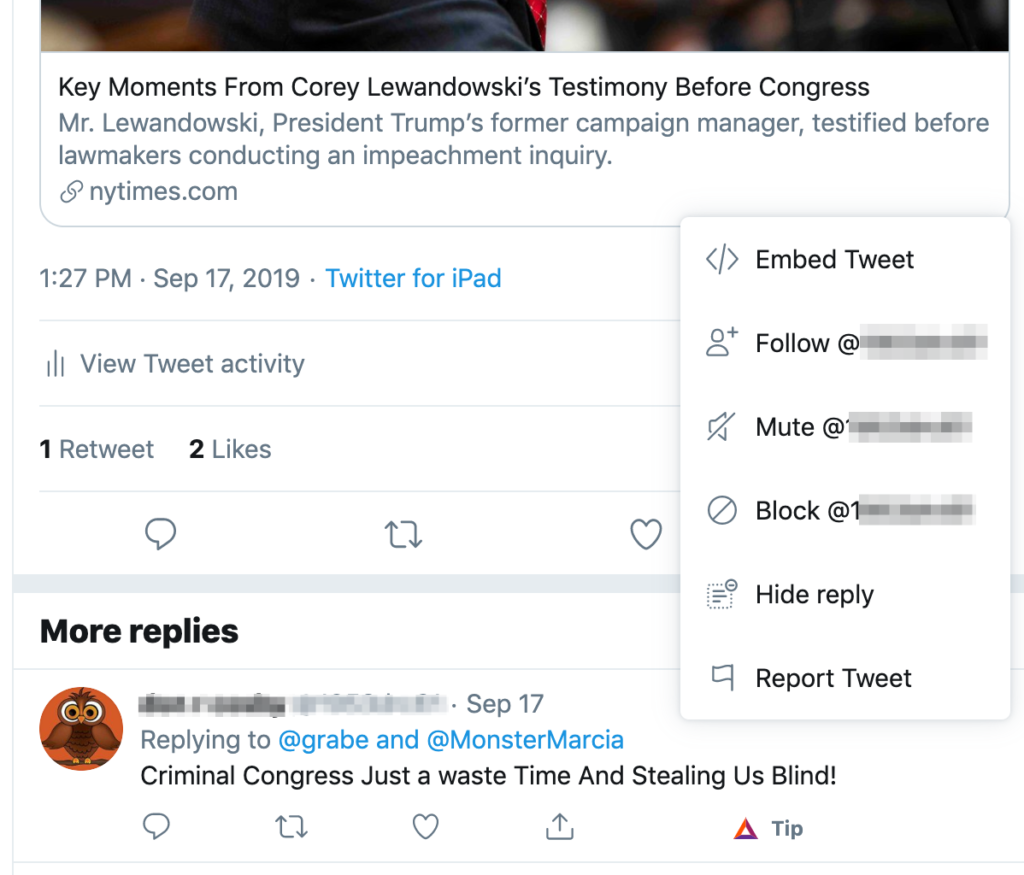
What you see here is the type of political comment I make that probably begs for an iffy reaction. So I had posted a link to a NYTimes article concerning Corey Lewandowski’s testimony before a congressional committee in which he had refused to explain comments he had made that had appeared in the Mueller report. I had suggested that refusing to answer a question from this congressional committee was an unlawful and obstructionist act as Lewandoski had no official standing allowing him to suggest he could refused to respond to questions based on this being a privileged conversation with the President. Someone (I have blurred the individual’s identify) did not address my argument, but made a blanket statement about the committee. What if I regard this is completely irrelevant and inappropriate.
As the author of the original post, I can access multiple options in reaction to this reply (see image). Among these options is “hide reply”. As I explained above, anyone examining my tweet and reactions would then not see this comment unless they opened the options available with my original tweet and selected the show hidden comments option. I am guessing Twitter is walking a fine line here and has decided this combination of hide reply and see hidden replies is a reasonable approach.
I would not actually hide the reply I used in this example. Knowing about this option I might hide responses that were a personal attack.
I have a mixed reaction to what Twitter is doing here. I think there are clearly inappropriate responses to social media posts that others should not have to read and this is one way of blocking these specific comments. Of course, the same feature could be used by the tweet author to hide appropriate counter arguments.
Perhaps are there are individuals with audiences (say in education) that have to worry about the responses made to their social media activity. In general, I think inappropriate responses are more a reflection on the poster than me or my argument and I am willing to allow others to see both my comments and responses that I assume should be an embarrassment to the poster. It is useful to know this capability exists and each of us have to make decisions about how it used.
We recently returned from a trip to southern Africa during which we had the opportunity to view and photograph the amazing wildlife of this area. I took hundreds and hundreds of photos and kept probably half. One task I took on as a project was to select from these images some I thought students might find useful. Yes, you could create a similar collection by going to the zoo and such a visit by students would be superior to looking at my pictures. However, what I have done is create a collection I am making available under creative common licenses. If you have a use for these photos, download them. I also linked the images to online content offering additional information.
For me, bird identification is not easy. I am not a birder and I easily forgot the identifications provided by our guides. I used several online tools to try to attach accurate labels to the photos I have. There are several African birding guides available online. I found one of the best tools was Google lens. This service required I download images I had taken with my camera to my phone, but once this was accomplished Google provided a best guess, images to compare, and links to additional information.
I found this Wired article on the future book while looking through my folder of articles I thought might be of interest. The article reviews the history of promises that books will change. For the more mature among you, the history included both recognition of Alan Kays “Dynabook” and some of the early innovations making use of Hypercard.
The author, Craig Mod, concludes that the promise we would experience a different kind of book has not materialized. Books have not become more complex and more interactive as promised. I might note that recently Pearson has again promised a new vision for a learning experience to replace textbooks that would move in the direction Mod promised.
Mod does propose that it has been the process of publication that has changed pointing to the greater variety of sources for books provided by Amazon. Having written a couple of these books myself, I would suggest that Kindle books although often sold in a digital format are probably more text based than the more complex multimedia and formatting used in most textbooks from publishing companies. The text heavy format is a function of the limited flexibility Amazon expects in offering the digital version of books for different devices of different sizes and I would suggest the demands on authors unable to tap into the capabilities of large publishing companies. No art department. No page designers adding boxes, side bars, embedded call outs. Amazon now offers a new authoring tool designed to allow authors to create more multimedia and Internet capable resources for the textbook market, but there is a downside to this fixed page approach for inexpensive reading devices. From experience, I have noted that the free flow text approach offered a way to adjust text size to device and reader preferences. Apple’s iBook author offers the potential for a different kind of book, but the limitation of products to Apple devices and Apple pretty much ignoring this product has stunted any increase in use of this tool.
I have long promoted RSS readers as a way to control the online content you follow. This post describes the RSS reader from feeder.co. Although you can use this service as a dashboard application, the unique advantage I see with this service is the opportunity to use it as an extension from within a browser.
The browser approach I am describing here makes use of a chrome extension. The service is available for other browsers as well. The extension is downloaded and installed through the Chrome Web Store. There are other reader extensions available so make certain this is the extension from feeder.co.
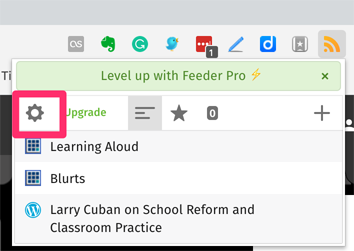
Once installed, the extension should show up as an icon in the menubar (see upper right). Within this app, select the gear icon to establish a feeder.co account and open the full screen view of the service.
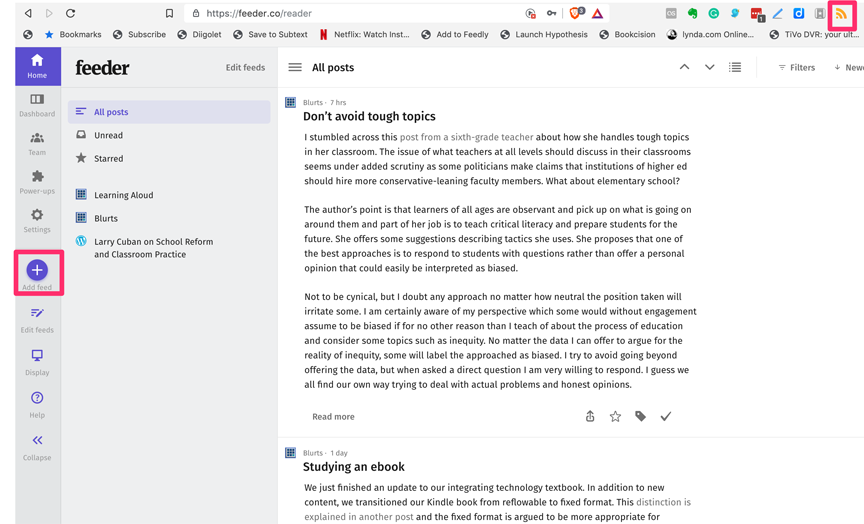
This icon will also identify the feeds you have established and indicate whether new content has been added to any of the individual feeds since your last review. The top image shows what viewing a populated feed looks like.
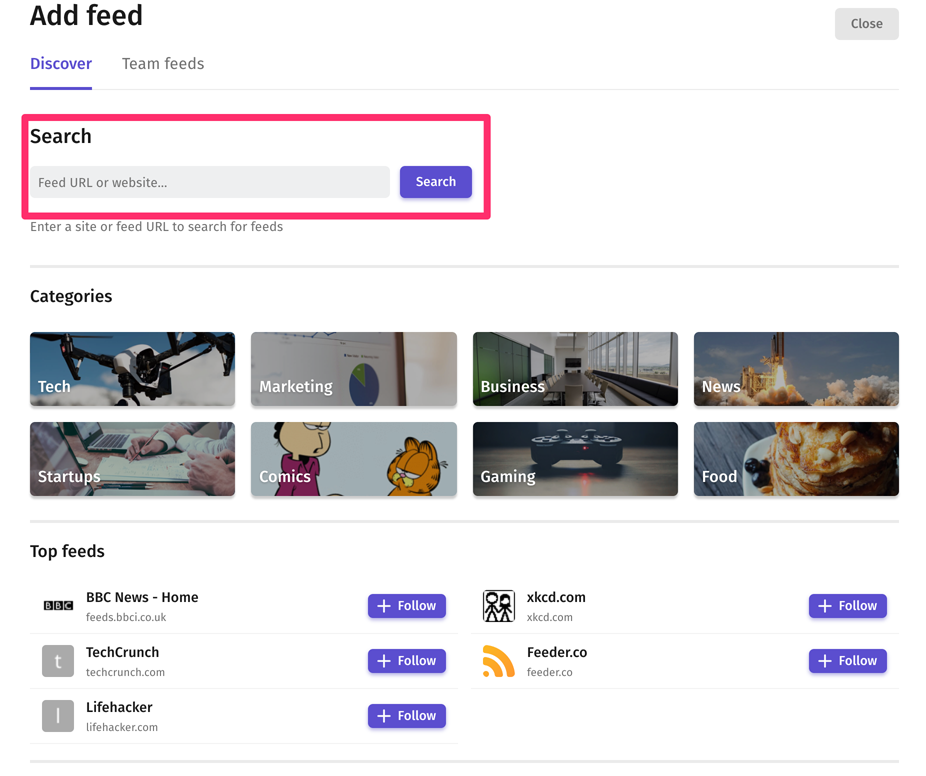
You add feeds to your service by going to the full screen view, selecting the + button on the left (see first image), and then entering the URL (address for the the site you want to follow) in the search box. The system should then locate the RSS information for you and begin following that site.
There is a free and paid versions of this service. I make use of other RSS services that do not require a subscription fee for advanced services so I will probably not pay for this service, but still use the free level. The common complaint I have about many subscription services is that the lowest paid level is a substantial jump from the free version (roughly $5 a month in this case). I might pay $5-10 a year given what I know about competing products, but not this amount. Others may see something in the paid version of this service that it appropriate for their needs.
I have been putting in a lot of time trying to get our textbook revised by the start of the Fall semester. I have had the revisions completed for a few days and I have been struggling with formatting issues as I prepared the document for uploading to Amazon. Since we split from Cengage, we have been self-publishing for about 5 years. That story our move to work without a commercial publisher has been told multiple times, so I will not tell it again.
In preparation to generate an ebook, I read several ebooks on publishing with Amazon. If you read the forward for these books, you typically find the authors claim they decided to write about publishing in this way after publishing in this way. After having done this several times now, I can appreciate this sentiment. However, at this point, working on another manuscript is about the last thing I want to do. I did decide to offer a few comments on the process for those who might wonder what this is like.
Let me begin with this statement. I know that many folks complain about the cost of textbooks and I have a mixed reaction which I have explained in previous posts. BTW – if want to read the previous comments I mention here, you might search this blog by using the tag “book” which should be attached to this post. When a college student purchases a textbook, they are paying for many things. Some of these things they may value and some may represent what they assume are unnecessary. I suggest they keep their position and also try understanding the situation from the perspective of the publisher and author. A major factor in cost is that the publisher must make its money and cover its expenses (including the 12-14% of the price to the bookstore that goes to the author) on the first sale. This is the only one that counts for them and us. Then there are the sales expenses that cover ads, free books for instructors, and salespeople going door to door trying to push their books. Finally, there are the costs of features that make the book look pretty and perhaps more useful. Photographers, editors, and designers must be paid in addition to the authors. If you have read many Kindle books you will note that the are plain in appearance and contain even in the highest sales books from famous self-publishing authors a few spelling and grammar errors. Doing it all yourself requires time and skills that vary and are independent of content knowledge.
There are really two categories of Kindle books each with different issues. There are free-flowing and fixed-format books. A free-flowing book is what is used for text-only books (most of the popular books). Free-flowing content can be adjusted by the reader to meet the personal preferences of text size and text format. You might find you need to enlarge text to make it easier to read (I do) so with text-heavy books free flow makes sense. It creates some weird formatting problems. You might encounter a section header at the end of a page. There is probably an editors term for this, but I don’t remember what it is. Our textbook has been published as a free flowing book until today.
Fixed format books are better suited to books with images and graphs and tables. This is what you encounter in a heavy dosage in most textbooks. A fixed format is just what it seems – the author/editor controls the format the reader will experience. The problem here is that a fixed size page (enlarged or shrunk) is not ideal for the multiple devices and multiple preferences of readers. For example, to produce a product I like to read, I have to use a 14 point font for body text. Without this sized font, the print size that appears on a smaller iPad is just too small. This size may seem unnecessarily large on a computer where you would have the room to manipulate the size of the page as a way to manipulate the size of the print.
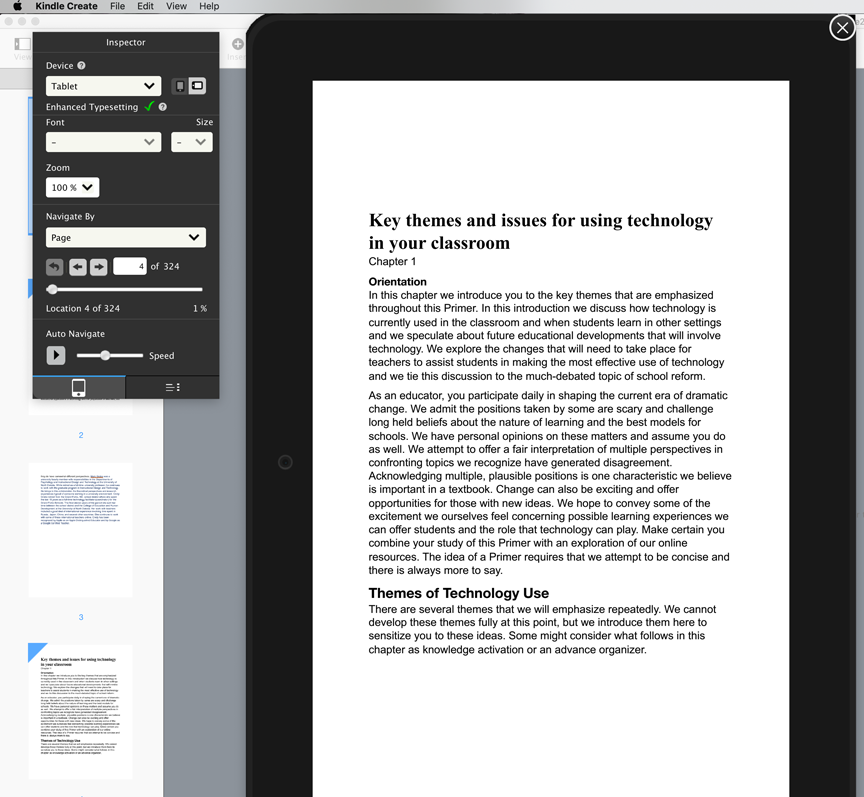
When you submit a fixed page format manuscript, you are basically working with a pdf within the special Kindle Create tool. Because of the way I work, I had multiple challenges getting to the stage of generating this pdf. Our textbook is a “technology for teachers” resource for teachers, but mainly written for undergrad courses that address this area. One thing I have always done is to use the same tools I suggest teachers use in my own work. So, I use inexpensive or free tools in my writing and web development activities. Amazon seems to assume authors will use Microsoft Word. I don’t own this product and although I still work on occasion for a university that would allow me to use it for free, I prefer to write in Google Docs.
I assumed I knew most of the ins and outs of working with Google tools, but did not realize that a 300 page manuscript would not be converted to a pdf when downloading from Google docs. People don’t believe me when I say this because they have created pdfs with Google docs. They have not tried doing this with a large file. My workaround sounds pretty strange, but it kind of worked. I downloaded a docx file from Google, opened it in Pages, and saved out as a pdf. Only one issue most also might not anticipate. When you cross products like this, you can encounter font substitution. Different products don’t always recognize the same fonts and when another font is substituted this can change the number of lines that appear on a given page messing up the page formatting that had been so carefully crafted. I know of no easy way to fix this issue. I used a recommended style guide for selecting fonts and font sizes, but I guess I should have used a Word book to find these suggestions rather than an ebook guide for the Mac. I scrolled through the manuscript 5 times between yesterday and today playing with page breaks before I gave up. There are still a few issues, but pretty is not my goal.
I probably started this project too late for what I ended up doing. It is interesting to watch the sales pattern for our textbook. We see single sales over the summer and then group purchases once Fall hits. I was working as fast as I could, but now these singles, some of which I assume represent profs looking for a textbook, represent the view of a dated book when a new book should be available in a couple days. This matters because in switching from a free flow book to a fixed format more appropriate (according to Amazon) for a textbook, I have to list the new book as a different book. Those web addresses instructors may have saved for the book they reviewed will not work once I see the new book is available and I delete the older book.
This is probably far more than you want to know about ebook publishing, but I thought some of the experiences may have provided useful insights.
Our newest book is now available, but it will be a week or so before you can take a peek with the x-ray view feature.
Manage Consent
To provide the best experiences, we use technologies like cookies to store and/or access device information. Consenting to these technologies will allow us to process data such as browsing behavior or unique IDs on this site. Not consenting or withdrawing consent, may adversely affect certain features and functions.
Functional
Always active
The technical storage or access is strictly necessary for the legitimate purpose of enabling the use of a specific service explicitly requested by the subscriber or user, or for the sole purpose of carrying out the transmission of a communication over an electronic communications network.
Preferences
The technical storage or access is necessary for the legitimate purpose of storing preferences that are not requested by the subscriber or user.
Statistics
The technical storage or access that is used exclusively for statistical purposes.The technical storage or access that is used exclusively for anonymous statistical purposes. Without a subpoena, voluntary compliance on the part of your Internet Service Provider, or additional records from a third party, information stored or retrieved for this purpose alone cannot usually be used to identify you.
Marketing
The technical storage or access is required to create user profiles to send advertising, or to track the user on a website or across several websites for similar marketing purposes.



You must be logged in to post a comment.