Before the web did anything, Hypercard did everything

“Before the web did anything, Hypercard did everything” was the subtitle of an Ars Technica article I cited and liked in 2019. I use it here to celebrate the life of Apple software genius Bill Atkinson following his recent passing. HyperCard played a significant role in my academic career, and while I have written about the personal connections in the past, one more mention seems appropriate. Hypercard, often called a software erector set, was innovative and accurately foretold many future innovations we now take for granted. 

Among the unique features were:

  • Hypertext/hypermedia
  • Object-oriented programming
  • Low bar / high ceiling software

I will attempt to call attention to these features as I offer a brief description. I spent hundreds of hours developing educational applications in Hypercard and would love to display some screen captures of my work. Unfortunately, Apple last updated HyperCard in 1998. I do have some old discs with my original work, but neither an appropriate drive nor an Apple operating system suited to run HyperCard. For a few images, I used my phone to capture from a textbook I wrote with my wife in 1996. One more comment. While I did work on HyperCard stacks for hundreds of hours, that was 25 or so years ago, so I may be fuzzy on some of the details. 

The analogy – a stack of cards

Card, field, button

HyperCard was based on a hierarchy of objects. The most basic and encompassing element is a stack. A stack is made up of cards. Each card has a background and a foreground to which the user could add elements, such as text, images, text boxes, and buttons. The difference between the background and foreground was important when a card was duplicated. Typically, cards were intended to look the same with only key elements changing (e.g., a unique image, text information). Rather than create each card from scratch, it was possible to duplicate a card to retain the background and then add the unique features. 

The following image shows a card from a series of cards built to provide information about the birds most commonly found in North Dakota. There are several text fields and buttons that would be common across all cards, and a unique image and descriptive text for each species. HyperCard, in this case, was used as a type of database. 

Adding Action – Hypertalk was the language of HyperCard

Nearly anything done with HyperCard, e.g., opening a stack, clicking on a button, generated what was called an event. Events had no consequence unless there was a handler available appropriate to that event. A handler was pretty much a segment of code that would be executed when the relevant event was encountered. So, for example, mouseUp would respond to a mouse click.

On mouseUp

go next

End mouseUp

This handler added to a button would advance the card from a stack that was visible to the next card.

A unique feature of HyperCard, consistent with the philosophy of low bar, high ceiling, was that HyperCard would write many of the basic event handlers for you. You could do many things without coding, but also use the powerful scripting language, hypertalk, to do much more. 

HyperCard came with a large assortment of symbols many appropriate as buttons (first image). However, when added to a card, the symbols were inert unless scripted. It was easy to find and add a button to a card, but then HyperCard was willing to help make the button do something (Button actions 1 and 2). The process here was to select an icon from button choices and then select the desired action.

Some of the button choices

Button Actions 1

Button Actions 2
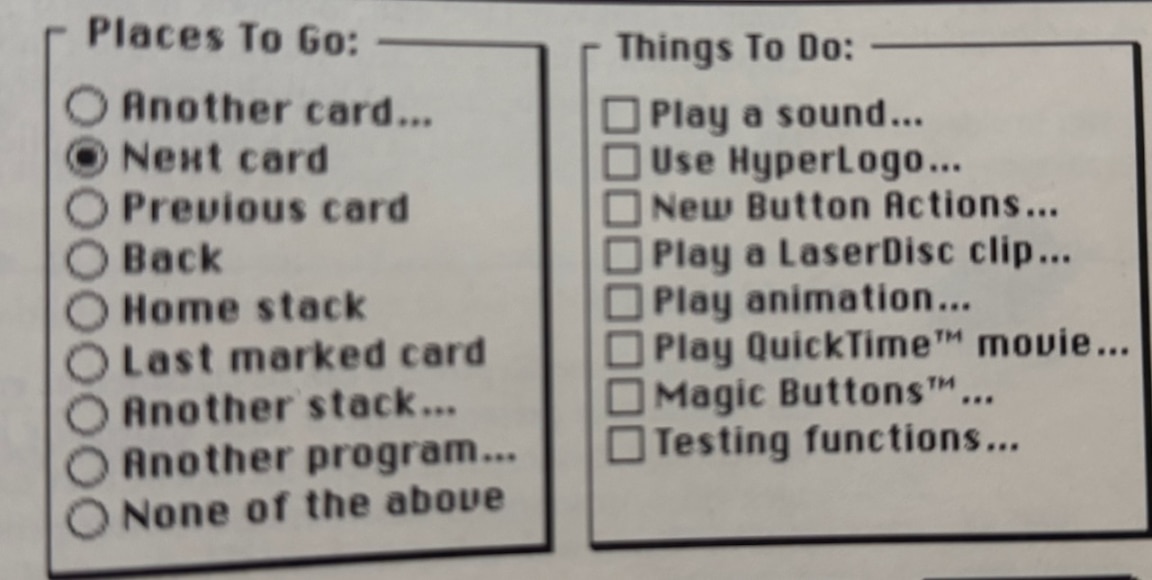
If you opened the script for the button created in this fashion, you would see the script I included above as an example. Of course, once you learned hypertalk, the scripting language, you could just input this script from the keyboard. 

Scripts could be added to most HyperCard objects and created actions originating from the object to which the script was attached. There was no single program, but rather a collection of programs associated with the various objects from which a stack was assembled (object-oriented programming). Events associated with one object (say a card) might trigger a handler somewhere else, where it would make more sense. I think of this as an event looking for a home. If an event does not find a handler on the object that generated the event, it falls through the HyperCard hierarchy to the next level. Because so many actions generate an event, every mouse click, opening of a card, opening the stack, etc., many do not find a handler and nothing happens. If you forget to assign a “go to the next card script” to a MouseUp associated with a button, nothing happens. 

I have tried to find an old online manual that might provide a complete exposure to HyperTalk without luck. This description of hypertalk from Wikipedia includes sufficient samples of scripts to offer a way to consider just how powerful the language could be. 

What I did with HyperCard

I used HyperCard for a variety of things. Here are a couple of examples.

The North Dakota Wild clipart collection

I used my tech skills outside of my role as a college professor. I had an interest in technology applications in science education and was interested in project-based learning. North Dakota Game and Fish had a program called OWLS (outdoor wildlife learning sites) and gave small grants to schools to support the development of small sections of land (think native plant gardens) associated with schools. I became involved in attempting to create activities and develop the sharing of project ideas between schools using technology. One of the projects involved the creation of HyperCard stacks of North Dakota Wildlife. The image used here was from the Bird stack. The idea was to provide students with images that the students could use in their own creations. The entire collection of images is still available from my server. Again, to imagine how this resource might be used, you have to put yourself back in time more than 20 years. 

Technology Enhanced Study

Much of my academic research concerned study effectiveness, and I was particularly interested in large lecture, introductory, college courses. The freshman lecture course represents an interesting case. It places the least experienced students in a setting that is the most impersonal and most isolating of their college experience – heavy reading loads, long lectures, and the expectation that you process the inputs without guidance to take high-consequence exams that are likely unlike those you took in high school. My interest was in helping student identify their areas of weakness as they studied and providing an efficient way to address any weaknesses identified. You don’t need to review the entire chapter again. Study the poorly understood sections or ask a colleague for assistance with the topics you don’t understand. Don’t just mindlessly go over the same material again and again. 

The course I had in mind was the Introduction to Psychology. I had access to the test item database provided by the textbook company (approximately 200 MC questions for each chapter). The items from the test bank included associated page numbers from the book and what I would call topics (maybe 20-25 for each chapter). Topics were simply identified by number and designated a group of questions addressing the same topic and section of the chapter. These questions provided the basis for the digital study environment I provided to students. Half of the questions for each chapter were used in the study tool, and the other half were reserved for possible use on examinations 

The HyperCard study tool took me most of three months during a sabbatical to write. A study experience from the perspective of a student would work like this. Opening the stack on a Mac would offer the student the option of working on one of several chapters (usually 1-4) covered on the next examination. Once selected, Hypercard would display a randomly selected multiple-choice item from that chapter. The student would respond and the computer would then indicate whether the response was correct, and if not, the page numbers in the textbook associated with that question. The idea was that the student could use their textbook to review the page or so associated with that question and possibly take a note in their notebook or highlight the textbook. If the response was incorrect, the stack would then select another item at random from the other items with the same topic number. This would not guarantee a direct test of their understanding of a specific issue they found difficult, but at least would address the same topic. If correct, the system would select another topic at random from the chapter. As the student worked, the stack recorded the date and time of each response and whether the response was correct or incorrect. Aside from general performance, the data allowed consideration of when during the interval between examinations the student used the system (was the student cramming or studying systematically) and the time delay between questions. The delay following incorrect responses was regarded as particularly important because longer median delays were assumed to indicate targeted rereading, notetaking, or some other form of reflection. Students who showed little difference following correct and incorrect responses were using the system in a more passive manner, possibly assuming that responding to the questions alone was beneficial. 

The process of preparing the HyperCard study tool was augmented by other Hypercard programs that would take a flat file of questions and create the full study tool by creating the study tool card by card adding a card for each line of text from the flat file representing one question. A procedure built into the Study Tool stack also exported data and added an identifier for the student who had used that specific stack.

Making this system work also required some concessions. Many students were not assumed to have their own Macintosh computer, and for research to be meaningful, access to the tool had to be standardized. At the beginning of each course segment, I took trays containing 200 disks to the reserve desk of the library. The library had a Mac lab always available to students. The disks were assigned an identification number with each student assigned their own disk that had a unique bar code so the disks were checked out in the same manner as other material made available for a specific course. After each exam, I would collect the disks, dump the data for analysis, and prepare the same disks with the questions appropriate to the next examination. 

Readers who are familiar with such topics as comprehension monitoring, retrieval practice (testing effect), and distributed versus massed practice should be able to identify the theoretical bases for the tool and how I intended it to be used. What may not surprise educators is the finding that study opportunities are typically designed to address recognized study challenges, yet when released into the wild, students do not use them as intended. The tool was great for investigating actual student study behavior, but the benefits assumed are more difficult to generate than one might think. Capable students not really needing support flocked to the study tool. They used it more frequently and as intended. When answering questions incorrectly, their post-question delays were longer, indicating they were engaged in some effort to act on this awareness. This is not to say that students who were more likely to need help received no benefit, but the difference in who used the system and who used it most appropriately was one of the more challenging findings. 

Eventually, I moved on from HyperCard to create online versions of a technology-enabled study environment using a small server, PHP, and MySQL. Students could work from their dorm rooms or any location with Internet access using their own equipment and any browser. My interest in actual student study behavior was more authentic when it did not require a trip to the library. Still, HyperCard was a way to get started and provided a sophisticated, user-friendly experience. For anyone who finds this type of research to be interesting, my published studies based on the study environments can be picked from the list of my publications provided by Google Scholar.

One final Bill Atkinson product

When Bill retired, he began working on one final vision. He lamented the total focus on online image collections and wondered what physical objects would remain to save personal memories. His passion project resulted in PhotoCard was a tool for creating personal postcards. These cards could be sent using the Internet, but Bill really wanted you to pay a small fee to have him print cards you created and he would send them for you. 

I corresponded with Bill about PhotoCard and explained I had been a fan since HyperCard. I ended up with this mental image of him personally printing these postcards on his high-quality printer and making the effort to make small adjustments to get things just right. Then, he would head off with a box of these cards to mail them at the post office. This was not about the money as seemed his general approach. This was about making great things that people would use.

Bill Atkinson will always be one of my technology heroes. 

Loading

The Concept of Disruption Applied to Education


The Concept of Disruption Applied to Education

I think of Clayton Christensen as a theorist and writer mainly focused on business. He seems to focus on the challenges of change. Two core ideas have stuck with me. First is the concept of the innovator’s dilemma, which describes the difficulty of moving on from a successful approach when faced with new circumstances. Why does success at one point limit future success. The second core topic considers the opportunities and risks that arise when a field encounters great disruption. These two big ideas are interrelated, as great disruptions may create circumstances challenging an existing successful approach.

Big ideas are not necessarily specific to a given field (e.g., business) and Christensen has made the effort to apply his theories to education. This effort resulted in his 2008 book Disrupting Class, written with Michael Horn and Curtis Johnson. For those interested in K12 education, it should not be difficult to anticipate how Christensen’s core ideas might apply. The methods of K12 teaching are often criticized as unchanging often noting that someone from a century ago would not be lost if suddenly dropped into a classroom of today. The long-standing model involves age-based classes of students reporting to a teacher standing at the front of a room, engaging the class with presentations and discussions covering isolated subjects of math, science, history, and language arts with performance evaluated using tests at regular intervals. This model has existed in pretty much the same approach for a long period of time and seems very resistant to change.

While stable, the K12 model faces significant challenges. Students are often unmotivated with high absentee rates. Despite significant resources invested in the U.S., performance measured by standardized tests lags behind that observed in other countries. The COVID crisis appears to have created problems that remain when students could not meet in the traditional face-to-face classroom situation. Despite the mantras of “all students succeed” and “leave no child behind”, student performance has grown increasingly more variable as students move through the grade levels, bringing many questions of meeting the needs of a diverse population of learners into focus.

These issues exist within an environment of educator complaints of low pay and a lack of public support, with increasing pressure to address an ever-increasing number of goals. Why aren’t students more capable of understanding the basics of money management? Why are kids spending so much time on their phones and reading so little? Why are kids questioning their sexual orientation? Why can’t K12 schools do a better job of preparing those students who are interested in a job after high school rather than pursuing the experiences of higher education? Why do kids have so many psychological problems?

Rereading Disrupting Class

After the delay of a decade or so, I just reread Christensen’s Disrupting Class, which turned out to be an interesting experience in a couple of ways. First, I don’t reread many books because there always seems to be something new I want to read, but the investment of time may be beneficial with a certain type of book. Rereading books that gave you important insights into an emerging or changing situation can be quite informative. The delay between reads allows the accumulation of relevant experiences that allow further reflection on your original conclusions and insights. These intervening experiences can also guide rereading to discover nuances that did not initially stand out. There is more. Some writers who explore an emerging trend are willing to predict specific accomplishments and related time frames. What actually happened? Were the predictions realized, and if not, what factors turned out to prevent the predicted outcomes?

I became interested in Christensen’s analysis of the challenges of K12 education because I thought the challenges I have already outlined could be addressed through the use of technology to individualize learning opportunities in ways that addressed differences in aptitude, existing knowledge, and preferences for different approaches to learning (Christensen used Howard Gardner’s theory of multiple intelligences as a justification for alternate learning experiences.). When translating these suggestions to my own way of thinking about instructional alternatives, I equated Christensen’s suggestions with an updated way of implementing mastery learning, taking advantage of online technology. This was not the term used in his book, but Christensen did mention k12.org as one of his examples and I would define this as an example of online mastery instruction.

Christensen observed that disruptive practices tend to emerge in the margins with mainstream practices being very resistant to disruption. Established mainstream practices fall prey to the innovator’s dilemma, with efforts limited to doing a better job of what is already being done. He predicted that home schooling, credit recovery experiences (a way to address failed or incomplete courses), and unique courses that cannot draw enough students in an individual school would provide the earliest exposure for online, individualized learning experiences.

While online, digital approaches have succeeded on the fringe, these successes are intended to encourage more mainstream adoption. Now this is what I mean by having the opportunity to test predictions. Implementation has not progressed as anticipated. For example, Christensen predicted that by 2019, about 50% of high school courses would be delivered online. This prediction proved to be overly optimistic, and I would guess that any movement in that direction was reversed by negative experiences associated with the total forced online efforts of the COVID years. There are other failed predictions. One concerns the alternative educational materials that would be available to satisfy the multiple intelligences Christensen identified. Rather than a single, common textbook, he predicted that technology would mature to the point that educators and student peers could create learning materials. Course management systems (CMSs) were emerging and these systems would serve to store, sequence, and provide options generated by commercial providers as well as educators themselves. Perhaps some attempts have been made in this direction. I would point to concepts such as Google app-based Hyperdocs and teacher-based content production processes such as Teachers Pay Teachers (TPT) as consistent with this prediction, but the scale of adoption has been small.

I spent some of my time teaching in a graduate program focused on Instructional Design and I did find the concept of teachers as instructional designers of interest. To this point, educators are not prepared as designers and instructional design is different from lesson planning. Teachers would certainly have the background to become instructional designers, but like so many things educators could do, there is always the issue of how their time should be allocated.

Is technology a tool for disruption or will it be limited to isolated and focused improvements?

Perhaps technology is not a tool that will result in educational disruption, but will play a more focused role in improving some specific areas of what we already do. The alternative could be that technology provides the only reasonable means to break free from an approach that seems to be floundering in complexity, inefficiency, and frustration. Perhaps Christensen succumbed to Amara’s law. You may have heard of this but not know to whom the argument has been attributed. When associated with progress involving technology, Amara proposed that we tend to overestimate the impact of technology in the short term and underestimate the impact in the long term. Perhaps we are too impatient.

I understand that one criticism of those who advocate alternatives to the status quo is that when an alternative does not seem to generate much change, the reaction is to claim “you didn’t do it right”. There is certainly some legitimacy in the claim that people are reluctant to abandon good ideas when the ideas do not result in practical successes. Keeping this in mind in combination with the limited success of current approaches, I still believe there are some areas of potential.

Here are some examples:

Teachers can create instructional materials efficiently with the use of AI. Specialized AI tools (e.g., eduaide.ai, Diffit) assist educators in creating instructional materials customized to suit students who prefer different types of learning experiences.

AI offers the opportunity for personalized tutoring. Christensen refers frequently to the impact of tutoring, but he uses tutoring to refer to instructional tutorials. It is true that there are certain ways in which tutorials provide individualized learning experiences. When I think of tutoring, and this has been a topic I have always found interesting, I tend to think of a one-to-one interaction with another individual. Again, AI can approximate this experience and is more accessible and economical than traditional tutors. I have written several posts focused on AI tutors and I encourage educators to explore this possibility. The common complaint that technology is isolating is worth considering. As an adult independent learner, I would counter that all of us end up learning in isolation. Having suggested developing the skills of independent learning to be essential, I do note Christensen lists two requirements that must be met to motivate K12 learners?—?a way to feel competent as a learner and social connections. I agree and see peer engagement within an AI tutoring environment as a very reasonable approach. This strategy offers a combination of AI and peer tutoring.

Individualized learning opportunities?—?I am not ready to give up on online, individualized learning experiences. These experiences might best be used as a supplement to other classroom experiences (i.e., as an alternative to a textbook) or assigned for enhancement or remedial purposes. Khan Academy offers a flexible environment and set of tools that should be available for assignment by educators or access by individual learners.

I am not ready to dismiss the role technology can play in K12 education. I am waiting for those who point to limitations to offer reasonable options.


Loading

Old folks benefit from social media

I first learned that the association between online activity and health among older individuals may actually be positive from a television news program. Since I spend a lot of time reviewing research related to the use of digital tools, I decided to follow up. Disclosure – I have no expertise in health issues, but I do read a lot of research focused on the cognitive benefits or detriments of technology. I also have considerable personal experience using technology as an older adult, and I thought others may be interested.

There are multiple concerns that technology may have damaging effects that we users may conveniently ignore.

  • Technology appears to discourage physical activity, which may result in weight problems and poor physical conditioning.
  • Technology may reduce face-to-face social interaction and the benefits (emotional and physical) associated with interactivity. The hostility so common on social media sites when it comes to certain issues, such as political discussions, may have resulted in significant divisions within society. 
  • Certain technology tools (AI) may be used in place of the struggle involved with important cognitive tasks (e.g., writing, mathematical problem solving), limiting the learning of important skills.

It is easy to generalize concerns, and it makes some sense that older people are less tech savvy and would be less concerned about the dangers of spending a lot of time online. However, it is always worth collecting the data, and when Baylor and University of Texas at Austin researchers began to look at the published studies,s they concluded that social media activity was actually helpful in multiple areas.

The study that caught my attention was published in the journal Nature Human Behaviour, which reviewed 57 studies involving more than 411,000 adults across the globe, with an average participant age of nearly 69. The researchers Jared Benge and Michael Scullin used a statistical procedure called meta-analysis which is used to identify a general trend across the work of many other researchers. Most uses of this approach also identify variables potentially differentiating the studies and then examine outcomes found in subgroups associated with these differences to possibly identify important factors that might explain how any relationship between variables identified by the larger study might be explained. Sometimes, such an approach can identify a general explanation based on differences in what the smaller studies show. (Summary of study for public distribution).

This pattern of cognitive protection persisted when the researchers controlled for socioeconomic status, education, age, gender, baseline cognitive ability, social support, overall health, and engagement with mental activities like reading that might have explained the findings.

So, the general conclusion was that more use of social media was related to better physical and mental health. Specific causes cannot be identified in what are correlational studies (more on that at a later point) but the authors speculated there were several possible benefits:

  • Social connectivity – social engagement is known to facilitate mental and physical health so it seems possible to be able to connect with others even with physical limitations or the inability to drive a car. The access to visual connections (e.g, Apple’s FaceTime) offers a more social interaction.
  • Performance enhancement – opportunities such as online banking and shopping encourage independence and keep older individuals more active and involved. Even services that provide assistance with directions keep individuals more active. 

The issue with correlational research

You may be familiar with the phrase correlation is not causation. This means that finding a relationship between one variable (tech use) and another (health variables) does not mean that greater use of your cell phone is responsible for improved health outcomes. You might have immediately made the same observation – what if those with illness or in cognitive decline don’t use their smartphones as much? Researchers can try to statistically control for other variables, but the certainty of the direction of a relationship cannot be guaranteed. The reason more powerful research designs are not applied is easy enough to understand when you think about the topic of this research and many other issues that involve avoiding a negative situation. You cannot ethically create a situation hypothesized to be damaging to see if it really is? 

I decided I should take a look at a couple of the individual studies to see if the design was a simple are “A & B” type of design, and this was clearly the case in some cases.

So, despite the frustration the phrase creates among those seeking a high degree of certainty – “more research is needed”.

Sources:

Benge, J. F., & Scullin, M. K. (2025). A meta-analysis of technology use and cognitive aging. Nature Human Behaviour, 1-15.

Godie, E. A., Elfiky, E. R., & Ibrahim, E. E. (2022). Smartphone Use and Its Relation to Cognitive Impairment and Depressive Symptoms among Elderly People. Assiut Scientific Nursing Journal, 10(33), 188-196

Loading

Twitter Chats Now On BlueSky

Ten years ago or so when I was still involved in teaching graduate courses in instructional design, a kludged way of using Twitter popularly referred to as Twitter Chats emerged and became popular within the education community. It is fair to say that I was not a fan, but in keeping with the charge for my course I spent a lot of time in such chats and exposed my students to the experience through class assignments.

I tried without luck over several years to get a student to do a thesis focused on these chats. I proposed creating a system based on research studies from the past analyzing classroom interaction. How much time was devoted to teacher talk and to student talk? Who initiates questions and who responds? Who responds to responses? Does the teacher rephrase requests for participation based on categories the teacher could be asked to provide about learner characteristics – e.g., male/female, advanced/struggling? What proportion of classroom interaction was devoted to maintenance, content, discipline, socialization?

An observation of my own regarding chats was that they were extremely inefficient in comparison to other technology tools – discussion boards, group video interactions. So what was the point? My proposal to students was that a classification system of chat transcripts would be a way to investigate questions related to chat behavior. 

I never did get a grad student interested in my proposal and then Twitter Chats seemed to fade away. Until now that is. I have switched from being a Twitter (X) user to BlueSky and see that many other educators have as well. I just saw that the old Twitter Chat procedures are now being promoted on BlueSky. This encouraged me to search for something I wrote years ago about my suggestions for improving these chats even though I thought other tools offered educators better learning and communication experiences. What follows is that content minimally modified to be more timely. I have left the original use of Twitter as the focus, but replacing Twitter with BlueSky would be legitimate as the chat techniques are identical. 

***

Many educators have taken to using Twitter as a tool for “discussions”. Among participants, these discussions are more commonly described as chats and may be used as a way for students to share content, but more commonly seem a way for educators and their colleagues to interact.

Twitter chats, often called edchats when used in education, tend to follow a particular format partly to take advantage of characteristics of Twitter and partly because the approach is an efficient way to impose a synchronous approach on a tool not necessarily designed to be used in the way it has come to be used. Twitter was developed to share comments with followers. An edchat does not require that participants follow each other.

The essential feature of a Twitter chat is a common hashtag. All comments during a chat must contain the same hashtag. A Twitter hashtag is the symbol # followed by some series of letters or numbers; e.g., #grabechat. Participants in a chat actually search for the designated hashtag rather than watch their Twitter feed.

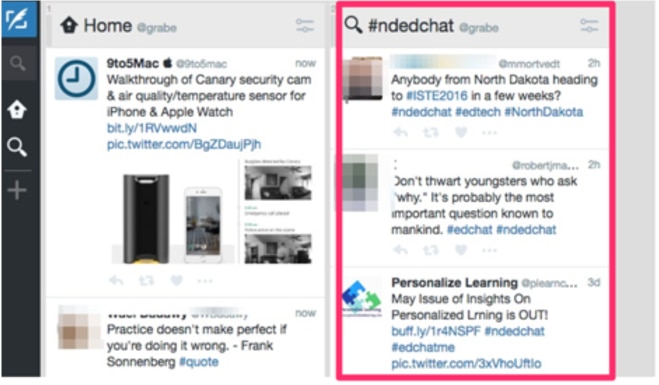
Following a series of tweets containing a common hashtag during a chat works best with a tool that automatically updates itself so the user does not have to repeat the search over and over again. My tool of choice is Tweetdeck (see image that follows). This tool allows an on-going search to be established based on a designated phrase (e.g., #ndedchat) and will keep this search current.

The other “rules” for a Twitter chat are conventions, i.e., made up rules. To have a synchronous chat, participants need to be online at the same time – e.g., Wednesday at 9 P.M. A variant called a slow chat, uses many of the same techniques but relies on an asynchronous approach – participants connect when they can over a greater amount of time.

The most common approach for a Twitter chat is a question and answer format based on a theme. A “moderator” may generate the questions for the week or participants may share responsibility for this task. Posting the questions before the chat allows participants to prepare. Some participants may even generate answers and then paste them into the chat tool when the questions are presented. This slows the discussion process down for these participants and allows them to spend the time thinking about what others have to say. This approach is uncommon, but would seem to lead to greater reflection (see my criticism of the typical chat that follows this description).

Another convention is used to deal with other typical challenges of an online discussion. Because real-time chats involving many participants have the potential to become disjointed, questions and answers are often numbered; e.g., Q1, Q2, … and A1, A2, … . The appropriate label is added to each question or answer. This approach allows individuals to make clear how their responses match with a specific question or earlier replies from other individuals. A typical hour-long chat seems to be based on 8-10 questions. Note that the inclusion of a hashtag and the indicator for a given question reduces the length of any given tweet.

Critical analysis and suggestions

I have participated in and viewed many edchats. These experiences have resulted in criticisms both of the technical tool and the way chats tend to unfold (the tactics).

I have fallen into analyzing educational technology experiences in terms of tools and tactics and this approach may be useful here. The idea is to separate the consideration of the potential and actual perceived value of the tool (the specific service or application) and tactics (the strategies of use). My assumption in the comments that follow is that the general goal for an edchat is professional development – the acquisition by professionals of new knowledge and skills. The existing tool is Twitter and the tactic is participant responses to a series of approximately 10 questions within an hour long block of time.

Assumed advantages of tool (Twitter) – free, easy to learn, large installed base of users

Assumed advantages of tactic – educators are familiar with a question and answer format and can participate with little preparation

Issues

A general issue with social media is that once a platform (tool) has attracted a user base, new and better tools fail to gain participants because individuals are reluctant to migrate for fear their social connections will be lost. I think this is the case with Twitter in the education community. I think Twitter has inherent issues because of the brief comments it allows. This limitation and the time to enter comments from a keyboard or screen, in my opinion, leads to rather shallow interactions. It may be a great way to learn about new things via links, but it is not a tool suited to meaningful, synchronous discussion.

The edchat format (the tactic) has taken hold and it seems popular to have such chats. There is a certain momentum here. There is also the issue of doing it like everyone else does. Conformity seems to limit a consideration of both tool and tactic.

I tend to look at this setting as if it were a class I was facilitating. As educators, does the typical edchat generate the type of interaction you would want to see in your class. What would you change?

How to improve edchats – some ideas:

Prepare beyond the generation of a lengthy series of questions. Either come up with 2-3 questions of greater depth or offer a common preparation task (read this post, read this book, etc.). Perhaps the moderator for the week should either find a resource or write a position statement.

I find the questions and topics to be too general. As an academic, I understand that since we are frequently described as being abstract and not getting the level of actual application this would seem a strange concern, but review chats and see what you think. I try to recognize my own possible biases here by looking at the responses the questions generate. The questions seem to generate few specific suggestions or examples.

I see very little interaction. Put more bluntly – the discussions are seldom discussions. Sometimes a response from another participant is praised, but there are few reactions, counter examples, requests for clarification, etc. If this was a FTF classroom, the typical edchat would be similar to choral responding rather than a discussion. I would propose these limitations are the result of both the tool (lack of room for depth) and the tactic (too many questions and responding without preparation).

Blogging before discussing might be helpful. Taking a position on an issue before interacting can be productive. Give some thought to your position before you are tainted by what others have to say. Offer an example. Process your own experiences and externalize a position for others to consider. Post before you participate. A moderator and other participants might then use these comments to request clarification or note differences of opinion.

Some comments on tools.

I admit at this point that it is difficult to isolate tool and tactics. I think moving beyond Twitter would be helpful.

I think it is time to consider other tools. I have always had access to discussion tools and I see greater opportunity for depth in synchronous commenting and responding in using these tools.

I understand that folks enjoy the social experience of Twitter chats, but I think it important to consider whether group socializing is the primary goal.

I am not familiar with all of the tools available to educators. Does the state or school offer a general set of tools (a discussion option, a blogging option)? What about Zoom or Teams?

Twitter chats may be the “in thing” but it may be time to think through the tool and the tactics and either make adjustments or move on to a better tool and improved tactics.

Summary:

1) Reduce the number of questions and give more thought to the type of questions used

2) Have a pre-session expectation for preparation of some type. I think expecting a product is always helpful related to this preparation is always helpful. Somehow, the popularization of “flipping” various education experiences should apply here. Prepare before you participate should be the expectation.

3) The moderator needs to encourage more give and take rather than limiting “discussion” to call and response. As I have already suggested, existing position statements that can be contrasted would be a great place to start. I understand the concern with how stating a different position will be received, but the generic positive reactions add little.

4) Consider other technology tools.

5) Generate a discussion summary (perhaps the moderator or a designated discussant). Did the summarizer learn anything?

Given these observations, I encourage you to form your own opinions. I wish Twitter chats had been analyzed more empirically, but to my knowledge this has not been the case at the time this content was generated. It is easy enough to explore on your own.

The following video summarizes some of these ideas.

Loading

Instagram to Pixelfed

Social media users seem to be living in a period of time when many are questioning their long-time commitments to specific big tech platforms. Perhaps they object to the political leanings of owners and the way they have tweaked the algorithms that generate automatic content feeds in objectionable ways. Perhaps they object to privacy issues that target them both for ads and for other content. For many years, they may have held similar concerns, but felt locked in by the network effect – the accumulation of friends and contacts connected to them and each other. 

This has been my personal experience. I became a Twitter member in 2006. That was a long time ago in Internet time. I joined TruthSocial much more recently. I left both platforms a few months ago for a variety of reasons. With Twitter, I was upset with the algorithm that seemed to send me (the “For me” option) more and more content I regarded as misinformation and also lowered the chances I would see posts containing links. Links to interesting content were one of the reasons I had previously found Twitter (not X) to be useful. With TruthSocial, I left because the election of 2024 was over and my interest had been countering the misinformation so common on that platform. There seems little point now.

I am having second thoughts because abandoning those platforms to the infidels seems only a way to change the experience for others. I may change my mind and check in once and a while to explore.

I do think we now have options whether we prefer to commit to individual platforms or maintain a meaningful, active presence on several. The power of the network effect has abated and federated services offer flexibility.

Instagram to Pixelfed

This post describes the expansion of the way I use two photo-heavy or photo-first platforms. Many probably consider Instagram the default in this category. I used Instagram originally to share images with friends and family. Friends and family were also users so it was easy to fall into this commitment. My use expanded beyond sharing images and captions and this transition seemed true of many.

I started using Pixelfed in 2019 which was soon after it was first made available. I take a lot of photos and have had the opportunity to take pictures in many locations. Pixelfed became a way to share some of my best with others interested in photography.

Why change and what will be different?

I was prompted to write this post mostly because Pixelfed just released apps for iOS and Android. The version I had used from my laptop or desktop computer was fine for my focus on sharing my best photos which was my perception of the way others used the platform at that time. Many folks use Instagram on their phones in a broader variety of ways moving seamlessly from collecting images to sharing images to friends and family. It is easy and informal. Pixelfed can be used in the same way and I think the phone-based version will greatly expand the way the platform is used.

You might want to explore an alternative to Instagram because of some of the reasons I have already mentioned. There are other implications that might be less obvious. First, there is the privacy issue. Pixelfed does not host ads and has no need to collect user data to target ads. Second, Pixelfed is a federated service. This means there are multiple hosts referred to as instances some of which may have a unique focus. Hosts with identifiable interests allow users to find and associate with users similar to themselves. Still, users are not limited to a specified topic and you experience content on many different topics. It is a difference in topic density that differentiates such sites from Instagram. For example, Mastodon is a different federated, but related service comparable to Twitter (X). I am a member of two Maston instances which have attracted different types of users. Twit.social is run by a technology podcaster and has mostly folks interested in technology. Mastodon.education as the name implies attracts mostly folks interested in educational issues. Pixelfed works in the same way and multiple hosts are available. I joined the original instance (Pixelfed.social). Here is an interesting difference between Instagram and Twitter and Mastodon and Pixelfed. Users of Mastodon instances can follow my image posts on Pixelfed and most posts will appear in their feeds. So, federation allows this interesting mechanism for both focus and cross-interest sharing. 

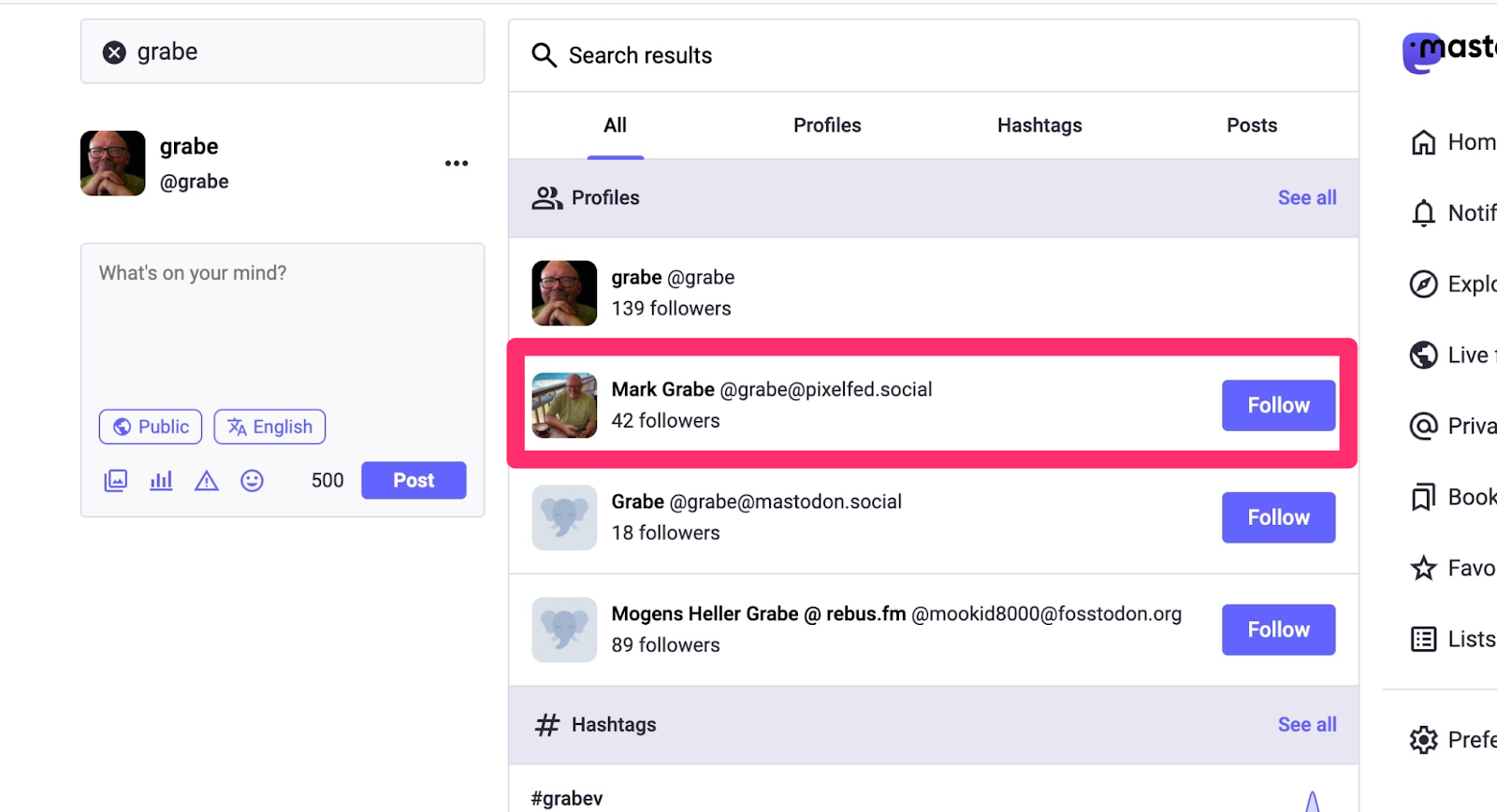
I use the same user identifier on all federated platforms (grabe – grabe@twit.social, grabe@mastodon.education, and grabe@pixelfed.social). This consistency ends up being helpful as searching for grabe within one of the platforms will find me in all of the instances of all type. I will demonstrate this in detail later in this post. 

Pixelfed

For those unfamiliar with PixelFed, it looks and operates very much like Instagram. The following image shows the feed using the iOS app. If you look at the bottom of the one post from the feed that is visible, you should see a + within a red box. This is the button used to bring up the template for submitting your own photo and text. 

The following is the empty template for generating a post and the second image a post with a photo and text. The red box in the first image identifies the button used to upload photos from your iOS photos collection.

Following other users from their federated accounts

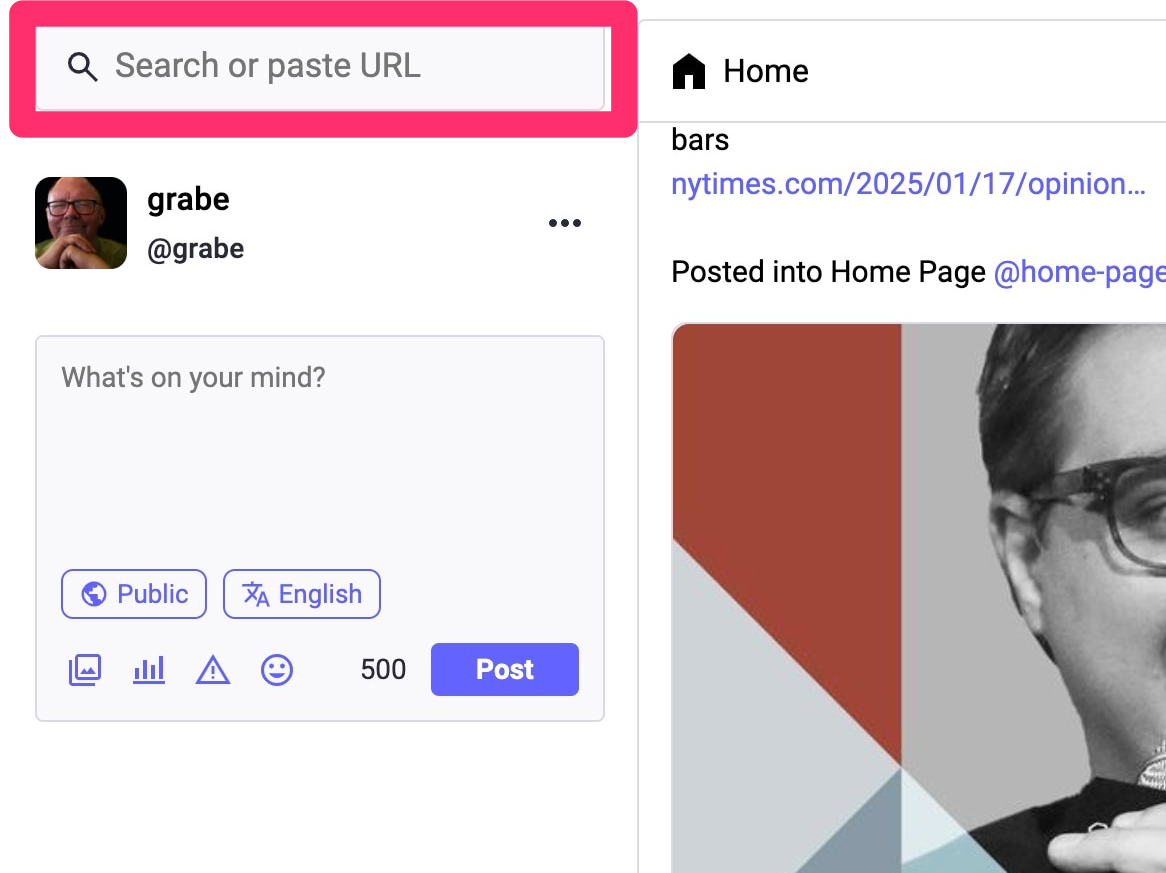
The easiest way (I think) to follow other users is to conduct a search. The search box should be easy to locate. I may be aware of another user already or identify someone through a discovery feed. In this case, I want to follow my Pixelfed account from one of my Mastodon instances. As I explained earlier, I use “grabe” as my name in all of my instances and the second and third image show the response to searching for “grabe” and the use of the options presented to follow the individual and instance that interests me. Select “Follow” and new content will appear in your feed.

Summary

Hopefully, this post explained several reasons someone might want to use federated social media in place of some of the major platforms or to add social media instances to one’s existing online presence. The specific example proposed that Pixelfed is a reasonable and perhaps desirable alternative to Instagram. Pixelfed is easy to join and use. The opportunity to link across instances of different federated categories was demonstrated and offers some unique experiences not available with the platforms wanting to concentrate users and prevent them from straying. 

Loading

The screen time issue – nudges or blocks?

What can be done to reduce the time spent on our devices has become a very public question. The issue has resulted in K12 schools being legislated in many areas to prevent students from bringing their phones to class and concerns are common that the rest of us should also cut back. I have written previously about the issue when present in young phone users and whether heavy use should be characterized as a physical addiction or a bad habit. 

The present post originated from my continued reading on this topic and an article I read related to the bad habit perspective proposing that adolescent screen time could be reduced if adolescents became more aware of their screen time and begin to think of it in terms of time not spent on other activities they value. This article described a program called Project Reboot and the Clearspace app. The app allows a user to set specific limits and informs the user when limits are being exceeded. The notion of improving mindfulness and the exertion of personal control seemed related to the bad habit perspective. Is awareness enough or should use simply be prevented?

Research on apps that intervene

It seemed likely that researchers would have investigated digital strategies to address a problem that originates with digital devices and I located a meta-analysis of such strategies (Tahmillah and colleagues, 2023). I recommend anyone interested in this topic take a look at this article because it does a great job of categorizing apps and the approaches taken to impact screen time. Just the list of apps was informative (Clearspace was not included) if for no other reasons than many may be unaware that such interventions exist and because the costs vary greatly. Identifying the apps proven to have an impact on behavior in combination with the mechanisms employed by such apps was informative. Simply blocking the use of an app or taking phones away limits screen time, but technology in general and most apps specifically have both opportunities and limitations so most of us in the long run would be better off making decisions about when and for how long to use our apps. 

The classification system

Rahmillah and colleagues proposed the following categories:

  1. Block
  2. Self-tracking
  3. Goal advancement
  4. Reward/punishment

Categories were further differentiated by underlying processes. For example, goal advancement, the approach that most interested me, included among the processes the opportunity to set a goal and a goal warning that the limit was approaching. 

The idea of the meta-analysis was to identify the apps that had demonstrated success in reducing screen time and then consider the underlying processes used by the more successful apps. In reviewing the studies found to impact screen time, I discovered the built-in screen time capabilities of iOS were listed (example of iOS screentime study available online). Given the costs I had found associated with other apps, this seemed important to me as users might be reluctant to consider costly apps this seemed important. 

Description of iOS Screen Time Controls

iOS Screen Time offers capabilities that seem examples of the goal-setting and goal-warning processes of a Goal Advancement approach. The following describes how to set up an iOS device to provide these functions.

The following image shows important iOS settings for limiting use. These features are available from the System settings. The Screen Time button (left-hand panel) provides access to multiple settings in the right-hand panel. Goals can often be accomplished in multiple ways and I am describing just one sequence here.

From the following image, note the following. The settings you can implement can be protected by a password (red box near bottom of image). If you wanted to set controls on a child’s phone to prevent access or limit the time on an app, you might want to protect the setting with a password. For your own use, you might not want to use a password offering you a way to ignore the notice that you had reached the limit you had established. You can set limits in several ways – individually or by category. If you decide to set limits by category, you might want to exclude some apps from that category. Always allowed provides a way to do this. 

The approach I am taking here makes use of the See All Apps and Website Activity option (Green box). 

The Apps activity option shows time spent by app or by category. You can toggle between the two presentations by selecting the button shown in the smaller green box (this would take you to the app view from the category view). Toward the right end of a category, you should see the > symbol. Selecting this symbol will reveal the apps associated with that category. 

You can now select the category or individual apps to set limits. I have selected Instagram. 

I can then set the maximum time per day and customize the time during a week should I want to do something more complex such as extend the limit for the weekend. 

What happens when you exceed your goal? You will encounter the following Time Limit Screen. If you have a password set, you (or someone with the password) would have to enter the password to provide you more time. If no password has been set, you see the following options and can make an informed selection to continue.

Screenshot

Summary

Apps are available to help individuals manage their screen time and research indicates some apps do produce improvement. Of course, research studies do not claim every individual will respond in this manner. Some techniques allow individuals to set goals and inform the user when they have spent the maximum time they intended to spend. This approach is based on the assumption that the lack of awareness is a reason many exceed the amount of time individuals intend to spend and behavior will change when a method of improving awareness is provided. iOS has screen time controls built in that allow for goal setting and goal awareness to be provided. Because these functions come with the operating system on Apple devices a user does not have to spend money on additional capabilities. This post explains how to set goals in iOS. 

Reference

Rahmillah, F. I., Tariq, A., King, M., & Oviedo-Trespalacios, O. (2023). Evaluating the effectiveness of apps designed to reduce mobile phone use and prevent maladaptive mobile phone use: multimethod study. Journal of Medical Internet Research, 25, e42541.

Loading

The bad habits applied when reading from a screen

I have resisted the complaints that reading from a screen leads to poorer comprehension for some time. Much of my own research and writing have promoted the educational benefits of technology and the multiple studies and meta-analyses reporting that comprehension is adversely impacted when reading on a computer or tablet seemed a challenge to my message. A recent post on Reading Rockets by Timothy Shanahan identified several new studies I had not read and encouraged another look and another post.

When I first wrote about educational applications of technology, my approach was strongly influenced by David Jonassen’s mid-1990s book Mindtools. Rather than focusing on programming, computer literacy, or drill software, Jonassen proposed that educators consider how using productivity tools (e.g., word processing) could change how learners explored ideas. Again using word processing as an example, how writing to learn with a computer might expand the cognitive benefits of the writing experience beyond that allowed by pencil and paper.

A more recent version of the “tool perspective” (e.g., Etchells, 2024) offers a more nuanced view and notes that tools are in many ways neutral and users determine whether tools will be used effectively or detrimentally. The ills associated with technology are challenging because technology offers opportunities and challenges. However, Etchells proposes that the challenges are not due to addictions or biological triggers. The challenges are often best described as bad habits. This creates a difficult situation for some with the tendency to promote but also allows others to blame the tool as bad and ignore the control and responsibility of the user. With a specific focus on reading from digital devices which of these perspectives makes the most sense? If I maintain a position of advocacy, can I focus on the responsibility of the learner in a way that offers potential solutions rather than blaming the victim?

My “out”

First, I have no concerns about my own nearly total reliance on reading from digital devices. Even if there is a minor hit to my comprehension, my digital reading is part of a process of getting from a review of the ideas of others to my own written output. Digital reading allows me to efficiently highlight and annotate and export these personalizations of my understanding into external storage that I have accumulated over the years and use months and sometimes years later as background for what I write. This is one of those situations in which I cannot direct others to research evaluating the relative effectiveness of this approach to knowledge work, but trying to approximate my process on paper seems pointless. Put another way, reading comprehension is just one component in combination with long-term storage, multi-document processing, organization, retrieval, the flexible connection of stored elements, etc. that are involved in the writing and teaching I do.

Shallow Comprehension

I am starting to find the redundancy of the basic research studies and meta-analyses that have filled journal space in recent years to be mildly irritating. Replication is important in science, but at some point, it is time to move on to replication and extension. The studies that are attempting to study the process of comprehension when reading from a screen or paper are an example of what I mean by extension. Because it is not obvious why reading text on paper or on a screen involves the cognitive processes involved in reading, repetition of differences in the product (answers to test questions) has a decreasing value.

It would seem that the existing research demonstrates an issue, but not an explanation. Reading from a screen and paper would seem to involve the same cognitive subtasks, but the results are not equivalent. The explanation that seems to have gained the widest acceptance (my judgment) is commonly called the “shallowing hypothesis. I attribute this claim originally to Nicholas Carr who wrote a popular book titled “The Shallows”. As I understand the argument, the reading we tend to do online mostly involves what we might commonly describe as skimming. This experience leads to a bad habit that is activated when we read material from a screen even with content we might read more carefully under other circumstances. The reading habits of doomscrolling are proposed to generalize to reading books.

Eye movement research offers a way to watch the process of reading. We know that reading on a screen moves faster and readers overestimate their understanding level. Speed to complete the reading of a passage and requests to estimate the level of understanding by asking for prediction of performance areas variables that are easy enough to collect. I studied the phenomenon of failed reader understanding of their level of understanding and recognized the issue as a problem of comprehension monitoring resulting in poorer calibration. Calibration is simply the accuracy with which you can estimate the quality of a future performance. I always explained it as the decision that a student makes the night before an examination. Can they stop studying now and go out with friends or should they keep working to get the exam score they want? I was interested in calibration as a challenge for less capable readers reasoning that simple fix-up problems such as stopping and rereading sections that were poorly understood was the basic adjustment less capable readers were unable to make. In reflecting on the challenge in the context of college student study behavior, I tended to think of the problem as a matter of efficiency. Students used to tell me they had read chapters several times in preparation for an exam. Rereading is a common strategy among the motivated, but less capable learner. It would be far better to recognize the topics you did not understand and focus on these topics. It would be even better to notice this immediately while reading and while being more aware of the context of the material being read. This would be the ideal time to reread a paragraph or two.

When I was actively involved in this research, this challenge was sometimes studied by inserting different types of errors in text and determining if readers could identify the problems. Create circumstances that should result in a failure of comprehension and see if a reader would recognize the problem. For example, a statement that existing knowledge should indicate was inaccurate or a conflict between two sentences in the same sentence. Better readers were better at identifying these inserted errors. The technique was criticized because it placed readers in the role of proofreaders which is not the way we actually read. At the time, I tried to investigate the issue of monitoring skills by using a similar technique without informing the participants in my research and using eye-movement recordings to determine what happened when readers encountered what should have been confusing sentences. At the time the technique was tricky to use and intrusive as readers had to maintain their heads in a fixed position by bracing their chin on a bar. My research traded one form of artificiality for another.

The sophistication of the equipment has drastically improved and eye movement techniques are being used to compare participants reading from printed material and from a screen. For example, a recent study compared 8th graders in Norway (Jensen and colleagues, 2024) reading items from the national reading assessment exam from paper and screen while recording eye movements. As part of the preparation for the actual experiment, the researchers asked about their experience with reading from paper and screen and determined that many students proposed they comprehended better when reading from screens.

The reading examination itself involved passages of text each followed by several questions. Readers could refer to the written material when answering the questions. The eye movements indicated that readers referred back and forth between text and questions more times while reading from the screen to answer the questions. The researcher found that the readers had greater difficulty understanding when reading from a screen. This makes sense, but the readers still performed more poorly on the questions which would seem to indicate they were aware that they did not understand and could not completely remedy the difficulty.

Solutions

I don’t see online reading as a behavior that will disappear or diminish in frequency. I wonder about the hypothesis that poor habits are developed from heavy exposure to the scanning behaviors that many apply in texting and scrolling through social media feeds such as Twitter, Mastodon, and Blue Sky. I admit my perspective differs because I am a reader of books and journal articles on digital devices. I try to remember that my age means this style of reading (long form) predated any exposure to reading on a device. So my habits could be different allowing strategies of reading to differ between long-form and the types of text more suited a superficial approach.

Shanahan proposes that if technology environments encourage maladaptive behaviors why couldn’t they be engineered to encourage more effective behaviors? I think there are already such opportunities with longer-form content, but the opportunities are both ignored by most readers and not taught in educational settings. The exporting of annotations and highlights I rely on is seldom a part of the reading process of most learners. Here is another example of the transfer of a habit. Younger students are not allowed to highlight or write in their print books and the highlighting behavior of college students has frequently been criticized. I have written extensively about a variety of ways in which educators and learners can increase their active engagement with digital content. I call this collection of techniques layering because the strategies are external to the text itself and yet provide opportunities for processing text (and video) in more cognitively active ways.

Maybe improved awareness is also important. If skimming can be understood as a habit sometimes applied inappropriately in some settings, greater metacognitive awareness of goals and content would seem to be important. Concepts such as deep reading versus recreational reading are not new and the concern for shallow reading on devices is just another version of this older way of thinking about what learning from reading requires.

Sources

Carr, N. (2020). The shallows: What the Internet is doing to our brains. WW Norton & Company.

Etchells, P. (2024). Unlocked: the real science of screen time (and how to spend it better). Hachette UK

Jensen, R. E., Roe, A., & Blikstad-Balas, M. (2024). The smell of paper or the shine of a screen? Students’ reading comprehension, text processing, and attitudes when reading on paper and screen. Computers & Education, 219, 105107.

Jonassen, D. H., & Carr, C. S. (2020). Mindtools: Affording multiple knowledge representations for learning. In Computers as cognitive tools (pp. 165–196). Routledge.

Singer, L. M., & Alexander, P. A. (2017). Reading on paper and digitally: What the past decades of empirical research reveal. Review of Educational Research, 87(6), 1007–1041. https://doi.org/10.3102/0034654317722961.

Loading