Social bookmarking with Google

The idea of social bookmarking is that a collection of bookmarks can be created and shared socially. These two functions are independent so that in one application a collection of bookmarks is shared with a group. In the other applications, a group collaborates in creating a collection of bookmarks. Both techniques have potential value in a classroom situation. The teacher may want students to examine a set of online resources. The teacher and groups of students may want to organize a collection of bookmarks on a specific topic.

There are various ways to engage in social bookmarking. I pay for and share using a powerful tool called Diigo. In this post, I am explaining the use of Google and the Google browser to engage in similar practices

This is the screen one sees when using the Google browser. The first step in the process I have in mind is the creation of a collection of bookmarks and the first step in this process is the creation and naming of a collection.

The collection button appears at the bottom of the screen display when using the browser.
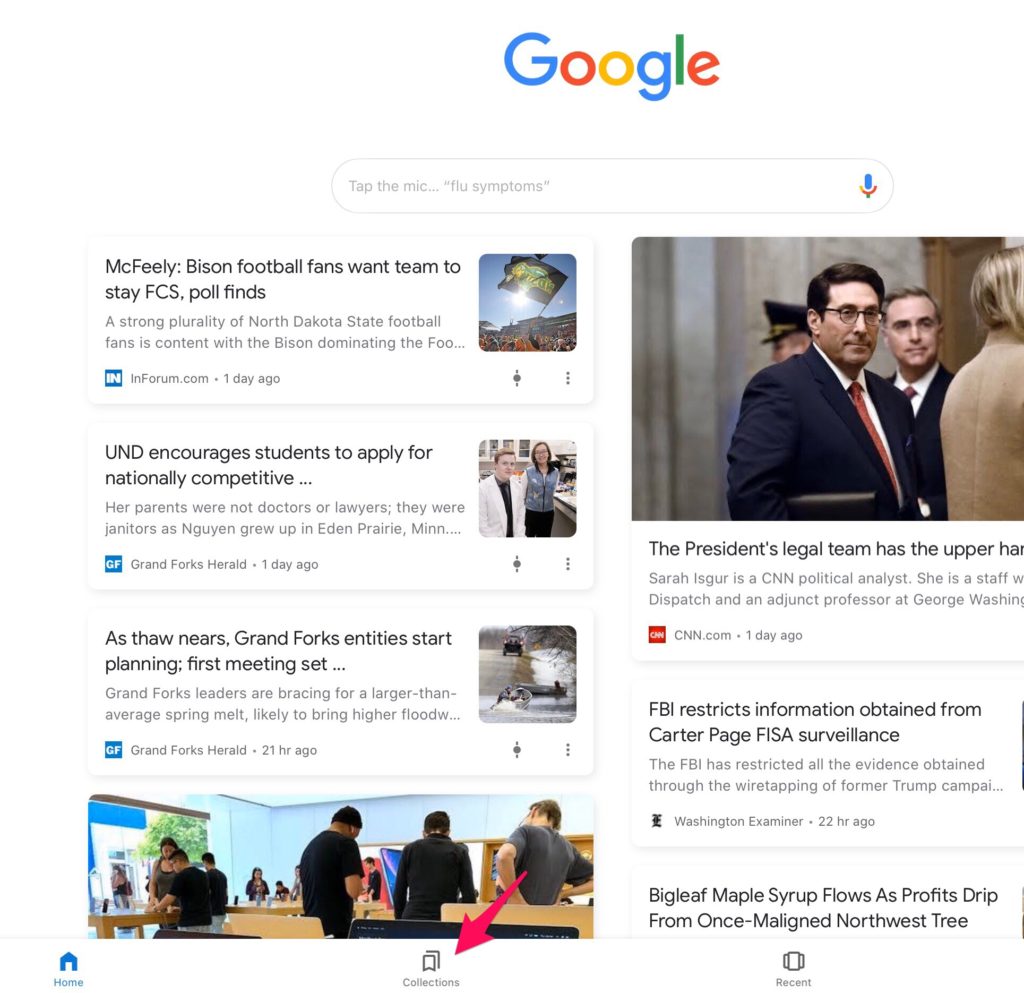
Selecting this button allows a new collection to be identified. Using this button displayed the existing collections and the + button us used to create a new collection.
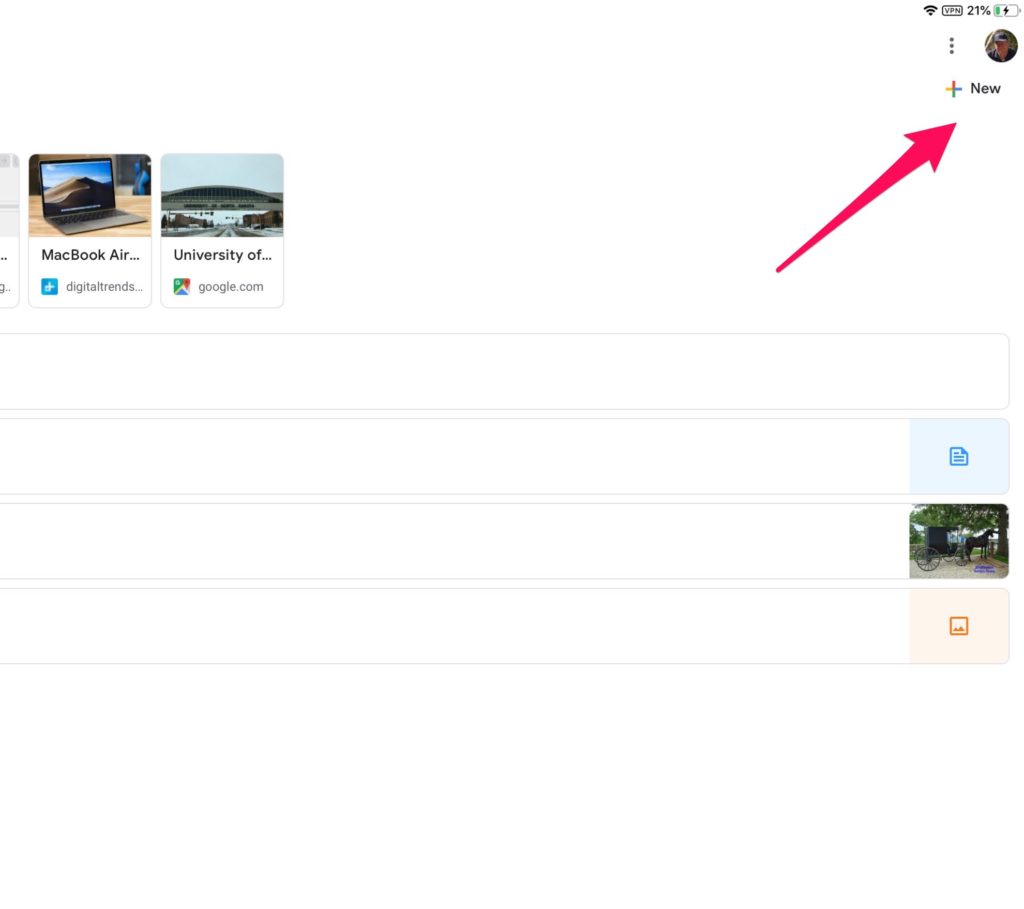
Once the desired collection has been established, you can now add bookmarks to this collection. To add a bookmark, you browse with the Google browser and then use the bookmark icon when you are on a web page you want to add to the collection.
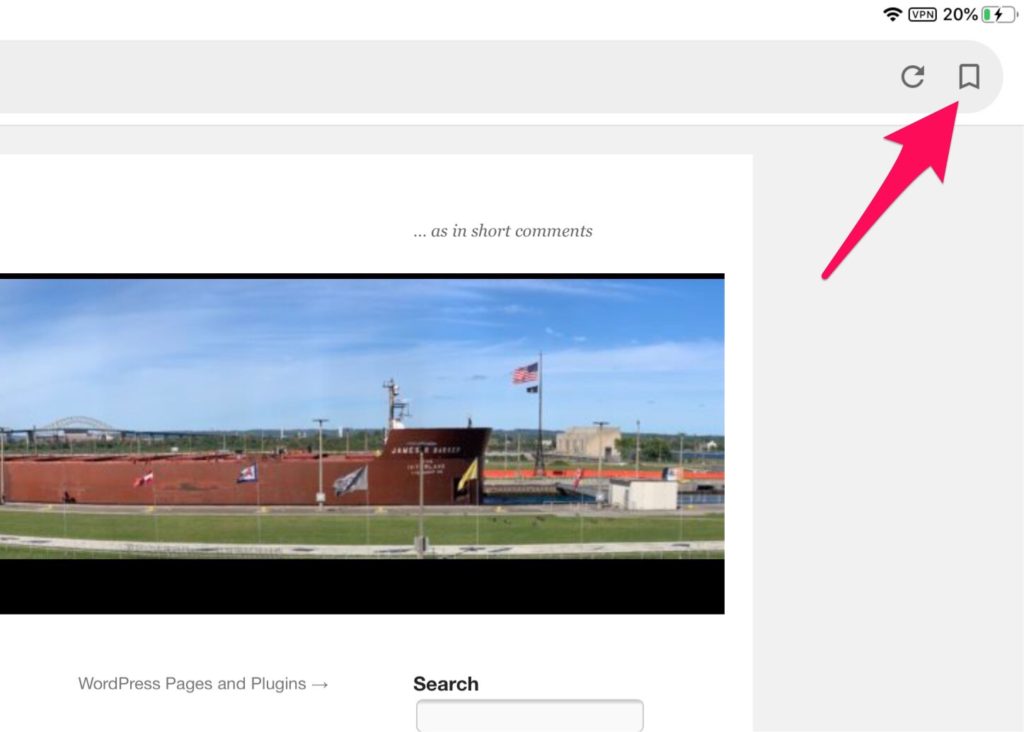
Selecting the bookmark icon, causes the display at the bottom of the browser window to display the default collection and offer you the opportunity to switch to a different collection.
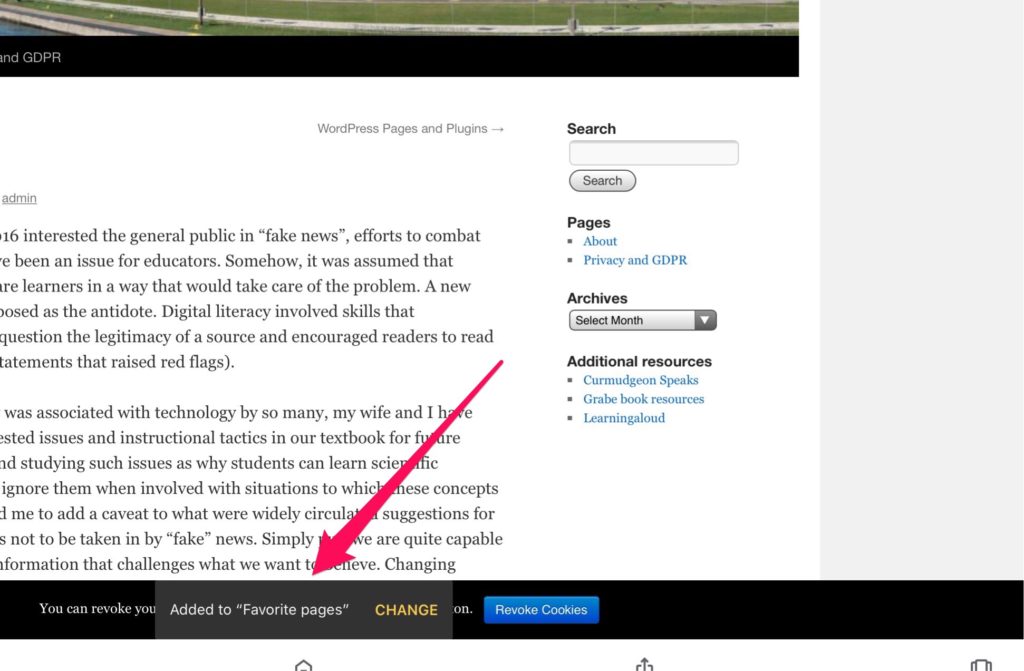
The “change” option brings up the existing bookmark collections and you select the one you want.
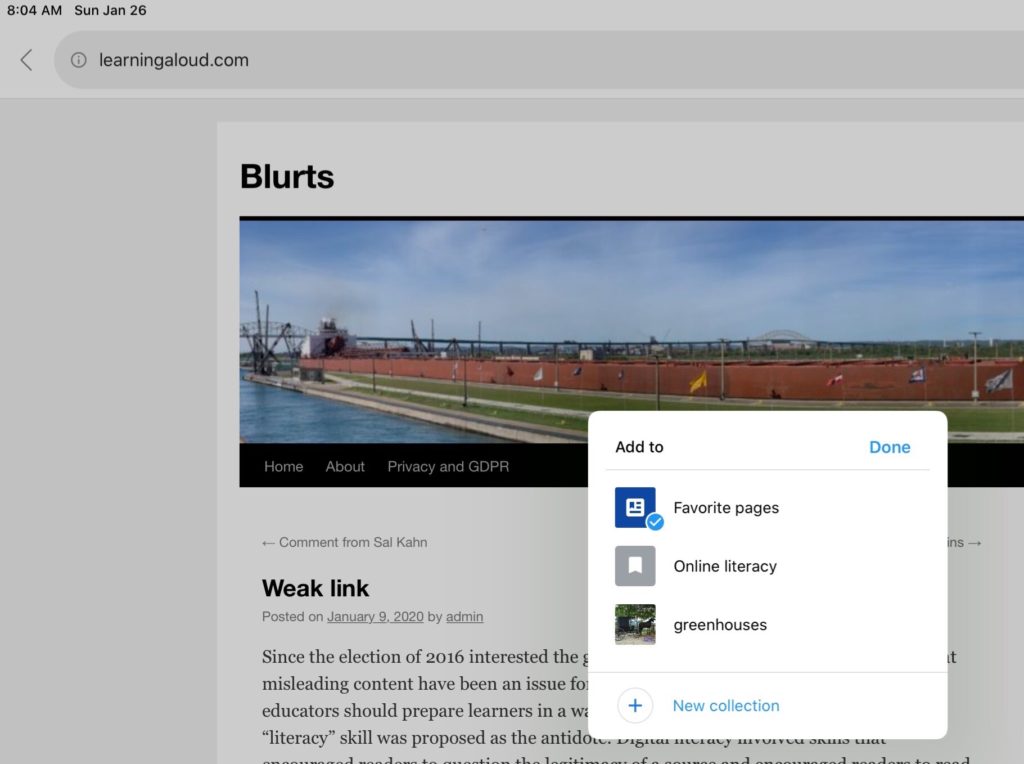
This process is repeated to build up the collection of bookmarks.

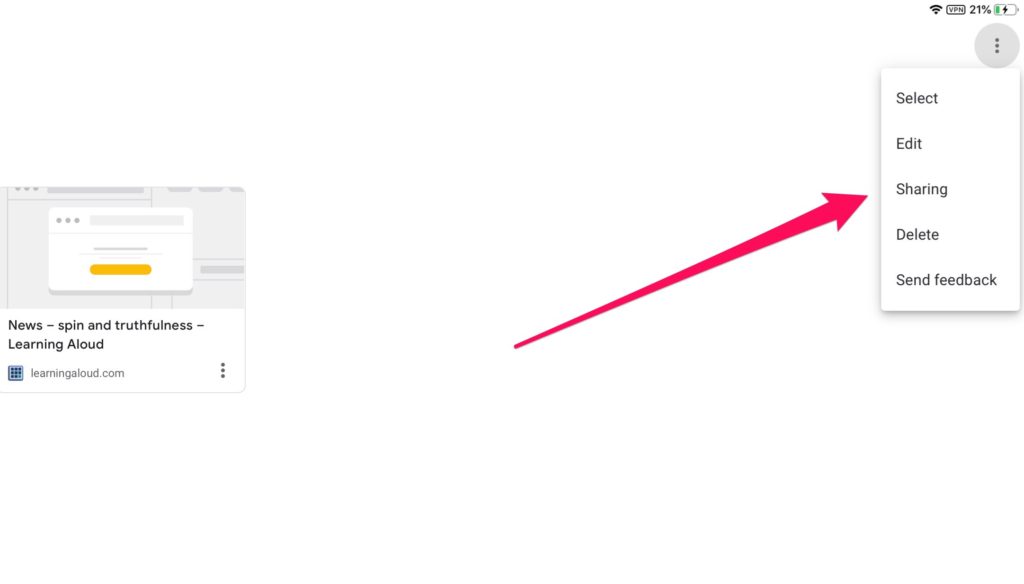
At some point you will want to share a collection. This is done from the collection page.
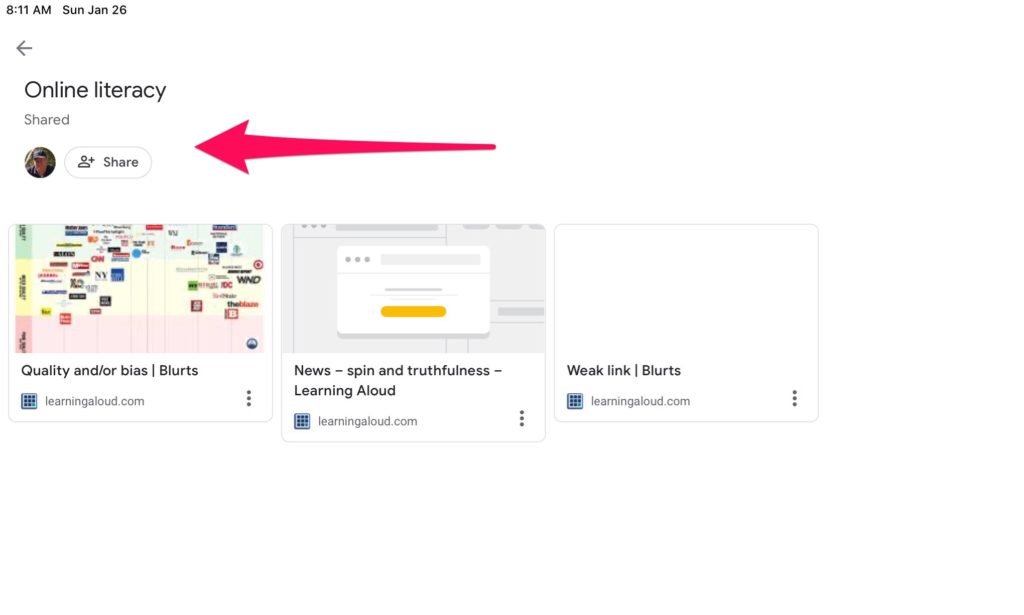
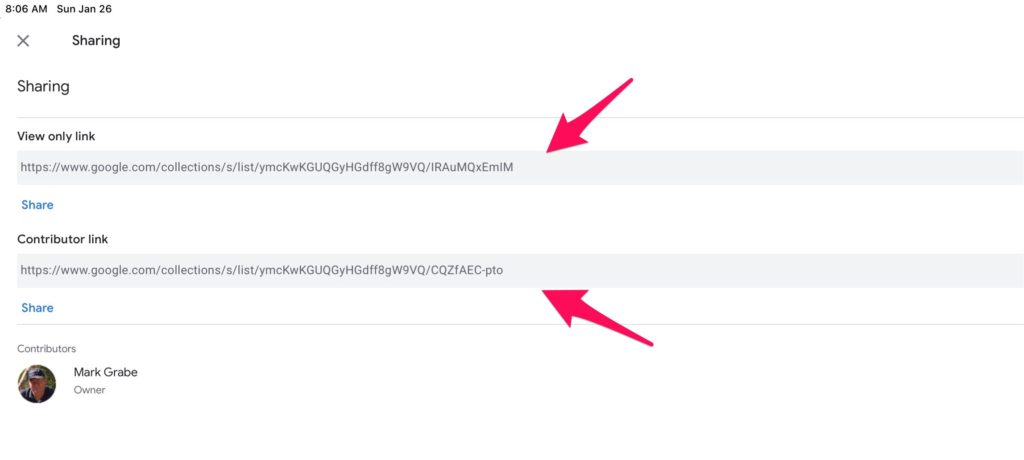
There are two sharing options. One offers “read only” access. This would be the approach if a teacher created a collection and wanted students to examine items in the collection. The link identifying the collection would be shared with students. The other option opens up the collection to a collaborative process. This link would be shared with students who then could use the Google browser to add and view links.
Loading

Google Alerts

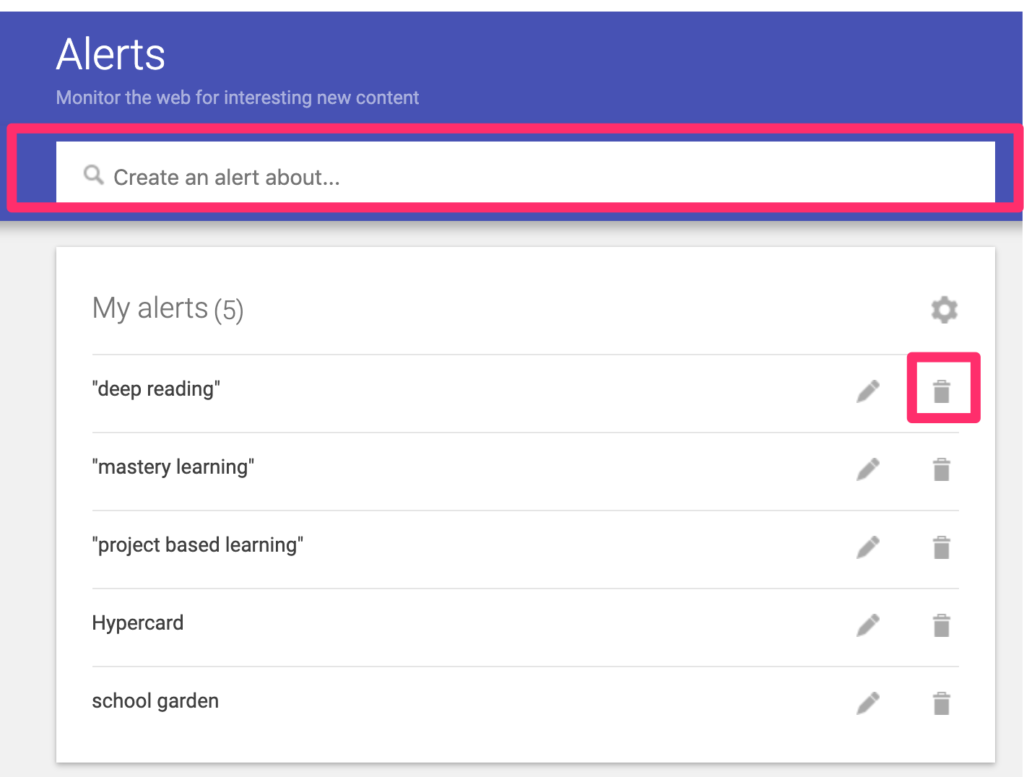
Google Alerts allow a user to create an automatically repeated search that returns results to a designated email address. The easiest way to set up a search is to use the address https://google.com/alerts from your browser. This address will display existing alerts you have established, provide a way to terminate an existing search (see trash can following an existing search), and the search box for a new alert.

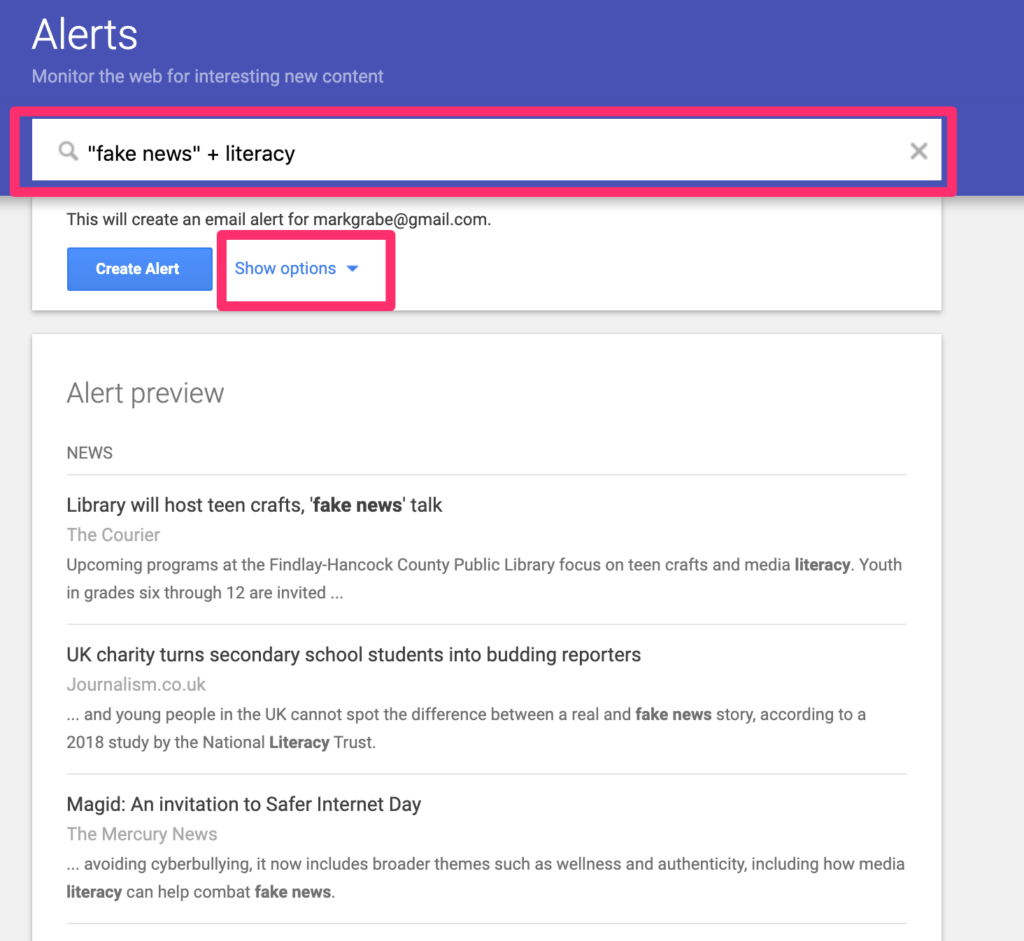
Your search to generate an alert using the same rules you would apply in implementing a one time search. Samples of what these descriptors will generate appear when the descriptors are entered. It is helpful to set specific options you would like to apply.

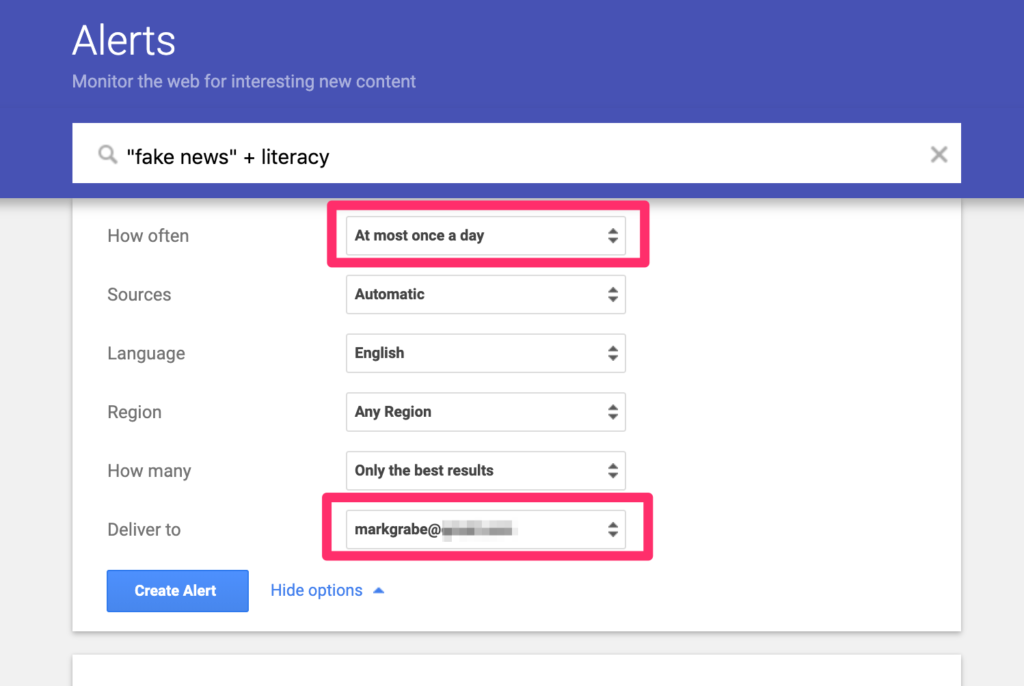
The following options allow a user to control parameters such as the address you would like to be used to return results and the frequency you would like to receive results.

Alerts offer educators a convenient way to follow topics on a permanent basis or for a time period during which a specific category of information might be useful. Alerts are perfect as a way to return current information relevant to a classroom project.

The following video takes you through the process I have just described.

Loading

Chrome extension to locate CC images

Richard Byrne recently described a chrome extension allowing users to locate images available with creative commons (CC) licenses. I have authored several posts over the years on using CC licensed photos so I thought I would give the extension a try. Here is the download site for the extension.

The extension works in a strange way. Typically, an extension is applied to what you happen to have active in your Browser, but this extension operates independently of your existing activity and is very much like opening a new site.

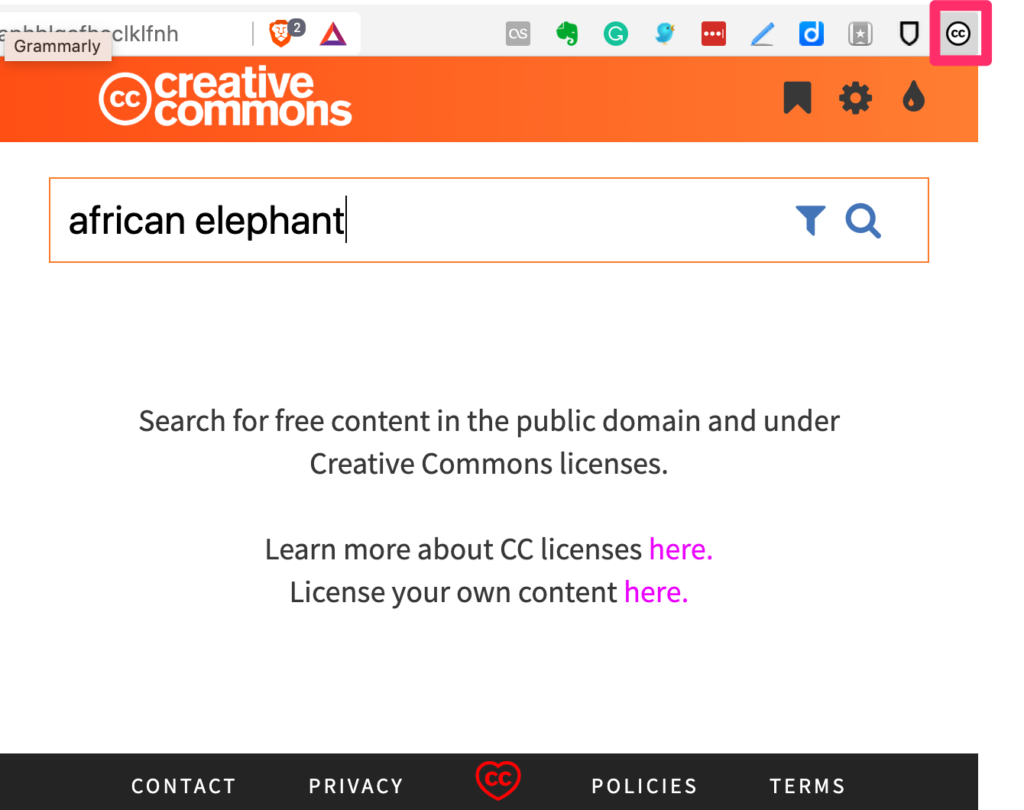
Opening the extension (see red box around item in menubar) opens a display that contains a text box allowing a search.

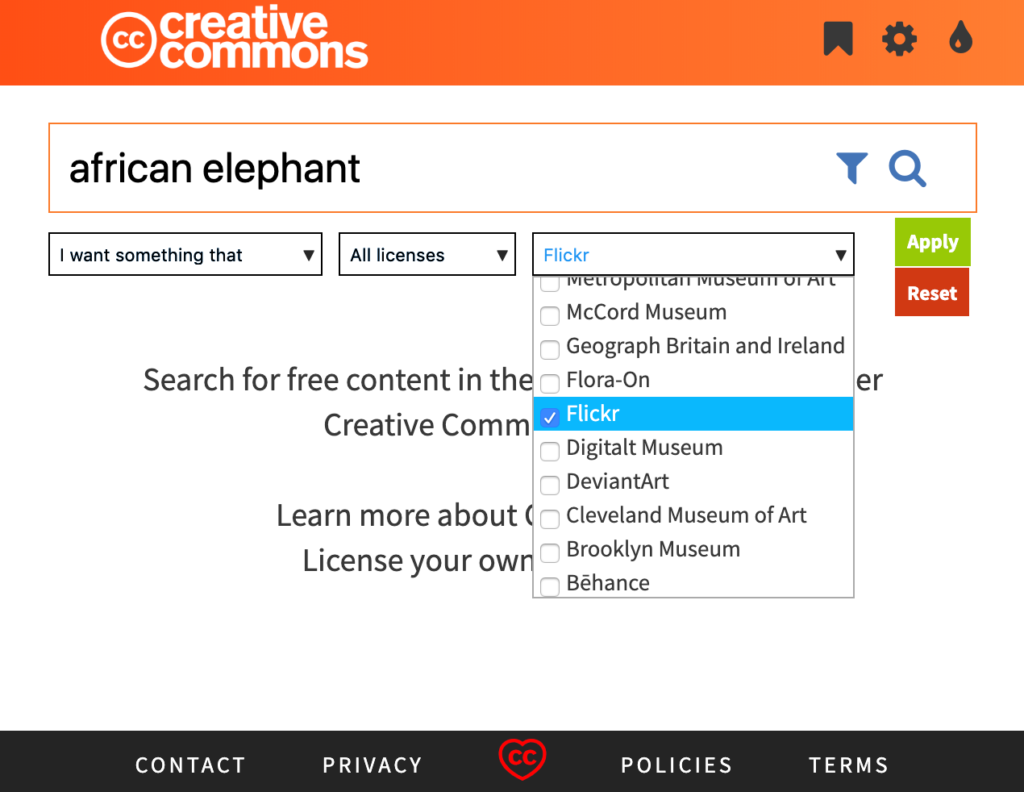
Your search can be filtered to designate the sources you want to investigate. I was curious to see if the search would locate elephant images from Flickr I had assigned a CC designation so this example is based on a search of Flickr.

Even searching a single source, I located many images in response to my request. I got tired of searching and did not find any of my images. I realized that many great images were taken in zoo settings so I guess this was to be expected.

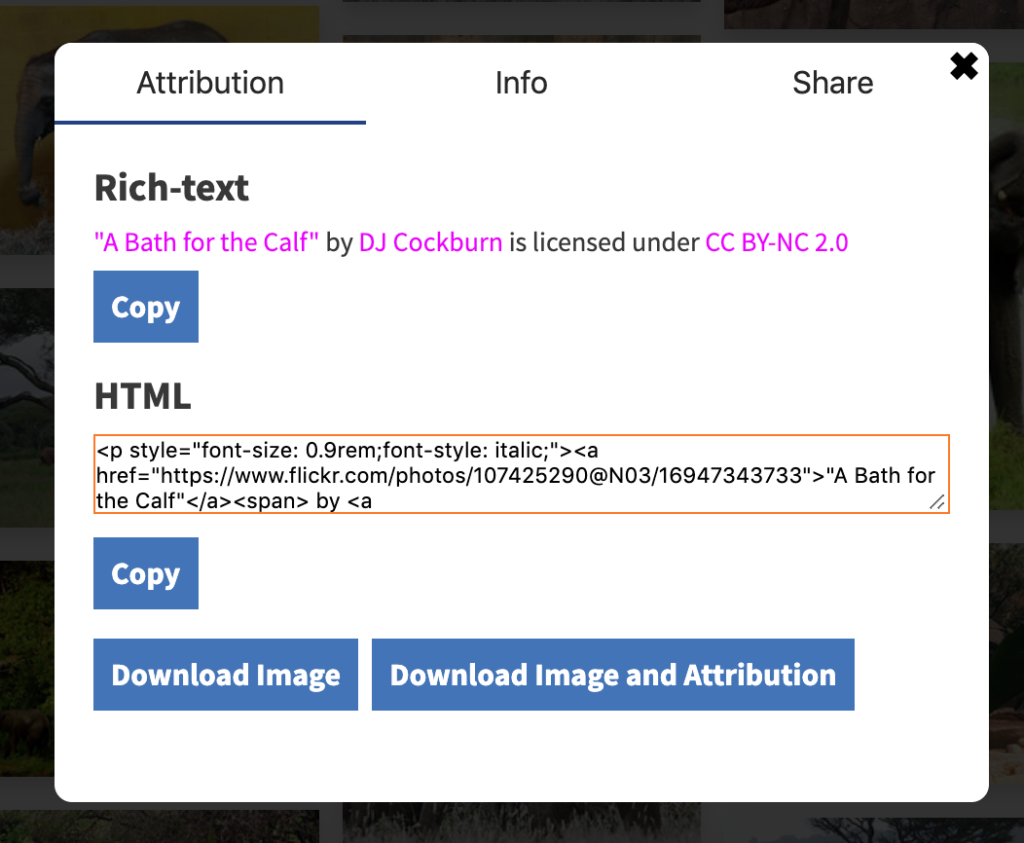
Double-clicking an image brings more information about the image, a way to embed the image, and download buttons for the image and an attribution statement.

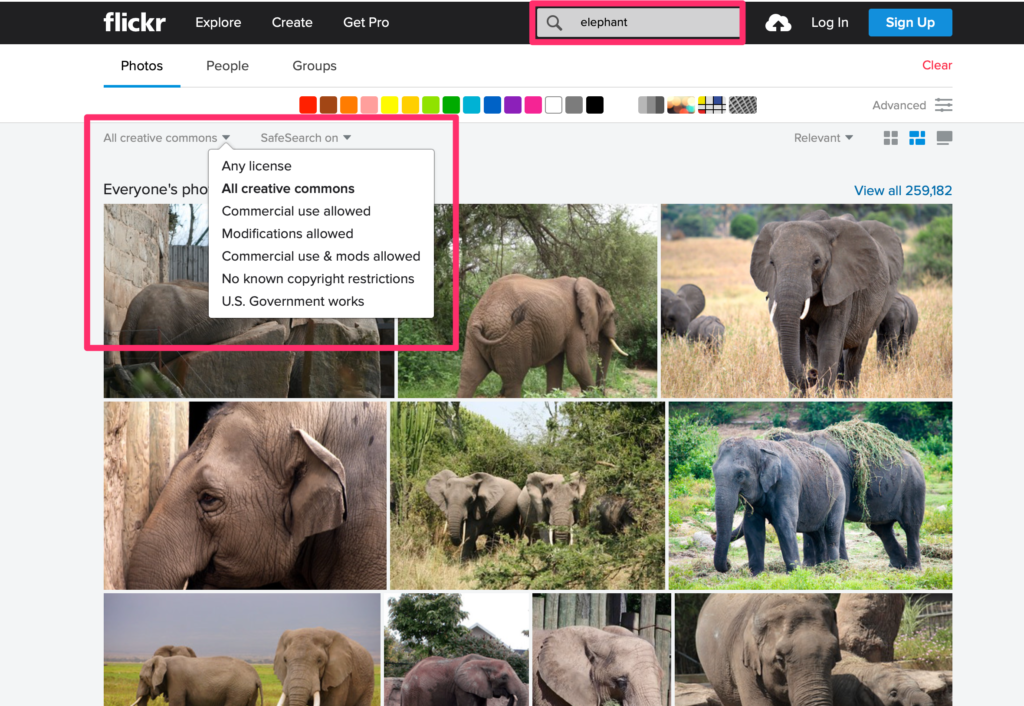
Quickly, here is a contrasting approach from Flickr. Visiting the site allows a search (see search box) and a drop-down menu specifies the various CC licenses you can use to filter your search.

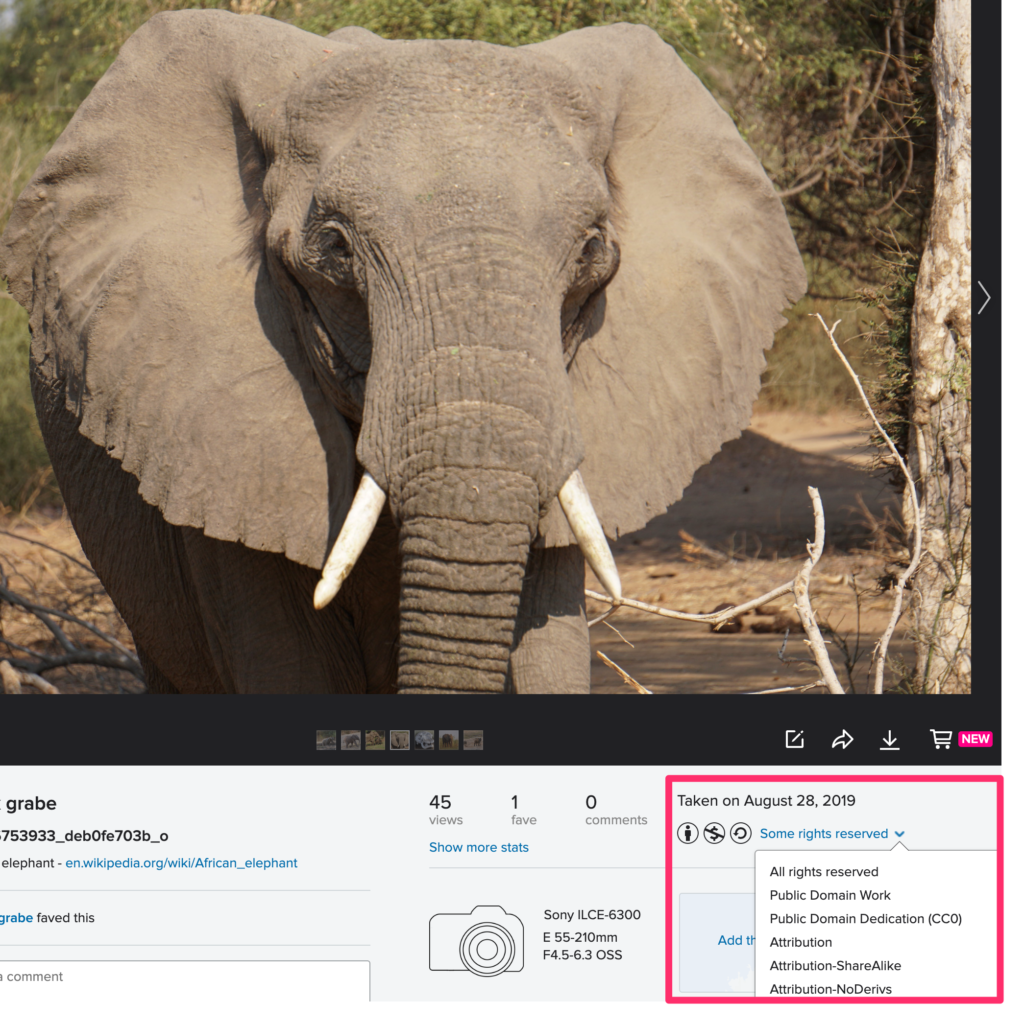
Here is the upload side of CC designation within Flickr. Once the image has been uploaded a dropdown menu will appear associated with that image (use the Some rights reserve link). As a content provider, you then select the license combinations you want to apply.

Loading

Layering for learning

A few years ago now, I began promoting a concept I called layering for learning. This effort combined my personal interest in developing and applying skills that others might call studying with my interest in technology. Of the various learning activities involved in education, I would argue that studying tends to be one of the most overlooked of education and yet what is conveniently described as studying in a formal education setting is the basis for the learning we do throughout our lives.

The distinction between studying and say reading can be quite important. For example, the concern that has been associated with reading on a device ignores the special benefits a device can provide in studying a text. Highlighting, note-taking, searching the large archive of the content that can be identified and expanded through highlighting and annotating a large body of content (a textbook), sharing efforts at personal understanding, searching for confirming or disconfirming evidence, and so one are powerful advantages for the use of technology in studying. Where can learners develop the skills in applying such tactics to digital or paper-based studying and who will help teach these tactics?

Layering for Learning is intended to target a carefully defined body of content; i.e., the content offered online which may or may not be designed as a learning resource. When I teach these ideas, I often associate it with the concept of teacher as designer to emphasize the distinction between content designed for education and the additional work educators should do to help learners with content not designed for instruction. This more general purpose content could be text-only, multimedia, or video. I am interested in this body of content because many educators value the authenticity of such sources and because there are important copyright issues associated with this content educators should recognize. We are also becoming aware that this type of content comes with added challenges as it must be vetted by a learner for factual accuracy. Add verification to the studying skills that must be acquired.

I define layering as a technique that adds elements on top of the content provided by an Internet source which does not actually modify that original source and retains all of the expectations the content creator might have had when providing this source online. For example, if a content creator assumed her/his content would be displayed with ads, the ads will be visible and responsive when a learner studies layered content. If a content creator relies on the frequency with which her/his content is viewing as a revenue metric for a sponsor, layering still requires that the server providing this content continues to send this content each time it is viewed. A layered experience actually combines information from two sources (the server sending the original content combined with additional elements from the layering service) that are experienced by the learner as if the combination originated from a single source. 

The elements that can be layered vary from service to service but include highlights, comments possibly including links to other sources, questions, discussion prompts and shared replies, and diagrams or images. Again, depending on the service, these elements can be provided by an educator or generated by a learner. The elements can be shared socially or shared in a limited way to individualize the experience of providing analysis and feedback. Some services allow the tracking of the use of elements through a dashboard used by the educator.

I have developed both a Primer available from Amazon and free online video tutorials associated with several different free and commercial services that allow educators to utilize these services in their classrooms. The Primer is intended to explain how the layering tactics facilitate studying and provide examples. The tutorials are focused on how to set up and assign the layering services.

My focus on layering is restrictive to allow a focus for my writing, but the concepts apply to other tools such as Edji or Newsela that allow the application of similar tactics, but assume the educator has the rights to the content to the content that is being studied. The same goals of developing technology-based study skills can be developed within these environments.

So, if interest, I encourage your exploration of a few of my free tutorials. If these tutorials spark an interest, the $3 primer might be worth the investment.

Loading

Decade of Web 2.0 Decline

I thought I should give some thought to authoring a comment on the technology decade now ending. For me, the 2010’s was the decade of Web 2.0 decline. I have always attributed the phrase Web 2.0 to Tim O’Reilly whom I think it appropriate to say popularized the phrase, but the Wikipedia source of all knowledge claims the phrase was first used by Darci DiNucci. O’Reilly noted that the Internet in the early 2000’s had become a platform allowing applications to be available on the Internet rather than being limited to the desktop. In addition because of their online presence, these applications offered a social opportunity. The notion of participation via the Internet was a hopeful way to look at politics, global awareness, and learning.

My wife and I had an educational technology textbook at the time and the generative potential of this shared social space and the opportunities to create in several formats fit very well with a core concept in our writing. Several alternatives to the phrase Web 2.0 captured our thinking more effectively for educators. The same collection of features labeled Web 2.0 was sometimes called the Read/Write web or the participatory web. We adapted concepts such as Writing to Learn and Teaching to Learn to the generative and social opportunities Web 2.0 made available.

We tried to stay true to the participatory opportunity of Web 2.0. I had the opportunity to run personal servers when I was still working at a University and had web pages as soon as this became possible. My original blog launched in 2002 using early Blogger software you could run on your own equipment. The promise of wikis was also appealing and I developed a wiki focused on the potential of “The Participatory Web” to explore the potential of a textbook offered using this tool. While wikis are by intent designed to encourage participation and shared authorship, my interest was mostly in using this software as an easy way to offer content and I did not allow others to modify what I had written. I did use a shared wiki in my graduate Instructional Design class. The wiki content from my personal server was eventually modified for sharing as linked pages using WordPress as the software for this platform was easier for me to keep current.

I have had a sense that online participation is fading. I recently came across a BuzzFeed article making the same observation and examined possible explanations. The following excerpt offers the core observation from this article.

The internet of the 2010s will be defined by social media’s role in the 2016 election, the rise of extremism, and the fallout from privacy scandals like Cambridge Analytica. But there’s another, more minor theme to the decade: the gradual dismantling and dissolution of an older internet culture.

The BuzzFeed article goes through the decline or closing of multiple services (e.g., MySpace, blogs, Google Reader, Flickr) and offers some general concerns. For example, does the elimination of services users have contributed to for years lead to a skittishness with investment in new platforms. A version of this same problem occurs when services move from one company to another and the new company changes the rules (e.g., Flickr). I have the luxury of renting server space so I am less dependent on what individual companies decide to do, but the downturn of interest in reading online content generated and maintained by individuals determines whether there is an audience for those of us investing in this model of authoring.

I wish I could offer a remedy. I am most concerned that the educational opportunities of writing to learn will become less attractive without experienced educators and an authentic audience for student work. My project for this year’s winter trip is to update my participatory web site to offer more current tutorials and argue that participation is a partial remedy to the dissemination of false information. Too much consumption and not enough contemplation and participation would seem a reasonable way to address what we now face in the decline of Web 2.0.

Loading

News – spin and truthfulness

Helping learners contemplate the truthfulness of information is becoming an important objective for educators. The focus has frequently been on evaluating the value of a single source. A different perspective might target knowledge of the orientation taken by sources. The reality is that sources may align themselves with different political perspectives – liberal or conservative – and slant their messaging accordingly. This is often described as spin and concerns not so much the factual accuracy of what is reported, but what is emphasized or ignored and how the facts offered are explained.

Attempts to identify how different news sources exist and one of the most useful in my opinion comes from adfontsmedia. This organization categorizes sources along multiple axes – reliability and bias (spin). Within this two dimensional space the organization positions sources you likely know (e.g., CBS, Fox News, CNN) and some you don’t (e.g., Alternet, Info Wars). The methodology used to position news outlets is based on expert analysis of a sample of multiple articles from sources. The organization offers educators both free and paid resources for classrooms.

Loading

The popularity of teaching as a career in steep decline

We depend on education to address so many important issues in society one might think that the importance of those who serve this general societal need would draw the best and the brightest. Data from universities and colleges offer a very different picture. Enrollment in teacher preparation programs nationwide has declined by more than 30% and the decline in some states (e.g., Michigan, Oklahoma, Illinois) is greater than 50%. This trend despite what has been described as a generally better economy and an increasing population requiring more teachers.

Teacher compensation is certainly part of the problem. Teachers make 21% less than those with other BA/BS degrees. This differential can be interpreted as a reflection of many factors, but this differential has decreased greatly in recent years. The difference has increased over the last thirty years. Many news outlets have described the needs for teachers to pay for part of their own classroom resources and have brought attention to the multiple teacher strikes that have occurred this past year. Yes, teachers are striking for more money, but also over issues of the number of students in their classrooms and other student-focused issues such as access to counselors.

The public has common issues when it comes to education. A frequent complaint is that teachers work 9 months a year and I assume that many contrast this with their own year-round employment obligations. Not teaching year-round is a condition that teachers themselves created. Many do look for other employment options during their time out of the classroom, but if you considered what you might do when out of work on a regular basis it should be clear that the options are limited. One in six educators has at least one other job and this is not a function of being unemployed in the summer. During the early years of work, most educators must also spend time and money seeking the graduate work necessary for them to advance on the salary schedule and to meet expectations for professional status in some states.

There are some issues that do irritate me about the behavior of some teachers. I attribute many of these issues to the vagueness of whether being a K12 teachers is a profession or a job. Teachers themselves seem to see this differently and I don’t think this necessarily works to their benefit. How many hours you work and having a balanced life are positions on work I don’t associate with professionals. I agree that more are talking about work/life balance, but to me professionals primarily worry about the quality of their work. You complain about the demands that limit this goal – responsibility for too many people and too many expectations for what is to be accomplished, unnecessary tasks that compete with primary responsibilities, lack of support from those you seek to help, and lack of resources important in achieving the goals of your profession.

I am also troubled by the perspective of outsiders than anyone can teach. Sure, it is great that programs encourage young people to dedicate a few years to education, but at least the area in which I work (classroom application of technology) shows that it takes several years to reach a peak in application. Data on classroom applications that show this growth over the first half-dozen or so years makes some sense. The complexities of the classroom and school setting require some experience and there are priorities that are focused on early with more advanced skills that involve innovation appearing later. As educators gain this experience there is also the reality that they must continue to invest time to make use of new methods and address new problems society expects educators to solve.

Loading