Researchers investigate topics most of us don’t consider as questions. A recent article in the Sydney Morning Herald summarized human factors studies related to email use. I really don’t follow this paper but read a description of the article on Slashdot.
Email proves very distracting for some users who feel the need to constantly check email. According to the article, it takes approximately a minute to recover your “train of thought” AFTER checking your email. So, it is not just the time to process the email, but the added inefficiency once you return to your primary task.
Hmm, this explains a lot …
Now, what was I working on before I decided to check my bloglines and write this post? There are addictions worse than email.
The potential of photography as a generative learning activity has always appealed to me. I am mostly a Macintosh user, but I realize that not everyone shares my choice in equipment so I try to keep up with options for the Windows OS. You can use the online photo sharing site whatever your choice in operating system. What I have searched for is a low cost alternative for collecting, organizing, and annotating images similar to iPhoto. Picasa is such an application. Actually, iPhoto is low cost, Picasa is free
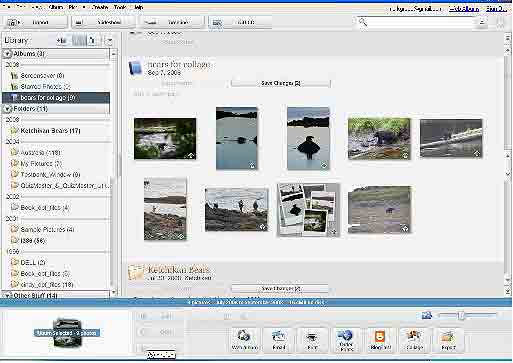
I found the newest Picasa sluggish, but I am guessing my old hardware was at fault. The YouTube video linked above showed a much more responsive experience. The layout is very similar to iPhoto and I was able to duplicate what I saw in the video without difficulty.
There are some things in Picasa that are not available in iPhoto. The opportunity to organize a collection of images as a collage offers a nice way to present images associated with a theme. Organizing the images within the collage is what caused me the most difficulty with response speed, but the product is of high quality. The collage appearing below is approximately 50% of the size of the original.
Picasa the app and Picasa the photo sharing site do work together and it is easy to upload an album. I have attempted to match a set of photographs and one Flip video to allow comparison. I realized after completing the process that it is impossible to unconfound the application from the social site, but a more straight forward comparison will have to wait.
Wordle is a program that makes word clouds of text (previous post). Most common words are included and the more frequent words appear in a larger font. Someone decided it would be interesting to run the speeches presented at the recent conventions through Wordle and the results were posted to the Wired web site. Not sure what it all means, but it is fun to compare the images.
Google was officially incorporated 10 years ago today and for good or bad the way we locate information has forever changed. The BBC provides an interesting summary of the Google decade.
Google’s company motto could quite as well be: “Anything you can do I can do better – and for free.”
The tech news the last few days promoted the arrival of Chrome – a browser from Google. If you are a windows user, you can download Chrome now. Mac users will have to wait (you can sign up for information).
I downloaded Chrome and took a look. My first reaction was – nice browser, it seems to work. I have been trying to read some things online to try to determine what I am missing. Why spend the time and money to generate another browser. There are a few things you notice from the demos. You can type anything into the web address window and if the entry is not a web address the browser assumes you want to search. That is a little different. I think it is called the “omnibox”.
The Google folks must have anticipated that “the differences” would not be obvious so they commissioned a comic book to explain things. As I understand some of the technical details, the present advantage lies in independence of processes (one page can crash and this will not influence another page), a new implementation of javascript, and a more socially-based method of debugging (using automated feedback from willing users). The independence thing is technically interesting – each “tab” kind of works like another browser. I can’t really say my browser crashes frequently, bit perhaps this will be a larger issue as we move beyond viewing pages and on to more demanding apps.
From other sites, I get the feeling this venture also has to do with a browser that can be trusted to support the “cloud apps” that Google sees as the future. In offering users a browser, Google knows there will be a browser that works well with other Google products.
The missing piece at present seems to be “plugins”. The comic books describes some of the issues with plugins, but plugins and other add-ons offer the features I like the most in Firefox. Plugins in some form must be on the way.
What could be wrong with another browser? Have you ever had the experience that a function you want to perform (e.g., Yepshot) is only available on another browser? The occasional annoyance aside, I think it is a good thing that there are multiple competitors in any field.
Now, if Google could just get their Mac version finished so I could invest enough time to really see how things work.
I wonder if the IE for the Mac will ever resurface.
Cindy forwarded a post by Kim Cofino that describes how to share a Gmail account with others (e.g., an elementary class). For whatever reason, Google allows the attachment of additional information to the name in a Gmail address and this additional information could be the name of a student (for those who are familiar with web forms, it appears to work in a similar manner to the attachment of variables to the URL). For example, information could be added to my Gmail address as follows: markgrabe+cindyg@gmail.com.
As I read the post, this hack does not get you all of the way to where you want to go. You need to also add a filter to gmail to recognize expected additions (in this case the names of students). With the filter, when the filter is tripped by an incoming email, a label appears in the Gmail sidebar. So a filter set to detect cgrabe would be triggered when incoming mail was addressed to markgrabe+cindyg. Once applied, students could connect to the common account and check the sidebar to see if they have received any email.
The Cofino post includes a link to a screencast that offers a demonstration.
Is this worth the trouble? I would assume the value is in convincing the administration that you will take responsibility for the email of your students because you will have the capability of screening all material.
Could the system be abused? I would think so. There is not really a way to set priviledges to my knowledge so you still really have one account and no way to identify who might be sending outbound mail or who looks at what within the mail received. With access to the account, couldn’t you assume the identity of the teacher or any other student?


You must be logged in to post a comment.