I can’t say that I anticipate Edge becoming my daily workhorse, but it seems suited to one process I do a lot. I locate content, annotate and highlight that content, save what I have marked up, reflect on several marked up documents, and then write something. I have a system for doing this from PDFs (mostly journal articles I download), but I have yet to find a perfect system for doing this with web content.
Edge has what I regard as reasonable markup and share tools built in. I can’t really say that build in tools are better than capabilities added as plugins or extensions, but I am just guessing that there is an efficiency advantage. As long as a browser does not integrate too many capabilities, built in would seem to offer advantages. This is the present state of Edge.
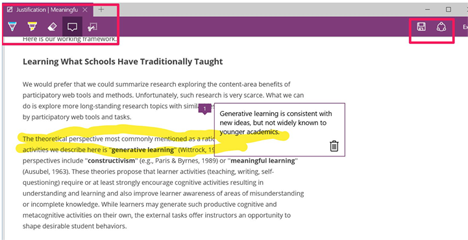
The icon to activate the annotation/highlight options appears in the upper-right corner of the browser display.
Selecting the annotation icons opens up a tool display (top left-hand corner). You can highlight, write/draw directly on the browser image, or add a text comment. Your finished work can be saved to OneNote or shared to several to one of several options (I save work to Evernote).
My only complaint at this point is the method of highlighting. I would prefer a highlighter that carefully follows a line of text. The Edge highlighter is used like an actual highlighter meaning my highlights come out messy rather than neat.
Many who read this blog may be unfamiliar with RSS and RSS readers. By some accounts, RSS is an old technology – still around, but not the way most now discover online content to read.
I still teach my advanced ed tech students how to use RSS to follow online sources. I make no apology for this. I expect technology leaders to be better informed than those who such leaders propose to assist and I believe RSS offers an approach to controlling awareness not available with social services such as Twitter. RSS allows the learner to identify valued sources and follow these sources for updates. It does not rely on others to locate and then share information from such sources. RSS and “social discovery” have unique advantages and disadvantages and I believe it is best to combine the approaches rather than to rely on one or the other.
If you are unfamiliar with RSS (real simple syndication), think of it as a way for a user to receive notice when sites the user designates have been changed. Such a system is particularly important with blogs and podcasts. A user might follow hundreds of such sites each of which may be updated on an unpredictable schedule. It would be highly inefficient for the user to go to each site and see if something has changed (a new post or podcast has been added). An RSS reader takes care of the searching and offers a user a list of just the updates.
I am presently using three “readers” (obviously more than I need, but I try to experiment to be able to offer recommendations). These readers include Feedly, Reeder 2, and NetNewsWire. I work mainly from Apple hardware and I use these services on both the desktop and the tablet. I have paid for accounts for Reeder and NetNewsWire. Feedly would possibly be my favorite, but their “pro” account requires a monthly fee. I prefer to pay one time and so use the free version.
Feedly
Reeder 2
NetNewsWire
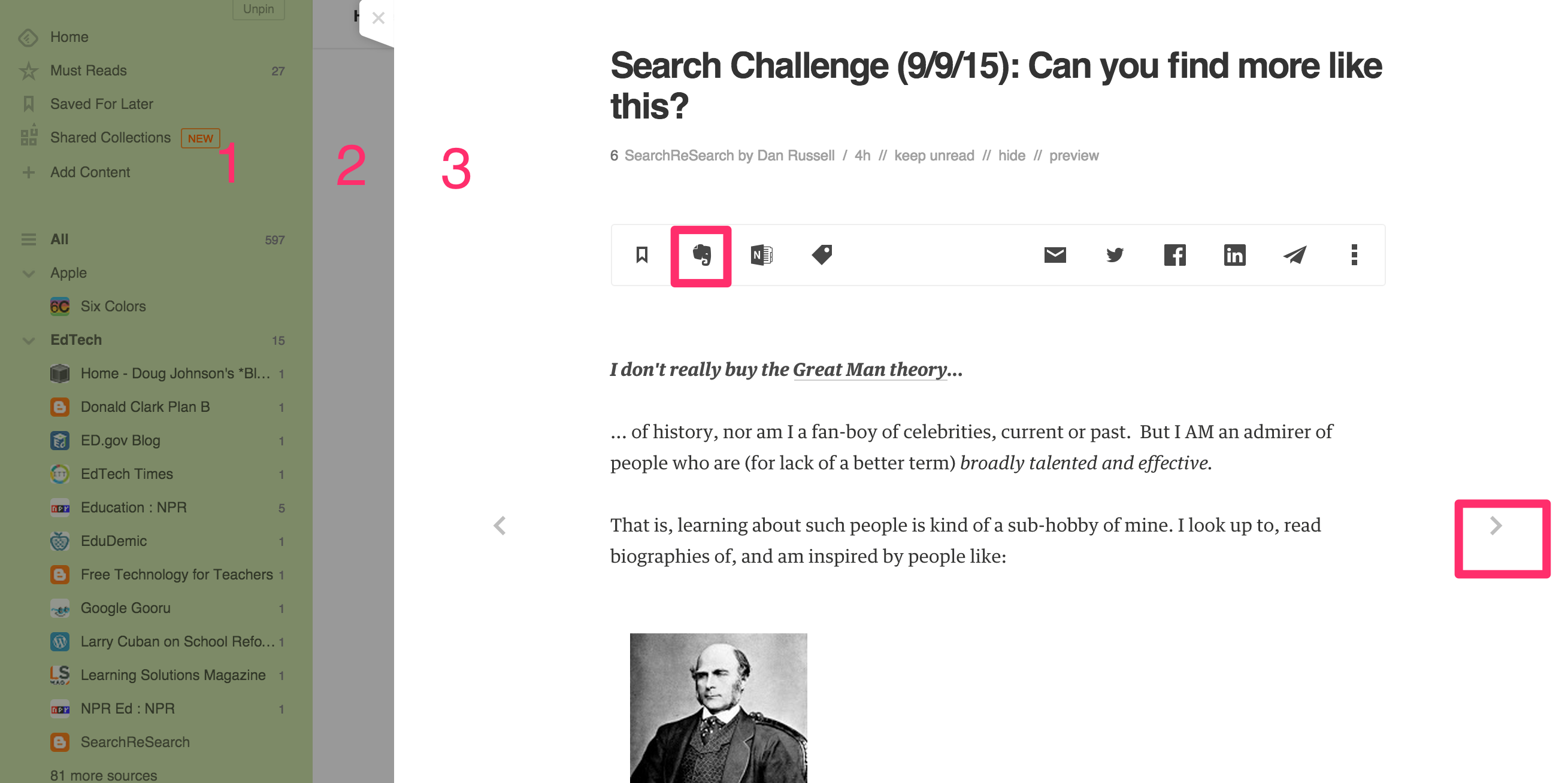
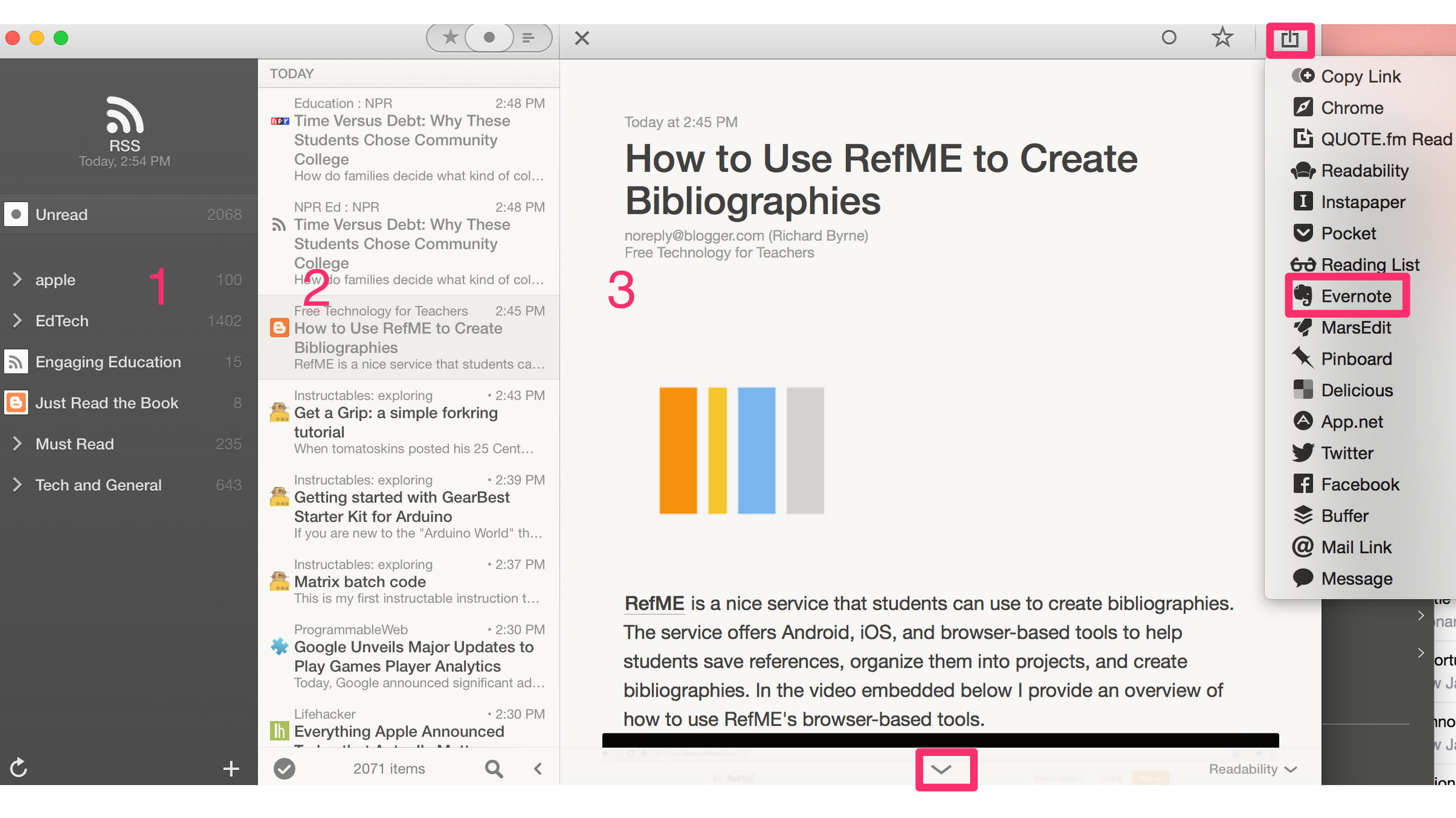
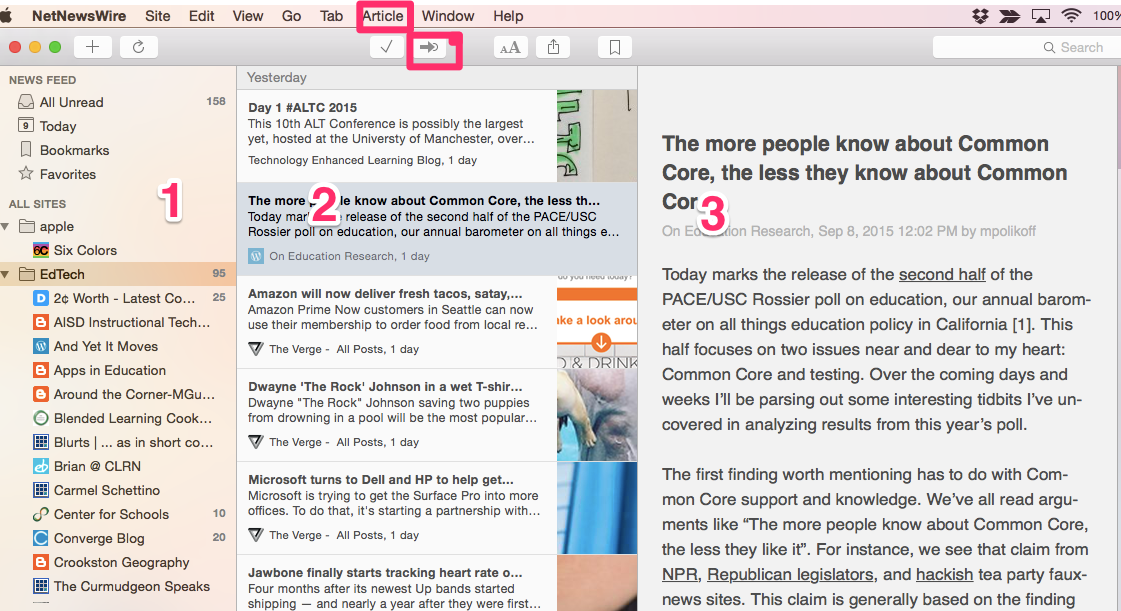
What you see here are the desktop views for all three services. The systems look very similar. Each has three panels (not all may be visible) displaying the feed sources, the headline view, and a detailed view. The detailed view may contain the entire article or it will contain a smaller portion if the author has limited the amount of content to be made available via RSS. I use both the desktop and mobile apps, but prefer the desktop view because I like to scan the detailed views. I can do this quickly on a larger screen. Each service offers a button for moving from post to post (identified by a red square).
I use an RSS reader in a particular way. I prefer to use the readers to scan content and to save the material I want to use for some future purpose to Evernote. All readers offer some way to “share” content, but Reeder 2 works best for me. Evernote sharing is a “pro” feature in Feedly and not one of the present options in NetNewsWire. For those who do not mind an extra step, there is an easy work around. You can open the original article in a browser from the reader and then use an Evernote extension to upload the content from the browser.
It is time for new students to report to campus. An interesting controversy has developed over the issue of which students go where. Should institutions use the ACT or SAT to determine which students are allowed to attend. Some institutions have decided to drop these tests proposing that this move allows greater equity of access. The true motives of these institutions have been called into question.
I spent a good part of my academic career instructing and researching the study performance of beginning students. Let me say from personal experience and from the data I collected that allowing poorly prepared students into a college unsuited to their needs is not doing anyone a favor.
As a researcher, I did not use SAT or ACT data in my work. I primarily made use of a measure of reading skill. My course of interest was the Introduction to Psychology. I taught large groups of students and a major part of the student’s grade was based on several multiple-choice question exams based on student understanding and application of lecture and textbook content. My interest as a researcher was in study behavior and I made heavy use of an online study activities allowing me to operationalize how well, when, and how much students studied textbook content. My interest was in evaluating how such variables were related to examination performance.
As one would expect, reading comprehension skill was strongly correlated to examination performance. Without going further, in the large course environment in which I worked, I would suggest that poorly prepared students are going to struggle and allowing admission as an equity commitment may simply set certain students up for failure.
My research goes further to address related issues. I will say that my main research interest was to see if I could create online technology tools to assist poor readers in identifying specific areas of failed understanding to improve self-remediation. The biggest problem in publishing my research over the years was this. I continually ran into a problem that would call into question any effort I might make to evaluate the value of my intervention strategy. The problem was that more effective readers made greater use of the study tool than the poorer readers. This alone is a very interesting finding, but not of great value if what you want to do is develop cost-effective ways to assist poorly prepared students. Use of my study technique was predictive of higher examination performance, but use of my technique was also predicted by being a better student.
I am not defending the use of textbooks, multiple choice examinations, or large classes for the least experienced college students. Each of these issues would warrant a much longer analysis. Whatever one thinks of any of these issues, one important reality is that the commitment to each of these tactics is partly determined by the cost of higher education. I would have loved to work with groups of 25 intro students, but large state institutions cannot make this approach work on the tuition students are willing to pay.
So, having struggled with this situation for many years and having spent countless hours attempting to develop interventions that I felt would partly respond to the cost issue, I must say that increasing the range of aptitude, background knowledge, motivation, etc. of students at the beginning level is not a strategy that will be successful without major interventions that are likely to be expensive. I would include as a short list – smaller classes and much more personal contact.
A recent Hechinger Report offers an analysis of the technology utilization of those who prepare future teachers. The report provides to those of us who specialize in learning with technology what seems a familiar analysis. The report makes the observation that college educators are familiar with technology but they are not necessarily prepared to adapt this experience to classroom use. This sounds very much like what ed tech profs often say about the future K-12 students in their classes.
The Hechinger Report notes that:
there are no national standards for teachers of educators when it comes to integrating technology into the curriculum, according to the American Association of Colleges for Teacher Education, a voluntary national association of teacher preparation programs.
The concern is that future teachers will teach as they are taught and a dedicated “technology for teachers” course does not allow the participants to experience technology as learners. Learning about teaching with technology and learning with technology may have different roles in the influence of future professional behavior. This has actually long been the case. Back in the days of PT3 (the Preparing Technology to Teach With Technology grant program), our applications were based on the commitment to provide future teachers with opportunities to observe K-12 teachers who we knew to be doing interesting things with technology in their classrooms. I admit when the resources were gone the future teachers were back to observing their college professors.
I must say I find it interesting that so little has changed in the past dozen years. While I understand that “content” courses are more similar to the courses future secondary teachers will end up teaching, getting faculty outside of education colleges to change teaching methods when faculty of education colleges do not lead will be difficult.
This is a repeat from 2002 with a few additions. What a wild ride it has been. After 5 editions we a commercial publisher, our book is now available through Kindle in combination with some online resources. The online resources are available at no cost to all. The Kindle edition is approximately 15% of the cost of the 5th edition from the publisher.
The True Story of How Mark and Cindy Became Authors (Short Version)
Scene 1: Visitors Center – Theodore Roosevelt National Park (early 1990s)
Mark and Cindy discover the North Dakota Wildlife Coloring Book. This coloring book consisted of simple line drawings of North Dakota fish and animals. Mark and Cindy recognize that these images might be scanned and used in student projects. Mark contacts North Dakota Game and Fish to obtain permission to use images in this way. (Note: He later offers a proposal to Game and Fish that if they would hire an artist to create a more complete series of images, he would digitize the images, create a HyperCard stack to organize the images, write a short manual of suggestions for classroom use of these images, and distribute these materials to teachers. State Game and Fish names Mark Grabe to the Project Wild Advisory Board. The clip art collection still lives and is now available online.)
Scene 2: Pam Carlson’s Classroom – The Butterfly Project
The first major classroom project actually created using coloring book images was conducted in the classroom of second grade teacher Pam Carlson. Pam was known to us as a creative teacher interested in involving students in projects. We worked with Pam to implement several projects involving butterflies. One of the projects made use of clip art generated from a butterfly coloring book. Students each were assigned a butterfly, learned as much as they could about “their butterfly” from library resources, created a picture incorporating the butterfly image within Kid Pix, and eventually create a three card, Hypercard stacks incorporating the colored butterfly images and the information the students had learned about the butterfly. Newer versions of the butterfly project are still described in our books.
Scene 3: Some large bookstore in some large city (the details are a little vague)
Mark and Cindy are attending an American Educational Research Association Convention and are exploring a large bookstore (at the time we did not have this type of mega-store in Grand Forks, North Dakota). In this store, we locate a large collection of topical coloring books. There are books on plants, animals, Native Americans, historical events, etc. An idea emerges. Perhaps the company producing all of these resources does not realize just how useful all of these images would be to teachers in a form appropriate to computer supported projects. Perhaps the company would be willing to repurpose these coloring books as clip art collections and market the collections to schools. The company publishing all of the coloring books was Houghton Mifflin.
Scene 4: Loretta Wolozin (Houghton Mifflin Education Editor) Visits the Grabes in Grand Forks
When Mark returns home from the convention, he writes a proposal for Houghton Mifflin. He proposes the development of a product that would consist of a disk of clip art, a copy of the coloring book, and a short manual that would both establish a rationale for curriculum related projects using the clip art (history, biology, etc.) and would explain how to create several specific types of projects (incorporating clip art in word processing documents, incorporating clip art into more complete images using a “paint program”, simple multimedia projects using HyperCard). The proposal and a couple of sample projects are sent off to Houghton-Mifflin.
Nothing happens for several weeks. Eventually, Mark receives a call from Loretta Wolozin. She explains that the trade division (I think that was what it was called) was not interested in the clip art proposal. However, somehow, the proposal for a coloring book related clip art collection had come to the attention of someone in the college division. It turns out the ideas for how students might use technology are regarded as different and interesting. Loretta, who has the responsibility for the books used in the preparation of teachers, wants to know if she can fly to Grand Forks and look at some of our work. I can’t say I have taken many phone calls like this. Loretta came to Grand Forks, sat in front on an Apple Macintosh LC and went through our examples of student projects. I guess she liked what she saw. We are asked to submit an outline for a book and sample chapters. The core of our books then and now remains authentic student projects.
The fourth edition of the book I have just described will be released in a couple of months. Among other things, this brief description is a way of thanking Loretta Wolozin, Pam Carlson and the teachers we have worked with over the years. Taking a chance on an approach that was different, when it involved learning new skills and new ways of doing things (in the case of the teachers) or investing money (in the case of Loretta), is still greatly appreciated.
There is probably another message in this story. We have enjoyed some personal success because of what most would describe as a string of fortuitous events (translate – we were lucky). However, if you are lucky enough to do work you find to be valuable, productive and fun, you don’t always have to search for opportunities. Sometimes, opportunities find you.
Classroom teachers who hear stories of innovative technology-using schools may find it difficult to imagine just how the alternate models work. Stereotypes such as the assumption that students spend most of their time working through online exercises are likely and typically unfounded.
Here is a resource we recommend to offer better insights. The Kahn Academy hosts a course, Blended Learning 101, that explains the philosophy and practice of blended classrooms and schools. The “course” was developed by Silicon Schools Fund and the Clayton Christensen Institute. Of course, the series is “pro reform”, but it is well done, filled with examples that offer a feel for classroom activities, and free.
Be informed about reform and take the time to consider these models and examples.
P.S. – There are some issues with the links. If you persist and return to the original site map, you can access all of the video segments.
I have been reading several books proposing various individual differences that should be addressed in instruction. I have long supported the use of technology to address differences in speed of learning, but the notion of learning styles or intelligences makes little sense (and has little empirical support).
The multiple intelligences proposed by Gardner make a good example. Robert Sternberg had a simpler system and made more progress in operationalizing the three intelligences he proposed and determining whether these intelligences demonstrated trait by treatment interactions in achievement. However, the books I read seem to focus on Gardner. I think the notion of individual differences in social, musical and motor skills resonates with readers. They understand that others can sing and they can’t or that others are better athletes or dancers.
The issue is really what differences in skill areas have to do with achievement in other areas. Since research success has little to do with whether or not individuals have a role to play in education, I will ignore the lack of empirical support and try to make my point in another way.
The common argument is that education typically focused on a certain kind of thinking – one or at most a couple of the intelligences. I would propose that these in the Gardner system are verbal and logical. I am ignoring art, music, and physical education for the moment, but I will get back to these areas. I will accept this position. Reading, writing, math, physics, chemistry, etc., do emphasize and involve linguistic and analytical skills. The question I would ask for those concerned about this focus is “Do we want to help learners develop linguistic and analytical skills or do we assume they should learn to compensate for lack of these skills?” While compensation may always be possible (I may be able to use my social skills to convince a colleague to write a paper for me because my linguistic skills are not at her level?), should developing coping mechanisms really be the goal?
We tend to make this argument commenting on linguistic and analytical skills, but what if we focus on some of the other competencies (I cannot use the term intelligences). I did say I would return to discuss other areas of talent schools address. Should I tell the football coach I would rather he focus on analytical skill because my son does not have the coordination to catch a pass or the endurance to run a lap around the field? What expectations should I have of the choral director? Isn’t the idea to develop whatever level of motor or musical skill can be developed. You might hope the football coach would not ignore social competence as team cohesiveness is a major component of team success, but in the final analysis, the goal is really to develop motor skills.
If the idea in addressing styles or intelligences is assuming that some trait by treatment interaction exists, I just have a hard team imagining how that would work for any given intelligence one might designate.
Manage Consent
To provide the best experiences, we use technologies like cookies to store and/or access device information. Consenting to these technologies will allow us to process data such as browsing behavior or unique IDs on this site. Not consenting or withdrawing consent, may adversely affect certain features and functions.
Functional
Always active
The technical storage or access is strictly necessary for the legitimate purpose of enabling the use of a specific service explicitly requested by the subscriber or user, or for the sole purpose of carrying out the transmission of a communication over an electronic communications network.
Preferences
The technical storage or access is necessary for the legitimate purpose of storing preferences that are not requested by the subscriber or user.
Statistics
The technical storage or access that is used exclusively for statistical purposes.The technical storage or access that is used exclusively for anonymous statistical purposes. Without a subpoena, voluntary compliance on the part of your Internet Service Provider, or additional records from a third party, information stored or retrieved for this purpose alone cannot usually be used to identify you.
Marketing
The technical storage or access is required to create user profiles to send advertising, or to track the user on a website or across several websites for similar marketing purposes.



You must be logged in to post a comment.