Geotagged Pictures – Amazing

I bought Cindy a new camera for her birthday, mother’s day, or some recent holiday. We have several very nice SLRs, but the camera I purchased had the unique capability of geotagging pictures as they were taken. In other words, the camera has a built-in GPS and coordinates are stored as part of the image file.

Cindy is preparing for some interesting adventures (e.g., a trip to Russia in September) and we anticipated that the geotagging capability would have some very interesting educational applications. We returned a week or so ago from the NECC convention in Washinton, DC and the trip gave us the opportunity to evaluate what we might be able to do with this camera.

I had intended to do this demo in Picasa, but it turns out the geotag feature does not presently function in the version available for the Mac. So, I return to my Mac fanboy roots and resorted to iPhoto. I try to be even handed but what works is what works.

So, here is what one can do with a collection of tagged images in iPhoto.

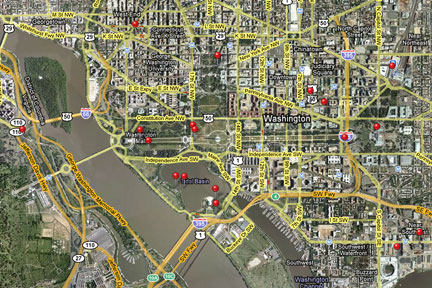
dcmap

Here is the map of the collection. You can click on a pin to see photos taken at each location.

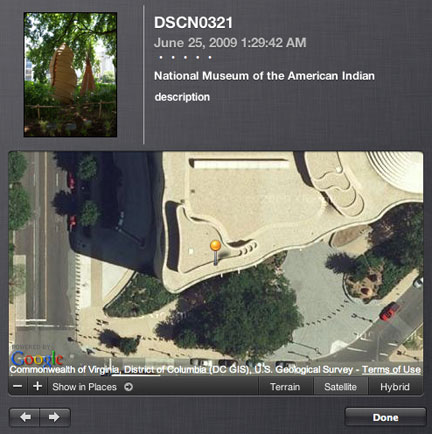
americanindianmuseum

Here is a photo taken outside the American Indian museum. You see both a small insert of the image and then the location as available from Google Maps.

whitehouseactual

Here is a photo of the White House.

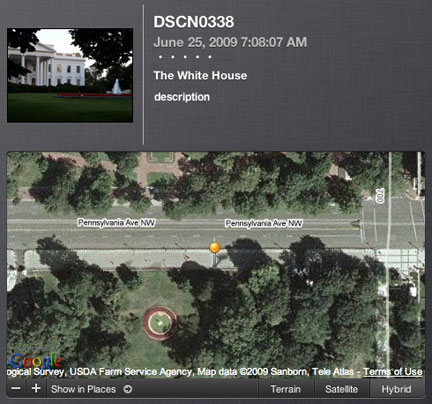
whitehousegps

Here is the the photo and the location identified by the geotag. At first the map information confused me – no white house. Then it I realized, we are standing on Pennsylvania Ave. on the other side of the fence shooting through the trees to frame the picture.

All images that appear here have been greatly reduced in size to fit within the form factor required for this blog.

Loading

Custom Search

Google offers the opportunity to create a custom search service and I knew this, but I had never considered potential educational applications until I heard Alan November present some ideas at NECC.

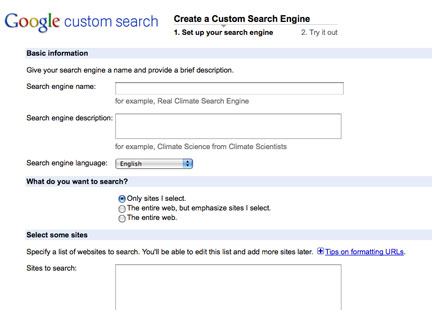
googlecustom

You can set up a search engine and control the web sites it will access (you can probably get the idea from the screen capture I have inserted above. You need a Google account to gain access and then locate the option under the list of Google Products (I can’t offer a link here because the link would not work unless you have a Google account). So, this was not new to me.

What I did not consider was that you can also control who can add sites to search and who can view and how setting these preferences might be of some educational value. Assume a tech coordinator sets up a search engine focused on useful web sites for elementary science and offers elementary teachers within the district the opportunity to contribute URLs. Perhaps the goal is to explore the wildlife of the state. Access to this collection could be made public or shared more privately. What might be made available to students as a consequence of this process might be a Google search engine that would then only return search results appropriate to the topic (level, focus, quality, etc..).

What follows is a custom search engine that will return hits from my two blogs. You can test it be first locating something in this blog and then conducting a search to see if you locate the post you expect (and perhaps others).

Loading

At least failures give us real examples

There is now some distance between the NECC experience and the present. This is true on several dimensions – I have had time to reflect and I have completed the drive home (3500+ miles round trip).

I find that I am beginning to find the “dataless” pronouncements of some who advocate for positions I actually suport to be quite annoying. I can attach this annoyance to names, but this is not my point. I take offense in the implication that truth is obvious to those who understand and asking for evidence is somehow an indication that I lack insight, intelligence, or a degree from the appropriate graduate program (the one that did provide me a degree mant years ago did require I offer data in defense of the claims I made in my dissertation). I am not requesting standardized test data – this is the straw man you attack over and over again. I am simply asking you for working examples in the wild of the great variety of real kids with parents (or not) of real incomes.

My request is simple – don’t complain and enough of the rhetoric – offer me something a little more concrete.  Enough of what others do wrong where they work. Forget about your next speaking gig and the fee it will bring. Spend some of your energy working to create a productive working example of what you advocate in a real working educational setting.

Consider, for example, the Microsoft and Philadelphia School of the Future. The story of the SOF has been covered in eSchool News over the past couple of issues (June and July – current issue requires login). This is not a story of success, but it at least is a story. There is something concrete to consider. What happens when an effort is made to translate vision into reality? What can go wrong? Why did things not work out? Are the concerns that may have led to the disintegration of SOF avoidable?

Perhaps this was a failure. Perhaps this was something concrete that can guide future efforts. At least it was more than words.

Blogged with the Flock Browser

Loading

DLP Technology – Cindy Makes a New Friend

Cindy somehow learned about something called DLP technology (she can’t remember how). She knew that it had been applied as an alternative to whiteboard technology and searched for information through YouTube. She located the following demonstration.

So, today she heads off to the Texas Instruments booth in the exhibits hall to see if they had a working demonstration and finds not only the technology, but the kid (to us) who created the demonstration video. This made quite a hit in the Texas Instruments booth because no one else had made the connection between the youtube post and the person working the booth. Finally, he had a fan.

cindymarshall

So, here is a picture of Cindy and Marshall.

BTW – watch his YouTube demonstration. This is going to be a very interesting classroom option when the cost comes down a bit.

Loading

Wandering the Outside Aisle – 2009

I started a practice in 2004 of writing a post based on my exploration of the NECC trade show. I called this practice “wandering the outside aisle” because the idea was to locate a new product/service advanced by a small company. These companies tend to purchase small floor areas around the outside of the trade show pavilion.

I decided that my selection this year would be yolink.  Yolink provides a browser plugin that offers some improvements on the traditional search process. There are probably many different ways to use the product (actually a plugin and a space reserved for you on the company server), but the basic idea works something like this.

1) Do a traditional search or load a web page with many links.

2) Do a re-search by using yolink within these findings (using the original search term or new terms)

yolink1

Yolink will locate the links, find the search terms within the content these links access, and display this content.

2) You can move to the sites by clicking a paragraph of interest (or)

3) Select a resource to save and share

yolink2

Select from the paragraphs containing the search terms those that you wish to save

4)

yolink3

The selected paragraphs and a thumbnail of the site will be saved to your acount (or sent to your email address or another of several other options for sharing).

This all strikes me as pretty cool and potentially useful in the process of collecting online information. I sometimes wonder how processes such as these are legal – you do seem to be moving the paragraphs from a site into your possession (if I understand what is happening). I also cannot explain the business model allowing this service to be offered. I assume the copyright issue is somehow not an issue. I will leave it to the company to worry about their bottom line.

Loading

NAEP Technology Literacy

I attended an information session for the NAEP effort to assess technology literacy. A couple of issues to note – 1) this effort is not intended to offer state by state feedback and 2) the definition of technology is broad encompassing not just computers and the Internet, but also technology systems, maintenance and troubleshooting, technology in the natural world, etc

Loading

Is there still a market for desktop apps?

We spent a good part of the day at a NECC (now just ISTE according to the opening remarks) presession sponsored by the Constructivist Consortium. We received some great software at no cost and had an opportunity to explore what the new products had to offer. Mostly, though, it was a opportunity for like-minded folks to catch up and talk shop.

I spent most of my time exploring Transform from LCSI (remember Logowriter from the old days), but also at least opened Animation-ish from FableVision. What these tools have in common is a very open design allowing students to create a range of projects. PBL and creativity are key concepts for these folks.

I spent several hours exploring Transform – mostly simple things and seeing what I could remember about LOGO. My sun moves slowly across the sky and the cow appears.

transform

I wonder about the future of desktop-based educational software. Everything I saw today was pretty cool and clearly more sophisticated and capable than what we used 10-15 years ago. Perhaps programming as problem solving or programming as as computer literacy will make a come back. With clould apps, netbooks, and tight budgets, will cool software generation the necessary traction to attract of critical mass of schools/teachers? I don’t have a position on this one. I am inclined to suggest that there are open source and cloud alternatives (Squeak, Scratch) that will attract those willing to explore in this space.

Loading