Just took Cindy to the airport and she is off on another of her “adventures”. This one is a two-week follow up to her previous trip to Russia to do some presentations and visit several schools. Cindy seems to have the right combination of technological and pedagogical knowledge, presentations skills, and personality to repeatedly be supported for these ventures. She tends to be very unassuming and unimposing unless some salesperson in a big box tech store or trade show vendor exhibit makes assumptions about what some 60-year old grandmother from North Dakota could possibly know about technology.
I have been waiting to write this post because with all of the illness about we both were somewhat concerned the trip would not happen. International travel with all of the equipment she carries, the multiple stops, and the sometimes “planes, trains, and automobile” transitions is exhausting beyond the point at which I would describe the experience as exciting. At least, I can now say she is no longer “in the house”.
The reference to the former USSR and/or a Beatles song may seem somewhat inappropriate (since Russia is different from the former USSR). I would have used a different lead to be more PC, but Cindy’s interpreter sent an email using the same phrase – “So, its back to the USSR?”
Stories and photos to follow – Cindy is not a regular blogger, but she does write some interesting material when she travels (With Eyes Wide Open).
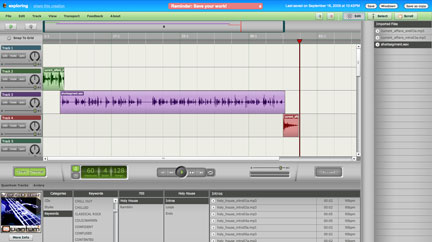
The new, free online tools keep coming. Here is an online audio editor called Myna (Aviary, Inc.). I think of this product as an audio-only Garageband. Maybe something else will come to me as I explore some more. You put together your audio creation from clips that are provided, record audio, or upload audio you already have. You can overlay tracks, fade-in, fade-out, etc. If you have used Garageband, you understand the basics and can pretty much just begin creating. When finished, you first mix-down your tracks and then share.
It is pretty late so I uploaded a short segment of audio I used as part of a demo podcast created some time ago (in this case without the images) and combined this upload with some music segments available from the Myna library. It was a fairly basic undertaking, but enough of an exercise for me to explore the application and offer something as an example (see link to short audio product below).
I would think this tool would be great for creating podcasts.
It is hard to keep up with blog feeds. I kind of run hot and cold on whether I think reviewing blogs provides me information useful to my professional interests. Perhaps I value the process of writing more than reading. Having said this, I am also afraid I will miss something. I have decided I need a strainer for my aggregator(s). I think some folks use Twitter in this way. They rapidly scan and look for things to follow-up on. I am not convinced this helps – you are processing shorter prompts, but you read more comments of limited relevance.
I keep searching and exploring attempting to either create a system or locate a tool that will prove useful. Here are the two tools I am presently exploring.
Feedly
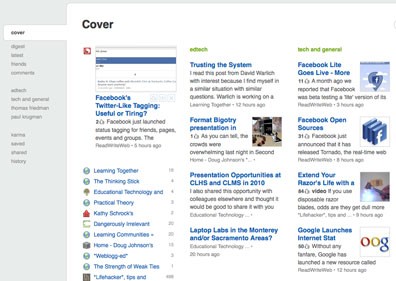
Feedly is a Firefox plug-in that synchs with Google reader.
Feedly asks that you classify your themes into categories and that you differentiate favorite and non-favorite feeds within categories. Your actions when using feedly (selecting items to share, what you favorite) influences what is selected for most immediate access.
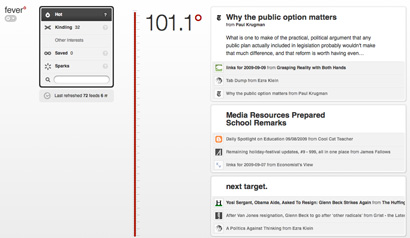
Fever uses a different and somewhat mysterious approach to “straining”. This one is not free ($30) and requires that you have access to a server (PHP and MySQL). I am a sucker for tools I can run on my own servers.
There are some similarities – with fever you differentiate those feeds you follow intently (kindling) from those which you sometimes examine (sparks). What fever identifies are trending themes – what topics are hot (I am trying to keep with the fire theme here). How this works is a little unclear. I have included a couple of related articles and one speculates that the categorization process may be based on common “out links” – links of high overall frequency generate a higher temp and also serves to organize posts into themes. Makes some sense.
Both of these services allow you to read feeds in a conventional manner. Feedly offers an advantage if Google Reader is your traditional tool because of the synchronization. If you use multiple “strainers”, you may end up spending more rather than less time. What you star, share, or save (or whatever) with one tool does not carry over to the other tool. So, what I am doing here is still experimenting.
After all the hype and the controversy, the speech is underway. It is unfortunate that some will not be able to share in the enthusiasm of the moment. Just a few minutes in length, the message was simple and not at all political. Don’t let yourself down – life requires responsibility. Do some disagree? Do a few parents really think their opinion on instructional experiences should over rule common opinion and common sense? Shouldn’t they then make personal decisions for their own children?
When it was over, it was back to class. Where to go next? What period is it now?
The ideas and the options that show up on the Internet are simply amazing. I try quite a few.
Here is my first product from a company called Animoto.
30 second productions are free. Longer productions and the opportunity to download rather than stream your products costs $30 a year. I wonder if there is a way to add a voice over?
I had this image collection from a podcast I did. The pictures were taken last year at about this time.
Some ideas for more sophisticated products from the langwitches blog. Insert text slides to tell a story.
Take 2:
You can integrate titles, but each counts as a slide and the total number is very limited in the free version. Might be worth $30 for a class account.
For most of us, search makes use of the same tool and the simple process of entering a couple of words we think will surface useful information. Nothing very sophisticated even when advance options are available for our use.
We encourage students to explore search options by trying the same search with different search engines.
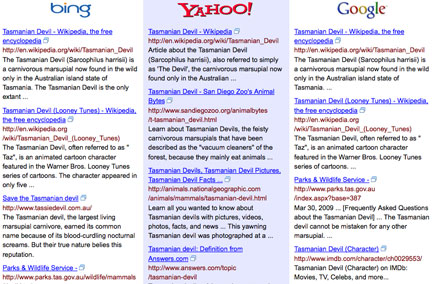
This process has been automated through a clever hack by Michael Kordahi. BlindSearch submits a search to three search engine and returns the results in three columns without identifying the search engine responsible for each search. The idea is to examine the results and identify the column you feel provides the most useful results. The search engine associated with each column is then revealed. A link on the search page offers a running total of best search performance for the past 8 weeks.
I tried several different searches and my selections of “best” results were all over the place. This would make a useful classroom activity.
Late last evening after exploring lala, I tweeted the following:
Wow – you can now scrobble from lala to last.fm – update for the digital natives. Check under beta.
It was kind of a challenge from one 60-year-old to the digital natives of the world.
For those needing a translation (digital natives included) – LaLa and Last.Fm are online music services with interesting features. LaLa allows you to purchase music for download (or in CD format), but you can also play any song once for free and for 10 cents play any song any time. In addition, LaLa knows what music you own (if you enable the LaLa music mover) and you have access to these songs without payment even when accessing from different machines.
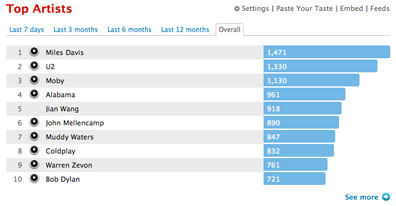
Last.Fm is a social music service. It offers streams based on your interests and your neighbours (British company), but the feature I like most is that it keeps track of the music you play on your computers (I guess to be more accurate I also have an app on my iPod and other apps may exist for other devices). I have been a pro member since Nov. 2006 (you need not pay the $4 per month if you want fewer services) and in this time it knows I have listened to 82944 songs. It knows my favorite artists and songs (Guns N Roses – Sweet Child of Mine with 80 plays). I can examine data for the last week, 6 m., year and for the duration of my membership. Lots of data to mine.
The discovery feature works this way. The service uses your musical preferences to identify those with similar interests. You can visit their public profiles and possibly identify new artists/songs you may want to investigate and purchase. When I explain the use of online social tools as opportunities for discovery, I tend to use this example. Imagine visiting the home of someone with similar tastes and browsing through their CD collection. Would you locate something new? Of course! Might it interest you? Perhaps.
Discovery works in a similar fashion across different tools (Twitter, blogs, social bookmarking) and content domains. Identify individuals with similar interests and pick up on what else they are reading, listening to, or viewing.
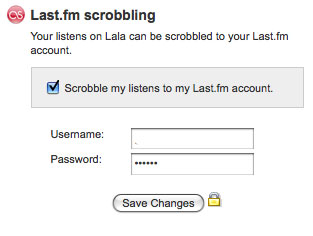
Scrobbling? Try Wikipedia for a formal definition. I think of it as a centralized accumulation and aggregation of data about your behaviors. LastFM accumulates and aggregates information about the music I listen to whether I use LastFM, PandoraFM, or iTunes. Until recently, Lala did not offer scrobbling and I really liked the LaLa features and cost. Not an unusual tech dilemma – stick with a service you have invested a lot of time in and have used to accumulate a lot of useful information or move on to a better system (think delicious vs diigo). Anyway, LaLa added scrobbling so I am happy (BTW – you find the scrobbling option by going to edit personal information and then selecting the Beta tab (not the easiest feature to discover).
And that, digital natives, is how to get your geek on 😉
Manage Consent
To provide the best experiences, we use technologies like cookies to store and/or access device information. Consenting to these technologies will allow us to process data such as browsing behavior or unique IDs on this site. Not consenting or withdrawing consent, may adversely affect certain features and functions.
Functional
Always active
The technical storage or access is strictly necessary for the legitimate purpose of enabling the use of a specific service explicitly requested by the subscriber or user, or for the sole purpose of carrying out the transmission of a communication over an electronic communications network.
Preferences
The technical storage or access is necessary for the legitimate purpose of storing preferences that are not requested by the subscriber or user.
Statistics
The technical storage or access that is used exclusively for statistical purposes.The technical storage or access that is used exclusively for anonymous statistical purposes. Without a subpoena, voluntary compliance on the part of your Internet Service Provider, or additional records from a third party, information stored or retrieved for this purpose alone cannot usually be used to identify you.
Marketing
The technical storage or access is required to create user profiles to send advertising, or to track the user on a website or across several websites for similar marketing purposes.





You must be logged in to post a comment.