Structure

The more recent Learning and Leading has an article authored by Judi Harris and colleagues. There are certain writers who have promoted core ideas that appeal to me and Harris is one. She has a concept – activity types – that makes sense to me as an important idea in professional development. Rather than promoting specific examples she proposes that educators think in terms of categories of activities. I have always understood the purpose of this approach as an attempt to steer folks away from the duplication of specific examples which may or may not be appropriate for their unique situations. Instead, the idea is to understand tasks at a more general level. I am guessing the use of examples in instruction is typically not attempt to promote the exact same task, but does it come across in this fashion? Harris and others have established a wiki to outline the various activity structures they have identified.

So, this distinction between activity types and examples has caused me to consider what structural variables guide my own thinking. Sometimes I think such organizational patterns exist but we fail to reflect enough on our own thinking to externalize these patterns. Here is an initial effort.

I think I organize my take on tech integration in terms of:

  • Conceptual frameworks – e.g., authoring to learn, 21st century skills
  • Tools
  • Tactics (something like activity structures),
  • Examples

So, authoring to learn is a general generative framework that assumes students can be encouraged to process content they have experienced by explaining this content to others. This process can be accomplished using various tools (e.g., podcast, wiki, blog). Various pedagogical strategies (cooperative learning, editing, discussion) can be employed in implementing a given project. Of course, to explain various nuances of the combination of framework, tool and tactic, it is likely useful to use multiple examples to illustrate various combinations and the strengths and weaknesses of each.

I wonder how teachers make instructional decisions. Is there a process to what they decide to do? Would a structured approach help?

Loading

Lots could change

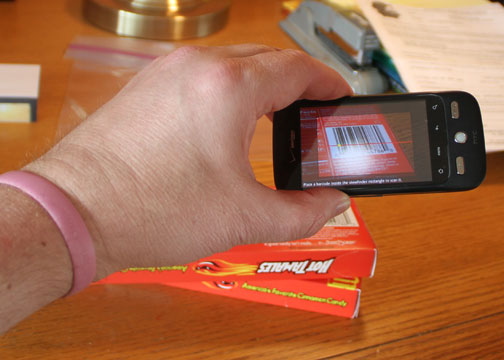
I just purchased Barcode Scanner for my Droid phone. It works great. Scan the barcode on a book and sure enough it identifies the book. Scan the barcode on a 9.5 oz box of Hot Tamales and it informs me that I can get this box for $3 from Amazon and $1.79 from alwaysdirect.com.

Not impressed? Consider this. Walk into the bookstore and check out the prices on the textbooks needed for next semester. I bet you can find a better price and simply order from your phone.

Game changer

Loading

Office2 HD

I noticed today that this product has been updated (Apr. 22). I downloaded the upgrade and tried for about 30 minutes the routine that had produced corrupted files previously. At this point I have been unable to recreate the same problem so I am optimistic that the problem has been fixed. The web site did indicate that the file corruption problem had been corrected in the update.

My post on my difficulties using the Office2 Pro app to edit Google docs has attracted quite a few hits. My experience appears to be in contradiction to the experience of others. I feel bad because my report documents the struggles I have had attempting to get this app to work without success and I am unable to explain why others are not experiencing the same problem. I want people to know I have experimented with this app extensively as late as last evening and I continue to have the same problem. The files are somehow corrupted and the app then freezes. The problem seems “random” and as a programmer these are the kinds of bugs that are most frustrating. It may be something as simple as an upload problem (to Google docs) that fails to complete some kind of process within a certain time period leaving the Google doc in a flawed state. My experience has been that if I continue to edit and save a doc to Google docs this will eventually happen. All I can say is that the app/Google doc combination is too iffy for me to trust and if you are using Google docs for “work” I am urging caution.

I have explored other options of this app and have stored documents in my mobileme account. I have done this without problems, but doubt this is a serious solution for many people.

I have submitted my bug report to the company and this morning received the following reply:

The corruption of Google Docs documents is a result of something that Google changed in the last few days that highlighted an incompatibility with the way we write DOC files and the way Google interprets them. We’ve found a solution however and have already submitted it to Apple, so we expect it to be available in a few days time. For more information, including how to recover documents, please see http://www.bytesquared.com/products/office/ipad/google_corruption.asp

Loading

Disregard previous post – there may be hope

I have edited this post multiple times as my experiences with this product and the upgrade to the product have resulted in different impressions.

I noticed today that this product has been updated (Apr. 22). I downloaded the upgrade and tried for about 30 minutes the routine that had produced corrupted files previously. At this point I have been unable to recreate the same problem so I am optimistic that the problem has been fixed. The web site did indicate that the file corruption problem had been corrected in the update.

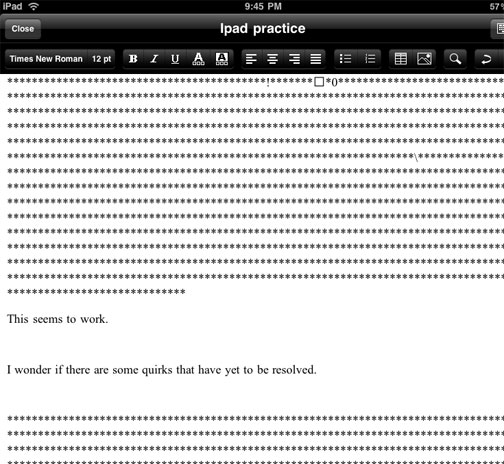
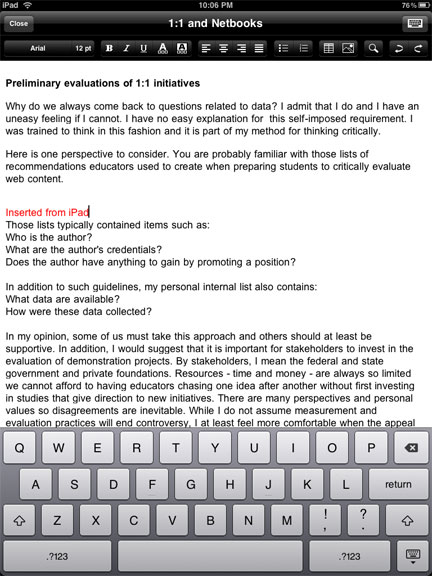
I am rescinding my endorsement of this product. I am experiencing consistent problems when resaving documents after an initial upload. This issue may be something I am doing wrong, but it seems consistent and I would not want to encourage purchasing of this product until I can figure this out. (Apr. 11). The image below illustrates the problem. My initial text (This seems to work.) seems ironic when saved as part of attempting to add new text to the file. The additional characters seem to be the type of content you see when opening a word processor generated RTF file with a text editor.

——————————-

Sooner or later, the answer always seems to appear.

Disregard my previous post indicating you could not edit Google docs from the iPad. A post from from jkontherun described the Office2 Pro app – for editing Google docs and other sources. Works fine.

Loading

Initial Comment on the iPad

Everyone who has an iPad seems already to have posted something to explain their initial impressions. I guess this should not be a surprise – there seemed to be a great deal of commentary, both pro and con, before anyone actually had the opportunity to use one themselves. Why would this change when the iPad became available. I have been trying to determine what I might add based on my brief experience with the device.

How about this – a pre-experience issue within the educational community concerned whether the device would encourage production as well as consumption. In other words, it seemed obvious that the device would be a great way to read books, explore web resources, and watch videos. However, information consumption according to some is over emphasized in education – for some reason listening to lectures is too passive and even reading books seems to be on the outs. Man – seems like just a few years ago we were worried that Johnny could not read and now we are concerned that learning from books is over emphasized. Experiences relayed from experienced and recognized authorities are possibly less valuable than personal experiences. This post is not about this “discussion”.

What about the production capabilities of the iPad? Well, it is widely known that you cannot take pictures or video. You can record audio. I was disappointed that I was unable to write in Google docs and I am not sure why. You can actually enter data in a spreadsheet (use the desktop and not the Google Mobile option), but I cannot find a way to enter text in Google docs. This disappoints me – I do most of my writing in docs. You can do gmail, Twitter apps, and blog entries (with one of my blog apps I could enter text in HTML, but not WYSIWYG mode). I do not understand these inconsistencies. I have been impressed by Pages (the $10 word processing app from Apple).

ipadnetbook

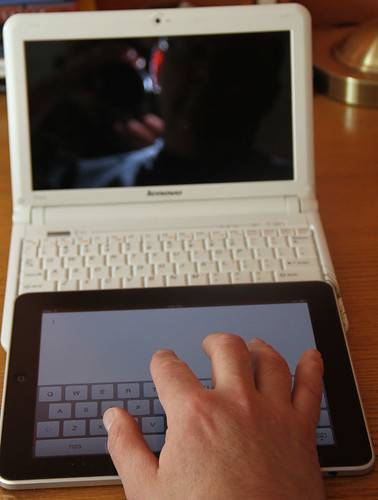
Here is a comment I have not seen addressed elsewhere. What about the ease of entering text? You can add an external keyboard, but what about the build in keyboard? I find that it was as easy and possibly easier to enter text using the on screen keyboard than from the keyboard of my netbook. Neither, in my experience, is as easy as using a standard keyboard. I had a hunch about why this was my experience so I lined up the iPad with my Lenovo S10. I would suggest that the iPad keys are larger and more widely spaced on the iPad. If you look at the image I have provided, you should be able to see why this is the case. The netbook keyboard is a bit wider, but the netbook “wastes” this extra space and more on keys the iPad does not have. The letters on the iPad are actually larger and more widely spaced.

Do note the size of my hand relative to either keyboard and it is probably obvious why I do better on a standard keyboard. Both the iPad and netbooks force me out of my well practiced keyboarding style. Still the iPad is a reasonable device for text input at least equivalent to a netbook and superior to mobile handheld devices (smartphones) some are willing to argue are effective in an educational setting.

Loading

Books, books, books – a social focus

Web developers are constantly looking for a niche to fill – a focus for a site that will attract a reasonable number of users. Some social sites are general and some encourage interaction around a topic or process. I would argue that Facebook is an example of the general approach and users can shape the general tool to their interests. In contract, a social bookmarking site (e.g., Diigo) is organized around a process (personal bookmarking) that has a social element (sharing bookmarks).

The books we read can become the basis for social interaction. Face to face groups that agree to read and then discuss a given book are common. In a way, this focus and the potential for a similar interaction has found an online niche.

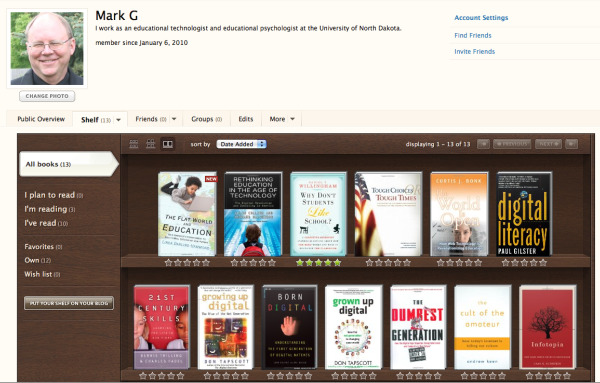
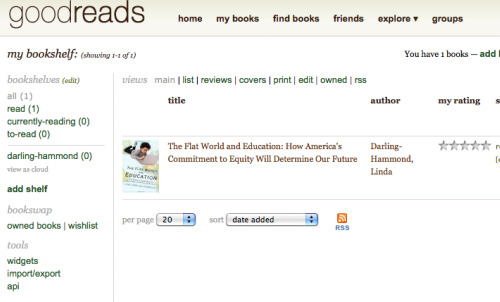
I have two examples of this category of services. Both allow users to identify the books they have read, are reading, or want to read. Both allow comments on these books and opportunities for interaction. I have treated these services like I have treated the social music services I use (e.g., LastFM) – spend some time with the record-keeping capabilities of the service, but I ignore the social component. I am not interested in sharing concert experiences related to the musical groups I follow (I have no such experiences) and I am also am limited in the time I can spend interacting online so I mostly post comments on the books I read to my blogs rather than the book sites.  So, I am not a poster boy for these services, but perhaps you find this focused topical sharing of interest. I do read the comments of others related to some of the books I have read.

So my two suggestions if you are interesting in exploring social conversations around books are:

Shelfari.com

GoodReads

Loading

Sharing Google Bookmarks

I am not looking for a new social bookmarking tool. I use Diigo and once you invest for a period of time in a specific service making a change, even to a better service, is a tough choice. However, I read a recent description of changes made to the Google bookmarking system (Free Technology for Teachers) that peaked my interest so here is a brief description another new and useful service from Google. The new feature allows the assignment of bookmarks to lists that can be shared or kept private. It should take but a moment to see how this flexibility might be useful for teachers.

Rather than explaining the entire bookmarking system, I will focus mainly on the new list feature. But briefly, if you have a Google account, you can either add a bookmarklet or a Google Toolbar to your browser (Google instructions). The difference is pretty much whether the bookmark service is accessed from an icon that appears as part of your generic browser toolbar or appears as part of specialized Google toolbar offering additional services see below.

Selecting the bookmark icon from the menubar (either form) allows the current page to be bookmarked (stored by Google in contrasted to being stored by the browser as would be the case with browser bookmarking systems). The immediate advantage of off-site bookmarking is access from other browsers and computers.

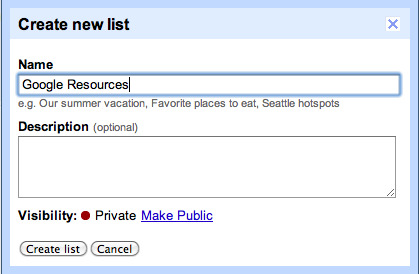
Now when storing a bookmark, you have the option of also assigning the bookmark to a list. Lists are generated (see below) and then bookmarks are assigned to lists.

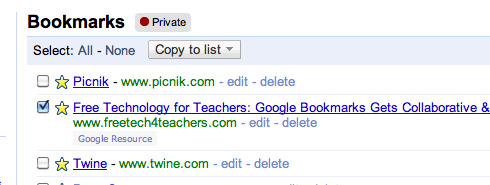
From the list of bookmarks, select a bookmark (checkbox to left of bookmark)

The public view of this list is now available.

Powered by ScribeFire.

Loading