When the obvious isn’t so

I read once that great researchers pay special attention not so much when the obvious happens or when they find nothing, but when they encounter an outcome that runs contrary to what they expected. It is in these situations that there is the chance to really learn something.

A couple of reports this week revealed results that might offer this opportunity. Both were reported in secondary sources and the original sources are presently difficult to find.

1) New teachers are not necessarily any more likely to engage their students with technology (summarized in eSchool News).

A quote from ISTE guy Don Knezek speculates that:

There could be two reasons for this, Knezek added: Either they are coming out of teacher preparation programs unprepared to integrate technology effectively, or they’re entering a school environment where they’re not encouraged to do so.

I read a study reaching a similar conclusion some years ago and this earlier study offered a somewhat different conclusion. This study speculated that technology integration requires some unique educator skills and new teachers are operating on a type of Maslow’s hierarchy (taking care of survival skills first – I take credit for the Maslow reference, but it does seem to fit). If I remember correctly, this study determined that at about 5 years of teacher experience of so you see heavier student use. I take this explanation to be different from either of the explanations offered by Knezek.

Counter intuitive insight – we may be wrong in assuming growing up with tech is that important. It may be the non-tech aspects of integration in combination with the general school demands that must be developed. I am not certain I blame this on training programs unless school-based experiences (e.g., student teaching) are included. Expertise with any complex skill requires considerable experience to mature.

2) Sending computers home will extend the school day, reduce SES access differences, and improve achievement.

To the contrary, the NY Times offers a piece mostly focused on a collection of studies that go against these predictions even demonstrating disadvantages.

Counter intuitive insight – home access to the Internet is just a tool and tools can be applied to various tasks. Spending time exploring personal interests my even take time away from doing traditional homework. Perhaps we assumed too much and we should structure out of school tasks to take advantage of the tools provided.


Loading

Can you compete with free?

We are now a week or so out from ISTE 2010 and those of us who attended have had some time to think about the experience. Over the years, I have probably personally received more benefit from strolling through the giant vendor area than attending sessions. It is just a convenient way to see what is available.

The last couple of years I have begun to feel a little sorry for those attempting to interest schools in purchasing their software and online services – particularly those focused on learning experiences in contrast to assessment or filtering. The problem I see is what might be called the free option – a similar opportunity, typically online, that costs schools nothing beyond Internet access.

There are great companies out there with dedicated developers (some of whom we know) who really do have great products.

HyperStudio

IMG_2114

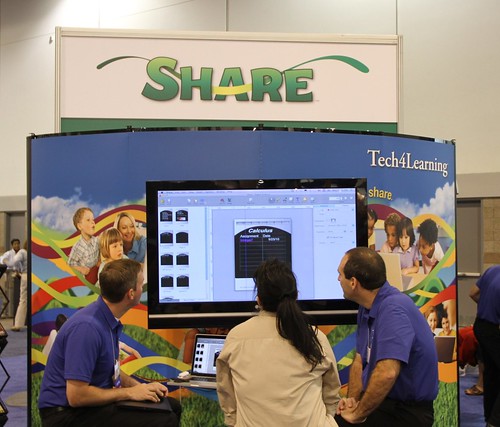
Share

IMG_2112

The challenge comes from companies that offer free opportunities to develop web sites, store and share images, or interact with others. These are general purpose participatory opportunities that can be tailored to learning goals.

Google

IMG_2111

So, what advantage might the companies attempting to sell software and services have. Perhaps their products can be customized to learners or learning. When it comes to desktop authoring products, this may be the case. To some extent, companies do not have “low end” products that offer fewer features at a significantly lower price. For example, there is no such alternative to Dreamweaver from Adobe. Perhaps, the companies could offer targeted professional development, a community focused on education, and educational examples from which educators might draw ideas for their own classrooms.

I think that service and focus are what the education-focused companies attempt to do, but the companies offering “free” also are aware of the opportunity to encourage use of their products and services in the classroom. For example, Google offers online opportunities for educators (Google for Educators) and has recognized the appeal of developing committed individuals who might then have opportunities to train colleagues (Teacher Academy). Other services have less corporate backing (e.g., Flickr), but educational user groups or individuals function in a similar manner.

I can’t say that I really have solutions, but I do hope there are enough niche opportunities that financial opportunities for innovation remain.

Loading

Reading from various devices (including the book)

A recent comment by researcher Jakob Nielson is likely to generate a good deal of discussion among bloggers (the MacWorld version, Nielson post) and will likely generate some studies from graduate students. The topic of whether a reader benefits equally from processing content presented as a book, on a Kindle, or on an iPad certainly deserves some attention. The short version of the results – the participants read more quickly from a standard book.

Researchers are trained to be critical in considering the methodology of the research they review. We ask questions – do the results follow from the method, how might the method deliver results that could be misinterpreted, etc.

Some initial reactions of this critical nature:

Does the reporting focus on speed and not comprehension reveal anything of importance? Reading speed is quite important because of working memory limits, but the bottom line is really comprehension. The MacWorld version comments that participants “were measured for their reading speeds and story comprehension”, but I found only the data on speed were reported there. The Nielson summary indicates “Our test participants got almost all the questions right, regardless of device, so we won’t analyze this data further here.” Clearly more sophisticated assessment of comprehension is needed. It seems strange to me that a 11% deficit in speed would not be accompanied by a decline in comprehension. Perhaps excluding less capable readers was responsible for the failure to demonstrate an impact on comprehension.

What about an experience bias? What level of experience did participants have with the devices (other than the book)? Do experienced e-book users function at a higher reading rate?

I would regard a reading rate that is nearly 11% slower as a significant concern (the type of concern my wife expresses because I drive 65 on Interstates that allow 75) because time certainly matters in education. I am guessing we will see more on this topic.

Loading

1:1 Options

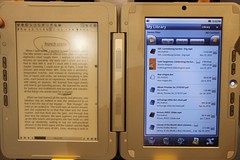
One of my goals for ISTE10 was to locate an Android “slatet/tablet” I could purchase and compare with Cindy’s iPad. I did not see much, but did locate the Entourage Edge ( see image).

entourageedge

The Edge looks something like a Kindle and an iPad joined together with duct tape. The duct tape comment is no reflection on the company – this is how I would make such a device. The price in the mid $500s seems reasonable given the combination, but I was only interested in the web access device. I get the concept – it appears to assume educational reading material in the “Kindle” window linked with web content on the other device. Very handy in this configuration, but cost is higher and it is heavy (3 pounds if I remember correctly). I wonder if the Internet-device would be sufficient.

I attended a group session during Edubloggercon that considered whether the iPad (or similar devices not yet released) would be sufficient for 1:1 initiatives. The two experts leading the discussion did not think so and were concerned with production capabilities of the iPad. I was not certain what capabilities are supposedly missing. Video editing was the one example. I wonder if either expert has ever actually done any video editing on a net book. This is a miserable task in my opinion. Purchase a couple macbooks for the occasional video project.

I will purchase some type of Android product in the next month or so.

Written on an iPad in the car (not driving) somewhere in South Dakota.

You will certainly want to read reviews before getting too excited – here is a review from TechCrunch.

Loading

ISTE Outside Aisle 2010

In 2004, I started a personal NECC (ISTE) tradition. I called it the OutSide Aisle Vendor Award and it was intended to recognize one of the smaller businesses or organizations that offered their product or service from the outside aisle. This year’s award goes to University of Colorado’s PhET Interactive Science Simulation project. The simulations are free and the project supported by impressive sponsors; NSF, Hewlett Foundation, and King Saud University. My wife is involved in a STEM grant focused on the use of simulations in science education and pleased to locate this resource. The one possible downside for her – the simulations are flash based and she just purchased multiple iPads for the project.

Outside aisle 2010

Loading

Use Paper.li for your ISTE morning read

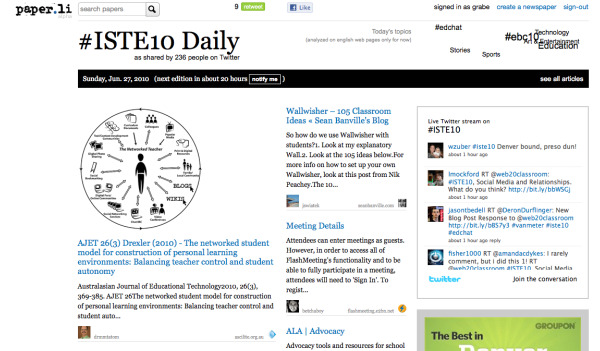
Paper.li takes Twitter data and fashions into a single display resembling a newspaper. You create a free account and in this case enter the tag (#iste2010) you want the service to use in collecting information. The screen capture below shows part of the resulting display.

Of course, my example was selected to take advantage of the interest in the ISTE conference and the tool could be used to follow whatever specific topic you like.

Loading