Web of Things

The Web of things is an abstract and futuristic concept. We have experience with desktop computers, cell phones and maybe even printers, but beyond that the concept gets a little bit weird. We know it is supposedly coming, but we are not certain when it will arrive or what it will look like when it gets here

Here is a new personal experience that has expanded my vision a bit. We own a lake property located some 350 miles from our home and we get there when we can. We made the trip for the holiday. One of my original fears when purchasing the property was that not being on site I could experience serious issues with vandalism or some serious malfunction in the heating system. Things went well for the first year. We have encountered some issues most would find foreign. For example, the drain field on our septic system froze limiting our use of water for the rest of the winter. This was manageable. One of my original concerns manifest itself this trip. The furnace had stopped working (a component locked up preventing the furnace from igniting). With temps below 0, water in the pipes froze. It ended up we were very lucky as the plastic cover for a filtration system  must have been the weak place in the system. This system split and relieved the pressure on the rest of the pipes (we do turn off the water when we leave, but there is still water in the systems).

Anyway, we had to call both a plumber and someone to work on the furnace. Expensive, but the situation could have been far, far worse.

The guy working on the furnace recommended that we consider a new thermostat system. The immediate motivation was that the system connected to the Internet and would send us emails if there was a concern. However, the system does much more.
The EcoBee

ecobee1

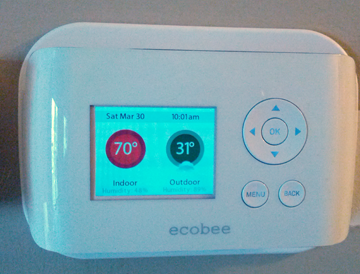
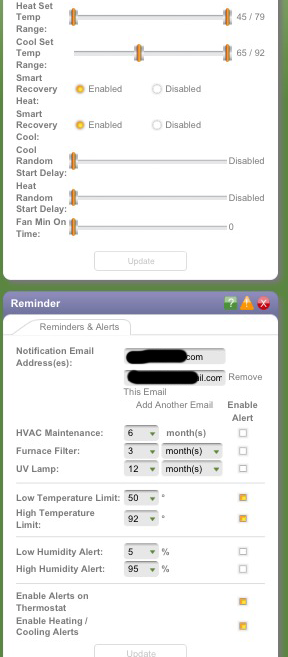
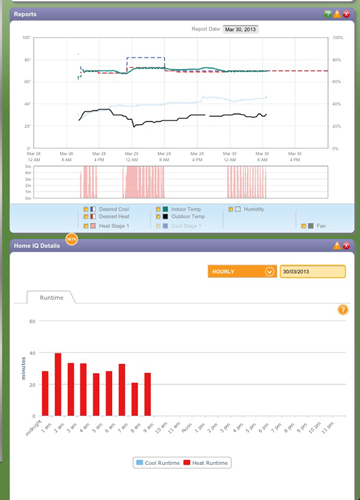
The Ecobee smart thermostate is web enabled. It connection with a cloud location and through this server we can control the thermostat and download data. The system also sends automatic alerts (emails) when preset conditions are met. For example, it would have emailed us when the furnace would not ignite and the temp fell below a temp that was dangerous for the pipes.

This is one of those smart systems that has economic benefits – you can set temps for times of the day and days at a time. You can turn the temp down to 50 when you are not present and have it raise to 65 an hour before you arrive. You can adjust the temp from your phone before you get out of bed in the morning.
ecobee2


I like the ability of the system to store data – just because it is fun. For example, because of the large windows in the home, the air conditioning cannot keep up with rising temperatures in the summer. So, it will be interesting to determine how much of the time in the summer the house is warmer than the setting for air conditioning.
ecobee3


If you have imagined our situation, it may occur to you that this is not a perfect solution. For example, the alert system would have allowed us to prevent the problem we had this time, but what would happen if the electricity or web went down? This is presently a limitation of the Ecobee system. You would think the server would be able to identify when it was no longer receiving a signal from a given location, but this appears not to be something the present system is designed to address.

There are some other interesting features; e.g., we can get temps inside and outside from this remote location and we can get the forcast for the coming week. You can get information from your thermostat including the weather forecast for the next week. The thermostat is a functional computer with Internet access but the software is limited to weather data.

I am assuming it will take a long time to recoup our purchase investment on the basis of energy savings, but it does gives us some protection against certain problems and it is fun to check the most recent data from a computer or phone.

It occurs to me that there is some danger in the complexity of the system – one messed up setting and I could turn on the air conditioning in the middle of winter.


 

Loading

Feedly as a replacement for Reader

One of the biggest tech stories of the week was Google announcement that it would shut down Reader. This service is used by many to organize their RSS feeds – the syndication that announces new content. It is possible you follow such feeds using another app, but it is likely that this app loads information from Reader. For those of us who use RSS feeds to follow trusted sources, the loss of Reader is significant. This post features what is likely the front runner as a replacement.

Among those quick to offer options, Feedly seems the present choice. Since the recommendation has been so common, I thought it might be helpful to offer some comments on use. I review my feeds from my iPad, but it is helpful if a service can be accessed using multiple platforms. Feedly is available from Android and IOS and from an app operating within the Chrome, Safari or Firefox browser. Hence, you can work from your tablet, phone, or computer.

If you are a Google Reader user, migrating to Feedly is an easy process. Simply put, you connect to Feedly and login with your Reader name and password. Your existing feeds are now available in Feedly.

Once you have made the transition, you will want to be able to add and delete feeds. The addition of new feeds had me confused for a bit – it appears to work a little differently from a tablet than from a computer.

Here is the procedure from the app within a browser (Chrome in this example).

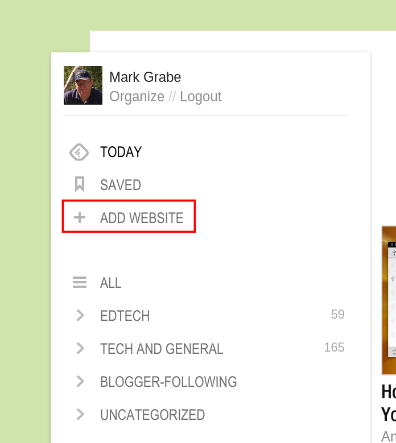
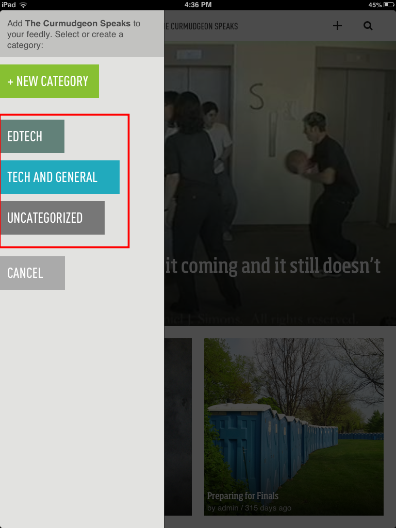
There is an icon in the upper left-hand corner of the app I assume is called “Home”. Selecting this icon, reveals then organizational structure you have generated for your feeds, but also the “add website” button. To add a new feed, select this button and then enter the URL for the site you want to follow.

feedlychromeapp1

feedlychromeapp

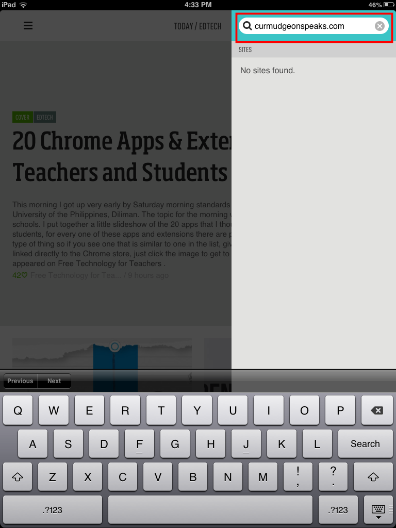
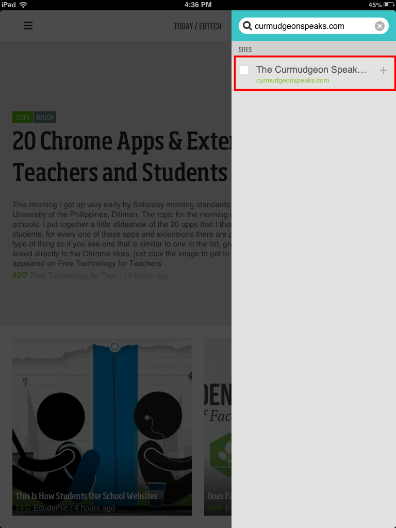
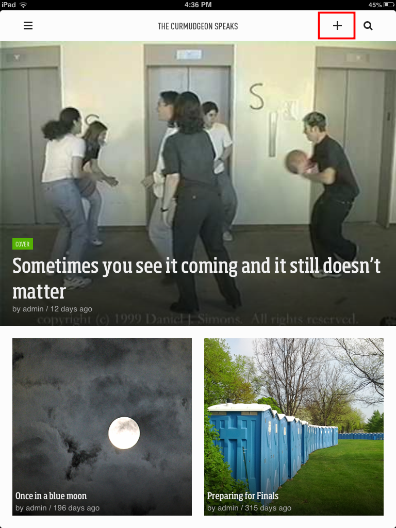
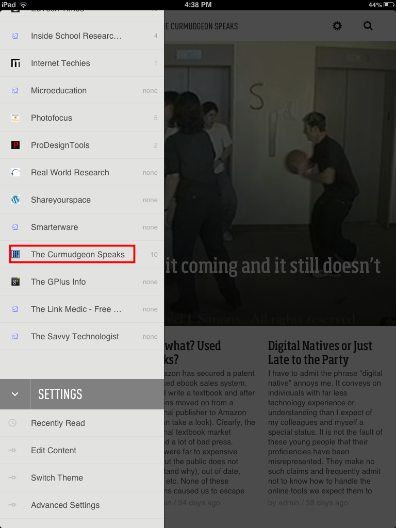
I was unable to find a comparable button within the iPad app. Here the process seems to work in a different way. You can use Feedly to visit web sites much in the way you would use a browser. You search for a site using the search icon in the upper right-hand corner of the app. First search for the site. Options matching your search are listed and you select the one you want to display the site. Once displayed a + will appear at the top of the app. Selecting the + indicates that you want to add the feed. You will be asked to indicate how you would like to organize the addition and then you are finished.

ios1feedly

ios2feedly

ios3feedly

ios4feedly

ios5feedly

Loading

The money does matter

One of my initial reactions to MOOCs was based on personal experience as the instructor of large courses and administrator of a department with many large courses.  It was like something was obvious to me but not others. Do people assume this is our preferred method of instruction? Finally, I have encountered someone with a similar perspective.

A big part of this situation is about the money. Those of us who we teach under these circumstances allow others to teach groups of 25 or work with grad students. The complaints obviously annoy me. Take away the large lecture courses and see what happens to tuition!

Loading

The learn to program campagin


Hmm..    There has been long been an educational interest in programming. Clearly, coding can be a vocational skill. If there has been a unique component to my professional skill set, it has been that I can write the code to create online learning environments and collect data on how the environments are used.

What is a little more “iffy” is the proposal that coding experience develops other kinds of skills any more than say working on large writing assignments. In fact, the research tends to show that higher order skills such as problem solving are largely domain specific. This, for example, is how I remember the large volume of research on the LOGO programming boom. The notion that a focus on a specific skill has general consequences makes about as much sense as Chris Bosh contending that Bill Gates should learn to play basketball because it is a great way to stay in shape. Developing the specific skill would certainly not be the most efficient way to accomplish the desired end.

Pro programmers are not actually the experts on the general benefits of developing such skills.

Loading

WordPress Education Vertical


WordPress is one of the most popular alternatives for blogging and web publishing. The software is free to those who want to install it on a server or available hosted by Automattic (the company responsible for WordPress). The software delivering the blog you are reading falls into the first category.

WordPress is adapting its online blogging service to what it describes as “vertical markets.” One of the targeted markets is K-12 education with the focused service called WordPress Classrooms. The idea is to encourage the use of blogging and other formats (static pages) available via the powerful WordPress platform to communicate with other teachers, students and parents. Free services are available to address what can sometimes be unique needs for classroom use; e.g., limiting access to designated participants, turning comments off. There are also paid upgrades that provide additional features.

One issue addressed by some already commenting on this service but not others concerns the required age for use (without documented parental permission):

Please read this Agreement carefully before accessing or using the Website. By accessing or using any part of the web site, you agree to become bound by the terms and conditions of this agreement. If you do not agree to all the terms and conditions of this agreement, then you may not access the Website or use any services. If these terms and conditions are considered an offer by Automattic, acceptance is expressly limited to these terms. The Website is available only to individuals who are at least 13 years old.

Examples offered by bloggers describing potential activities for 3rd graders may be a bit deceptive or uninformed.

I am not a fan of the “chalkboard theme” Automattic is championing. This is too much of a stereotype in my opinion.


Loading

Flipped Classroom …. blah, blah, blah

The snow is falling making it unwise for me to leave the house. Hence, it is a good time to generate a blog post.

The online education community I follow seems enamored of the “flipped classroom”. Of course and when I am unable to edit my own skepticism, they seem enamored of anything shiny and new that offers them something to talk about. It can be difficult to come up with topics on a regular basis. However, frequent mention of anything should not be considered equivalent to the discovery of an important innovation. Perhaps it has just been a slow news week, year, etc.

Here is my take on what can potentially be “flipped”.

The core idea in the flipped classroom appears to be that class time is dominated by instructor presentations. Some go as far as to claim BORING classroom presentations. The solution it seems is to take advantage of technology to record such presentation and make them available before (and after) class. Hence, students can carefully review this content ahead of time and then come to class prepared to ask questions and engage in deep discussion.

We used to call this expectation “read the textbook before tomorrow’s class”, but perhaps the personal video presentations prepared by the average classroom educator would be superior the content generated by the textbook author.

Here is what I really think. It would seem helpful to consider what is likely necessary for successful learning. I am talking in a practical way here – not how you or your brilliant and self motivated relatives prefer to learn. I have always liked a simple instructional design model proposed by Alessi and Trollip. They suggested that formal learning can be understood as a four stage model:

  • exposure to information
  • guided consideration of the information to assure understanding
  • extended practice to provide fluency and increase retention
  • assessment

If these stages make sense (I think they do), the challenge is then to determine how the stages will be accomplished by the largest possible members of a learning group. BTW – the stages are sequential only in some instances and feedback loops are frequently a prudent course of action.

You can attach your own labels to the stages. This is a productive exercise. Perhaps stage three might be “homework” to you. Perhaps you believe class time can be used to meet stages 2,3 and 4. My point is that the translation of these requirements into activities and the association of learning time with each activity is how we should be thinking. It is essential to analyze instruction and learning experiences in this way. What is the most efficient and effective way to expose learners to new ideas? Is a recorded lecture the best way to do this? Can we count on learners carefully reviewing prerecorded online presentations? Will tests to be required to generate compliance? What should be done if 50% appear to have reviewed the content and 50% have not made the effort?

A post entitled “ The flipped classroom is a way TO the answers” offers somewhat similar in analysis. I would suggest a different title – The flipped classroom is a way to the questions.


Loading

I wish this was the case

The annual Project Tomorrow Speak Up report is out. This year’s focus describes the digital experiences and expectations for tomorrow’s teachers. The report summzrizes what preservice teachers describe themselves as knowing about technology, how well prepared they feel they are to use technology in their future classrooms, and what present school administrators want and see in the new practitioners coming to work in their schools.

Let me begin with this observation. Part of what I understand my job responsibilities to be involves the preparation of teachers (practicing and preservice) to use technology in their classrooms. If what I do were a business, I would regard this report as good for business. The report would indicate that there was an unmet need and the report would indicate that the skills I happen to believe would be helpful to future and practicing teachers are the skills that are requested by those who hire these individuals.

Quite a few years ago now there was a series of years in which the federal government put money into higher education to encourage a focus on teaching with technology skills (PT3 – Preparing Tomorrows Teachers to Use Technology). The present report could have been used as the background justifying that funding program of long ago. The logic justifying some type of change, then and now, goes something like this. Preservice teachers have an interest in technology, but do not see meaningful educational use of technology in their college classes or in their observations in K12 classrooms. They may learn about technology in a stand alone college course, but this experience in combination with other preparatory experiences does not translate into instructional ideas or methods.

Here is the thing. My background may be focused on technology integration, but my background also encourages careful consideration of data and educational research. As much as I would like to believe that future teachers have this wealth of personal experience justing waiting to be redirected and as much as I would like to believe that school administrators support a much heavier emphasis on podcasting, blogging, etc. in the classroom, I am not certain that I do. My concern is that the survey methodology employed was more likely to attract “true believers” rather than a representative sample of preservice teachers and school administrators.

I do not believe that 20% of preservice teachers and 11% of practicing teacher have an active blog. I do not believe that 30% of preservice teachers and 10% of practicing teachers use Twitter on a regular basis (my wife disagrees on Twitter and suggests someone ask about SnapChat). I am inclined to believe that 80% of preservice teachers update a personal social networking site (Facebook). It also surprises me that 25% of administrators expect new teachers to be able to teach an online class or that 65% expect them to be able to create and use podcasts (not certain if this was in reference to the teachers or their students). All of this does seem to represent the logic and the experiences of those who might take advantage of an uncompensated opportunity to comment on technology in schools – not a representative sample in my opinion.

I constantly scour the literature for data related to K12 classroom uses of technology. I am not saying I have not added the Speak Up survey to may database. I keep track of whatever data I can find. While I like the summary, I think there is some danger in accepting some of the data at face value. I agree that college faculty members involved in all aspects of teacher preparation have a responsibility model what they believe are important instructional practices. I am less inclined to accept that college students have a wide range of technology skills that should be repurposed into instructional methods. I still believe these skills and related instructional strategies need to be developed.

Loading